目录
[1 重绘类](#1 重绘类)
[2 添加数据](#2 添加数据)
本文介绍了一个自定义DataGridView进度条单元格的实现方案。通过继承DataGridViewImageCell并重写Paint方法,实现了在单元格中绘制进度条的效果。关键点包括:1)使用progressBrush绘制进度条;2)处理进度值转换确保0-100范围;3)解决Int32到Image的强制转换错误。同时定义了DataGridViewProgressColumn列类型和TestProgressData数据结构,并提供了数据绑定示例。该方案适用于需要显示进度状态的WinForms应用,解决了默认DataGridView无法直接显示进度条的问题。
1 重绘类
cs
public class DataGridViewProgressCell : DataGridViewImageCell
    {
        // 用于绘制进度条的刷子
        private static readonly Brush progressBrush = new SolidBrush(Color.LightSeaGreen);
        private static readonly Brush textBrush = new SolidBrush(Color.Black);
        private static readonly Pen borderPen = new Pen(Color.DarkGray);

        public DataGridViewProgressCell()
        {
            // 设置单元格的值类型为int
            ValueType = typeof(int);
        }

        // 重写单元格的类型
        public override Type ValueType
        {
            get { return typeof(int); }
            set { base.ValueType = typeof(int); }
        }
        // 提供默认值
        public override object DefaultNewRowValue
        {
            get { return 0; }
        }

        // 关键修复:重写此方法避免类型转换错误
        protected override object GetFormattedValue(object value,
            int rowIndex,
            ref DataGridViewCellStyle cellStyle,
            TypeConverter valueTypeConverter,
            TypeConverter formattedValueTypeConverter,
            DataGridViewDataErrorContexts context)
        {
            // 直接返回空,避免将int强制转为Image
            return null;
        }
        // 重绘单元格,绘制进度条
        protected override void Paint(Graphics graphics, Rectangle clipBounds,
            Rectangle cellBounds, int rowIndex, DataGridViewElementStates cellState,
            object value, object formattedValue, string errorText,
            DataGridViewCellStyle cellStyle, DataGridViewAdvancedBorderStyle advancedBorderStyle,
            DataGridViewPaintParts paintParts)
        {
            // 基础背景绘制
            base.Paint(graphics, clipBounds, cellBounds, rowIndex, cellState,
                value, null, errorText, cellStyle, advancedBorderStyle,
                paintParts & ~DataGridViewPaintParts.ContentForeground);
            int progress = 0;
            // 尝试将值转换为进度值(0-100)
            if (value != null && int.TryParse(value.ToString(), out int val))
            {
                progress = Math.Max(0, Math.Min(100, val)); // 确保值在0-100之间
            }

            // 绘制单元格背景
            using (Brush backBrush = new SolidBrush(cellStyle.BackColor))
            {
                graphics.FillRectangle(backBrush, cellBounds);
            }

            // 绘制进度条背景
            Rectangle progressRect = new Rectangle(
                cellBounds.X + 2,
                cellBounds.Y + 2,
                cellBounds.Width - 4,
                cellBounds.Height - 4);
            graphics.FillRectangle(Brushes.White, progressRect);

            // 绘制进度条
            int progressWidth = (int)((progressRect.Width * progress) / 100.0);
            Rectangle fillRect = new Rectangle(
                progressRect.X,
                progressRect.Y,
                progressWidth,
                progressRect.Height);
            graphics.FillRectangle(progressBrush, fillRect);

            // 绘制进度条边框
            graphics.DrawRectangle(borderPen, progressRect);

            // 绘制进度文本
            string text = $"{progress}%";
            SizeF textSize = graphics.MeasureString(text, cellStyle.Font);
            graphics.DrawString(text, cellStyle.Font, textBrush,
                cellBounds.X + (cellBounds.Width - textSize.Width) / 2,
                cellBounds.Y + (cellBounds.Height - textSize.Height) / 2);
        }


    }
    // 自定义进度条列
    public class DataGridViewProgressColumn : DataGridViewColumn
    {
        public DataGridViewProgressColumn()
        {
            CellTemplate = new DataGridViewProgressCell();
            this.ValueType = typeof(int);
            // 关键修复:禁用默认图像生成
            this.DefaultCellStyle.NullValue = null;
            DefaultCellStyle.Alignment = DataGridViewContentAlignment.MiddleCenter;
        }
    }
    // 定义数据结构体
    public class TestProgressData
    {
        public string devIDInfo { get; set; }
        public int    progressValue { get; set; }        // 进度值(0-100)
        public string progressStatus { get; set; }     // 实时进度状态
        public string testResult { get; set; }          // 测试结果
        public string errorMessage { get; set; }        // 错误信息
    }
2 添加数据
cs
private void InitializeDeviceInfoGrid(int group)
        {
            //dataGridView_data.DataError += dataGridView_DataError;
            // 设置DataGridView属性
            //dataGridView_data.Dock = DockStyle.Fill;
            dataGridView_data.AllowUserToAddRows = false;
            dataGridView_data.ReadOnly = true;
            dataGridView_data.RowHeadersVisible = false;
            // 添加状态列
            dataGridView_data.Columns.Add(new DataGridViewTextBoxColumn
            {
                HeaderText = "设备名",
                DataPropertyName = "devIDInfo",
                Width = 150
            });
            // 添加进度条列
            DataGridViewProgressColumn progressColumn = new DataGridViewProgressColumn();
            progressColumn.HeaderText = "进度";
            progressColumn.Width = 200;
            progressColumn.DataPropertyName = "progressValue";
            dataGridView_data.Columns.Add(progressColumn);

            // 添加状态列
            dataGridView_data.Columns.Add(new DataGridViewTextBoxColumn
            {
                HeaderText = "实时进度状态",
                DataPropertyName = "progressStatus",
                Width = 150
            });

            // 添加测试结果列
            dataGridView_data.Columns.Add(new DataGridViewTextBoxColumn
            {
                HeaderText = "测试结果",
                DataPropertyName = "testResult",
                Width = 120
            });

            // 添加错误信息列
            dataGridView_data.Columns.Add(new DataGridViewTextBoxColumn
            {
                HeaderText = "错误信息",
                DataPropertyName = "errorMessage",
                Width = 200
            });
            AddTestData();
            // 绑定数据
            //dataGridView_data.DataSource = dataList;

        }
        // 添加测试数据
        private void AddTestData()
        {
            // 添加几行测试数据
            dataList.Add(new TestProgressData
            {
                devIDInfo = "123",
                progressValue = 30,
                progressStatus = "正在处理",
                testResult = "",
                errorMessage = ""
            }); ;

            dataList.Add(new TestProgressData
            {
                devIDInfo = "123",
                progressValue = 100,
                progressStatus = "处理完成",
                testResult = "成功",
                errorMessage = ""
            });

            dataList.Add(new TestProgressData
            {
                devIDInfo = "123",
                progressValue = 50,
                progressStatus = "正在验证",
                testResult = "",
                errorMessage = ""
            });

            dataList.Add(new TestProgressData
            {
                devIDInfo = "123",
                progressValue = 75,
                progressStatus = "正在传输",
                testResult = "",
                errorMessage = "网络延迟"
            });

            dataList.Add(new TestProgressData
            {
                devIDInfo = "123",
                progressValue = 100,
                progressStatus = "处理完成",
                testResult = "失败",
                errorMessage = "文件格式错误"
            });

            // 刷新数据绑定
            dataGridView_data.DataSource = null;
            dataGridView_data.DataSource = dataList;
            //dataGridView_data.Refresh();
        }
3 遇到的问题
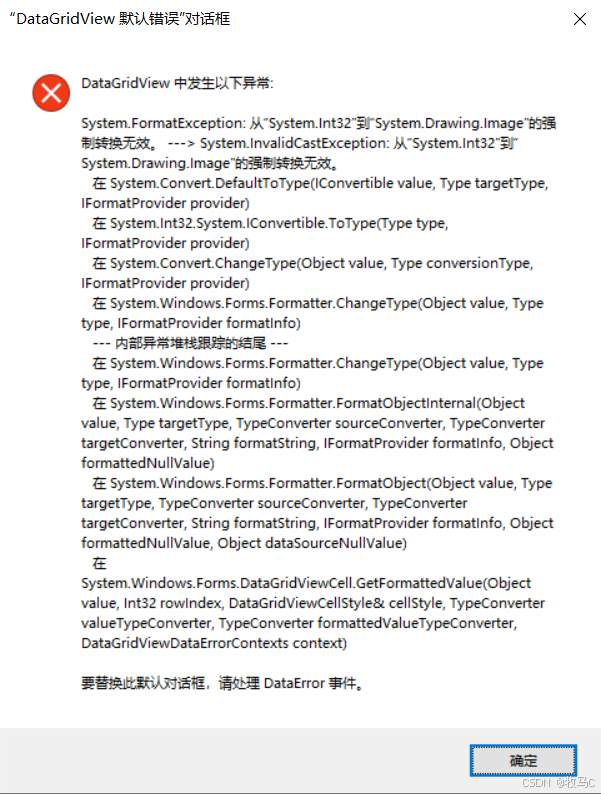
DataGridView错误:从"System.Int32"到"System.Drawing.Image"的强制转换无效。,行:0,列:1