在使用XXL---JOB的实现定时任务过程中,有时候可能由于部署环境的要求,就只能用Spring自带的实现方式。
所以为了通用性和灵活性,突发奇想地看看能不能实现在不修改原本Spring定时任务代码的前提下,通过配置灵活控制定时任务具体的实现,同时任务的日志的管理也要同步进行切换。
分析并列出需要解决的问题思路
根据需求背景可以初步分析实现的大致方向和实现流程。实现的思路其实不复杂,重点在于如何具体去实现落地。
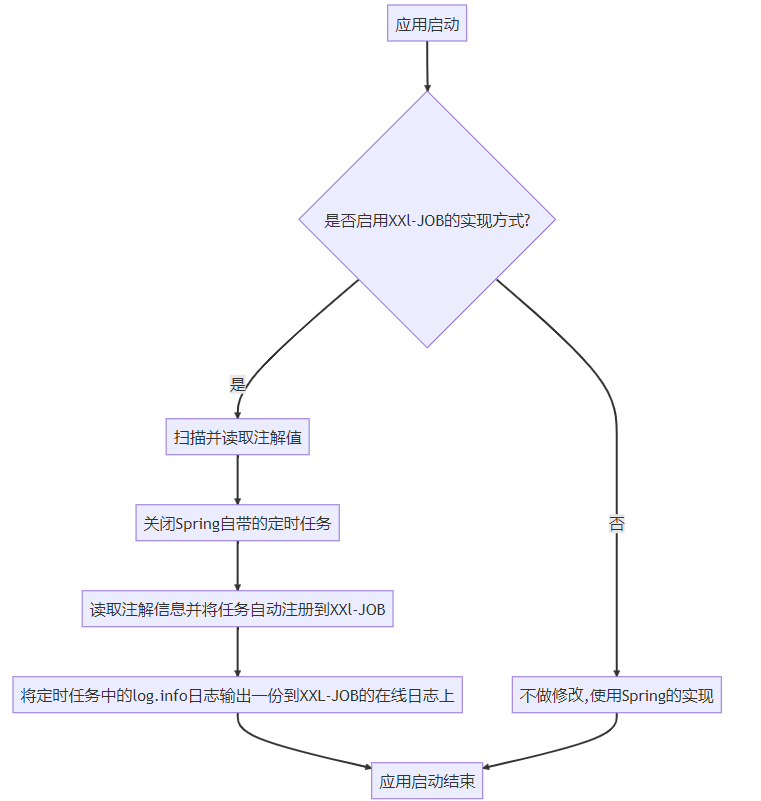
具体实现
判断是否启用XXl-JOB的实现方式
和大多数第三方starter包一样,我们可以利用SpringBoot的自动装配,读取配置中的某个属性值,作为是否装配我们写的类。特别注意的是SpringBoot不同版本的配置方式有所不同。
自动装配类如下:
/**
 * 自动装配类
 */
@Configuration
@ConditionalOnProperty(name = "xxl.job.enable",havingValue = "true")
@ComponentScan("com.teoan.job.auto.core")
public class XxlJobAutoConfiguration {
}这里我们根据xxl.job.enable 的值,决定是否启用XXl-JOB的实现方式,如果xxl.job.enable 为false,则就什么都不装配不修改实现方式,默认就是Spring自带的实现方式。关注公众号:码猿技术专栏,回复关键词:1111 获取阿里内部Java性能调优手册!
扫描并读取注解值
熟悉SpringBoot的的朋友都应该知道,SpringBoot启动的时候,会去扫描目标注解,然后去做对应的初始化操作,比如@Service,@Component就是使被扫描到并将对应的类注入到Spring容器中。所以我们可以按照相同的思路,可以在应用启动就绪之后,扫描@Scheduled注解,对其进行对应的操作。
Spring中的@EventListener注解
Spring中使用@EventListener标记某个方法为应用监听事件的处理逻辑,还能配合异步注解@Async实现异步触发,@EventListener通过传值的方式设置需要被监听的事件类型,比如应用启动时、应用就绪时、启动失败时等,具体有哪些监听的事件,可以参考Spring源码包org.springframework.boot.context.event。
现在,我们可以利用Spring提供的监听注解,在应用启动就绪后,扫描对应注解,去实现我们的代码逻辑,同时为了不影响程序的正常启动速度,使用异步执行的方式。
伪代码如下:
@Component
@Slf4j
public class JobAutoRegister {
    @EventListener(ApplicationReadyEvent.class)
    @Async
    public void onApplicationEvent(ApplicationReadyEvent event) {
        // 执行扫描注解,自动注册xxl-job任务逻辑
    }
}
扫描并获取被@Scheduled标记的方法和对象
我们知道,使用@Scheduled注解对应的对象,必须是被Spring所托管的类,定时任务才会生效,所以我们可以扫描被@Component标记的类,再定位@Scheduled注解,获取对应的值、对象、方法等信息。
伪代码如下:
private void addJobInfo() {
    List<Object> beanList = applicationContext.getBeansWithAnnotation(Component.class).values().stream().toList();
    beanList.forEach(bean -> {
        Map<Method, Scheduled> annotatedMethods = MethodIntrospector.selectMethods(bean.getClass(),
                (MethodIntrospector.MetadataLookup<Scheduled>) method -> AnnotatedElementUtils.findMergedAnnotation(method, Scheduled.class));
        annotatedMethods.forEach((k, v) -> {
            // 停止Spring自带的定时任务

            // 自动注册到xxl-job任务

            // 注册xxl-job的任务

        });
    });
}
关闭Spring自带的定时任务
ScheduledAnnotationBeanPostProcessor类是一个Spring框架的类,用于处理@Scheduled注解,实现定时任务的功能。我们可以通过这个类,对Spring中的定时任务进行一定的操作。关注公众号:程序员Geek,回复关键词:BAT 获取阿里内部历届面试真题!
通过阅读Spring源码,发现ScheduledAnnotationBeanPostProcessor有这么一个方法postProcessBeforeDestruction,该方法实现DestructionAwareBeanPostProcessor接口,用于销毁一个Bean的前置操作,而在ScheduledAnnotationBeanPostProcessor类中,这个方法的实现是取消某个Bean中的所有定时任务。具体可以看一下这个方法的源码。
@Override
public void postProcessBeforeDestruction(Object bean, String beanName) {
 Set<ScheduledTask> tasks;
 synchronized (this.scheduledTasks) {
  tasks = this.scheduledTasks.remove(bean);
 }
 if (tasks != null) {
  for (ScheduledTask task : tasks) {
   task.cancel();
  }
 }
}由于我们上一步已经扫描获取到被@Scheduled注解标记过方法,我们可以直接通过方法对象,获取到对应的Bean,将Bean作为入参传入postProcessBeforeDestruction方法中,关闭Spring自带的定时任务。
/**
 * 停止Spring自带的定时注解
 *
 * @param clazz 带有定时注解的类
 */
private void stopScheduled(Class<?> clazz) {
    ScheduledAnnotationBeanPostProcessor processor = (ScheduledAnnotationBeanPostProcessor) applicationContext
            .getBean("org.springframework.context.annotation.internalScheduledAnnotationProcessor");
    processor.postProcessBeforeDestruction(applicationContext.getBean(clazz), "");
}
读取注解信息并将任务自动注册到XXl-JOB
有使用过XXL-JOB的小伙伴都清楚,在使用方法模式时,除了使用注解标记定时任务的方法,关注公众号:程序员Geek,回复关键词:BAT 获取阿里内部历届面试真题!还需要在调度中心上进行任务的配置,定时任务才会生效。
目前我们已经获取到 @Scheduled 注解的信息,我们可以将 @Scheduled 所带的信息转换为对应XXL-JOB上对应的任务类型,在启动的时候自动地注册到调度中心,简化XXl-JOB任务调度的使用配置步骤。
注册JobHandler
翻看XXl-JOB中关于@XxlJob的源码,发现会将@XxlJob所标记的方法,向调度中心注册一个MethodJobHandler类型的JobHandler,表示方法模式对应的处理器。
入口代码及位置如下
com.xxl.job.core.executor.impl.XxlJobSpringExecutor#initJobHandlerMethodRepository
protected void registJobHandler(XxlJob xxlJob, Object bean, Method executeMethod){
    if (xxlJob == null) {
        return;
    }

    String name = xxlJob.value();
    //make and simplify the variables since they'll be called several times later
    Class<?> clazz = bean.getClass();
    String methodName = executeMethod.getName();
    if (name.trim().length() == 0) {
        thrownew RuntimeException("xxl-job method-jobhandler name invalid, for[" + clazz + "#" + methodName + "] .");
    }
    if (loadJobHandler(name) != null) {
        thrownew RuntimeException("xxl-job jobhandler[" + name + "] naming conflicts.");
    }

    // execute method
    /*if (!(method.getParameterTypes().length == 1 && method.getParameterTypes()[0].isAssignableFrom(String.class))) {
        throw new RuntimeException("xxl-job method-jobhandler param-classtype invalid, for[" + bean.getClass() + "#" + method.getName() + "] , " +
                "The correct method format like \" public ReturnT<String> execute(String param) \" .");
    }
    if (!method.getReturnType().isAssignableFrom(ReturnT.class)) {
        throw new RuntimeException("xxl-job method-jobhandler return-classtype invalid, for[" + bean.getClass() + "#" + method.getName() + "] , " +
                "The correct method format like \" public ReturnT<String> execute(String param) \" .");
    }*/

    executeMethod.setAccessible(true);

    // init and destroy
    Method initMethod = null;
    Method destroyMethod = null;

    if (xxlJob.init().trim().length() > 0) {
        try {
            initMethod = clazz.getDeclaredMethod(xxlJob.init());
            initMethod.setAccessible(true);
        } catch (NoSuchMethodException e) {
            thrownew RuntimeException("xxl-job method-jobhandler initMethod invalid, for[" + clazz + "#" + methodName + "] .");
        }
    }
    if (xxlJob.destroy().trim().length() > 0) {
        try {
            destroyMethod = clazz.getDeclaredMethod(xxlJob.destroy());
            destroyMethod.setAccessible(true);
        } catch (NoSuchMethodException e) {
            thrownew RuntimeException("xxl-job method-jobhandler destroyMethod invalid, for[" + clazz + "#" + methodName + "] .");
        }
    }

    // 核心方法
    registJobHandler(name, new MethodJobHandler(bean, executeMethod, initMethod, destroyMethod));

}我们可以参考源码,将被@Scheduled标记的方法,以同样的方式,注册到调度中心中去。从而实现@XxlJob同样的效果。
/**
 * 注册任务到xxl-job上
 *
 * @param handlerName   JobHandler名称
 * @param executeMethod 执行定时任务的方法
 */
private void registJobHandler(String handlerName, Method executeMethod) {
    executeMethod.setAccessible(true);
    // xxl-job初始化和销毁方法对象,后续有需要再赋值
    Method initMethod = null;
    Method destroyMethod = null;
    //获取方法的Bean对象
    Object bean = applicationContext.getBean(executeMethod.getDeclaringClass());
    XxlJobExecutor.registJobHandler(handlerName, new MethodJobHandler(bean, executeMethod, initMethod, destroyMethod));
}
自动向调度中心注册执行器和对应的任务信息
「注册执行器」
XXL-JOB没有像PowerJob一样,提供类似powerjob-client的OpenAPI接口,但是问题不大,根据XXL-JOB的源码,我们可以自己实现一个,将获取token,添加执行器信息,添加任务信息等包装为service。
具体代码可以查看文章后的github地址,这里简单贴出向调度中心注册执行器的代码。
public boolean autoRegisterGroup() {
    String url = adminAddresses + "/jobgroup/save";
    HttpRequest httpRequest = HttpRequest.post(url)
            .form("appname", appName)
            .form("title", title);

    httpRequest.form("addressType", addressType);
    if (addressType.equals(1)) {
        if (Strings.isBlank(addressList)) {
            thrownew RuntimeException("手动录入模式下,执行器地址列表不能为空");
        }
        httpRequest.form("addressList", addressList);
    }

    HttpResponse response = httpRequest.cookie(jobLoginService.getCookie())
            .execute();
    Object code = JSONUtil.parse(response.body()).getByPath("code");
    if(!code.equals(200)){
        log.error(">>>>>>>>>>> xxl-job auto register group fail!msg[{}]",JSONUtil.parse(response.body()).getByPath("msg"));
        returnfalse;
    }
    returntrue;
}
「添加对应任务信息」
同样的,添加任务信息的逻辑也包装为一个service。考虑到可能重复注册的问题,这里需要判断注册的任务是否已存在在调度中心中。
private void addJobInfo() {
    List<XxlJobGroup> jobGroups = jobGroupService.getJobGroup();
    XxlJobGroup xxlJobGroup = jobGroups.get(0);
    List<Object> beanList = applicationContext.getBeansWithAnnotation(Component.class).values().stream().toList();
    beanList.forEach(bean -> {
        Map<Method, Scheduled> annotatedMethods = MethodIntrospector.selectMethods(bean.getClass(),
                (MethodIntrospector.MetadataLookup<Scheduled>) method -> AnnotatedElementUtils.findMergedAnnotation(method, Scheduled.class));java
        annotatedMethods.forEach((k, v) -> {
            // 停止Spring自带的定时任务
            stopScheduled(k.getDeclaringClass());
            // 自动注册到xxl-job 暂定Handle名称规则beanName#MethodName
            String handlerName = StringUtils.joinWith("#", k.getDeclaringClass().getName(), k.getName());
            // 注册xxl-job的任务
            registJobHandler(handlerName, k);
            //因为是模糊查询,需要再过滤一次
            Optional<XxlJobInfo> first = jobInfoService.getJobInfo(xxlJobGroup.getId(), handlerName).stream()
                    .filter(xxlJobInfo -> xxlJobInfo.getExecutorHandler().equals(handlerName))
                    .findFirst();
            XxlJobInfo xxlJobInfo = createXxlJobInfo(xxlJobGroup, v, handlerName);
            if (first.isEmpty()) {
                Integer jobInfoId = jobInfoService.addJobInfo(xxlJobInfo);
                if (ObjectUtils.isNotEmpty(jobInfoId)) {
                    log.info(">>>>>>>>>>> xxl-job auto add jobInfo success! JobInfoId[{}] JobInfo[{}]", jobInfoId,
                            JSONUtil.toJsonStr(xxlJobInfo));
                }
            }
        });
    });
}将定时任务中的log.info()日志输出一份到XXL-JOB的在线日志上
XXl-JOB中提供了XxlJobHelper类,用于将任务中的日志输出到调度中心,方便在调度中心上进行查看。而 lombok 生成的log.info()依赖于Slf4j日志门面。
而我们知道,SpringBoot默认Slf4j的实现是Logback,Logback中提供类自定义Appender的接口,用于自定义日志信息的处理逻辑。我们可以在自定义的Appender中将日志打印到XXl-JOB中的调度中心。
/**
 * @author Teoan
 * @description 处理日志事件
 */
@Component
publicclass XxlJobLogAppender extends AppenderBase<ILoggingEvent> {

    @Override
    protected void append(ILoggingEvent iLoggingEvent) {
        if (XxlJobHelper.getJobId() == -1) {
            return;
        }
        if (Level.ERROR.equals(iLoggingEvent.getLevel())) {
            ThrowableProxy throwableProxy = (ThrowableProxy) iLoggingEvent.getThrowableProxy();
            if (throwableProxy != null) {
                XxlJobHelper.log(throwableProxy.getThrowable());
            } else {
                XxlJobHelper.log(iLoggingEvent.getMessage());
            }
        } else {
            XxlJobHelper.log(iLoggingEvent.getMessage());
        }
    }
}
第三方应用集成Starter使用
为了让使用方更加方便的集成使用,减少其他依赖的配置,以上的实现封装为一个Starter,使用起来将非常的方便,具体的使用步骤如下。
在POM文件中引入Starter依赖
提供的Starter对XXL-JOB没有强依赖,所以使用方还得引入XXL-JOB的依赖。
<!-- xxl-job-core -->
<dependency>
    <groupId>com.xuxueli</groupId>
    <artifactId>xxl-job-core</artifactId>
    <version>${xxl-job.version}</version>
</dependency>
<dependency>
    <groupId>com.teoan</groupId>
    <artifactId>xxl-job-auto-spring-boot-starter</artifactId>
    <version>${project.version}</version>
</dependency>
SpringBoor配置文件中添加XXL-JOB的配置
除了配置XXL-JOB的基本配置,还需要配置我们自定义实现功能所需要的配置项,具体如下:
server:
  port:8080
spring:
application:
    name:xxlJobAuto
xxl:
job:
    # 自动注册自定义新增配置项 是否使用Xxl实现定时任务
    enable:true
    accessToken:
    admin:
      addresses:http://localhost:8080/xxl-job-admin
      # 以下admin配置为自动注册自定义新增配置项,必须项
      username:admin                         #admin 用户名
      password:password                      #admin 密码
    executor:
      appname:${spring.application.name}
      ip:
      address:
      logpath:
      logretentiondays:3
      port:0
      # 以下executor配置为自动注册自定义新增配置项,可选
      addressList:    #在addressType为1的情况下,手动录入执行器地址列表,多地址逗号分隔
      addressType:0      #执行器地址类型:0=自动注册、1=手动录入,默认为0
      title:${spring.application.name}    #执行器名称
XXL-JOB执行器组件配置
这个是XXL-JOB执行器所需要的配置。
@Configuration
@Slf4j
publicclass XxlJobConfig {

    @Value("${xxl.job.admin.addresses}")
    private String adminAddresses;

    @Value("${xxl.job.accessToken}")
    private String accessToken;

    @Value("${xxl.job.executor.appname}")
    private String appname;

    @Value("${xxl.job.executor.address}")
    private String address;

    @Value("${xxl.job.executor.ip}")
    private String ip;

    @Value("${xxl.job.executor.port}")
    privateint port;

    @Value("${xxl.job.executor.logpath}")
    private String logPath;

    @Value("${xxl.job.executor.logretentiondays}")
    privateint logRetentionDays;


    @Bean
    public XxlJobSpringExecutor xxlJobExecutor() {
        log.info(">>>>>>>>>>> xxl-job config init.");
        XxlJobSpringExecutor xxlJobSpringExecutor = new XxlJobSpringExecutor();
        xxlJobSpringExecutor.setAdminAddresses(adminAddresses);
        xxlJobSpringExecutor.setAppname(appname);
        xxlJobSpringExecutor.setAddress(address);
        xxlJobSpringExecutor.setIp(ip);
        xxlJobSpringExecutor.setPort(port);
        xxlJobSpringExecutor.setAccessToken(accessToken);
        xxlJobSpringExecutor.setLogPath(logPath);
        xxlJobSpringExecutor.setLogRetentionDays(logRetentionDays);

        return xxlJobSpringExecutor;
    }

}
使用SpringBoot自带的@Scheduled注解开发定时任务
新建一个Job类模拟使用定时任务的场景。
/**
 * @author Teoan
 */
@Slf4j
@Component
public class XxlJobAutoSamplesJob {

    @Scheduled(fixedRate = 10000)
    public void samplesJob(){
        log.info("samplesJob executor success!");
    }
}
启动项目验证
先将配置文件中的xxl.job.enable设置为false,使用Spring默认的实现方式。
  .   ____          _            __ _ _
 /\\ / ___'_ __ _ _(_)_ __  __ _ \ \ \ \
( ( )\___ | '_ | '_| | '_ \/ _` | \ \ \ \
 \\/  ___)| |_)| | | | | || (_| |  ) ) ) )
  '  |____| .__|_| |_|_| |_\__, | / / / /
 =========|_|==============|___/=/_/_/_/
 :: Spring Boot ::                (v3.0.5)

2023-05-07 15:46:19.633 [main] INFO  com.teoan.job.auto.samples.XxlJobAutoApplication - Starting XxlJobAutoApplication using Java 17.0.6 with PID 28253 (/Users/teoan/Project/xxl-job-auto/xxl-job-auto-spring-boot-samples/target/classes started by teoan in /Users/teoan/Project/xxl-job-auto)
2023-05-07 15:46:19.645 [main] INFO  com.teoan.job.auto.samples.XxlJobAutoApplication - No active profile set, falling back to 1 default profile: "default"
2023-05-07 15:46:21.083 [main] INFO  o.s.boot.web.embedded.tomcat.TomcatWebServer - Tomcat initialized with port(s): 8080 (http)
2023-05-07 15:46:21.091 [main] INFO  org.apache.coyote.http11.Http11NioProtocol - Initializing ProtocolHandler ["http-nio-8080"]
2023-05-07 15:46:21.092 [main] INFO  org.apache.catalina.core.StandardService - Starting service [Tomcat]
2023-05-07 15:46:21.092 [main] INFO  org.apache.catalina.core.StandardEngine - Starting Servlet engine: [Apache Tomcat/10.1.7]
2023-05-07 15:46:21.179 [main] INFO  o.a.c.core.ContainerBase.[Tomcat].[localhost].[/] - Initializing Spring embedded WebApplicationContext
2023-05-07 15:46:21.179 [main] INFO  o.s.b.w.s.c.ServletWebServerApplicationContext - Root WebApplicationContext: initialization completed in 1295 ms
2023-05-07 15:46:21.367 [main] INFO  com.teoan.job.auto.samples.config.XxlJobConfig - >>>>>>>>>>> xxl-job config init.
2023-05-07 15:46:21.797 [main] INFO  o.s.b.actuate.endpoint.web.EndpointLinksResolver - Exposing 1 endpoint(s) beneath base path '/actuator'
2023-05-07 15:46:21.954 [main] INFO  org.apache.coyote.http11.Http11NioProtocol - Starting ProtocolHandler ["http-nio-8080"]
2023-05-07 15:46:21.969 [main] INFO  o.s.boot.web.embedded.tomcat.TomcatWebServer - Tomcat started on port(s): 8080 (http) with context path ''
2023-05-07 15:46:21.998 [scheduling-1] INFO  c.teoan.job.auto.samples.job.XxlJobAutoSamplesJob - samplesJob executor success!
2023-05-07 15:46:22.000 [main] INFO  com.teoan.job.auto.samples.XxlJobAutoApplication - Started XxlJobAutoApplication in 3.014 seconds (process running for 3.887)
2023-05-07 15:46:22.020 [Thread-4] INFO  com.xxl.job.core.server.EmbedServer - >>>>>>>>>>> xxl-job remoting server start success, nettype = class com.xxl.job.core.server.EmbedServer, port = 9999
2023-05-07 15:46:22.397 [RMI TCP Connection(2)-192.168.123.139] INFO  o.a.c.core.ContainerBase.[Tomcat].[localhost].[/] - Initializing Spring DispatcherServlet 'dispatcherServlet'
2023-05-07 15:46:22.399 [RMI TCP Connection(2)-192.168.123.139] INFO  org.springframework.web.servlet.DispatcherServlet - Initializing Servlet 'dispatcherServlet'
2023-05-07 15:46:22.402 [RMI TCP Connection(2)-192.168.123.139] INFO  org.springframework.web.servlet.DispatcherServlet - Completed initialization in 3 ms
2023-05-07 15:47:31.997 [scheduling-1] INFO  c.teoan.job.auto.samples.job.XxlJobAutoSamplesJob - samplesJob executor success!
2023-05-07 15:47:41.997 [scheduling-1] INFO  c.teoan.job.auto.samples.job.XxlJobAutoSamplesJob - samplesJob executor success!
2023-05-07 15:47:51.996 [scheduling-1] INFO  c.teoan.job.auto.samples.job.XxlJobAutoSamplesJob - samplesJob executor success!
2023-05-07 15:48:01.994 [scheduling-1] INFO  c.teoan.job.auto.samples.job.XxlJobAutoSamplesJob - samplesJob executor success!
嗯,没啥毛病。scheduling-1 用的啥Spring自带的scheduling线程池去执行定时任务。 接下来将配置文件中的xxl.job.enable设置为true,再看看日志。
  .   ____          _            __ _ _
 /\\ / ___'_ __ _ _(_)_ __  __ _ \ \ \ \
( ( )\___ | '_ | '_| | '_ \/ _` | \ \ \ \
 \\/  ___)| |_)| | | | | || (_| |  ) ) ) )
  '  |____| .__|_| |_|_| |_\__, | / / / /
 =========|_|==============|___/=/_/_/_/
 :: Spring Boot ::                (v3.0.5)

2023-05-07 15:56:50.011 [main] INFO  com.teoan.job.auto.samples.XxlJobAutoApplication - Starting XxlJobAutoApplication using Java 17.0.6 with PID 30937 (/Users/teoan/Project/xxl-job-auto/xxl-job-auto-spring-boot-samples/target/classes started by teoan in /Users/teoan/Project/xxl-job-auto)
2023-05-07 15:56:50.025 [main] INFO  com.teoan.job.auto.samples.XxlJobAutoApplication - No active profile set, falling back to 1 default profile: "default"
2023-05-07 15:56:51.538 [main] INFO  o.s.boot.web.embedded.tomcat.TomcatWebServer - Tomcat initialized with port(s): 8080 (http)
2023-05-07 15:56:51.548 [main] INFO  org.apache.coyote.http11.Http11NioProtocol - Initializing ProtocolHandler ["http-nio-8080"]
2023-05-07 15:56:51.549 [main] INFO  org.apache.catalina.core.StandardService - Starting service [Tomcat]
2023-05-07 15:56:51.549 [main] INFO  org.apache.catalina.core.StandardEngine - Starting Servlet engine: [Apache Tomcat/10.1.7]
2023-05-07 15:56:51.642 [main] INFO  o.a.c.core.ContainerBase.[Tomcat].[localhost].[/] - Initializing Spring embedded WebApplicationContext
2023-05-07 15:56:51.642 [main] INFO  o.s.b.w.s.c.ServletWebServerApplicationContext - Root WebApplicationContext: initialization completed in 1351 ms
2023-05-07 15:56:51.835 [main] INFO  com.teoan.job.auto.samples.config.XxlJobConfig - >>>>>>>>>>> xxl-job config init.
2023-05-07 15:56:52.282 [main] INFO  o.s.b.actuate.endpoint.web.EndpointLinksResolver - Exposing 1 endpoint(s) beneath base path '/actuator'
2023-05-07 15:56:52.444 [main] INFO  org.apache.coyote.http11.Http11NioProtocol - Starting ProtocolHandler ["http-nio-8080"]
2023-05-07 15:56:52.457 [main] INFO  o.s.boot.web.embedded.tomcat.TomcatWebServer - Tomcat started on port(s): 8080 (http) with context path ''
2023-05-07 15:56:52.477 [scheduling-1] INFO  c.teoan.job.auto.samples.job.XxlJobAutoSamplesJob - samplesJob executor success!
2023-05-07 15:56:52.480 [main] INFO  com.teoan.job.auto.samples.XxlJobAutoApplication - Started XxlJobAutoApplication in 3.118 seconds (process running for 3.86)
2023-05-07 15:56:52.515 [Thread-4] INFO  com.xxl.job.core.server.EmbedServer - >>>>>>>>>>> xxl-job remoting server start success, nettype = class com.xxl.job.core.server.EmbedServer, port = 9999
2023-05-07 15:56:52.712 [RMI TCP Connection(3)-192.168.123.139] INFO  o.a.c.core.ContainerBase.[Tomcat].[localhost].[/] - Initializing Spring DispatcherServlet 'dispatcherServlet'
2023-05-07 15:56:52.714 [RMI TCP Connection(3)-192.168.123.139] INFO  org.springframework.web.servlet.DispatcherServlet - Initializing Servlet 'dispatcherServlet'
2023-05-07 15:56:52.715 [RMI TCP Connection(3)-192.168.123.139] INFO  org.springframework.web.servlet.DispatcherServlet - Completed initialization in 1 ms
2023-05-07 15:56:53.145 [main] INFO  com.teoan.job.auto.core.JobAutoRegister - >>>>>>>>>>> xxl-job auto register group success!
2023-05-07 15:56:53.490 [main] INFO  com.xxl.job.core.executor.XxlJobExecutor - >>>>>>>>>>> xxl-job register jobhandler success, name:com.teoan.job.auto.samples.job.XxlJobAutoSamplesJob#samplesJob, jobHandler:com.xxl.job.core.handler.impl.MethodJobHandler@223cbf0d[class com.teoan.job.auto.samples.job.XxlJobAutoSamplesJob#samplesJob]
2023-05-07 15:56:53.647 [main] INFO  com.teoan.job.auto.core.JobAutoRegister - >>>>>>>>>>> xxl-job auto add jobInfo success! JobInfoId[11085] JobInfo[{"id":0,"jobGroup":2080,"jobDesc":"com.teoan.job.auto.samples.job.XxlJobAutoSamplesJob#samplesJob","author":"JobAutoRegister","scheduleType":"FIX_RATE","scheduleConf":"10","misfireStrategy":"DO_NOTHING","executorRouteStrategy":"FIRST","executorHandler":"com.teoan.job.auto.samples.job.XxlJobAutoSamplesJob#samplesJob","executorBlockStrategy":"SERIAL_EXECUTION","executorTimeout":0,"executorFailRetryCount":0,"glueType":"BEAN","glueRemark":"GLUE代码初始化","triggerStatus":1,"triggerLastTime":0,"triggerNextTime":0}]
2023-05-07 15:56:53.650 [main] INFO  com.teoan.job.auto.core.JobAutoRegister - >>>>>>>>>>> xxl-job auto register success
2023-05-07 15:57:24.538 [xxl-job, EmbedServer bizThreadPool-123827075] INFO  com.xxl.job.core.executor.XxlJobExecutor - >>>>>>>>>>> xxl-job regist JobThread success, jobId:11085, handler:com.xxl.job.core.handler.impl.MethodJobHandler@223cbf0d[class com.teoan.job.auto.samples.job.XxlJobAutoSamplesJob#samplesJob]
2023-05-07 15:57:24.540 [xxl-job, JobThread-11085-1683446244537] INFO  c.teoan.job.auto.samples.job.XxlJobAutoSamplesJob - samplesJob executor success!
日志看起来没啥问题,注册执行器和注册任务信息的相关日志都打印了出来,定时任务的执行日志也有了。我们上调度中心看看。


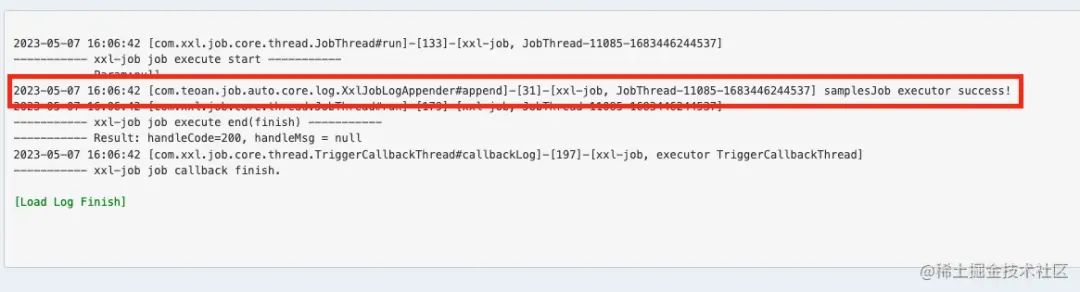
嗯,符合预期,执行器和任务详情都自动添加到调度中心了,任务中心的日志也能在调度中心中查看了。
实现过程中思考的几个问题
是否实现任务信息的更新
一开始想着是否需要监听注解上值的变化,对应地去更新XXL-JOB上的任务信息,如经常需要改变的定时任务的间隙时间或者corn表达式,后来还是决定不实现了,考虑到大多数场景下,自动注册任务只是作为应用启动的初始化工作,后续需要调整还是得上调度中心进行操作,所以任务的配置就不能一直以注解上配置为准了。
是否采用修改数据库数据的方式实现任务的注册
自动注册任务和执行器信息,其实可以直接利用ORM操作数据库去实现。不过如果XXL-JOB的数据库和当前应用不在同一台机器上,就需要配置多个数据源了,相对比较麻烦,对于第三方使用者来说,也会多出一些配置。总体看起来不够优雅,最后还是采用读取调度中心地址,利用http工具调用API的方式去实现。
是否在自动装配类上加上@Scheduled
在提供的自动装配类中,其实可以帮使用者默认加上 @Scheduled 开启SpringBoot的自动任务,但是为了尽量不影响正常的开发配置,开头说到的尽量让用户无感知,所以这个 @Scheduled 还是需要starter的使用方自己去配置,然后走默认实现的定时任务开发。
提供的Starter是否加上XXL-Job的依赖
提供的strarter包只是作为增强功能的存在,所以是可选的,不应该耦合XXL-JOB的核心依赖,就像Hutool中POI工具一样,本身并不依赖POI的核心依赖,作为Strarter包,应该只提供自己的核心功能就行。
总结
第一次根据自己的突发奇想,对中间件进行二次开发,了解了XXL-JOB的具体实现的过程中,也间接锻炼了自己阅读开源代码的能力。 从有想法到实现,这个过程中自己收获颇多,也就有了这篇博客,当作自己的过程笔记吧,分享给有需要的人。源码什么的也在github上开源了,喜欢的小伙伴也不妨点个stars。