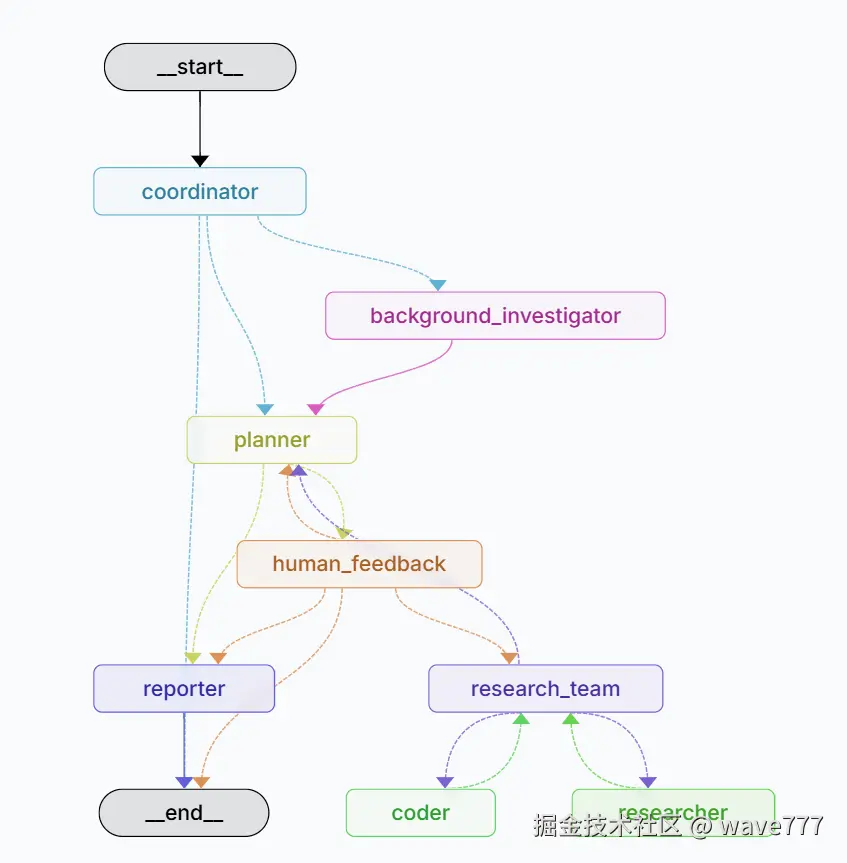
浅读deer-flow源代码,梳理流程
只是浅显的debug,读了一下,文内可能有不对的地方,请多包涵。
调试时候注意几点:
- token消耗量巨大,一下午消耗1m的token。迭代次数调低,完整跑一次估计要400k~500k。
- 已经试过qwen-max不行,deepseek-chat不行。只有doubao可以。
basic
构建的图位置
python
def _build_base_graph():
    """Build and return the base state graph with all nodes and edges."""
    builder = StateGraph(State)
    builder.add_edge(START, "coordinator")
    builder.add_node("coordinator", coordinator_node)
    builder.add_node("background_investigator", background_investigation_node)
    builder.add_node("planner", planner_node)
    builder.add_node("reporter", reporter_node)
    builder.add_node("research_team", research_team_node)
    builder.add_node("researcher", researcher_node)
    builder.add_node("coder", coder_node)
    builder.add_node("human_feedback", human_feedback_node)
    builder.add_edge("background_investigator", "planner")
    builder.add_conditional_edges(
        "research_team",
        continue_to_running_research_team,
        ["planner", "researcher", "coder"],
    )
    builder.add_edge("reporter", END)
    return builder
下面逐个分析
coordinator_node
提交问题之后,就会到这个节点。
python
def coordinator_node(
    state: State, config: RunnableConfig
) -> Command[Literal["planner", "background_investigator", "__end__"]]:
    """Coordinator node that communicate with customers."""
    logger.info("Coordinator talking.")
    configurable = Configuration.from_runnable_config(config)
    messages = apply_prompt_template("coordinator", state) # prompt就是coordinator.md。里面指示了 llm需要做什么,对每种情况如何回复,什么时候需要分发请求。
    response = (
        get_llm_by_type(AGENT_LLM_MAP["coordinator"])
        .bind_tools([handoff_to_planner])
        .invoke(messages)
    ) # 初始化 llm 客户端 并调用llm
    # 这里prompt指定多数情况都调用handoff_to_planner,
    logger.debug(f"Current state messages: {state['messages']}")

    goto = "__end__"
    locale = state.get("locale", "en-US")  # Default locale if not specified
    research_topic = state.get("research_topic", "")

    if len(response.tool_calls) > 0: # 检查大模型想不想要调用工具
        goto = "planner"
        if state.get("enable_background_investigation"):
            # if the search_before_planning is True, add the web search tool to the planner agent
            goto = "background_investigator"
        try:
            for tool_call in response.tool_calls:
                if tool_call.get("name", "") != "handoff_to_planner":
                    continue
                if tool_call.get("args", {}).get("locale") and tool_call.get(
                    "args", {}
                ).get("research_topic"):
                # 如果大模型调用工具,它会返回要调用的工具名,也就是 handoff_to_planner,还有这个函数的参数 research_topic 就是我们输入的提问
                    locale = tool_call.get("args", {}).get("locale")
                    research_topic = tool_call.get("args", {}).get("research_topic")
                    break
        except Exception as e:
            logger.error(f"Error processing tool calls: {e}")
    else:
        logger.warning(
            "Coordinator response contains no tool calls. Terminating workflow execution."
        )
        logger.debug(f"Coordinator response: {response}")
    messages = state.get("messages", [])

    # 调用函数的情况下没有 content,返回一个command,第一次进来 goto=background_investigator
    if response.content:
        messages.append(HumanMessage(content=response.content, name="coordinator"))
    return Command(
        update={
            "messages": messages,
            "locale": locale,
            "research_topic": research_topic,
            "resources": configurable.resources,
        },
        goto=goto,
    )
background_investigation
python
def background_investigation_node(state: State, config: RunnableConfig):
    logger.info("background investigation node is running.")
    configurable = Configuration.from_runnable_config(config)
    query = state.get("research_topic")
    background_investigation_results = None
    if SELECTED_SEARCH_ENGINE == SearchEngine.TAVILY.value:
        searched_content = LoggedTavilySearch(
            max_results=configurable.max_search_results
        ).invoke(query)
        if isinstance(searched_content, list):
            # 把TAVILY的搜索结果拼起来,然后就返回
            background_investigation_results = [
                f"## {elem['title']}\n\n{elem['content']}" for elem in searched_content
            ]
            return {
                "background_investigation_results": "\n\n".join(
                    background_investigation_results
                )
            }
        else:
            logger.error(
                f"Tavily search returned malformed response: {searched_content}"
            )
    else:
        background_investigation_results = get_web_search_tool(
            configurable.max_search_results
        ).invoke(query)
    return {
        "background_investigation_results": json.dumps(
            background_investigation_results, ensure_ascii=False
        )
    }
在构建图的时候,有一段代码
python
builder.add_edge("background_investigator", "planner")所以下一个是planner节点
planner_node
这个planner的markdown写的是真全,太长了就不贴上来了。链接地址
python
def planner_node(
    state: State, config: RunnableConfig
) -> Command[Literal["human_feedback", "reporter"]]:
    """Planner node that generate the full plan."""
    logger.info("Planner generating full plan")
    configurable = Configuration.from_runnable_config(config)
    plan_iterations = state["plan_iterations"] if state.get("plan_iterations", 0) else 0
    messages = apply_prompt_template("planner", state, configurable)

    if state.get("enable_background_investigation") and state.get(
        "background_investigation_results"
    ):
        # background_investigation_results 是上一步查询的初始结果
        messages += [
            {
                "role": "user",
                "content": (
                    "background investigation results of user query:\n"
                    + state["background_investigation_results"]
                    + "\n"
                ),
            }
        ]

    if configurable.enable_deep_thinking:
        llm = get_llm_by_type("reasoning")
    elif AGENT_LLM_MAP["planner"] == "basic": # 进入这里
        llm = get_llm_by_type("basic").with_structured_output(
            Plan,
            # method="json_mode",
        )
    else:
        llm = get_llm_by_type(AGENT_LLM_MAP["planner"])

    # if the plan iterations is greater than the max plan iterations, return the reporter node
    if plan_iterations >= configurable.max_plan_iterations:
        return Command(goto="reporter")

    full_response = ""
    if AGENT_LLM_MAP["planner"] == "basic" and not configurable.enable_deep_thinking:
        response = llm.invoke(messages)
        full_response = response.model_dump_json(indent=4, exclude_none=True)
    else:
        response = llm.stream(messages)
        for chunk in response:
            full_response += chunk.content
    logger.debug(f"Current state messages: {state['messages']}")
    logger.info(f"Planner response: {full_response}")
    # response的结果取决于plan的prompt,llm会thought然后列出他要做的每一个step

    try:
        curr_plan = json.loads(repair_json_output(full_response))
    except json.JSONDecodeError:
        logger.warning("Planner response is not a valid JSON")
        if plan_iterations > 0:
            return Command(goto="reporter")
        else:
            return Command(goto="__end__")
    if isinstance(curr_plan, dict) and curr_plan.get("has_enough_context"): # llm觉得够了的情况
        logger.info("Planner response has enough context.")
        new_plan = Plan.model_validate(curr_plan)
        return Command(
            update={
                "messages": [AIMessage(content=full_response, name="planner")],
                "current_plan": new_plan,
            },
            goto="reporter",
        )
    # 否则需要继续查
    return Command(
        update={
            "messages": [AIMessage(content=full_response, name="planner")],
            "current_plan": full_response,
        },
        goto="human_feedback",
    )
这是response的输出结果
json
{
    "locale": "en-US",
    "has_enough_context": false,
    "thought": "The user wants to know who Donald Trump is. The existing information mainly covers his basic personal details, political tenure, and some legal issues, but lacks comprehensive coverage in aspects such as historical business development, current political influence, future political trends, various stakeholder perspectives, more detailed quantitative and qualitative data, and in - depth comparative analysis. So, more information needs to be gathered.",
    "title": "Comprehensive Research on Donald Trump",
    "steps": [
        {
            "need_search": true,
            "title": "Research on Trump's Business and Historical Political Development",
            "description": "Gather detailed historical data on Trump's business development in real estate, sports, and entertainment. Find out about the significant events, challenges, and turning points in the history of The Trump Organization. Also, collect information on the historical background and development of his political journey before the 2016 and 2024 presidential elections, including his political stances, policy - making processes, and the impact of his early political activities.",
            "step_type": "research"
        },
        {
            "need_search": true,
            "title": "Collection of Current Political and Social Impact Data",
            "description": "Collect current data on Trump's political influence, including his current policy positions, his influence on the Republican Party, and his impact on current political debates in the United States. Also, gather information on how different social groups view Trump, such as the attitudes of voters, business communities, and international stakeholders. Find the latest news and reports on his public activities and statements.",
            "step_type": "research"
        },
        {
            "need_search": true,
            "title": "Analysis of Future Political Trends and Comparative Data",
            "description": "Search for forecasts and projections about Trump's future political influence, potential future political actions, and possible scenarios in future U.S. politics. Additionally, conduct a comparative analysis of Trump with other U.S. presidents, especially those who served non - consecutive terms like Grover Cleveland, in terms of policies, leadership styles, and historical legacies. Collect comprehensive statistics and data related to Trump's political achievements, approval ratings, and economic impacts during his presidencies for a more in - depth comparison.",
            "step_type": "research"
        }
    ]
}
上面最后的goto到human_feedback 先看human_feedback
human_feedback
python
def human_feedback_node(
    state,
) -> Command[Literal["planner", "research_team", "reporter", "__end__"]]:
    current_plan = state.get("current_plan", "")
    # check if the plan is auto accepted
    auto_accepted_plan = state.get("auto_accepted_plan", False)
    if not auto_accepted_plan: # auto_accepted_plan 表示是否自动,如果不是自动,就需要人类反馈,我这里是 true,
        feedback = interrupt("Please Review the Plan.")

        # if the feedback is not accepted, return the planner node
        if feedback and str(feedback).upper().startswith("[EDIT_PLAN]"):
            return Command(
                update={
                    "messages": [
                        HumanMessage(content=feedback, name="feedback"),
                    ],
                },
                goto="planner",
            )
        elif feedback and str(feedback).upper().startswith("[ACCEPTED]"):
            logger.info("Plan is accepted by user.")
        else:
            raise TypeError(f"Interrupt value of {feedback} is not supported.")

    # if the plan is accepted, run the following node
    plan_iterations = state["plan_iterations"] if state.get("plan_iterations", 0) else 0
    goto = "research_team"
    try:
        current_plan = repair_json_output(current_plan)
        # increment the plan iterations
        plan_iterations += 1
        # parse the plan
        new_plan = json.loads(current_plan)
    except json.JSONDecodeError:
        logger.warning("Planner response is not a valid JSON")
        if plan_iterations > 1:  # the plan_iterations is increased before this check
            return Command(goto="reporter")
        else:
            return Command(goto="__end__")

    return Command(
        update={
            "current_plan": Plan.model_validate(new_plan), # 把json转成类对象
            "plan_iterations": plan_iterations,
            "locale": new_plan["locale"],
        },
        goto=goto,
    )
代码比较简单,如果不需要人工干预,就是修复一下json然后返回。 当前goto是research_team
research_team
python
def research_team_node(state: State):
    """Research team node that collaborates on tasks."""
    logger.info("Research team is collaborating on tasks.")
    pass
在构建图的时候有一步,决定research_team下一步去哪
python
builder.add_conditional_edges(
        "research_team",
        continue_to_running_research_team,
        ["planner", "researcher", "coder"],
    )
def continue_to_running_research_team(state: State):
    current_plan = state.get("current_plan") # current_plan 就是上一步生成的plan
    if not current_plan or not current_plan.steps:
        return "planner"

    if all(step.execution_res for step in current_plan.steps): # 所有plan都有结果了
        return "planner"

    # Find first incomplete step
    incomplete_step = None
    for step in current_plan.steps:
        if not step.execution_res:
            incomplete_step = step
            break

    if not incomplete_step:
        return "planner"

    # step_type也是上一步planner生成的
    if incomplete_step.step_type == StepType.RESEARCH:
        return "researcher"
    if incomplete_step.step_type == StepType.PROCESSING:
        return "coder"
    return "planner"
下一步会进入researcher
researcher_node
调用搜索函数,搜索,我这里会调用Tavily
python
async def researcher_node(
    state: State, config: RunnableConfig
) -> Command[Literal["research_team"]]:
    """Researcher node that do research"""
    logger.info("Researcher node is researching.")
    configurable = Configuration.from_runnable_config(config)
    tools = [get_web_search_tool(configurable.max_search_results), crawl_tool]
    retriever_tool = get_retriever_tool(state.get("resources", []))
    if retriever_tool:
        tools.insert(0, retriever_tool)
    logger.info(f"Researcher tools: {tools}")
    return await _setup_and_execute_agent_step(
        state,
        config,
        "researcher",
        tools,
    )
_setup_and_execute_agent_step 会判断有没有mcp,如果没有mcp,会调用search函数,然后传入researcher的prompt
python
    if mcp_servers:
       ...
    else:
        # Use default tools if no MCP servers are configured
        agent = create_agent(agent_type, agent_type, default_tools, agent_type)
        return await _execute_agent_step(state, agent, agent_type)
_execute_agent_step函数里面,这里面就会让agent自动调用对应的函数执行,核心代码就是最后的ainvoke
python
async def _execute_agent_step(
    state: State, agent, agent_name: str
) -> Command[Literal["research_team"]]:
    """Helper function to execute a step using the specified agent."""
    current_plan = state.get("current_plan")
    plan_title = current_plan.title
    observations = state.get("observations", [])

    # Find the first unexecuted step
    current_step = None
    completed_steps = []
    for step in current_plan.steps:
        if not step.execution_res:
            current_step = step
            break
        else:
            completed_steps.append(step)

    if not current_step:
        logger.warning("No unexecuted step found")
        return Command(goto="research_team")

    logger.info(f"Executing step: {current_step.title}, agent: {agent_name}")

    # Format completed steps information
    completed_steps_info = ""
    if completed_steps:
        completed_steps_info = "# Completed Research Steps\n\n"
        for i, step in enumerate(completed_steps):
            completed_steps_info += f"## Completed Step {i + 1}: {step.title}\n\n"
            completed_steps_info += f"<finding>\n{step.execution_res}\n</finding>\n\n"

    # Prepare the input for the agent with completed steps info
    agent_input = {
        "messages": [
            HumanMessage(
                content=f"# Research Topic\n\n{plan_title}\n\n{completed_steps_info}# Current Step\n\n## Title\n\n{current_step.title}\n\n## Description\n\n{current_step.description}\n\n## Locale\n\n{state.get('locale', 'en-US')}"
            )
        ]
    }

    # Add citation reminder for researcher agent
    if agent_name == "researcher":
        if state.get("resources"):
            resources_info = "**The user mentioned the following resource files:**\n\n"
            for resource in state.get("resources"):
                resources_info += f"- {resource.title} ({resource.description})\n"

            agent_input["messages"].append(
                HumanMessage(
                    content=resources_info
                    + "\n\n"
                    + "You MUST use the **local_search_tool** to retrieve the information from the resource files.",
                )
            )

        agent_input["messages"].append(
            HumanMessage(
                content="IMPORTANT: DO NOT include inline citations in the text. Instead, track all sources and include a References section at the end using link reference format. Include an empty line between each citation for better readability. Use this format for each reference:\n- [Source Title](URL)\n\n- [Another Source](URL)",
                name="system",
            )
        )

    # Invoke the agent
    default_recursion_limit = 25
    try:
        env_value_str = os.getenv("AGENT_RECURSION_LIMIT", str(default_recursion_limit))
        parsed_limit = int(env_value_str)

        if parsed_limit > 0:
            recursion_limit = parsed_limit
            logger.info(f"Recursion limit set to: {recursion_limit}")
        else:
            logger.warning(
                f"AGENT_RECURSION_LIMIT value '{env_value_str}' (parsed as {parsed_limit}) is not positive. "
                f"Using default value {default_recursion_limit}."
            )
            recursion_limit = default_recursion_limit
    except ValueError:
        raw_env_value = os.getenv("AGENT_RECURSION_LIMIT")
        logger.warning(
            f"Invalid AGENT_RECURSION_LIMIT value: '{raw_env_value}'. "
            f"Using default value {default_recursion_limit}."
        )
        recursion_limit = default_recursion_limit

    logger.info(f"Agent input: {agent_input}")
    # ainvoke函数:Agent 框架会自动处理 LLM 的输出,解析是否需要调用工具,并自动执行工具调用循环
    result = await agent.ainvoke(
        input=agent_input, config={"recursion_limit": recursion_limit}
    )

    logger.info(f"research_result:{result}")
    # Process the result
    response_content = result["messages"][-1].content
    logger.debug(f"{agent_name.capitalize()} full response: {response_content}")

    # Update the step with the execution result
    current_step.execution_res = response_content
    logger.info(f"Step '{current_step.title}' execution completed by {agent_name}")

    return Command(
        update={
            "messages": [
                HumanMessage(
                    content=response_content,
                    name=agent_name,
                )
            ],
            "observations": observations + [response_content],
        },
        goto="research_team",
    )
然后回到research_team,然后会判断下一个step是什么类型,如果还是research,就会再次循环,直到完成。
python
def continue_to_running_research_team(state: State):
    current_plan = state.get("current_plan") # current_plan 是planner生成的
    if not current_plan or not current_plan.steps:
        return "planner"

    if all(step.execution_res for step in current_plan.steps): # 所有plan都有结果了
        return "planner"

    # Find first incomplete step
    incomplete_step = None
    for step in current_plan.steps:
        if not step.execution_res:
            incomplete_step = step
            break

    if not incomplete_step:
        return "planner"

    # 执行下一个step的逻辑
    if incomplete_step.step_type == StepType.RESEARCH:
        return "researcher"
    if incomplete_step.step_type == StepType.PROCESSING:
        return "coder"
    return "planner"
所有结果都执行完之后会回到planner
搜索完结果之后回到planner
由于max_plan_iterations为1,所以只迭代一次就返回了,尽管实际结果中has_enough_context还是false。
python
def planner_node(
    state: State, config: RunnableConfig
) -> Command[Literal["human_feedback", "reporter"]]:
    """Planner node that generate the full plan."""
    logger.info("Planner generating full plan")
    configurable = Configuration.from_runnable_config(config)
    plan_iterations = state["plan_iterations"] if state.get("plan_iterations", 0) else 0
    messages = apply_prompt_template("planner", state, configurable)
    logger.info(f"planner_node:{state}")

    if state.get("enable_background_investigation") and state.get(
        "background_investigation_results"
    ):
        messages += [
            {
                "role": "user",
                "content": (
                    "background investigation results of user query:\n"
                    + state["background_investigation_results"]
                    + "\n"
                ),
            }
        ]

    if configurable.enable_deep_thinking:
        llm = get_llm_by_type("reasoning")
    elif AGENT_LLM_MAP["planner"] == "basic":
        llm = get_llm_by_type("basic").with_structured_output(
            Plan,
            # method="json_mode",
        )
    else:
        llm = get_llm_by_type(AGENT_LLM_MAP["planner"])

    # if the plan iterations is greater than the max plan iterations, return the reporter node
    # max_plan_iterations 默认是1,所以直接到reporter
    if plan_iterations >= configurable.max_plan_iterations:
        return Command(goto="reporter")
    ...
reporter
这一步就是生成结果了,代码很简单,精华都在reporter.md里面,链接
python
def reporter_node(state: State, config: RunnableConfig):
    """Reporter node that write a final report."""
    logger.info("Reporter write final report")
    configurable = Configuration.from_runnable_config(config)
    current_plan = state.get("current_plan")
    input_ = {
        "messages": [
            HumanMessage(
                f"# Research Requirements\n\n## Task\n\n{current_plan.title}\n\n## Description\n\n{current_plan.thought}"
            )
        ],
        "locale": state.get("locale", "en-US"),
    }
    invoke_messages = apply_prompt_template("reporter", input_, configurable)
    observations = state.get("observations", [])

    # Add a reminder about the new report format, citation style, and table usage
    invoke_messages.append(
        HumanMessage(
            content="IMPORTANT: Structure your report according to the format in the prompt. Remember to include:\n\n1. Key Points - A bulleted list of the most important findings\n2. Overview - A brief introduction to the topic\n3. Detailed Analysis - Organized into logical sections\n4. Survey Note (optional) - For more comprehensive reports\n5. Key Citations - List all references at the end\n\nFor citations, DO NOT include inline citations in the text. Instead, place all citations in the 'Key Citations' section at the end using the format: `- [Source Title](URL)`. Include an empty line between each citation for better readability.\n\nPRIORITIZE USING MARKDOWN TABLES for data presentation and comparison. Use tables whenever presenting comparative data, statistics, features, or options. Structure tables with clear headers and aligned columns. Example table format:\n\n| Feature | Description | Pros | Cons |\n|---------|-------------|------|------|\n| Feature 1 | Description 1 | Pros 1 | Cons 1 |\n| Feature 2 | Description 2 | Pros 2 | Cons 2 |",
            name="system",
        )
    )

    # 拼接消息,发给llm
    for observation in observations:
        invoke_messages.append(
            HumanMessage(
                content=f"Below are some observations for the research task:\n\n{observation}",
                name="observation",
            )
        )
    logger.debug(f"Current invoke messages: {invoke_messages}")
    response = get_llm_by_type(AGENT_LLM_MAP["reporter"]).invoke(invoke_messages)
    response_content = response.content
    logger.info(f"reporter response: {response_content}")

    return {"final_report": response_content}
总结
coordinator接受用户输入,让llm判断需不需要分发请求,还是直接返回。如果要分发请求,下一步会到background_investigator。
background_investigator 会调用搜索引擎完成基本搜索。下一步会交给planer。
planer会对上面的基本搜索结果评估,然后生成计划。生成什么样的计划,有哪些关键点,全都写在prompt里面。
planner生成多个step之后,调用human_feedback,当前是不反馈,所以继续下一步。
research_team,负责执行上面planner的计划。当前的计划是搜索,所以research_team就会调用researcher开始搜索,搜索每一步step。
搜索完之后会回到planner,planner检查结果,如果ok,就会交给reporter生成结果。
reporter生成结果也是采用prompt控制的,交给llm生成。
这是langgraph生成的流程图,可以帮助理解: