七夕
源于牛郎织女星河相会的古老传说
星河浩瀚,喜鹊搭桥
一年一度,始得相逢
而今,我们虽不能令喜鹊飞临
却可用代码绘就一片璀璨星空
让星光随思念明灭,让星轨如鹊桥延展
让AI替你书写浪漫的告白!
现在,就向文心快码Zulu许愿!
一起,用代码绘出一片动态星空!
一、愿望构思
1.为了让Zulu生成的星空更符合预期,可以找一张参考图给它,需要参考图片设计动态星空。
2.为了让这个星空不那么单调,需要星空中有爱情相关的古诗文出现。
3.同时为了页面美观度,我们可以描述一下文字的样式,比如白色光芒、动态效果。
二、输入赛博版"乞巧愿"
less
请帮我开发一个网页版动态星空电子情书,具体需求如下:

背景:制作动态星空效果,包含闪烁的星星(明暗交替)、缓慢移动的星轨或流星轨迹,参考图片

文字内容:参考 #poems ,文字颜色为纯白色。

文字排版与动画:

文字采用竖向排列(从上到下阅读)

文字需添加动态效果(渐显渐隐)

文字周围要有白色光芒/辉光效果(类似发光滤镜,增强梦幻感)

整体风格:浪漫、沉浸式,适配PC端屏幕,动画效果流畅不卡顿。

技术实现:使用HTML、CSS、JavaScript结合Canvas或CSS动画实现,星空背景和文字动画需协调搭配,营造星空下情书的氛围感。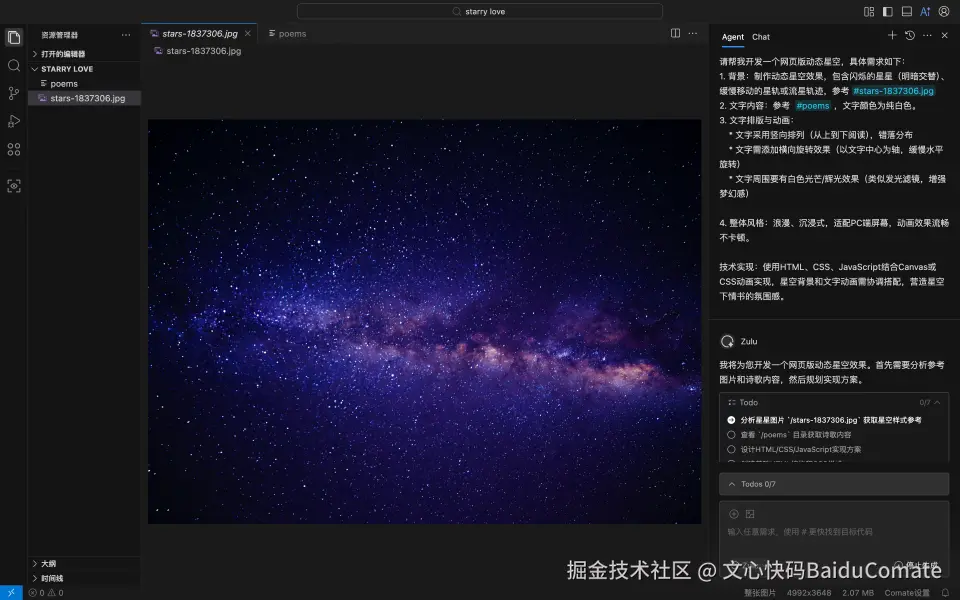
三、Zulu帮你实现
Zulu在10秒内就输出了完整代码框架。并且现在最新版的文心快码Zulu已经支持在执行过程中展示Todo list,我们可以在开发流程中更好地监控Zulu的执行。
分析星星图片/stars-1837306.jpg获取星空样式参考
查看/poems目录获取诗歌内容
设计HTML/CSS/JavaScript实现方案
创建基础HTML结构和CSS样式
实现星空动画效果
实现诗歌文字动画效果
整合所有元素并测试效果

四、持续优化
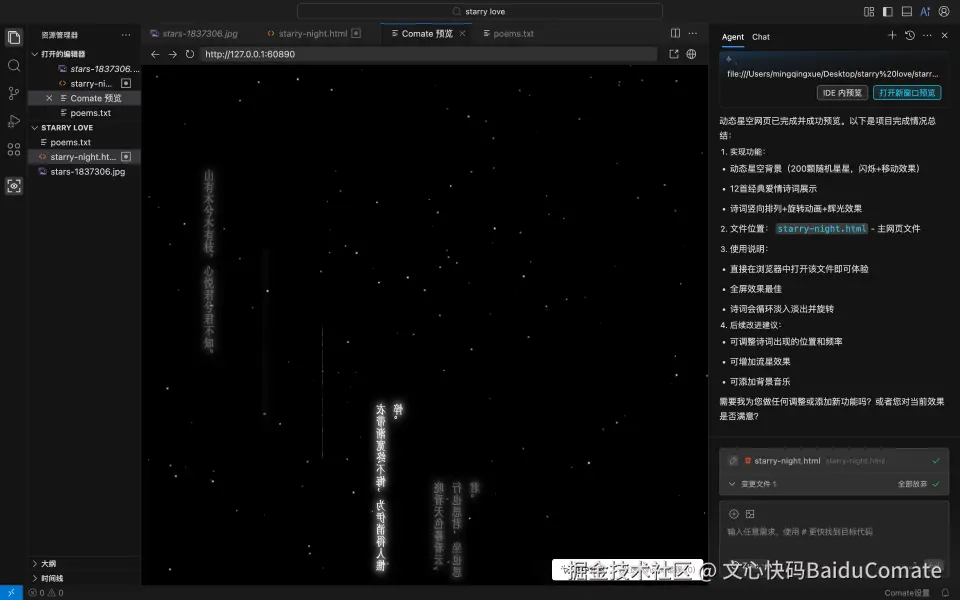
Zulu实现了第一版,但是这个动态星空的电子情书并不是很美观,可以继续迭代优化。
- 我注意到有的诗文换行了,每行诗文需要纵向排列,错落有致,分布均匀
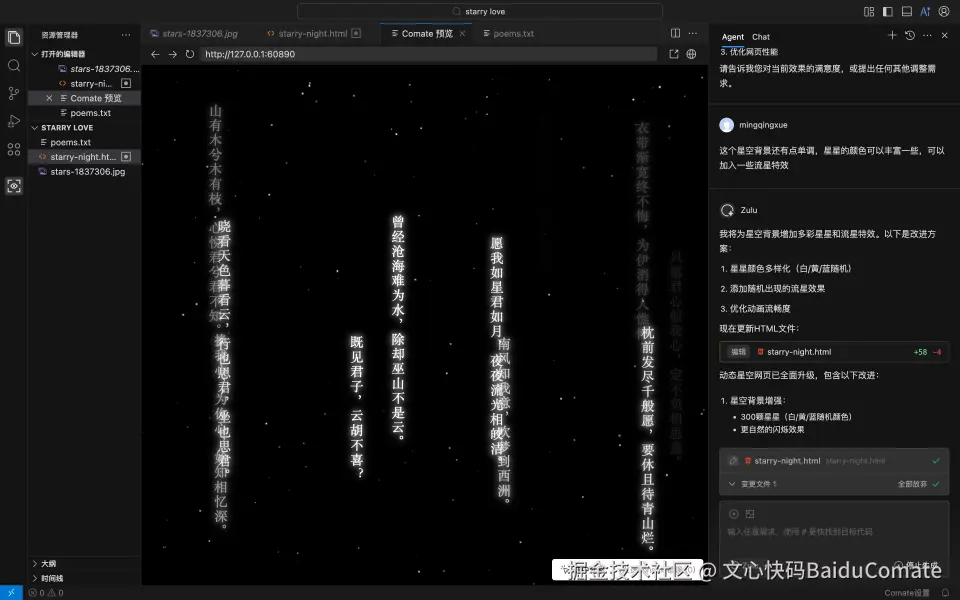
- 这个星空背景还有点单调,星星的颜色可以丰富一些,可以加入一些流星特效
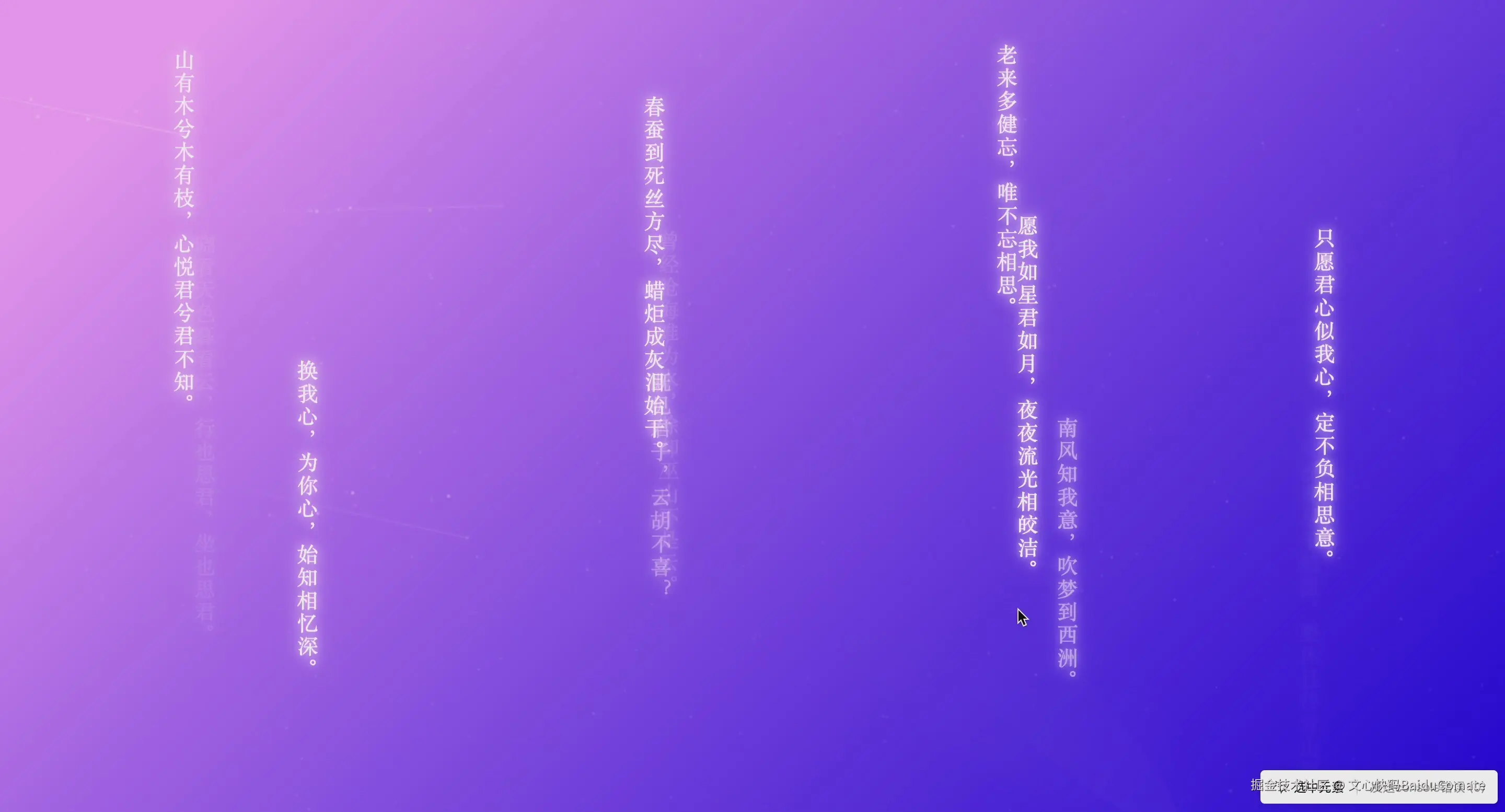
- 星空背景颜色需要更浪漫一点,参考颜色:background-image: linear-gradient (135deg, #FAB2FF 10%, #1904E5 100%),并调整各图层透明度,确保效果
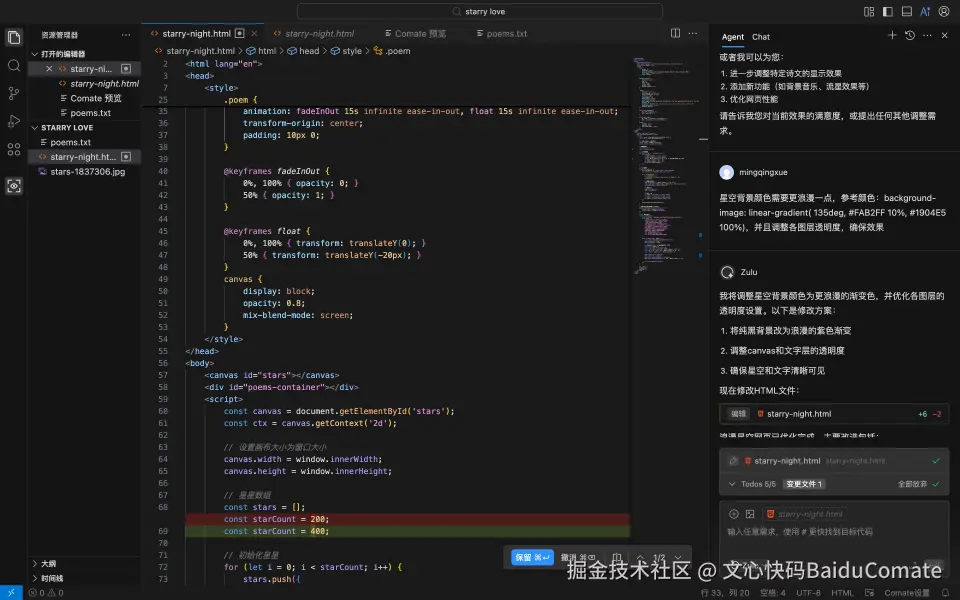
最后,我们就成功实现了
动态星空的电子情书!👉 点击观看视频
五、更多功能
文心快码Zulu能做的不只这些!还能化身你的专属爱情保安,守护你的七夕甜蜜计划!
1 帮你提高编码效率,七夕早下班
还在为繁琐的代码调试头疼?文心快码助你拉满编码效率!
- 超级代码补全: 智能预测,一键补全,大幅减少重复输入
- 智能Debug: 精准定位错误,并提供修复建议
- 自动生成单测: 支持多种测试框架,快速生成高覆盖率的单元测试用例
早下班不是梦,更多时间陪Ta过节!
2 帮你解决送什么难题,创意无限
用AI编程,创意不重样,亲手为Ta打造一个独一无二的赛博礼物!
- 照片回忆册: 用代码快速整理你们的照片,生成专属回忆相册
- 爱心代码动画: 几行代码就能生成动态爱心图案,炫技又浪漫
- 个性化网页: 快速搭建一个专属七夕告白页面,记录专属日常
- 小游戏开发: 简单几步制作一个互动小游戏,共渡休闲时光
0基础也没关系! 告诉文心快码Zulu你的想法,自动生成代码,稍作修改就能送出特别的浪漫!
这个七夕,让Coding Agent成为你的爱情保安,bug退散,love满分,有AI更有爱!
点击获取Zulu定制的文心快码Comate AI IDE七夕专属页面,下载体验Coding Agent的超能力!

附录1:七夕产品宣传页生成prompt示例
bash
我要做一个 AI IDE的七夕宣传页面,请帮我设计下,我的产品名叫 Comate AI IDE,重点突出 Agent、补全、Debug、前端预览调试。
第一屏使用这个背景图 https://comate.baidu.com/ai-ide/raw/520-background.png
ide 的下载链接是 https://comate.baidu.com/zh/download#aiIde
附录2:动态星空代码
ini
<!DOCTYPE html>
<html lang="en">
<head>
    <meta charset="UTF-8">
    <meta name="viewport" content="width=device-width, initial-scale=1.0">
    <title>Starry Night</title>
    <style>
        body {
            margin: 0;
            overflow: hidden;
            background-image: linear-gradient(135deg, #FAB2FF 10%, #1904E5 100%);
            font-family: 'SimSun', serif;
            color: white;
        }

        #poems-container {
            position: absolute;
            top: 0;
            left: 0;
            width: 100%;
            height: 100%;
            pointer-events: none;
        }

        .poem {
            position: absolute;
            writing-mode: vertical-rl;
            text-orientation: upright;
            font-size: 20px;
            line-height: 1.6;
            white-space: nowrap;
            letter-spacing: 2px;
            text-shadow: 0 0 6px rgba(255,182,255,0.9), 0 0 12px rgba(255,255,255,0.7), 0 0 20px rgba(255,255,255,0.5);
            opacity: 0;
            animation: fadeInOut 15s infinite ease-in-out, float 15s infinite ease-in-out;
            transform-origin: center;
            padding: 10px 0;
        }

        @keyframes fadeInOut {
            0%, 100% { opacity: 0; }
            50% { opacity: 1; }
        }

        @keyframes float {
            0%, 100% { transform: translateY(0); }
            50% { transform: translateY(-20px); }
        }
        canvas {
            display: block;
            opacity: 0.8;
            mix-blend-mode: screen;
        }
    </style>
</head>
<body>
    <canvas id="stars"></canvas>
    <div id="poems-container"></div>
    <script>
        const canvas = document.getElementById('stars');
        const ctx = canvas.getContext('2d');

        // 设置画布大小为窗口大小
        canvas.width = window.innerWidth;
        canvas.height = window.innerHeight;

        // 星星数组
        const stars = [];
        const starCount = 500;

        // 流星数组
        const meteors = [];
        const maxMeteors = 3;

        // 初始化星星
        for (let i = 0; i < starCount; i++) {
            stars.push({
                x: Math.random() * canvas.width,
                y: Math.random() * canvas.height,
                radius: Math.random() * 1.5,
                vx: Math.random() * 0.3 - 0.15,
                vy: Math.random() * 0.3 - 0.15,
                brightness: Math.random(),
                twinkleSpeed: Math.random() * 0.05 + 0.01
            });
        }

        // 绘制银河
        function drawMilkyWay() {
            const centerX = canvas.width / 2;
            const centerY = canvas.height / 2;
            const angle = Math.PI / 4; // 银河倾斜角度
            const width = canvas.width * 0.8;
            const height = canvas.height * 0.15;

            // 创建银河渐变
            const gradient = ctx.createLinearGradient(
                centerX - width * Math.cos(angle) / 2,
                centerY - width * Math.sin(angle) / 2,
                centerX + width * Math.cos(angle) / 2,
                centerY + width * Math.sin(angle) / 2
            );

            gradient.addColorStop(0, 'rgba(255,255,255,0)');
            gradient.addColorStop(0.3, 'rgba(200,220,255,0.1)');
            gradient.addColorStop(0.5, 'rgba(180,200,255,0.15)');
            gradient.addColorStop(0.7, 'rgba(200,220,255,0.1)');
            gradient.addColorStop(1, 'rgba(255,255,255,0)');

            ctx.save();
            ctx.translate(centerX, centerY);
            ctx.rotate(angle);

            // 绘制银河核心
            ctx.fillStyle = gradient;
            ctx.beginPath();
            ctx.ellipse(0, 0, width / 2, height / 2, 0, 0, Math.PI * 2);
            ctx.fill();

            // 绘制银河光晕
            ctx.globalCompositeOperation = 'lighter';
            ctx.filter = 'blur(10px)';
            ctx.beginPath();
            ctx.ellipse(0, 0, width / 2, height, 0, 0, Math.PI * 2);
            ctx.fill();

            ctx.restore();
        }

        // 绘制星星和流星
        function drawStars() {
            ctx.clearRect(0, 0, canvas.width, canvas.height);
            drawMilkyWay();
            ctx.fillStyle = 'rgba(255, 255, 255, 0.9)';

            // 生成自然流动的流星
            if (meteors.length < maxMeteors && Math.random() < 0.025) {
                // 从左侧或上侧开始,更符合自然规律
                const startFromTop = Math.random() > 0.7;
                const x = startFromTop ?
                    Math.random() * canvas.width :
                    0;
                const y = startFromTop ?
                    0 :
                    Math.random() * canvas.height * 0.8;

                // 自然的速度和角度变化
                const baseSpeed = Math.random() * 2 + 3;
                const speedVariation = Math.random() * 1.5;
                const angle = (Math.random() - 0.5) * 0.4; // 自然的角度变化

                meteors.push({
                    x: x,
                    y: y,
                    vx: baseSpeed * Math.cos(angle) + speedVariation,
                    vy: baseSpeed * Math.sin(angle) + speedVariation * 0.5,
                    life: 120, // 更长的生命周期
                    length: Math.random() * 50 + 70,
                    brightness: 1.3,
                    tailWidth: Math.random() * 2 + 1,
                    tailParticles: [] // 尾迹粒子数组
                });
            }

            // 绘制流星
            for (let i = meteors.length - 1; i >= 0; i--) {
                const meteor = meteors[i];

                // 流星主体 - 带光晕效果
                ctx.save();
                ctx.shadowBlur = 15;
                ctx.shadowColor = `rgba(255, 255, 255, ${meteor.brightness * 0.7})`;

                // 主尾迹
                const gradient = ctx.createLinearGradient(
                    meteor.x, meteor.y,
                    meteor.x - meteor.vx * meteor.length * 0.7, meteor.y - meteor.vy * meteor.length * 0.7
                );
                gradient.addColorStop(0, `rgba(255, 255, 255, ${meteor.brightness})`);
                gradient.addColorStop(1, `rgba(180, 200, 255, ${meteor.brightness * 0.2})`);

                ctx.strokeStyle = gradient;
                ctx.lineWidth = meteor.tailWidth;
                ctx.beginPath();
                ctx.moveTo(meteor.x, meteor.y);
                ctx.lineTo(meteor.x - meteor.vx * meteor.length * 0.7, meteor.y - meteor.vy * meteor.length * 0.7);
                ctx.stroke();

                // 次尾迹 - 更淡更长的效果
                ctx.strokeStyle = `rgba(180, 200, 255, ${meteor.brightness * 0.15})`;
                ctx.lineWidth = meteor.tailWidth * 0.6;
                ctx.beginPath();
                ctx.moveTo(meteor.x - meteor.vx * meteor.length * 0.3, meteor.y - meteor.vy * meteor.length * 0.3);
                ctx.lineTo(meteor.x - meteor.vx * meteor.length, meteor.y - meteor.vy * meteor.length);
                ctx.stroke();

                ctx.restore();

                // 随机生成尾迹粒子
                if (Math.random() < 0.3) {
                    meteor.tailParticles.push({
                        x: meteor.x - meteor.vx * Math.random() * meteor.length * 0.5,
                        y: meteor.y - meteor.vy * Math.random() * meteor.length * 0.5,
                        life: 20 + Math.random() * 30,
                        size: Math.random() * 1.5 + 0.5
                    });
                }

                // 绘制尾迹粒子
                meteor.tailParticles.forEach((particle, index) => {
                    ctx.fillStyle = `rgba(255, 255, 255, ${particle.life / 50})`;
                    ctx.beginPath();
                    ctx.arc(particle.x, particle.y, particle.size, 0, Math.PI * 2);
                    ctx.fill();

                    particle.life--;
                    if (particle.life <= 0) {
                        meteor.tailParticles.splice(index, 1);
                    }
                });

                // 流星头部
                ctx.fillStyle = `rgba(255, 255, 255, ${meteor.brightness})`;
                ctx.beginPath();
                ctx.arc(meteor.x, meteor.y, 2, 0, Math.PI * 2);
                ctx.fill();

                // 更新流星位置和生命周期
                meteor.x += meteor.vx;
                meteor.y += meteor.vy;
                meteor.life--;
                meteor.brightness = meteor.life / 100;

                // 移除消失的流星
                if (meteor.life <= 0 ||
                    meteor.x < 0 || meteor.x > canvas.width ||
                    meteor.y < 0 || meteor.y > canvas.height) {
                    meteors.splice(i, 1);
                }
            }

            stars.forEach(star => {
                ctx.beginPath();
                ctx.arc(star.x, star.y, star.radius, 0, Math.PI * 2);
                ctx.fill();

                // 星星闪烁效果
                star.brightness += (Math.random() - 0.5) * star.twinkleSpeed;
                star.brightness = Math.max(0.3, Math.min(1, star.brightness));
                ctx.globalAlpha = star.brightness * 0.9 + 0.1; // 确保最小可见度

                // 星星移动
                star.x += star.vx;
                star.y += star.vy;

                // 边界检查
                if (star.x < 0) star.x = canvas.width;
                if (star.x > canvas.width) star.x = 0;
                if (star.y < 0) star.y = canvas.height;
                if (star.y > canvas.height) star.y = 0;
            });

            requestAnimationFrame(drawStars);
        }

        // 窗口大小调整时重设画布大小
        window.addEventListener('resize', () => {
            canvas.width = window.innerWidth;
            canvas.height = window.innerHeight;
        });

        // 添加诗歌文字
        function addPoems() {
            const container = document.getElementById('poems-container');
            const poems = [
                "山有木兮木有枝,心悦君兮君不知。",
                "春蚕到死丝方尽,蜡炬成灰泪始干。",
                "老来多健忘,唯不忘相思。",
                "衣带渐宽终不悔,为伊消得人憔悴。",
                "晓看天色暮看云,行也思君,坐也思君。",
                "曾经沧海难为水,除却巫山不是云。",
                "愿我如星君如月,夜夜流光相皎洁。",
                "只愿君心似我心,定不负相思意。",
                "换我心,为你心,始知相忆深。",
                "既见君子,云胡不喜?",
                "南风知我意,吹梦到西洲。",
                "枕前发尽千般愿,要休且待青山烂。"
            ];

            poems.forEach((line, index) => {
                const poem = document.createElement('div');
                poem.className = 'poem';
                poem.textContent = line;

                // 优化分布算法 - 确保不重叠且均匀分布
                const col = index % 4;
                const row = Math.floor(index / 4);
                const left = 15 + col * 25 + (Math.random() * 10 - 5);
                const top = 10 + row * 20 + (Math.random() * 10 - 5);
                const delay = index * 1.2 + Math.random() * 2;

                poem.style.left = `${left}%`;
                poem.style.top = `${top}%`;
                poem.style.animationDelay = `${delay}s`;
                poem.style.animationDuration = `${8 + Math.random() * 4}s`;

                container.appendChild(poem);
            });
        }

        // 开始动画
        drawStars();
        addPoems();
    </script>
</body>
</html>