最近在学WPF,上一篇文章记录了WPF的MVVM自己实现和用框架的区别(WPF+MVVM入门学习),接下这篇文章记录一下在WPF中使用IOC,这里演示用的是微软官方的DependencyInjection,也可以用其他的第三方框架。
项目源码:https://gitee.com/cplmlm/SelfServiceReportPrinter
GitHub - cplmlm/SelfServiceReportPrinter: WPF+IOC+MVVM 医院自助检验检查报告打印
推荐学习博主:B站UP十月的寒流
一、基本概念
为什么要用IOC?
可以提高代码的耦合度、更方便的控制生命周期、提高代码复用和可维护性、便于测试。
控制反转
本来要在一个类里面实现依赖,现在我们可以把这个依赖抽出来。
依赖注入
通过依赖的方式注入到类里面的,我们通常使用构造函数注入,还有属性注入、接口注入。
生命周期
|------------------|--------------------|--------------------------------------------------------------------------------------------------------------------|
| 名称 | 概念 | 使用场景 |
| AddSingleton(单例) | 在整个应用程序生命周期中只有一个实例 | 例如配置数据库连接、身份验证等服务。 |
| AddScoped(作用域) | 该对象的生命周期与请求的作用域一致 | 这种方式适用于需要在请求期间处理共享状态的服务。例如:请求中可能会使用一个数据库上下文来处理数据库相关操作,这时候使用 AddScoped 就可以保证数据库上下文的实例在请求期间是唯一的,从而避免了多个请求之间的冲突和数据错乱。 |
| AddTransient(瞬时) | 每次服务请求都会创建一个新的实例 | 适用于需要经常创建和销毁的轻型服务。例如, 日志记录服务、轻量级对象、单次使用对象 |
二、示例代码
1、安装Microsoft.Extensions.DependencyInjectio包。
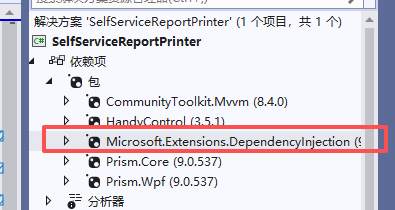
2、在app.cs添加以下代码,目的是为了实现注入,我这里直接从微软官方复制过来的,代码地址: CommunityToolkit.Mvvm 的 IoC 控制反转
 /// <summary>
 /// Interaction logic for App.xaml
 /// </summary>
 public partial class App : Application
 {
     public App()
     {
         Services = ConfigureServices();
         this.InitializeComponent();
     }

     /// <summary>
     /// 获取当前应用程序实例
     /// </summary>
     public new static App Current => (App)Application.Current;

     /// <summary>
     /// 获取当前应用程序的服务提供程序
     /// </summary>
     public IServiceProvider Services { get; }

     /// <summary>
     /// 配置服务
     /// </summary>
     private static IServiceProvider ConfigureServices()
     {
         var services = new ServiceCollection();
         services.AddTransient<KeyPressViewModelCommunityToolkit>();
         services.AddTransient<KeyPressViewModelPrism>();
         services.AddTransient<KeyPressViewModel>();
         services.AddTransient(sp=>new MainWindow() { DataContext=sp.GetRequiredService<KeyPressViewModelCommunityToolkit>()});
         return services.BuildServiceProvider();
     }
 }
3、MainWindow窗口我们也是通过注入的方式,所有和之前的有区别,之前是在StartupUri设置的,通过依赖注入的方式需要重写了OnStartup方法。
修改前:
<Application x:Class="WpfAppMvvm.App"
             xmlns="http://schemas.microsoft.com/winfx/2006/xaml/presentation"
             xmlns:x="http://schemas.microsoft.com/winfx/2006/xaml"
             xmlns:local="clr-namespace:WpfAppMvvm"
             StartupUri="MainWindow.xaml">
    <Application.Resources>

    </Application.Resources>
</Application>
修改后:
<Application x:Class="SelfServiceReportPrinter.App"
             xmlns="http://schemas.microsoft.com/winfx/2006/xaml/presentation"
             xmlns:x="http://schemas.microsoft.com/winfx/2006/xaml"
             xmlns:local="clr-namespace:SelfServiceReportPrinter"
            >
    <Application.Resources>
        <ResourceDictionary>
            <ResourceDictionary.MergedDictionaries>
                <ResourceDictionary Source="pack://application:,,,/HandyControl;component/Themes/SkinDefault.xaml"/>
                <ResourceDictionary Source="pack://application:,,,/HandyControl;component/Themes/Theme.xaml"/>
                <ResourceDictionary Source="/Resources/CommonDictionary.xaml"/>
            </ResourceDictionary.MergedDictionaries>
        </ResourceDictionary>
    </Application.Resources>
</Application>

public partial class App : Application
{
    public App()
    {
        Services = ConfigureServices();
        this.InitializeComponent();
    }

    /// <summary>
    /// 获取当前应用程序实例
    /// </summary>
    public new static App Current => (App)Application.Current;

    /// <summary>
    /// 获取当前应用程序的服务提供程序
    /// </summary>
    public IServiceProvider Services { get; }

    /// <summary>
    /// 配置服务
    /// </summary>
    private static IServiceProvider ConfigureServices()
    {
        var services = new ServiceCollection();
        services.AddTransient<KeyPressViewModelCommunityToolkit>();
        services.AddTransient<KeyPressViewModelPrism>();
        services.AddTransient<KeyPressViewModel>();
        services.AddTransient(sp=>new MainWindow() { DataContext=sp.GetRequiredService<KeyPressViewModelCommunityToolkit>()});
        return services.BuildServiceProvider();
    }

    /// <summary>
    /// 启动应用程序
    /// </summary>
    /// <param name="e"></param>
    protected override void OnStartup(StartupEventArgs e)
    {
        base.OnStartup(e);
        MainWindow= Services.GetRequiredService<MainWindow>();
        MainWindow?.Show();
    }
}