概述
Vue.js 提供了强大的 class 和 style 绑定功能,使开发者能够动态地操作元素的 CSS 类列表和内联样式。与简单的字符串拼接相比,Vue 的特殊增强功能提供了更直观和强大的数据绑定方式。
1. 绑定 HTML Class
1.1 绑定对象语法
通过对象语法,可以根据数据属性的真假值动态切换 class。
html
<!-- 基本用法 -->
<div :class="{ active: isActive, 'text-danger': hasError }"></div>

<!-- 与普通 class 共存 -->
<div class="static" :class="{ active: isActive, 'text-danger': hasError }"></div>
TypeScript
// 对应的 JavaScript
const isActive = ref(true)
const hasError = ref(false)
渲染结果 :
1.2 绑定对象变量
可以直接绑定一个响应式对象:
TypeScript
const classObject = reactive({
  active: true,
  'text-danger': false
})
html
<div :class="classObject"></div>1.3 使用计算属性
对于更复杂的逻辑,可以使用计算属性:
TypeScript
const isActive = ref(true)
const error = ref(null)

const classObject = computed(() => ({
  active: isActive.value && !error.value,
  'text-danger': error.value && error.value.type === 'fatal'
}))
html
<div :class="classObject"></div>1.4 绑定数组语法
可以通过数组语法绑定多个 class:
TypeScript
const activeClass = ref('active')
const errorClass = ref('text-danger')
html
<div :class="[activeClass, errorClass]"></div>渲染结果 :
1.5 数组中的条件渲染
在数组中使用条件表达式:
html
<!-- 使用三元表达式 -->
<div :class="[isActive ? activeClass : '', errorClass]"></div>

<!-- 在数组中嵌套对象 -->
<div :class="[{ [activeClass]: isActive }, errorClass]"></div>
2. 在组件上使用 Class
2.1 单根元素组件
class 会被添加到根元素上并合并:
html
<!-- 子组件模板 -->
<p class="foo bar">Hi!</p>

<!-- 使用组件时 -->
<MyComponent class="baz boo" />

<!-- 渲染结果 -->
<p class="foo bar baz boo">Hi!</p>
2.2 多根元素组件
需要使用 $attrs 指定接收 class 的元素:
html
<!-- 组件模板 -->
<p :class="$attrs.class">Hi!</p>
<span>This is a child component</span>

<!-- 使用组件 -->
<MyComponent class="baz" />

<!-- 渲染结果 -->
<p class="baz">Hi!</p>
<span>This is a child component</span>
3. 绑定内联样式
3.1 绑定对象语法
可以直接绑定样式对象:
TypeScript
const activeColor = ref('red')
const fontSize = ref(30)
html
<!-- 直接书写 -->
<div :style="{ color: activeColor, fontSize: fontSize + 'px' }"></div>

<!-- 使用 kebab-case -->
<div :style="{ 'font-size': fontSize + 'px' }"></div>
3.2 绑定样式对象
可以绑定一个样式对象:
TypeScript
const styleObject = reactive({
  color: 'red',
  fontSize: '30px'
})
html
<div :style="styleObject"></div>3.3 与常规 style 共存
:style 可以与常规的 style 属性共存:
html
<h1 style="color: red" :style="{ fontSize: '1em' }">hello</h1>

<!-- 渲染结果 -->
<h1 style="color: red; font-size: 1em;">hello</h1>
3.4 绑定数组语法
可以绑定多个样式对象,它们会被合并:
html
<div :style="[baseStyles, overridingStyles]"></div>3.5 自动前缀
Vue 会自动为需要浏览器特殊前缀的 CSS 属性添加相应前缀。
3.6 样式多值
可以为样式属性提供多个值:
html
<div :style="{ display: ['-webkit-box', '-ms-flexbox', 'flex'] }"></div>浏览器只会渲染支持的最后一个值(本例中为 display: flex)。
4. 总结与对比
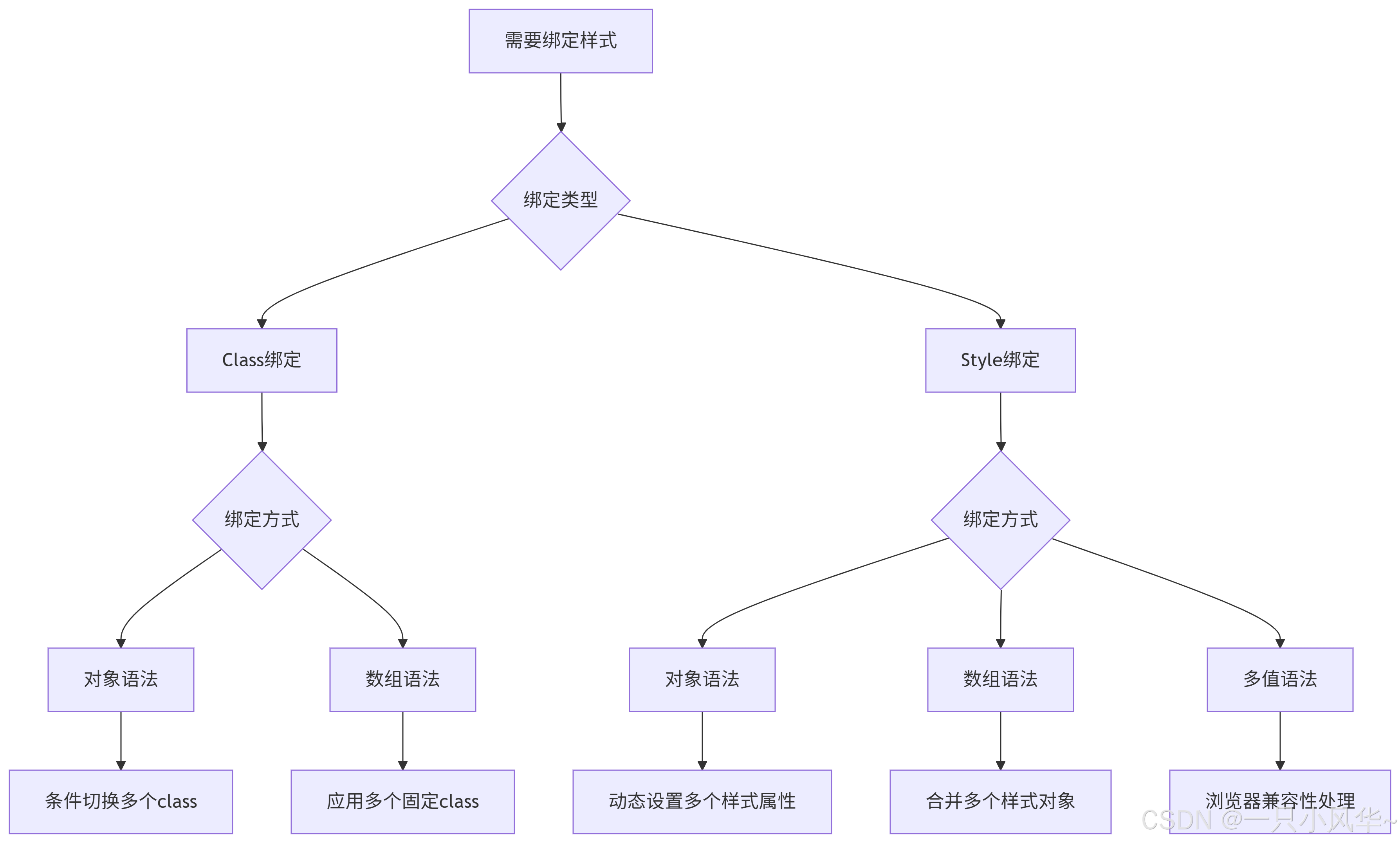
4.1 Class 绑定方式对比
| 方式 | 语法 | 适用场景 |
|---|---|---|
| 对象语法 | :class="{class1: condition1, class2: condition2}" |
根据条件动态切换多个 class |
| 数组语法 | :class="[class1, class2]" |
应用多个固定的 class |
| 混合使用 | :class="[{active: isActive}, errorClass]" |
结合条件和固定 class |
4.2 Style 绑定方式对比
| 方式 | 语法 | 适用场景 |
|---|---|---|
| 对象语法 | :style="{color: activeColor, fontSize: size + 'px'}" |
动态设置多个样式属性 |
| 数组语法 | :style="[baseStyles, overridingStyles]" |
合并多个样式对象 |
| 多值语法 | :style="{display: ['-webkit-box', 'flex']}" |
提供多个浏览器前缀值 |
4.3 选择指南
5. 最佳实践
-
复杂逻辑使用计算属性:当 class 或 style 逻辑复杂时,使用计算属性提高可维护性
-
组件设计考虑:设计组件时考虑 class 和 style 的继承行为
-
性能考虑:避免在样式中使用过于复杂的对象,尤其是频繁更新的情况
-
浏览器兼容性:利用 Vue 的自动前缀功能处理浏览器兼容性问题
6. 示例代码汇总
html
<!DOCTYPE html>
<html>
<head>
  <style>
    .active { background-color: #f0f0f0; }
    .text-danger { color: red; }
    .static { border: 1px solid #ccc; }
  </style>
</head>
<body>
  <div id="app">
    <!-- Class 绑定示例 -->
    <div :class="{ active: isActive, 'text-danger': hasError }">Class 对象绑定</div>
    <div :class="classObject">Class 对象变量绑定</div>
    <div :class="[activeClass, errorClass]">Class 数组绑定</div>

    <!-- Style 绑定示例 -->
    <div :style="{ color: activeColor, fontSize: fontSize + 'px' }">Style 对象绑定</div>
    <div :style="styleObject">Style 对象变量绑定</div>
    <div :style="[baseStyles, overridingStyles]">Style 数组绑定</div>
  </div>

  <script type="module">
    import { createApp, ref, reactive, computed } from 'vue'

    createApp({
      setup() {
        // Class 绑定数据
        const isActive = ref(true)
        const hasError = ref(false)
        const activeClass = ref('active')
        const errorClass = ref('text-danger')

        const classObject = reactive({
          active: true,
          'text-danger': false
        })

        // Style 绑定数据
        const activeColor = ref('blue')
        const fontSize = ref(20)

        const styleObject = reactive({
          color: 'green',
          fontSize: '25px'
        })

        const baseStyles = reactive({
          padding: '10px',
          margin: '5px'
        })

        const overridingStyles = reactive({
          color: 'purple'
        })

        return {
          isActive,
          hasError,
          activeClass,
          errorClass,
          classObject,
          activeColor,
          fontSize,
          styleObject,
          baseStyles,
          overridingStyles
        }
      }
    }).mount('#app')
  </script>
</body>
</html>