一、架构
下位机(esp32)→ MQTT broker(mosquito)→上位机(python前端)
python脚本
sqlite数据库
二、安装sqlite
1、更新系统
bash
sudo apt update2、安装python3和pip
bash
sudo apt install python3 python3-pip3、安装需要的python库
bash
pip3 install paho-mqtt4、安装sqlite
bash
sudo apt install sqlite3三、执行python脚本
1、python脚本编写
python
import sqlite3
import json
import paho.mqtt.client as mqtt
from datetime import datetime

# ==================== 配置区域 ====================
MQTT_BROKER = "192.168.136.55"
MQTT_PORT = 1883
MQTT_TOPIC = "test/esp32/data"  # 请确保与ESP32发布的主题一致

DATABASE_FILE = '/home/han/sensor_data.db'  # 数据库文件路径

CLIENT_ID = "python_database"

USERNAME = "han2"
PASSWORD = "123456"

# ================================================

# 初始化数据库
def init_db():
    conn = sqlite3.connect(DATABASE_FILE)
    c = conn.cursor()
    # 创建表(如果不存在)
    c.execute('''
        CREATE TABLE IF NOT EXISTS sensor_data (
            id INTEGER PRIMARY KEY AUTOINCREMENT,
            timestamp DATETIME DEFAULT CURRENT_TIMESTAMP,
            topic TEXT NOT NULL,
            temperature REAL,
            humidity REAL
        )
    ''')
    conn.commit()
    conn.close()
    print(f"Database initialized at {DATABASE_FILE}")


# MQTT 回调函数
def on_connect(client, userdata, flags, rc):
    print(f"Connected to MQTT broker with result code {rc}")
    client.subscribe(MQTT_TOPIC)
    print(f"Subscribed to topic: {MQTT_TOPIC}")


def on_message(client, userdata, msg):
    try:
        payload = msg.payload.decode()
        print(f"Received: [{msg.topic}] {payload}")

        # 解析JSON
        data = json.loads(payload)
        sensor_data = data.get('params', {})  # 适配您的格式

        # 提取数据
        temp = sensor_data.get('temp')
        humidity = sensor_data.get('humidity')

        # 写入数据库
        conn = sqlite3.connect(DATABASE_FILE)
        c = conn.cursor()
        c.execute(
            "INSERT INTO sensor_data (topic, temperature, humidity) VALUES (?, ?, ?)",
            (msg.topic, temp, humidity)
        )
        conn.commit()
        conn.close()

        print(f"Data stored: Temp={temp}, Humidity={humidity}")

    except Exception as e:
        print(f"Error processing message: {e}")


# 主程序
if __name__ == "__main__":
    print("Starting MQTT to SQLite bridge...")
    init_db()

    client = mqtt.Client(mqtt.CallbackAPIVersion.VERSION1, CLIENT_ID)
    client.on_connect = on_connect
    client.on_message = on_message

    # 如果服务器需要认证,请取消下面两行的注释
    # client.username_pw_set(USERNAME, PASSWORD)

    client.connect(MQTT_BROKER, MQTT_PORT, 60)
    client.loop_forever()
2、运行脚本
①在FinalShell上,上传写好的python程序。
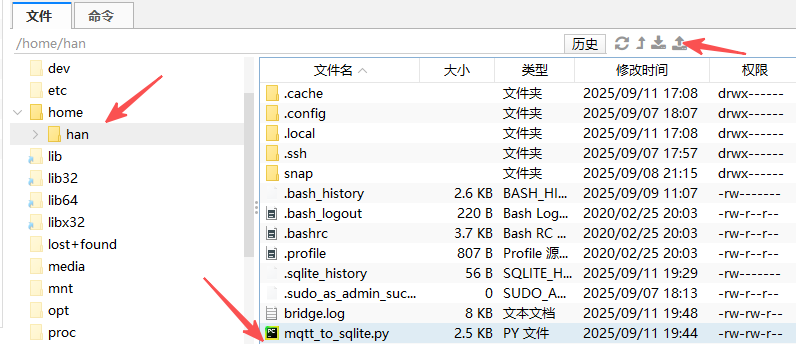
②运行程序
bash
nohup python3 mqtt_to_sqlite.py > bridge.log 2>&1 &③检查进程是否运行
bash
ps aux | grep python3
四、查看数据库
查看数据库之前应该确定下位机已经开始发数据了。
打开数据库 + 查询所有数据
bash
han@han:~$ sqlite3 sensor_data.db
SQLite version 3.31.1 2020-01-27 19:55:54
Enter ".help" for usage hints.
sqlite> select * from sensor_data
   ...> ;
bash
1|2025-09-11 11:45:12|test/esp32/data|98.0|99.0
2|2025-09-11 11:45:15|test/esp32/data|99.0|100.0
3|2025-09-11 11:45:18|test/esp32/data|0.0|1.0
4|2025-09-11 11:45:21|test/esp32/data|1.0|2.0
5|2025-09-11 11:45:24|test/esp32/data|2.0|3.0
6|2025-09-11 11:45:27|test/esp32/data|3.0|4.0
7|2025-09-11 11:45:30|test/esp32/data|4.0|5.0
8|2025-09-11 11:45:33|test/esp32/data|5.0|6.0
9|2025-09-11 11:45:36|test/esp32/data|6.0|7.0
10|2025-09-11 11:45:39|test/esp32/data|7.0|8.0
11|2025-09-11 11:45:42|test/esp32/data|8.0|9.0
12|2025-09-11 11:45:45|test/esp32/data|9.0|10.0
13|2025-09-11 11:45:48|test/esp32/data|10.0|11.0
14|2025-09-11 11:45:51|test/esp32/data|11.0|12.0
15|2025-09-11 11:45:54|test/esp32/data|12.0|13.0
16|2025-09-11 11:45:57|test/esp32/data|13.0|14.0
17|2025-09-11 11:46:00|test/esp32/data|14.0|15.0
18|2025-09-11 11:46:03|test/esp32/data|15.0|16.0
19|2025-09-11 11:46:06|test/esp32/data|16.0|17.0
20|2025-09-11 11:46:09|test/esp32/data|17.0|18.0
21|2025-09-11 11:46:12|test/esp32/data|18.0|19.0
22|2025-09-11 11:46:15|test/esp32/data|19.0|20.0
23|2025-09-11 11:46:18|test/esp32/data|20.0|21.0
24|2025-09-11 11:46:21|test/esp32/data|21.0|22.0
25|2025-09-11 11:46:24|test/esp32/data|22.0|23.0
26|2025-09-11 11:46:27|test/esp32/data|23.0|24.0
27|2025-09-11 11:46:30|test/esp32/data|24.0|25.0
28|2025-09-11 11:46:33|test/esp32/data|25.0|26.0
29|2025-09-11 11:46:36|test/esp32/data|26.0|27.0
30|2025-09-11 11:46:39|test/esp32/data|27.0|28.0
31|2025-09-11 11:46:42|test/esp32/data|28.0|29.0
32|2025-09-11 11:46:45|test/esp32/data|29.0|30.0
33|2025-09-11 11:46:48|test/esp32/data|30.0|31.0
34|2025-09-11 11:46:51|test/esp32/data|31.0|32.0
35|2025-09-11 11:46:54|test/esp32/data|32.0|33.0
36|2025-09-11 11:46:57|test/esp32/data|33.0|34.0
37|2025-09-11 11:47:00|test/esp32/data|34.0|35.0
38|2025-09-11 11:47:03|test/esp32/data|35.0|36.0
39|2025-09-11 11:47:06|test/esp32/data|36.0|37.0
40|2025-09-11 11:47:09|test/esp32/data|37.0|38.0
41|2025-09-11 11:47:12|test/esp32/data|38.0|39.0
42|2025-09-11 11:47:15|test/esp32/data|39.0|40.0
43|2025-09-11 11:47:18|test/esp32/data|40.0|41.0
44|2025-09-11 11:47:21|test/esp32/data|41.0|42.0
45|2025-09-11 11:47:24|test/esp32/data|42.0|43.0
46|2025-09-11 11:47:27|test/esp32/data|43.0|44.0
47|2025-09-11 11:47:30|test/esp32/data|44.0|45.0
48|2025-09-11 11:47:33|test/esp32/data|45.0|46.0
49|2025-09-11 11:47:36|test/esp32/data|46.0|47.0
50|2025-09-11 11:47:39|test/esp32/data|47.0|48.0
51|2025-09-11 11:47:42|test/esp32/data|48.0|49.0
52|2025-09-11 11:47:45|test/esp32/data|49.0|50.0
53|2025-09-11 11:47:48|test/esp32/data|50.0|51.0
54|2025-09-11 11:47:51|test/esp32/data|51.0|52.0
55|2025-09-11 11:47:54|test/esp32/data|52.0|53.0
56|2025-09-11 11:47:57|test/esp32/data|53.0|54.0
57|2025-09-11 11:48:00|test/esp32/data|54.0|55.0
58|2025-09-11 11:48:03|test/esp32/data|55.0|56.0
59|2025-09-11 11:48:06|test/esp32/data|56.0|57.0
60|2025-09-11 11:48:09|test/esp32/data|57.0|58.0
61|2025-09-11 11:48:12|test/esp32/data|58.0|59.0
62|2025-09-11 11:48:15|test/esp32/data|59.0|60.0
63|2025-09-11 11:48:18|test/esp32/data|60.0|61.0
64|2025-09-11 11:48:21|test/esp32/data|61.0|62.0
65|2025-09-11 11:48:24|test/esp32/data|62.0|63.0
66|2025-09-11 11:48:27|test/esp32/data|63.0|64.0
67|2025-09-11 11:48:30|test/esp32/data|64.0|65.0
68|2025-09-11 11:48:33|test/esp32/data|65.0|66.0
69|2025-09-11 11:48:36|test/esp32/data|66.0|67.0
70|2025-09-11 11:48:39|test/esp32/data|67.0|68.0
71|2025-09-11 11:48:42|test/esp32/data|68.0|69.0
72|2025-09-11 11:48:45|test/esp32/data|69.0|70.0
73|2025-09-11 11:48:48|test/esp32/data|70.0|71.0
74|2025-09-11 11:48:51|test/esp32/data|71.0|72.0
75|2025-09-11 11:48:54|test/esp32/data|72.0|73.0
76|2025-09-11 11:48:57|test/esp32/data|73.0|74.0
77|2025-09-11 11:49:00|test/esp32/data|74.0|75.0
78|2025-09-11 11:49:03|test/esp32/data|75.0|76.0
79|2025-09-11 11:49:06|test/esp32/data|76.0|77.0
80|2025-09-11 11:49:09|test/esp32/data|77.0|78.0
81|2025-09-11 11:49:12|test/esp32/data|78.0|79.0
82|2025-09-11 11:49:15|test/esp32/data|79.0|80.0
83|2025-09-11 11:49:18|test/esp32/data|80.0|81.0
84|2025-09-11 11:49:21|test/esp32/data|81.0|82.0
85|2025-09-11 11:49:24|test/esp32/data|82.0|83.0
86|2025-09-11 11:49:27|test/esp32/data|83.0|84.0
87|2025-09-11 11:49:30|test/esp32/data|84.0|85.0
88|2025-09-11 11:49:33|test/esp32/data|85.0|86.0
89|2025-09-11 11:49:36|test/esp32/data|86.0|87.0
90|2025-09-11 11:49:39|test/esp32/data|87.0|88.0
91|2025-09-11 11:49:42|test/esp32/data|88.0|89.0
92|2025-09-11 11:49:45|test/esp32/data|89.0|90.0
93|2025-09-11 11:49:48|test/esp32/data|90.0|91.0
94|2025-09-11 11:49:51|test/esp32/data|91.0|92.0
95|2025-09-11 11:49:54|test/esp32/data|92.0|93.0
96|2025-09-11 11:49:57|test/esp32/data|93.0|94.0
97|2025-09-11 11:50:00|test/esp32/data|94.0|95.0
98|2025-09-11 11:50:03|test/esp32/data|95.0|96.0
99|2025-09-11 11:50:06|test/esp32/data|96.0|97.0
100|2025-09-11 11:50:09|test/esp32/data|97.0|98.0
101|2025-09-11 11:50:12|test/esp32/data|98.0|99.0
102|2025-09-11 11:50:15|test/esp32/data|99.0|100.0
103|2025-09-11 11:50:18|test/esp32/data|0.0|1.0
104|2025-09-11 11:50:21|test/esp32/data|1.0|2.0
105|2025-09-11 11:50:24|test/esp32/data|2.0|3.0
106|2025-09-11 11:50:27|test/esp32/data|3.0|4.0
107|2025-09-11 11:50:30|test/esp32/data|4.0|5.0
108|2025-09-11 11:50:33|test/esp32/data|5.0|6.0
109|2025-09-11 11:50:36|test/esp32/data|6.0|7.0
110|2025-09-11 11:50:39|test/esp32/data|7.0|8.0
111|2025-09-11 11:50:42|test/esp32/data|8.0|9.0
112|2025-09-11 11:50:45|test/esp32/data|9.0|10.0
113|2025-09-11 11:50:48|test/esp32/data|10.0|11.0
114|2025-09-11 11:50:51|test/esp32/data|11.0|12.0
115|2025-09-11 11:50:54|test/esp32/data|12.0|13.0
116|2025-09-11 11:50:57|test/esp32/data|13.0|14.0
117|2025-09-11 11:51:00|test/esp32/data|14.0|15.0
118|2025-09-11 11:51:03|test/esp32/data|15.0|16.0
119|2025-09-11 11:51:06|test/esp32/data|16.0|17.0
120|2025-09-11 11:51:09|test/esp32/data|17.0|18.0
121|2025-09-11 11:51:12|test/esp32/data|18.0|19.0
122|2025-09-11 11:51:15|test/esp32/data|19.0|20.0
123|2025-09-11 11:51:18|test/esp32/data|20.0|21.0
124|2025-09-11 11:51:21|test/esp32/data|21.0|22.0
125|2025-09-11 11:51:24|test/esp32/data|22.0|23.0
126|2025-09-11 11:51:27|test/esp32/data|23.0|24.0
127|2025-09-11 11:51:30|test/esp32/data|24.0|25.0
128|2025-09-11 11:51:33|test/esp32/data|25.0|26.0
129|2025-09-11 11:51:36|test/esp32/data|26.0|27.0
130|2025-09-11 11:51:39|test/esp32/data|27.0|28.0
131|2025-09-11 11:51:42|test/esp32/data|28.0|29.0
132|2025-09-11 11:51:45|test/esp32/data|29.0|30.0
133|2025-09-11 11:51:48|test/esp32/data|30.0|31.0
134|2025-09-11 11:51:51|test/esp32/data|31.0|32.0
135|2025-09-11 11:51:54|test/esp32/data|32.0|33.0