摘要
本文介绍在SpringBoot 2.7.18中集成Elasticsearch、Logstash、Kibana的步骤,简单展示了ES增删改查的API用法,测试Logstash日志收集,并实现Kibana数据看板可视化分析日志。
示例步骤
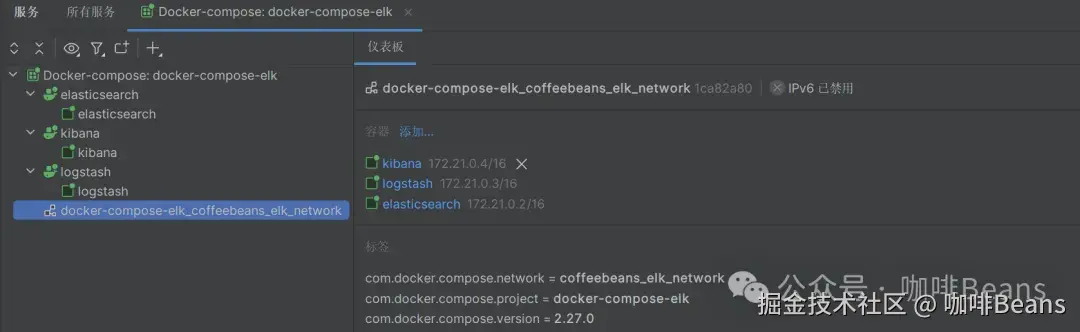
1) 启动docker中的elk服务
我这里logstash通信地址是192.168.233.129:4560
2) 引入依赖
xml
<dependencies>
    <!--我这里sprinboot用的2.7.18 es9.0.3服务调save接口时会有报错 但不影响逻辑生效-->
    <!-- Spring Data Elasticsearch -->
    <dependency>
        <groupId>org.springframework.boot</groupId>
        <artifactId>spring-boot-starter-data-elasticsearch</artifactId>
    </dependency>
    <!-- Elasticsearch Rest High Level Client -->
    <dependency>
        <groupId>org.elasticsearch.client</groupId>
        <artifactId>elasticsearch-rest-high-level-client</artifactId>
    </dependency>
    <!--集成logstash 版本有讲究 不然会报错-->
    <dependency>
        <groupId>ch.qos.logback</groupId>
        <artifactId>logback-classic</artifactId>
        <version>1.2.11</version>
    </dependency>
    <dependency>
        <groupId>net.logstash.logback</groupId>
        <artifactId>logstash-logback-encoder</artifactId>
        <version>6.6</version>
    </dependency>
    <dependency>
        <groupId>org.projectlombok</groupId>
        <artifactId>lombok</artifactId>
    </dependency>
    <dependency>
        <groupId>org.springframework.boot</groupId>
        <artifactId>spring-boot-starter-test</artifactId>
    </dependency>
</dependencies>
3)配置连接ES(据说过时了,写法仅供参考)
kotlin
package org.coffeebeans.config;

import org.apache.http.HttpHost;
import org.apache.http.auth.AuthScope;
import org.apache.http.auth.UsernamePasswordCredentials;
import org.apache.http.client.CredentialsProvider;
import org.apache.http.impl.client.BasicCredentialsProvider;
import org.elasticsearch.client.RestClient;
import org.elasticsearch.client.RestHighLevelClient;
import org.springframework.beans.factory.annotation.Value;
import org.springframework.context.annotation.Bean;
import org.springframework.context.annotation.Configuration;
import org.springframework.data.elasticsearch.core.ElasticsearchOperations;
import org.springframework.data.elasticsearch.core.ElasticsearchRestTemplate;

@Configuration
public class ElasticsearchConfig {

    @Value("${spring.data.elasticsearch.rest.uris}")
    private String elasticsearchUrl;

    @Value("${spring.data.elasticsearch.rest.username}")
    private String username;

    @Value("${spring.data.elasticsearch.rest.password}")
    private String password;

    @Bean
    public RestHighLevelClient restHighLevelClient() {
        final CredentialsProvider credentialsProvider = new BasicCredentialsProvider();
        credentialsProvider.setCredentials(AuthScope.ANY, new UsernamePasswordCredentials(username, password));

        return new RestHighLevelClient(
                RestClient.builder(new HttpHost("192.168.233.129", 9200, "http"))
                        .setHttpClientConfigCallback(httpClientBuilder ->
                                httpClientBuilder.setDefaultCredentialsProvider(credentialsProvider)));
    }

    @Bean
    public ElasticsearchOperations elasticsearchTemplate(RestHighLevelClient client) {
        return new ElasticsearchRestTemplate(client);
    }
}
application.yml
yaml
spring:
  data:
    elasticsearch:
      rest:
        uris: http://192.168.233.129:9200 # Elasticsearch 地址
        username: elastic
        password: your_password
        connection-timeout: 1000 #连接超时
        read-timeout: 3000 #请求超时
      data:
        elasticsearch:
          repositories:
            enabled: true
4)建立实体对象映射ES索引
vbnet
package org.coffeebeans.entity;

import com.fasterxml.jackson.annotation.JsonFormat;
import lombok.Data;
import org.elasticsearch.common.geo.GeoPoint;
import org.springframework.data.annotation.CreatedDate;
import org.springframework.data.annotation.Id;
import org.springframework.data.elasticsearch.annotations.*;
import java.math.BigDecimal;
import java.util.Date;

/**
 * <li>ClassName: Book </li>
 * <li>Author: OakWang </li>
 * 把实体映射成ES的索引
 */
@Data
@Document(indexName = "book")//indexName指定索引名 默认存储库引导时创建索引
public class Book {

    //标记主键字段 对应ES的_id
    @Id
    private Integer id;

    //type指定字段类型;analyzer指定自定义分析器和规范化器,这里使用IK分词器(需要es安装插件)
    //FieldType常用 Text, Keyword, Integer, Long, Double, Date, Boolean, Object, Nested, Ip
    @Field(type = FieldType.Text, analyzer = "ik_max_word")
    private String title;

    @Field(type = FieldType.Keyword)
    private String author;

    @Field(type = FieldType.Text, analyzer = "ik_max_word")
    private String content;

    @Field(type = FieldType.Double)
    private BigDecimal price;

    //标记地理坐标字段(经纬度)
    @GeoPointField
    private GeoPoint location;

    @CreatedDate
    @Field(type = FieldType.Date, format = DateFormat.date_hour_minute_second)// format指定内置日期格式
    @JsonFormat(pattern = "yyyy-MM-dd HH:mm:ss", timezone = "GMT+8")//这里应该确保时间格式和索引里的匹配
    private Date createTime;

    /*
        对应ES的restful写法 使用IK分词器的写法(ES需要提前安装好IK分词器)

        PUT /book
        {
          "settings": {
            "number_of_shards": 2,
            "number_of_replicas": 1,
            "analysis": {
              "analyzer": {
                "ik_max_word": {
                  "type": "custom",
                  "tokenizer": "ik_max_word"
                }
              }
            }
          },
          "mappings": {
            "properties": {
              "title": {
                "type": "text",
                "analyzer": "ik_max_word"
              },
              "author": {
                "type": "keyword"
              },
              "content": {
                "type": "text",
                "analyzer": "ik_max_word"
              },
              "price": {
                "type": "double"
              },
              "location": {
                "type": "geo_point"
              },
              "createTime": {
                "type": "date",
                "format": "yyyy-MM-dd HH:mm:ss||yyyy-MM-dd'T'HH:mm:ss||strict_date_optional_time"
              }
            }
          }
        }
     */


    /*
        使用内置分词器的写法

        PUT /book
        {
          "settings": {
            "number_of_shards": 2,
            "number_of_replicas": 1
          },
          "mappings": {
            "properties": {
              "title":   { "type": "text", "analyzer": "standard" },
              "author":  { "type": "keyword" },
              "content": { "type": "text", "analyzer": "standard" },
              "price":   { "type": "double" },
              "location":{ "type": "geo_point" },
              "createTime": { "type": "date", "format": "yyyy-MM-dd HH:mm:ss||yyyy-MM-dd'T'HH:mm:ss||strict_date_optional_time" }
            }
          }
        }

     */

}
5)定义Repository
kotlin
package org.coffeebeans.mapper;

import org.coffeebeans.entity.Book;
import org.springframework.data.elasticsearch.repository.ElasticsearchRepository;
import org.springframework.stereotype.Repository;

/**
 * <li>ClassName: BookRepository </li>
 * <li>Author: OakWang </li>
 */
@Repository
public interface BookRepository extends ElasticsearchRepository<Book, String> {
    // 自定义查询方法(根据方法名自动生成查询) 这一步没试过
}
6)逻辑类Service
typescript
package org.coffeebeans.service;

import lombok.extern.slf4j.Slf4j;
import org.coffeebeans.entity.Book;
import org.coffeebeans.mapper.BookRepository;
import org.elasticsearch.index.query.QueryBuilders;
import org.elasticsearch.search.builder.SearchSourceBuilder;
import org.elasticsearch.search.fetch.subphase.highlight.HighlightBuilder;
import org.elasticsearch.action.search.SearchRequest;
import org.elasticsearch.action.search.SearchResponse;
import org.elasticsearch.client.RequestOptions;
import org.elasticsearch.client.RestHighLevelClient;
import org.elasticsearch.search.SearchHit;
import org.elasticsearch.search.fetch.subphase.highlight.HighlightField;
import org.springframework.beans.factory.annotation.Autowired;
import org.springframework.stereotype.Service;
import java.io.IOException;
import java.util.ArrayList;
import java.util.List;
import java.util.Map;

/**
 * <li>ClassName: BookService </li>
 * <li>Author: OakWang </li>
 */
@Slf4j
@Service
public class BookService {

    @Autowired
    private RestHighLevelClient restHighLevelClient;

    @Autowired
    private BookRepository bookRepository;

    // 保存
    public Book save(Book book) {
        return bookRepository.save(book);
    }

    // 查询
    public Book findById(String id) {
        return bookRepository.findById(id).orElse(null);
    }

    // 删除
    public void deleteById(String id) {
        bookRepository.deleteById(id);
    }

    // 高亮查询
    public List<Map<String, Object>> searchWithHighlight(String keyword) {
        // 1. 构建查询条件
        SearchSourceBuilder sourceBuilder = new SearchSourceBuilder();
        sourceBuilder.query(QueryBuilders.matchQuery("title", keyword));

        // 2. 配置高亮字段和样式
        HighlightBuilder highlightBuilder = new HighlightBuilder();
        highlightBuilder
                .field("title")  // 指定需要高亮的字段
                .preTags("<span style= 'color:red'>")  // 匹配词前缀标签
                .postTags("</span>");  // 匹配词后缀标签
        sourceBuilder.highlighter(highlightBuilder);

        // 3. 构建搜索请求
        SearchRequest searchRequest = new SearchRequest("book");
        searchRequest.source(sourceBuilder);

        List<Map<String, Object>> results = new ArrayList<>();
        try {
            // 4. 执行查询
            SearchResponse searchResponse= restHighLevelClient.search(searchRequest, RequestOptions.DEFAULT);

            // 5. 处理高亮结果
            for (SearchHit hit : searchResponse.getHits()) {
                Map<String, Object> sourceAsMap = hit.getSourceAsMap(); // 获取结果集
                Map<String, HighlightField> highlightFields = hit.getHighlightFields(); // 获取高亮字段

                // 将高亮字段值替换到原始结果中
                if (highlightFields.containsKey("title")) {
                    HighlightField highlightField = highlightFields.get("title");
                    if (highlightField.getFragments() != null && highlightField.getFragments().length > 0) {
                        sourceAsMap.put("title", highlightField.getFragments()[0].string());
                    }
                }
                results.add(sourceAsMap);
            }
        } catch (IOException e) {
            e.printStackTrace();
            log.error("查询失败:" + e.getMessage());
        }
        return results;
    }
}
7)绑定logstash
定义输出到logstash的日志逻辑logback.xml
xml
<?xml version="1.0" encoding="UTF-8"?>
<configuration>
    <property name="log.path" value="../logs/elasticsearch-use"/>
    <property name="console.log.pattern"
              value="%red(%d{yyyy-MM-dd HH:mm:ss.SSS}) %green([%thread]) %highlight(%-5level) %boldMagenta(%logger{36}%n) - %msg%n"/>
    <property name="log.pattern" value="%d{yyyy-MM-dd HH:mm:ss} [%thread] %-5level %logger{36} - %msg%n"/>

    <!-- logstash推送 -->
    <appender name="LOGSTASH" class="net.logstash.logback.appender.LogstashTcpSocketAppender">
        <destination>192.168.233.129:4560</destination>
        <encoder class="net.logstash.logback.encoder.LogstashEncoder" charset="UTF-8"/>
    </appender>

    <!-- 控制台输出 -->
    <appender name="console" class="ch.qos.logback.core.ConsoleAppender">
        <encoder class="ch.qos.logback.classic.encoder.PatternLayoutEncoder">
            <pattern>${console.log.pattern}</pattern>
            <charset>utf-8</charset>
        </encoder>
    </appender>

    <!-- 系统操作日志 -->
    <root level="info">
        <appender-ref ref="LOGSTASH"/>
        <appender-ref ref="console"/>
    </root>
</configuration>
8)运行测试类,写入日志
vbscript
package org.coffeebeans;

import lombok.extern.slf4j.Slf4j;
import org.coffeebeans.entity.Book;
import org.coffeebeans.service.BookService;
import org.elasticsearch.common.geo.GeoPoint;
import org.junit.jupiter.api.Test;
import org.springframework.beans.factory.annotation.Autowired;
import org.springframework.boot.test.context.SpringBootTest;
import java.math.BigDecimal;
import java.util.Date;

/**
 * <li>ClassName: org.coffeebeans.ESTest </li>
 * <li>Author: OakWang </li>
 */
@Slf4j
@SpringBootTest
public class ESTest {


    @Autowired
    private BookService bookService;

    @Test
    void test1() {
       Book book = new Book();
       book.setId(1);
       book.setAuthor("作者");
       book.setPrice(new BigDecimal("30.00"));
       book.setLocation(new GeoPoint(40.12, -71.34));
       book.setTitle("你是一个牛马");
       book.setContent("赚钱生活学习");
       book.setCreateTime(new Date());
       bookService.save(book); //这里es和服务端版本不兼容会报错Unable to parse response body for Response,但不影响结果
       /*
            类比request:
          PUT /book/_doc/1
          {
            "id": 1,
            "author": "作者",
            "price": 30.00,
            "location": {
             "lat": 40.12,
             "lon": -71.34
            },
            "title": "你是一个牛马",
            "content": "赚钱生活学习",
            "createTime": "2025-07-20 12:30:39"
          }
         */
    }

    @Test
    void test2() {
       log.info("返回结果:" + bookService.findById("1"));
        /*
            返回结果:Book(id=1, title=你是一个牛马, author=作者, content=赚钱生活学习, price=30.0, location=40.12, -71.34, createTime=Mon Jul 20 12:30:39 CST 2025)

            类比request:GET /book/_doc/1
            返回:{"id":1,"title":"你是一个牛马","author":"作者","content":"赚钱生活学习","price":30.0,"location":{"lat":40.12,"lon":-71.34,"geohash":"drjk0xegcw06","fragment":true},"createTime":"2025-07-20 12:30:39"}
         */
    }

    @Test
    void test3() {
       log.info("返回结果:" + bookService.searchWithHighlight("你是一个牛马"));
        /*
            返回结果:[{createTime=2025-07-28T14:09:39, author=作者, price=30.0, location={lon=-71.34, lat=40.12}, _class=org.coffeebeans.entity.Book, id=1, title=<span style= 'color:red'>你</span><span style= 'color:red'>是</span><span style= 'color:red'>一个</span><span style= 'color:red'>牛马</span>, content=赚钱生活学习}]

            类比request:
          GET /book/_search
          {
            "query": {
             "match": {
               "title": {
                "query": "你是一个牛马",
                "analyzer": "ik_max_word"
               }
              }
            },
            "highlight": {
             "pre_tags": ["<span style='color:red'>"],
             "post_tags": ["</span>"],
             "fields": {
               "title": {}
             }
            }
          }
            返回:[{"createTime":"2025-07-20T12:30:39","author":"作者","price":30.0,"location":{"lon":-71.34,"lat":40.12},"_class":"org.coffeebeans.entity.Book","id":1,"title":"<span style= 'color:red'>你</span><span style= 'color:red'>是</span><span style= 'color:red'>一个</span><span style= 'color:red'>牛马</span>","content":"赚钱生活学习"}]
         */
    }

    @Test
    void test4() {
       bookService.deleteById("1"); //这里es和服务端版本不兼容会报错Unable to parse response body for Response,但不影响结果
        /*
            类比request:
            DELETE /book/_doc/1
         */
    }

    @Test
    void test5() {
       log.info("返回结果:来自sprinboot的测试日志");
    }

}
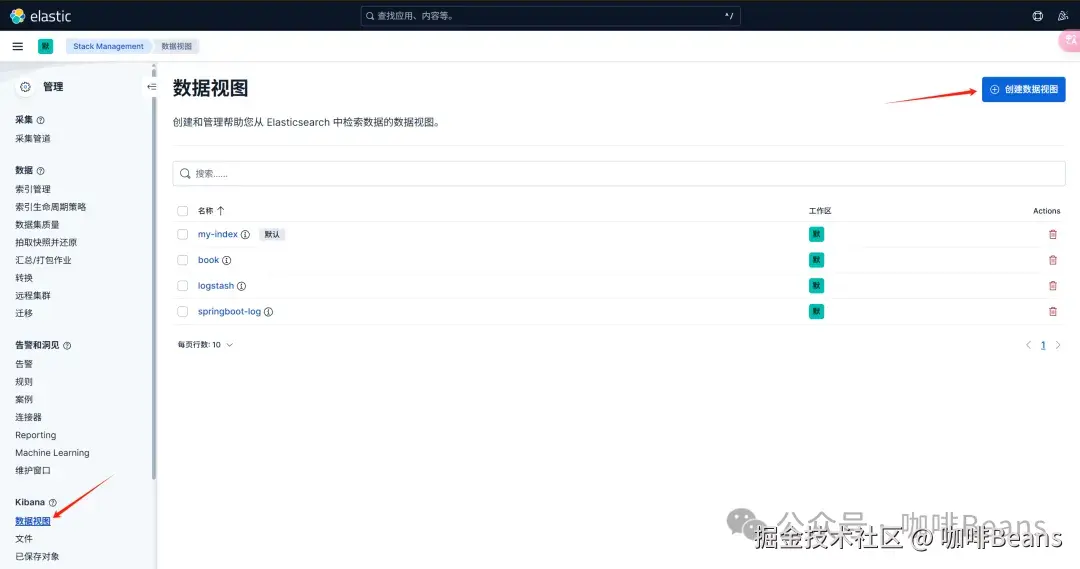
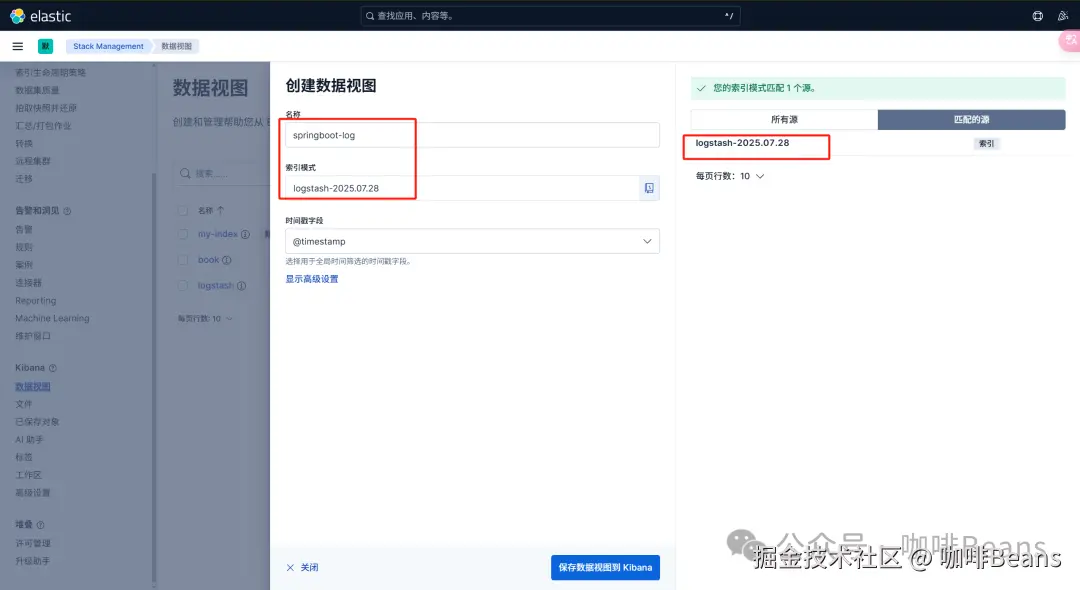
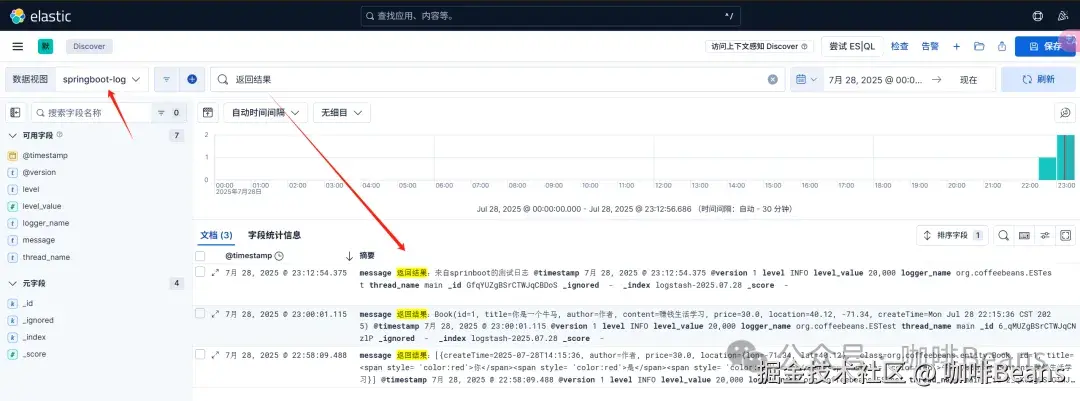
9)kibana新建数据视图管理日志
需确保日志写进来了,索引模式才能匹配到源,进行视图管理。
打开discover进行日志筛选
总结
以上我们了解了如何在Springboot2.7.18中集成ELK,以实现ES的API调用,并能用Logstash收集日志,ES存储日志,Kibana可视化分析日志。常见问题有版本间的兼容性、日志推送的集成写法、端口通信、ES配置等。
关注公众号:咖啡Beans
在这里,我们专注于软件技术的交流与成长,分享开发心得与笔记,涵盖编程、AI、资讯、面试等多个领域。无论是前沿科技的探索,还是实用技巧的总结,我们都致力于为大家呈现有价值的内容。期待与你共同进步,开启技术之旅。