安装
bash
npm install @packy-tang/vue-tinymce下载tinymce源代码,我这里用的是7.7的已经将中文翻译放进去了,我试过8以后要提供key
资源下载地址 https://download.csdn.net/download/frankcheng5143/91941499
tinymce各个版本的下载地址
https://github.com/tinymce/tinymce-dist/tags
tinymce语言包下载地址
https://www.tiny.cloud/get-tiny/language-packages/
将下载的源代码解压到public目录下
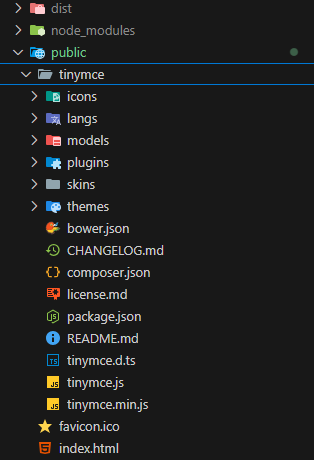
main.js引入tinymce
javascript
// 引入富文本编辑器tinymce
import VueTinymce from "@packy-tang/vue-tinymce";
Vue.use(VueTinymce);
接下来配置tinymce富文本组件
定义组件TinymceEditor
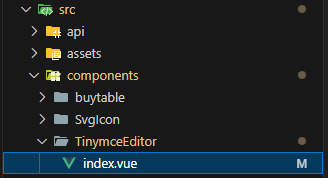
javascript
<template>
  <div class="TinymceEditor" :style="{ 'width': `${width}` }">
    <vue-tinymce v-model="currentValue" :setting="mini ? miniSetting : setting" />
  </div>
</template>

<script>
import { upload } from "@/utils/s3upload";

export default {
  name: 'TinymceEditor',
  props: {
    content: {
      type: String,
      require: true
    },
    inline: {
      type: Boolean,
      default: false
    },
    mini: {
      type: Boolean,
      default: false
    },
    width: {
      type: String,
      default: 'auto'
    },
    placeholder: {
      type: String,
      default: '请输入内容'
    }
  },
  data() {
    return {
      miniSetting: {
        menubar: false,
        height: 100,
        statusbar: false,
        autoresize_bottom_margin: 1,
        placeholder: this.placeholder,
        paste_data_images: false,
        toolbar: ['fontsizeinput bold italic forecolor backcolor | numlist bullist  alignleft aligncenter alignright '],
        plugins: 'lists autoresize',
        language: 'zh_CN'
      },
      setting: {
        placeholder: this.placeholder,
        height: 300,
        menubar: false,
        inline: this.inline,
        paste_data_images: true,
        resize: true,
        elementpath: false,
        highlight_on_focus: true,
        content_style: 'img {max-width:100%;height:auto}',
        promotion: false, // 更新按钮
        toolbar: [
          'undo redo removeformat | bold italic underline strikethrough superscript subscript backcolor forecolor | numlist bullist | blocks | searchreplace fullscreen',
          'fontfamily fontsize fontsizeselect fontsizeinput | alignleft aligncenter alignright alignjustify lineheight outdent indent | link unlink image table | preview print code'
        ],
        plugins: 'lists link anchor code wordcount image table visualchars visualblocks searchreplace preview pagebreak nonbreaking media insertdatetime fullscreen directionality autosave autolink advlist',
        font_size_formats: '10px 12px 14px 16px 18px 20px 22px 24px 26px 28px 36px 42px 48px 72px',
        // 配置工具栏时添加的 fontsizeinput 工具可以展示一个可输入字号的组件,默认单位是pt,现改为px
        font_size_input_default_unit: 'px',
        font_family_formats: "微软雅黑='微软雅黑';宋体='宋体';黑体='黑体';仿宋='仿宋';楷体='楷体';隶书='隶书';幼圆='幼圆';Andale Mono=andale mono,times;Arial=arial,helvetica,sans-serif;Arial Black=arial black,avant garde;Book Antiqua=book antiqua,palatino;Comic Sans MS=comic sans ms,sans-serif;Courier New=courier new,courier;Georgia=georgia,palatino;Helvetica=helvetica;Impact=impact,chicago;Symbol=symbol;Tahoma=tahoma,arial,helvetica,sans-serif;Terminal=terminal,monaco;Times New Roman=times new roman,times;Trebuchet MS=trebuchet ms,geneva;Verdana=verdana,geneva;Webdings=webdings;Wingdings=wingdings",
        images_upload_handler: (blobInfo, progress) => new Promise((resolve, reject) => {
          upload(blobInfo.blob(), ({ loaded, total }) => {
            console.log('上传回调,', loaded, total)
          }).then(result => {
            console.log('上传结果', result)
            resolve(result.url)
          })
        }),
        language: 'zh_CN' // 本地化设置
      },
      currentValue: ''
    }
  },
  watch: {
    content: {
      handler(val) {
        if (val !== this.currentValue) {
          this.currentValue = val === null ? '' : val
        }
      },
      immediate: true
    },
    currentValue(value) {
      this.$emit('change', value)
    }
  }
}
</script>

<style>
.tox-statusbar__branding {
  display: none;
}

.tox-tinymce-aux {
  z-index: 2100 !important;
}
</style>
<style lang="scss" scoped></style>其中import { upload } from "@/utils/s3upload";是我的图片上传
这里面定义了两种模式,精简模式和全部模式
精简模式
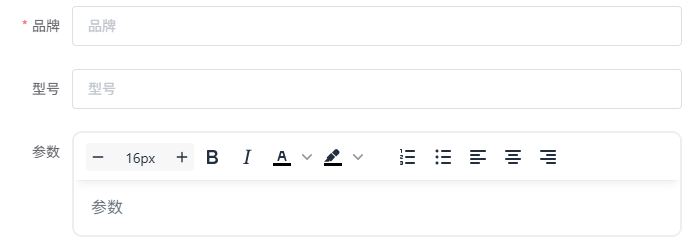
全部模式
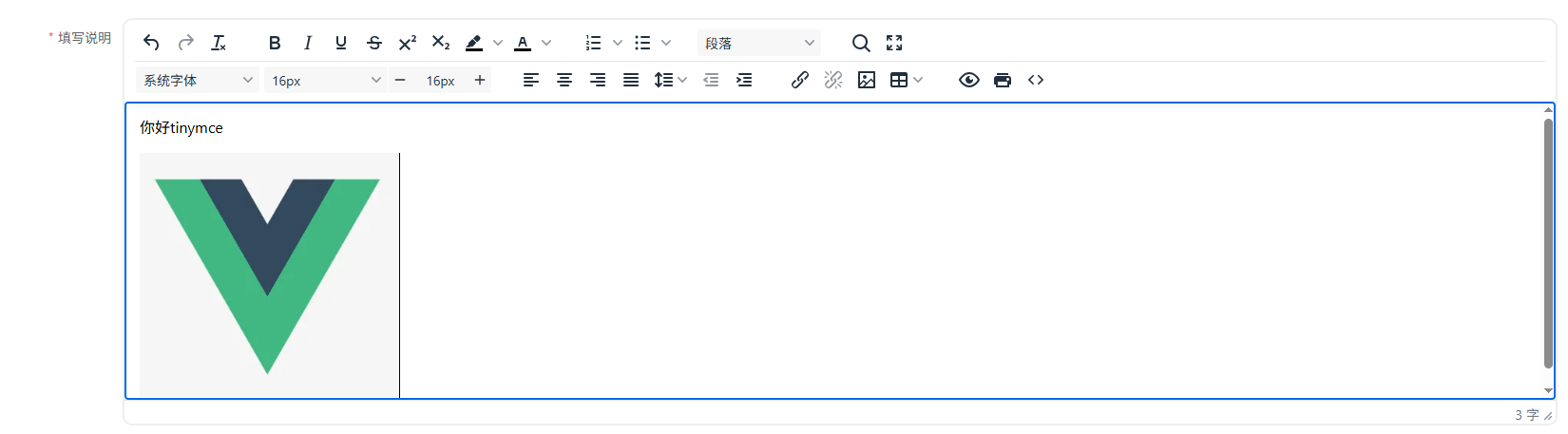
其它页面引用
javascript
<template>
    <div>
			<TinymceEditor :content="ruleForm.description" placeholder="请输入填写说明" @change="handleEditorChange"></TinymceEditor>
    </div>
</template>
<script>
import TinymceEditor from '@/components/TinymceEditor/index.vue'
components: {
    TinymceEditor
},
methods: {
		handleEditorChange(value) {
		    console.log(value)
		},
}
</script>