概述
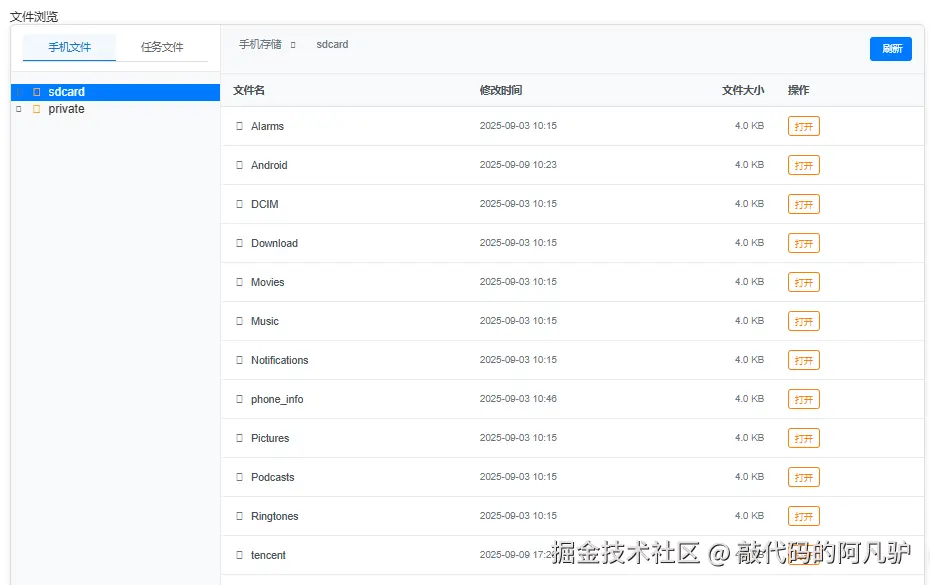
在现代Web应用中,文件管理是一个常见的需求。本文介绍了一个基于Vue.js的双模式文件浏览器组件的设计与实现。该组件支持两种文件模式:手机文件和任务文件,提供了直观的目录树导航、文件列表展示、文件预览和下载等功能。
功能特性
- 双模式文件浏览:支持手机文件(如sdcard和private目录)和任务文件(如aieprivate目录)的切换。
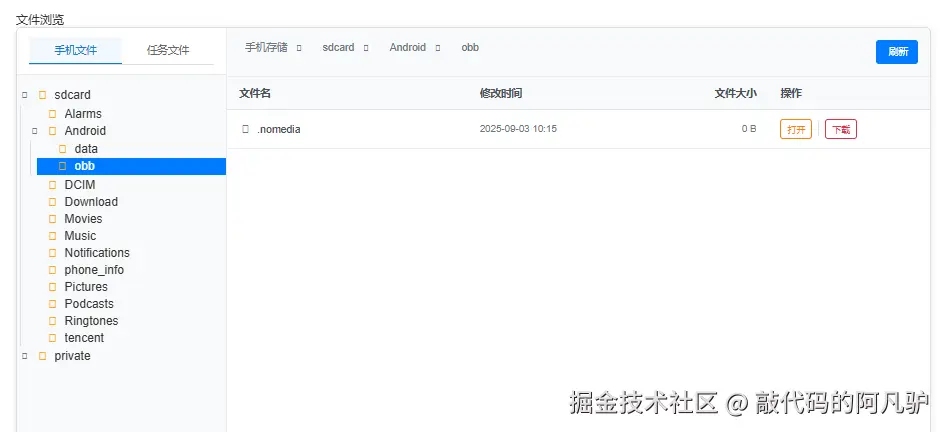
- 目录树导航:左侧面板展示可展开/折叠的目录树,右侧面板展示当前目录下的文件和子目录。
- 面包屑导航:显示当前路径,并允许用户快速跳转到上级目录。
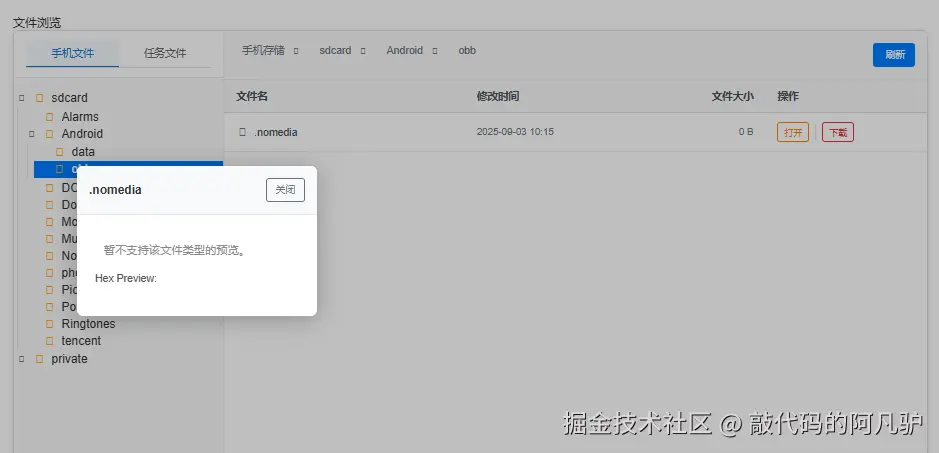
- 文件操作:支持打开目录、预览文件(文本、JSON、JS等)和下载文件。
- 状态管理:使用Vuex管理全局状态(如任务ID和令牌),组件内部管理UI状态(如当前路径、展开的节点等)。
- 响应式设计:适配不同屏幕尺寸,提供良好的用户体验。
实现效果
技术实现
组件结构
该文件浏览器由三个主要组件构成:
- FileBrowsing:主组件,负责处理核心逻辑和API通信。
- DirectoryTree:目录树组件,负责展示目录结构。
- TreeNode:树节点组件,负责单个节点的渲染和交互。
状态管理
组件内部使用Vue的data属性来管理状态,包括:
currentFileType:当前文件类型('phone'或'task')。currentPath:当前浏览的路径。expandedNodes:已展开的节点路径数组(之前使用Set,现改为Array)。filePreview:文件预览的相关状态。
同时,使用Vuex的mapGetters来获取全局状态,如任务ID和令牌。
API通信
组件通过RESTful API与后端交互,主要接口包括:
- 目录列表:获取指定路径下的目录列表。
- 文件列表:获取指定路径下的文件列表。
- 文件下载:下载指定文件。
- 文件打开:打开并预览文件。
API请求使用fetch函数发送,并处理响应结果。请求参数包括任务ID、令牌、执行类型和远程路径。
文件预览
文件预览功能根据文件类型提供不同的展示方式:
- 文本文件(txt、log、js、json等):直接显示内容,其中JSON文件会尝试格式化。
- 二进制文件:显示十六进制预览。
- 不支持的文件类型:显示提示信息。
预览内容通过模态框展示,用户可以通过点击关闭按钮或背景来关闭预览。
目录树操作
目录树支持展开、折叠和选择节点等操作。展开节点时会加载子目录,选择节点时会更新当前路径并加载该路径下的文件和子目录。
样式设计
组件使用Flex布局实现左右面板结构,左侧面板宽度固定,右侧面板自适应。使用CSS样式美化界面,包括按钮、表格、滚动条等。
FileBrowsing主组件:
xml
<template>
    <div class="file-browsing">
        <h4>文件浏览</h4>
        <div class="file-browser-container">
            <!-- Left Panel: Directory Tree -->
            <div class="left-panel">
                <div class="tree-header">
                    <div class="file-type-tabs">
                        <button class="tab-btn" :class="{ active: currentFileType === 'phone' }"
                            @click="switchToPhoneFiles">手机文件</button>
                        <button class="tab-btn" :class="{ active: currentFileType === 'task' }"
                            @click="switchToTaskFiles">任务文件</button>
                    </div>
                </div>
                <div class="tree-container">
                    <DirectoryTree :items="treeItems" :selected-path="currentPath" :expanded-nodes="expandedNodes"
                        @select="onNodeSelect" @expand="onNodeExpand" @collapse="onNodeCollapse" />
                </div>
            </div>

            <!-- Right Panel: File List -->
            <div class="right-panel">
                <div class="file-browser-header">
                    <div class="breadcrumb">
                        <span v-for="(segment, index) in pathSegments" :key="index" class="breadcrumb-item">
                            {{ segment.name }}
                            <i v-if="index < pathSegments.length - 1" class="fas fa-chevron-right"></i>
                        </span>
                    </div>
                    <button class="btn btn-primary" @click="refreshFileList">
                        <i class="fas fa-sync-alt"></i> 刷新
                    </button>
                </div>

                <div class="file-list-container">
                    <table class="file-table">
                        <thead>
                            <tr>
                                <th class="col-name">文件名</th>
                                <th class="col-modified">修改时间</th>
                                <th class="col-size">文件大小</th>
                                <th class="col-actions">操作</th>
                            </tr>
                        </thead>
                        <tbody>
                            <tr v-for="item in currentItems" :key="item.path" class="file-row">
                                <td class="file-name">
                                    <i :class="getFileIcon(item)" class="file-icon"></i>
                                    <span>{{ item.name }}</span>
                                </td>
                                <td class="file-modified">{{ formatDate(item.modified) }}</td>
                                <td class="file-size">{{ formatFileSize(item.size) }}</td>
                                <td class="file-actions">
                                    <button class="btn btn-sm btn-orange" @click="onOpen(item)">
                                        打开
                                    </button>
                                    <template v-if="item.type === 'file'">
                                        <span class="action-separator"></span>
                                        <button class="btn btn-sm btn-red" @click="onDownload(item)">
                                            下载
                                        </button>
                                    </template>
                                </td>
                            </tr>
                        </tbody>
                    </table>
                </div>
            </div>
        </div>
        <div v-if="isLoading" class="loading-overlay">
            <div class="spinner"></div>
            <div class="loading-text">{{ loadingText }}</div>
        </div>
        <div v-if="filePreview.visible" class="file-preview-overlay">
            <div class="file-preview-modal">
                <div class="file-preview-header">
                    <span>{{ filePreview.fileName }}</span>
                    <button class="btn btn-outline" @click="filePreview.visible = false">关闭</button>
                </div>
                <div class="file-preview-body" v-html="filePreview.html"></div>
            </div>
            <div class="file-preview-backdrop" @click="filePreview.visible = false"></div>
        </div>
    </div>
</template>
js
<script>
import DirectoryTree from './DirectoryTree.vue'
import { mapGetters } from "vuex";
export default {
name: 'FileBrowsing',
components: { DirectoryTree },
props: {
// taskId: {
// type: String,
// default: ''
// },
// taskToken: {
// type: String,
// default: ''
// }
},
data() {
return {
// 加载状态
isLoading: false,
loadingText: '加载中,请稍候...',
// 手机文件数据
phoneFilesData: [
{ name: 'sdcard', path: '/sdcard', type: 'directory', children: null, loaded: false },
{ name: 'private', path: '/private', type: 'directory', children: null, loaded: false }
],
// 任务文件数据
taskFilesData: [
{ name: 'private', path: '/aieprivate', type: 'directory', children: null, loaded: false }
],
currentFileType: 'phone', // 'phone' 或 'task'
currentPath: '/',
treeItems: [],
// 关键修改:将expandedNodes从Set改为Array
expandedNodes: ['/'],
// Overlay state for file preview
filePreview: {
visible: false,
fileName: '',
extension: '',
content: '',
html: ''
},
// 保存每种文件类型的状态
fileTypeStates: {
phone: {
currentPath: '/sdcard',
expandedNodes: [] // 改为数组
},
task: {
currentPath: '/aieprivate',
expandedNodes: [] // 改为数组
}
},
inputData: -1,
}
},
computed: {
...mapGetters("sandbox", {
// taskId: "taskId",
token: "token",
apkInfoId: "apkInfoId"
}),
pathSegments() {
const segments = this.currentPath.split('/').filter(segment => segment)
// 根据当前文件类型显示不同的根目录名称
const isPhoneDir = this.currentFileType === 'phone'
const rootName = isPhoneDir ? '手机存储' : '任务存储'
const result = [{ name: rootName, path: '/' }]
let path = '/'
segments.forEach(segment => {
path += segment + '/'
// 只有当完整路径是'/aieprivate'时才替换为'private'
const displayName = (!isPhoneDir && segment === 'aieprivate') ? 'private' : segment
result.push({ name: displayName, path })
})
return result
},
currentItems() {
const findNodeByPath = (nodes, path) => {
for (const node of nodes) {
if (node.path === path) return node
if (node.children) {
const found = findNodeByPath(node.children, path)
if (found) return found
}
}
return null
}
const node = findNodeByPath(this.treeItems, this.currentPath)
return node && node.children ? node.children : []
}
},
async created() {
if (process.env.NODE_ENV === 'development') {
// 开发环境默认值
this.inputData = 500;
} else if (process.env.NODE_ENV === 'production') {
// 生产环境接口调用
try {
const res = await fetch('/init_data')
if (!res.ok) {
throw new Error(`server error: ${res.status}`)
}
this.inputData = await res.json()
} catch (error) {
console.error('init-data error:', error)
}
}
this.treeItems = this.phoneFilesData
},
methods: {
getTimestamp() {
return BigInt(Date.now()) & 0x7fffffffffffffffn
},
/**
* Add all parent paths of a given path to the expandedNodes set.
* e.g. /a/b/c => /a, /a/b, /a/b/c
*/
expandAllParentPaths(path, expandedArray) {
const segments = path.split('/').filter(Boolean)
let current = ''
for (const segment of segments) {
current += '/' + segment
// 检查路径是否已存在,不存在则添加
if (!expandedArray.includes(current)) {
expandedArray.push(current)
}
}
},
/**
* 辅助函数:将子节点映射为名称+类型的键值对
*/
mapByNameType(children) {
const map = new Map()
for (const child of children || []) {
map.set(child.name + ':' + child.type, child)
}
return map
},
sendRequest({ cmdAct, execType, rmtPath }) {
return new Promise(async (resolve, reject) => {
// Get taskId from props
const taskId = this.apkInfoId || ''
if (!taskId) {
this.$message.warning('任务ID不存在!')
return reject(new Error('task_id is notfound'))
}
// Build query string
const url = `${cmdAct}` +
`?req_id=${this.getTimestamp()}` +
`&task_id=${this.apkInfoId}` +
`&token=${this.token}` +
`&exec_type=${execType}` +
`&rmt_path=${rmtPath}`
try {
const res = await fetch(url, { method: 'GET' })
if (!res.ok) throw new Error(`请求失败: ${res.status}`)
const data = await res.json()
resolve(data)
} catch (err) {
console.error('File browsing request failed:', err)
reject(err)
}
})
},
/**
* 处理后端API返回的目录列表响应
*/
processDirListResponse(browsing, node) {
// 处理手机文件目录(1)和任务文件目录(6)的响应
if (browsing.exec_type !== 1 && browsing.exec_type !== 6) return
// 根据当前文件类型确定使用哪个数据源
const isPhoneFile = browsing.exec_type === 1
const targetData = isPhoneFile ? this.phoneFilesData : this.taskFilesData
// 在目标数据源中查找对应节点
const targetNode = this.findNodeByPath(targetData, node.path) || node
const separator = node.path.endsWith('/') ? '' : '/'
const oldMap = this.mapByNameType((targetNode.children || []).filter(child => child.type === 'directory'))
const fileChildren = (targetNode.children || []).filter(child => child.type !== 'directory')
const newDirs = []
for (const dir of browsing.dir_list) {
const key = dir + ':directory'
let child = oldMap.get(key)
if (!child) {
child = { name: dir, path: node.path + separator + dir, type: 'directory', children: null }
}
newDirs.push(child)
oldMap.delete(key)
}
// 更新目标节点的子节点
targetNode.children = [...newDirs, ...fileChildren]
// 如果目标节点不是当前节点,则同步更新
if (targetNode !== node) {
node.children = targetNode.children
}
},
/**
* 处理后端API返回的文件列表响应
*/
processFileListResponse(browsing, node, basePath) {
// 处理手机文件列表(2)和任务文件列表(7)的响应
if (browsing.exec_type !== 2 && browsing.exec_type !== 7) return
// 根据当前文件类型确定使用哪个数据源
const isPhoneFile = browsing.exec_type === 2
const targetData = isPhoneFile ? this.phoneFilesData : this.taskFilesData
// 在目标数据源中查找对应节点
const targetNode = this.findNodeByPath(targetData, basePath) || node
const separator = basePath.endsWith('/') ? '' : '/'
const oldMap = this.mapByNameType(targetNode.children)
const newChildren = []
for (const file of browsing.file_list) {
const type = file.file_type === 2 ? 'directory' : file.file_type === 1 ? 'file' : 'unknown'
const key = file.name + ':' + type
let child = oldMap.get(key)
if (child) {
child.size = file.size
child.modified = file.modified
} else {
child = {
name: file.name,
path: basePath + separator + file.name,
type,
size: file.size,
modified: file.modified,
children: type === 'directory' ? null : undefined
}
}
newChildren.push(child)
oldMap.delete(key)
}
// 更新目标节点的子节点
targetNode.children = newChildren
// 如果目标节点不是当前节点,则同步更新
if (targetNode !== node) {
node.children = targetNode.children
}
},
processFileDownloadResponse(browsingFile, item) {
// 处理手机文件下载(4)和任务文件下载(9)的响应
if (browsingFile.exec_type === 4 || browsingFile.exec_type === 9) {
const bytes = new Uint8Array(browsingFile.file_content)
const blob = new Blob([bytes], { type: 'application/octet-stream' })
const url = URL.createObjectURL(blob)
const a = document.createElement('a')
a.href = url
a.download = browsingFile.file_name || item.name
document.body.appendChild(a)
a.click()
document.body.removeChild(a)
URL.revokeObjectURL(url)
}
},
processFileOpenResponse(browsingFile) {
// 处理手机文件打开(5)和任务文件打开(10)的响应
if (browsingFile.exec_type === 5 || browsingFile.exec_type === 10) {
const fileName = browsingFile.file_name || ''
const fileContentRaw = new Uint8Array(browsingFile.file_content) || new Uint8Array()
const extension = fileName.split('.').pop() && fileName.split('.').pop().toLowerCase()
// Helper: show hex preview for binary
const toHexPreview = (bytes, maxLen = 256) => {
let hex = Array.from(bytes.slice(0, maxLen)).map(b => b.toString(16).padStart(2, '0')).join(' ')
if (bytes.length > maxLen) hex += ' ...'
return hex
}
const escapeHtml = (str) => {
return String(str)
.replace(/&/g, '&')
.replace(/</g, '<')
.replace(/>/g, '>')
.replace(/"/g, '"')
.replace(/'/g, ''')
}
const previewHandler = (ext, fileContentRaw) => {
const decodeUtf8 = (bytes) => new TextDecoder('utf-8').decode(bytes)
switch (ext) {
case 'txt':
case 'log':
case 'js':
case 'json': {
const fileContent = decodeUtf8(fileContentRaw)
let displayContent = fileContent
let bg = '#fff'
let color = '#000'
if (ext === 'js' || ext === 'log') {
bg = '#222'
color = '#eee'
} else if (ext === 'json') {
bg = '#f6f8fa'
try {
displayContent = JSON.stringify(JSON.parse(fileContent), null, 2)
} catch {
displayContent = fileContent
}
}
return `
<div class="file-content-viewer">
<pre style="white-space: pre-wrap; word-break: break-all; padding: 12px; background:${bg}; color:${color};">${escapeHtml(displayContent)}</pre>
</div>
`
}
case 'dex':
return `
<div class="file-content-viewer">
<div style="color: #888; padding: 12px;">DEX 文件预览功能即将支持 (WASM)...</div>
</div>
`
default: {
const hex = toHexPreview(fileContentRaw)
return `
<div class="file-content-viewer">
<div style="color: #888; padding: 12px;">暂不支持该文件类型的预览。</div>
<div style="margin-top:8px; font-size:14px; color:#555;">Hex Preview:
<pre style="background:#f6f8fa;">${hex}</pre>
</div>
</div>
`
}
}
}
const html = previewHandler(extension, fileContentRaw)
this.filePreview = {
visible: true,
fileName,
extension,
content: '', // not used in UI
html
}
}
},
onNodeExpand(node) {
// 使用数组版本的展开方法
this.expandAllParentPaths(node.path, this.expandedNodes)
const execType = this.currentFileType === 'phone' ? 1 : 6
this.handleApiResponse(
this.sendRequest({ cmdAct: '/browsing', execType, rmtPath: node.path }),
resp => this.processDirListResponse(resp, node),
'Node expand failed'
)
},
onNodeCollapse(node) {
const index = this.expandedNodes.indexOf(node.path)
if (index !== -1) {
this.expandedNodes.splice(index, 1)
}
},
onNodeSelect(node) {
this.currentPath = node.path
// 根据当前文件类型选择正确的execType
const execType = this.currentFileType === 'phone' ? 2 : 7
this.handleApiResponse(
this.sendRequest({ cmdAct: '/browsing', execType, rmtPath: node.path }),
resp => this.processFileListResponse(resp, node, node.path),
'Node select failed'
)
},
onOpen(item) {
if (item.type === 'directory') {
this.currentPath = item.path
this.expandAllParentPaths(item.path, this.expandedNodes)
// 根据当前文件类型选择正确的execType
const execType = this.currentFileType === 'phone' ? 2 : 7
this.handleApiResponse(
this.sendRequest({ cmdAct: '/browsing', execType, rmtPath: item.path }),
resp => this.processFileListResponse(resp, item, item.path),
'Open dir failed'
)
} else {
const maxOpenSize = (this.inputData && this.inputData.max_open_size) || 10
if (item.size && item.size > maxOpenSize * 1024 * 1024) {
this.$message.warning(`文件大小 ${this.formatFileSize(item.size)} 已超过打开限制 ${maxOpenSize} MB`)
return
}
// 根据当前文件类型选择正确的execType
const execType = this.currentFileType === 'phone' ? 5 : 10
// 设置延迟加载定时器
let loadingTimer = setTimeout(() => {
this.isLoading = true
this.loadingText = '打开文件中,请稍候...'
}, 500)
this.handleApiResponse(
this.sendRequest({ cmdAct: '/browsing_file', execType, rmtPath: item.path }),
resp => {
clearTimeout(loadingTimer)
this.processFileOpenResponse(resp)
this.isLoading = false
},
'Open file failed'
).finally(() => {
clearTimeout(loadingTimer)
if (this.isLoading) this.isLoading = false
})
}
},
onDownload(item) {
// Check file size before making the request
const maxDownloadSize = (this.inputData && this.inputData.max_download_size) || 500
if (item.size && item.size > maxDownloadSize * 1024 * 1024) {
this.$message.warning(`文件大小 ${this.formatFileSize(item.size)} 已超过下载限制 ${maxDownloadSize} MB`)
return
}
// 根据当前文件类型选择正确的execType
const execType = this.currentFileType === 'phone' ? 4 : 9
// 设置延迟加载定时器
let loadingTimer = setTimeout(() => {
this.isLoading = true
this.loadingText = '下载文件中,请稍候...'
}, 500)
this.handleApiResponse(
this.sendRequest({ cmdAct: '/browsing_file', execType, rmtPath: item.path }),
resp => {
clearTimeout(loadingTimer)
this.processFileDownloadResponse(resp, item)
this.isLoading = false
},
'File download failed'
).finally(() => {
clearTimeout(loadingTimer)
if (this.isLoading) this.isLoading = false
})
},
refreshFileList() {
const currentNode = this.findNodeByPath(this.treeItems, this.currentPath)
if (currentNode) {
// 根据当前文件类型选择正确的execType
const execType = this.currentFileType === 'phone' ? 2 : 7
this.handleApiResponse(
this.sendRequest({ cmdAct: '/browsing', execType, rmtPath: this.currentPath }),
resp => this.processFileListResponse(resp, currentNode, this.currentPath),
'Refresh file list failed'
)
}
},
getFileIcon(item) {
if (item.type === 'directory') return 'fas fa-folder'
const extension = item.name.split('.').pop() && item.name.split('.').pop().toLowerCase()
const iconMap = {
'txt': 'fas fa-file-alt',
'json': 'fas fa-file-code',
'js': 'fas fa-file-code',
'html': 'fas fa-file-code',
'css': 'fas fa-file-code',
'png': 'fas fa-file-image',
'jpg': 'fas fa-file-image',
'jpeg': 'fas fa-file-image',
'pdf': 'fas fa-file-pdf',
'zip': 'fas fa-file-archive',
'rar': 'fas fa-file-archive'
}
return iconMap[extension] || 'fas fa-file'
},
formatFileSize(size) {
if (size === null || size === undefined) return '-'
if (size < 1024) return size + ' B'
if (size < 1024 * 1024) return (size / 1024).toFixed(1) + ' KB'
if (size < 1024 * 1024 * 1024) return (size / (1024 * 1024)).toFixed(1) + ' MB'
return (size / (1024 * 1024 * 1024)).toFixed(1) + ' GB'
},
formatDate(date) {
if (!date) return '-'
return date
},
async handleApiResponse(promise, processor, errorMessage = '操作失败') {
try {
let response = await promise
const browsing = response
if (!browsing) {
this.$message.error('响应格式错误')
return false
}
if (!browsing.result) {
console.error(errorMessage + ':', browsing.err_msg || browsing.errMsg)
this.$message.warning(browsing.err_msg || browsing.errMsg || errorMessage)
return false
}
if (processor) {
processor(browsing)
}
return true
} catch (error) {
console.error(errorMessage + ':', error)
this.$message.error(errorMessage)
return false
}
},
switchFileType(targetType) {
if (this.currentFileType !== targetType) {
const sourceType = this.currentFileType
// 保存当前文件类型的状态(数组复制)
this.fileTypeStates[sourceType].currentPath = this.currentPath
// 复制数组而不是Set
this.fileTypeStates[sourceType].expandedNodes = [...this.expandedNodes]
// 切换到目标文件类型
this.currentFileType = targetType
this.treeItems = targetType === 'phone' ? this.phoneFilesData : this.taskFilesData
// 恢复目标文件类型的状态
this.currentPath = this.fileTypeStates[targetType].currentPath
// 复制数组而不是Set
this.expandedNodes = [...this.fileTypeStates[targetType].expandedNodes]
// 重新加载当前路径的内容
const currentNode = this.findNodeByPath(this.treeItems, this.currentPath)
if (currentNode) {
const execType = targetType === 'phone' ? 2 : 7
this.handleApiResponse(
this.sendRequest({ cmdAct: '/browsing', execType, rmtPath: this.currentPath }),
resp => this.processFileListResponse(resp, currentNode, this.currentPath),
`Switch to ${targetType} files failed`
)
}
}
},
switchToPhoneFiles() {
this.switchFileType('phone')
},
switchToTaskFiles() {
this.switchFileType('task')
},
// 辅助函数:在树中查找指定路径的节点
findNodeByPath(nodes, path) {
if (!nodes) return null
for (const node of nodes) {
if (node.path === path) return node
if (node.children) {
const found = this.findNodeByPath(node.children, path)
if (found) return found
}
}
return null
}
}
}
</script>
css
<style scoped>
.file-browsing {
    padding: 20px;
    height: 100%;
    width: 100%;
}

.file-type-tabs {
    display: flex;
    width: 100%;
    border-bottom: 1px solid #e0e0e0;
}

.tab-btn {
    flex: 1;
    padding: 8px 12px;
    background: none;
    border: none;
    cursor: pointer;
    font-size: 14px;
    font-weight: 500;
    color: #666;
    transition: all 0.3s ease;
}

.tab-btn:hover {
    background-color: #f5f5f5;
}

.tab-btn.active {
    color: #1976d2;
    border-bottom: 2px solid #1976d2;
    background-color: rgba(25, 118, 210, 0.05);
}

.file-browser-container {
    display: flex;
    height: 1000px;
    border: 1px solid #ddd;
    background: #fff;
    border-radius: 8px;
    overflow: hidden;
    box-shadow: 0 2px 8px rgba(0, 0, 0, 0.1);
}

/* Left Panel Styles */
.left-panel {
    width: 280px;
    min-width: 280px;
    flex-shrink: 0;
    background: #f8f9fa;
    border-right: 1px solid #e9ecef;
    display: flex;
    flex-direction: column;
    overflow-x: auto;
    /* allow horizontal scroll if needed */
}

.tree-header {
    display: flex;
    justify-content: space-between;
    align-items: center;
    padding: 12px 16px;
    border-bottom: 1px solid #e9ecef;
    background: #fff;
}

.tree-header h5 {
    margin: 0;
    font-size: 14px;
    font-weight: 600;
    color: #495057;
}

.tree-container {
    flex: 1;
    overflow-y: auto;
    overflow-x: auto;
    /* allow horizontal scroll if needed */
    padding: 8px 0;
}

/* Right Panel Styles */
.right-panel {
    flex: 1;
    min-width: 0;
    display: flex;
    flex-direction: column;
    background: #fff;
}

.file-browser-header {
    display: flex;
    justify-content: space-between;
    padding: 16px;
    border-bottom: 1px solid #e9ecef;
    background: #f8f9fa;
    box-sizing: border-box;
    overflow: auto;
}

.breadcrumb {
    align-items: center;
    white-space: nowrap;
    padding-right: 70px;
}

.breadcrumb-item {
    align-items: center;
    padding: 4px 8px;
    color: #6c757d;
    font-size: 14px;
}

.breadcrumb-item i {
    margin: 0 8px;
    font-size: 10px;
    color: #6c757d;
}

.file-list-container {
    flex: 1;
    box-sizing: border-box;
    overflow: auto;
}

.file-table {
    min-width: max-content;
    /* Allow table to be wider than container */
    width: 100%;
    border-collapse: collapse;
    font-size: 14px;
}

.file-table th {
    background: #f8f9fa;
    padding: 12px 16px;
    text-align: left;
    font-weight: 600;
    color: #495057;
    border-bottom: 2px solid #dee2e6;
    position: sticky;
    top: 0;
    z-index: 10;
}

.file-table th.col-name {
    min-width: 200px;
    /* Minimum width for filename column */
}

.file-table th.col-modified {
    min-width: 150px;
    /* Minimum width for modified date */
    flex-shrink: 0;
    /* Prevent shrinking */
}

.file-table th.col-size {
    text-align: right !important;
    min-width: 100px;
    /* Minimum width for file size */
    flex-shrink: 0;
    /* Prevent shrinking */
}

.file-table th.col-actions {
    min-width: 120px;
    /* Minimum width for action buttons */
    flex-shrink: 0;
    /* Prevent shrinking */
}

.file-table td {
    padding: 12px 16px;
    /* border-bottom: 1px solid #e9ecef; */
    vertical-align: middle;
}

.file-row:hover {
    background-color: #f8f9fa;
}
.file-row {
    border-bottom: 1px solid #e9ecef;
    /* height: 50px; */
}

.file-name {
    display: flex;
    align-items: center;
}

.file-icon {
    margin-right: 8px;
    width: 16px;
    text-align: center;
    color: #6c757d;
}

.file-name span {
    color: #495057;
}

.file-modified {
    color: #6c757d;
    font-size: 13px;
}

.file-size {
    color: #6c757d;
    font-size: 13px;
    text-align: right !important;
}

.file-actions {
    display: flex;
    align-items: center;
    gap: 8px;
}

.action-separator {
    width: 1px;
    height: 20px;
    background: #dee2e6;
}

/* Button Styles */
.btn {
    padding: 6px 12px;
    border: 1px solid transparent;
    border-radius: 4px;
    font-size: 13px;
    cursor: pointer;
    transition: all 0.2s;
    text-decoration: none;
    display: inline-flex;
    align-items: center;
    gap: 4px;
    white-space: nowrap;
}

.btn-sm {
    padding: 4px 8px;
    font-size: 12px;
}

.btn-primary {
    background: #007bff;
    color: white;
    border-color: #007bff;
}

.btn-primary:hover {
    background: #0056b3;
    border-color: #0056b3;
}

.btn-outline {
    background: transparent;
    color: #6c757d;
    border-color: #6c757d;
}

.btn-outline:hover {
    background: #6c757d;
    color: white;
}

.btn-orange {
    background: #fff;
    color: #fd7e14;
    border-color: #fd7e14;
}

.btn-orange:hover {
    background: #fd7e14;
    color: white;
}

.btn-red {
    background: #fff;
    color: #dc3545;
    border-color: #dc3545;
}

.btn-red:hover {
    background: #dc3545;
    color: white;
}

/* Scrollbar Styles */
.tree-container::-webkit-scrollbar,
.file-browser-header::-webkit-scrollbar,
.file-list-container::-webkit-scrollbar {
    width: 6px;
    height: 6px;
}

.tree-container::-webkit-scrollbar-track,
.file-browser-header::-webkit-scrollbar-track,
.file-list-container::-webkit-scrollbar-track {
    background: #f1f1f1;
}

.tree-container::-webkit-scrollbar-thumb,
.file-browser-header::-webkit-scrollbar-thumb,
.file-list-container::-webkit-scrollbar-thumb {
    background: #c1c1c1;
    border-radius: 3px;
}

.tree-container::-webkit-scrollbar-thumb:hover,
.file-browser-header::-webkit-scrollbar-thumb:hover,
.file-list-container::-webkit-scrollbar-thumb:hover {
    background: #a8a8a8;
}

.file-preview-overlay {
    position: fixed;
    top: 0;
    left: 0;
    width: 100vw;
    height: 100vh;
    display: flex;
    align-items: center;
    justify-content: center;
    z-index: 2000;
}

/* Loading Overlay Styles */
.loading-overlay {
    position: fixed;
    top: 0;
    left: 0;
    width: 100vw;
    height: 100vh;
    display: flex;
    flex-direction: column;
    align-items: center;
    justify-content: center;
    background: rgba(255, 255, 255, 0.8);
    z-index: 3000;
}

.spinner {
    border: 4px solid rgba(0, 0, 0, 0.1);
    width: 36px;
    height: 36px;
    border-radius: 50%;
    border-left-color: #09f;
    animation: spin 1s linear infinite;
    margin-bottom: 16px;
}

@keyframes spin {
    0% {
        transform: rotate(0deg);
    }

    100% {
        transform: rotate(360deg);
    }
}

.loading-text {
    font-size: 16px;
    color: #333;
    font-weight: 500;
}

.file-preview-modal {
    background: #fff;
    border-radius: 8px;
    box-shadow: 0 4px 32px rgba(0, 0, 0, 0.25);
    max-width: 80vw;
    max-height: 80vh;
    min-width: 320px;
    min-height: 200px;
    overflow: auto;
    position: relative;
    z-index: 2001;
    display: flex;
    flex-direction: column;
}

.file-preview-header {
    display: flex;
    justify-content: space-between;
    align-items: center;
    padding: 16px;
    border-bottom: 1px solid #e9ecef;
    background: #f8f9fa;
    font-weight: 600;
    font-size: 16px;
}

.file-preview-body {
    padding: 24px;
    overflow: auto;
    font-size: 15px;
}

.file-preview-backdrop {
    position: fixed;
    top: 0;
    left: 0;
    width: 100vw;
    height: 100vh;
    background: rgba(0, 0, 0, 0.25);
    z-index: 2000;
}
</style>
DirectoryTree目录树组件:
xml
<template>
  <div class="directory-tree">
    <TreeNode v-for="item in items" :key="item.path" :node="item" :selected-path="selectedPath"
      :expanded-nodes="expandedNodes" @expand="$emit('expand', $event)" @collapse="$emit('collapse', $event)"
      @select="$emit('select', $event)" />
  </div>
</template>
js
<script>
import TreeNode from './TreeNode.vue'

export default {
   name: 'DirectoryTree',
  components: {
    TreeNode
  },
  props: {
    items: { type: Array, default: () => [] },
    selectedPath: { type: String, default: '/' },
    expandedNodes: {
      type: Array,  // 改为 Array 类型
      required: true,
      default: () => []  // 添加默认值
    }
  }
}
</script>
css
<style scoped>
.directory-tree {
  padding: 8px 0;
  overflow-y: auto;
}
</style>
TreeNode树节点组件:
xml
<template>
  <div class="tree-node" :class="{ selected: isSelected }">
    <div class="tree-node-content" @click="selectNode">
      <span class="tree-arrow" @click.stop="toggleNode">
        <i v-if="hasChildren" :class="isExpanded ? 'fas fa-caret-down' : 'fas fa-caret-right'" class="arrow-icon"></i>
        <span v-else class="arrow-placeholder"></span>
      </span>
      <i class="fas fa-folder tree-icon"></i>
      <span class="tree-label">{{ node.name }}</span>
    </div>
    <div v-if="hasChildren && isExpanded" class="tree-children">
      <TreeNode v-for="child in filteredChildren" :key="child.path"
        :node="child" :selected-path="selectedPath" :expanded-nodes="expandedNodes" @expand="$emit('expand', $event)"
        @collapse="$emit('collapse', $event)" @select="$emit('select', $event)" />
    </div>
  </div>
</template>
js
<script>
export default {
  name: 'TreeNode',
  props: {
    node: { type: Object, required: true },
    selectedPath: { type: String, default: '/' },
    expandedNodes: { type: Array, required: true },
  },
  computed: {
    isExpanded() {
      return this.expandedNodes.includes(this.node.path);
    },
    isSelected() {
      return this.selectedPath === this.node.path;
    },
    hasChildren() {
      return this.node.children && this.node.children.some(child => child.type === 'directory');
    },
    filteredChildren() {
      return this.node.children.filter(child => child.type === 'directory');
    }
  },
  methods: {
    toggleNode() {
      if (this.isExpanded) {
        this.$emit('collapse', this.node);
      } else {
        this.$emit('expand', this.node);
      }
    },
    selectNode() {
      this.$emit('select', this.node);
    }
  }
}
</script>
css
<style scoped>
.tree-node {
  cursor: pointer;
}

.tree-node-content {
  display: flex;
  align-items: center;
  padding: 2px 4px 2px 4px;
  transition: background-color 0.2s;
  min-width: 200px;
}

.tree-node-content:hover {
  background-color: #e9ecef;
}

.tree-node.selected>.tree-node-content {
  background-color: #007bff;
  color: white;
}

.tree-arrow {
  display: inline-flex;
  align-items: center;
  justify-content: center;
  width: 4px;
  min-width: 4px;
  margin-right: 14px;
  margin-left: 4px;
  font-size: 12px;
  color: #6c757d;
}

.arrow-icon {
  font-size: 12px;
  color: #6c757d;
  transition: transform 0.2s ease;
}

.arrow-placeholder {
  display: inline-block;
  width: 12px;
  height: 12px;
}

.tree-icon {
  margin-right: 8px;
  width: 16px;
  text-align: center;
  color: #ffa726;
}

.tree-label {
  flex: 1;
  white-space: nowrap;
  overflow: hidden;
  text-overflow: ellipsis;
}

.tree-children {
  margin-left: 4px;
  margin-top: 2px;
  margin-bottom: 2px;
  padding-left: 8px;
  border-left: 1px solid #e0e0e0;
}

.directory-tree {
  font-size: 12px;
}
</style>