该 HTML 文件是一个沉浸式中文歌词滚动播放器的前端实现,融合了现代 UI 设计(玻璃拟物、渐变光影)与交互逻辑(自动滚动、点击跳转、进度同步),模拟音乐播放时的歌词展示场景,视觉层次感与用户体验俱佳。
大家复制代码时,可能会因格式转换出现错乱,导致样式失效。建议先少量复制代码进行测试,若未能解决问题,私信回复源码两字,我会发送完整的压缩包给你。
演示效果
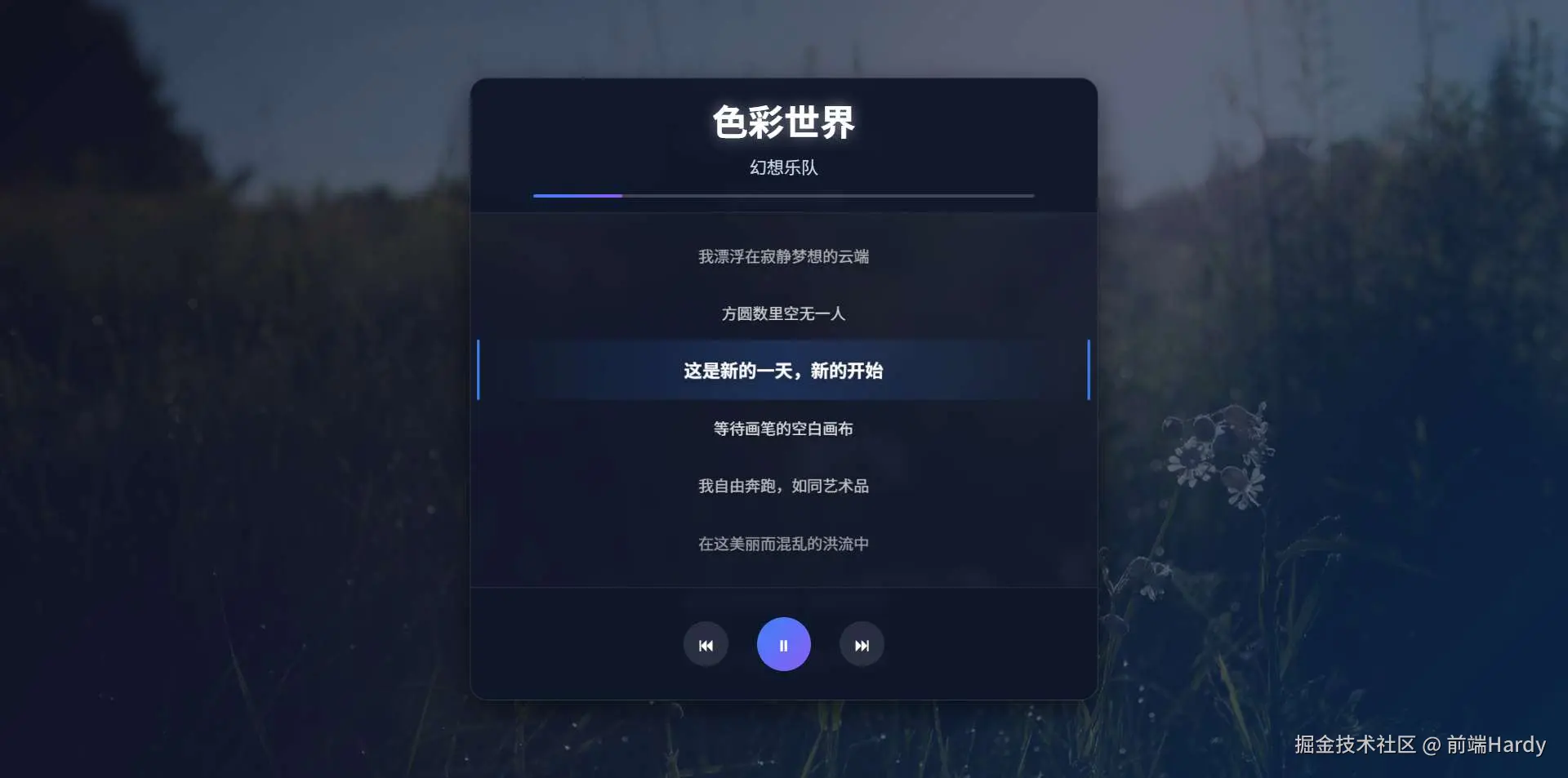

HTML&CSS
html
<!DOCTYPE html>
<html lang="zh-CN">

<head>
    <meta charset="UTF-8">
    <meta name="viewport" content="width=device-width, initial-scale=1.0">
    <title>中文歌词滚动效果</title>
    <script src="https://cdn.tailwindcss.com"></script>
    <link href="https://fonts.googleapis.com/css2?family=Noto+Sans+SC:wght@400;500;700&display=swap" rel="stylesheet">
    <style>
        body {
            font-family: 'Noto Sans SC', sans-serif;
            color: #ffffff;
            overflow: hidden;
            height: 100vh;
            display: flex;
            justify-content: center;
            align-items: center;
            background: linear-gradient(135deg, #1a1a2e 0%, #16213e 50%, #0f3460 100%);
            position: relative;
        }

        body::before {
            content: '';
            position: absolute;
            top: 0;
            left: 0;
            width: 100%;
            height: 100%;
            background-image: url('https://picsum.photos/id/33/1920/1080');
            background-size: cover;
            background-position: center;
            opacity: 0.3;
            z-index: -1;
        }

        .lyric-container {
            position: relative;
            width: 90%;
            max-width: 700px;
            height: 80vh;
            overflow-y: scroll;
            scrollbar-width: none;
            -ms-overflow-style: none;
            background: rgba(15, 23, 42, 0.7);
            backdrop-filter: blur(10px);
            border-radius: 20px;
            box-shadow: 0 10px 30px rgba(0, 0, 0, 0.5);
            border: 1px solid rgba(255, 255, 255, 0.1);
        }

        .lyric-container::-webkit-scrollbar {
            display: none;
        }

        .lyric-line {
            text-align: center;
            font-size: 1.2rem;
            line-height: 3rem;
            transition: all 0.3s ease-out;
            will-change: opacity, transform;
            padding: 0.5rem 1rem;
            white-space: nowrap;
            opacity: 0.4;
            transform: scale(0.9);
            font-weight: 400;
            text-shadow: 0 2px 10px rgba(0, 0, 0, 0.3);
        }

        .lyric-line.active {
            opacity: 1;
            transform: scale(1.05);
            font-weight: 700;
            color: #ffffff;
            background: linear-gradient(90deg, transparent, rgba(59, 130, 246, 0.2), transparent);
            border-left: 3px solid #3b82f6;
            border-right: 3px solid #3b82f6;
        }

        .header {
            text-align: center;
            padding: 1rem 0 1rem;
            position: sticky;
            top: 0;
            background: rgba(15, 23, 42, 0.9);
            backdrop-filter: blur(10px);
            z-index: 10;
            border-bottom: 1px solid rgba(255, 255, 255, 0.1);
        }

        .song-title {
            font-size: 2.5rem;
            font-weight: 700;
            margin-bottom: 0.5rem;
            color: #ffffff;
            text-shadow: 0 0 15px rgba(255, 255, 255, 0.5);
        }

        .song-artist {
            font-size: 1.2rem;
            color: #cbd5e1;
            margin-bottom: 1rem;
        }

        .progress-bar {
            width: 80%;
            height: 4px;
            background: rgba(255, 255, 255, 0.2);
            border-radius: 2px;
            margin: 0 auto;
            overflow: hidden;
        }

        .progress {
            height: 100%;
            width: 30%;
            background: linear-gradient(90deg, #3b82f6, #8b5cf6);
            border-radius: 2px;
            transition: width 0.3s ease;
        }

        .footer {
            text-align: center;
            padding: 1rem 0 2rem;
            position: sticky;
            bottom: 0;
            background: rgba(15, 23, 42, 0.9);
            backdrop-filter: blur(10px);
            z-index: 10;
            border-top: 1px solid rgba(255, 255, 255, 0.1);
        }

        .controls {
            display: flex;
            justify-content: center;
            align-items: center;
            gap: 2rem;
            margin-top: 1rem;
        }

        .control-btn {
            background: rgba(255, 255, 255, 0.1);
            border: none;
            border-radius: 50%;
            width: 50px;
            height: 50px;
            display: flex;
            align-items: center;
            justify-content: center;
            cursor: pointer;
            transition: all 0.3s ease;
            color: white;
            font-size: 1.2rem;
        }

        .control-btn:hover {
            background: rgba(255, 255, 255, 0.2);
            transform: scale(1.1);
        }

        .play-btn {
            background: linear-gradient(135deg, #3b82f6, #8b5cf6);
            width: 60px;
            height: 60px;
        }

        .play-btn:hover {
            background: linear-gradient(135deg, #2563eb, #7c3aed);
        }

        @media (max-width: 768px) {
            .lyric-container {
                width: 95%;
                height: 85vh;
            }

            .lyric-line {
                font-size: 1rem;
                line-height: 2.8rem;
            }

            .song-title {
                font-size: 2rem;
            }
        }
    </style>
</head>

<body>
    <div class="lyric-container">
        <div class="header">
            <div class="song-title">色彩世界</div>
            <div class="song-artist">幻想乐队</div>
            <div class="progress-bar">
                <div class="progress"></div>
            </div>
        </div>

        <div class="p-6">
            <div class="lyric-line">如今我眼中的世界色彩斑斓</div>
            <div class="lyric-line">天空呈现出从未见过的色调</div>
            <div class="lyric-line">城市灯火被染成金黄与绯红</div>
            <div class="lyric-line">每条街道都像是不同的家园</div>
            <div class="lyric-line">噢,这种感觉如同一曲交响乐</div>
            <div class="lyric-line">光与声的和谐旋律</div>
            <div class="lyric-line">我漂浮在寂静梦想的云端</div>
            <div class="lyric-line">方圆数里空无一人</div>
            <div class="lyric-line">这是新的一天,新的开始</div>
            <div class="lyric-line">等待画笔的空白画布</div>
            <div class="lyric-line">我自由奔跑,如同艺术品</div>
            <div class="lyric-line">在这美丽而混乱的洪流中</div>
            <div class="lyric-line">让我们找到节奏,稳定的节拍</div>
            <div class="lyric-line">引导我们穿越错综复杂的道路</div>
            <div class="lyric-line">让这些时刻变得苦乐参半</div>
            <div class="lyric-line">成为我们短暂日子里最美好的时光</div>
            <div class="lyric-line">如今我眼中的世界色彩斑斓</div>
            <div class="lyric-line">天空呈现出从未见过的色调</div>
            <div class="lyric-line">城市灯火被染成金黄与绯红</div>
            <div class="lyric-line">每条街道都像是不同的家园</div>
            <div class="lyric-line">噢,这种感觉如同一曲交响乐</div>
            <div class="lyric-line">光与声的和谐旋律</div>
            <div class="lyric-line">我漂浮在寂静梦想的云端</div>
            <div class="lyric-line">方圆数里空无一人</div>
            <div class="lyric-line">这是新的一天,新的开始</div>
            <div class="lyric-line">等待画笔的空白画布</div>
            <div class="lyric-line">我自由奔跑,如同艺术品</div>
            <div class="lyric-line">在这美丽而混乱的洪流中</div>
            <div class="lyric-line">让我们找到节奏,稳定的节拍</div>
            <div class="lyric-line">引导我们穿越错综复杂的道路</div>
            <div class="lyric-line">让这些时刻变得苦乐参半</div>
            <div class="lyric-line">成为我们短暂日子里最美好的时光</div>
            <div class="lyric-line">如今我眼中的世界色彩斑斓</div>
            <div class="lyric-line">天空呈现出从未见过的色调</div>
            <div class="lyric-line">城市灯火被染成金黄与绯红</div>
            <div class="lyric-line">每条街道都像是不同的家园</div>
            <div class="lyric-line">噢,这种感觉如同一曲交响乐</div>
            <div class="lyric-line">光与声的和谐旋律</div>
            <div class="lyric-line">我漂浮在寂静梦想的云端</div>
            <div class="lyric-line">方圆数里空无一人</div>
        </div>

        <div class="footer">
            <div class="controls">
                <button class="control-btn">⏮</button>
                <button class="control-btn play-btn">▶</button>
                <button class="control-btn">⏭</button>
            </div>
        </div>
    </div>

    <script>
        document.addEventListener('DOMContentLoaded', () => {
            const lyricContainer = document.querySelector('.lyric-container');
            const lyricLines = document.querySelectorAll('.lyric-line');
            const progressBar = document.querySelector('.progress');
            const playBtn = document.querySelector('.play-btn');

            let isPlaying = false;
            let scrollInterval;
            let currentActiveIndex = -1;

            // 初始触发一次滚动事件
            window.addEventListener('load', () => {
                lyricContainer.dispatchEvent(new Event('scroll'));
            });

            lyricContainer.addEventListener('scroll', () => {
                const containerTop = lyricContainer.scrollTop;
                const containerHeight = lyricContainer.clientHeight;
                const containerCenter = containerTop + containerHeight / 2;

                // 更新进度条
                const scrollPercentage = (containerTop / (lyricContainer.scrollHeight - containerHeight)) * 100;
                progressBar.style.width = `${scrollPercentage}%`;

                let closestIndex = -1;
                let minDistance = Infinity;

                // 找到距离中心最近的歌词行
                lyricLines.forEach((line, index) => {
                    const lineTop = line.offsetTop;
                    const lineHeight = line.clientHeight;
                    const lineCenter = lineTop + lineHeight / 2;
                    const distance = Math.abs(containerCenter - lineCenter);

                    if (distance < minDistance) {
                        minDistance = distance;
                        closestIndex = index;
                    }
                });

                // 如果找到的最近行与当前高亮行不同,则更新高亮
                if (closestIndex !== currentActiveIndex && closestIndex !== -1) {
                    // 移除所有行的active类
                    lyricLines.forEach(line => {
                        line.classList.remove('active');
                    });

                    // 为最近的行添加active类
                    lyricLines[closestIndex].classList.add('active');
                    currentActiveIndex = closestIndex;
                }

                // 设置所有行的透明度(除了高亮行)
                lyricLines.forEach((line, index) => {
                    const lineTop = line.offsetTop;
                    const lineHeight = line.clientHeight;
                    const lineCenter = lineTop + lineHeight / 2;
                    const distance = Math.abs(containerCenter - lineCenter);
                    const maxDistance = containerHeight * 0.6;

                    // 计算不透明度,距离中心越远,不透明度越低
                    let opacity = 1 - (distance / maxDistance);
                    opacity = Math.max(0.2, Math.min(1, opacity));

                    // 如果不是高亮行,设置透明度
                    if (index !== currentActiveIndex) {
                        line.style.opacity = opacity;
                    } else {
                        line.style.opacity = 1;
                    }
                });
            });

            // 自动滚动功能
            playBtn.addEventListener('click', () => {
                isPlaying = !isPlaying;

                if (isPlaying) {
                    playBtn.innerHTML = '⏸';
                    // 开始自动滚动
                    scrollInterval = setInterval(() => {
                        lyricContainer.scrollTop += 1;

                        // 如果滚动到底部,回到顶部
                        if (lyricContainer.scrollTop >= lyricContainer.scrollHeight - lyricContainer.clientHeight) {
                            lyricContainer.scrollTop = 0;
                        }
                    }, 50);
                } else {
                    playBtn.innerHTML = '▶';
                    clearInterval(scrollInterval);
                }
            });

            // 添加点击歌词跳转功能
            lyricLines.forEach(line => {
                line.addEventListener('click', () => {
                    const lineTop = line.offsetTop;
                    const containerHeight = lyricContainer.clientHeight;
                    const targetScroll = lineTop - containerHeight / 2 + line.clientHeight / 2;

                    lyricContainer.scrollTo({
                        top: targetScroll,
                        behavior: 'smooth'
                    });
                });
            });
        });
    </script>
</body>

</html>
HTML
- lyric-container:播放器主容器,包裹所有子模块,提供滚动区域,是页面核心交互载体
- header:头部模块:包含歌曲标题、歌手名、播放进度条,采用 sticky: top 固定在顶部,滚动时不消失
- song-title song-artist:分别显示歌曲名(色彩世界)与歌手名(幻想乐队),承担信息展示功能
- progress-bar progress:播放进度条:外层为背景条,内层为进度填充条,进度随歌词滚动同步更新
- lyric-line:单个歌词行容器,每个元素对应一句中文歌词,是动态高亮效果的核心载体
- footer:底部控制模块:包含播放 / 切歌按钮,采用 sticky: bottom 固定在底部,方便用户操作
- controls:控制按钮容器,用 flex 布局横向排列按钮,确保对齐美观
- control-btn:控制按钮:左 / 右按钮为切歌(⏮/⏭),中间为播放 / 暂停(▶/⏸),play-btn 类单独强化样式
CSS
- .lyric-container 播放器主容器:宽度 90%(最大 700px)、高度 80vh,适配不同屏幕;玻璃拟物风格(background: rgba(15,23,42,0.7)+backdrop-filter: blur(10px))、圆角 20px、阴影(0 10px 30px rgba(0,0,0,0.5))、半透明边框(1px solid rgba(255,255,255,0.1));启用垂直滚动(overflow-y: scroll),隐藏滚动条(多浏览器兼容:scrollbar-width: none/::-webkit-scrollbar)。
- .header/.footer 头部与底部模块:sticky 固定(头部 top:0、底部 bottom:0),滚动时保持可见; 视觉:同播放器主容器的玻璃拟物风格,底部添加 1px 半透明边框(border-top/bottom: 1px solid rgba(255,255,255,0.1)),分隔区域; 内边距:padding: 1rem 0,确保内容不拥挤。
- .song-title/.song-artist 歌曲信息样式:标题:字体 2.5rem、700 字重、白色,添加文字阴影(0 0 15px rgba(255,255,255,0.5)),增强视觉突出度;歌手名:字体 1.2rem、浅灰色(#cbd5e1),作为标题的辅助信息,视觉上更柔和。
- .progress-bar/.progress 进度条样式:背景条:宽度 80%、高度 4px、浅灰背景(rgba(255,255,255,0.2))、圆角 2px;进度条:渐变填充(linear-gradient(90deg, #3b82f6, #8b5cf6)),进度随滚动动态更新,transition: width 0.3s ease 确保过渡平滑。
- .control-btn/.play-btn 控制按钮样式:普通按钮:圆形(border-radius: 50%)、50×50px 尺寸、半透明背景(rgba(255,255,255,0.1))、白色图标,hover 时背景加深(rgba(255,255,255,0.2))+ 缩放(scale(1.1));播放按钮:单独放大(60×60px),渐变背景(linear-gradient(135deg, #3b82f6, #8b5cf6)),hover 时渐变加深,视觉上突出核心操作。
- .lyric-line 歌词行基础样式:布局:文字居中、不换行(white-space: nowrap)、内边距 0.5rem 1rem、行高 3rem,确保歌词间距舒适;视觉:默认半透明(opacity: 0.4)、缩小(scale(0.9))、400 字重,文字阴影(0 2px 10px rgba(0,0,0,0.3))增强可读性;动画:transition: all 0.3s ease-out,确保高亮 / 透明度变化平滑。
- .lyric-line.active 歌词高亮样式(当前聚焦行):视觉强化:不透明度 1、放大(scale(1.05))、700 字重、白色文字; 装饰效果:中间渐变背景(linear-gradient(90deg, transparent, rgba(59,130,246,0.2), transparent))、左右 3px 蓝色边框(#3b82f6),明确标识当前歌词。
JavaScript
- 初始化与变量定义
js
document.addEventListener('DOMContentLoaded', () => {
    // 获取核心元素引用
    const lyricContainer = document.querySelector('.lyric-container');
    const lyricLines = document.querySelectorAll('.lyric-line');
    const progressBar = document.querySelector('.progress');
    const playBtn = document.querySelector('.play-btn');

    // 状态变量:播放状态(默认暂停)、滚动定时器、当前高亮歌词索引
    let isPlaying = false;
    let scrollInterval;
    let currentActiveIndex = -1;

    // 页面加载完成后触发一次滚动事件,确保初始状态正确(如默认高亮第一句歌词)
    window.addEventListener('load', () => {
        lyricContainer.dispatchEvent(new Event('scroll'));
    });
});- 歌词滚动与高亮逻辑(核心交互)
监听歌词容器的 scroll 事件,实时计算歌词位置并更新样式:
js
lyricContainer.addEventListener('scroll', () => {
    // 1. 计算容器中心点位置
    const containerTop = lyricContainer.scrollTop; // 容器已滚动高度
    const containerHeight = lyricContainer.clientHeight; // 容器可视高度
    const containerCenter = containerTop + containerHeight / 2; // 容器垂直中心点

    // 2. 同步进度条:根据滚动高度计算进度百分比
    const scrollPercentage = (containerTop / (lyricContainer.scrollHeight - containerHeight)) * 100;
    progressBar.style.width = `${scrollPercentage}%`;

    // 3. 找到距离容器中心最近的歌词行(确定当前应高亮的歌词)
    let closestIndex = -1;
    let minDistance = Infinity; // 初始设为无限大,确保能找到最小距离
    lyricLines.forEach((line, index) => {
        const lineTop = line.offsetTop; // 歌词行距离容器顶部高度
        const lineHeight = line.clientHeight; // 歌词行高度
        const lineCenter = lineTop + lineHeight / 2; // 歌词行垂直中心点
        const distance = Math.abs(containerCenter - lineCenter); // 与容器中心的距离

        // 更新最小距离与对应索引
        if (distance < minDistance) {
            minDistance = distance;
            closestIndex = index;
        }
    });

    // 4. 更新歌词高亮状态:仅高亮最近的歌词行
    if (closestIndex !== currentActiveIndex && closestIndex !== -1) {
        // 移除所有歌词的active类
        lyricLines.forEach(line => line.classList.remove('active'));
        // 为最近的歌词添加active类
        lyricLines[closestIndex].classList.add('active');
        currentActiveIndex = closestIndex; // 更新当前高亮索引
    }

    // 5. 调整非高亮歌词的透明度:距离中心越远,透明度越低
    lyricLines.forEach((line, index) => {
        if (index === currentActiveIndex) return; // 跳过高亮行

        const lineTop = line.offsetTop;
        const lineHeight = line.clientHeight;
        const lineCenter = lineTop + lineHeight / 2;
        const distance = Math.abs(containerCenter - lineCenter);
        const maxDistance = containerHeight * 0.6; // 最大影响距离(容器高度60%)

        // 计算透明度:1 - (距离/最大距离),范围限制在0.2~1之间
        let opacity = 1 - (distance / maxDistance);
        opacity = Math.max(0.2, Math.min(1, opacity));
        line.style.opacity = opacity; // 应用透明度
    });
});- 自动滚动功能(播放 / 暂停控制)
监听播放按钮的 click 事件,切换播放状态并控制歌词自动滚动:
js
playBtn.addEventListener('click', () => {
    isPlaying = !isPlaying; // 切换播放状态

    if (isPlaying) {
        // 播放状态:更新按钮图标为暂停(⏸),启动自动滚动定时器
        playBtn.innerHTML = '⏸';
        scrollInterval = setInterval(() => {
            lyricContainer.scrollTop += 1; // 每次滚动1px,速度平缓

            // 滚动到底部时重置到顶部(循环播放)
            if (lyricContainer.scrollTop >= lyricContainer.scrollHeight - lyricContainer.clientHeight) {
                lyricContainer.scrollTop = 0;
            }
        }, 50); // 每50ms滚动一次,确保滚动流畅
    } else {
        // 暂停状态:更新按钮图标为播放(▶),清除滚动定时器
        playBtn.innerHTML = '▶';
        clearInterval(scrollInterval);
    }
});- 歌词点击跳转功能
点击任意歌词行,平滑滚动到该歌词并高亮,提升用户主动交互体验:
js
lyricLines.forEach(line => {
    line.addEventListener('click', () => {
        // 计算目标滚动位置:让点击的歌词行居中显示
        const lineTop = line.offsetTop; // 歌词行距离容器顶部高度
        const containerHeight = lyricContainer.clientHeight; // 容器可视高度
        const targetScroll = lineTop - containerHeight / 2 + line.clientHeight / 2;

        // 平滑滚动到目标位置
        lyricContainer.scrollTo({
            top: targetScroll,
            behavior: 'smooth'
        });
    });
});各位互联网搭子,要是这篇文章成功引起了你的注意,别犹豫,关注、点赞、评论、分享走一波,让我们把这份默契延续下去,一起在知识的海洋里乘风破浪!