Maven POM 文件完整详解
一、项目坐标和元数据配置
1.1 完整的项目坐标配置
<modelVersion>标签:POM模型版本号,固定4.0.0- GAVP
<groupId>标签:公司域名倒写+部门。<artifactId>标签:项目名称<version>标签:项目版本号<packaging>标签:打包类型,war、jar还是pom文件
xml
<project xmlns="http://maven.apache.org/POM/4.0.0"
         xmlns:xsi="http://www.w3.org/2001/XMLSchema-instance"
         xsi:schemaLocation="http://maven.apache.org/POM/4.0.0
         http://maven.apache.org/xsd/maven-4.0.0.xsd">

    <!-- POM 模型版本,固定为 4.0.0 -->
    <modelVersion>4.0.0</modelVersion>

    <!-- 项目坐标 GAV -->
    <groupId>com.company.department.project</groupId>
    <artifactId>project-module</artifactId>
    <version>1.0.0-SNAPSHOT</version>

    <!-- 打包类型 -->
    <packaging>jar</packaging>

    <!-- 继承配置:存在parent标签,说明该pom文件是子项目 -->
    <parent>
        <groupId>com.company</groupId>
        <artifactId>parent-project</artifactId>
        <version>1.0.0</version>
        <relativePath>../parent/pom.xml</relativePath>
    </parent>
</project>- 项目名称和描述
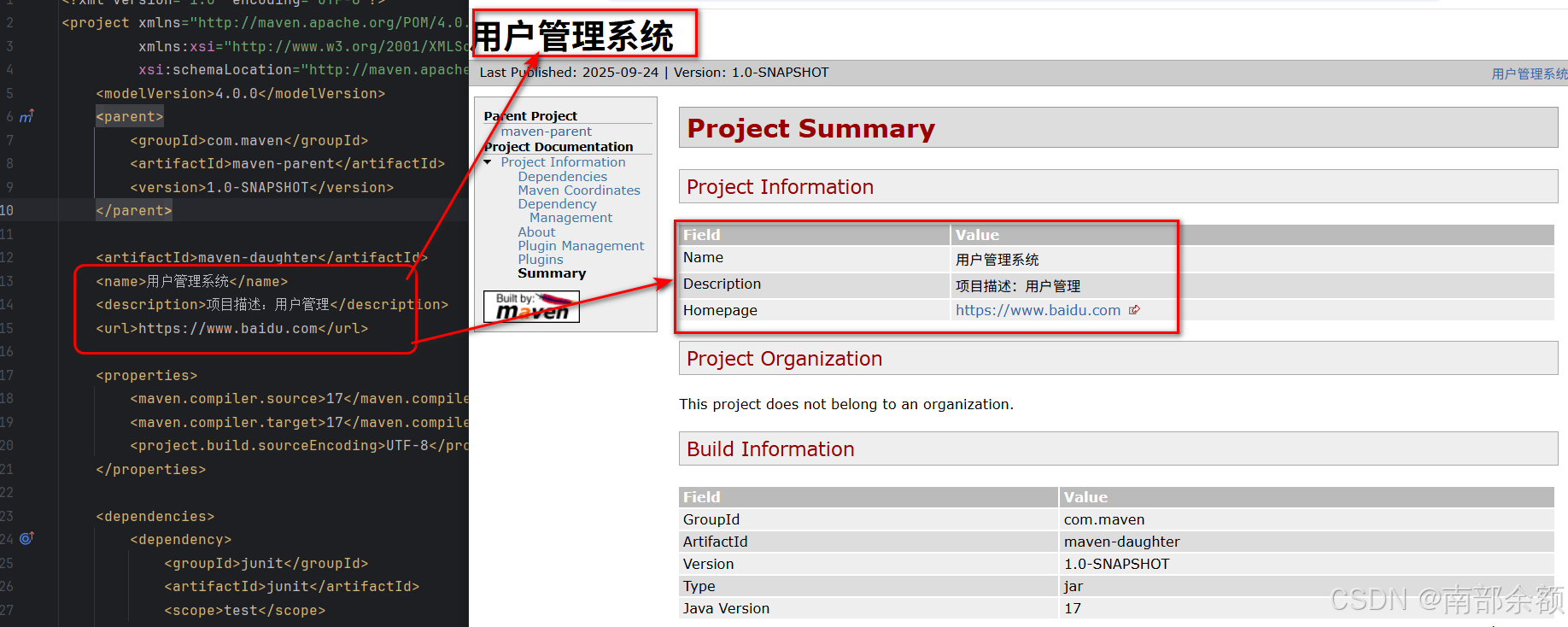
<name>标签:项目提供一个描述性的名称,比<artifactId>更友好,并且在IDEA的工具栏MAVEN中,会显示修改后的名字。并且使用site命令生成文档时,也会展示修改后的名字。<description>标签:项目描述信息<url>标签:用于指定项目的首页 URL
xml
 <!-- 项目名称和描述 -->
    <name>用户管理系统</name>
    <description>项目详细描述信息</description>
    <url>http://www.example.com/project</url>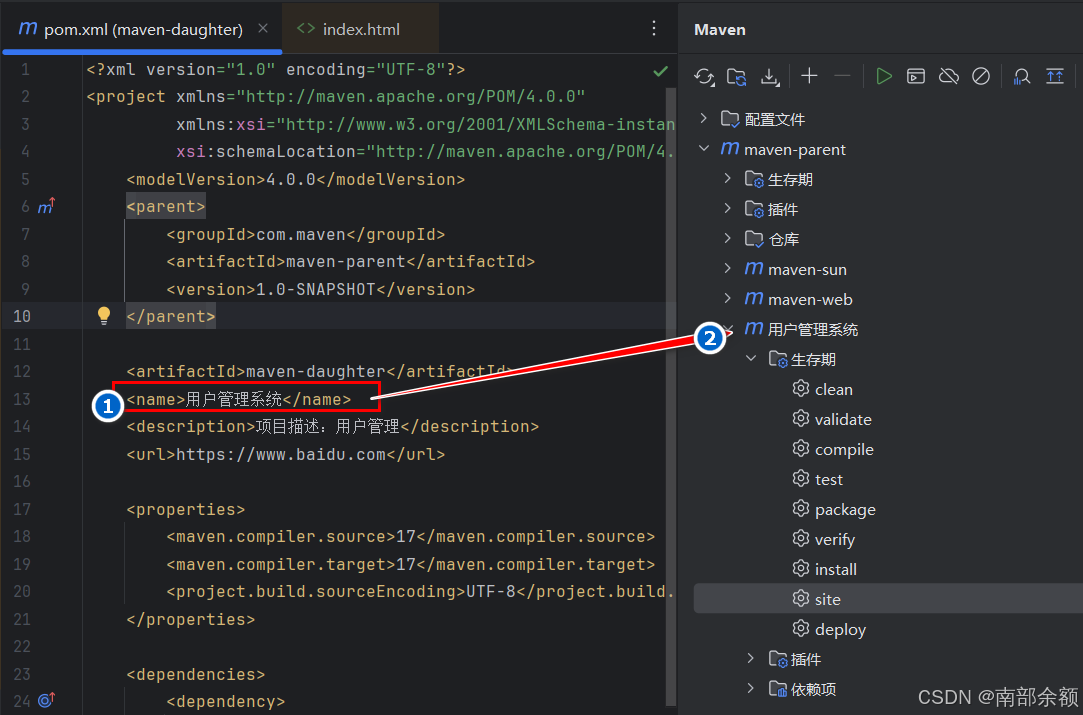
- site报告:
1.2 打包类型详解
| 打包类型 | 说明 | 输出文件 | 应用场景 |
|---|---|---|---|
| jar | Java 归档文件 | .jar |
标准 Java 库或应用 |
| war | Web 应用归档 | .war |
Web 应用程序 |
| ear | 企业应用归档 | .ear |
J2EE 企业应用 |
| pom | 项目对象模型 | 无 | 父项目或聚合项目 |
| maven-plugin | Maven 插件 | .jar |
Maven 插件开发 |
1.3 版本号管理策略
xml
<!-- 版本号规范 -->
<version>主版本.次版本.增量版本-限定符</version>

<!-- 版本号示例 -->
<version>1.0.0</version>                    <!-- 正式发布版 -->
<version>1.0.0-SNAPSHOT</version>           <!-- 开发快照版 -->
<version>1.0.0-RELEASE</version>            <!-- 发布标记 -->
<version>1.0.0-M1</version>                 <!-- 里程碑版本 -->
<version>1.0.0-RC1</version>                <!-- 候选发布版 -->

<!-- 版本号升级规则 -->
<!-- 主版本:不兼容的 API 修改 -->
<!-- 次版本:向下兼容的功能性新增 -->
<!-- 增量版本:向下兼容的问题修正 -->
二、参数配置和属性管理
2.1 完整的属性配置
<properties>标签:使用<properties>来管理依赖版本号。
xml
<properties>
    <!-- 1. 项目基本信息 -->
    <project.build.sourceEncoding>UTF-8</project.build.sourceEncoding>
    <project.reporting.outputEncoding>UTF-8</project.reporting.outputEncoding>
    <maven.compiler.source>1.8</maven.compiler.source>
    <maven.compiler.target>1.8</maven.compiler.target>

    <!-- 2. 依赖版本统一管理 -->
    <spring.version>5.3.20</spring.version>
    <spring-boot.version>2.7.0</spring-boot.version>
    <hibernate.version>5.6.9.Final</hibernate.version>
    <junit.version>5.8.2</junit.version>
    <log4j.version>2.17.2</log4j.version>
    <slf4j.version>1.7.36</slf4j.version>

    <!-- 3. 插件版本管理 -->
    <maven-compiler-plugin.version>3.10.1</maven-compiler-plugin.version>
    <maven-surefire-plugin.version>2.22.2</maven-surefire-plugin.version>
    <maven-jar-plugin.version>3.2.2</maven-jar-plugin.version>

    <!-- 4. 自定义业务属性 -->
    <app.name>my-application</app.name>
    <app.version>${project.version}</app.version>
    <deploy.env>development</deploy.env>
    <database.url>jdbc:mysql://localhost:3306/test</database.url>

    <!-- 5. 系统属性 -->
    <java.version>1.8</java.version>
    <file.encoding>UTF-8</file.encoding>
    <user.timezone>Asia/Shanghai</user.timezone>
</properties>
2.2 属性引用和表达式
version内引用在<properties>标签定义的统一的版本号信息。
xml
<!-- 在依赖中使用属性 -->
<dependency>
    <groupId>org.springframework</groupId>
    <artifactId>spring-core</artifactId>
    <version>${spring.version}</version>
</dependency>

<!-- 在插件配置中使用属性 -->
<plugin>
    <groupId>org.apache.maven.plugins</groupId>
    <artifactId>maven-compiler-plugin</artifactId>
    <version>${maven-compiler-plugin.version}</version>
    <configuration>
        <source>${java.version}</source>
        <target>${java.version}</target>
        <encoding>${project.build.sourceEncoding}</encoding>
    </configuration>
</plugin>

<!-- 在资源过滤中使用属性 -->
<resource>
    <directory>src/main/resources</directory>
    <filtering>true</filtering>
    <includes>
        <include>**/*.properties</include>
        <include>**/*.xml</include>
    </includes>
</resource>
2.3 内置属性变量
xml
<!-- Maven 内置属性 -->
${project.groupId}          <!-- 项目组ID -->
${project.artifactId}       <!-- 项目构件ID -->
${project.version}          <!-- 项目版本 -->
${project.name}             <!-- 项目名称 -->
${project.description}      <!-- 项目描述 -->
${project.build.directory}  <!-- 构建目录,通常是 target -->
${project.build.outputDirectory}  <!-- 编译输出目录 -->
${project.build.sourceDirectory}  <!-- 源代码目录 -->
${project.build.testOutputDirectory}  <!-- 测试编译输出目录 -->
${project.build.testSourceDirectory}  <!-- 测试源代码目录 -->

<!-- 环境属性 -->
${env.JAVA_HOME}            <!-- 环境变量 -->
${env.PATH}                 <!-- 系统路径 -->
${user.home}                <!-- 用户主目录 -->
${user.name}                <!-- 用户名 -->

<!-- Settings 属性 -->
${settings.localRepository} <!-- 本地仓库路径 -->
${settings.offline}         <!-- 是否离线模式 -->
三、依赖管理详细配置
基本定义
在Maven中,<scope>标签用于指定依赖项的作用范围,即依赖项在项目的哪些阶段可用。默认值为compile,即编译范围。
compile 是 Maven 依赖的默认作用域 。如果不在依赖中指定 scope,Maven 会自动使用 compile 作用域。
作用域范围
- 编译阶段(compile)
- 打包部署(provided)
- 测试阶段(test)
- 运行阶段(runtime)
- compile(编译范围)
-
定义 :
compile是默认的依赖范围。对于编译、测试、运行都有效。 -
特点:该范围的依赖会被打包到项目的主要输出中(如JAR、WAR等),并会传递到依赖该项目的其他项目中。
-
使用场景:大多数依赖都是这个范围,例如Spring Core、Hibernate等。
- provided(已提供范围)
-
定义 :表示该依赖在编译和测试时可用,但在运行时由JDK或容器提供。
-
特点:该范围的依赖不会被打包到项目的输出中,也不会传递到依赖该项目的其他项目中。
-
使用场景:例如Servlet API、JSP API等,在编译和测试时需要,但在运行时会由Web容器(如Tomcat的lib文件夹)提供。
- runtime(运行时范围)
-
定义:表示该依赖在测试和运行时需要,但在编译时不需要。
-
特点:该范围的依赖会被打包到项目的输出中,并会传递到依赖该项目的其他项目中。
-
使用场景:例如JDBC驱动,在编译时只需要接口,在运行时才需要具体的驱动实现。
- test(测试范围)
-
定义:表示该依赖仅在测试阶段需要,包括编译测试代码和运行测试。
-
特点:该范围的依赖不会被打包到项目的输出中,也不会传递到依赖该项目的其他项目中。
-
使用场景:例如JUnit、Mockito等测试框架。
作用域详细对比表
| 作用域 | 编译阶段 | 测试阶段 | 运行时 | 是否打包 | 是否传递 | 典型应用场景 |
|---|---|---|---|---|---|---|
| compile | ✅ 可用 | ✅ 可用 | ✅ 可用 | ✅ 打包 | ✅ 传递 | Spring Core、Hibernate等核心依赖 |
| provided | ✅ 可用 | ✅ 可用 | ❌ 不可用 (容器提供) | ❌ 不打包 | ✅ 传递 | Servlet API、JSP API等容器提供API |
| runtime | ❌ 不可用 | ✅ 可用 | ✅ 可用 | ✅ 打包 | ✅ 传递 | JDBC驱动、日志实现等运行时依赖 |
| test | ❌ 不可用 (仅测试代码) | ✅ 可用 | ❌ 不可用 | ❌ 不打包 | ❌ 不传递 | JUnit、Mockito等测试框架 |
传递性
具有传递性:如果项目 A 依赖 B(scope=compile),B 依赖 C(scope=compile),那么 A 会自动依赖 C。
完整的依赖配置
scope
xml
<dependencies>
    <!-- 1. 编译期依赖 -->
    <dependency>
        <groupId>org.springframework</groupId>
        <artifactId>spring-core</artifactId>
        <version>${spring.version}</version>
        <scope>compile</scope>
        <!-- 默认值,可省略 -->
        <optional>false</optional>
        <!-- 是否传递依赖 -->
    </dependency>

    <!-- 2. 测试依赖 -->
    <dependency>
        <groupId>org.junit.jupiter</groupId>
        <artifactId>junit-jupiter</artifactId>
        <version>${junit.version}</version>
        <scope>test</scope>
        <!-- 排除冲突的传递依赖 -->
        <exclusions>
            <exclusion>
                <groupId>org.junit.vintage</groupId>
                <artifactId>junit-vintage-engine</artifactId>
            </exclusion>
        </exclusions>
    </dependency>

    <!-- 3. 运行时依赖 -->
    <dependency>
        <groupId>mysql</groupId>
        <artifactId>mysql-connector-java</artifactId>
        <version>8.0.29</version>
        <scope>runtime</scope>
        <!-- 分类器(可选) -->
        <classifier>sources</classifier>
        <!-- 类型(默认jar,可省略) -->
        <type>jar</type>
    </dependency>

    <!-- 4. 提供期依赖 -->
    <dependency>
        <groupId>javax.servlet</groupId>
        <artifactId>javax.servlet-api</artifactId>
        <version>4.0.1</version>
        <scope>provided</scope>
    </dependency>
</dependencies>
四、各作用域详细解析
4.1 provided - 已提供作用域
定义:
依赖在编译和测试阶段可用,但运行时由JDK或容器提供,打包时不会包含。
典型应用:
xml
<!-- Servlet API - 容器会提供 -->
<dependency>
    <groupId>javax.servlet</groupId>
    <artifactId>javax.servlet-api</artifactId>
    <version>4.0.1</version>
    <scope>provided</scope>
</dependency>

<!-- Spring Boot Tomcat 依赖 - 内嵌容器时不用provided,外部容器时用 -->
<dependency>
    <groupId>org.springframework.boot</groupId>
    <artifactId>spring-boot-starter-tomcat</artifactId>
    <scope>provided</scope>  <!-- 使用外部Tomcat时 -->
</dependency>
使用场景:
java
// 编译和测试时可用
import javax.servlet.http.HttpServlet;

public class MyServlet extends HttpServlet {
    // 编译通过,但运行时需要容器提供Servlet API
}
4.2 runtime - 运行时作用域
定义:
依赖在编译时不可用,但在测试和运行时可用。
典型应用:
xml
<!-- JDBC驱动 - 编译时只需要接口,运行时需要具体实现 -->
<dependency>
    <groupId>mysql</groupId>
    <artifactId>mysql-connector-java</artifactId>
    <version>8.0.29</version>
    <scope>runtime</scope>
</dependency>

<!-- 日志实现 - 编译时用接口,运行时绑定具体实现 -->
<dependency>
    <groupId>ch.qos.logback</groupId>
    <artifactId>logback-classic</artifactId>
    <version>1.2.11</version>
    <scope>runtime</scope>
</dependency>
使用场景:
java
// 编译时:只能使用JDBC接口
import java.sql.Connection;
import java.sql.DriverManager;

public class DatabaseService {
    public Connection getConnection() {
        // 编译时不需要具体的MySQL驱动类
        return DriverManager.getConnection("jdbc:mysql://localhost:3306/test");
    }
}

// 运行时:ClassLoader会加载MySQL驱动
4.3 test - 测试作用域
定义:
依赖仅在测试阶段可用,主代码编译和运行时不可用。
典型应用:
xml
<!-- 测试框架 -->
<dependency>
    <groupId>org.junit.jupiter</groupId>
    <artifactId>junit-jupiter</artifactId>
    <version>5.8.2</version>
    <scope>test</scope>
</dependency>

<!-- 模拟框架 -->
<dependency>
    <groupId>org.mockito</groupId>
    <artifactId>mockito-core</artifactId>
    <version>4.5.1</version>
    <scope>test</scope>
</dependency>

<!-- 测试工具 -->
<dependency>
    <groupId>org.springframework.boot</groupId>
    <artifactId>spring-boot-starter-test</artifactId>
    <version>2.7.0</version>
    <scope>test</scope>
</dependency>
使用场景:
java
// src/test/java/ 测试代码中可用
import org.junit.jupiter.api.Test;
import org.mockito.Mockito;

public class MyServiceTest {
    @Test
    public void testMethod() {
        // 测试代码可以使用JUnit和Mockito
    }
}

// src/main/java/ 主代码中不可用(编译错误)
// import org.junit.jupiter.api.Test;  // 编译错误!
五、作用域的传递性规则
传递性:
具有传递性:如果项目 A 依赖 B(scope=compile),B 依赖 C(scope=compile),那么 A 会自动依赖 C。
5.1 传递性依赖的作用域转换
当A依赖B,B依赖C时,A对C的作用域取决于B对C的作用域:
| B对C的作用域 | A对B的作用域 | A对C的作用域 |
|---|---|---|
| compile | compile | compile |
| compile | test | - (不传递) |
| compile | provided | provided |
| compile | runtime | runtime |
| provided | compile | provided |
| provided | provided | provided |
| provided | runtime | provided |
| provided | test | - (不传递) |
| runtime | compile | runtime |
| runtime | runtime | runtime |
| runtime | provided | provided |
| runtime | test | - (不传递) |
| test | 任何 | - (不传递) |
5.2 实际示例
xml
<!-- 项目A的pom.xml -->
<dependencies>
    <dependency>
        <groupId>com.example</groupId>
        <artifactId>B</artifactId>
        <version>1.0</version>
        <scope>compile</scope>
    </dependency>
</dependencies>

<!-- 项目B的pom.xml -->
<dependencies>
    <dependency>
        <groupId>com.example</groupId>
        <artifactId>C</artifactId>
        <version>1.0</version>
        <scope>runtime</scope>  <!-- B对C是runtime -->
    </dependency>
</dependencies>

<!-- 结果:A对C的作用域是runtime -->
六、构建配置详解
6.1 完整的构建配置
xml
<build>
    <!-- 1. 最终名称:jar包或者war包的最终名称 -->
    <finalName>${project.artifactId}-${project.version}</finalName>

    <!-- 2. 目录结构配置 -->
    <directory>${project.basedir}/target</directory>
    <outputDirectory>${project.build.directory}/classes</outputDirectory>
    <testOutputDirectory>${project.build.directory}/test-classes</testOutputDirectory>

    <sourceDirectory>${project.basedir}/src/main/java</sourceDirectory>
    <testSourceDirectory>${project.basedir}/src/test/java</testSourceDirectory>

    <!-- 3. 资源文件配置 -->
    <resources>
        <resource>
            <directory>src/main/resources</directory>
            <includes>
                <include>**/*.properties</include>
                <include>**/*.xml</include>
                <include>**/*.yml</include>
                <include>**/*.yaml</include>
                <include>**/*.json</include>
            </includes>
            <excludes>
                <exclude>**/*.secret</exclude>
                <exclude>**/test-*.properties</exclude>
            </excludes>
            <filtering>true</filtering>
            <!-- 目标路径(相对于输出目录) -->
            <targetPath>config</targetPath>
        </resource>

        <!-- 多个资源目录 -->
        <resource>
            <directory>src/main/config</directory>
            <includes>
                <include>**/*</include>
            </includes>
            <filtering>false</filtering>
        </resource>
    </resources>

    <!-- 4. 测试资源 -->
    <testResources>
        <testResource>
            <directory>src/test/resources</directory>
            <filtering>true</filtering>
        </testResource>
    </testResources>

    <!-- 5. 插件配置 -->
    <plugins>
        <!-- 编译器插件 -->
        <plugin>
            <groupId>org.apache.maven.plugins</groupId>
            <artifactId>maven-compiler-plugin</artifactId>
            <version>3.10.1</version>
            <configuration>
                <source>${java.version}</source>
                <target>${java.version}</target>
                <encoding>${project.build.sourceEncoding}</encoding>
                <showWarnings>true</showWarnings>
                <showDeprecation>true</showDeprecation>
                <compilerArgs>
                    <arg>-parameters</arg>
                    <arg>-Xlint:all</arg>
                </compilerArgs>
                <fork>true</fork>
                <executable>${env.JAVA_HOME}/bin/javac</executable>
            </configuration>
            <executions>
                <execution>
                    <id>default-compile</id>
                    <phase>compile</phase>
                    <goals>
                        <goal>compile</goal>
                    </goals>
                </execution>
            </executions>
        </plugin>

        <!-- 打包插件 -->
        <plugin>
            <groupId>org.apache.maven.plugins</groupId>
            <artifactId>maven-jar-plugin</artifactId>
            <version>3.2.2</version>
            <configuration>
                <archive>
                    <manifest>
                        <addClasspath>true</addClasspath>
                        <classpathPrefix>lib/</classpathPrefix>
                        <mainClass>com.example.MainApplication</mainClass>
                        <addDefaultImplementationEntries>true</addDefaultImplementationEntries>
                        <addDefaultSpecificationEntries>true</addDefaultSpecificationEntries>
                    </manifest>
                    <manifestEntries>
                        <Built-By>${user.name}</Built-By>
                        <Build-Jdk>${java.version}</Build-Jdk>
                        <Build-Timestamp>${maven.build.timestamp}</Build-Timestamp>
                    </manifestEntries>
                </archive>
                <excludes>
                    <exclude>**/test/**</exclude>
                    <exclude>**/*.properties</exclude>
                </excludes>
            </configuration>
        </plugin>

        <!-- 资源插件 -->
        <plugin>
            <groupId>org.apache.maven.plugins</groupId>
            <artifactId>maven-resources-plugin</artifactId>
            <version>3.2.0</version>
            <configuration>
                <encoding>${project.build.sourceEncoding}</encoding>
                <useDefaultDelimiters>true</useDefaultDelimiters>
                <delimiters>
                    <delimiter>@</delimiter>
                </delimiters>
            </configuration>
        </plugin>

        <!-- Surefire 测试插件 -->
        <plugin>
            <groupId>org.apache.maven.plugins</groupId>
            <artifactId>maven-surefire-plugin</artifactId>
            <version>2.22.2</version>
            <configuration>
                <includes>
                    <include>**/*Test.java</include>
                    <include>**/*Tests.java</include>
                </includes>
                <excludes>
                    <exclude>**/*IntegrationTest.java</exclude>
                </excludes>
                <systemPropertyVariables>
                    <java.util.logging.config.file>src/test/resources/logging.properties</java.util.logging.config.file>
                </systemPropertyVariables>
                <argLine>-Xmx1024m -XX:MaxPermSize=256m</argLine>
            </configuration>
        </plugin>
    </plugins>

    <!-- 6. 插件管理 -->
    <pluginManagement>
        <plugins>
            <!-- 统一管理插件版本 -->
        </plugins>
    </pluginManagement>

    <!-- 7. 扩展配置 -->
    <extensions>
        <extension>
            <groupId>org.apache.maven.wagon</groupId>
            <artifactId>wagon-ssh</artifactId>
            <version>3.4.3</version>
        </extension>
    </extensions>
</build>
七、Maven 构建过程与构建周期
构建过程详解
清理 clean 编译 compile 测试 test 报告 site 打包 package 部署 install/deploy
| 构建步骤 | 功能描述 | 输出结果 |
|---|---|---|
| 清理(clean) | 删除上一次构建的产物 | 删除target文件夹 |
| 编译(compile) | Java源文件编译成class文件 | 生成target/classes文件夹 |
| 测试(test) | 检查代码编译异常,批量执行单元测试 | 运行测试用例 |
| 报告(site) | 生成包含项目Maven依赖信息的页面 | 生成项目站点报告(相对鸡肋) |
| 打包(package) | 将Maven工程进行打包 | SE工程→jar包,EE工程→war包 |
| 部署(install/deploy) | 将jar包加入到Maven仓库供其他项目使用 | 分两种部署方式 |
部署的两种方式:
- 本地部署(install):将jar包添加到当前电脑的本地仓库,只能被当前电脑的其他项目使用
- 私服部署(deploy):将jar包添加到公司的局域网仓库,公司内所有员工都可以使用
Maven构建周期命令
构建周期概念
- 构建周期:一个构建动作的有序集合
- 重要特性 :触发同一个周期后的命令会自动触发同一个周期前的所有命令,只触发默认周期的
install/deploy命令,默认周期前的命令(compile→test→package)也会顺序执行。
构建周期的作用
- 简化构建动作和行为
- 提供标准化的构建流程
- 原本需要以此点击 clean、compile、test、package、install,现在只需要点击clean和package
- 简化了整个流程。
周期划分和对应命令
周期的划分:清理周期(clean) 、默认周期( compile → test → package → install / deploy ) 、报告周期(site)
| 构建周期 | 包含命令 | 描述 |
|---|---|---|
| 清理周期 | clean |
清理构建产物 |
| 默认周期 | compile → test → package → install → deploy |
主要的构建生命周期 |
| 报告周期 | site |
生成项目站点报告 |
最佳命令使用实践
| 使用场景 | 推荐命令 | 说明 |
|---|---|---|
| 清理数据 | mvn clean |
仅清理构建产物 |
| 重新编译 | mvn clean compile |
清理后重新编译 |
| 重新打包 | mvn clean package |
清理后重新打包 |
| 重新部署 | mvn clean install 或 mvn clean deploy |
清理后部署到仓库 |
八、Build 配置逐行详解
maven默认路径
xml
<build>
    <!-- 指定构建输出目录,默认是项目根目录下的target文件夹 -->
    <directory>${project.basedir}/target</directory>

    <!-- 定义最终构建产物的名称,不包括文件扩展名 -->
    <finalName>${project.artifactId}-${project.version}</finalName>

    <!-- 指定主Java源码目录,非标准项目结构时需要配置 -->
    <sourceDirectory>src/main/java</sourceDirectory>

    <!-- 指定测试Java源码目录 -->
    <testSourceDirectory>src/test/java</testSourceDirectory>

    <!-- 指定脚本源码目录,如shell脚本等 -->
    <scriptSourceDirectory>src/main/scripts</scriptSourceDirectory>

    <!-- 指定编译后的类文件输出目录 -->
    <outputDirectory>target/classes</outputDirectory>

    <!-- 指定测试编译后的类文件输出目录 -->
    <testOutputDirectory>target/test-classes</testOutputDirectory>
资源文件配置详解
resources资源文件
xml
<build>
    <!-- 主资源文件配置开始 -->
    <resources>
        <!-- 第一个资源文件配置块 -->
        <resource>
            <!-- 资源文件所在的源目录 -->
            <directory>src/main/resources</directory>

            <!-- 是否启用资源过滤:true表示启用,会替换资源文件中的${}占位符 -->
            <filtering>true</filtering>

            <!-- 定义包含哪些文件 -->
            <includes>
                <!-- 包含所有properties文件 -->
                <include>**/*.properties</include>
                <!-- 包含所有XML配置文件 -->
                <include>**/*.xml</include>
                <!-- 包含所有JSON文件 -->
                <include>**/*.json</include>
                <!-- 包含所有YAML文件 -->
                <include>**/*.yml</include>
                <include>**/*.yaml</include>
            </includes>

            <!-- 定义排除哪些文件 -->
            <excludes>
                <!-- 排除所有包含secret的文件 -->
                <exclude>**/*.secret</exclude>
                <!-- 排除测试用的配置文件 -->
                <exclude>**/test-*.properties</exclude>
                <!-- 排除本地开发配置文件 -->
                <exclude>**/local-*.properties</exclude>
            </excludes>

            <!-- 指定资源文件在输出目录中的目标路径 -->
            <targetPath>config</targetPath>
        </resource>

        <!-- 第二个资源文件配置块:多环境配置 -->
        <resource>
            <!-- 使用变量指定环境特定的资源目录 -->
            <directory>src/main/resources-${env}</directory>

            <!-- 启用环境变量替换 -->
            <filtering>true</filtering>

            <!-- 包含该目录下所有文件 -->
            <includes>
                <include>**/*</include>
            </includes>

            <!-- 不排除任何文件 -->
            <excludes>
                <!-- 这里可以定义排除规则 -->
            </excludes>
        </resource>

        <!-- 第三个资源文件配置块:静态资源 -->
        <resource>
            <!-- 静态资源目录 -->
            <directory>src/main/static</directory>

            <!-- 静态资源不需要变量替换 -->
            <filtering>false</filtering>

            <!-- 包含所有静态资源文件 -->
            <includes>
                <include>**/*.css</include>
                <include>**/*.js</include>
                <include>**/*.png</include>
                <include>**/*.jpg</include>
                <include>**/*.gif</include>
                <include>**/*.ico</include>
            </includes>
        </resource>
    </resources>
testResources测试资源文件配置
xml
    <!-- 测试资源文件配置开始 -->
    <testResources>
        <!-- 测试资源文件配置 -->
        <testResource>
            <!-- 测试资源文件目录 -->
            <directory>src/test/resources</directory>

            <!-- 测试资源通常不需要过滤 -->
            <filtering>false</filtering>

            <!-- 包含所有测试资源文件 -->
            <includes>
                <include>**/*</include>
            </includes>

            <!-- 排除大文件或不需要的测试资源 -->
            <excludes>
                <exclude>**/*.large</exclude>
            </excludes>
        </testResource>

        <!-- 测试环境特定配置 -->
        <testResource>
            <directory>src/test/resources-${env}</directory>
            <filtering>true</filtering>
            <includes>
                <include>**/*.properties</include>
            </includes>
        </testResource>
    </testResources>
插件管理配置详解
pluginManagement插件管理
xml
    <!-- 插件管理:定义插件的标准配置,供子模块继承 -->
    <pluginManagement>
        <!-- 插件列表开始 -->
        <plugins>
            <!-- 编译器插件配置 -->
            <plugin>
                <!-- 插件组ID:Apache Maven官方插件 -->
                <groupId>org.apache.maven.plugins</groupId>

                <!-- 插件构件ID:编译器插件 -->
                <artifactId>maven-compiler-plugin</artifactId>

                <!-- 插件版本号 -->
                <version>3.11.0</version>

                <!-- 插件配置参数 -->
                <configuration>
                    <!-- 源代码兼容版本 -->
                    <source>11</source>

                    <!-- 目标字节码版本 -->
                    <target>11</target>

                    <!-- 文件编码格式 -->
                    <encoding>UTF-8</encoding>

                    <!-- 是否显示警告信息 -->
                    <showWarnings>true</showWarnings>

                    <!-- 是否显示过时API警告 -->
                    <showDeprecation>true</showDeprecation>

                    <!-- 编译器参数配置 -->
                    <compilerArgs>
                        <!-- 保留参数名称(用于反射) -->
                        <arg>-parameters</arg>

                        <!-- 启用所有lint检查 -->
                        <arg>-Xlint:all</arg>

                        <!-- 禁用某些lint警告 -->
                        <arg>-Xlint:-processing</arg>
                    </compilerArgs>

                    <!-- 注解处理器配置 -->
                    <annotationProcessorPaths>
                        <!-- Lombok注解处理器 -->
                        <path>
                            <groupId>org.projectlombok</groupId>
                            <artifactId>lombok</artifactId>
                            <version>1.18.24</version>
                        </path>
                    </annotationProcessorPaths>
                </configuration>
            </plugin>

            <!-- JAR打包插件配置 -->
            <plugin>
                <groupId>org.apache.maven.plugins</groupId>
                <artifactId>maven-jar-plugin</artifactId>
                <version>3.3.0</version>
                <configuration>
                    <!-- JAR包归档配置 -->
                    <archive>
                        <!-- Manifest文件配置 -->
                        <manifest>
                            <!-- 是否添加类路径 -->
                            <addClasspath>true</addClasspath>

                            <!-- 类路径前缀 -->
                            <classpathPrefix>lib/</classpathPrefix>

                            <!-- 主类全限定名 -->
                            <mainClass>com.example.MainApplication</mainClass>
                        </manifest>

                        <!-- 自定义Manifest条目 -->
                        <manifestEntries>
                            <!-- 构建者信息 -->
                            <Built-By>Maven</Built-By>

                            <!-- 构建JDK版本 -->
                            <Build-Jdk>${java.version}</Build-Jdk>

                            <!-- 构建时间 -->
                            <Build-Timestamp>${maven.build.timestamp}</Build-Timestamp>

                            <!-- 实现版本 -->
                            <Implementation-Version>${project.version}</Implementation-Version>
                        </manifestEntries>
                    </archive>

                    <!-- 排除某些文件不打入JAR包 -->
                    <excludes>
                        <exclude>**/*.properties</exclude>
                    </excludes>
                </configuration>
            </plugin>
        </plugins>
    </pluginManagement>
plugins标准插件配置详解
xml
    <!-- 实际使用的插件配置 -->
    <plugins>
        <!-- 编译器插件 -->
        <plugin>
            <groupId>org.apache.maven.plugins</groupId>
            <artifactId>maven-compiler-plugin</artifactId>
            <version>3.11.0</version>
            <configuration>
                <source>11</source>
                <target>11</target>
                <encoding>UTF-8</encoding>
                <compilerArgs>
                    <arg>-parameters</arg>
                    <arg>-Xlint:all</arg>
                </compilerArgs>
            </configuration>

            <!-- 插件执行配置 -->
            <executions>
                <!-- 第一个执行配置:主代码编译 -->
                <execution>
                    <!-- 执行ID,用于标识 -->
                    <id>default-compile</id>

                    <!-- 绑定的生命周期阶段 -->
                    <phase>compile</phase>

                    <!-- 要执行的插件目标 -->
                    <goals>
                        <goal>compile</goal>
                    </goals>

                    <!-- 该执行的配置(可覆盖插件全局配置) -->
                    <configuration>
                        <source>11</source>
                        <target>11</target>
                    </configuration>
                </execution>

                <!-- 第二个执行配置:测试代码编译 -->
                <execution>
                    <id>default-testCompile</id>
                    <phase>test-compile</phase>
                    <goals>
                        <goal>testCompile</goal>
                    </goals>
                </execution>

                <!-- 自定义执行:编译时生成源码 -->
                <execution>
                    <id>generate-sources</id>
                    <phase>generate-sources</phase>
                    <goals>
                        <goal>compile</goal>
                    </goals>
                </execution>
            </executions>

            <!-- 插件依赖 -->
            <dependencies>
                <!-- 可以添加插件本身的依赖 -->
                <dependency>
                    <groupId>org.codehaus.plexus</groupId>
                    <artifactId>plexus-compiler-javac</artifactId>
                    <version>2.8.4</version>
                </dependency>
            </dependencies>
        </plugin>

        <!-- 资源处理插件 -->
        <plugin>
            <groupId>org.apache.maven.plugins</groupId>
            <artifactId>maven-resources-plugin</artifactId>
            <version>3.3.1</version>
            <configuration>
                <!-- 资源文件编码 -->
                <encoding>UTF-8</encoding>

                <!-- 是否使用默认分隔符 -->
                <useDefaultDelimiters>false</useDefaultDelimiters>

                <!-- 自定义占位符分隔符 -->
                <delimiters>
                    <!-- 使用@作为占位符分隔符 -->
                    <delimiter>@</delimiter>

                    <!-- 可以定义多个分隔符 -->
                    <delimiter>${*}</delimiter>
                </delimiters>

                <!-- 转义字符 -->
                <escapeString>\</escapeString>

                <!-- 是否支持多行过滤 -->
                <supportMultiLineFiltering>true</supportMultiLineFiltering>
            </configuration>

            <executions>
                <!-- 处理主资源 -->
                <execution>
                    <id>copy-resources</id>
                    <phase>process-resources</phase>
                    <goals>
                        <goal>copy-resources</goal>
                    </goals>
                    <configuration>
                        <outputDirectory>target/classes</outputDirectory>
                        <resources>
                            <resource>
                                <directory>src/main/resources</directory>
                                <filtering>true</filtering>
                            </resource>
                        </resources>
                    </configuration>
                </execution>
            </executions>
        </plugin>