一、源码展示
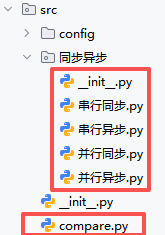
1.1串行同步.py
import time
from playwright.sync_api import sync_playwright

URL = "https://www.baidu.com"


def do_one(page, keyword, is_first_run):
    t0 = time.perf_counter()

    # 优化1:首次运行才加载页面,后续复用页面
    if is_first_run:
        # 优化等待策略:DOM加载完成即可,无需等待全部资源
        page.goto(URL, wait_until='domcontentloaded')
    else:
        # 非首次运行:直接返回首页并清空搜索框(比重新goto更快)
        page.get_by_role("link", name="到百度首页").click()
        page.wait_for_selector('#chat-textarea', timeout=10000)

    # 输入搜索关键词
    page.fill('#chat-textarea', keyword)

    # 优化2:合并点击与导航等待,减少一次等待
    with page.expect_navigation(wait_until='domcontentloaded'):
        page.click('#chat-submit-button')

    # 优化3:用精准元素等待替代networkidle
    page.wait_for_selector('#content_left', timeout=10000)

    cost = time.perf_counter() - t0
    return cost


def main():
    t_all = time.perf_counter()
    with sync_playwright() as p:
        # 浏览器启动优化:添加参数加速
        t_launch = time.perf_counter()
        browser = p.chromium.launch(
            headless=True,
            args=[
                '--disable-gpu',
                '--disable-extensions',
                '--no-sandbox',
                '--disable-dev-shm-usage'
            ]
        )
        launch_cost = time.perf_counter() - t_launch

        page = browser.new_page()

        # 保持串行执行,通过参数标记是否首次运行
        jay_cost = do_one(page, "周杰伦", is_first_run=True)
        kun_cost = do_one(page, "蔡徐坤", is_first_run=False)

        browser.close()

    total_biz = jay_cost + kun_cost
    wall_clock = time.perf_counter() - t_all
    return launch_cost, total_biz, wall_clock


if __name__ == '__main__':
    a,b,c=main()
    print(a+b+c)
1.2串行异步.py
import time
import asyncio
from playwright.async_api import async_playwright

URL = "https://www.baidu.com"


async def do_one(page, keyword):
    t0 = time.perf_counter()

    # 修复:添加await关键字,正确调用异步方法
    window_obj = await page.evaluate("() => window")
    if "已初始化" not in window_obj:
        # 首次加载:使用domcontentloaded加快首屏加载
        await page.goto(URL, wait_until='domcontentloaded')
        # 标记为已初始化
        await page.evaluate("() => window['已初始化'] = true")
    else:
        # 非首次:直接清空搜索框,无需重新加载整个页面
        await page.fill('#chat-textarea', '')

    # 输入搜索关键词
    await page.fill('#chat-textarea', keyword)

    # 点击与导航等待合并
    async with page.expect_navigation(wait_until='domcontentloaded'):
        await page.click('#chat-submit-button')

    # 等待搜索结果区域出现
    await page.wait_for_selector('#content_left', timeout=10000)

    cost = time.perf_counter() - t0
    return cost


async def main():
    async with async_playwright() as p:
        # 浏览器启动优化
        t_launch_0 = time.perf_counter()
        browser = await p.chromium.launch(
            headless=True,
            args=[
                '--disable-gpu',
                '--disable-extensions',
                '--no-sandbox',
                '--disable-dev-shm-usage'
            ]
        )
        launch_cost = time.perf_counter() - t_launch_0

        page = await browser.new_page()

        # 保持串行执行
        jay_cost = await do_one(page, "周杰伦")
        kun_cost = await do_one(page, "蔡徐坤")

        await browser.close()

    total_biz = jay_cost + kun_cost
    wall_clock = launch_cost + total_biz
    return launch_cost, total_biz, wall_clock


if __name__ == '__main__':
    a, b, c = asyncio.run(main())
    print(a+b+c)
1.3并行同步.py
import time
from playwright.sync_api import sync_playwright
from concurrent.futures import ThreadPoolExecutor
import threading

URL = "https://www.baidu.com"

# 使用线程本地存储来隔离不同线程的Playwright实例
thread_local = threading.local()


def init_playwright():
    """为每个线程初始化独立的Playwright实例"""
    if not hasattr(thread_local, 'playwright'):
        thread_local.playwright = sync_playwright().start()
    return thread_local.playwright


def do_work(keyword):
    # 每个线程使用自己的Playwright实例,避免线程冲突
    p = init_playwright()

    # 浏览器冷启动计时
    t_launch = time.perf_counter()
    browser = p.chromium.launch(
        headless=True,
        args=[
            '--disable-gpu',
            '--disable-extensions',
            '--no-sandbox',
            '--disable-setuid-sandbox',
            '--disable-dev-shm-usage'
        ]
    )
    launch_cost = time.perf_counter() - t_launch

    page = browser.new_page()
    t0 = time.perf_counter()

    # 优化页面加载策略
    page.goto(URL, wait_until='domcontentloaded')

    # 元素交互
    search_box = page.locator('#chat-textarea')
    search_box.fill(keyword)

    # 点击与导航等待合并
    with page.expect_navigation(wait_until='domcontentloaded'):
        page.click('#chat-submit-button')

    # 等待搜索结果区域出现
    page.wait_for_selector('#content_left', timeout=10000)

    biz_cost = time.perf_counter() - t0
    browser.close()
    return launch_cost, biz_cost


def main():
    t_all = time.perf_counter()
    results = []

    # 定义线程清理函数
    def cleanup_thread_local():
        if hasattr(thread_local, 'playwright'):
            thread_local.playwright.stop()

    try:
        with ThreadPoolExecutor(max_workers=2) as pool:
            results = list(pool.map(do_work, ["周杰伦", "蔡徐坤"]))

        (launch1, biz1), (launch2, biz2) = results
        launch_cost = launch1 + launch2
        total_biz = max(biz1, biz2)
        wall_clock = time.perf_counter() - t_all
        return launch_cost, total_biz, wall_clock
    finally:
        # 确保所有线程的Playwright实例都被正确关闭
        cleanup_thread_local()


if __name__ == '__main__':
    a, b, c = main()
    print(a+b+c)
1.4并行异步.py
import time
import asyncio
from playwright.async_api import async_playwright

URL = "https://www.baidu.com"


async def do_one(page, keyword):
    t0 = time.perf_counter()
    # 优化导航等待策略,使用'domcontentloaded'可能比'load'更快
    await page.goto(URL, wait_until='domcontentloaded')
    # 直接使用选择器操作,减少可能的查找开销
    search_box = page.locator('#chat-textarea')
    await search_box.fill(keyword)
    # 点击搜索按钮,同时等待导航完成
    async with page.expect_navigation(wait_until='domcontentloaded'):
        await page.click('#chat-submit-button')
    # 可以根据实际情况调整等待策略,不一定需要networkidle
    # 例如等待某个特定元素出现
    await page.wait_for_selector('#content_left')
    cost = time.perf_counter() - t0
    return cost


async def main():
    async with async_playwright() as p:
        # 浏览器启动优化:可以添加一些启动参数加速
        t_launch_0 = time.perf_counter()
        browser = await p.chromium.launch(
            headless=True,
            args=[
                '--disable-gpu',
                '--disable-extensions',
                '--disable-dev-shm-usage',
                '--no-sandbox',
                '--disable-setuid-sandbox'
            ]
        )
        launch_cost = time.perf_counter() - t_launch_0

        # 优化:可以复用一个上下文而不是创建两个
        # 除非有特殊的隔离需求
        context = await browser.new_context()
        page1, page2 = await context.new_page(), await context.new_page()

        # 并行执行两个搜索任务
        biz_costs = await asyncio.gather(
            do_one(page1, "周杰伦"),
            do_one(page2, "蔡徐坤")
        )

        await browser.close()

    jay_cost, kun_cost = biz_costs
    total_biz = max(biz_costs)
    wall_clock = launch_cost + total_biz
    return launch_cost, total_biz, wall_clock


if __name__ == '__main__':
    a,b,c=asyncio.run(main())
    print(a+b+c)
1.5init.py
from .串行同步 import main as one
from .串行异步 import main as two
from .并行同步 import main as three
from .并行异步 import main as four
1.6compare.py
import asyncio
import matplotlib.pyplot as plt
from 同步异步 import one, two, three, four


def out_pic():
    # 中文与负号
    plt.rcParams['font.sans-serif'] = ['SimHei']
    plt.rcParams['axes.unicode_minus'] = False

    labels = ['串行同步', '串行异步', '并行同步', '并行异步']

    # 收集数据
    launch_costs, total_biz, wall_clocks = [], [], []
    for func in (one, lambda :asyncio.run(two()), three, lambda :asyncio.run(four())):
        lc, tb, wc = func()
        launch_costs.append(lc)
        total_biz.append(tb)
        wall_clocks.append(wc)

    # 一个画布上画 3 个子图
    fig, axes = plt.subplots(1, 3, figsize=(15, 4), sharey=False)

    colors = ['skyblue', 'orange', 'lightgreen']
    titles = ['浏览器冷启动时间', '业务耗时对比', '总耗时对比']
    data_list = [launch_costs, total_biz, wall_clocks]

    for ax, data, title, color in zip(axes, data_list, titles, colors):
        ax.bar(labels, data, color=color)
        ax.set_title(title)
        ax.set_ylabel('秒')
        # 关键:先设刻度位置,再设标签
        ax.set_xticks(range(len(labels)))  # 固定刻度位置
        ax.set_xticklabels(labels, rotation=15, ha='right')

    plt.tight_layout()
    plt.show()


if __name__ == '__main__':
    out_pic()
二、目录结构
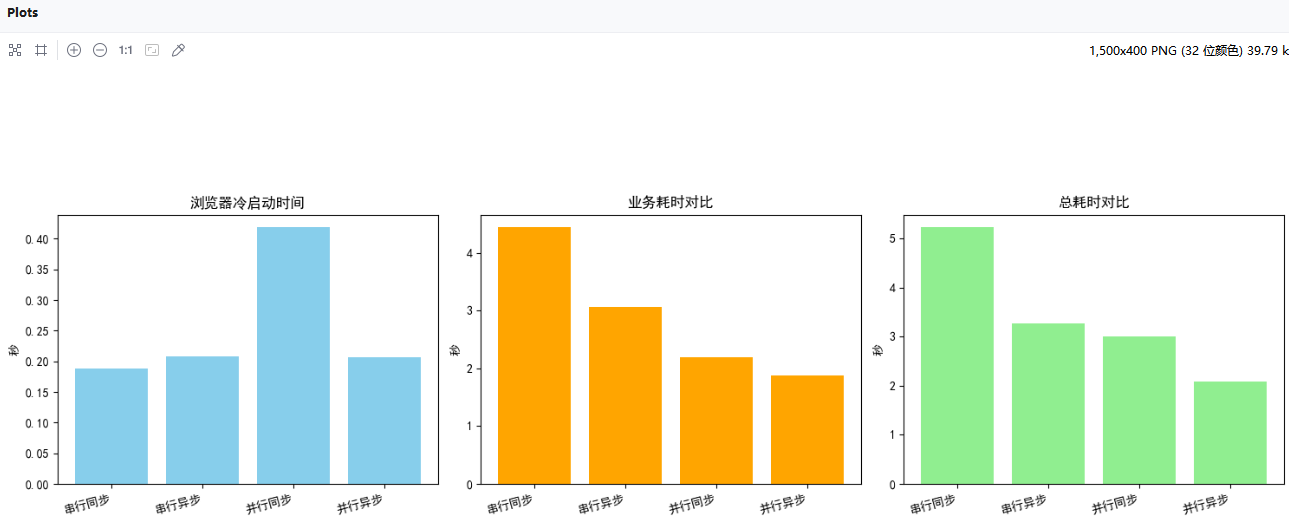
三、运行结果
四、结论
理论上说,并行异步运行最快,实际运行可能有些许误差