1.异常情况
异常情况如下:
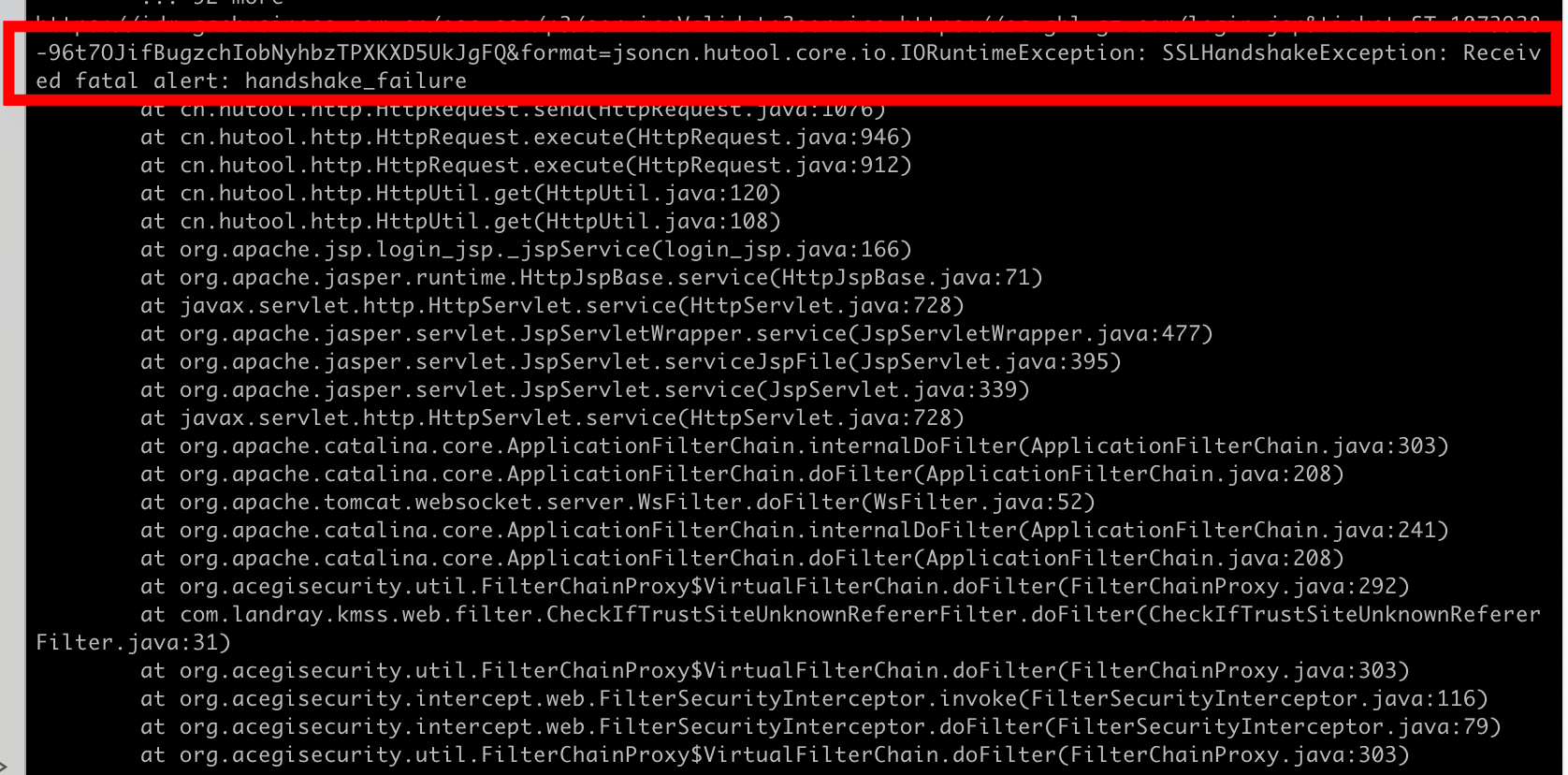
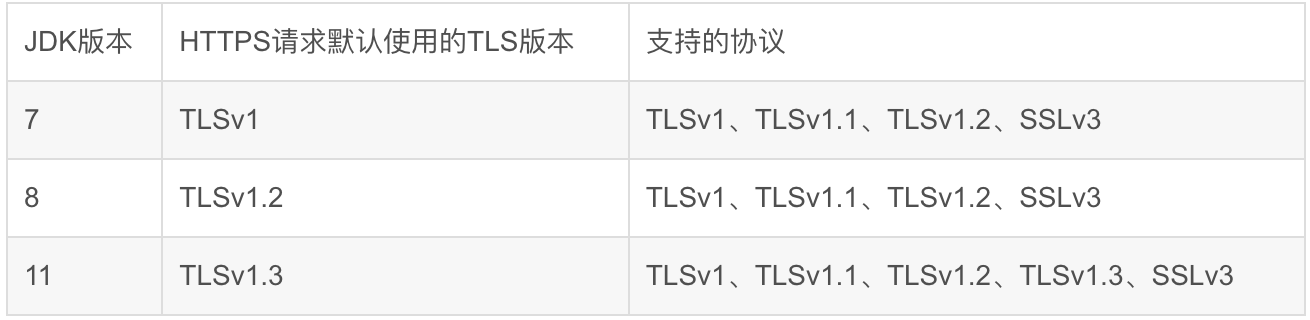
JDK版本中安全机制导致,不同https安全协议不一致,TLS协议版本越高,HTTPS通信的安全性越高,但是相较于低版本TLS协议,高版本TLS协议对浏览器的兼容性较差。我方系统是jdk1.7默认使用TLSV1.0,对方系统是jdk1.8默认使用TLSV1.2,导致出现异常。
JDK与TLS版本情况如图所示:
2.解决方法
系统做http请求时,手动将TLS版本号改为1.2即可。
2.1http接口解决方法
java
public class HttpsClient {

    private static Log logger = LogFactory.getLog(HttpClientUtil.class);

	private volatile static CloseableHttpClient httpsClient = null;

	private HttpsClient(){}

	public static CloseableHttpClient getInstance() throws Exception{
		if (httpsClient == null ){
            synchronized (HttpsClient.class){
                if (httpsClient == null ) {
                	httpsClient = createSSLHttpClient();
                }
            }
        }
        return httpsClient;
	}

    private static CloseableHttpClient createSSLHttpClient() {
        CloseableHttpClient client = null;

        // 设置ssl兼容协议版本
        SSLConnectionSocketFactory sslsf = null;
        try {
            SSLContext sslContext = new SSLContextBuilder()
                    .loadTrustMaterial(null, new TrustStrategy() {
                        @Override
                        public boolean isTrusted(X509Certificate[] chain,
                                                 String authType) throws CertificateException {
                            return true;
                        }
                    }).build();
            sslsf = new SSLConnectionSocketFactory(
                    sslContext,
                    new String[] { "TLSv1.2" },
                    null,
                    SSLConnectionSocketFactory.ALLOW_ALL_HOSTNAME_VERIFIER);

            javax.net.ssl.SSLSocketFactory factory = sslContext.getSocketFactory();
            SSLSocket socket = (SSLSocket) factory.createSocket();
            String[] protocols = socket.getSupportedProtocols();
            logger.trace("支持的协议:" + Arrays.asList(protocols));

            client = HttpClients.custom()
                    .setSSLSocketFactory(sslsf)
                    .build();
        } catch (Exception e) {
            logger.error("创建SSLConnectionSocketFactory失败", e);
            e.printStackTrace();
        }

        // 创建httpclient
        if (client == null) {
            logger.error("创建支持SSL的HttpClient失败,创建普通的HttpClient");
            client = HttpClients.createDefault();
        }
        return client;
    }

}
2.2 webservice接口解决方法
java
public String submitToOA(KmReviewParamterForm form) throws Exception {
    	ISysCodeService sysCodeService = (ISysCodeService)SpringBeanUtil.getBean("sysCodeService");
    	WebServiceConfig cfg = WebServiceConfig.getInstance();
    	cfg.setAddress(sysCodeService.getContentByCode("reviewUrl").getFdContent());
    	cfg.setUser(sysCodeService.getContentByCode("reviewFinanceUser").getFdContent());
    	cfg.setPassword(sysCodeService.getContentByCode("reviewFinancePassword").getFdContent());
    	IKmReviewWebserviceService service = (IKmReviewWebserviceService) callService(cfg.getAddress(), cfg.getServiceClass());

		//2025-07-18 设置TLSv1.2版本 START
		Client client = ClientProxy.getClient(service);
		HTTPConduit httpConduit = (HTTPConduit) client.getConduit();
		SSLSocketFactory sslSocketFactory = SSLSocketFactoryBuilder.create().setProtocol("TLSv1.2").build();
		TLSClientParameters tlsClientParameters = new TLSClientParameters();
		tlsClientParameters.setSSLSocketFactory(sslSocketFactory);
		httpConduit.setTlsClientParameters(tlsClientParameters);
		//2025-07-18 设置TLSv1.2版本 END

		return service.addReview(form);

    }