🚀 基于Kafka+ElasticSearch+MongoDB+Redis+XXL-Job的日志分析系统
🏗️ 系统架构
🎯 技术栈选型的深层考量
🚀 Apache Kafka - 消息传输的核心引擎
- 在系统中的作用: 作为日志数据的缓冲层,解耦日志生产和消费,确保系统的高可用性
📊 MongoDB - 可靠的数据主存储
- 选择理由: 文档型数据库天然适合存储结构化的日志数据
- 关键特性: Change Streams功能实现数据变更的实时监听,副本集保证高可用
🔍 Elasticsearch - 强大的搜索分析引擎
- 选择理由: 基于Lucene的全文搜索引擎,提供毫秒级的查询响应和强大的聚合分析能力
- 在系统中的作用: 专门负责日志的全文检索、复杂查询和实时分析
⚡ Redis - 缓存层
- 在系统中的作用: 缓存错误日志和热点查询结果,大幅提升系统响应速度
⏰ XXL-Job - 分布式任务调度
- 在系统中的作用: 负责数据清理、统计分析等定时任务的执行
🎨 系统架构设计图
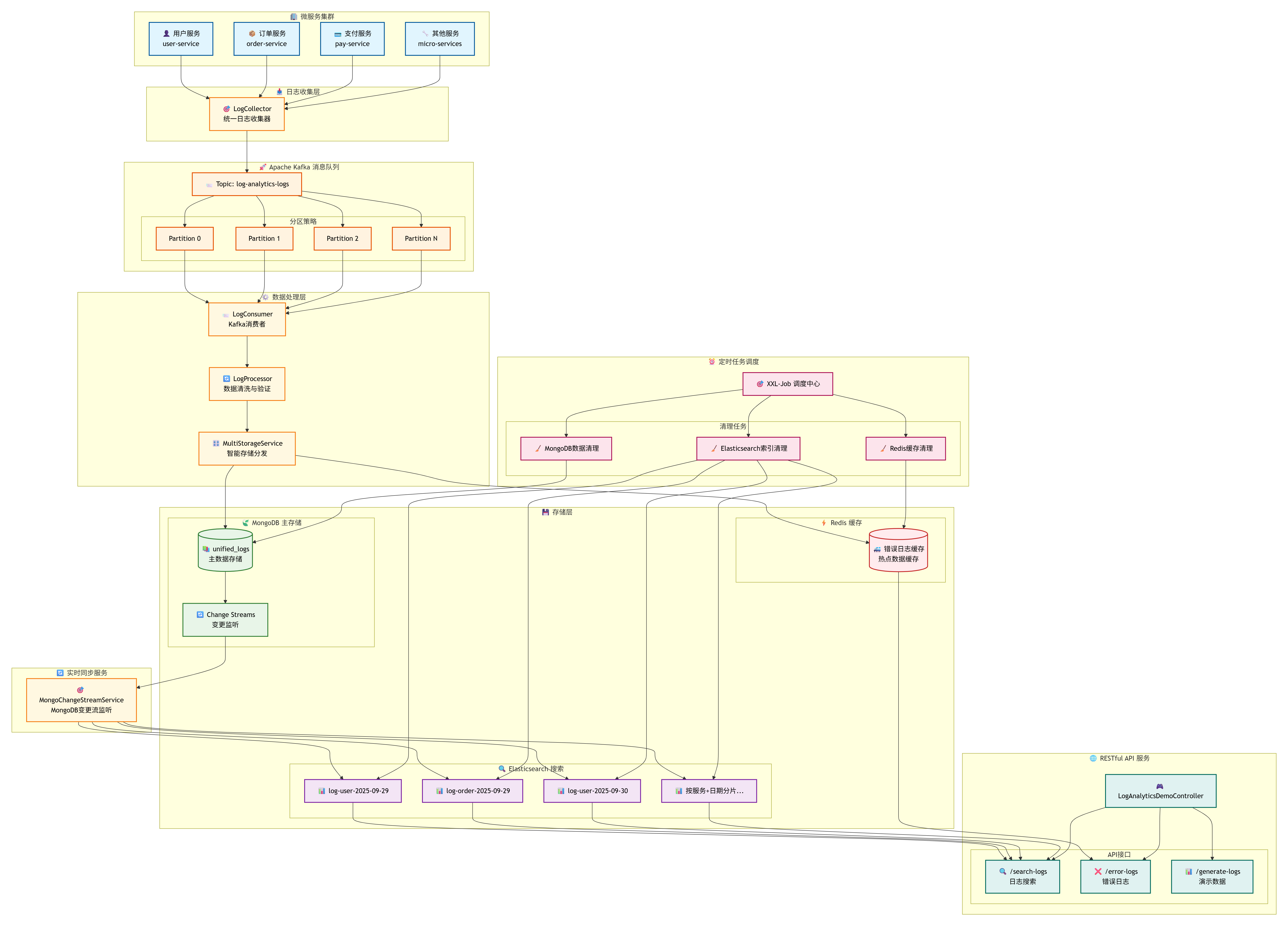
🔄 数据流转详细说明
1. 📥 日志收集阶段
各个微服务通过LogCollector统一收集日志,避免了直接与Kafka耦合,提供了更好的抽象层。
2. 🚀 消息传输阶段
Kafka的分区机制确保了数据的有序性和负载均衡,同时提供了消息的持久化保证。
3. ⚙️ 数据处理阶段
LogConsumer消费多个分区的数据,LogProcessor负责数据的清洗、验证和格式化。
4. 🎛️ 存储分发阶段
MultiStorageService根据业务规则智能地将数据分发到不同的存储系统。
5. 🔄 实时同步阶段
MongoDB Change Streams监听数据变更,实时同步到Elasticsearch,保证数据一致性。
6. 🌐 查询服务阶段
根据不同的查询需求,从最适合的存储系统获取数据。
🛠️ 核心组件深度实现
1. 📋 统一日志实体设计
🔑 核心字段说明
- logId: 全局唯一标识符,用于日志去重和精确定位
- timestamp: 日志产生的精确时间,支持毫秒级精度
- level: 日志级别,支持标准的五级分类
- serviceName: 服务标识,用于多服务环境下的日志分类
- traceId: 分布式链路追踪ID,关联同一请求的所有日志
- userId: 用户标识,支持用户行为分析和问题定位
java
/**
 * 统一日志实体类 - 标准化的日志数据模型
 * 支持MongoDB文档存储,包含完整的日志元信息和链路追踪能力
 */
@Document(collection = "unified_logs")
public class UnifiedLogEntity {

    @Id
    private String id;

    @Field("logId")
    private String logId;           // 日志唯一标识

    @Field("timestamp")
    private LocalDateTime timestamp; // 日志时间戳

    @Field("level")
    private LogLevel level;         // 日志级别

    @Field("type")
    private LogType type;           // 日志类型

    @Field("serviceName")
    private String serviceName;     // 服务名称

    @Field("message")
    private String message;         // 日志消息

    @Field("traceId")
    private String traceId;         // 链路追踪ID

    @Field("userId")
    private String userId;          // 用户ID

    @Field("ipAddress")
    private String ipAddress;       // IP地址

    @Field("createTime")
    private LocalDateTime createTime; // 创建时间

    // 省略getter/setter方法
}

/**
 * 日志级别枚举 - 标准五级日志分类
 */
public enum LogLevel {
    DEBUG, INFO, WARN, ERROR, FATAL
}

/**
 * 日志类型枚举 - 按业务场景分类
 */
public enum LogType {
    APPLICATION, SYSTEM, SECURITY, PERFORMANCE
}
2. 📥 日志收集器 - 统一的数据入口
功能概述: 提供统一的日志收集接口,支持批量处理,将日志数据异步发送到Kafka消息队列,实现系统解耦。
java
/**
 * 日志收集器 - 统一日志收集入口
 * 负责接收各微服务的日志数据,进行预处理后发送到Kafka
 */
@Slf4j
@Service
public class LogCollector {

    @Autowired
    private LogProducer logProducer;

    @Autowired
    private ObjectMapper objectMapper;

    /**
     * 批量采集日志 - 支持高并发批量处理
     * 遍历日志列表,逐条发送到Kafka,提供详细的处理日志
     */
    public void collectBatch(List<UnifiedLogEntity> logs) {
        try {
            for (UnifiedLogEntity log : logs) {
                sendLogToKafka(log);
            }
            log.info("批量采集日志完成,共处理 {} 条日志", logs.size());
        } catch (Exception e) {
            log.error("批量采集日志失败: {}", e.getMessage(), e);
        }
    }

    /**
     * 发送日志到Kafka - 序列化日志对象并异步发送
     * 将日志实体转换为JSON格式,通过LogProducer发送到Kafka主题
     */
    private void sendLogToKafka(UnifiedLogEntity logEntity) {
        try {
            String logJson = objectMapper.writeValueAsString(logEntity);
            logProducer.sendLogMessage(logEntity.getLogId(), logJson);
        } catch (Exception e) {
            log.error("发送日志到Kafka失败: {}", e.getMessage(), e);
        }
    }
}
3. 🚀 Kafka生产者 - 消息发送
功能概述: 负责将日志消息异步发送到Kafka,具备智能重试机制和死信队列处理,确保消息不丢失。
🔧 关键技术特性:
- 异步发送: 使用CompletableFuture实现非阻塞发送
- 智能重试: 自动重试机制,失败后延迟重试
- 死信队列: 对于无法恢复的消息,自动路由到死信队列
java
/**
 * Kafka日志生产者 - 高可靠性消息发送
 * 提供异步发送、重试机制、死信队列等企业级特性
 */
@Slf4j
@Component
public class LogProducer {

    @Autowired
    private KafkaTemplate<String, String> kafkaTemplate;

    @Value("${log-analytics.kafka.log-topic:log-analytics-logs}")
    private String logTopic;

    /**
     * 发送日志消息 - 异步发送到Kafka主题
     * 使用CompletableFuture实现异步发送,提供发送结果回调处理
     */
    public void sendLogMessage(String logId, String logMessage) {
        log.debug("准备发送日志消息到Topic: {}, LogId: {}", logTopic, logId);

        CompletableFuture<SendResult<String, String>> future =
            kafkaTemplate.send(logTopic, logId, logMessage);

        future.whenComplete((result, ex) -> {
            if (ex == null) {
                log.debug("日志消息发送成功 [Topic: {}, Partition: {}, Offset: {}, LogId: {}]",
                        result.getRecordMetadata().topic(),
                        result.getRecordMetadata().partition(),
                        result.getRecordMetadata().offset(),
                        logId);
            } else {
                log.error("日志消息发送失败 [LogId: {}]: {}", logId, ex.getMessage(), ex);
                handleSendFailure(logId, logMessage, ex);
            }
        });
    }

    /**
     * 处理发送失败的情况 - 智能重试和死信队列机制
     * 实现延迟重试,重试失败后自动发送到死信队列
     */
    private void handleSendFailure(String logId, String logMessage, Throwable ex) {
        // 重试机制和死信队列处理
        log.warn("日志消息发送失败,将尝试重试或发送到死信队列 [LogId: {}]", logId);

        try {
            Thread.sleep(1000);
            CompletableFuture<SendResult<String, String>> retryFuture =
                kafkaTemplate.send(logTopic, logId, logMessage);
            retryFuture.whenComplete((result, retryEx) -> {
                if (retryEx == null) {
                    log.info("日志消息重试发送成功 [LogId: {}]", logId);
                } else {
                    log.error("日志消息重试发送仍然失败 [LogId: {}]: {}",
                            logId, retryEx.getMessage());
                    sendToDeadLetterQueue(logId, logMessage);
                }
            });
        } catch (InterruptedException e) {
            Thread.currentThread().interrupt();
            log.error("重试发送日志消息时被中断 [LogId: {}]", logId);
        }
    }

    /**
     * 死信队列处理 - 无法恢复的消息最终处理
     * 将无法正常发送的消息发送到专门的死信队列,便于后续人工处理
     */
    private void sendToDeadLetterQueue(String logId, String logMessage) {
        String deadLetterTopic = logTopic + "-dead-letter";
        try {
            kafkaTemplate.send(deadLetterTopic, logId, logMessage);
            log.info("日志消息已发送到死信队列 [LogId: {}, Topic: {}]", logId, deadLetterTopic);
        } catch (Exception e) {
            log.error("发送到死信队列也失败了 [LogId: {}]: {}", logId, e.getMessage(), e);
        }
    }
}
4. 📨 消息消费者 - 可靠的数据处理
功能概述: 从Kafka消费日志消息,进行数据解析、处理和存储分发,具备异常处理和重试机制。
java
/**
 * Kafka日志消费者 - 可靠的消息处理
 * 监听Kafka主题,消费日志消息并进行后续处理流程
 */
@Slf4j
@Component
@Lazy(value = false)
public class LogConsumer {

    @Autowired
    private ObjectMapper objectMapper;

    @Autowired
    private LogProcessor logProcessor;

    @Autowired
    private MultiStorageService multiStorageService;

    /**
     * 处理日志消息 - Kafka监听器主方法
     * 监听指定主题,处理消费到的日志消息,包含完整的异常处理和确认机制
     */
    @KafkaListener(
            topics = "${log-analytics.kafka.log-topic:log-analytics-logs}",
            groupId = "${log-analytics.kafka.consumer-group-id:log-analytics-consumer-group}",
            containerFactory = "kafkaListenerContainerFactory"
    )
    public void processLogMessage(
            ConsumerRecord<String, String> record,
            Acknowledgment ack,
            @Header(KafkaHeaders.RECEIVED_TOPIC) String topic,
            @Header(KafkaHeaders.RECEIVED_PARTITION) int partition,
            @Header(KafkaHeaders.OFFSET) long offset) {

        String logId = record.key();
        log.info("开始处理日志消息 [Topic: {}, Partition: {}, Offset: {}, LogId: {}]",
                topic, partition, offset, logId);

        try {
            String logMessage = record.value();

            // 1. 解析日志消息 - JSON反序列化为日志实体
            UnifiedLogEntity logEntity = parseLogMessage(logMessage);
            if (logEntity == null) {
                log.error("日志消息解析失败,跳过处理 [LogId: {}]", logId);
                ack.acknowledge();
                return;
            }

            // 2. 数据处理和清洗 - 数据验证和格式化
            UnifiedLogEntity processedLog = logProcessor.processLog(logEntity);

            // 3. 存储到多个存储引擎 - 智能存储分发
            multiStorageService.storeLog(processedLog);

            log.info("日志消息处理成功 [Topic: {}, Partition: {}, Offset: {}, LogId: {}]",
                    topic, partition, offset, logId);

        } catch (Exception e) {
            log.error("日志消息处理失败 [Topic: {}, Partition: {}, Offset: {}, LogId: {}]: {}",
                    topic, partition, offset, logId, e.getMessage(), e);

            if (shouldRetry(e)) {
                throw new RuntimeException("日志处理失败,需要重试", e);
            } else {
                log.warn("日志消息处理失败但不重试,直接确认 [LogId: {}]", logId);
            }
        } finally {
            ack.acknowledge();
        }
    }

    /**
     * 解析日志消息 - JSON字符串转换为日志实体
     * 将Kafka消息中的JSON字符串反序列化为UnifiedLogEntity对象
     */
    private UnifiedLogEntity parseLogMessage(String logMessage) {
        try {
            return objectMapper.readValue(logMessage, UnifiedLogEntity.class);
        } catch (Exception e) {
            log.error("解析日志消息失败: {}", e.getMessage());
            return null;
        }
    }

    /**
     * 判断是否需要重试 - 智能异常分类处理
     * 根据异常类型判断是否为可重试的临时性异常
     */
    private boolean shouldRetry(Exception e) {
        // 网络异常、临时性异常等可以重试
        if (e instanceof java.net.ConnectException ||
            e instanceof java.net.SocketTimeoutException ||
            e instanceof org.springframework.dao.TransientDataAccessException) {
            return true;
        }
        return false;
    }
}
5. 🎛️ 智能多存储引擎服务 - 数据分发中心
功能概述: 根据业务规则智能地将日志数据分发到不同的存储系统,实现存储策略的统一管理和优化。
📊 存储策略详解
🍃 MongoDB主存储策略:
- 所有日志数据首先写入MongoDB,确保数据的完整性和一致性
⚡ Redis缓存策略:
- 错误级别日志:ERROR级别的日志自动缓存,便于快速故障排查
🔍 Elasticsearch同步策略:
- 通过MongoDB Change Streams实现实时同步
- 按服务名和日期自动创建索引,优化查询性能
- 支持全文检索
java
/**
 * 多存储引擎服务 - 智能存储分发中心
 * 根据业务规则将日志数据分发到MongoDB、Redis等不同存储系统
 */
@Slf4j
@Service
public class MultiStorageService {

    @Autowired
    private MongoLogService mongoLogService;

    @Autowired
    private LogCacheService logCacheService;

    /**
     * 存储单条日志到多个存储引擎
     * MongoDB作为主存储,Redis作为缓存,Elasticsearch通过Change Stream自动同步
     */
    public void storeLog(UnifiedLogEntity logEntity) {
        if (logEntity == null) {
            log.error("日志实体为空,跳过存储");
            return;
        }

        String logId = logEntity.getLogId();
        log.info("开始存储日志到存储引擎 [LogId: {}]", logId);

        // 异步并行存储到MongoDB和Redis - 提高存储性能
        CompletableFuture<Void> mongoFuture = CompletableFuture.runAsync(() -> {
            try {
                mongoLogService.saveLog(logEntity);
                log.info("日志存储到MongoDB成功 [LogId: {}]", logId);
            } catch (Exception e) {
                log.error("日志存储到MongoDB失败 [LogId: {}]: {}", logId, e.getMessage(), e);
                throw new RuntimeException("MongoDB存储失败", e);
            }
        });

        CompletableFuture<Void> cacheFuture = CompletableFuture.runAsync(() -> {
            try {
                if (shouldCache(logEntity)) {
                    logCacheService.cacheLog(logEntity);
                    log.info("日志缓存到Redis成功 [LogId: {}]", logId);
                }
            } catch (Exception e) {
                log.error("日志缓存到Redis失败 [LogId: {}]: {}", logId, e.getMessage(), e);
            }
        });

        // 等待存储操作完成 - 确保数据一致性
        CompletableFuture.allOf(mongoFuture, cacheFuture)
            .whenComplete((result, throwable) -> {
                if (throwable != null) {
                    log.error("存储引擎存储过程中发生异常 [LogId: {}]: {}",
                            logId, throwable.getMessage());
                } else {
                    log.debug("日志存储完成,Elasticsearch将通过Change Stream自动同步 [LogId: {}]",
                            logId);
                }
            }).join();
    }

    /**
     * 判断日志是否需要缓存到Redis - 智能缓存策略
     * 根据日志级别、时间、链路追踪等维度判断是否需要缓存
     */
    private boolean shouldCache(UnifiedLogEntity logEntity) {
        if (logEntity == null) {
            return false;
        }

        // 缓存策略:ERROR级别的日志、最近1小时的日志、包含链路追踪ID的日志
        if (LogLevel.ERROR.equals(logEntity.getLevel()) ||
            LogLevel.FATAL.equals(logEntity.getLevel())) {
            return true;
        }

        if (logEntity.getTimestamp() != null &&
            logEntity.getTimestamp().isAfter(LocalDateTime.now().minusHours(1))) {
            return true;
        }

        if (logEntity.getTraceId() != null && !logEntity.getTraceId().isEmpty()) {
            return true;
        }

        return false;
    }
}
6. 🔄 MongoDB Change Stream同步服务 - 实时数据同步
功能概述: 监听MongoDB数据变更事件,实时同步数据到Elasticsearch,确保搜索引擎数据的实时性和一致性。
java
/**
 * MongoDB变更流监听服务 - 实时数据同步
 * 监听MongoDB的Change Stream事件,自动同步新增数据到Elasticsearch
 */
@Service
@Slf4j
public class MongoChangeStreamService {

    @Autowired
    private MongoTemplate mongoTemplate;

    @Autowired
    private EnhancedElasticsearchService elasticsearchService;

    /**
     * 启动Change Stream监听 - 应用启动后自动开始监听
     * 监听unified_logs集合的数据变更,实现实时同步
     */
    @Async
    @EventListener(ApplicationReadyEvent.class)
    public void listen() {
        mongoTemplate.getCollection("unified_logs")
                .watch()
                .forEach(this::processChange);
    }

    /**
     * 处理数据变更事件 - 解析变更类型并同步到Elasticsearch
     * 当MongoDB中有新数据插入时,自动索引到Elasticsearch
     */
    private void processChange(ChangeStreamDocument<org.bson.Document> changeStreamDocument) {
        OperationType operationType = changeStreamDocument.getOperationType();

        // 判断操作类型 - 目前只处理INSERT操作
        if (operationType == OperationType.INSERT) {
            Document document = changeStreamDocument.getFullDocument();
            UnifiedLogEntity unifiedLogEntity = mongoTemplate.getConverter().read(UnifiedLogEntity.class, document);
            elasticsearchService.indexLog(unifiedLogEntity);
            log.info("日志存储到ElasticSearch成功 [LogId: {}]", unifiedLogEntity.getLogId());
        }
    }
}
ElasticSearch服务,同步数据到ElasticSearch中并且提供查询索引功能
java
@Slf4j
@Service
public class EnhancedElasticsearchService {

    @Autowired
    private ElasticsearchClient elasticsearchClient;

    @Autowired
    private ObjectMapper objectMapper;

    private static final String INDEX_PREFIX = "log-analytics";
    private static final DateTimeFormatter DATE_FORMATTER = DateTimeFormatter.ofPattern("yyyy-MM-dd");


    /**
     * 索引单条日志
     */
    public void indexLog(UnifiedLogEntity logEntity) {
        if (logEntity == null) {
            log.error("日志实体为空,跳过ElasticSearch索引");
            return;
        }

        try {
            String indexName = generateIndexName(logEntity);

            // 确保索引存在
            ensureIndexExists(indexName);

            // 转换为Map以便索引
            Map<String, Object> logMap = convertLogToMap(logEntity);

            IndexRequest<Map<String, Object>> request = IndexRequest.of(i -> i
                    .index(indexName)
                    .id(logEntity.getLogId())
                    .document(logMap)
            );

            elasticsearchClient.index(request);
            log.debug("日志索引到ElasticSearch成功 [LogId: {}, Index: {}]",
                    logEntity.getLogId(), indexName);

        } catch (Exception e) {
            log.error("日志索引到ElasticSearch失败 [LogId: {}]: {}",
                    logEntity.getLogId(), e.getMessage(), e);
            throw new RuntimeException("ElasticSearch索引失败", e);
        }
    }


    /**
     * 搜索日志
     */
    public List<UnifiedLogEntity> searchLogs(String serviceName,
                                           LogLevel level,
                                           String keyword,
                                           LocalDateTime startTime,
                                           LocalDateTime endTime,
                                           int from, int size) {
        try {
            String indexPattern = generateIndexPattern(serviceName);

            SearchRequest.Builder searchBuilder = new SearchRequest.Builder()
                    .index(indexPattern)
                    .from(from)
                    .size(size);

            // 构建查询条件
            Query query = buildQuery(
                    serviceName, level, keyword, startTime, endTime);

            searchBuilder.query(query);

            // 添加排序
            searchBuilder.sort(s -> s
                    .field(f -> f
                            .field("timestamp")
                            .order(SortOrder.Desc)
                    )
            );

            SearchResponse<Map> response = elasticsearchClient.search(searchBuilder.build(), Map.class);

            List<UnifiedLogEntity> logs = new ArrayList<>();
            for (Hit<Map> hit : response.hits().hits()) {
                try {
                    UnifiedLogEntity log = convertMapToLog(hit.source());
                    logs.add(log);
                } catch (Exception e) {
                    log.warn("转换搜索结果失败: {}", e.getMessage());
                }
            }

            log.info("ElasticSearch搜索完成,返回结果数量: {}", logs.size());
            return logs;

        } catch (Exception e) {
            log.error("ElasticSearch搜索失败: {}", e.getMessage(), e);
            return new ArrayList<>();
        }
    }


    /**
     * 删除过期索引
     */
    public void deleteExpiredIndices(int retentionDays) {
        try {
            LocalDate cutoffDate = LocalDate.now().minusDays(retentionDays);

            // 获取所有日志分析索引
            var indicesResponse = elasticsearchClient.cat().indices(i -> i.index(INDEX_PREFIX + "-*"));

            for (var indexInfo : indicesResponse.valueBody()) {
                String indexName = indexInfo.index();

                // 从索引名称中提取日期
                String dateStr = extractDateFromIndexName(indexName);
                if (dateStr != null) {
                    try {
                        LocalDate indexDate = LocalDate.parse(dateStr, DATE_FORMATTER);

                        if (indexDate.isBefore(cutoffDate)) {
                            DeleteIndexRequest deleteRequest = DeleteIndexRequest.of(d -> d.index(indexName));
                            elasticsearchClient.indices().delete(deleteRequest);
                            log.info("删除过期ElasticSearch索引: {}", indexName);
                        }
                    } catch (Exception e) {
                        log.warn("解析索引日期失败 [Index: {}]: {}", indexName, e.getMessage());
                    }
                }
            }

        } catch (Exception e) {
            log.error("删除过期ElasticSearch索引失败: {}", e.getMessage(), e);
        }
    }


    /**
     * 生成索引名称
     */
    private String generateIndexName(UnifiedLogEntity logEntity) {
        String dateStr = logEntity.getTimestamp().toLocalDate().format(DATE_FORMATTER);
        return String.format("%s-%s-%s", INDEX_PREFIX, logEntity.getServiceName(), dateStr);
    }

    /**
     * 生成索引模式
     */
    private String generateIndexPattern(String serviceName) {
        if (serviceName != null && !serviceName.trim().isEmpty()) {
            return INDEX_PREFIX + "-" + serviceName + "-*";
        } else {
            return INDEX_PREFIX + "-*";
        }
    }

    /**
     * 确保索引存在
     */
    private void ensureIndexExists(String indexName) {
        try {
            ExistsRequest existsRequest = ExistsRequest.of(e -> e.index(indexName));
            boolean exists = elasticsearchClient.indices().exists(existsRequest).value();

            if (!exists) {
                createIndex(indexName);
            }
        } catch (Exception e) {
            log.error("检查索引是否存在失败 [Index: {}]: {}", indexName, e.getMessage(), e);
        }
    }

    /**
     * 创建索引
     */
    private void createIndex(String indexName) {
        try {
            CreateIndexRequest createRequest = CreateIndexRequest.of(c -> c
                    .index(indexName)
                    .mappings(createLogMapping())
                    .settings(s -> s
                            .numberOfShards("1")
                            .numberOfReplicas("1")
                            .refreshInterval(t -> t.time("1s"))
                    )
            );

            elasticsearchClient.indices().create(createRequest);
            log.info("创建ElasticSearch索引成功: {}", indexName);

        } catch (Exception e) {
            log.error("创建ElasticSearch索引失败 [Index: {}]: {}", indexName, e.getMessage(), e);
        }
    }

    /**
     * 创建日志映射
     */
    private TypeMapping createLogMapping() {
        Map<String, Property> properties = new HashMap<>();

        // 基础字段
        properties.put("logId", Property.of(p -> p.keyword(k -> k)));
        properties.put("serviceName", Property.of(p -> p.keyword(k -> k)));
        properties.put("timestamp", Property.of(p -> p.date(d -> d.format("yyyy-MM-dd HH:mm:ss||yyyy-MM-dd'T'HH:mm:ss||epoch_millis"))));
        properties.put("level", Property.of(p -> p.keyword(k -> k)));
        properties.put("type", Property.of(p -> p.keyword(k -> k)));

        // 消息字段(支持全文搜索)
        properties.put("message", Property.of(p -> p.text(t -> t.analyzer("standard"))));

        // 链路追踪字段
        properties.put("traceId", Property.of(p -> p.keyword(k -> k)));

        // 用户和网络信息字段
        properties.put("userId", Property.of(p -> p.keyword(k -> k)));
        properties.put("ipAddress", Property.of(p -> p.ip(i -> i)));

        // 元数据字段
        properties.put("createTime", Property.of(p -> p.date(d -> d.format("yyyy-MM-dd HH:mm:ss||yyyy-MM-dd'T'HH:mm:ss||epoch_millis"))));

        return TypeMapping.of(t -> t.properties(properties));
    }

    /**
     * 构建查询条件
     */
    private co.elastic.clients.elasticsearch._types.query_dsl.Query buildQuery(
            String serviceName,
            LogLevel level,
            String keyword,
            LocalDateTime startTime,
            LocalDateTime endTime) {

        var boolQuery = BoolQuery.of(b -> {
            var builder = b;

            // 服务名过滤
            if (serviceName != null && !serviceName.trim().isEmpty()) {
                builder = builder.filter(f -> f.term(t -> t.field("serviceName").value(serviceName)));
            }

            // 日志级别过滤
            if (level != null) {
                builder = builder.filter(f -> f.term(t -> t.field("level").value(level.name())));
            }

            // 时间范围过滤
            if (startTime != null || endTime != null) {
                builder = builder.filter(f -> f.range(r -> {
                    var rangeBuilder = r.field("timestamp");
                    if (startTime != null) {
                        rangeBuilder = rangeBuilder.gte(JsonData.of(startTime.toString()));
                    }
                    if (endTime != null) {
                        rangeBuilder = rangeBuilder.lte(JsonData.of(endTime.toString()));
                    }
                    return rangeBuilder;
                }));
            }

            // 关键词搜索
            if (keyword != null && !keyword.trim().isEmpty()) {
                builder = builder.must(m -> m.multiMatch(mm -> mm
                        .query(keyword)
                        .fields("message", "serviceName")
                        .type(TextQueryType.BestFields)
                ));
            }

            return builder;
        });

        return Query.of(q -> q.bool(boolQuery));
    }

    /**
     * 将日志实体转换为Map
     */
    private Map<String, Object> convertLogToMap(UnifiedLogEntity logEntity) {
        try {
            String json = objectMapper.writeValueAsString(logEntity);
            return objectMapper.readValue(json, Map.class);
        } catch (Exception e) {
            log.error("转换日志实体为Map失败: {}", e.getMessage(), e);
            return new HashMap<>();
        }
    }

    /**
     * 将Map转换为日志实体
     */
    private UnifiedLogEntity convertMapToLog(Map<String, Object> map) {
        try {
            String json = objectMapper.writeValueAsString(map);
            return objectMapper.readValue(json, UnifiedLogEntity.class);
        } catch (Exception e) {
            log.error("转换Map为日志实体失败: {}", e.getMessage(), e);
            return null;
        }
    }

    /**
     * 从索引名称中提取日期
     */
    private String extractDateFromIndexName(String indexName) {
        try {
            // 索引名称格式: log-analytics-application-yyyy-MM-dd
            String[] parts = indexName.split("-");
            if (parts.length >= 3) {
                // 取最后三部分作为日期
                int len = parts.length;
                return parts[len-3] + "-" + parts[len-2] + "-" + parts[len-1];
            }
        } catch (Exception e) {
            log.warn("从索引名称提取日期失败 [Index: {}]: {}", indexName, e.getMessage());
        }
        return null;
    }
}
7. ⚡ Redis缓存服务
功能概述: 提日志缓存服务,支持错误日志专门缓存
java
/**
 * Redis日志缓存服务 - 高性能缓存管理
 * 提供日志数据的高速缓存,支持错误日志专门存储和智能缓存策略
 */
@Slf4j
@Service
public class LogCacheService {

    @Autowired
    private RedisTemplate<String, String> redisTemplate;

    @Autowired
    private ObjectMapper objectMapper;

    private static final String LOG_KEY_PREFIX = "log-analytics:log:";
    private static final String ERROR_LOG_SET_KEY = "log-analytics:error-logs";
    private static final Duration LOG_TTL = Duration.ofHours(2);

    /**
     * 缓存单条日志 - 智能缓存策略
     * 将日志数据序列化后存储到Redis,错误日志额外存储到专门的有序集合
     */
    public void cacheLog(UnifiedLogEntity logEntity) {
        if (logEntity == null || logEntity.getLogId() == null) {
            log.warn("日志实体或LogId为空,跳过Redis缓存");
            return;
        }

        try {
            String key = LOG_KEY_PREFIX + logEntity.getLogId();
            String value = objectMapper.writeValueAsString(logEntity);
            redisTemplate.opsForValue().set(key, value, LOG_TTL);

            // 如果是错误日志,额外缓存到错误日志集合中
            if (logEntity.getLevel() != null &&
                (logEntity.getLevel().name().equals("ERROR") ||
                 logEntity.getLevel().name().equals("FATAL"))) {
                cacheErrorLog(logEntity);
            }

        } catch (Exception e) {
            log.error("日志缓存到Redis失败 [LogId: {}]: {}",
                    logEntity.getLogId(), e.getMessage(), e);
        }
    }

    /**
     * 缓存错误日志到专门的集合 - 错误日志优先处理
     * 使用Redis有序集合存储错误日志,按时间戳排序,便于快速查询
     */
    private void cacheErrorLog(UnifiedLogEntity logEntity) {
        try {
            String logJson = objectMapper.writeValueAsString(logEntity);
            double score = System.currentTimeMillis();
            redisTemplate.opsForZSet().add(ERROR_LOG_SET_KEY, logJson, score);
            redisTemplate.expire(ERROR_LOG_SET_KEY, Duration.ofHours(24));

            log.debug("错误日志已缓存到Redis [LogId: {}]", logEntity.getLogId());

        } catch (Exception e) {
            log.error("缓存错误日志失败 [LogId: {}]: {}",
                    logEntity.getLogId(), e.getMessage(), e);
        }
    }

    /**
     * 获取所有缓存的日志 - 分页查询支持
     * 从Redis获取缓存的日志数据,支持按服务名过滤和分页查询
     */
    public List<UnifiedLogEntity> getAllCachedLogs(String serviceName, int page, int size) {
        List<UnifiedLogEntity> logs = new ArrayList<>();

        try {
            Set<String> keys = redisTemplate.keys(LOG_KEY_PREFIX + "*");

            if (keys != null && !keys.isEmpty()) {
                List<String> keyList = new ArrayList<>(keys);

                int start = page * size;
                int end = Math.min(start + size, keyList.size());

                if (start < keyList.size()) {
                    List<String> pageKeys = keyList.subList(start, end);

                    for (String key : pageKeys) {
                        try {
                            String value = redisTemplate.opsForValue().get(key);
                            if (value != null) {
                                UnifiedLogEntity logEntity =
                                    objectMapper.readValue(value, UnifiedLogEntity.class);

                                if (serviceName == null || serviceName.trim().isEmpty() ||
                                    serviceName.equals(logEntity.getServiceName())) {
                                    logs.add(logEntity);
                                }
                            }
                        } catch (Exception e) {
                            log.warn("解析Redis日志数据失败 [Key: {}]: {}", key, e.getMessage());
                        }
                    }
                }
            }

            // 按时间戳倒序排列 - 最新日志优先显示
            logs.sort((a, b) -> b.getTimestamp().compareTo(a.getTimestamp()));

        } catch (Exception e) {
            log.error("从Redis获取缓存日志失败: {}", e.getMessage(), e);
        }

        return logs;
    }
}
8. ⏰ 分布式定时任务系统 - 数据生命周期管理
功能概述: 基于XXL-Job实现的分布式定时任务,负责清理过期数据,维护系统存储空间和性能。
java
/**
 * 数据清理定时任务 - 系统维护和优化
 * 定期清理各存储系统中的过期数据,保持系统性能和存储空间
 */
@Slf4j
@Component
public class DataCleanupJob {

    @Autowired
    private MongoLogService mongoLogService;

    @Autowired
    private EnhancedElasticsearchService elasticsearchService;

    @Autowired
    private LogCacheService logCacheService;

    /**
     * 清理过期日志数据 - 定时清理任务主方法
     * XXL-Job配置:每天凌晨2点执行,Cron表达式:0 0 2 * * ?
     * 清理30天前的历史数据,释放存储空间
     */
    @XxlJob("cleanupExpiredLogs")
    public void cleanupExpiredLogs() {
        log.info("开始执行日志数据清理任务...");

        try {
            // 清理30天前的日志数据
            LocalDateTime expireTime = LocalDateTime.now().minusDays(30);

            // 清理MongoDB过期日志 - 删除主存储中的历史数据
            long mongoDeletedCount = mongoLogService.deleteExpiredLogs(expireTime);
            log.info("MongoDB清理过期日志完成,删除数量: {}", mongoDeletedCount);

            // 清理Elasticsearch过期索引 - 删除搜索引擎中的历史索引
            elasticsearchService.deleteExpiredIndices(30);
            log.info("Elasticsearch清理过期索引完成");

            // 清理Redis过期缓存 - 清理缓存中的过期数据
            logCacheService.cleanupExpiredCache();
            log.info("Redis清理过期缓存完成");

            log.info("日志数据清理任务执行完成");

        } catch (Exception e) {
            log.error("日志数据清理任务执行失败: {}", e.getMessage(), e);
            throw new RuntimeException("数据清理任务失败", e);
        }
    }
}
9. 🌐 RESTful API服务 - 统一查询接口
功能概述: 提供RESTful风格的API接口,支持多维度日志查询、错误日志快速检索和演示数据生成。
🎯 核心接口功能
🔍 日志搜索接口 (/search-logs):
- 支持多维度组合查询(服务名、日志级别、关键词、时间范围)
- 基于Elasticsearch的全文检索能力
- 支持复杂的查询语法和聚合分析
- 提供分页和排序功能
❌ 错误日志接口 (/error-logs):
- 专门针对错误日志的快速查询
- 直接从Redis缓存获取,响应速度极快
java
/**
 * 日志分析演示控制器
 * 提供日志分析系统的演示功能和测试接口
 */
@RestController
@RequestMapping("/api/demo")
@CrossOrigin(origins = "*")
public class LogAnalyticsDemoController {

    @Autowired
    private LogCollector logCollector;

    @Autowired
    private EnhancedElasticsearchService elasticsearchService;

    @Autowired
    private MongoLogService mongoLogService;

    @Autowired
    private LogCacheService logCacheService;

    @Autowired
    private MultiStorageService multiStorageService;


    /**
     * 生成演示日志数据
     */
    @GetMapping("/generate-logs")
    public ResponseEntity<Map<String, Object>> generateDemoLogs(@RequestParam(defaultValue = "100") int count) {
        try {
            List<UnifiedLogEntity> logs = new ArrayList<>();
            Random random = new Random();

            String[] services = {"user-service", "order-service"};
            String[] messages = {
                "User login successful",
                "Order created successfully",
                "Payment processed",
                "Inventory updated",
                "Database connection timeout",
                "Service unavailable"
            };

            for (int i = 0; i < count; i++) {
                UnifiedLogEntity log = new UnifiedLogEntity();
                log.setLogId(UUID.randomUUID().toString());
                log.setTimestamp(LocalDateTime.now().minusDays(2)); // 过去24小时内
                log.setLevel(LogLevel.values()[random.nextInt(LogLevel.values().length)]);
                log.setType(LogType.APPLICATION);
                log.setServiceName(services[random.nextInt(services.length)]);
                log.setMessage(messages[random.nextInt(messages.length)]);
                log.setTraceId("trace-" + UUID.randomUUID().toString().substring(0, 8));
                log.setUserId("user-" + (1000 + random.nextInt(9000)));
                log.setIpAddress("192.168.1." + (1 + random.nextInt(254)));
                log.setCreateTime(LocalDateTime.now());

                logs.add(log);
            }

            // 批量收集日志
            logCollector.collectBatch(logs);

            Map<String, Object> response = new HashMap<>();
            response.put("success", true);
            response.put("message", "成功生成 " + count + " 条演示日志");
            response.put("count", count);

            return ResponseEntity.ok(response);
        } catch (Exception e) {
            Map<String, Object> response = new HashMap<>();
            response.put("success", false);
            response.put("message", "生成演示日志失败: " + e.getMessage());
            return ResponseEntity.internalServerError().body(response);
        }
    }

    /**
     * 基于Elasticsearch的日志搜索
     */
    @GetMapping("/search-logs")
    public ResponseEntity<Map<String, Object>> searchLogs(
            @RequestParam(required = false) String serviceName,
            @RequestParam(required = false) String level,
            @RequestParam(required = false) String keyword,
            @RequestParam(required = false) String startTime,
            @RequestParam(required = false) String endTime,
            @RequestParam(defaultValue = "0") int page,
            @RequestParam(defaultValue = "20") int size) {

        try {
            // 解析时间参数
            LocalDateTime start = null;
            LocalDateTime end = null;

            if (startTime != null && !startTime.trim().isEmpty()) {
                start = LocalDateTime.parse(startTime);
            }
            if (endTime != null && !endTime.trim().isEmpty()) {
                end = LocalDateTime.parse(endTime);
            }

            // 解析日志级别
            LogLevel logLevel = null;
            if (level != null && !level.trim().isEmpty()) {
                try {
                    logLevel = LogLevel.valueOf(level.toUpperCase());
                } catch (IllegalArgumentException e) {
                    Map<String, Object> response = new HashMap<>();
                    response.put("success", false);
                    response.put("message", "无效的日志级别: " + level);
                    return ResponseEntity.badRequest().body(response);
                }
            }

            // 执行搜索
            List<UnifiedLogEntity> logs = elasticsearchService.searchLogs(
                    serviceName, logLevel, keyword, start, end, page * size, size);

            Map<String, Object> response = new HashMap<>();
            response.put("success", true);
            response.put("data", logs);
            response.put("page", page);
            response.put("size", size);
            response.put("total", logs.size());
            response.put("timestamp", LocalDateTime.now());

            return ResponseEntity.ok(response);

        } catch (Exception e) {
            Map<String, Object> response = new HashMap<>();
            response.put("success", false);
            response.put("message", "日志搜索失败: " + e.getMessage());
            response.put("timestamp", LocalDateTime.now());
            return ResponseEntity.internalServerError().body(response);
        }
    }


    /**
     * 获取错误日志
     */
    @GetMapping("/error-logs")
    public ResponseEntity<Map<String, Object>> getErrorLogs() {

        List<UnifiedLogEntity> errorLogs = logCacheService.getErrorLogs();
        Map<String, Object> response = new HashMap<>();
            response.put("success", true);
            response.put("errorLogs", errorLogs);
            response.put("count", errorLogs.size());
            response.put("timestamp", LocalDateTime.now());
            return ResponseEntity.ok(response);
    }


}
🎯 总结
这个日志分析系统通过Kafka实现高吞吐量的消息传输,MongoDB提供可靠的数据存储,Elasticsearch支持强大的搜索分析,Redis提供高速缓存,XXL-Job负责定时任务调度。