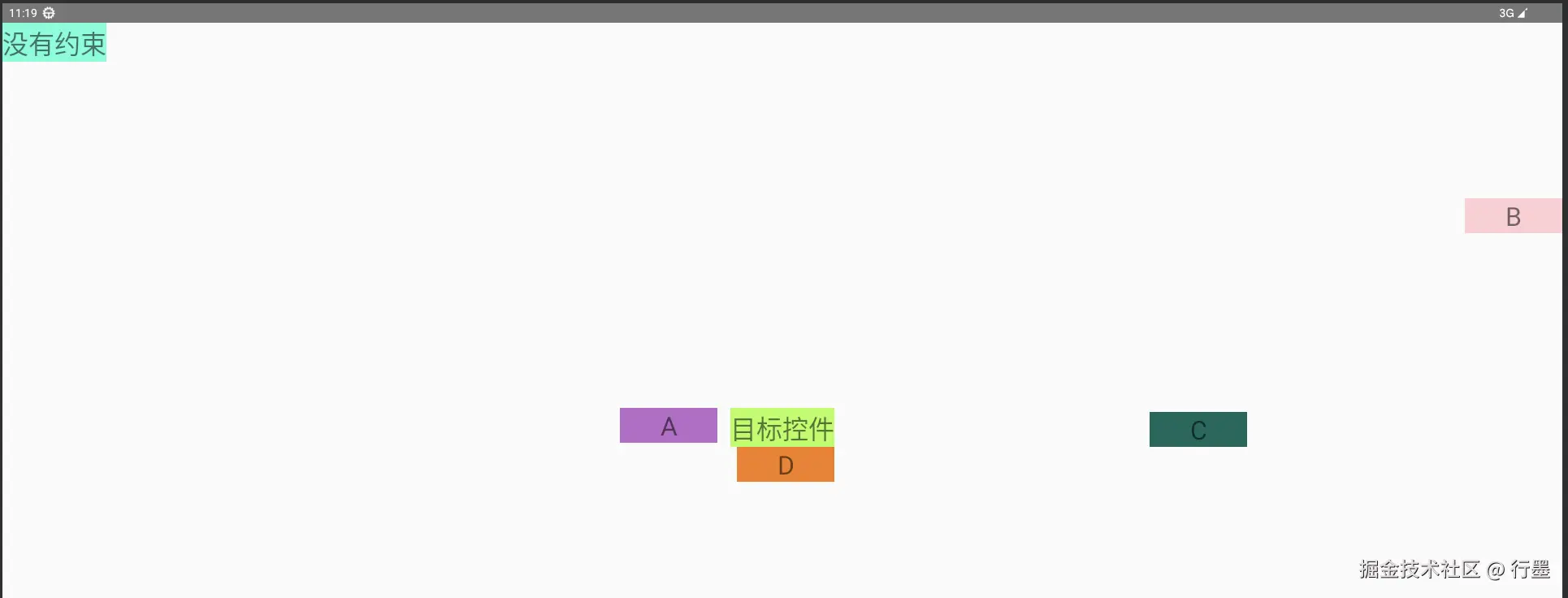
 这个布局使用
 ConstraintLayout 作为根容器,以一个 "目标控件" 为中心,围绕它放置了多个文本视图,形成了有明确空间关系的布局结构。下面是详细解析:
1. 根布局(ConstraintLayout)
xml
ini
<androidx.constraintlayout.widget.ConstraintLayout
    xmlns:android="http://schemas.android.com/apk/res/android"
    xmlns:app="http://schemas.android.com/apk/res-auto"
    xmlns:tools="http://schemas.android.com/tools"
    android:layout_width="match_parent"
android:layout_height="match_parent">- 根布局宽高均为
match_parent,占据整个屏幕空间 - 定义了必要的命名空间,支持系统属性、ConstraintLayout 自定义属性和布局编辑器工具属性
2. 核心目标控件(target)
xml
ini
<TextView
    android:id="@+id/target"
    android:layout_width="wrap_content"
    android:layout_height="wrap_content"
    app:layout_constraintWidth_min="120dp"
    android:text="目标控件"
    android:gravity="center"
    android:textSize="32sp"
    android:background="@color/color_10"
    app:layout_constraintTop_toTopOf="parent"
    app:layout_constraintEnd_toEndOf="parent"
    app:layout_constraintStart_toStartOf="parent"
app:layout_constraintBottom_toBottomOf="parent" />- 定位:通过四个方向(上下左右)都与父布局对齐,被约束在屏幕正中心
- 尺寸 :宽度自适应内容,但最小宽度为 120dp(
app:layout_constraintWidth_min) - 样式 :32sp 大字体,文字居中显示,背景色为
color_10(需在 colors.xml 中定义) - 这是整个布局的核心参考点,其他多个控件都以它为基准进行定位
3. 无约束的 TextView("没有约束")
xml
ini
<TextView
    android:layout_width="wrap_content"
    android:layout_height="wrap_content"
    android:background="@color/color_7"
    android:gravity="center"
    android:text="没有约束"
    android:textSize="32sp"
app:layout_constraintWidth_min="120dp" />- 特点 :没有设置任何
app:layout_constraintXXX属性,也没有tools:属性 - 实际位置:在运行时会默认显示在屏幕左上角(0,0 坐标)
- 问题:这是不规范的写法,没有约束的控件在不同设备上可能出现位置偏移
4. A 控件(左侧文本)
xml
ini
<TextView
    android:layout_width="wrap_content"
    android:layout_height="wrap_content"
    android:background="@color/color_3"
    android:gravity="center"
    android:text="A"
    android:textSize="32sp"
    android:layout_marginEnd="16dp"
    app:layout_constraintEnd_toStartOf="@+id/target"
    app:layout_constraintTop_toTopOf="@+id/target"
app:layout_constraintWidth_min="120dp" />-
定位关系:
app:layout_constraintEnd_toStartOf="@+id/target":右边缘与目标控件的左边缘对齐app:layout_constraintTop_toTopOf="@+id/target":上边缘与目标控件的上边缘对齐android:layout_marginEnd="16dp":与目标控件之间保持 16dp 的间距
-
最终位置:位于目标控件的左侧,且与目标控件顶部对齐
5. B 控件(上方文本)
xml
ini
<TextView
    android:layout_width="wrap_content"
    android:layout_height="wrap_content"
    android:background="@color/color_1"
    android:gravity="center"
    android:text="B"
    android:textSize="32sp"
    app:layout_constraintBottom_toTopOf="@+id/target"
    app:layout_constraintEnd_toEndOf="parent"
    app:layout_constraintTop_toTopOf="parent"
app:layout_constraintWidth_min="120dp" />-
定位关系:
app:layout_constraintBottom_toTopOf="@+id/target":下边缘与目标控件的上边缘对齐app:layout_constraintEnd_toEndOf="parent":右边缘与父布局右边缘对齐app:layout_constraintTop_toTopOf="parent":上边缘与父布局上边缘对齐
-
最终位置:位于屏幕右侧、目标控件的上方,高度会拉伸填充父布局顶部到目标控件顶部之间的空间
6. C 控件(右侧文本)
xml
ini
<TextView
    android:id="@+id/textView"
    android:layout_width="wrap_content"
    android:layout_height="wrap_content"
    android:background="@color/color_8"
    android:gravity="center"
    android:text="C"
    android:textSize="32sp"
    app:layout_constraintBottom_toBottomOf="@+id/target"
    app:layout_constraintEnd_toEndOf="parent"
    app:layout_constraintStart_toEndOf="@+id/target"
app:layout_constraintWidth_min="120dp" />-
定位关系:
app:layout_constraintStart_toEndOf="@+id/target":左边缘与目标控件的右边缘对齐app:layout_constraintBottom_toBottomOf="@+id/target":下边缘与目标控件的下边缘对齐app:layout_constraintEnd_toEndOf="parent":右边缘与父布局右边缘对齐
-
最终位置:位于目标控件的右侧,与目标控件底部对齐,宽度会拉伸填充目标控件右侧到父布局右边缘的空间
7. D 控件(下方文本)
xml
ini
<TextView
    android:layout_width="wrap_content"
    android:layout_height="wrap_content"
    android:background="@color/color_12"
    android:gravity="center"
    android:text="D"
    android:textSize="32sp"
    app:layout_constraintEnd_toEndOf="@+id/target"
    app:layout_constraintTop_toBottomOf="@+id/target"
app:layout_constraintWidth_min="120dp" />-
定位关系:
app:layout_constraintTop_toBottomOf="@+id/target":上边缘与目标控件的下边缘对齐app:layout_constraintEnd_toEndOf="@+id/target":右边缘与目标控件的右边缘对齐
-
最终位置:位于目标控件的正下方,且与目标控件右对齐
整体布局效果
- 屏幕中心是 "目标控件"
- 目标控件左侧是 "A" 控件
- 目标控件右侧是 "C" 控件
- 目标控件上方右侧是 "B" 控件
- 目标控件下方右侧是 "D" 控件
- 屏幕左上角是 "没有约束" 控件(运行时位置)
这个布局展示了 ConstraintLayout 的核心能力:以一个中心控件为参考点,通过简单的约束关系实现其他控件的精确定位,形成清晰的空间结构,同时保持布局层级的扁平化。