摘要
基于最近在学习安卓开发,完成一个计算器实现,基于java实现,学习一项技能最好的就是现在开始,千里之行,始于足下,这个事情也是拖了很久很久,以前完全没有静心学习,断断续续,无疾而终,今天终于完成了第一步。
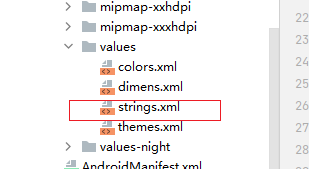
1, 布局文件
java
<resources>
    <string name="app_name">chapter03</string>
    <string name="sim_calc">简单计算器</string>

    <string name="opAdd">+</string>
    <string name="opMinus">-</string>
    <string name="opMultiply">*</string>
    <string name="opDivide">/</string>
    <string name="num1">1</string>
    <string name="num2">2</string>
    <string name="num3">3</string>
    <string name="num4">4</string>
    <string name="num5">5</string>
    <string name="num6">6</string>
    <string name="num7">7</string>
    <string name="num8">8</string>
    <string name="num9">9</string>
    <string name="num0">0</string>
    <string name="opEqual">=</string>
    <string name="opClear">AC</string>
    <string name="opPoint">.</string>
    <string name="opPower">1/x</string>
    <string name="opSqrt">√</string>


</resources>
java
<?xml version="1.0" encoding="utf-8"?>
<LinearLayout xmlns:android="http://schemas.android.com/apk/res/android"
    android:layout_width="match_parent"
    android:layout_height="match_parent"
    android:background="#EEEEEE"
    android:orientation="vertical"
    android:padding="5dp">

  <ScrollView
      android:layout_width="match_parent"
      android:layout_height="wrap_content">
      <LinearLayout
          android:layout_width="match_parent"
          android:layout_height="wrap_content"
          android:orientation="vertical">

          <TextView
              android:layout_width="match_parent"
              android:layout_height="wrap_content"
              android:text="@string/sim_calc"
              android:gravity="center"
              android:textColor="@color/black">
          </TextView>

          <TextView
              android:id="@+id/tv_result"
              android:layout_width="match_parent"
              android:layout_height="wrap_content"
              android:text="0"
              android:lines="3"
              android:textColor="@color/black"
              android:background="@color/white"
              android:textSize="25dp"
              android:gravity="right|bottom">
          </TextView>
      </LinearLayout>
  </ScrollView>

    <GridLayout
        android:layout_width="match_parent"
        android:layout_height="wrap_content"
        android:columnCount="4"
        android:rowCount="5"
        ><Button
        android:id="@+id/add"
        style="@style/Widget.AppCompat.Button.Colored"
        android:layout_width="wrap_content"
        android:layout_height="wrap_content"
        android:layout_margin="3dp"
        android:text="@string/opAdd"
        android:textSize="25sp" />

        <Button
            android:id="@+id/minus"
            style="@style/Widget.AppCompat.Button.Colored"
            android:layout_width="wrap_content"
            android:layout_height="wrap_content"
            android:layout_margin="3dp"
            android:text="@string/opMinus"
            android:textSize="25sp" />

        <Button
            android:id="@+id/multiply"
            style="@style/Widget.AppCompat.Button.Colored"
            android:layout_width="wrap_content"
            android:layout_height="wrap_content"
            android:layout_margin="3dp"
            android:text="@string/opMultiply"
            android:textSize="25sp" />

        <Button
            android:id="@+id/divide"
            style="@style/Widget.AppCompat.Button.Colored"
            android:layout_width="wrap_content"
            android:layout_height="wrap_content"
            android:layout_margin="3dp"
            android:text="@string/opDivide"
            android:textSize="25sp" />

        <Button
            android:id="@+id/num1"
            style="@style/Widget.AppCompat.Button.Colored"
            android:layout_width="wrap_content"
            android:layout_height="wrap_content"
            android:layout_margin="3dp"
            android:text="@string/num1"
            android:textSize="25sp" />

        <Button
            android:id="@+id/num2"
            style="@style/Widget.AppCompat.Button.Colored"
            android:layout_width="wrap_content"
            android:layout_height="wrap_content"
            android:layout_margin="3dp"
            android:text="@string/num2"
            android:textSize="25sp" />

        <Button
            android:id="@+id/num3"
            style="@style/Widget.AppCompat.Button.Colored"
            android:layout_width="wrap_content"
            android:layout_height="wrap_content"
            android:layout_margin="3dp"
            android:text="@string/num3"
            android:textSize="25sp" />

        <Button
            android:id="@+id/power"
            style="@style/Widget.AppCompat.Button.Colored"
            android:layout_width="wrap_content"
            android:layout_height="wrap_content"
            android:layout_margin="3dp"
            android:text="@string/opPower"
            android:textSize="25sp" />

        <Button
            android:id="@+id/num4"
            style="@style/Widget.AppCompat.Button.Colored"
            android:layout_width="wrap_content"
            android:layout_height="wrap_content"
            android:layout_margin="3dp"
            android:text="@string/num4"
            android:textSize="25sp" />

        <Button
            android:id="@+id/num5"
            style="@style/Widget.AppCompat.Button.Colored"
            android:layout_width="wrap_content"
            android:layout_height="wrap_content"
            android:layout_margin="3dp"
            android:text="@string/num5"
            android:textSize="25sp" />

        <Button
            android:id="@+id/num6"
            style="@style/Widget.AppCompat.Button.Colored"
            android:layout_width="wrap_content"
            android:layout_height="wrap_content"
            android:layout_margin="3dp"
            android:text="@string/num6"
            android:textSize="25sp" />

        <Button
            android:id="@+id/sqrt"
            style="@style/Widget.AppCompat.Button.Colored"
            android:layout_width="wrap_content"
            android:layout_height="wrap_content"
            android:layout_margin="3dp"
            android:text="@string/opSqrt"
            android:textSize="25sp" />

        <Button
            android:id="@+id/num7"
            style="@style/Widget.AppCompat.Button.Colored"
            android:layout_width="wrap_content"
            android:layout_height="wrap_content"
            android:layout_margin="3dp"
            android:text="@string/num7"
            android:textSize="25sp" />

        <Button
            android:id="@+id/num8"
            style="@style/Widget.AppCompat.Button.Colored"
            android:layout_width="wrap_content"
            android:layout_height="wrap_content"
            android:layout_margin="3dp"
            android:text="@string/num8"
            android:textSize="25sp" />

        <Button
            android:id="@+id/num9"
            style="@style/Widget.AppCompat.Button.Colored"
            android:layout_width="wrap_content"
            android:layout_height="wrap_content"
            android:layout_margin="3dp"
            android:text="@string/num9"
            android:textSize="25sp" />

        <Button
            android:id="@+id/equal"
            style="@style/Widget.AppCompat.Button.Colored"
            android:layout_width="wrap_content"
            android:layout_height="wrap_content"
            android:layout_margin="3dp"
            android:text="@string/opEqual"
            android:textSize="25sp" />

        <Button
            android:id="@+id/clear"
            style="@style/Widget.AppCompat.Button.Colored"
            android:layout_width="wrap_content"
            android:layout_height="wrap_content"
            android:layout_margin="3dp"
            android:text="@string/opClear"
            android:textSize="25sp" />

        <Button
            android:id="@+id/num0"
            style="@style/Widget.AppCompat.Button.Colored"
            android:layout_width="wrap_content"
            android:layout_height="wrap_content"
            android:layout_margin="3dp"
            android:text="@string/num0"
            android:textSize="25sp" />

        <Button
            android:id="@+id/point"
            style="@style/Widget.AppCompat.Button.Colored"
            android:layout_width="wrap_content"
            android:layout_height="wrap_content"
            android:layout_margin="3dp"
            android:text="@string/opPoint"
            android:textSize="25sp" />
        <Button
            android:id="@+id/ce"
            style="@style/Widget.AppCompat.Button.Colored"
            android:layout_width="wrap_content"
            android:layout_height="wrap_content"
            android:layout_margin="3dp"
            android:text="CE"
            android:textSize="25sp" />
  <!--      <Button
            android:id="@+id/cancel"
            android:layout_width="0dp"
            android:layout_height="@dimen/Button_front_height"
            android:layout_columnWeight="1"
            android:gravity="center"
            android:text="cancel"
            android:textAllCaps="false"
            android:textColor="@color/black"
            android:textSize="@dimen/Button_front_siez"
            />
        <Button
            android:id="@+id/c13"
            android:layout_width="0dp"
            android:layout_height="@dimen/Button_front_height"
            android:layout_columnWeight="1"
            android:gravity="center"
            android:text="cancel"
            android:textAllCaps="false"
            android:textColor="@color/black"
            android:textSize="@dimen/Button_front_siez"
            />
        <Button
            android:id="@+id/c2"
            android:layout_width="0dp"
            android:layout_height="@dimen/Button_front_height"
            android:layout_columnWeight="1"
            android:gravity="center"
            android:text="cancel"
            android:textAllCaps="false"
            android:textColor="@color/black"
            android:textSize="@dimen/Button_front_siez"
            />
        <Button
            android:id="@+id/c3"
            android:layout_width="0dp"
            android:layout_height="@dimen/Button_front_height"
            android:layout_columnWeight="1"
            android:gravity="center"
            android:text="cancel"
            android:textAllCaps="false"
            android:textColor="@color/black"
            android:textSize="@dimen/Button_front_siez"
            />-->
    </GridLayout>

</LinearLayout>
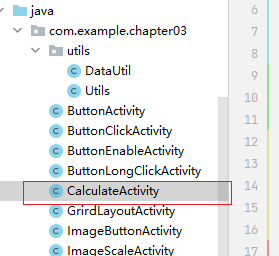
2,执行文件
java
package com.example.chapter03;

import static android.text.method.TextKeyListener.clear;

import androidx.appcompat.app.AppCompatActivity;
import android.view.View.OnClickListener;
import android.os.Bundle;
import android.view.View;
import android.widget.Button;
import android.widget.TextView;

public class CalculateActivity extends AppCompatActivity implements OnClickListener {


    private TextView textView;
    @Override
    protected void onCreate(Bundle savedInstanceState) {
        super.onCreate(savedInstanceState);
        setContentView(R.layout.activity_calculate);
        textView = findViewById(R.id.tv_result);
        findViewById(R.id.add).setOnClickListener(this);
        findViewById(R.id.ce).setOnClickListener(this);
        findViewById(R.id.clear).setOnClickListener(this);
        findViewById(R.id.multiply).setOnClickListener(this);

        findViewById(R.id.num0).setOnClickListener(this);
        findViewById(R.id.num2).setOnClickListener(this);
        findViewById(R.id.num1).setOnClickListener(this);
        findViewById(R.id.num3).setOnClickListener(this);

        findViewById(R.id.num4).setOnClickListener(this);
        findViewById(R.id.num5).setOnClickListener(this);
        findViewById(R.id.num6).setOnClickListener(this);
        findViewById(R.id.num7).setOnClickListener(this);

        findViewById(R.id.num8).setOnClickListener(this);
        findViewById(R.id.num9).setOnClickListener(this);
        findViewById(R.id.minus).setOnClickListener(this);
        findViewById(R.id.divide).setOnClickListener(this);

        findViewById(R.id.equal).setOnClickListener(this);
        findViewById(R.id.sqrt).setOnClickListener(this);
        findViewById(R.id.power).setOnClickListener(this);
        findViewById(R.id.point).setOnClickListener(this);
    }

    String input;
    String firstNum = "";
    String oprator = "";
    String SecondNum = "";
    String result = "";
    String showtext = "";
    @Override
    public void onClick(View v) {

        if (v.getId() == R.id.sqrt)
        {
            input = "√";
        }
        else
        {
            input = ((TextView) v).getText().toString();
        }


        switch (v.getId())
        {
            case R.id.clear:
               clear();
                break;
            case R.id.ce:
                break;
            case R.id.power:
                double power_result =1.0/Double.parseDouble(firstNum);
                refreshOperate(String.valueOf(power_result));
                refreshText(showtext + "/=" + result);
                break;
            case R.id.add:
            case R.id.minus:
            case R.id.multiply:
            case R.id.divide:
                oprator = input;
                refreshText(showtext + oprator);
                break;

            case R.id.equal:
                double calculate_result = calculateFour();
                refreshOperate(String.valueOf(calculate_result));
                refreshText(showtext + "=" + result);
                break;
            case R.id.sqrt:
                double sqrt_result =Math.sqrt(Double.parseDouble(firstNum));
                refreshOperate(String.valueOf(sqrt_result));
                refreshText(showtext + "√=" + result);
                break;
            default:
                if (result.length() > 0 && oprator.equals(""))
                    clear();
                //有运算符
                if (oprator.equals(""))
                {
                    firstNum = firstNum + input;
                }
                else//无运算符
                {
                    SecondNum = SecondNum+ input;
                }
                //整数前不需要加0显示
                if (showtext.equals("0") && !showtext.equals("."))
                {
                    refreshText(input);
                }
                else
                {
                    refreshText(showtext + input);
                }
                break;
        }
    }
  //返回计算结果
    private double calculateFour() {

        switch (oprator)
        {
            case "+":
                return  Double.parseDouble(firstNum) + Double.parseDouble(SecondNum);
            case "-":
                return  Double.parseDouble(firstNum) - Double.parseDouble(SecondNum);
            case "x":
                return  Double.parseDouble(firstNum) * Double.parseDouble(SecondNum);
            case "/":
                return  Double.parseDouble(firstNum) / Double.parseDouble(SecondNum);
            default:
                break;
        }

        return 0;
    }

    private void clear() {
        refreshText("");
        refreshOperate("");
    }
    //刷新运算结果

    private void refreshOperate(String  newResult)
    {
        result = newResult;
        firstNum = result;
        SecondNum = "";
        oprator = "";

    }

    //刷新文本显示
    private  void refreshText(String text)
    {
        showtext = text;
        textView.setText(showtext);
    }
}
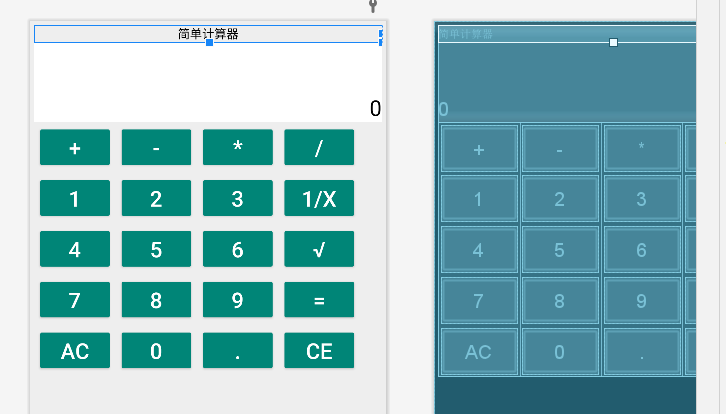
3,完成效果
4总结
从开始制作这个到完成,整个耗时两个小时,收获蛮大的。只需要新建工程后,完整复制以上代码到布局文件xml中以及到Activity中即可实现。
如果出现编译乱码
!\[Pasted image 20251002163739.png]
https://blog.csdn.net/hongke_fei/article/details/109178237
2、解决办法:打开Studio的安装根目录,如下图
!\[Pasted image 20251002163803.png]
3、进入bin目录里面,如下图:
!\[Pasted image 20251002163808.png]
找到图中1和2 两个文件,用文档形式打开,注意,两个文档基本一致,修改如下图:
!\[Pasted image 20251002163814.png]
在最后一行添加以上代码
-Dfile.encoding=UTF-8
然后重启Studio就可以了。
编译报错
如果报错找不到文件,以管理员方式打开andriod studio
下边编译出现乱码解决情况
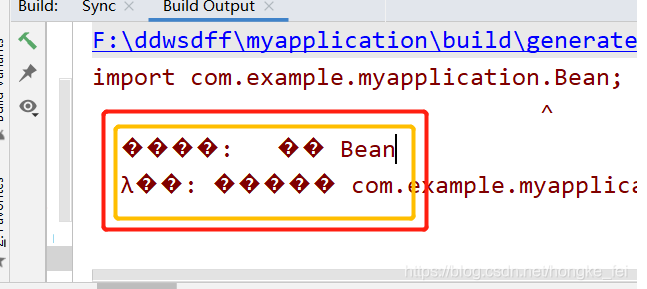
参加网上链接