xlog 是微信团队分享的基于 c/c++ 高可靠性高性能的运行期日志组件,官方 wiki 上集成的方式很简单,只需要执行build_ios.py脚本,选择Clean && build xlog.即可,但实际上还是有一些坑。
真机打包报错修复
shell
Undefined symbols for architecture arm64:

  "_MD5", referenced from:

      strutil::BufferMD5(std::__1::basic_string<char, std::__1::char_traits<char>, std::__1::allocator<char>> const&) in mars[arm64][16](strutil.cc.o)

      strutil::BufferMD5(void const*, unsigned long) in mars[arm64][16](strutil.cc.o)

ld: symbol(s) not found for architecture arm64

clang: error: linker command failed with exit code 1 (use -v to see invocation)
出现了_MD5这个Undefined symbols。这个符号是在mars/comm/strutil.cc文件里引入的。
cpp
#include "openssl/md5.h"

// ...

std::string BufferMD5(const std::string &buf) {
    return BufferMD5(buf.data(), buf.size());
}

std::string BufferMD5(const void* buffer, size_t size) {
    uint8_t md5[MD5_DIGEST_LENGTH] = {0};
    MD5(static_cast<const unsigned char*>(buffer), static_cast<unsigned int>(size), md5);
    return strutil::MD5DigestToBase16(md5);
}
但在打包的时候,并没有把openssl 打进去。
方法一:自行依赖 openssl
想简单解决的话,可以自行依赖一个 openssl 的 pod 库。我这里试了下面这个版本,是可以正常运行的,虽然和mars 库里的似乎不是一个版本。
ruby
pod 'OpenSSL-Universal', '1.0.2.20'方法二:修改 mars 库
通过阅读源码,可以发现这个BufferMD5,在 xlog 里并没有使用到,只有打整个 mars 库的时候才会用到。可以简单通过宏定义,跳过相关的代码。
build脚本修改
python
IOS_BUILD_SIMULATOR_XLOG_CMD = 'cmake ../.. -DCMAKE_BUILD_TYPE=Release -DCMAKE_TOOLCHAIN_FILE=../../ios.toolchain.cmake -DPLATFORM=SIMULATOR -DENABLE_ARC=0 -DENABLE_BITCODE=0 -DENABLE_VISIBILITY=1 -DMARS_XLOG_ONLY=1 && make -j8 && make install'
IOS_BUILD_OS_XLOG_CMD = 'cmake ../.. -DCMAKE_BUILD_TYPE=Release -DCMAKE_TOOLCHAIN_FILE=../../ios.toolchain.cmake -DPLATFORM=OS -DENABLE_ARC=0 -DENABLE_BITCODE=0 -DENABLE_VISIBILITY=1 -DMARS_XLOG_ONLY=1 && make -j8 && make install'

// 替换build_ios_xlog里的IOS_BUILD_OS_CMD和IOS_BUILD_SIMULATOR_CMD
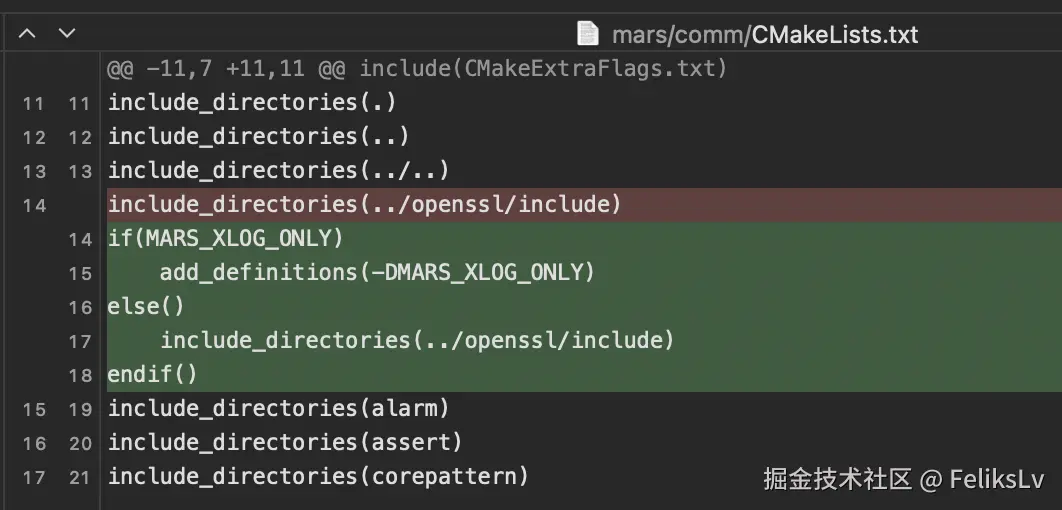
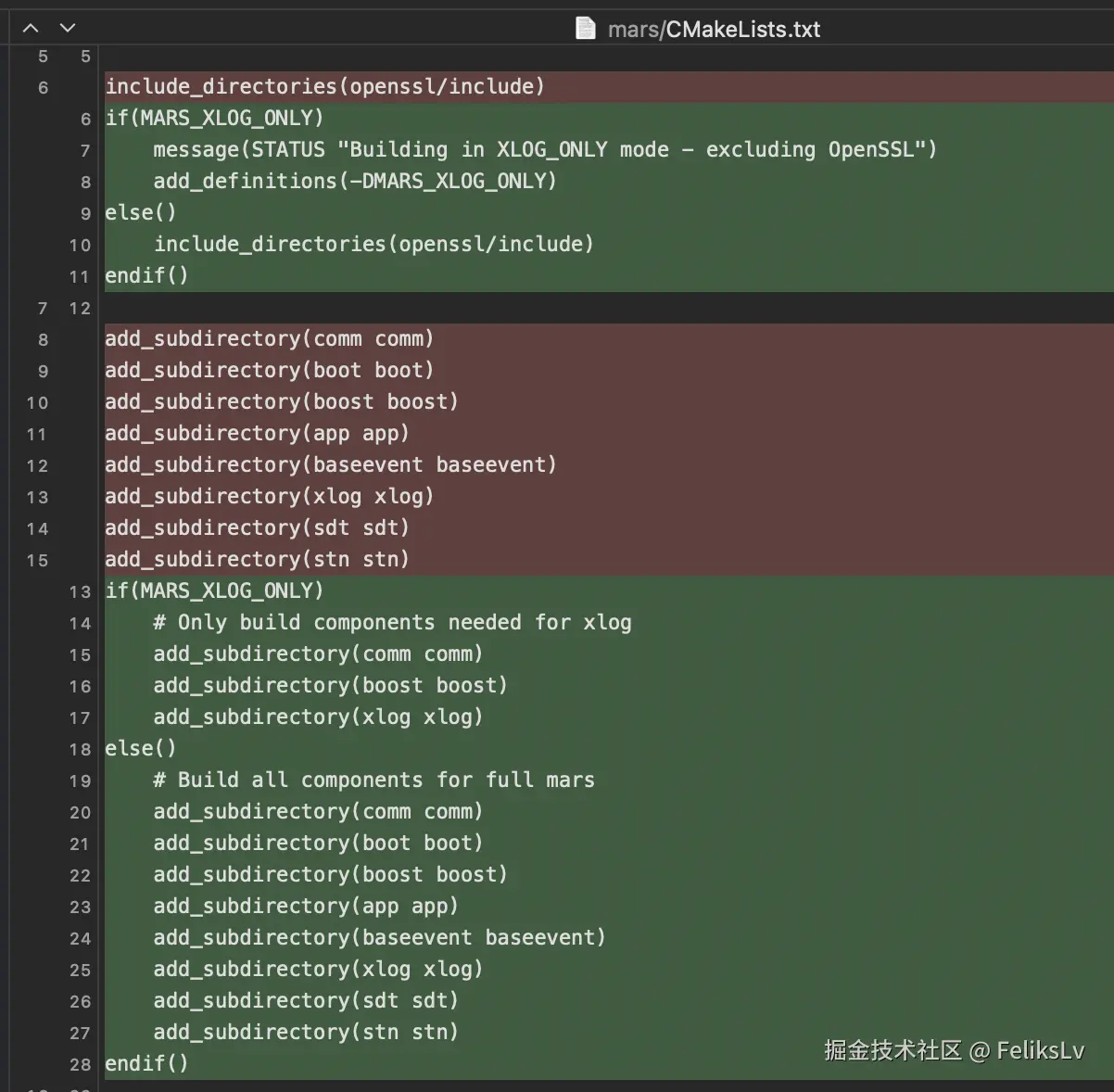
CMakeLists.txt 修改
- mars/comm/CMakeLists.txt
- mars/CMakeLists.txt
修改代码
- mars/comm/strutil.h
cpp
#ifndef MARS_XLOG_ONLY
std::string BufferMD5(const void* buffer, size_t size);
std::string BufferMD5(const std::string& buf);
#endif- mars/comm/strutil.cc
cpp
#ifndef MARS_XLOG_ONLY
#include "openssl/md5.h"
#endif

// ...

#ifndef MARS_XLOG_ONLY
std::string BufferMD5(const std::string &buf) {
    return BufferMD5(buf.data(), buf.size());
}
@@ -338,6 +341,7 @@ std::string BufferMD5(const void* buffer, size_t size) {
    MD5(static_cast<const unsigned char*>(buffer), static_cast<unsigned int>(size), md5);
    return strutil::MD5DigestToBase16(md5);
}
#endif
还有个mars/comm/shuffle.h,依赖了openssl/rand.h,也需要处理下
cpp
#ifndef MARS_XLOG_ONLY
// 头文件里的函数定义,这里就不放了
#endif
之后重新build framework 即可。