、自己实现
1、首先我们创建一个BaseNotifyPropertyChanged类,继承INotifyPropertyChanged,这个方法的作用是属性值变化时自动更新UI界面。
 public class BaseNotifyPropertyChanged : INotifyPropertyChanged
 {
     public event PropertyChangedEventHandler? PropertyChanged;
     public void RaisePropertyChanged(string propertyName)
     {
         if (!string.IsNullOrEmpty(propertyName))
         {
             PropertyChanged?.Invoke(this, new PropertyChangedEventArgs(propertyName));
         }
     }
 }
2、创建一个KeyPressViewModel类,继承BaseNotifyPropertyChanged。
 public class KeyPressViewModel : BaseNotifyPropertyChanged
 {
     private string cardNumber;
     private int selectionStart=0;

     /// <summary>
     /// 输入文本框的值
     /// </summary>
     public string CardNumber
     {
         get { return cardNumber; }
         set
         {
             cardNumber = value;
             RaisePropertyChanged(nameof(CardNumber));
         }
     }

     /// <summary>
     /// 输入框光标位置
     /// </summary>
     public int SelectionStart
     {
         get { return selectionStart; }
         set { RaisePropertyChanged(nameof(SelectionStart)); }
     }

     /// <summary>
     /// 数字按钮绑定事件
     /// </summary>
     public ICommand NumberCommand
     {
         get { return new RelayCommand<string>(Number); }
     }

     /// <summary>
     /// 清空按钮绑定事件
     /// </summary>
     public ICommand ClearCommand
     {
         get { return new RelayCommand(Clear); }
     }

     /// <summary>
     /// 删除按钮绑定事件
     /// </summary>

     public ICommand DeleteCommand
     {
         get { return new RelayCommand(Delete); }
     }

     /// <summary>
     /// 数字点击事件
     /// </summary>
     /// <param name="key"></param>
     private void Number(string? key)
     {
         CardNumber += key;
     }

     /// <summary>
     /// 清空点击事件
     /// </summary>
     private void Clear()
     {
         CardNumber = string.Empty;
     }
     /// <summary>
     /// 删除点击事件
     /// </summary>
     private void Delete()
     {
         // 光标在输入框时,删除光标前一个字符
         if (!string.IsNullOrEmpty(CardNumber) && SelectionStart > 0)
         {
             CardNumber = CardNumber.Remove(SelectionStart - 1, 1);
         }
         //光标没有在输入框时,删除最后一个字符
         if (SelectionStart == 0)
         {
             CardNumber = CardNumber.Remove(CardNumber.Length - 1, 1);
         }
     }
 }
3、创建RelayCommand类,这个类的作用是绑定事件的操作,一个泛型版本,一个是非泛型。
public class RelayCommand : ICommand
{

    private Action _execute;
    private Func<bool> _canExecute;


    public RelayCommand(Action execute) : this(execute, null)
    {
    }

    public RelayCommand(Action execute, Func<bool> canExecute)
    {
        if (execute == null)
            throw new ArgumentNullException("execute");
        _execute = execute;
        _canExecute = canExecute;
    }

    public event EventHandler? CanExecuteChanged
    {
        add
        {
            if (_canExecute != null)
            {
                CommandManager.RequerySuggested += value;
            }
        }
        remove
        {
            if (_canExecute != null)
            {
                CommandManager.RequerySuggested -= value;
            }
        }
    }

    public bool CanExecute(object parameter)
    {
        return _canExecute == null ? true : _canExecute();
    }

    public void Execute(object parameter)
    {
        _execute();
    }
}

public class RelayCommand<T> : ICommand
{
    private readonly Predicate<T> _canExecute;
    private readonly Action<T> _execute;

    public RelayCommand(Action<T> execute) : this(execute, null)
    {
    }

    public RelayCommand(Action<T> execute, Predicate<T> canExecute)
    {
        if (execute == null)
            throw new ArgumentNullException("execute");
        _execute = execute;
        _canExecute = canExecute;
    }

    public event EventHandler? CanExecuteChanged
    {
        add { CommandManager.RequerySuggested += value; }
        remove { CommandManager.RequerySuggested -= value; }
    }

    public bool CanExecute(object parameter)
    {
        return _canExecute == null ? true : _canExecute((T)parameter);
    }

    public void Execute(object parameter)
    {
        _execute((T)parameter);
    }
}
4、通过binding绑定输入框的值和事件的操作,代替传统直接在后台cs文件写事件。
<TextBox Text="{Binding CardNumber}"     x:Name="CardNumberTextBox"   local:TextBoxSelectionHelper.SelectionStart="{Binding SelectionStart, Mode=TwoWay}" Height="40"     Width="460" />
<Button  Content="1" Style="{StaticResource NumberButtonStyle}" Command="{Binding NumberCommand}"  CommandParameter="1"/>
<Button  Content="删除" Style="{StaticResource RedButtonStyle}" Command="{Binding DeleteCommand}"   />
<Button  Content="清空" Style="{StaticResource RedButtonStyle}" Command="{Binding ClearCommand}"   />
5、将MainWindow的DataContext赋值给ViewModel,我这里用了依赖注入的方法,所以直接是在app.cs里面赋值的,也可以在MainWindow.cs。
  public partial class App : Application
  {
      public App()
      {
          Services = ConfigureServices();
          this.InitializeComponent();
      }

      /// <summary>
      /// Gets the current <see cref="App"/> instance in use
      /// </summary>
      public new static App Current => (App)Application.Current;

      /// <summary>
      /// Gets the <see cref="IServiceProvider"/> instance to resolve application services.
      /// </summary>
      public IServiceProvider Services { get; }

      /// <summary>
      /// Configures the services for the application.
      /// </summary>
      private static IServiceProvider ConfigureServices()
      {
          var services = new ServiceCollection();
          services.AddTransient<KeyPressViewModelCommunityToolkit>();
          services.AddTransient<KeyPressViewModelPrism>();
          services.AddTransient<KeyPressViewModel>();
          services.AddTransient(sp=>new MainWindow() { DataContext=sp.GetRequiredService<KeyPressViewModelCommunityToolkit>()});
          return services.BuildServiceProvider();
      }

      protected override void OnStartup(StartupEventArgs e)
      {
          base.OnStartup(e);
          MainWindow= Services.GetRequiredService<MainWindow>();
          MainWindow.Show();
      }
  }

    public partial class MainWindow : Window
    {
        public MainWindow()
        {
            InitializeComponent();
            DataContext =App.Current.Services.GetService<KeyPressViewModel>();
        }
    }
6、如果不用依赖注入的方式,可以在MainWindow.xaml或者MainWindow.cs将MainWindow的DataContext赋值给ViewModel。
<Window x:Class="SelfServiceReportPrinter.MainWindow"
        xmlns="http://schemas.microsoft.com/winfx/2006/xaml/presentation"
        xmlns:x="http://schemas.microsoft.com/winfx/2006/xaml"
        xmlns:d="http://schemas.microsoft.com/expression/blend/2008"
        xmlns:mc="http://schemas.openxmlformats.org/markup-compatibility/2006"
        xmlns:selfservicereportprinter="clr-namespace:SelfServiceReportPrinter"
        xmlns:local="clr-namespace:SelfServiceReportPrinter"
        mc:Ignorable="d"
        WindowStartupLocation="CenterScreen"
        AllowsTransparency="True"
        WindowStyle="None"
        Title="MainWindow"
        Height="1080"
        Width="1920">
    <Window.DataContext>
        <local:KeyPressViewModel />
    </Window.DataContext>

 public partial class MainWindow : Window
 {
     public MainWindow()
     {
         InitializeComponent();
         DataContext =new KeyPressViewModel();
     }
 }
以上就是自己去实现mvvm的方式,会比较繁琐,如果不是复杂的项目大多数还是用社区的CommunityToolkit.MVVM,复杂的项目可以使用Prism
二、使用微软社区的CommunityToolkit.MVVM
1、首先安装CommunityToolkit.MVVM的包。
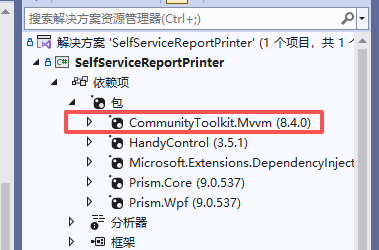
2、创建一个新的类KeyPressViewModelCommunityToolkit类,继承ObservableObject,CommunityToolkit代码就简洁很多了,直接在方法或者属性上面加特性就可以。
public partial class KeyPressViewModelCommunityToolkit : ObservableObject
{
    [ObservableProperty]
    private string cardNumber = string.Empty;

    [ObservableProperty]
    private int selectionStart;

    /// <summary>
    /// 数字点击事件
    /// </summary>
    /// <param name="key"></param>
    [RelayCommand]
    private void Number(string? key)
    {
        CardNumber += key;
    }

    /// <summary>
    /// 清空输入框
    /// </summary>
    [RelayCommand]
    private void Clear()
    {
        CardNumber = string.Empty;
    }

    /// <summary>
    /// 删除点击事件
    /// </summary>
    [RelayCommand]
    private void Delete()
    {
        // 光标在输入框时,删除光标前一个字符
        if (!string.IsNullOrEmpty(CardNumber) && SelectionStart > 0)
        {
            CardNumber = CardNumber.Remove(SelectionStart - 1, 1);
        }
        //光标没有在输入框时,删除最后一个字符
        if (SelectionStart == 0)
        {
            CardNumber = CardNumber.Remove(CardNumber.Length - 1, 1);
        }
    }
}
三、Prism
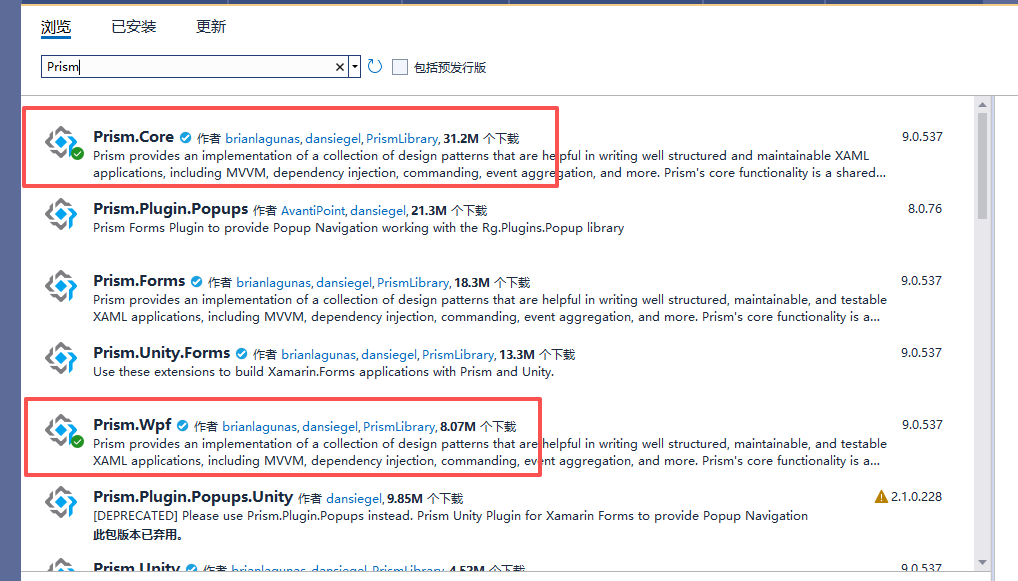
1、安装Prism.Core和Prism.Wpf,其他的包根据后续实际使用在安装。
2、创建一个KeyPressViewModelPrism类继承BindableBase。
public partial class KeyPressViewModelPrism : BindableBase
{
    private string cardNumber;
    private int selectionStart;

    public string CardNumber
    {
        get { return cardNumber; }
        set { SetProperty(ref cardNumber, value); }
    }

    public int SelectionStart
    {
        get { return selectionStart; }
        set { SetProperty(ref selectionStart, value); }
    }

    public DelegateCommand<string> NumberCommand { get; }
    public DelegateCommand ClearCommand { get; }
    public DelegateCommand DeleteCommand { get; }
    public KeyPressViewModelPrism()
    {
        NumberCommand = new DelegateCommand<string>(Number);
        ClearCommand = new DelegateCommand(Clear);
        DeleteCommand = new DelegateCommand(Delete);
    }

    /// <summary>
    /// 数字点击事件
    /// </summary>
    /// <param name="key"></param>
    private void Number(string? key)
    {
        CardNumber += key;
    }

    /// <summary>
    /// 清空点击事件
    /// </summary>
    private void Clear()
    {
        CardNumber = string.Empty;
    }

    /// <summary>
    /// 删除点击事件
    /// </summary>
    private void Delete()
    {
        // 光标在输入框时,删除光标前一个字符
        if (!string.IsNullOrEmpty(CardNumber) && SelectionStart > 0)
        {
            CardNumber = CardNumber.Remove(SelectionStart - 1, 1);
        }
        //光标没有在输入框时,删除最后一个字符
        if (SelectionStart == 0)
        {
            CardNumber = CardNumber.Remove(CardNumber.Length - 1, 1);
        }
    }