利用pthon和Deekseek搞了一个点名程序后,心血来潮,又整了一个html版的。效果如下:
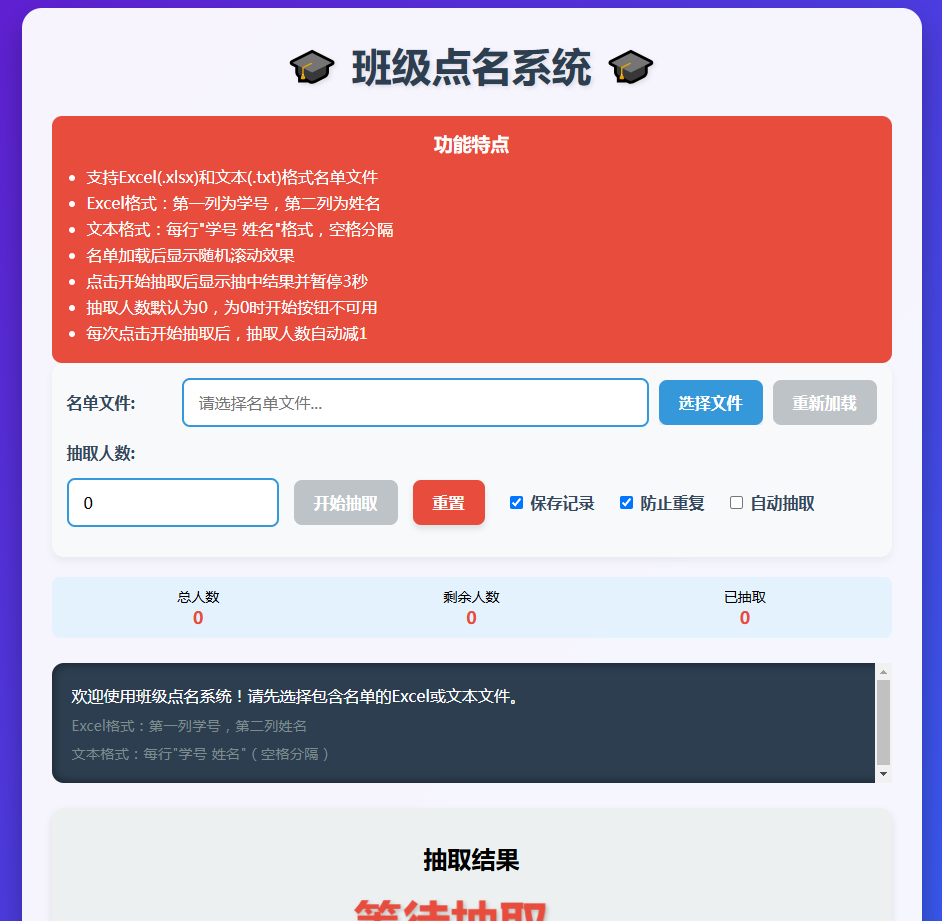
代码如下:
<!DOCTYPE html>
<html lang="zh-CN">
<head>
<meta charset="UTF-8">
<meta name="viewport" content="width=device-width, initial-scale=1.0">
<title>班级点名系统</title>
<style>
* {
margin: 0;
padding: 0;
box-sizing: border-box;
font-family: 'Microsoft YaHei', sans-serif;
}
body {
background: linear-gradient(135deg, #6a11cb 0%, #2575fc 100%);
min-height: 100vh;
display: flex;
justify-content: center;
align-items: center;
padding: 20px;
}
.container {
width: 90%;
max-width: 900px;
background: rgba(255, 255, 255, 0.95);
border-radius: 20px;
box-shadow: 0 15px 30px rgba(0, 0, 0, 0.3);
padding: 30px;
overflow: hidden;
}
h1 {
text-align: center;
color: #2c3e50;
margin-bottom: 25px;
font-size: 2.5rem;
text-shadow: 2px 2px 4px rgba(0, 0, 0, 0.1);
}
.control-group {
margin-bottom: 20px;
padding: 15px;
background: #f8f9fa;
border-radius: 12px;
box-shadow: 0 4px 8px rgba(0, 0, 0, 0.05);
}
.control-row {
display: flex;
flex-wrap: wrap;
align-items: center;
gap: 15px;
margin-bottom: 15px;
}
.file-controls {
display: flex;
align-items: center;
gap: 10px;
flex: 1;
}
.extract-controls {
display: flex;
flex-wrap: wrap;
align-items: center;
gap: 15px;
}
label {
font-weight: bold;
color: #34495e;
min-width: 100px;
}
input[type="text"], input[type="number"] {
padding: 12px 15px;
border: 2px solid #3498db;
border-radius: 8px;
font-size: 16px;
transition: border-color 0.3s;
flex: 1;
}
input:focus {
border-color: #e74c3c;
outline: none;
box-shadow: 0 0 8px rgba(231, 76, 60, 0.3);
}
button {
padding: 12px 20px;
background: #3498db;
color: white;
border: none;
border-radius: 8px;
cursor: pointer;
font-size: 16px;
font-weight: bold;
transition: all 0.3s;
box-shadow: 0 4px 6px rgba(0, 0, 0, 0.1);
}
button:hover {
background: #2980b9;
transform: translateY(-2px);
box-shadow: 0 6px 8px rgba(0, 0, 0, 0.15);
}
button:active {
transform: translateY(0);
}
button:disabled {
background: #bdc3c7;
cursor: not-allowed;
transform: none;
box-shadow: none;
}
.btn-danger {
background: #e74c3c;
}
.btn-danger:hover {
background: #c0392b;
}
.btn-success {
background: #2ecc71;
}
.btn-success:hover {
background: #27ae60;
}
.checkbox-group {
display: flex;
align-items: center;
gap: 8px;
margin-left: 10px;
}
.process-container {
background: #2c3e50;
color: white;
padding: 20px;
border-radius: 12px;
margin: 25px 0;
height: 120px;
overflow-y: auto;
box-shadow: inset 0 0 10px rgba(0, 0, 0, 0.5);
font-family: 'Courier New', monospace;
line-height: 1.6;
}
.result-container {
background: #ecf0f1;
padding: 25px;
border-radius: 12px;
text-align: center;
min-height: 200px;
display: flex;
flex-direction: column;
justify-content: center;
align-items: center;
box-shadow: 0 4px 8px rgba(0, 0, 0, 0.1);
position: relative;
}
.winner {
font-size: 3rem;
color: #e74c3c;
font-weight: bold;
text-shadow: 2px 2px 4px rgba(0, 0, 0, 0.2);
margin: 15px 0;
animation: pulse 1.5s infinite;
transition: all 0.5s ease;
}
.winner.scrolling {
animation: none;
transform: scale(1.1);
color: #3498db;
}
@keyframes pulse {
0% { transform: scale(1); }
50% { transform: scale(1.05); }
100% { transform: scale(1); }
}
.student-info {
font-size: 1.2rem;
margin-top: 5px;
color: #3498db;
transition: all 0.5s ease;
}
.student-info.scrolling {
color: #e74c3c;
}
.history-title {
margin-top: 25px;
color: #2c3e50;
font-size: 1.5rem;
text-align: center;
}
.history-list {
max-height: 200px;
overflow-y: auto;
padding: 15px;
background: #f8f9fa;
border-radius: 12px;
margin-top: 10px;
box-shadow: inset 0 0 5px rgba(0, 0, 0, 0.1);
}
.history-item {
padding: 10px;
border-bottom: 1px dashed #ddd;
}
.history-item:last-child {
border-bottom: none;
}
.instructions {
background: #f1c40f;
color: #2c3e50;
padding: 15px;
border-radius: 10px;
margin-top: 25px;
font-size: 0.9rem;
}
.feature-highlight {
background: #e74c3c;
color: white;
padding: 15px;
border-radius: 10px;
margin-top: 20px;
}
.feature-highlight h3 {
margin-bottom: 10px;
text-align: center;
}
.feature-highlight ul {
padding-left: 20px;
}
.feature-highlight li {
margin-bottom: 5px;
}
.file-input-wrapper {
position: relative;
display: inline-block;
overflow: hidden;
}
.file-input-wrapper input[type="file"] {
position: absolute;
left: 0;
top: 0;
opacity: 0;
cursor: pointer;
height: 100%;
width: 100%;
}
.status-bar {
display: flex;
justify-content: space-between;
margin-top: 15px;
padding: 10px;
background: #e3f2fd;
border-radius: 8px;
font-size: 14px;
}
.status-item {
display: flex;
flex-direction: column;
align-items: center;
flex: 1;
}
.status-value {
font-weight: bold;
font-size: 1.2em;
color: #e74c3c;
}
.file-info {
font-size: 0.9em;
color: #7f8c8d;
margin-top: 5px;
}
</style>
</head>
<body>
<div class="container">
<h1>🎓 班级点名系统 🎓</h1>
<div class="feature-highlight">
<h3>功能特点</h3>
<ul>
<li>支持Excel(.xlsx)和文本(.txt)格式名单文件</li>
<li>Excel格式:第一列为学号,第二列为姓名</li>
<li>文本格式:每行"学号 姓名"格式,空格分隔</li>
<li>名单加载后显示随机滚动效果</li>
<li>点击开始抽取后显示抽中结果并暂停3秒</li>
<li>抽取人数默认为0,为0时开始按钮不可用</li>
<li>每次点击开始抽取后,抽取人数自动减1</li>
</ul>
</div>
<div class="control-group">
<div class="control-row">
<label for="fileName">名单文件:</label>
<div class="file-controls">
<input type="text" id="fileName" placeholder="请选择名单文件..." readonly>
<div class="file-input-wrapper">
<button id="selectFileBtn">选择文件</button>
<input type="file" id="fileInput" accept=".xlsx,.txt">
</div>
<button id="reloadBtn">重新加载</button>
</div>
</div>
<div class="control-row">
<label for="extractCount">抽取人数:</label>
<div class="extract-controls">
<input type="number" id="extractCount" min="0" value="0">
<button id="startBtn" class="btn-success">开始抽取</button>
<button id="resetBtn" class="btn-danger">重置</button>
<div class="checkbox-group">
<input type="checkbox" id="saveRecord" checked>
<label for="saveRecord" style="min-width: auto">保存记录</label>
</div>
<div class="checkbox-group">
<input type="checkbox" id="preventRepeat" checked>
<label for="preventRepeat" style="min-width: auto">防止重复</label>
</div>
<div class="checkbox-group">
<input type="checkbox" id="autoExtract">
<label for="autoExtract" style="min-width: auto">自动抽取</label>
</div>
</div>
</div>
</div>
<div class="status-bar">
<div class="status-item">
<div>总人数</div>
<div class="status-value" id="totalCount">0</div>
</div>
<div class="status-item">
<div>剩余人数</div>
<div class="status-value" id="remainingCount">0</div>
</div>
<div class="status-item">
<div>已抽取</div>
<div class="status-value" id="extractedCount">0</div>
</div>
</div>
<div class="process-container" id="processDisplay">
<p>欢迎使用班级点名系统!请先选择包含名单的Excel或文本文件。</p>
<p class="file-info">Excel格式:第一列学号,第二列姓名</p>
<p class="file-info">文本格式:每行"学号 姓名"(空格分隔)</p>
</div>
<div class="result-container">
<h2>抽取结果</h2>
<div class="winner" id="winnerDisplay">等待抽取...</div>
<div class="student-info" id="studentIdDisplay"></div>
</div>
<h3 class="history-title">历史记录</h3>
<div class="history-list" id="historyList">
<!-- 历史记录将显示在这里 -->
</div>
<div class="instructions">
<p><strong>使用说明:</strong></p>
<ol>
<li>点击"选择文件"按钮,选择Excel或文本格式名单文件</li>
<li>名单加载成功后,抽取结果区域会随机滚动显示学生姓名</li>
<li>设置抽取人数(默认0,需设置为正整数)</li>
<li>点击"开始抽取"按钮进行点名</li>
<li>抽取结果会显示3秒,然后重新开始随机滚动</li>
<li>每次抽取后,抽取人数会自动减1</li>
<li>当抽取人数为0时,开始按钮不可用</li>
<li>重置后抽取人数恢复为0,清空抽取名单</li>
</ol>
</div>
</div>
<!-- 引入SheetJS库用于处理Excel文件 -->
<script src="https://cdnjs.cloudflare.com/ajax/libs/xlsx/0.18.5/xlsx.full.min.js"></script>
<script>
document.addEventListener('DOMContentLoaded', () => {
// DOM元素
const selectFileBtn = document.getElementById('selectFileBtn');
const fileInput = document.getElementById('fileInput');
const reloadBtn = document.getElementById('reloadBtn');
const fileNameInput = document.getElementById('fileName');
const extractCountInput = document.getElementById('extractCount');
const startBtn = document.getElementById('startBtn');
const resetBtn = document.getElementById('resetBtn');
const saveRecordCheckbox = document.getElementById('saveRecord');
const preventRepeatCheckbox = document.getElementById('preventRepeat');
const autoExtractCheckbox = document.getElementById('autoExtract');
const processDisplay = document.getElementById('processDisplay');
const winnerDisplay = document.getElementById('winnerDisplay');
const studentIdDisplay = document.getElementById('studentIdDisplay');
const historyList = document.getElementById('historyList');
const totalCountDisplay = document.getElementById('totalCount');
const remainingCountDisplay = document.getElementById('remainingCount');
const extractedCountDisplay = document.getElementById('extractedCount');
// 全局变量
let studentList = []; // 学生列表 {id: '学号', name: '姓名'}
let remainingStudents = []; // 剩余学生
let extractedStudents = []; // 已抽取学生
let history = []; // 历史记录
let initialFileName = ''; // 初始文件名
let randomDisplayInterval = null; // 随机显示定时器
let isDisplayingResult = false; // 是否正在显示结果
let lastScrollTime = 0; // 上次滚动时间
// 初始化按钮状态
startBtn.disabled = true;
reloadBtn.disabled = true;
// 选择文件按钮事件
selectFileBtn.addEventListener('click', () => {
// 触发隐藏的文件输入框
fileInput.click();
});
// 文件选择事件
fileInput.addEventListener('change', async (e) => {
const file = e.target.files[0];
if (!file) return;
fileNameInput.value = file.name;
initialFileName = file.name;
reloadBtn.disabled = false;
try {
if (file.name.endsWith('.xlsx')) {
// 处理Excel文件
processDisplay.innerHTML = `<p>正在解析Excel文件: ${file.name}...</p>`;
await parseExcelFile(file);
} else if (file.name.endsWith('.txt')) {
// 处理文本文件
processDisplay.innerHTML = `<p>正在解析文本文件: ${file.name}...</p>`;
await parseTextFile(file);
} else {
processDisplay.innerHTML = `<p>错误:不支持的文件格式!请选择.xlsx或.txt文件。</p>`;
return;
}
if (studentList.length === 0) {
processDisplay.innerHTML = `<p>错误:未找到有效学生数据!请检查文件格式。</p>`;
return;
}
remainingStudents = [...studentList];
updateStatus();
processDisplay.innerHTML += `<p>文件加载成功!共加载 ${studentList.length} 名学生。</p>`;
processDisplay.scrollTop = processDisplay.scrollHeight;
// 重置抽取人数
extractCountInput.value = '0';
startBtn.disabled = true;
// 修改点:不再立即开始随机显示
// 仅设置初始状态,不启动滚动
winnerDisplay.textContent = '等待抽取...';
studentIdDisplay.textContent = '';
} catch (error) {
processDisplay.innerHTML = `<p>错误:文件处理失败 - ${error.message}</p>`;
}
});
// 解析Excel文件
async function parseExcelFile(file) {
return new Promise((resolve, reject) => {
const reader = new FileReader();
reader.onload = (e) => {
try {
const data = new Uint8Array(e.target.result);
const workbook = XLSX.read(data, {type: 'array'});
// 获取第一个工作表
const firstSheetName = workbook.SheetNames[0];
const worksheet = workbook.Sheets[firstSheetName];
// 将工作表转换为JSON
const jsonData = XLSX.utils.sheet_to_json(worksheet, {header: 1});
// 清空学生列表
studentList = [];
// 处理数据(跳过标题行)
for (let i = 1; i < jsonData.length; i++) {
const row = jsonData[i];
if (row.length >= 2 && row[0] && row[1]) {
studentList.push({
id: String(row[0]).trim(),
name: String(row[1]).trim()
});
}
}
resolve();
} catch (error) {
reject(error);
}
};
reader.onerror = () => {
reject(new Error('文件读取失败'));
};
reader.readAsArrayBuffer(file);
});
}
// 解析文本文件
async function parseTextFile(file) {
return new Promise((resolve, reject) => {
const reader = new FileReader();
reader.onload = (e) => {
try {
const content = e.target.result;
const lines = content.split('\n');
// 清空学生列表
studentList = [];
for (let i = 0; i < lines.length; i++) {
const line = lines[i].trim();
if (!line) continue;
// 尝试用空格分隔学号和姓名
const parts = line.split(/\s+/);
if (parts.length >= 2) {
studentList.push({
id: parts[0].trim(),
name: parts[1].trim()
});
} else {
processDisplay.innerHTML += `<p>警告:第${i+1}行格式不正确: ${line}</p>`;
}
}
resolve();
} catch (error) {
reject(error);
}
};
reader.onerror = () => {
reject(new Error('文件读取失败'));
};
reader.readAsText(file);
});
}
// 开始随机显示学生姓名
function startRandomDisplay() {
// 清除之前的定时器
stopRandomDisplay();
// 更新显示状态
winnerDisplay.textContent = "随机抽取中...";
studentIdDisplay.textContent = "";
winnerDisplay.classList.add('scrolling');
// 启动新的定时器
randomDisplayInterval = setInterval(() => {
if (remainingStudents.length > 0 && !isDisplayingResult) {
// 随机选择一个学生
const randomIndex = Math.floor(Math.random() * remainingStudents.length);
const student = remainingStudents[randomIndex];
// 更新显示
winnerDisplay.textContent = student.name;
studentIdDisplay.textContent = student.id;
// 添加滚动动画效果
winnerDisplay.classList.add('scrolling');
studentIdDisplay.classList.add('scrolling');
// 记录滚动时间
lastScrollTime = Date.now();
}
}, 100); // 每100毫秒更新一次
}
// 停止随机显示
function stopRandomDisplay() {
if (randomDisplayInterval) {
clearInterval(randomDisplayInterval);
randomDisplayInterval = null;
// 移除滚动动画效果
winnerDisplay.classList.remove('scrolling');
studentIdDisplay.classList.remove('scrolling');
}
}
// 重新加载
reloadBtn.addEventListener('click', () => {
if (studentList.length === 0) {
processDisplay.innerHTML += `<p>错误:没有可重新加载的文件!</p>`;
return;
}
remainingStudents = [...studentList];
extractedStudents = [];
updateStatus();
processDisplay.innerHTML += `<p>名单已重新加载!剩余 ${remainingStudents.length} 名学生。</p>`;
processDisplay.scrollTop = processDisplay.scrollHeight;
// 重置抽取人数
extractCountInput.value = '0';
startBtn.disabled = true;
// 清空结果显示
winnerDisplay.textContent = '随机抽取中...';
studentIdDisplay.textContent = '';
// 开始随机显示
startRandomDisplay();
});
// 抽取人数变化时更新按钮状态
extractCountInput.addEventListener('input', () => {
const count = parseInt(extractCountInput.value) || 0;
// 当抽取人数从0变为大于0时
if (count > 0 && studentList.length > 0) {
startBtn.disabled = false;
// 如果没有滚动效果,则启动随机滚动
if (!randomDisplayInterval && !isDisplayingResult) {
startRandomDisplay();
}
}
// 当抽取人数变为0时
else if (count === 0) {
startBtn.disabled = true;
// 停止滚动并恢复显示区域为等待抽取状态
stopRandomDisplay();
if (!isDisplayingResult) {
winnerDisplay.textContent = '等待抽取...';
studentIdDisplay.textContent = '';
}
}
startBtn.disabled = count <= 0 || studentList.length === 0;
});
startBtn.addEventListener('click', () => {
const count = parseInt(extractCountInput.value);
if (count <= 0) {
processDisplay.innerHTML += `<p>错误:抽取人数必须大于0!</p>`;
processDisplay.scrollTop = processDisplay.scrollHeight;
return;
}
if (remainingStudents.length === 0) {
processDisplay.innerHTML += `<p>错误:名单已用完,无法继续抽取!</p>`;
processDisplay.scrollTop = processDisplay.scrollHeight;
return;
}
if (autoExtractCheckbox.checked) {
// 自动抽取模式 - 开始前显示"等待抽取结果..."
winnerDisplay.textContent = '等待抽取结果...';
studentIdDisplay.textContent = '';
// 停止随机滚动
stopRandomDisplay();
processDisplay.innerHTML += `<p>开始自动抽取 ${count} 名学生...</p>`;
// 使用setTimeout让UI有机会更新
setTimeout(() => {
let winners = [];
for (let i = 0; i < count; i++) {
if (remainingStudents.length === 0) {
processDisplay.innerHTML += `<p>警告:名单已用完,只抽取到 ${i} 名学生!</p>`;
break;
}
const winner = extractOne();
if (winner) {
winners.push(winner);
processDisplay.innerHTML += `<p>抽取 ${i+1}: ${winner.name} (${winner.id})</p>`;
}
}
// 显示所有中奖者
if (winners.length > 0) {
winnerDisplay.textContent = winners.map(w => w.name).join('、');
studentIdDisplay.textContent = winners.map(w => w.id).join('、');
}
// 更新抽取人数
extractCountInput.value = '0';
startBtn.disabled = true;
// 3秒后显示"抽取完毕"
setTimeout(() => {
winnerDisplay.textContent = '抽取完毕';
studentIdDisplay.textContent = '';
}, 1000);
processDisplay.innerHTML += `<p>自动抽取完成!共抽取 ${winners.length} 名学生。</p>`;
processDisplay.scrollTop = processDisplay.scrollHeight;
}, 50);
} else {
// 单次抽取模式
processDisplay.innerHTML += `<p>开始抽取第 ${studentList.length - remainingStudents.length + 1} 名学生...</p>`;
// 停止随机显示
stopRandomDisplay();
isDisplayingResult = true;
// 抽取一个学生
const winner = extractOne();
if (winner) {
// 显示结果
winnerDisplay.textContent = winner.name;
studentIdDisplay.textContent = winner.id;
// 添加结果高亮效果
winnerDisplay.classList.add('scrolling');
studentIdDisplay.classList.add('scrolling');
processDisplay.innerHTML += `<p>抽取成功:${winner.name} (${winner.id})</p>`;
// 更新抽取人数
const newCount = count - 1;
extractCountInput.value = newCount.toString();
// 当抽取人数变为0时,恢复显示区域为等待状态
if (newCount === 0) {
startBtn.disabled = true;
setTimeout(() => {
winnerDisplay.textContent = '等待抽取...';
studentIdDisplay.textContent = '';
}, 2000);
} else {
startBtn.disabled = false;
}
processDisplay.innerHTML += `<p>剩余抽取次数: ${newCount}</p>`;
// 2秒后重新开始随机显示
setTimeout(() => {
isDisplayingResult = false;
// 如果抽取次数大于0,重新开始随机显示
if (newCount > 0) {
startRandomDisplay();
}
}, 2000); // 修改为2秒
}
}
updateStatus();
processDisplay.scrollTop = processDisplay.scrollHeight;
});
// 重置
resetBtn.addEventListener('click', () => {
// 清空结果和过程
winnerDisplay.textContent = '等待抽取...';
studentIdDisplay.textContent = '';
processDisplay.innerHTML = '<p>系统已重置...</p>';
extractedStudents = [];
history = [];
updateHistoryList();
// 重置抽取人数
extractCountInput.value = '0';
startBtn.disabled = true;
// 重置名单
if (studentList.length > 0) {
remainingStudents = [...studentList];
processDisplay.innerHTML += `<p>名单已重置!剩余 ${remainingStudents.length} 名学生。</p>`;
}
// 开始随机显示
startRandomDisplay();
updateStatus();
processDisplay.scrollTop = processDisplay.scrollHeight;
});
// 抽取一个学生
function extractOne() {
if (remainingStudents.length === 0) {
return null;
}
// 随机选择一个学生
const randomIndex = Math.floor(Math.random() * remainingStudents.length);
const winner = remainingStudents[randomIndex];
// 添加到已抽取列表
extractedStudents.push(winner);
// 添加到历史记录
if (saveRecordCheckbox.checked) {
history.push(winner);
updateHistoryList();
}
// 防止重复抽取
if (preventRepeatCheckbox.checked) {
remainingStudents.splice(randomIndex, 1);
}
return winner;
}
// 更新历史记录
function updateHistoryList() {
historyList.innerHTML = '';
history.forEach((student, index) => {
const item = document.createElement('div');
item.className = 'history-item';
item.textContent = `${index + 1}. ${student.name} (${student.id})`;
historyList.appendChild(item);
});
// 滚动到底部
if (historyList.scrollHeight > historyList.clientHeight) {
historyList.scrollTop = historyList.scrollHeight;
}
}
// 更新状态显示
function updateStatus() {
totalCountDisplay.textContent = studentList.length;
remainingCountDisplay.textContent = remainingStudents.length;
extractedCountDisplay.textContent = extractedStudents.length;
}
});
</script>
</body>
</html>