nginx访问控制 用户认证 https
一、nginx访问控制
//用于location段
Allow:设定允许哪台或哪些主机访问,多个参数间用空格隔开
Deny:设定禁止那台或哪些主机访问,多个参数间用空格隔开
比如:
allow 192.168.110.20 192.168.110.30;
deny all;
拒绝某台主机访问nginx状态页面
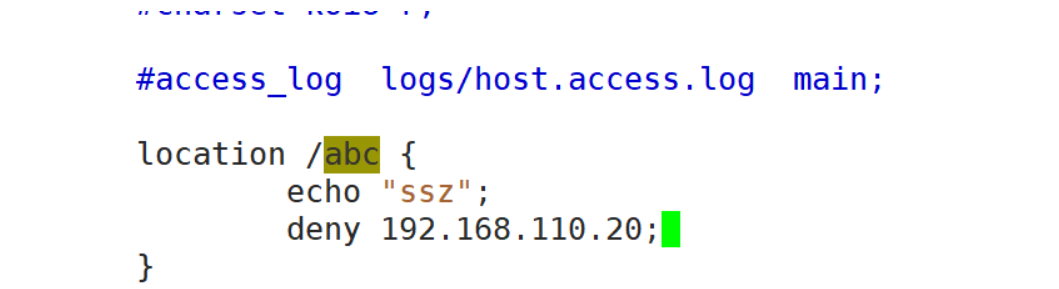
[root@ws2 ~]# curl http://192.168.110.10/abc
<html>
<head><title>403 Forbidden</title></head>
<body>
<center><h1>403 Forbidden</h1></center>
<hr><center>nginx/1.24.0</center>
</body>
</html>
//开启stub_status模块
stub_status模块主要作用于查看nginx的一些状态信息
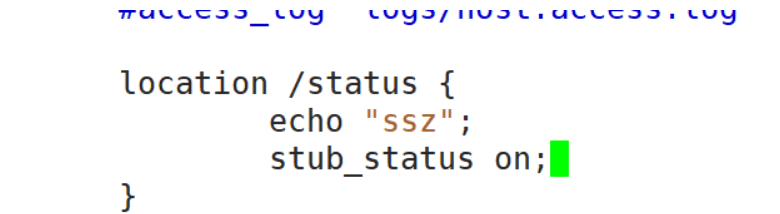
[root@ws2 ~]# curl http://192.168.110.10/status
Active connections: 1
server accepts handled requests
 6 6 6
Reading: 0 Writing: 1 Waiting: 0
Active connections:当前nginx正在处理的活动连接数
Server accepts handled requests:nginx总共处理了6个连接,成功创建6次握手,总共处理了6个请求
Reading:nginx读取到客户端的Header信息数
Writing:nginx返回给客户端的Header信息数
Waiting:开启keep-alive的情况下,这个值等于active-(reading+writing),意思就是nginx已经处理完成,正在等候下一次请求指令的驻留连接。所以,在访问效率高、请求很快就被处理完毕的情况下,waiting数比较多是正常的。如果reading+writing数较多,则说明并发访问量非常大,正在处理过程中。
//当allow和deny同时存在时
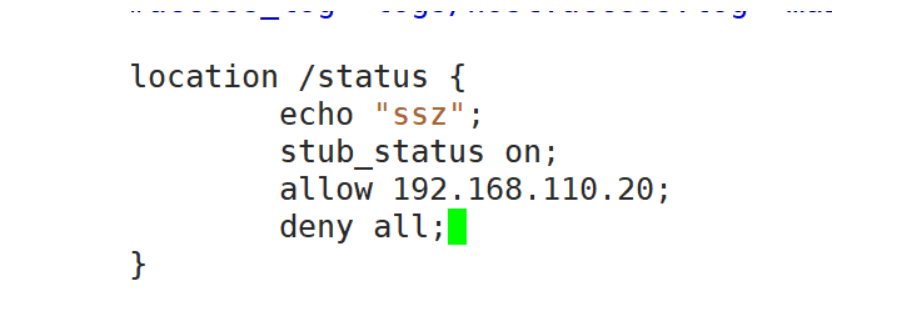
[root@ws2 ~]# curl http://192.168.110.10/status
Active connections: 1
server accepts handled requests
 9 9 9
Reading: 0 Writing: 1 Waiting: 0 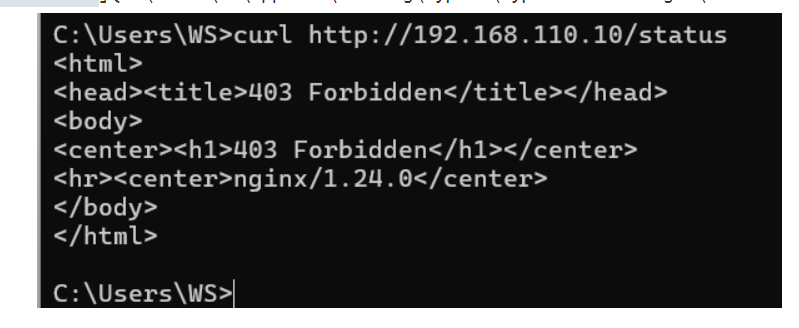
//默认是allow all
1、只允许指定得ip访问,禁止其他ip访问
  allow 192.168.100.11;
  allow 192.168.100.12;
  deny all;

2、只禁止指定的ip访问,允许其他ip访问
  deny 192.168.100.11;
  deny 192.168.100.12;
  allow all;
二、用户认证
auth_basic "欢迎信息";
auth_basic_user_file "/path/to/user_auth_file";
//user_auth_file内容格式
username:password
//这里的密码为加密后的密码串,建议用htpasswd来创建文件
htpasswd -c -m /path/to/.user_auth_file USERNAME
//授权用户
安装httpd-tools软件包
[root@ws ~]# yum -y install httpd-tools//创建用户密钥文件
[root@ws conf]# htpasswd -c -m user_auth_file ws
New password:
Re-type new password:
Adding password for user ws
[root@ws conf]# cat user_auth_file
ws:$apr1$nxOCtS5q$OV2/KblHDmzG5iv8xevRD.
//配置nginx(注意auth_basic_user_file必须用绝对路径)

//ngint -t 测试配置文件并重载配置文件
[root@ws conf]# nginx -t
nginx: the configuration file /usr/local/nginx/conf/nginx.conf syntax is ok
nginx: configuration file /usr/local/nginx/conf/nginx.conf test is successful
[root@ws conf]# nginx -s reload
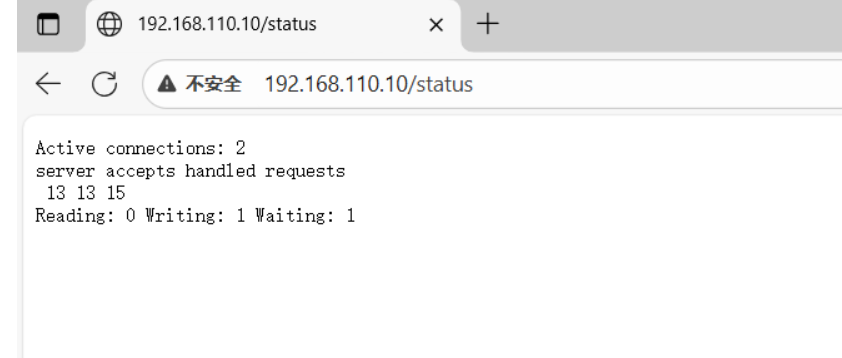
//验证测试
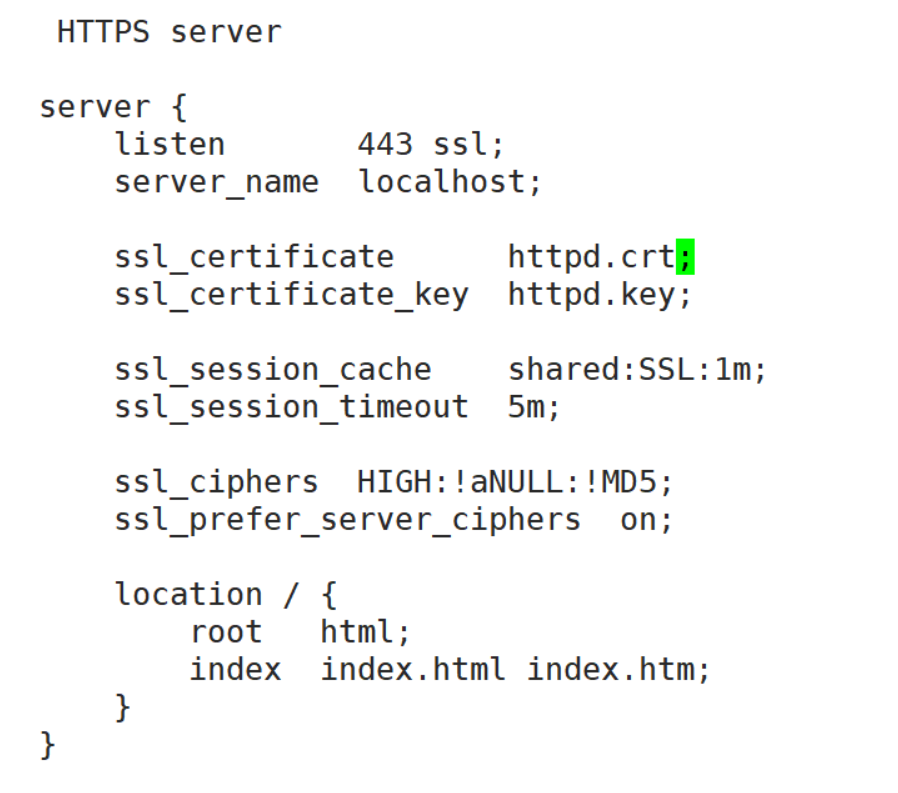
一、https配置
Nginx:192.168.110.10
CA:192.168.110.20
//在CA服务器中生成一对密钥
[root@ca ~]# cd /etc/pki/CA/
[root@ca CA]# ls
certs  crl  newcerts  private
[root@ca CA]# (umask 077;openssl genrsa -out private/cakey.pem 2048)
Generating RSA private key, 2048 bit long modulus
..........+++
..+++
e is 65537 (0x10001)
[root@ca CA]# openssl req -new -x509 -key private/cakey.pem -out cacert.pem -days 1024
You are about to be asked to enter information that will be incorporated
into your certificate request.
What you are about to enter is what is called a Distinguished Name or a DN.
There are quite a few fields but you can leave some blank
For some fields there will be a default value,
If you enter '.', the field will be left blank.
-----
Country Name (2 letter code) [XX]:CN
State or Province Name (full name) []:HB
Locality Name (eg, city) [Default City]:WH
Organization Name (eg, company) [Default Company Ltd]:LQ
Organizational Unit Name (eg, section) []:linux
Common Name (eg, your name or your server's hostname) []:ca
Email Address []:
[root@ca CA]# touch index.txt
[root@ca CA]# echo 01 > serial
//在nginix中生成证书签署请求,发送给CA
[root@ws ~]# cd /usr/local/nginx/conf/
[root@ws conf]# (umask 077;openssl genrsa -out httpd.key 2048)
Generating RSA private key, 2048 bit long modulus
...+++
.+++
e is 65537 (0x10001)
[root@ws conf]# openssl req -new -x509 -key httpd.key -out httpd.csr -days 1024
You are about to be asked to enter information that will be incorporated
into your certificate request.
What you are about to enter is what is called a Distinguished Name or a DN.
There are quite a few fields but you can leave some blank
For some fields there will be a default value,
If you enter '.', the field will be left blank.
-----
Country Name (2 letter code) [XX]:CN
State or Province Name (full name) []:HB
Locality Name (eg, city) [Default City]:WH
Organization Name (eg, company) [Default Company Ltd]:LQ
Organizational Unit Name (eg, section) []:linux
Common Name (eg, your name or your server's hostname) []:ws
Email Address []:
[root@ws conf]#
[root@ws conf]# ls
fastcgi.conf          fastcgi_params.default  koi-utf     mime.types.default  scgi_params          uwsgi_params
fastcgi.conf.default  httpd.csr               koi-win     nginx.conf          scgi_params.default  uwsgi_params.default
fastcgi_params        httpd.key               mime.types  nginx.conf.default  user_auth_file       win-utf
[root@ws conf]# scp httpd.csr root@192.168.110.20:/root/
The authenticity of host '192.168.110.20 (192.168.110.20)' can't be established.
ECDSA key fingerprint is SHA256:ns26rOoUG181jGScbaJaHhHwWsVuzNSM8JHsnTQoRgg.
ECDSA key fingerprint is MD5:69:c8:73:82:90:f8:0b:71:cb:ce:ae:22:c1:0b:86:ca.
Are you sure you want to continue connecting (yes/no)? yes
Warning: Permanently added '192.168.110.20' (ECDSA) to the list of known hosts.
root@192.168.110.20's password:
httpd.csr
//在CA主机中查看
[root@ca ~]# ls
anaconda-ks.cfg  httpd.csr  initial-setup-ks.cfg  公共  模板  视频  图片  文档  下载  音乐  桌面
//CA签署证书并发送给NGINX
[root@ws2 ~]# openssl ca -in httpd.csr -out httpd.crt -days 1024
Using configuration from /etc/pki/tls/openssl.cnf
Check that the request matches the signature
Signature ok
Certificate Details:
        Serial Number: 1 (0x1)
        Validity
            Not Before: Sep 26 08:53:48 2025 GMT
            Not After : Jul 16 08:53:48 2028 GMT
        Subject:
            countryName               = CN
            stateOrProvinceName       = HB
            organizationName          = LQ
            organizationalUnitName    = linux
            commonName                = wss
        X509v3 extensions:
            X509v3 Basic Constraints:
                CA:FALSE
            Netscape Comment:
                OpenSSL Generated Certificate
            X509v3 Subject Key Identifier:
                42:C6:73:D3:A4:B6:A6:E9:18:5A:0F:80:9A:E1:55:E9:62:72:CC:70
            X509v3 Authority Key Identifier:
                keyid:1E:48:94:C3:CB:F6:B1:33:CA:45:6F:FC:AE:33:CE:98:E9:B6:C8:0E

Certificate is to be certified until Jul 16 08:53:48 2028 GMT (1024 days)
Sign the certificate? [y/n]:y


1 out of 1 certificate requests certified, commit? [y/n]y
Write out database with 1 new entries
Data Base Updated
//将CA签署的证书httpd.crt和服务器的证书cacert.pem发送给nginx
[root@ws2 ~]# scp httpd.crt root@192.168.110.10:/usr/local/nginx/conf
The authenticity of host '192.168.110.10 (192.168.110.10)' can't be established.
ECDSA key fingerprint is SHA256:ns26rOoUG181jGScbaJaHhHwWsVuzNSM8JHsnTQoRgg.
ECDSA key fingerprint is MD5:69:c8:73:82:90:f8:0b:71:cb:ce:ae:22:c1:0b:86:ca.
Are you sure you want to continue connecting (yes/no)? yes
Warning: Permanently added '192.168.110.10' (ECDSA) to the list of known hosts.
root@192.168.110.10's password:
httpd.crt                                                                           100% 4360     1.1MB/s   00:00
[root@ws2 CA]# scp cacert.pem root@192.168.110.10:/usr/local/nginx/conf
root@192.168.110.10's password:
cacert.pem 100% 1261 342.2KB/s 00:00