Qt的官方UI控件中是并不包含SwitchButton的,不过可以直接手动创建一个类作为switchbutton来实现这样的效果。
效果图象:
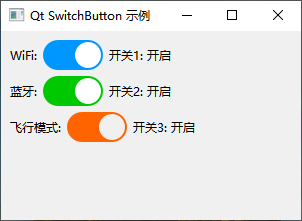
switchbutton.h代码:
cpp
#ifndef SWITCHBUTTON_H
#define SWITCHBUTTON_H

#include <QWidget>
#include <QPropertyAnimation>
#include <QPainter>
#include <QMouseEvent>

class SwitchButton : public QWidget
{
    Q_OBJECT
    Q_PROPERTY(int sliderPosition READ getSliderPosition WRITE setSliderPosition)

public:
    explicit SwitchButton(QWidget *parent = nullptr);

    // 获取当前状态
    bool isChecked() const { return m_checked; }

    // 设置状态
    void setChecked(bool checked);

    // 设置背景颜色
    void setBackgroundColor(const QColor &onColor, const QColor &offColor);

    // 设置滑块颜色
    void setSliderColor(const QColor &color);

signals:
    // 状态改变信号
    void toggled(bool checked);

protected:
    void paintEvent(QPaintEvent *event) override;
    void mousePressEvent(QMouseEvent *event) override;
    void resizeEvent(QResizeEvent *event) override;

private:
    int getSliderPosition() const { return m_sliderPosition; }
    void setSliderPosition(int position);

    void updateSliderPosition();

    bool m_checked = false;
    int m_sliderPosition = 0;

    QColor m_onColor = QColor(0, 150, 255);
    QColor m_offColor = QColor(150, 150, 150);
    QColor m_sliderColor = Qt::white;

    int m_sliderMargin = 2;
    int m_sliderRadius = 0;

    QPropertyAnimation *m_animation;
};

#endif // SWITCHBUTTON_H
switchbutton.cpp代码
cpp
#include "switchbutton.h"

SwitchButton::SwitchButton(QWidget *parent)
    : QWidget(parent)
{
    setFixedSize(60, 30);

    // 初始化动画
    m_animation = new QPropertyAnimation(this, "sliderPosition");
    m_animation->setDuration(200);

    updateSliderPosition();
}

void SwitchButton::setChecked(bool checked)
{
    if (m_checked != checked) {
        m_checked = checked;
        updateSliderPosition();
        update();
        emit toggled(m_checked);
    }
}

void SwitchButton::setBackgroundColor(const QColor &onColor, const QColor &offColor)
{
    m_onColor = onColor;
    m_offColor = offColor;
    update();
}

void SwitchButton::setSliderColor(const QColor &color)
{
    m_sliderColor = color;
    update();
}

void SwitchButton::paintEvent(QPaintEvent *event)
{
    Q_UNUSED(event);

    QPainter painter(this);
    painter.setRenderHint(QPainter::Antialiasing);

    // 绘制背景
    QColor bgColor = m_checked ? m_onColor : m_offColor;
    painter.setBrush(bgColor);
    painter.setPen(Qt::NoPen);

    // 绘制圆角矩形背景
    int cornerRadius = height() / 2;
    painter.drawRoundedRect(rect(), cornerRadius, cornerRadius);

    // 绘制滑块
    painter.setBrush(m_sliderColor);

    int sliderDiameter = height() - 2 * m_sliderMargin;
    QRect sliderRect(m_sliderPosition, m_sliderMargin,
                     sliderDiameter, sliderDiameter);

    painter.drawEllipse(sliderRect);
}

void SwitchButton::mousePressEvent(QMouseEvent *event)
{
    if (event->button() == Qt::LeftButton) {
        setChecked(!m_checked);
        event->accept();
    } else {
        QWidget::mousePressEvent(event);
    }
}

void SwitchButton::resizeEvent(QResizeEvent *event)
{
    Q_UNUSED(event);
    updateSliderPosition();
}

void SwitchButton::setSliderPosition(int position)
{
    if (m_sliderPosition != position) {
        m_sliderPosition = position;
        update();
    }
}

void SwitchButton::updateSliderPosition()
{
    int startPos = m_sliderMargin;
    int endPos = width() - height() + m_sliderMargin;

    if (m_checked) {
        m_sliderPosition = endPos;
    } else {
        m_sliderPosition = startPos;
    }

    // 设置动画
    m_animation->stop();
    m_animation->setStartValue(m_sliderPosition);
    m_animation->setEndValue(m_checked ? endPos : startPos);
    m_animation->start();
}
mainwindow.h代码
cpp
#ifndef MAINWINDOW_H
#define MAINWINDOW_H

#include <QMainWindow>
#include <QLabel>
#include <QVBoxLayout>
#include <QHBoxLayout>
#include "switchbutton.h"

class MainWindow : public QMainWindow
{
    Q_OBJECT

public:
    MainWindow(QWidget *parent = nullptr);
    ~MainWindow();

private slots:
    void onSwitch1Toggled(bool checked);
    void onSwitch2Toggled(bool checked);
    void onSwitch3Toggled(bool checked);

private:
    void setupUI();

    SwitchButton *m_switch1;
    SwitchButton *m_switch2;
    SwitchButton *m_switch3;

    QLabel *m_statusLabel1;
    QLabel *m_statusLabel2;
    QLabel *m_statusLabel3;
};

#endif // MAINWINDOW_H
mainwindow.cpp代码
cpp
#include "mainwindow.h"

MainWindow::MainWindow(QWidget *parent)
    : QMainWindow(parent)
{
    setupUI();

    // 连接信号槽
    connect(m_switch1, &SwitchButton::toggled, this, &MainWindow::onSwitch1Toggled);
    connect(m_switch2, &SwitchButton::toggled, this, &MainWindow::onSwitch2Toggled);
    connect(m_switch3, &SwitchButton::toggled, this, &MainWindow::onSwitch3Toggled);
}

MainWindow::~MainWindow()
{
}

void MainWindow::setupUI()
{
    QWidget *centralWidget = new QWidget(this);
    setCentralWidget(centralWidget);

    QVBoxLayout *mainLayout = new QVBoxLayout(centralWidget);

    // 创建第一个开关
    QHBoxLayout *layout1 = new QHBoxLayout();
    m_switch1 = new SwitchButton(this);
    m_statusLabel1 = new QLabel("开关1: 关闭", this);
    layout1->addWidget(new QLabel("WiFi:", this));
    layout1->addWidget(m_switch1);
    layout1->addWidget(m_statusLabel1);
    layout1->addStretch();

    // 创建第二个开关
    QHBoxLayout *layout2 = new QHBoxLayout();
    m_switch2 = new SwitchButton(this);
    m_switch2->setBackgroundColor(QColor(0, 200, 0), QColor(100, 100, 100)); // 绿色开启状态
    m_statusLabel2 = new QLabel("开关2: 关闭", this);
    layout2->addWidget(new QLabel("蓝牙:", this));
    layout2->addWidget(m_switch2);
    layout2->addWidget(m_statusLabel2);
    layout2->addStretch();

    // 创建第三个开关
    QHBoxLayout *layout3 = new QHBoxLayout();
    m_switch3 = new SwitchButton(this);
    m_switch3->setBackgroundColor(QColor(255, 100, 0), QColor(150, 150, 150)); // 橙色开启状态
    m_switch3->setSliderColor(QColor(240, 240, 240));
    m_statusLabel3 = new QLabel("开关3: 关闭", this);
    layout3->addWidget(new QLabel("飞行模式:", this));
    layout3->addWidget(m_switch3);
    layout3->addWidget(m_statusLabel3);
    layout3->addStretch();

    // 添加到主布局
    mainLayout->addLayout(layout1);
    mainLayout->addLayout(layout2);
    mainLayout->addLayout(layout3);
    mainLayout->addStretch();

    setWindowTitle("Qt SwitchButton 示例");
    resize(300, 200);
}

void MainWindow::onSwitch1Toggled(bool checked)
{
    m_statusLabel1->setText(QString("开关1: %1").arg(checked ? "开启" : "关闭"));
    qDebug() << "WiFi" << (checked ? "已开启" : "已关闭");
}

void MainWindow::onSwitch2Toggled(bool checked)
{
    m_statusLabel2->setText(QString("开关2: %1").arg(checked ? "开启" : "关闭"));
    qDebug() << "蓝牙" << (checked ? "已开启" : "已关闭");
}

void MainWindow::onSwitch3Toggled(bool checked)
{
    m_statusLabel3->setText(QString("开关3: %1").arg(checked ? "开启" : "关闭"));
    qDebug() << "飞行模式" << (checked ? "已开启" : "已关闭");
}