【HarmonyOS Bug踩坑】主窗口调用的UI表现在子窗口异常显示
一、问题现象:
这个问题的标题略显抽象,毕竟涉及到的异常表现形式太多,标题是临时拟定的。
说白了,这个问题是鸿蒙里经典的上下文指定问题。
异常的业务场景是,在主窗口之上,添加一个子窗口。当在主窗口里调用某些UI表现,例如:气泡,弹窗,模态窗口,自定义安全键盘,自定义loading等,你会发现,有时候都异常加载到子窗口中了,并没有在主窗口显示。如下图所示:
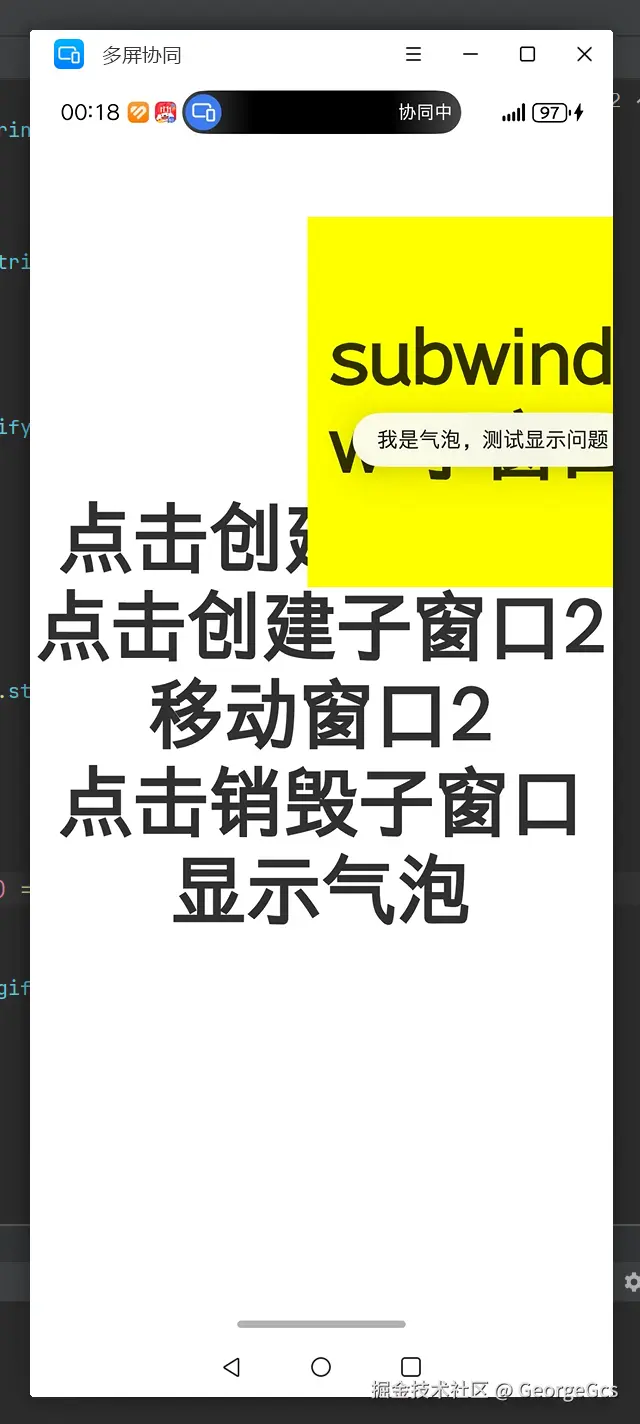
typescript
import { window } from '@kit.ArkUI';
import { BusinessError } from '@kit.BasicServicesKit';

@Entry
@Component
struct SubWinPage {
  private TAG: string = "SubWinPage";
  private sub_windowClass: window.Window | null = null;

   aboutToAppear() {
    this.showSubWindow("xxxx", 900, 300)
     setTimeout(()=>{
       try {
         this.destroySubWindow();
         // window.getLastWindow(getContext()).then((win)=>{
         //   console.error(this.TAG, 'win:' + JSON.stringify(win));
         //   let height = win.getWindowDecorHeight();
         //   console.error(this.TAG, 'height:' + height);
         // })

         let windowStage_:  window.WindowStage = globalThis.mWindowStage;
         let win = windowStage_.getMainWindowSync();
         let height = win.getWindowDecorHeight();
       }catch (e){
         console.error(this.TAG, 'e:' + JSON.stringify(e));
       }
     },1000)
  }

  private showSubWindow(name: string, num: number, x: number) {
    console.log(this.TAG, 'showSubWindow start');
    let windowStage_:  window.WindowStage = globalThis.mWindowStage;
    // 1.创建应用子窗口。
    if (windowStage_ == null) {
      console.error(this.TAG, 'Failed to create the subwindow. Cause: windowStage_ is null');
    }
    else {
      windowStage_.createSubWindow(name, (err: BusinessError, data) => {
        let errCode: number = err.code;
        if (errCode) {
          console.error(this.TAG, 'Failed to create the subwindow. Cause: ' + JSON.stringify(err));
          return;
        }
        this.sub_windowClass = data;
        console.info(this.TAG, 'Succeeded in creating the subwindow. Data: ' + JSON.stringify(data));
        // 2.子窗口创建成功后,设置子窗口的位置、大小及相关属性等。
        this.sub_windowClass.moveWindowTo(x, 300, (err: BusinessError) => {
          let errCode: number = err.code;
          if (errCode) {
            console.error(this.TAG, 'Failed to move the window. Cause:' + JSON.stringify(err));
            return;
          }
          console.info(this.TAG, 'Succeeded in moving the window.');
        });
        this.sub_windowClass.resize(num, num, (err: BusinessError) => {
          let errCode: number = err.code;
          if (errCode) {
            console.error(this.TAG, 'Failed to change the window size. Cause:' + JSON.stringify(err));
            return;
          }
          console.info(this.TAG, 'Succeeded in changing the window size.');
        });
        // 3.为子窗口加载对应的目标页面。
        this.sub_windowClass.setUIContent("pages/SubWinLoadPage", (err: BusinessError) => {
          let errCode: number = err.code;
          if (errCode) {
            console.error(this.TAG, 'Failed to load the content. Cause:' + JSON.stringify(err));
            return;
          }
          this.sub_windowClass?.setWindowTouchable(true)
          console.info(this.TAG, 'Succeeded in loading the content.');
          // 3.显示子窗口。 (this.sub_windowClass as window.Window)
          this.sub_windowClass?.showWindow((err: BusinessError) => {
            let errCode: number = err.code;
            if (errCode) {
              console.error(this.TAG, 'Failed to show the window. Cause: ' + JSON.stringify(err));
              return;
            }
            console.info(this.TAG, 'Succeeded in showing the window.');
          });
        });
      })
    }
    console.log(this.TAG, 'showSubWindow end');
  }

  destroySubWindow() {
    // 4.销毁子窗口。当不再需要子窗口时,可根据具体实现逻辑,使用destroy对其进行销毁。
    (this.sub_windowClass as window.Window).destroyWindow((err: BusinessError) => {
      let errCode: number = err.code;
      if (errCode) {
        console.error(this.TAG, 'Failed to destroy the window. Cause: ' + JSON.stringify(err));
        return;
      }
      console.info(this.TAG, 'Succeeded in destroying the window.');
    });
  }

  build() {
    Column() {
      Text("点击创建子窗口")
        .id('SubWinPageHelloWorld')
        .fontSize(50)
        .fontWeight(FontWeight.Bold)
        .onClick(()=>{
          this.showSubWindow("ooooo", 500, 300);
        })

      Text("点击创建子窗口2")
        .id('SubWinPageHelloWorld')
        .fontSize(50)
        .fontWeight(FontWeight.Bold)
        .onClick(()=>{
          this.showSubWindow("ooooo2", 800, 600);
        })

      Text("移动窗口2")
        .id('SubWinPageHelloWorld')
        .fontSize(50)
        .fontWeight(FontWeight.Bold)
        .onClick(()=>{

          this.sub_windowClass?.moveWindowTo(700, 300, (err: BusinessError) => {
            let errCode: number = err.code;
            if (errCode) {
              console.error(this.TAG, 'Failed to move the window. Cause:' + JSON.stringify(err));
              return;
            }
            console.info(this.TAG, 'Succeeded in moving the window.');
          });
        })

      Text("点击销毁子窗口")
        .id('SubWinPageHelloWorld')
        .fontSize(50)
        .fontWeight(FontWeight.Bold)
        .onClick(()=>{
          this.destroySubWindow();
        })

      Text("显示气泡")
        .id('SubWinPageHelloWorld')
        .fontSize(50)
        .fontWeight(FontWeight.Bold)
        .onClick(async ()=>{
             let win: window.Window = await window.getLastWindow(getContext());
              win.getUIContext().getPromptAction().showToast({
                message: "我是气泡,测试显示问题",
                duration: 5000
              });

          win.getUIContext().px2vp(200)
        })
    }
    .height('100%')
    .width('100%')
    .justifyContent(FlexAlign.Center)
  }
}
甚至还有使用老路由router跳转,在主窗口跳转也有可能会加载到子窗口中。或者一些使用逻辑处理的业务也可能异常。
该问题多出现在较大的工程里,使用了Har包,Hsp包。或者使用MVVM架构,纯逻辑层处理业务等。
二、问题原由:
综上所述,说了这么多,其实问题的原因在开头已经提到了,罪魁祸首就是上下文。Context。
如果接触鸿蒙开发,时间比较长的同学,其实对上下文还是很熟悉的,你会发现在日常开发中,经常要用到上下文去调用某些接口。特别是从api7最早开始接触鸿蒙,到如今api20了。这样的老同学体会更深,会发现很多之前不需要使用上下文调用的接口,现在也推荐或者强制让使用上下文引入接口了。
例如气泡,px2vp等等。
typescript
getUIContext().getPromptAction().showToast({
                message: "我是气泡,测试显示问题",
                duration: 5000
              });

getUIContext().px2vp(200)
其实该问题就是因为上下文依赖,因为鸿蒙特殊的堆叠渲染树,需要通过上下文作为挂靠节点的标志位。有了上下文作为导航,就知道当前要渲染的UI控件,现在挂载到哪个节点下了。
最早的时候,上下文是沉入到系统底层,上层开发感知比较少,很少需要调用到上下文去引出接口。但是随着接入鸿蒙的app越来越多。很多复杂的项目和业务场景迁移到鸿蒙中,发现这样的设计方式有问题。很多UI挂载的预期很离谱。
所以随着API的升级,上下文慢慢开放到应用层,让开发者来灵活的使用,来掌控挂载的预期效果。
该问题大多出现在api12或者之前的老项目中,因为封装的逻辑层,需要用到上下文。多是通过getLastWindow的形式,获取窗口,再从窗口中拿上下文。来做UI的引用操作。但是当有子窗口显示时,getLastWindow其实拿就不是主窗口,而是子窗口,这也导致后续获取的上下文也是子窗口的。
typescript
    let win: window.Window = await window.getLastWindow(getContext());
              win.getUIContext().getPromptAction().showToast({
                message: "我是气泡,测试显示问题",
                duration: 5000
              });
像Loading,弹窗,甚至是悬浮活动按钮,都喜欢用子窗口来做,都会导致该问题。虽然子窗口可以高于主窗口显示,方便在顶层做一些UI效果。但是后续的上下文调用处理很麻烦。
三、解决方案:
1、不更换子窗口的情况,UI调用处的上下文获取需要进行修改,可以将上下文获取的逻辑进行删除,通过外部调用方传入上下文的形式,来获取上下文。
该方案的优点是封装者不需要考虑上下文的获取,UI显示也会符合预期。 缺点就是暴露的参数多了一个,并且有时候调用方获取上下文可能也不方便,如果是多层逻辑调用,那就要穿透式新增上下文参数了,改动也比较大。
2、更换子窗口,使用其他容器方案来实现展示在主窗口层级之上的效果。例如浮层OverlayManager。