前言
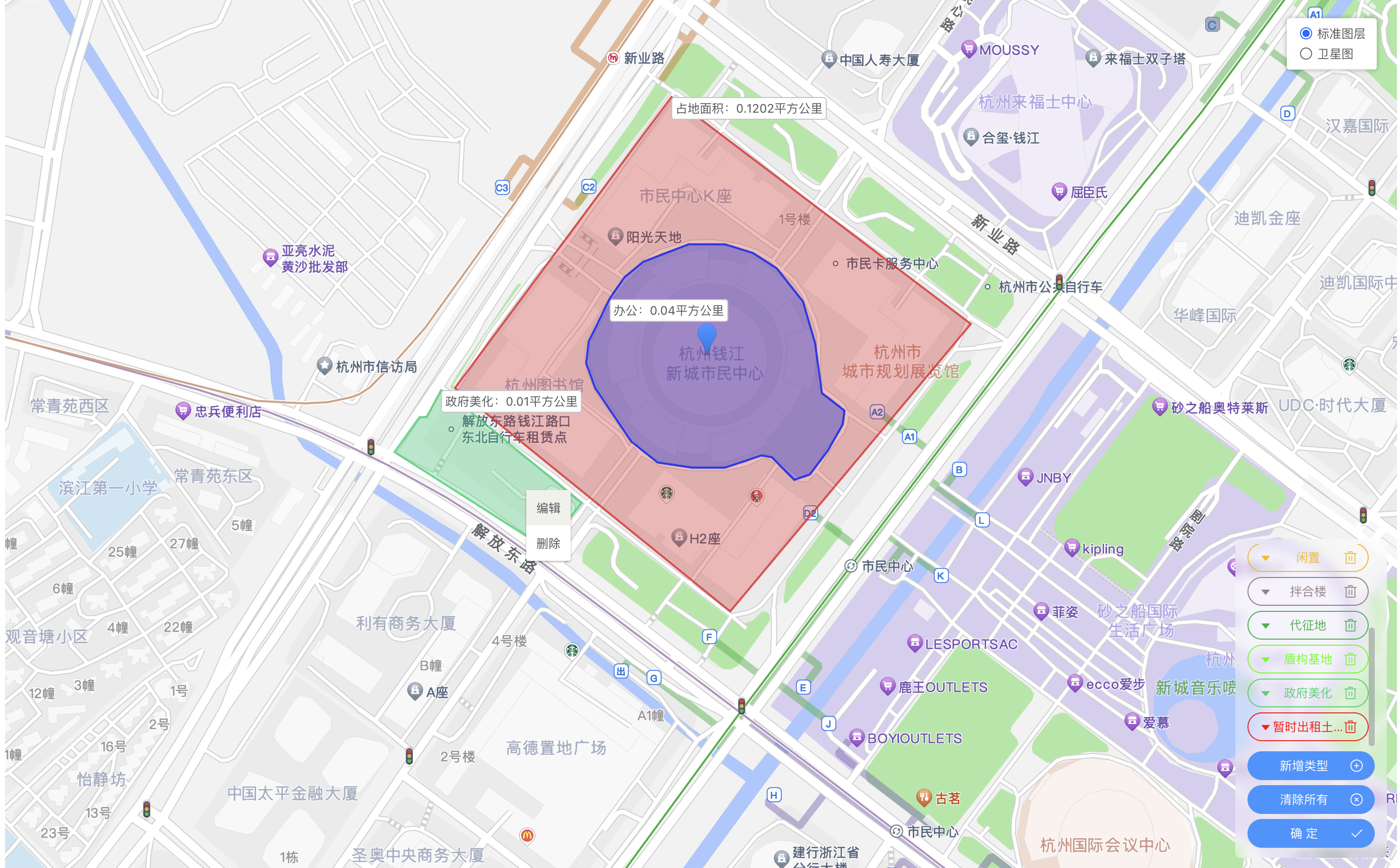
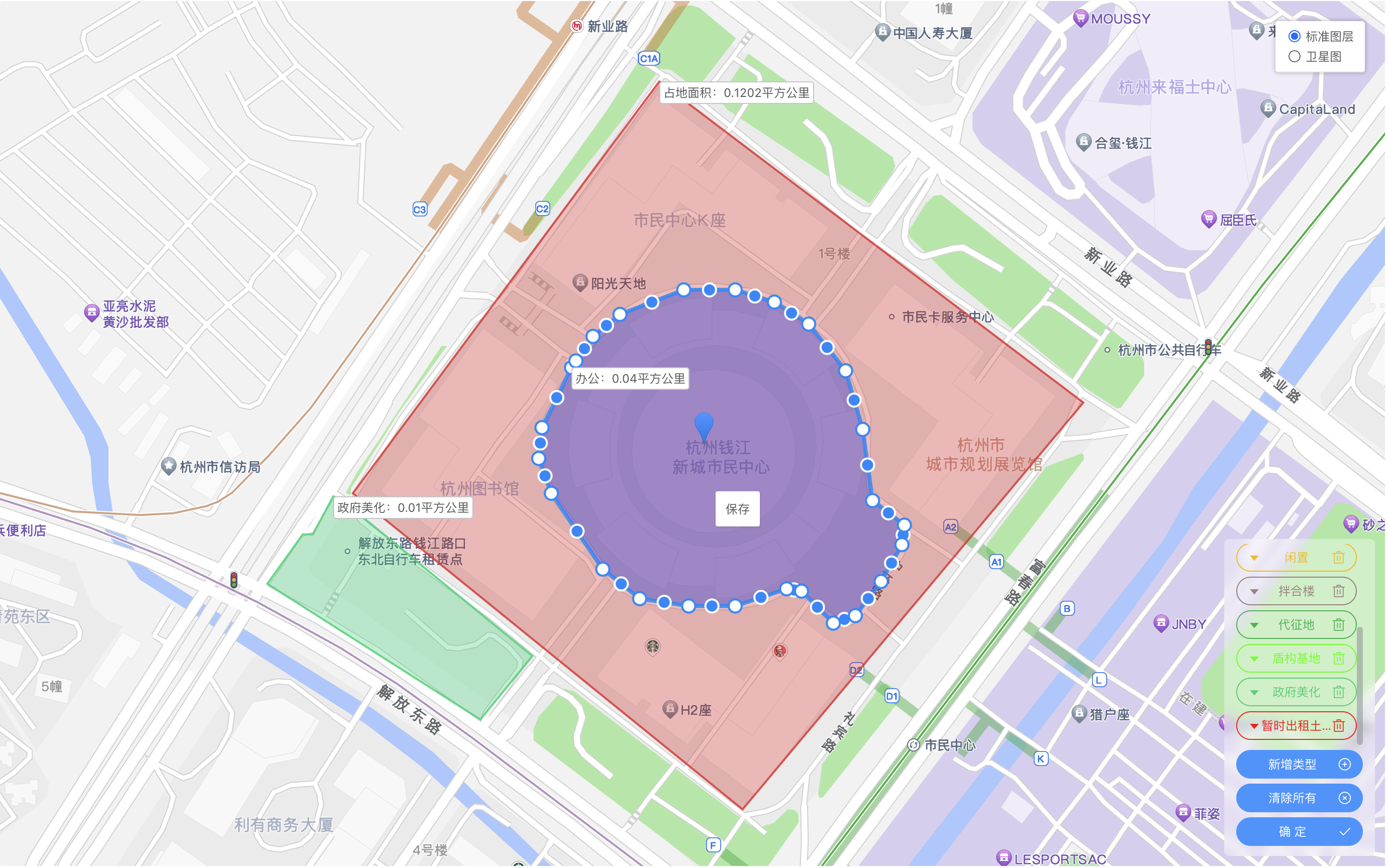
今天鸡米花为大家带来的是基于高德地图的电子围栏效果,可以实现地图选区、选区编辑、选区删除等功能,这里我就跳过高德地图的初始化了,如果有需要的同学可以去我往期博客里看一下。
效果图
一、引入插件
首先,我们需要在引入我们开发中所需要的高德地图插件,首先是创建多边形使用到MouseTool工具,右键点击多边形的菜单插件ContextMenu,以及多边形图形编辑工具PolygonEditor,以下引入为示例:
javascript
this.map = new AMap.Map('myMap', {
    zoom: 12, //级别
    center: [120.209758, 30.246809], //中心点坐标
});
AMap.plugin(['AMap.MouseTool', 'AMap.ContextMenu', 'AMap.PolygonEditor'], () => {
    this.mouseTool = new AMap.MouseTool(this.map);
    this.mouseTool.on('draw', this.measureAreaOver);
});
其中measureAreaOver为创建多边形后的回调,下面会详细解释。
二、多边形的创建
创建多边形很简单,就只需要调用我们在上面引入的插件this.mouseTool的polygon方法即可 ,这里this.mouseTool不仅支持创建多边形,也支持创建点、线,矩形和圆形。具体配置项可参考mouseTool文档,以下为我的引入示例:传入的为多边形的配置项,比如面的颜色和透明度,边框的颜色等,具体也可参照官方文档。
javascript
this.mouseTool.polygon({
    strokeColor: "#000",
    fillColor: "#aaa",
    fillOpacity: 0.3,
});
三、多边形保存
创建好多边形后,会触发我们在上面定义的measureAreaOver方法,代码如下:
javascript
measureAreaOver(e) {
    // 增加覆盖物右键点击事件
    e.obj.on('rightclick', this.polygonRightClick);
    // 增加覆盖物提示文本
    let { areaName } = this.areaTypeList.find(item => item.areaType == this.areaTypeActive) || {};
    let textTitle = areaName;
    let updateData = {};
    if (!textTitle) {
        updateData = e.obj.getExtData();
        textTitle = updateData.areaName;
    }
    // 通过时间戳生成唯一标识,仅供前端使用
    let timer = Number(new Date());
    e.obj.setExtData(timer);
    // 将文字标签设置在多边形的第一个点周围
    let textPosition = e.obj.getPath()[0];
    let textContent = `${textTitle}:${(e.obj.getArea() / 1000000).toFixed(4)}平方公里`;
    // 创建文字标签
    var text = new AMap.Text({
        text: textContent,
        position: textPosition,
        style: {
            'font-size': '12px',
        },
        extData: timer,
    });
    text.setMap(this.map);

    // 将覆盖物信息整合加入到全局
    let area = this.areaTypeList.find(item => item.areaType == this.areaTypeActive) || {};
    area = {
        ...updateData,
        ...area,
        area: e.obj.getArea(),
        path: e.obj.getPath(),
        data: e.obj,
        type: 'polygon',
    };
    this.areaList.push(area);
    this.areaTypeActive = '';
    // 关闭创建多边形
    if (this.mouseTool) this.mouseTool.close();
},
其中polygonRightClick方法为多边形右键点击事件,我们在整个事件里做多边形的编辑和删除。
四、多边形的编辑和删除
创建好多边形后,就会使用到插件ContextMenu,这个插件主要是在地图区域创建右键菜单,我们只需要给多边形区域绑定右键点击事件,再在事件内调起ContextMenu即可。
多边形的编辑,就是将多边形的经纬度传入到PolygonEditor插件中;
多边形编辑后的保存,则就是更新我们在创建多边形存在全局的数据;
多边形删除,就是调用高德地图删除覆盖物的方法。
编辑、删除、和保存的代码如下:
javascript
// 多边形右键点击事件
polygonRightClick(event) {
    this.contextMenu = new AMap.ContextMenu();
    // 如果多边形为编辑状态,则右键菜单展示保存,反之则显示编辑和删除
    if (this.polygonEditor && this.polygonEditor.getTarget()) {
        this.contextMenu.addItem('保存', this.measureAreaSave, 0);
    } else {
        this.contextMenu.addItem('编辑', this.measureAreaUpdate, 0);
        this.contextMenu.addItem('删除', this.measureAreaDel, 1);
    }
    // 打开右键菜单
    this.contextMenu.open(this.map, event.lnglat);
    // 更新右键菜单的位置
    this.contextMenuPosition = event.lnglat;
},
// 面积编辑事件
measureAreaUpdate(e) {
    // 关闭右键菜单
    this.contextMenu.close();
    let { areaData } = this.getClickArea();
    this.polygonEditor = new AMap.PolygonEditor(this.map, areaData.data);
    this.polygonEditor.open();
},
// 编辑面积保存
measureAreaSave() {
    this.polygonEditor.close();
    this.polygonEditor = null;
    let { areaData, text, areaIndex } = this.getClickArea();
    text.setText(`${areaData.areaName}:${(areaData.data.getArea() / 1000000).toFixed(2)}平方公里`);
    let updateArea = {
        ...areaData,
        area: areaData.data.getArea(),
        path: areaData.data.getPath(),
    };
    text.setPosition(updateArea.path[0]);

    this.areaList[areaIndex] = updateArea;
},
// 删除覆盖物
measureAreaDel() {
    this.contextMenu.close();
    let { areaData, text, areaIndex } = this.getClickArea() || {};
    if (text && text?.destroy) text.destroy(null);
    if (areaData?.data?.destroy) areaData.data.destroy(null);
    this.areaList = this.areaList.filter((item, index) => index !== areaIndex);
},
五、完整代码
html
<!--
* @description: 面积新增或修改
* @fileName: areaOperate.vue
* @author: jmh
* @date: 2025-10-16
!-->
<template>
<div class="areaOperate">
<div id="myMap"></div>
<div class="areaOperateBar">
<ul>
<li
:class="`areaOperateBarItem ${areaTypeActive == item.areaType ? 'areaOperateBarActive' : ''}`"
v-for="item in areaTypeList"
:style="`--trendsColor:${item.colorType};`"
@click.stop="measureArea(item)"
>
<div class="barButton sl">
<el-tooltip :content="item.areaName">
<span>
{{ item.areaName }}
</span>
</el-tooltip>
</div>
</li>
</ul>
<div class="areaOperateBarItem" @click="closeMeasureArea">
<div class="barButton">清除所有</div>
<div class="colorPicker">
<i class="el-icon-circle-close"></i>
</div>
</div>
<div class="areaOperateBarItem" @click="onSubmit">
<div class="barButton">确 定</div>
<div class="colorPicker">
<i class="el-icon-check"></i>
</div>
</div>
</div>
</div>
</template>
<script>
export default {
data() {
return {
// 中心坐标 默认为杭州市政府的坐标
initDrop: [120.209758, 30.246809],
// 地图实例
map: null,
zoom: 12,
mouseTool: null,
areaTypeList: [],
areaTypeActive: '',
areaList: [],
contextMenu: null,
contextMenuPosition: null,
polygonEditor: null,
areaTypeAddShow: false,
areaTypeAddFrom: {
colorType: '#409eff',
areaName: '',
},
areaData: [],
};
},
created() {
this.areaTypeList = [
{
id: 1,
areaType: '1',
areaName: '占地面积',
colorType: '#ec3636',
orderNo: 1,
delFlag: 'N',
remark: null,
},
{
id: 2,
areaType: '2',
areaName: '使用面积',
colorType: '#3f2ec2',
orderNo: 2,
delFlag: 'N',
remark: null,
},
{
id: 3,
areaType: '7',
areaName: '出租',
colorType: '#00f529',
orderNo: 7,
delFlag: 'N',
remark: null,
},
{
id: 4,
areaType: '5',
areaName: '办公',
colorType: '#0824f7',
orderNo: 5,
delFlag: 'N',
remark: null,
},
{
id: 5,
areaType: '4',
areaName: '闲置',
colorType: '#f9c301',
orderNo: 4,
delFlag: 'N',
remark: null,
},
{
id: 6,
areaType: '6',
areaName: '拌合楼',
colorType: '#a78b8b',
orderNo: 6,
delFlag: 'N',
remark: null,
},
{
id: 7,
areaType: '8',
areaName: '代征地',
colorType: '#20bc56',
orderNo: 8,
delFlag: 'N',
remark: null,
},
{
id: 8,
areaType: '3',
areaName: '盾构基地',
colorType: '#44ff00',
orderNo: 3,
delFlag: 'N',
remark: null,
},
{
id: 9,
areaType: '9',
areaName: '政府美化',
colorType: '#29d67d',
orderNo: 9,
delFlag: 'N',
remark: null,
},
{
id: 10,
areaType: '10',
areaName: '暂时出租土地',
colorType: '#ff0000',
orderNo: 10,
delFlag: 'N',
remark: null,
},
];
},
mounted() {
this.initMap();
},
methods: {
initMap(centerToe) {
var centerToe = centerToe || this.initDrop;
this.loadMap(centerToe).then(() => {
this.areaData = [
{
type: 'marker',
position: [120.529364, 30.356372],
},
{
type: 'polygon',
path: [
['120.529011', '30.356501'],
['120.528988', '30.35636'],
['120.529846', '30.356193'],
['120.529892', '30.356329'],
['120.529871', '30.356325'],
],
searchValue: null,
createBy: null,
createTime: null,
updateBy: null,
updateTime: null,
delFlag: 'N',
remark: null,
orderBy: null,
params: {},
id: 38,
mainId: 960,
coordinateGroup: '120.529011,30.356501;120.528988,30.35636;120.529846,30.356193;120.529892,30.356329;120.529871,30.356325',
actualArea: 1312.1,
colorType: '#ec3636',
areaType: '1',
areaName: '占地面积',
},
];
// 初始化传入数据时回显
let isInit = true;
if (isInit) this.initData();
});
},
// 开始绘制
measureArea(row) {
let { areaType, colorType } = row;
this.areaTypeActive = areaType;
this.mouseTool.polygon({
strokeColor: colorType,
fillColor: colorType,
fillOpacity: 0.3,
});
},
// 关闭绘制面积
closeMeasureArea() {
if (this.polygonEditor) this.polygonEditor.close();
this.areaTypeActive = '';
this.map.clearMap();
this.mouseTool.close(true);
this.areaList = [];
},
// 绘制面积结束
measureAreaOver(e) {
// 增加覆盖物右键点击事件
e.obj.on('rightclick', this.polygonRightClick);
e.obj.on('click', this.mapClick);
// 增加覆盖物提示文本
let { areaName } = this.areaTypeList.find(item => item.areaType == this.areaTypeActive) || {};
let textTitle = areaName;
let updateData = {};
if (!textTitle) {
updateData = e.obj.getExtData();
textTitle = updateData.areaName;
}
let timer = Number(new Date());
e.obj.setExtData(timer);
let textPosition = e.obj.getPath()[0];
let textContent = `${textTitle}:${(e.obj.getArea() / 1000000).toFixed(4)}平方公里`;
var text = new AMap.Text({
text: textContent,
position: textPosition,
style: {
'font-size': '12px',
},
extData: timer,
});
text.setMap(this.map);
// 将覆盖物信息整合加入到全局
let area = this.areaTypeList.find(item => item.areaType == this.areaTypeActive) || {};
area = {
...updateData,
...area,
area: e.obj.getArea(),
path: e.obj.getPath(),
data: e.obj,
type: 'polygon',
};
this.areaList.push(area);
this.areaTypeActive = '';
if (this.mouseTool) this.mouseTool.close();
},
// 获取右键点击的面积信息
getClickArea() {
let delAreaList = this.areaList.filter(item => {
let { lng, lat } = this.contextMenuPosition || {};
return item.data.contains(new AMap.LngLat(lng, lat));
});
if (!delAreaList?.length) return {};
let delArea = delAreaList[delAreaList.length - 1];
let allOverlays = this.map.getAllOverlays('text');
let textMark = allOverlays.find(item => item.getExtData() == delArea.data.getExtData());
let areaIndex = this.areaList.findIndex(item => item.data.getExtData() == delArea.data.getExtData());
return { areaData: delArea, text: textMark, areaIndex };
},
// 面积编辑事件
measureAreaUpdate(e) {
this.contextMenu.close();
let { areaData } = this.getClickArea();
this.polygonEditor = new AMap.PolygonEditor(this.map, areaData.data);
this.polygonEditor.open();
},
// 编辑面积保存
measureAreaSave() {
this.polygonEditor.close();
this.polygonEditor = null;
let { areaData, text, areaIndex } = this.getClickArea();
text.setText(`${areaData.areaName}:${(areaData.data.getArea() / 1000000).toFixed(2)}平方公里`);
let updateArea = {
...areaData,
area: areaData.data.getArea(),
path: areaData.data.getPath(),
};
text.setPosition(updateArea.path[0]);
this.areaList[areaIndex] = updateArea;
},
// 删除覆盖物
measureAreaDel() {
this.contextMenu.close();
let { areaData, text, areaIndex } = this.getClickArea() || {};
if (text && text?.destroy) text.destroy(null);
if (areaData?.data?.destroy) areaData.data.destroy(null);
this.areaList = this.areaList.filter((item, index) => index !== areaIndex);
},
// 加载地图
loadMap(centerToe) {
var centerToe = centerToe || this.initDrop;
return new Promise((resolve, reject) => {
this.map = new AMap.Map('myMap', {
zoom: this.zoom, //级别
center: centerToe, //中心点坐标
});
AMap.plugin(['AMap.MapType', 'AMap.MouseTool', 'AMap.ContextMenu', 'AMap.PolygonEditor'], () => {
// 右键点击
this.map.addControl(new AMap.MapType());
this.mouseTool = new AMap.MouseTool(this.map);
this.mouseTool.on('draw', this.measureAreaOver);
});
this.map.on('click', this.mapClick);
resolve();
});
},
initData() {
this.areaData.forEach(item => {
let { type } = item;
switch (type) {
case 'marker':
this.mapMarker = this.createdMarker(item?.position || [], item?.content || null, item);
break;
case 'polygon':
this.createPolygon(item?.path || [], item);
break;
default:
break;
}
});
if (!this.areaList?.length && this.mapMarker) {
this.map.setCenter(this.mapMarker.getPosition());
}
},
// 创建面
createPolygon(path, row) {
let { colorType } = row;
colorType = colorType || this.rgb();
var path = path.map(item => {
if (!(item instanceof Array)) {
return item;
}
return new AMap.LngLat(item[0], item[1]);
});
// 创建多边形 Polygon 实例
const polygon = new AMap.Polygon({
path: path,
fillColor: colorType, // 多边形填充颜色
fillOpacity: 0.3,
strokeColor: colorType, // 线条颜色
extData: { ...row },
});
this.measureAreaOver({ obj: polygon });
this.map.add(polygon);
this.map.setFitView([polygon]);
},
// 创建点
createdMarker(LngLat, content, row) {
let { colorType } = row || {};
const position = LngLat;
if (content) var content = `<div class='contentMarker' style='color:${colorType}'>${content}</div>`;
const marker = new AMap.Marker({
position: position,
content,
});
this.map.add(marker);
return marker;
},
rgb() {
//rgb颜色随机
const r = Math.floor(Math.random() * 256);
const g = Math.floor(Math.random() * 256);
const b = Math.floor(Math.random() * 256);
return `rgb(${r},${g},${b})`;
},
// 地图点击事件
mapClick(e) {
if (this.areaTypeActive) return;
if (this.mapMarker) this.mapMarker.remove();
let LngLat = e.lnglat;
this.mapMarker = this.createdMarker(LngLat);
},
polygonRightClick(event) {
this.contextMenu = new AMap.ContextMenu();
if (this.polygonEditor && this.polygonEditor.getTarget()) {
this.contextMenu.addItem('保存', this.measureAreaSave, 0);
} else {
this.contextMenu.addItem('编辑', this.measureAreaUpdate, 0);
this.contextMenu.addItem('删除', this.measureAreaDel, 1);
}
this.contextMenu.open(this.map, event.lnglat);
this.contextMenuPosition = event.lnglat;
},
onSubmit() {
let position = null;
if (this.mapMarker) {
position = this.mapMarker.getPosition();
}
this.$emit('change', this.areaList, position);
},
},
beforeDestroy() {
try {
if (this.map) this.map.destroy();
} catch (error) {
console.log('error :>> ', error);
}
},
};
</script>
<style lang="scss" scoped>
.areaOperate {
width: 100%;
height: 70vh;
position: relative;
.sl {
/* 强制不换行 */
white-space: nowrap;
overflow: hidden;
/* 文本超出省略 */
text-overflow: ellipsis;
}
#myMap {
width: 100%;
height: 100%;
&::v-deep .amap-marker-label {
color: #666;
transform: translate(0, -6px);
font-size: 12px;
line-height: 1.5;
}
&::v-deep .amap-marker-label {
background-color: #ffffffe3;
border: 0;
padding: 5px 10px;
border-radius: 3px;
}
&::v-deep .amap-ctrl-overlay-layer,
&::v-deep .amap-logo,
&::v-deep .amap-copyright {
display: none !important;
}
&::v-deep .amap-markers:has(.contentMarker) {
position: static;
.contentMarker {
font-size: 12px;
background-color: #ffffffcb;
border: 0;
padding: 3px 10px;
border-radius: 3px;
}
}
}
.areaOperateBar {
position: absolute;
right: 10px;
bottom: 10px;
z-index: 11;
background-color: #ffffff5b;
width: 150px;
box-sizing: border-box;
padding: 5px 12px;
border-radius: 5px;
backdrop-filter: blur(5px);
font-size: 12px;
> ul {
max-height: 200px;
overflow-y: auto;
}
.areaOperateBarItem {
color: var(--trendsColor);
padding: 5px 10px;
margin: 5px 0;
border-radius: 500px;
text-align: center;
border: 1px solid;
display: flex;
align-items: center;
transition: 0.3s;
&:hover {
opacity: 0.65;
}
.colorPicker {
position: relative;
font-size: 14px;
}
.barButton {
flex: 1;
cursor: pointer;
}
&::v-deep .el-color-picker {
top: 0;
opacity: 0;
bottom: 0;
left: 0;
right: 0;
margin: auto;
position: absolute;
.el-color-picker__trigger {
width: 100%;
height: 100%;
}
}
}
> div.areaOperateBarItem {
background-color: #409eff;
color: #fff;
border-color: #409eff;
}
.areaOperateBarActive {
background-color: var(--trendsColor);
.barButton,
.colorPicker {
filter: grayscale(1) contrast(999) invert(1);
}
}
}
}
</style>结语
以上就是我今天分享的全部内容啦,在完整代码里,复制之后可以完整的运行上述功能,只不过在地图初始化的时候,可能要根据项目中引入高德地图的方式做一些调整,在使用中有任何问题欢迎在评论区有留言或私信我,如果觉得我的分享有帮助的话,别忘了给鸡米花一个点赞收藏~