文章目录
-
- [1 日期函数](#1 日期函数)
-
- [1.1 获取当前日期](#1.1 获取当前日期)
- [1.2 获取当前时间](#1.2 获取当前时间)
- [1.3 获取当前时间戳](#1.3 获取当前时间戳)
- [1.4 返回 datetime 中的 date 部分](#1.4 返回 datetime 中的 date 部分)
- [1.5 在 datetime 中增加时间或是日期](#1.5 在 datetime 中增加时间或是日期)
- [1.6 在 datetime 中减去时间或是日期](#1.6 在 datetime 中减去时间或是日期)
- [1.7 计算两个日期的间隔时间(单位: 天)](#1.7 计算两个日期的间隔时间(单位: 天))
- [1.8 获取当前时间](#1.8 获取当前时间)
- [1.8 创建一个留言表](#1.8 创建一个留言表)
-
- [1.8.1 查询两分钟内发布的留言](#1.8.1 查询两分钟内发布的留言)
- [2 字符串函数](#2 字符串函数)
-
- [2.1 获取 commentTable 表各个列的数据的字符集](#2.1 获取 commentTable 表各个列的数据的字符集)
- [2.2 显示 commentTable 表的详细信息](#2.2 显示 commentTable 表的详细信息)
- [2.3 查询出 ecomment 列中各个记录所占用的字节数](#2.3 查询出 ecomment 列中各个记录所占用的字节数)
- [2.4 将 commentTable 表中的 ecomment 列中的 "world" 替换为 "MySQL"](#2.4 将 commentTable 表中的 ecomment 列中的 "world" 替换为 "MySQL")
- [2.5 截取 commentTable 表中各个记录 ecomment 的第二个到第五个字符](#2.5 截取 commentTable 表中各个记录 ecomment 的第二个到第五个字符)
- [2.6 将 commentTable 表中的 ecomment 字段以首字符大写剩余小写的方式进行展示](#2.6 将 commentTable 表中的 ecomment 字段以首字符大写剩余小写的方式进行展示)
- [3 数学函数](#3 数学函数)
-
- [3.1 绝对值](#3.1 绝对值)
- [3.2 十进制转换为二进制](#3.2 十进制转换为二进制)
- [3.3 十进制转换为八进制](#3.3 十进制转换为八进制)
- [3.4 十进制转十六进制](#3.4 十进制转十六进制)
- [3.5 进制转换](#3.5 进制转换)
- [3.6 向上取整](#3.6 向上取整)
- [3.7 向下取整](#3.7 向下取整)
- [3.8 格式化保留对应数位小数](#3.8 格式化保留对应数位小数)
- [3.9 返回随机数](#3.9 返回随机数)
- [3.10 取模求余](#3.10 取模求余)
- [4 其他函数](#4 其他函数)
-
- [4.1 查询当前用户](#4.1 查询当前用户)
- [4.2 对字符串进行 md5 摘取](#4.2 对字符串进行 md5 摘取)
- [4.3 使用 password 进行加密](#4.3 使用 password 进行加密)
- [4.4 判断两数是否为 NULL](#4.4 判断两数是否为 NULL)
1 日期函数
通常时间日期概念在数据库中十分重要, 通常可以标识该数据对应的日期时间等以此增加数据库中数据的有效性;
| 函数名称 | 描述 |
|---|---|
current_date() |
当前日期 |
current_time() |
当前时间 |
current_timestamp() |
当前时间戳 |
date(datetime) |
返回datetime中的日期部分 |
date_add(date, interval, d_value_type) |
在date中增加日期或者时间, interval后的数值单位可以是: year minute second day |
date_sub(date, interval d_value_type) |
在date中减去日期或者时间, interval后的数值单位可以是: year minute second day |
datediff(date1, date2) |
两个日期的差, 单位为天 |
now() |
当前日期时间 |
1.1 获取当前日期
sql
mysql> select current_date();
+----------------+
| current_date() |
+----------------+
| 2025-10-21     |
+----------------+
1 row in set (0.00 sec)直接使用select()调用current_date()函数即可;
1.2 获取当前时间
sql
mysql> select current_time();
+----------------+
| current_time() |
+----------------+
| 12:13:05       |
+----------------+
1 row in set (0.00 sec)直接使用select()调用current_time()函数;
1.3 获取当前时间戳
sql
mysql> select current_timestamp();
+---------------------+
| current_timestamp() |
+---------------------+
| 2025-10-21 12:13:56 |
+---------------------+
1 row in set (0.00 sec)直接使用select()调用current_timestamp()函数;
返回的时间戳格式为"year-mon-day hour:minute:second";
1.4 返回 datetime 中的 date 部分
通常使用date()来返回一个datetime中的date部分;
sql
mysql> select date(current_date());
+----------------------+
| date(current_date()) |
+----------------------+
| 2025-10-21           |
+----------------------+
1 row in set (0.00 sec)

mysql> select date(current_timestamp());
+---------------------------+
| date(current_timestamp()) |
+---------------------------+
| 2025-10-21                |
+---------------------------+
1 row in set (0.00 sec)

mysql> select date(now());
+-------------+
| date(now()) |
+-------------+
| 2025-10-21  |
+-------------+
1 row in set (0.00 sec)

mysql> select date(current_time());
+----------------------+
| date(current_time()) |
+----------------------+
| 2025-10-21           |
+----------------------+
1 row in set (0.00 sec)
这里列举了几个例子, 其中date()甚至可以获取current_time()的日期;
实际上current_time()获取的是当前时间与日期, 只不过在存储或是展示时只展示time部分;
1.5 在 datetime 中增加时间或是日期
sql
mysql> select date_add('2025-01-01', interval 10 day);
+-----------------------------------------+
| date_add('2025-01-01', interval 10 day) |
+-----------------------------------------+
| 2025-01-11                              |
+-----------------------------------------+
1 row in set (0.00 sec)


mysql> select date_add('2025-01-01 10:20:30', interval 10 minute);
+-----------------------------------------------------+
| date_add('2025-01-01 10:20:30', interval 10 minute) |
+-----------------------------------------------------+
| 2025-01-01 10:30:30                                 |
+-----------------------------------------------------+
1 row in set (0.00 sec)

mysql> select date_add('2025-01-01 10:20:30', interval 2 month);
+---------------------------------------------------+
| date_add('2025-01-01 10:20:30', interval 2 month) |
+---------------------------------------------------+
| 2025-03-01 10:20:30                               |
+---------------------------------------------------+
1 row in set (0.00 sec)通常使用date_add(DateOrTimeOrTimestamp, interval TimeOrDayOrMonthOrYears);
在一个时间, 日期等上加上对应的数值(可以是天/年/月/日/时/分/秒...);
1.6 在 datetime 中减去时间或是日期
使用与date_add()相同;
sql
mysql> select date_sub('2025-01-01 10:20:30', interval 10 minute);
+-----------------------------------------------------+
| date_sub('2025-01-01 10:20:30', interval 10 minute) |
+-----------------------------------------------------+
| 2025-01-01 10:10:30                                 |
+-----------------------------------------------------+
1 row in set (0.00 sec)
1.7 计算两个日期的间隔时间(单位: 天)
通常使用datediff()来计算两个时间的间隔, 其中单位为天;
sql
mysql> select datediff('2030-10-10', current_date());
+----------------------------------------+
| datediff('2030-10-10', current_date()) |
+----------------------------------------+
|                                   1815 |
+----------------------------------------+
1 row in set (0.00 sec)

mysql> select datediff('2030-10-10', current_time());
+----------------------------------------+
| datediff('2030-10-10', current_time()) |
+----------------------------------------+
|                                   1815 |
+----------------------------------------+
1 row in set (0.00 sec)

mysql> select datediff('2030-10-10', current_timestamp());
+---------------------------------------------+
| datediff('2030-10-10', current_timestamp()) |
+---------------------------------------------+
|                                        1815 |
+---------------------------------------------+
1 row in set (0.00 sec)

mysql> select datediff('2030-10-10', now());
+-------------------------------+
| datediff('2030-10-10', now()) |
+-------------------------------+
|                          1815 |
+-------------------------------+
1 row in set (0.00 sec)
1.8 获取当前时间
获取当前时间与current_timestamp()类似;
sql
mysql> select current_timestamp();
+---------------------+
| current_timestamp() |
+---------------------+
| 2025-10-21 13:28:21 |
+---------------------+
1 row in set (0.00 sec)

mysql> select now();
+---------------------+
| now()               |
+---------------------+
| 2025-10-21 13:28:27 |
+---------------------+
1 row in set (0.00 sec)
1.8 创建一个留言表
通常情况下留言表需要具体的时间来确认留言发布的时间;
sql
mysql> create table if not exists commentTable(
    -> id bigint(5) primary key auto_increment comment 'id 主键自增',
    -> ecomment varchar(100) not null comment '留言不可为空',
    -> etime datetime not null comment '发表 时间'
    -> );
Query OK, 0 rows affected, 1 warning (0.04 sec)

mysql> insert into commentTable ( ecomment, etime )
    -> values
    -> ('hello world', now()),
    -> ('HELLO WORLD', now()),
    -> ('hello mysql', now()),
    -> ('HELLO MYSQL', now());
Query OK, 4 rows affected (0.00 sec)
Records: 4  Duplicates: 0  Warnings: 0

mysql> select * from commentTable;
+----+-------------+---------------------+
| id | ecomment    | etime               |
+----+-------------+---------------------+
|  1 | hello world | 2025-10-21 13:37:57 |
|  2 | HELLO WORLD | 2025-10-21 13:37:57 |
|  3 | hello mysql | 2025-10-21 13:37:57 |
|  4 | HELLO MYSQL | 2025-10-21 13:37:57 |
+----+-------------+---------------------+
4 rows in set (0.00 sec)
1.8.1 查询两分钟内发布的留言
sql
mysql> select * from commentTable;
+----+-------------+---------------------+
| id | ecomment    | etime               |
+----+-------------+---------------------+
|  1 | hello world | 2025-10-21 13:37:57 |
|  2 | HELLO WORLD | 2025-10-21 13:37:57 |
|  3 | hello mysql | 2025-10-21 13:37:57 |
|  4 | HELLO MYSQL | 2025-10-21 13:37:57 |
+----+-------------+---------------------+
4 rows in set (0.00 sec)

mysql> select ecomment, etime from commentTable where date_add(etime, interval 2 minute) > now();
Empty set (0.00 sec) # 之前插入的数据已经超过两分钟

mysql> insert into commentTable ( ecomment, etime )  values ('its a new message', now()); # 新插入数据
Query OK, 1 row affected (0.00 sec)

mysql> select ecomment, etime from commentTable where date_add(etime, interval 2 minute) > now();
+-------------------+---------------------+
| ecomment          | etime               |
+-------------------+---------------------+
| its a new message | 2025-10-21 13:41:20 |
+-------------------+---------------------+
1 row in set (0.00 sec)
2 字符串函数
| 函数名称 | 描述 |
|---|---|
charset(str) |
返回字符串字符集 |
concat(string2 [, ...]) |
连接字符串 |
instr(string, substring) |
返回substring在string中的位置 |
ucase(string2) |
转换成大写 |
lcase(string2) |
转换成小写 |
left(string, length) |
right(string, length) |
length(string) |
string的长度(单位字节) |
replace(str, search_str, replace_str) |
在str中用replace_str替换search_str |
strcmo(string1, string2) |
逐字符比较两字符串大小(比较unicode大小) |
substring(str, position [, length]) |
从str的postion开始, 取length个字符 |
ltrim(string) |
rtrim(string) |
2.1 获取 commentTable 表各个列的数据的字符集
直接使用charset()对表内的个各类进行处理即可;
sql
mysql> select charset(id), charset(ecomment), charset(etime) from commentTable;
+-------------+-------------------+----------------+
| charset(id) | charset(ecomment) | charset(etime) |
+-------------+-------------------+----------------+
| binary      | utf8mb4           | binary         |
| binary      | utf8mb4           | binary         |
| binary      | utf8mb4           | binary         |
| binary      | utf8mb4           | binary         |
| binary      | utf8mb4           | binary         |
+-------------+-------------------+----------------+
5 rows in set (0.00 sec)
2.2 显示 commentTable 表的详细信息
如 "ID为 idnum 在 date 时间发布了一条留言为 message" ;
sql\
select concat("ID为 ", id, "在 ", etime, " 发布了一条留言为 ", ecomment ) from commentTable;-
结果:
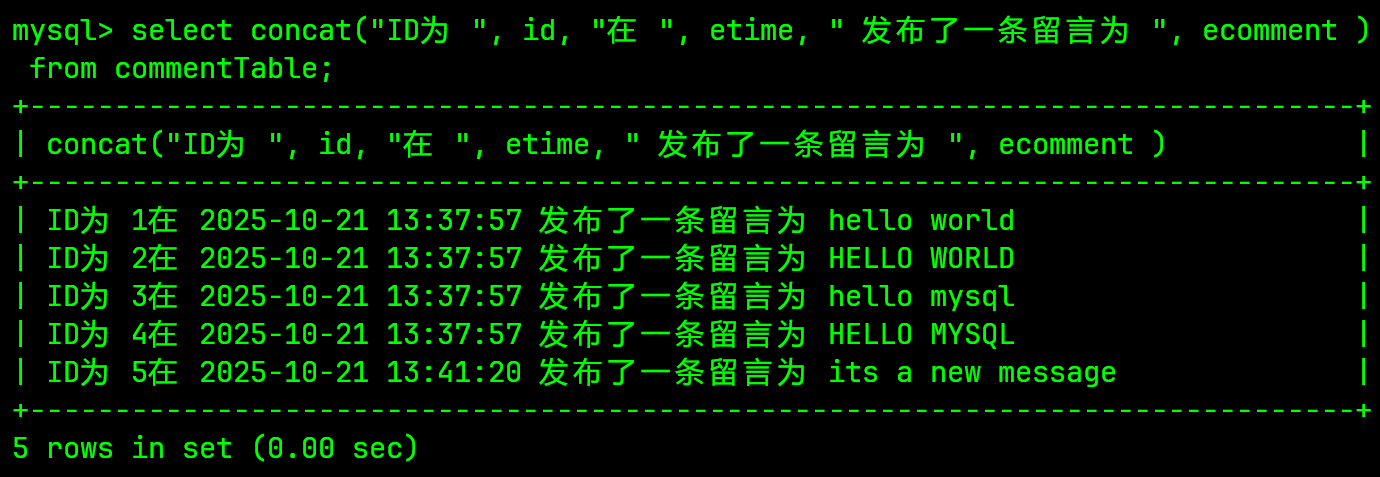
通常情况下使用concat函数进行字符串拼接时, 若是遇到不是字符串的记录, 将会自动将其转换为字符串而后再进行拼接;
2.3 查询出 ecomment 列中各个记录所占用的字节数
sql
mysql> select id, length(ecomment) from commentTable;
+----+------------------+
| id | length(ecomment) |
+----+------------------+
|  1 |               11 |
|  2 |               11 |
|  3 |               11 |
|  4 |               11 |
|  5 |               17 |
+----+------------------+
5 rows in set (0.00 sec)
通常情况下, length()函数返回的大小单位为字节, 字节大小与不同的字符集有关;
2.4 将 commentTable 表中的 ecomment 列中的 "world" 替换为 "MySQL"
sql
mysql> select replace(ecomment, "world", "MySQL") from commentTable;
+-------------------------------------+
| replace(ecomment, "world", "MySQL") |
+-------------------------------------+
| hello MySQL                         |
| HELLO WORLD                         |
| hello mysql                         |
| HELLO MYSQL                         |
| its a new message                   |
+-------------------------------------+
5 rows in set (0.00 sec)
2.5 截取 commentTable 表中各个记录 ecomment 的第二个到第五个字符
sql
mysql> select substring(ecomment, 2, 3) from commentTable;
+---------------------------+
| substring(ecomment, 2, 3) |
+---------------------------+
| ell                       |
| ELL                       |
| ell                       |
| ELL                       |
| ts                        |
+---------------------------+
5 rows in set (0.00 sec)
2.6 将 commentTable 表中的 ecomment 字段以首字符大写剩余小写的方式进行展示
此处需要使用嵌套, 其中使用substring分割成两个字符串;
sql
mysql> select substring(ecomment, 1, 1) from commentTable;
+---------------------------+
| substring(ecomment, 1, 1) |
+---------------------------+
| h                         |
| H                         |
| h                         |
| H                         |
| i                         |
+---------------------------+
5 rows in set (0.00 sec)

mysql> select substring(ecomment, 1, 1), substring(ecomment,2) from commentTable;
+---------------------------+-----------------------+
| substring(ecomment, 1, 1) | substring(ecomment,2) |
+---------------------------+-----------------------+
| h                         | ello world            |
| H                         | ELLO WORLD            |
| h                         | ello mysql            |
| H                         | ELLO MYSQL            |
| i                         | ts a new message      |
+---------------------------+-----------------------+
5 rows in set (0.00 sec)并且使用ucase(string2)和lcase(string2)分别将两段字符串进行大小写化;
sql
mysql> select ucase(substring(ecomment, 1, 1)), lcase(substring(ecomment,2)) from commentTable;
+----------------------------------+------------------------------+
| ucase(substring(ecomment, 1, 1)) | lcase(substring(ecomment,2)) |
+----------------------------------+------------------------------+
| H                                | ello world                   |
| H                                | ello world                   |
| H                                | ello mysql                   |
| H                                | ello mysql                   |
| I                                | ts a new message             |
+----------------------------------+------------------------------+
5 rows in set (0.00 sec)最后通过concat()对字符串进行连接;
sql
mysql> select concat(ucase(substring(ecomment, 1, 1)), lcase(substring(ecomment,2))) from commentTable;
+------------------------------------------------------------------------+
| concat(ucase(substring(ecomment, 1, 1)), lcase(substring(ecomment,2))) |
+------------------------------------------------------------------------+
| Hello world                                                            |
| Hello world                                                            |
| Hello mysql                                                            |
| Hello mysql                                                            |
| Its a new message                                                      |
+------------------------------------------------------------------------+
5 rows in set (0.00 sec)
3 数学函数
| 函数名称 | 函数描述 |
|---|---|
abs(number) |
绝对值函数 |
bin(decimal_number) |
十进制转换二进制 |
hex(decimal_number) |
十进制转十六进制 |
conv(number, from_base, to_base) |
进制转换 |
ceiling(number) |
向上取整(向+∞方向取整) |
floor(number) |
向下取整(向-∞方向取整) |
format(number, decimal_places) |
格式化, 保留小数位数 |
oct(decimalNumber) |
十进制转换为八进制 |
rand() |
返回随机浮点数, 范围[0.0, 1.0) |
mod(number, denominator) |
取模, 求余 |
3.1 绝对值
sql
mysql> select abs(-12.3);
+------------+
| abs(-12.3) |
+------------+
|       12.3 |
+------------+
1 row in set (0.00 sec)

mysql> select abs(+12.3);
+------------+
| abs(+12.3) |
+------------+
|       12.3 |
+------------+
1 row in set (0.00 sec)
3.2 十进制转换为二进制
sql
mysql> select bin(10);
+---------+
| bin(10) |
+---------+
| 1010    |
+---------+
1 row in set (0.00 sec)

mysql> select bin(10.5);
+-----------+
| bin(10.5) |
+-----------+
| 1010      |
+-----------+
1 row in set (0.00 sec)
实际上在进行二进制转换时, 在MySQL中并不会对浮点数进行IEEE754的计算方式, 若是使用bin()对浮点数进行计算时,将会对该浮点数先进行取整再进行二进制转换;
该处的bin(10.5)是一个很好的示例;
3.3 十进制转换为八进制
sql
mysql> select oct(10);
+---------+
| oct(10) |
+---------+
| 12      |
+---------+
1 row in set (0.00 sec)
3.4 十进制转十六进制
sql
mysql> select hex(10);
+---------+
| hex(10) |
+---------+
| A       |
+---------+
1 row in set (0.00 sec)
3.5 进制转换
此处将二进制的10,即1010转换为十六进制;
sql
mysql> select conv(1010, 2, 16);
+-------------------+
| conv(1010, 2, 16) |
+-------------------+
| A                 |
+-------------------+
1 row in set (0.00 sec)
此处的进制需要以十进制的方式进行输入, 如2表示二进制, 8表示八进制, 16表示十六进制;
3.6 向上取整
向上取整通常为向+∞方向进行取整, 如10.1进行向上取整结果为11, -0.99向上取整结果为0;
sql
mysql> select ceiling(10.1);
+---------------+
| ceiling(10.1) |
+---------------+
|            11 |
+---------------+
1 row in set (0.00 sec)

mysql> select ceiling(-0.99);
+----------------+
| ceiling(-0.99) |
+----------------+
|              0 |
+----------------+
1 row in set (0.00 sec)
3.7 向下取整
向下取整与向上取整相反, 即取整方向向-∞方向进行取整;
sql
mysql> select floor(1.9);
+------------+
| floor(1.9) |
+------------+
|          1 |
+------------+
1 row in set (0.00 sec)

mysql> select floor(-1.001);
+---------------+
| floor(-1.001) |
+---------------+
|            -2 |
+---------------+
1 row in set (0.00 sec)
3.8 格式化保留对应数位小数
sql
mysql> select format(3.1415926, 2);
+----------------------+
| format(3.1415926, 2) |
+----------------------+
| 3.14                 |
+----------------------+
1 row in set (0.00 sec)

mysql> select format(3.1415926, 0);
+----------------------+
| format(3.1415926, 0) |
+----------------------+
| 3                    |
+----------------------+
1 row in set (0.00 sec)

mysql> select format(3.1415926, 4);
+----------------------+
| format(3.1415926, 4) |
+----------------------+
| 3.1416               |
+----------------------+
1 row in set (0.00 sec)
可以发现在保留对应小数位时将会发生四舍五入的格式化方式;
3.9 返回随机数
sql
mysql> select rand();
+--------------------+
| rand()             |
+--------------------+
| 0.5872123367965336 |
+--------------------+
1 row in set (0.01 sec)

mysql> select format(rand()*10, 0);
+----------------------+
| format(rand()*10, 0) |
+----------------------+
| 1                    |
+----------------------+
1 row in set (0.00 sec)

mysql> select format(rand()*10, 0);
+----------------------+
| format(rand()*10, 0) |
+----------------------+
| 5                    |
+----------------------+
1 row in set (0.00 sec)
可以进行乘倍数并格式化小数位来定义需要的小数范围;
3.10 取模求余
sql
mysql> select mod(10, 3);
+------------+
| mod(10, 3) |
+------------+
|          1 |
+------------+
1 row in set (0.00 sec)

mysql> select mod(10.3, 3);
+--------------+
| mod(10.3, 3) |
+--------------+
|          1.3 |
+--------------+
1 row in set (0.00 sec)

mysql> select mod(-10.3, 3);
+---------------+
| mod(-10.3, 3) |
+---------------+
|          -1.3 |
+---------------+
1 row in set (0.00 sec)
4 其他函数
| 函数名称 | 函数描述 |
|---|---|
user() |
查询当前用户 |
md5(str) |
对字符串进行md5摘要得到一个定长32位字符串 |
database() |
显示当前正在使用的数据库 |
password(str) |
对某些数据进行加密 |
ifnull(val1, val2) |
分别对val1和val2进行判断, 如果其中一个为NULL即返回另一个, 若是都没有则返回第一个 |
4.1 查询当前用户
sql
mysql> select user();
+---------------+
| user()        |
+---------------+
| dio@localhost |
+---------------+
1 row in set (0.00 sec)
4.2 对字符串进行 md5 摘取
可对密码进行使用, 以防止一些隐私数据在数据库被盗后导致隐私泄露;
可通过md5对密码进行md5摘要;
假设存在一张表;
sql
mysql> show create table usersTable\G
*************************** 1. row ***************************
       Table: usersTable
Create Table: CREATE TABLE `usersTable` (
  `id` bigint NOT NULL AUTO_INCREMENT,
  `account` varchar(20) NOT NULL,
  `password` varchar(32) DEFAULT NULL,
  PRIMARY KEY (`id`)
) ENGINE=InnoDB AUTO_INCREMENT=4 DEFAULT CHARSET=utf8mb4 COLLATE=utf8mb4_0900_ai_ci
1 row in set (0.00 sec)
对数据进行插入, 其中password部分使用md5来进行加密并展示结果;
sql
mysql> insert into usersTable (account, password)
    -> values
    -> ("ZhangSan", md5("111111")),
    -> ("LiSi", md5("222222")),
    -> ("WangWu", md5("333333"));
Query OK, 3 rows affected (0.00 sec)
Records: 3  Duplicates: 0  Warnings: 0

mysql> select * from usersTable;
+----+----------+----------------------------------+
| id | account  | password                         |
+----+----------+----------------------------------+
|  1 | ZhangSan | 96e79218965eb72c92a549dd5a330112 |
|  2 | LiSi     | e3ceb5881a0a1fdaad01296d7554868d |
|  3 | WangWu   | 1a100d2c0dab19c4430e7d73762b3423 |
+----+----------+----------------------------------+
3 rows in set (0.00 sec)结果看出password部分数据被进行md5摘要加密;
通常情况下在进行查询时可以同样采用该种方式来对数据进行比对;
sql
mysql> select id, account, password from usersTable where password=md5("111111");
+----+----------+----------------------------------+
| id | account  | password                         |
+----+----------+----------------------------------+
|  1 | ZhangSan | 96e79218965eb72c92a549dd5a330112 |
+----+----------+----------------------------------+
1 row in set (0.00 sec)
4.3 使用 password 进行加密
通常情况下MySQL支持直接使用函数password()来对密码进行加密;
在MySQL8.0+的版本该内置函数已经被弃用, 此处不进行演示;
4.4 判断两数是否为 NULL
ifnull()可以判断两个数据是否为NULL, 其中一个为NULL则返回另一个不为NULL的数据, 两个都不为NULL则返回第一个, 两个都为NULL则返回NULL;
sql
mysql> select ifnull(NULL, 10);
+------------------+
| ifnull(NULL, 10) |
+------------------+
|               10 |
+------------------+
1 row in set (0.00 sec)

mysql> select ifnull(23, 10);
+----------------+
| ifnull(23, 10) |
+----------------+
|             23 |
+----------------+
1 row in set (0.00 sec)

mysql> select ifnull(NULL, NULL);
+--------------------+
| ifnull(NULL, NULL) |
+--------------------+
|               NULL |
+--------------------+
1 row in set (0.00 sec)