文章目录
1.配置pom.xml
xml
<dependency>
        <groupId>com.alibaba</groupId>
        <artifactId>easyexcel</artifactId>
        <version>3.1.3</version>
 </dependency>
2.导出功能
2.1model
java
package org.example.model;

import com.alibaba.excel.annotation.ExcelIgnore;
import com.alibaba.excel.annotation.ExcelProperty;
import com.alibaba.excel.annotation.write.style.ColumnWidth;
import com.baomidou.mybatisplus.annotation.IdType;
import com.baomidou.mybatisplus.annotation.TableField;
import com.baomidou.mybatisplus.annotation.TableId;
import com.baomidou.mybatisplus.annotation.TableName;
import com.fasterxml.jackson.annotation.JsonFormat;
import lombok.AllArgsConstructor;
import lombok.Data;
import lombok.NoArgsConstructor;
import org.springframework.format.annotation.DateTimeFormat;
import org.springframework.stereotype.Component;

import java.util.Date;
import java.util.List;

@Component(value = "user")
@Data
@NoArgsConstructor
@AllArgsConstructor
@TableName("users")
public class User {
    @TableId(value = "id", type = IdType.AUTO)
    @ExcelIgnore
    private Long id;
    @ExcelProperty(value = "用户编号")
    @ColumnWidth(20)
    private String account;
    @ExcelIgnore
    private String password;
    @ExcelProperty(value = "用户姓名")
    @ColumnWidth(20)
    private String name;
    @ExcelProperty(value = "用户性别")
    @ColumnWidth(20)
    private String gender;
    @ExcelProperty(value = "用户手机号")
    @ColumnWidth(20)
    private String phone;
    @ExcelProperty(value = "用户身份证号")
    @ColumnWidth(20)
    private String idCard;
    @ExcelProperty(value = "用户单位编号")
    @ColumnWidth(20)
    private Long unitId;
    @ExcelProperty(value = "用户角色编号")
    @ColumnWidth(20)
    private Long roleId;
    @ExcelProperty(value = "用户地址")
    @ColumnWidth(20)
    private String address;
    @ExcelProperty(value = "用户健康码")
    @ColumnWidth(20)
    private String healthCode;
    @ExcelProperty(value = "用户紧急联系人") //表格的行
    @ColumnWidth(20)
    private String emergencyContact;
    @ExcelProperty(value = "用户紧急联系人手机号")
    @ColumnWidth(20)
    private String emergencyPhone;
    @ExcelProperty(value = "用户状态")
    @ColumnWidth(20)
    private String status;

    @ExcelIgnore //忽略
    @DateTimeFormat(pattern = "yyyy-MM-dd HH:mm:ss")
    @JsonFormat(pattern = "yyyy-MM-dd HH:mm:ss", timezone = "GMT+8")
    private Date createTime;

    @ExcelIgnore
    @DateTimeFormat(pattern = "yyyy-MM-dd HH:mm:ss")
    @JsonFormat(pattern = "yyyy-MM-dd HH:mm:ss", timezone = "GMT+8")
    private Date updateTime;

    @ExcelIgnore
    @TableField(exist = false)
    private String roleName;

    @ExcelIgnore
    @TableField(exist = false)
    private String unitName;

    @ExcelIgnore
    @TableField(exist = false)
    private  Integer pageNo;//当前页码

    @TableField(exist = false)
    List<User> users;

    @ExcelIgnore
    @TableField(exist = false)
    private  Integer pageSize;//每页显示的数量
}
2.2Controller
java
@Api(tags = "Excel导出管理")
@RestController
@RequestMapping("/adminApi/export")
public class ExcelController {

    // 注入用户Service(用于从数据库查询数据)
    @Autowired
    private UserService userService;  // 假设已存在UserService及其实现类

    @GetMapping("/user")
    @ApiOperation(value = "导出用户列表", notes = "从数据库读取用户数据并导出为Excel", httpMethod = "GET")
    public void exportUserExcel(HttpServletResponse response,
                                  @RequestHeader("adminToken") String adminToken) {  // 移除前端传入的userList
        try {
            // 1. 鉴权:验证Token并获取当前用户(确保Token有效)
            User currentUser = JWTUtil.getUser(adminToken);
            currentUser  = userService.selectUserById(currentUser.getId());
            if (currentUser == null) {
                throw new RuntimeException("鉴权失败,请重新登录");
            }

            // 2. 从数据库查询全量用户数据(避免前端分页数据不全,建议根据实际需求加筛选条件)
            List<User> userList = userService.findUserList(new User(), currentUser).getRecords();  // 改用数据库查询,而非前端传入

            // 3. 设置响应头,告诉浏览器返回Excel文件
            response.setContentType("application/vnd.openxmlformats-officedocument.spreadsheetml.sheet");
            response.setCharacterEncoding("utf-8");
            String fileName = URLEncoder.encode("用户列表_" + System.currentTimeMillis(), StandardCharsets.UTF_8.name());
            response.setHeader("Content-disposition", "attachment;filename*=UTF-8''" + fileName + ".xlsx");

            // 4. 写入Excel流并返回前端
            EasyExcel.write(response.getOutputStream(), User.class)
                    // 设置Excel表头
                    .head(User.class)
                    // 设置Excel文件类型
                    .excelType(ExcelTypeEnum.XLSX)
                    // 设置Excel工作簿
                    .sheet("用户列表")
                    // 写入数据
                    .doWrite(userList);


        } catch (IOException e) {
            throw new RuntimeException("导出Excel失败:" + e.getMessage(), e);
            // 统一异常处理:避免控制台打印堆栈,返回明确错误信息

        } catch (Exception e) {
            // 统一异常处理:避免控制台打印堆栈,返回明确错误信息
            throw new RuntimeException("导出失败:" + e.getMessage(), e);
        }

    }

}
2.3前端触发和接收
java
   exportUsers() {
      this.$http.get('/adminApi/export/user',
        {
          responseType: 'blob', // 关键:告诉浏览器接收二进制文件流
        }
      )
        .then(response => {

          console.log('response.data', response.data);
          const fileName = `用户列表${new Date().getTime()}.xlsx`
          this.downloadExcelFile(response.data, fileName);
          this.$message.success('导出成功');
          // TODO: 实现文件下载

        })
        .catch(error => {
          console.error('导出用户失败:', error);
        });
    },
    downloadExcelFile(blobData, filename) {
      console.log('downloadExcelFile', blobData, filename);
      // 因为blobData已经是Blob,直接使用
      const url = window.URL.createObjectURL(blobData);
      const link = document.createElement('a');
      link.href = url;
      link.download = filename;

      document.body.appendChild(link);
      link.click();

      document.body.removeChild(link);
      window.URL.revokeObjectURL(url);
    },
3.excel导入数据库
3.1流程
- 前端给用户发送添加的模板
- 用户根据模板填写数据
- 填写好数据传到后端
- 后端接受处理成模型列表类
- 批量插入数据库
3.2以插入User类为例
3.2.1前端模板下载
html代码
vue
<el-dialog :title="'批量导入用户'" :visible.sync="importDialogVisible" width="500px">
      <div class="import-container">
        <el-upload
          class="upload-excel"
          :action="''"
          :on-change="handleFileChange"
          :before-upload="beforeUpload"
          :auto-upload="false"
          accept=".xlsx,.xls"
          drag
        >
          <i class="el-icon-upload"></i>
          <div class="el-upload__text">将文件拖到此处,或<em>点击上传</em></div>
          <div class="el-upload__tip" slot="tip">
            <div>仅支持 .xlsx、.xls 格式文件</div>
            <div style="margin-top: 10px;">
              <el-button size="small" type="text" @click="downloadTemplate">下载模板</el-button>
            </div>
          </div>
        </el-upload>
        <div v-if="uploadFile" class="file-info">
          <el-tag>{{ uploadFile.name }}</el-tag>
        </div>
      </div>
      <div slot="footer" class="dialog-footer">
        <el-button @click="importDialogVisible = false">取消</el-button>
        <el-button type="primary" @click="importUsers" :loading="importLoading">确认导入</el-button>
      </div>
    </el-dialog>
js数据
js
importDialogVisible: false,
uploadFile: null,
importLoading: false,
js显示对话框
js
showImportDialog() {
      this.importDialogVisible = true;
      this.uploadFile = null;
    },
处理文件选择
js
handleFileChange(file, fileList) {
      this.uploadFile = file.raw;
    }
js下载模板
js
downloadTemplate() {
      // 创建模板数据,严格按照userForm格式
      const templateData = [
        // 字段名行
        ['id', '用户姓名', '用户身份证号', '用户性别', '用户手机号', '用户状态', '用户状态', '用户角色编号'],
        // 说明行
        ['用户ID(自动生成,留空)', '姓名(必填)', '身份证号(必填)', '性别(男/女,必填)', '手机号', '状态(ACTIVE/INACTIVE,必填)', '单位ID(必填)', '角色ID(必填)'],
        // 示例数据
        ['', '张三', '110101199001011234', '男', '13800138000', 'ACTIVE', '1', '1'],
        ['', '李四', '110101199102022345', '女', '13900139000', 'ACTIVE', '2', '2']
      ];

      // 创建Excel文件
      const ws = XLSX.utils.aoa_to_sheet(templateData);
      const wb = XLSX.utils.book_new();
      XLSX.utils.book_append_sheet(wb, ws, '用户数据');

      // 生成Excel文件的二进制数据
      const excelBuffer = XLSX.write(wb, { bookType: 'xlsx', type: 'array' });
      const blob = new Blob([excelBuffer], { type: 'application/vnd.openxmlformats-officedocument.spreadsheetml.sheet' });
      const fileName = '用户导入模板.xlsx';
      this.downloadExcelFile(blob, fileName);
    }
注意:如果模板第二行是说明行,后端处理一定要注意从第三行开始或者过滤说明行,还要指定第一行是表头
3.2.2前端上传文件检验
js
beforeUpload(file) {
      const fileName = file.name.toLowerCase();
      const isExcel = fileName.endsWith('.xlsx') ||
                     fileName.endsWith('.xls') ||
                     fileName.endsWith('.csv');
      const isLt2M = file.size / 1024 / 1024 < 2;

      if (!isExcel) {
        this.$message.error('只支持.xlsx、.xls和.csv格式的文件');
        return false;
      }
      if (!isLt2M) {
        this.$message.error('上传文件大小不能超过2MB');
        return false;
      }
      return true;
    }
3.3.3向后端传入excel文件
js
importUsers() {
      if (!this.uploadFile) {
        this.$message.warning('请选择要导入的文件');
        return;
      }

      // 前端验证文件类型
      const fileName = this.uploadFile.name;
      const isExcel = fileName.endsWith('.xlsx') || fileName.endsWith('.xls') || fileName.endsWith('.csv');
      if (!isExcel) {
        this.$message.error('请上传Excel或CSV文件');
        return;
      }

      this.importLoading = true;
      const formData = new FormData();
      // 确保文件键名与后端接收的一致
      formData.append('file', this.uploadFile);
      console.log('文件大小:', this.uploadFile ? this.uploadFile.size : 'null');
      console.log('表单数据中文件:', formData.has('file'));

      // 重要:删除手动设置的Content-Type,让axios自动设置multipart/form-data头及其boundary
      this.$http.post('/adminApi/user/import', formData, {
        headers: {
          // 不设置Content-Type,让axios自动处理
        }
      })
      .then(response => {
        if (response.data.code === 200) {
            // 避免使用可选链操作符,使用传统条件检查
            const successCount = response.data.data && response.data.data.successCount ? response.data.data.successCount : 0;
            this.$message.success('导入成功,成功导入' + successCount + '条记录');
            if (response.data.data && response.data.data.errorCount > 0) {
              this.$message.warning('后端代码'+response.data.code+'有' + response.data.data.errorCount + '条记录导入失败,请查看错误详情');
            }
          this.importDialogVisible = false;
          this.loadUsers();
        } else {
          this.$message.error('导入失败:' + response.data.message || '未知错误');
        }
      })
      .catch(error => {
        console.error('导入用户失败:', error);
        this.$message.error('导入失败,请检查文件格式是否符合模板要求');
      })
      .finally(() => {
        this.importLoading = false;
      });
    }
前端效果图
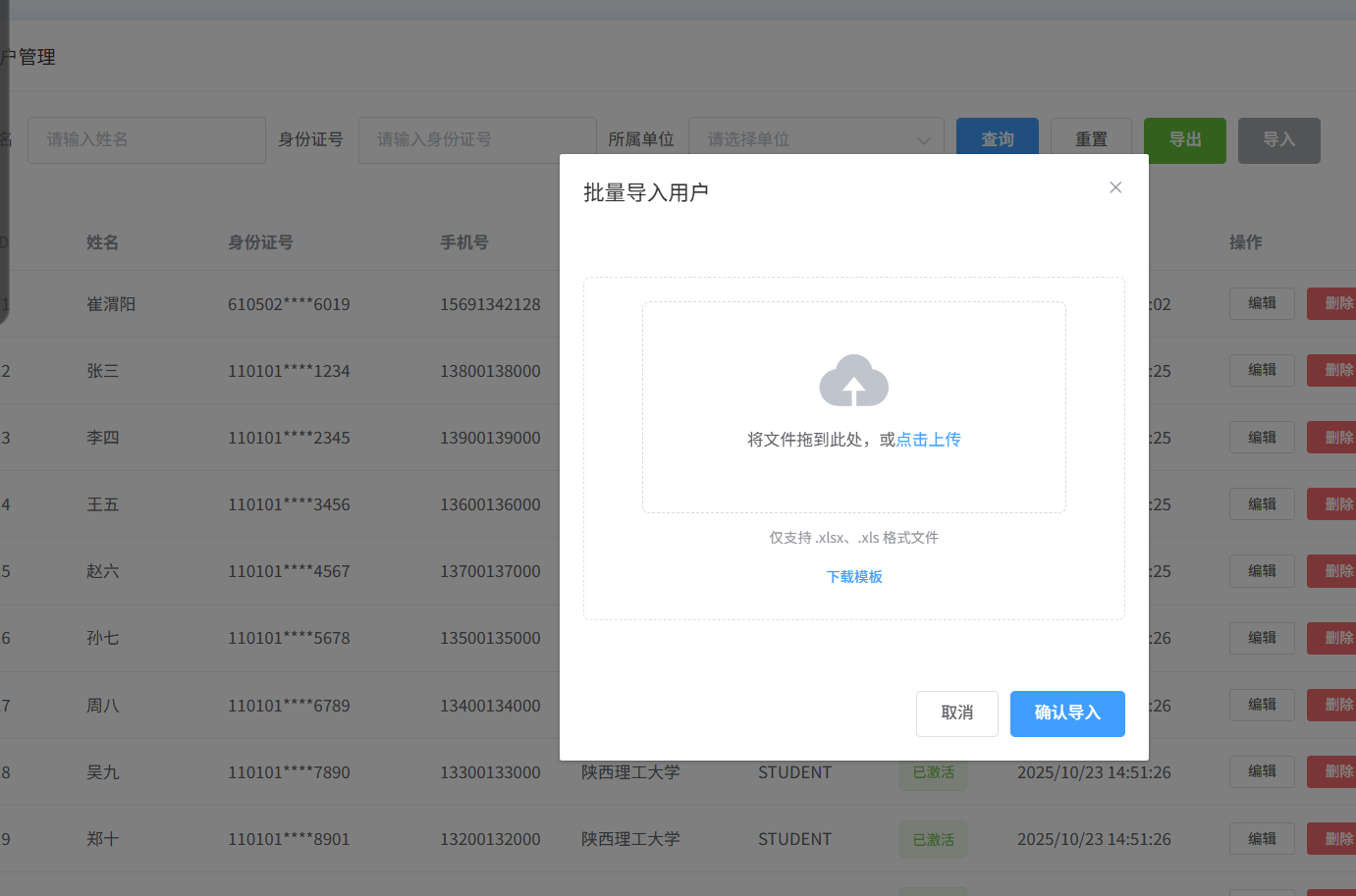
模板列表

3.3.4后端User模型
java
@Component(value = "user")
@Data
@NoArgsConstructor
@AllArgsConstructor
@TableName("users")
public class User {
    @TableId(value = "id", type = IdType.AUTO)
    @ExcelIgnore // 忽略,不读取
    private Long id;

    @ExcelIgnore // 忽略,不读取
    private String account;

    @ExcelIgnore // 忽略,不读取
    private String password;

    // 第1列:用户姓名(index=1)
    @ExcelProperty(value = "用户姓名", index = 1)
    @ColumnWidth(20)
    private String name;

    // 第3列:用户性别(index=3)
    @ExcelProperty(value = "用户性别", index = 3)
    @ColumnWidth(20)
    private String gender;

    // 第4列:用户手机号(index=4)
    @ExcelProperty(value = "用户手机号", index = 4)
    @ColumnWidth(20)
    private String phone;

    // 第2列:用户身份证号(index=2)
    @ExcelProperty(value = "用户身份证号", index = 2)
    @ColumnWidth(20)
    private String idCard;

    // 第6列:用户单位编号(index=6)
    @ExcelProperty(value = "用户单位编号", index = 6, converter = LongNullConverter.class)
    @ColumnWidth(20)
    private Long unitId;

    // 第7列:用户角色编号(index=7)
    @ExcelProperty(value = "用户角色编号", index = 7, converter = LongNullConverter.class)
    @ColumnWidth(20)
    private Long roleId;

    // 若Excel中没有"用户地址"列,需删除该注解或标记@ExcelIgnore
    @ExcelProperty(value = "用户地址", index = 8) // 假设在第8列,根据实际调整
    @ColumnWidth(20)
    private String address;

    // 同理,其他非必要字段(健康码、紧急联系人等)若Excel中没有,需删除注解或指定正确index
    @ExcelProperty(value = "用户健康码", index = 9) // 按实际列位置调整
    @ColumnWidth(20)
    private String healthCode;

    @ExcelProperty(value = "用户紧急联系人", index = 10)
    @ColumnWidth(20)
    private String emergencyContact;

    @ExcelProperty(value = "用户紧急联系人手机号", index = 11)
    @ColumnWidth(20)
    private String emergencyPhone;

    // 第5列:用户状态(index=5)
    @ExcelProperty(value = "用户状态", index = 5)
    @ColumnWidth(20)
    private String status;

    // 以下为忽略字段,无需修改
    @ExcelIgnore
    @DateTimeFormat(pattern = "yyyy-MM-dd HH:mm:ss")
    @JsonFormat(pattern = "yyyy-MM-dd HH:mm:ss", timezone = "GMT+8")
    private Date createTime;

    @ExcelIgnore
    @DateTimeFormat(pattern = "yyyy-MM-dd HH:mm:ss")
    @JsonFormat(pattern = "yyyy-MM-dd HH:mm:ss", timezone = "GMT+8")
    private Date updateTime;

    @ExcelIgnore // 非Excel导入字段,忽略
    @TableField(exist = false)
    private String roleName;

    @ExcelIgnore // 非Excel导入字段,忽略
    @TableField(exist = false)
    private String unitName;

    @ExcelIgnore
    @TableField(exist = false)
    private Integer pageNo;

    @ExcelIgnore
    @TableField(exist = false)
    List<User> users;

    @ExcelIgnore
    @TableField(exist = false)
    private Integer pageSize;
}
3.3.4controller层接收文件
这里我们默认使用mybatis-plus,并且已经创建了UserMapper持久层,如果没有配置可以转移作者的mybatis-plus笔记进行配置学习
java
@PostMapping("/import")
    @ApiOperation(value = "批量导入用户", notes = "从Excel文件批量导入用户数据", httpMethod = "POST")
    public Result<Map<String, Object>> importUsers(@RequestParam("file") MultipartFile file,
                                                   @RequestHeader("adminToken") String adminToken) {
        //如果没有token可以不需要验证currentUser,那么也不需要继续串currentUser参数
        User currentUser = JWTUtil.getUser(adminToken);
        currentUser = userService.selectUserById(currentUser.getId());
        System.out.println("当前用户角色" + currentUser.getRoleName());

        try {
            // 调用Service层进行用户导入
            Map<String, Object> result = userService.importUsers(file, currentUser);
            return new Result<>(200, "导入成功", result);
        } catch (Exception e) {
            e.printStackTrace();
            return new Result<>(500, "导入失败: " + e.getMessage(), null);
        }
    }
3.3.5service层
java
Map<String, Object> importUsers(MultipartFile file, User currentUser) throws Exception;3.3.6seviceImpl层
其实传入数据库方法有很多,可以参考关于Easyexcel | Easy Excel 官网我只使用其中一种
java
@Override
    @Transactional
    public Map<String, Object> importUsers(MultipartFile file, User currentUser) throws Exception {
        System.out.println("开始导入用户数据");
        // 权限验证
        if (!hasPermission(currentUser, "IMPORT_USER")) {
            throw new Exception("无权限导入用户");
        }

        // 验证文件
        if (file == null || file.isEmpty()) {
            throw new Exception("请选择要导入的文件");
        }

        // 检查文件类型
        String fileName = file.getOriginalFilename();
        if (fileName == null || (!fileName.endsWith(".xlsx") && !fileName.endsWith(".xls") && !fileName.endsWith(".csv"))) {
            throw new Exception("只支持.xlsx、.xls和.csv格式的文件");
        }

        // 用于统计导入结果
        final int[] successCount = {0};
        final int[] errorCount = {0};
        final List<String> errorMessages = new ArrayList<>();

        System.out.println("文件内容:"+file.toString());
        // 使用EasyExcel读取Excel文件,传入文件流并显式指定excelType
        EasyExcel.read(file.getInputStream(), User.class, new ReadListener<User>() {
            private static final int BATCH_COUNT = 100; // 每批处理数量
            private List<User> batchList = ListUtils.newArrayListWithExpectedSize(BATCH_COUNT);

            // 处理一行数据
            @Override
            public void invoke(User user, AnalysisContext context) {
                int headRowNumber = 2;
                int rowNum = context.readRowHolder().getRowIndex() + headRowNumber;
                System.out.println(user.toString());

                // 关键:过滤第2行的"表头说明"(根据name字段特征判断)
                if ("姓名(必填)".equals(user.getName()) || "用户ID(自动生成,留空)".equals(user.getId())) {
                    System.out.println("跳过表头说明行:第" + rowNum + "行");
                    return; // 直接返回,不加入batchList
                }
                try {
                    // 验证必填字段
                    if (StringUtils.isEmpty(user.getName())) {
                        throw new Exception("第" + rowNum + "行:用户姓名不能为空");
                    }
                    if (StringUtils.isEmpty(user.getIdCard())) {
                        throw new Exception("第" + rowNum + "行:身份证号不能为空");
                    }
                    if (StringUtils.isEmpty(user.getAccount())) {
                        user.setAccount(user.getIdCard()); // 如果没有提供账号,使用身份证号作为账号
                    }
                    // 校验unitId和roleId(必填)
                    if (user.getUnitId() == null) {
                        throw new Exception("第" + rowNum + "行:单位ID不能为空或格式错误");
                    }
                    if (user.getRoleId() == null) {
                        throw new Exception("第" + rowNum + "行:角色ID不能为空或格式错误");
                    }

                    // 检查账号是否已存在
                    QueryWrapper<User> queryWrapper = new QueryWrapper<>();
                    queryWrapper.eq("account", user.getAccount());
                    User existUser = userMapper.selectOne(queryWrapper);
                    if (existUser != null) {
                        throw new Exception("第" + rowNum + "行:账号" + user.getAccount() + "已存在");
                    }

                    // 检查身份证号是否已存在
                    queryWrapper.clear();
                    queryWrapper.eq("id_card", user.getIdCard());
                    existUser = userMapper.selectOne(queryWrapper);
                    if (existUser != null) {
                        throw new Exception("第" + rowNum + "行:身份证号" + user.getIdCard() + "已存在");
                    }

                    // 设置默认值
                    if (StringUtils.isEmpty(user.getPassword())) {
                        user.setPassword(generateDefaultPassword(user.getIdCard()));
                    }
                    if (StringUtils.isEmpty(user.getStatus())) {
                        user.setStatus("ACTIVE");
                    }

                    // 设置创建时间和更新时间
                    user.setCreateTime(new Date());
                    user.setUpdateTime(new Date());

                    // 添加到批次列表
                    batchList.add(user);
                    System.out.println("添加用户:" + user.toString());
                    successCount[0]++;

                    // 达到BATCH_COUNT,需要存储一次数据库,防止数据几万条数据内存溢出
                    if (batchList.size() >= BATCH_COUNT) {
                        System.out.println("开始存储数据");
                        saveData();
                        batchList = ListUtils.newArrayListWithExpectedSize(BATCH_COUNT);
                    }
                } catch (Exception e) {
                    e.printStackTrace();
                    errorCount[0]++;
                    errorMessages.add(e.getMessage());
                }
            }

            @Override
            public void doAfterAllAnalysed(AnalysisContext context) {
                System.out.println("所有数据解析完成");
                // 确保最后一批数据也被处理
                saveData();
            }

            private void saveData() {
                System.out.println("开始存储数据");
                if (!batchList.isEmpty()) {
                    // 批量插入数据库
                    for (User user : batchList) {
                        System.out.println("保存数据:" + user.toString());
                        userMapper.insert(user);
                    }
                    // 清空列表
                    batchList.clear();
                }
            }
            //headRowNumber表示从第几行开始读取数据
        }).headRowNumber(1).sheet().doRead();

        // 构建返回结果
        Map<String, Object> result = new HashMap<>();
        result.put("successCount", successCount[0]);
        result.put("errorCount", errorCount[0]);
        result.put("errorMessages", errorMessages);

        return result;
    }
OK,到此实现完毕我们运行一下上传
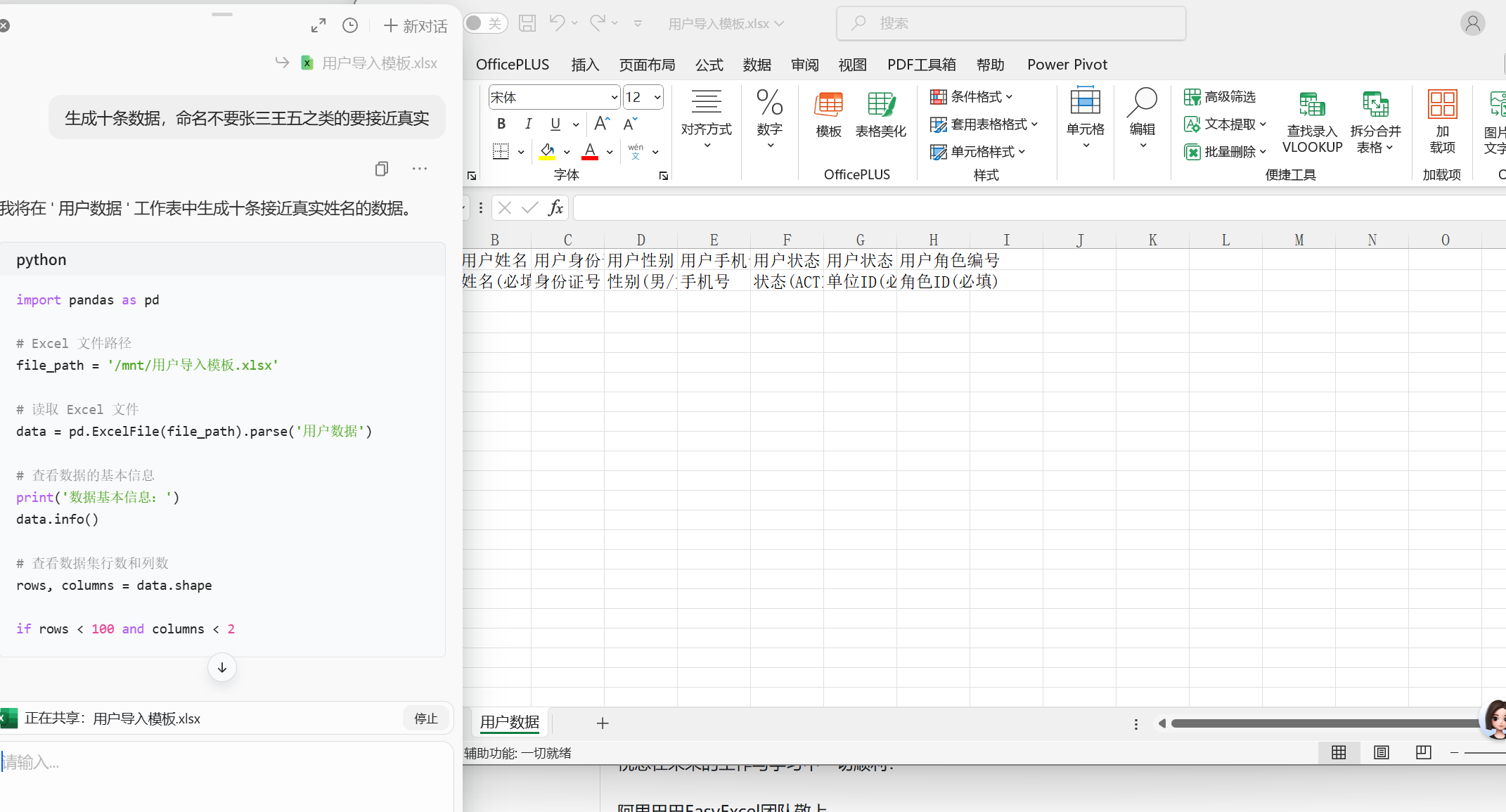
可以让ai生成10条模拟数据上传
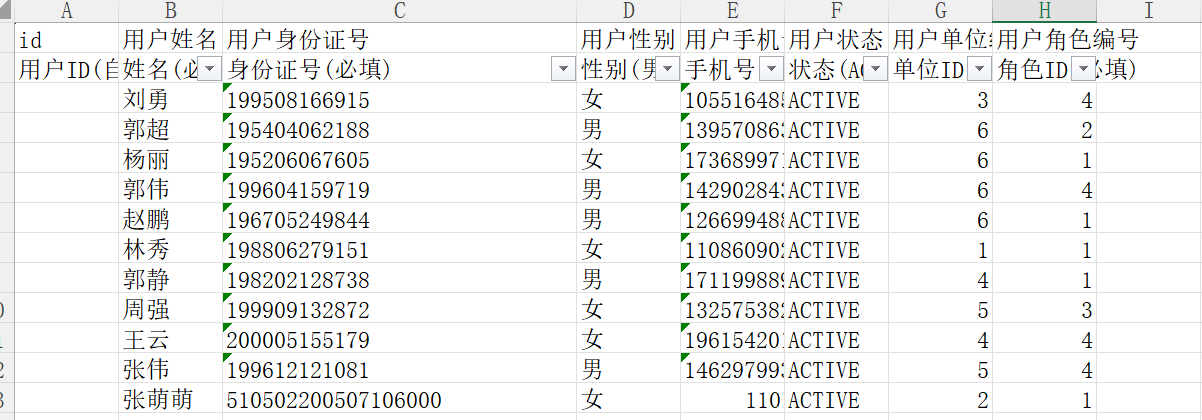
开始上传
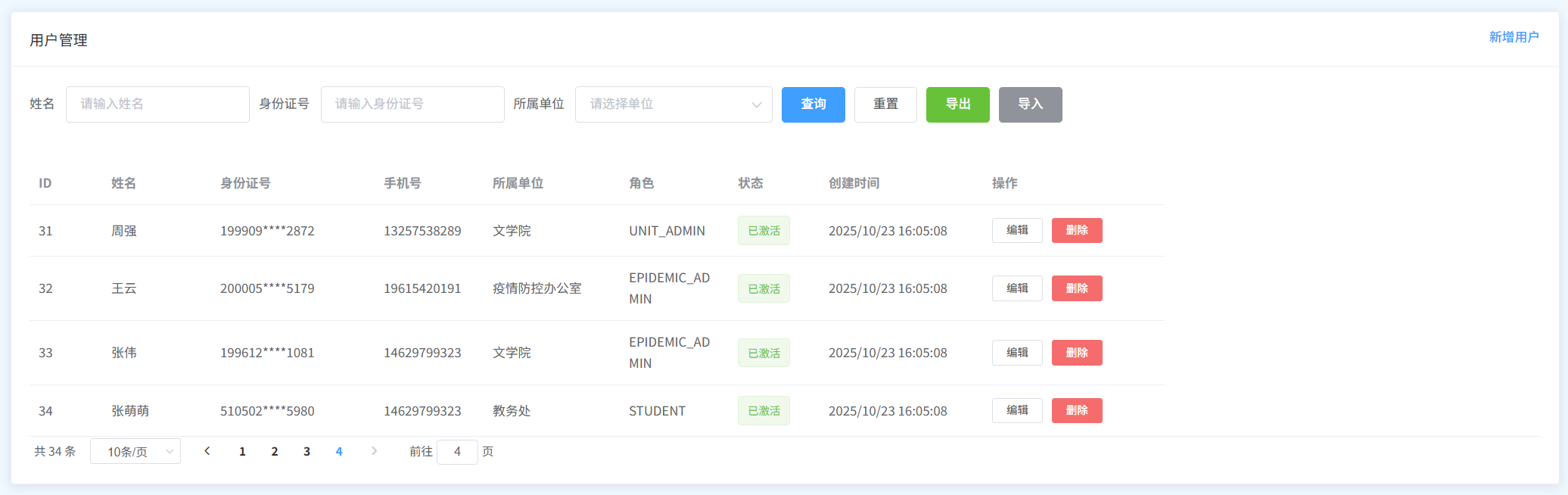
导入成功!!
3.3.7有些需要进行将前端的excel数据专函为long,那我们可以创建数据转换类
JAVA
/**
 * 支持Long类型与Excel单元格(文本/数字)的转换,兼容空值和非数字场景
 */
public class LongNullConverter implements Converter<Long> {
    @Override
    public Class<Long> supportJavaTypeKey() {
        return Long.class; // 支持Long类型
    }

    @Override
    public CellDataTypeEnum supportExcelTypeKey() {
        // 同时支持字符串和数字类型的单元格
        return CellDataTypeEnum.STRING;
    }

    // 读取Excel数据转为Long(核心修改)
    @Override
    public Long convertToJavaData(ReadCellData<?> cellData, ExcelContentProperty contentProperty, GlobalConfiguration globalConfiguration) {
        String value = null;
        System.out.println("处理字段:" + contentProperty.getField().getName() + ",单元格类型:" + cellData.getType());

        // 1. 读取数字或文本值
        if (cellData.getNumberValue() != null) {
            // 数字类型转为字符串(处理4.0这类情况)
            value = cellData.getNumberValue().toPlainString();
            System.out.println("数字值转换为字符串:" + value);
        } else {
            String rawValue = cellData.getStringValue();
            value = rawValue == null ? null : rawValue.trim();
            System.out.println("文本值:" + value);
        }

        // 2. 处理空值或无效值
        if (value == null || value.isEmpty()) {
            System.out.println("值为空,返回null");
            return null;
        }

        // 3. 兼容带.0的情况(如4.0 → 4)
        if (value.matches("\\d+\\.0+")) {
            value = value.split("\\.")[0]; // 截取小数点前的整数部分
            System.out.println("处理后的值(去除.0):" + value);
        }

        // 4. 校验是否为纯整数
        if (!value.matches("\\d+")) {
            System.out.println("非有效整数,返回null:" + value);
            return null;
        }

        // 5. 转换为Long
        try {
            Long result = Long.parseLong(value);
            System.out.println("转换成功,结果:" + result);
            return result;
        } catch (NumberFormatException e) {
            System.out.println("数字超出Long范围,返回null:" + e.getMessage());
            return null;
        }
    }

    // 写入Excel时的转换(导入场景可忽略,保持原样)
    @Override
    public WriteCellData<?> convertToExcelData(Long value, ExcelContentProperty contentProperty, GlobalConfiguration globalConfiguration) {
        return new WriteCellData<>(value == null ? "" : value.toString());
    }
}