既然我们已经配置好环境,并且准备好了具有挑战性的知识库,那么接下来合乎逻辑的步骤就是构建一个标准的普通检索增强生成(RAG)管道。这具有至关重要的作用......
首先构建一个尽可能简单的解决方案,我们可以针对它运行复杂查询,并确切观察如何以及为何它会失败。
以下是我们在本节中要做的事情:
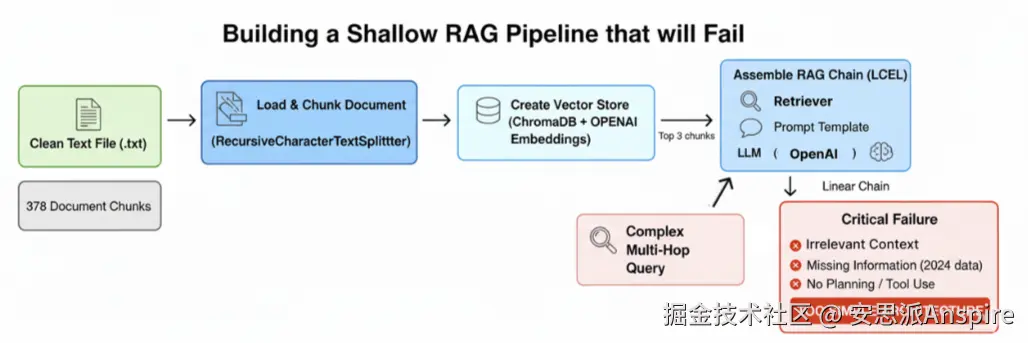
浅层RAG管道(作者:法里德·汗 )
-
**加载并分块处理文档:**我们将导入已清理的10-K文件,并将其分割成小的、固定大小的块,这是一种常见但语义上较为简单的方法。
-
**创建向量存储:**然后,我们将对这些文本块进行嵌入处理,并将其索引到ChromaDB向量存储中,以实现基本的语义搜索。
-
**组装RAG链:**我们将使用LangChain表达式语言(LCEL),它会将我们的检索器、提示模板和大语言模型(LLM)连接成一个线性管道。
-
**演示关键故障:**我们将针对这个简单系统执行多跳、多源查询,并分析其不充分的响应。
首先,我们需要加载已清理的文档并对其进行拆分。我们将使用递归字符文本拆分器,这是LangChain生态系统中的标准工具。
python
from langchain_community.document_loaders import TextLoader # A simple loader for .txt files
from langchain.text_splitter import RecursiveCharacterTextSplitter # A standard text splitter

print("Loading and chunking the document...")
# Initialize the loader with the path to our cleaned 10-K file
loader = TextLoader(doc_path_clean, encoding='utf-8')
# Load the document into memory
documents = loader.load()

# Initialize the text splitter with a defined chunk size and overlap
# chunk_size=1000: Each chunk will be approximately 1000 characters long.
# chunk_overlap=150: Each chunk will share 150 characters with the previous one to maintain some context.
text_splitter = RecursiveCharacterTextSplitter(chunk_size=1000, chunk_overlap=150)
# Split the loaded document into smaller, manageable chunks
doc_chunks = text_splitter.split_documents(documents)

print(f"Document loaded and split into {len(doc_chunks)} chunks.")


#### OUTPUT ####
Loading and chunking the document...
Document loaded and split into 378 chunks.
我们的主文档中有378个数据块,下一步是让它们可被搜索。为此,我们需要创建向量嵌入并将其存储在数据库中。我们将使用ChromaDB,一个流行的内存向量存储库,以及OpenAI的text-embedding-3-small模型,如我们的配置中所定义。
ini
from langchain_community.vectorstores import Chroma # The vector store we will use
from langchain_openai import OpenAIEmbeddings # The function to create embeddings

print("Creating baseline vector store...")
# Initialize the embedding function using the model specified in our config
embedding_function = OpenAIEmbeddings(model=config['embedding_model'])

# Create the Chroma vector store from our document chunks
# This process takes each chunk, creates an embedding for it, and indexes it.
baseline_vector_store = Chroma.from_documents(
    documents=doc_chunks,
    embedding=embedding_function
)
# Create a retriever from the vector store
# The retriever is the component that will actually perform the search.
# search_kwargs={"k": 3}: This tells the retriever to return the top 3 most relevant chunks for any given query.
baseline_retriever = baseline_vector_store.as_retriever(search_kwargs={"k": 3})

print(f"Vector store created with {baseline_vector_store._collection.count()} embeddings.")


#### OUTPUT ####
Creating baseline vector store...
Vector store created with 378 embeddings.
Chroma.from_documents组织这个过程,并将所有向量存储在一个可搜索的索引中。最后一步是使用LangChain表达式语言(LCEL)将它们组装成一个单一的、可运行的RAG链。
这个链将定义数据流的线性流程:从用户的问题到检索器,再到提示,最后到大型语言模型。
python
from langchain_core.prompts import ChatPromptTemplate # For creating prompt templates
from langchain_openai import ChatOpenAI # The OpenAI chat model interface
from langchain_core.runnable import RunnablePassthrough # A tool to pass inputs through the chain
from langchain_core.output_parsers import StrOutputParser # To parse the LLM's output as a simple string

# This template instructs the LLM on how to behave.
# {context}: This is where we will inject the content from our retrieved documents.
# {question}: This is where the user's original question will go.
template = """You are an AI financial analyst. Answer the question based only on the following context:
{context}

Question: {question}
"""
prompt = ChatPromptTemplate.from_template(template)
# We use our 'fast_llm' for this simple task, as defined in our config
llm = ChatOpenAI(model=config["fast_llm"], temperature=0)

# A helper function to format the list of retrieved documents into a single string
def format_docs(docs):
    return "\n\n---\n\n".join(doc.page_content for doc in docs)

# The complete RAG chain defined using LCEL's pipe (|) syntax
baseline_rag_chain = (
    # The first step is a dictionary that defines the inputs to our prompt
    {"context": baseline_retriever | format_docs, "question": RunnablePassthrough()}
    # The context is generated by taking the question, passing it to the retriever, and formatting the result
    # The original question is passed through unchanged
    | prompt # The dictionary is then passed to the prompt template
    | llm # The formatted prompt is passed to the language model
    | StrOutputParser() # The LLM's output message is parsed into a string
)
你应该知道,我们将定义一个字典作为第一步。其上下文键由子链填充,输入问题传递给基线检索器,其输出(文档对象列表)由格式化文档格式化为单个字符串。问题键通过使用可运行直通简单地传递原始输入来填充。
让我们运行这个简单的管道,了解它在哪里出现故障。
python
from rich.console import Console # For pretty-printing output with markdown
from rich.markdown import Markdown

# Initialize the rich console for better output formatting
console = Console()

# Our complex, multi-hop, multi-source query
complex_query_adv = "Based on NVIDIA's 2023 10-K filing, identify their key risks related to competition. Then, find recent news (post-filing, from 2024) about AMD's AI chip strategy and explain how this new strategy directly addresses or exacerbates one of NVIDIA's stated risks."

print("Executing complex query on the baseline RAG chain...")
# Invoke the chain with our challenging query
baseline_result = baseline_rag_chain.invoke(complex_query_adv)

console.print("\n--- BASELINE RAG FAILED OUTPUT ---")
# Print the result using markdown formatting for readability
console.print(Markdown(baseline_result))
当你运行上述代码时,我们会得到以下输出。
vbnet
#### OUTPUT ####
Executing complex query on the baseline RAG chain...

--- BASELINE RAG FAILED OUTPUT ---
Based on the provided context, NVIDIA operates in an intensely competitive semiconductor
industry and faces competition from companies like AMD. The context mentions
that the industry is characterized by rapid technological change. However, the provided documents do not contain any specific information about AMD's recent AI chip strategy from 2024 or how it might impact NVIDIA's stated risks.
在这个失败的RAG管道及其输出中,你可能已经注意到三件事。
-
无关上下文:检索器获取了关于"NVIDIA" 、**"竞争"和"AMD"**的通用信息块,但遗漏了2024年AMD战略的具体细节。
-
**信息缺失:**关键问题在于2023年的数据无法涵盖2024年的事件。系统没有意识到它缺少关键信息。
-
**无规划或工具使用:**将复杂查询视为简单问题。无法将其分解为步骤,也不会使用网络搜索等工具来填补空白。
系统失败不是因为大语言模型(LLM)愚蠢,而是因为架构过于简单。这是一个线性的、一次性的过程,却试图解决一个循环的、多步骤的问题。
既然我们已经了解了基本RAG管道存在的问题,现在就可以开始实施我们的深度思考方法论,看看它在解决复杂查询方面的效果如何。