1.获取Python之禅的内容
python之禅的网址:
https://peps.python.org/pep-0020/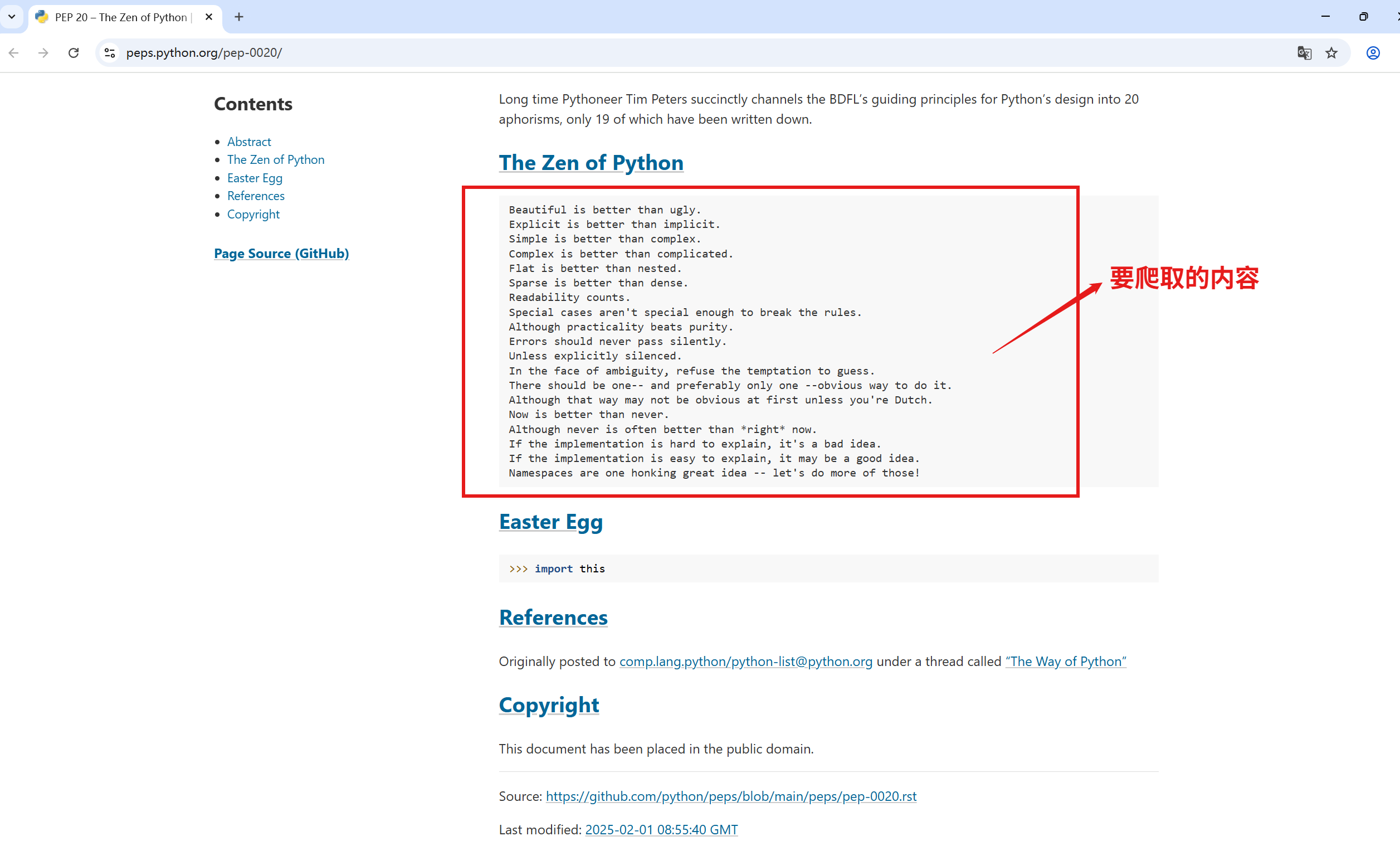
方法一:使用requests+re+html模块
re和html为内置模块
html模块中提供了一些处理HTML编码和解码的操作,包含两个主要函数:escape()和unescape()
编码:将特殊字符转换为HTML实体解码:将HTML实体转换回普通字符escape:逃跑,逃脱,退出
unescape:解码,解密
html.escape(s, quote=True)
-
这个函数用于将字符串s中的特殊字符转换为HTML实体。这可以防止HTML注入(XSS)并且通常在将字符串插入HTML文档时使用。
-
默认情况下,它会转换以下字符:
& -> & < -> < | (竖线) -> >
html.unescape(s)
-
这个函数将HTML实体(如<, >, &, ", '等)转换回它们对应的字符。它既可以处理命名实体(如<)也可以处理数字实体(如<)。
-
这在从HTML文档中提取文本并希望恢复原始字符时非常有用。
代码:
python
import re
import requests
import html

url = 'https://peps.python.org/pep-0020/'
headers = {
    'User-Agent':"Mozilla/5.0 (iPhone; CPU iPhone OS 18_5 like Mac OS X) AppleWebKit/605.1.15 (KHTML, like Gecko) Version/18.5 Mobile/15E148 Safari/604.1"
}
response = requests.get(url,headers=headers)
response.raise_for_status() #如果请求失败则抛出异常
response.encoding = 'utf-8'

pattern = re.compile(r'<pre><span></span>(.+?)</pre>',re.DOTALL) # re.DOTALL和re.S功能都一样,用于使元字符.可以匹配换行符,使得.可以匹配任何一个字符 dot 点
#正则表达式中,?不能放在()外面,否则表示匹配()0次或1次
#放在量词后才表示非贪婪模式

matcher = pattern.search(response.text)
the_zen_of_python = html.unescape(matcher.group(1))
print(the_zen_of_python)
输出:
Beautiful is better than ugly.
Explicit is better than implicit.
Simple is better than complex.
Complex is better than complicated.
Flat is better than nested.
Sparse is better than dense.
Readability counts.
Special cases aren't special enough to break the rules.
Although practicality beats purity.
Errors should never pass silently.
Unless explicitly silenced.
In the face of ambiguity, refuse the temptation to guess.
There should be one-- and preferably only one --obvious way to do it.
Although that way may not be obvious at first unless you're Dutch.
Now is better than never.
Although never is often better than *right* now.
If the implementation is hard to explain, it's a bad idea.
If the implementation is easy to explain, it may be a good idea.
Namespaces are one honking great idea -- let's do more of those!
方法二:使用this模块
this模块是一个彩蛋模块,它包含了Python之禅的内容
当你导入this模块时,它会打印出Python之禅的格言。这些格言是由Tim Peters编写的,代表了Python语言的设计哲学。
具体来说,this模块做了以下事情:
-
它定义了一个字符串
s,其中包含了一串经过rot13编码的字符串(一种简单的替换加密)。 -
当导入模块时,它会将这段字符串解码,并打印出来。
除了打印Python之禅,这个模块没有其他功能。它主要是为了传达Python的哲学思想。
我们可以看一下this模块的源代码(在Python中可以通过import this; print(this.__file__)找到源文件,或者直接查看源代码--按住ctrl鼠标点击this模块名称)
python
import this
print(this.s)
方法三:使用requests+BeautifulSoup模块
BeautifulSoup模块在解析HTML时会自动处理HTML实体(转义字符),将其转换成对应的字符
当使用BeautifulSoup提取文本时,得到的已经是解码后的文本,就不再需要使用html.unescape()了
观察网页的源代码:
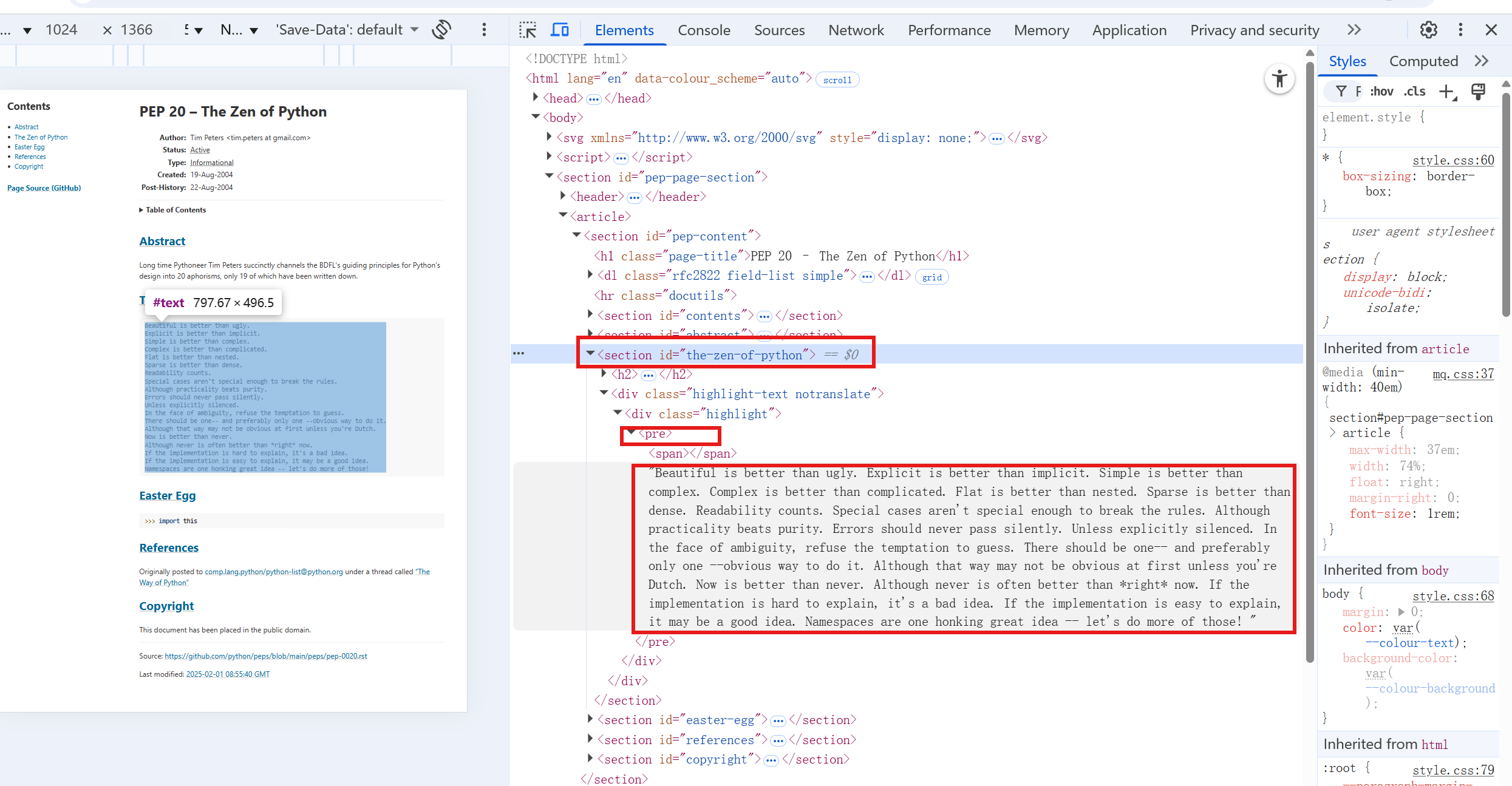
我们可以通过以下步骤来提取:
-
找到id为
the-zen-of-python的section标签。 -
在该section内找到
<div class="highlight-text">标签。 -
然后找到该div内的
<pre>标签。
查看Python之禅的具体位置
从源代码可以看到:
-
Python之禅在
<section id="the-zen-of-python">部分 -
具体内容在
<pre>标签中 -
这个
<pre>标签嵌套在多个div中,具有类名highlight-text
python
import requests
from bs4 import BeautifulSoup

url = 'https://peps.python.org/pep-0020/'
headers = {
    'User-Agent':"Mozilla/5.0 (iPhone; CPU iPhone OS 18_5 like Mac OS X) AppleWebKit/605.1.15 (KHTML, like Gecko) Version/18.5 Mobile/15E148 Safari/604.1"
 }
response = requests.get(url,headers = headers)
response.raise_for_status()

soup = BeautifulSoup(response.text,features='lxml')
zen_section = soup.find('section',attrs={'id':'the-zen-of-python'})

if zen_section: # find()方法找不到时返回None,find_all()方法找不到时返回空列表
    # print(type(zen_section)) # <class 'bs4.element.Tag'>
    pre_tag = zen_section.find('pre')
    if pre_tag:
        # print(type(pre_tag)) # <class 'bs4.element.Tag'>
        print(pre_tag.text)
        #也可以使用pre_tag.get_text()
        #两者都可以用于获取标签的文本内容
        #.get_text()中的参数可以指定在连接多个文本节点时使用的分隔符(默认是一个空字符串),还可以指定是否对获取的文本消除前后的空白
        #因此.get_text()方法比.text属性更灵活
        #大多数情况下,两者的作用是一样的
else:
    print("not found")
输出:
Beautiful is better than ugly.
Explicit is better than implicit.
Simple is better than complex.
Complex is better than complicated.
Flat is better than nested.
Sparse is better than dense.
Readability counts.
Special cases aren't special enough to break the rules.
Although practicality beats purity.
Errors should never pass silently.
Unless explicitly silenced.
In the face of ambiguity, refuse the temptation to guess.
There should be one-- and preferably only one --obvious way to do it.
Although that way may not be obvious at first unless you're Dutch.
Now is better than never.
Although never is often better than *right* now.
If the implementation is hard to explain, it's a bad idea.
If the implementation is easy to explain, it may be a good idea.
Namespaces are one honking great idea -- let's do more of those!