作者: Dave Bitter 发布时间: 2025 年 10 月 29 日 · 阅读时间约 7 分钟
翻译: 安东尼
深入探索 Chrome 的翻译与语言检测 API,并展示一个多语言商品评论的实时本地翻译 Demo。
背景
六月份参加 Google I/O Connect 和 Google Developer Expert 峰会后,我写过一篇关于 Chrome 内置 AI API 的文章,其中介绍了 Summarizer API、Language Detection API 和 Translation API ------ 都基于 Google 的 Gemini Nano 模型,本地运行、无需联网。
这段时间我一直想用这些 API 做点实际的东西。理论很香,但写代码最爽!
于是我专注于语言检测和翻译 API,并搭了一个真正能用的 Demo,测试它们在真实场景下表现如何。
剧透: 在 Chrome 138 之后,这些 API 进化得相当不错,用起来非常丝滑。
我做了什么?
我做了一个虚拟电商产品页,商品是:"AI 万能翻译设备"。
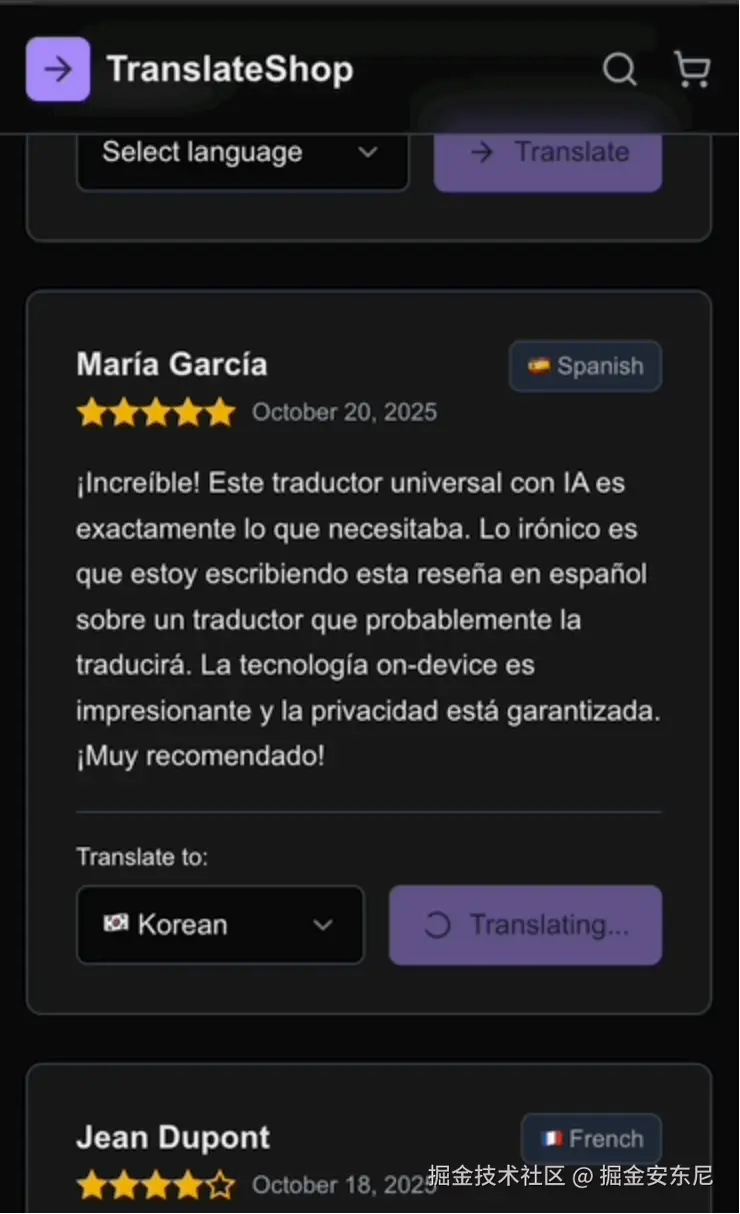
讽刺的是------评论都用不同语言写的,需要翻译才能看懂。😂
Demo 中有 8 条用户评论,分别是 英语、西班牙语、法语、德语、荷兰语、日语、意大利语、瑞典语。 每条评论都有语言选择器 + 翻译按钮,页面自动识别语言,你可以把任意评论翻译成你偏好的语言。
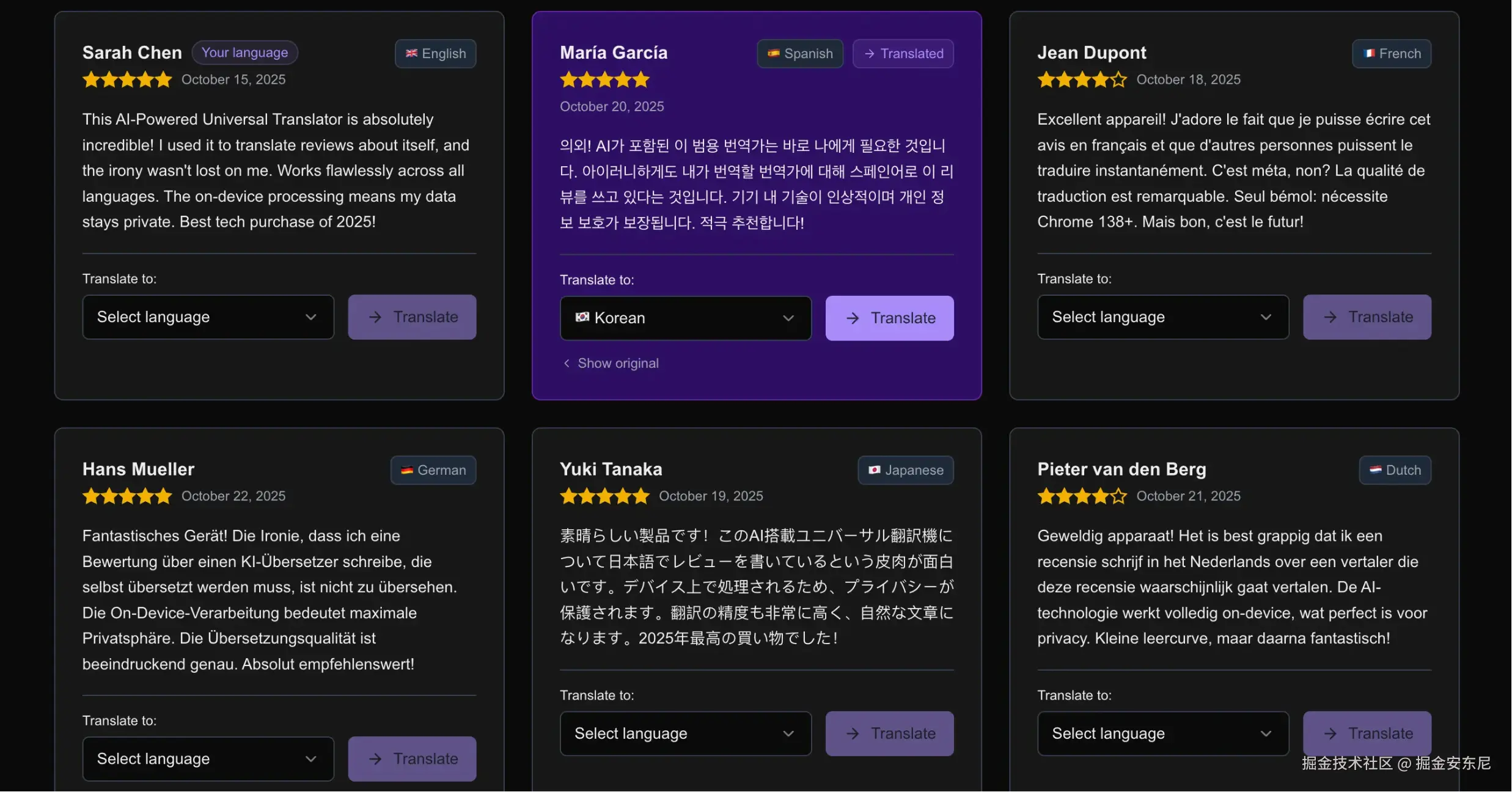
全程离线、本地执行、无需服务器、无需 API Key。你的浏览器本地跑 AI,魔法自行释放。
语言检测 API
语言检测 API 就是判断文本是啥语言,过程完全在本地执行,不会上传数据。
代码示例:
javascript
async function detectLanguage(text) {
  if (!window.LanguageDetector) return null

  const availability = await window.LanguageDetector.availability()
  if (availability === 'no') return null

  const detector = await window.LanguageDetector.create()
  const results = await detector.detect(text)

  return results?.[0]?.detectedLanguage || null
}
页面加载时,为每条评论执行检测:
scss
useEffect(() => {
  const detectOnMount = async () => {
    setIsDetecting(true)
    const detected = await detectLanguage(review.text)
    setDetectedLanguage(detected)
    setIsDetecting(false)
  }
  detectOnMount()
}, [review.text])
检测速度超快,几乎是瞬间。
如何启用语言检测 API
需要手动打开 Chrome Flags:
- 访问:
chrome://flags/#language-detection-api→ 启用 - 访问:
chrome://flags/#optimization-guide-on-device-model→ 启用 - 重启 Chrome
- 打开
chrome://components/并更新 "Optimization Guide On Device Model"
否则 window.LanguageDetector 会是 undefined。
翻译 API 详解
语言识别后,就可以翻译了。
Translation API 需要:
- 原语言
- 目标语言
- 文本
代码示例👇
javascript
async function translateText(text, targetLanguage, sourceLanguage, onProgress) {
  if (!window.Translator?.create) throw new Error('Translator API not available')

  const translator = await window.Translator.create({
    sourceLanguage,
    targetLanguage,
  })

  if (onProgress) {
    translator.addEventListener('downloadprogress', (e) => {
      onProgress({
        loaded: e.loaded,
        total: e.total,
        percentage: Math.round((e.loaded / e.total) * 100),
      })
    })
  }

  if (translator.ready) await translator.ready

  return await translator.translate(text)
}
翻译流程
点击「翻译」按钮后:
- 检测语言(若未检测)
- 首次翻译时下载模型(1--2GB)
- 翻译完成
- 展示翻译结果,并可切回原文
模型下载会显示进度条:
scss
(progress) => {
  setIsDownloading(true)
  setDownloadProgress(progress.percentage)
}
UX 提升显著,比无提示等待舒服太多!
组件状态示例
scss
const [translatedText, setTranslatedText] = useState(null)
const [selectedLanguage, setSelectedLanguage] = useState('')
const [isTranslating, setIsTranslating] = useState(false)
const [isDownloading, setIsDownloading] = useState(false)
const [downloadProgress, setDownloadProgress] = useState(0)
const [detectedLanguage, setDetectedLanguage] = useState(null)
UI 能够:
- 展示语言徽章
- 翻译进度条
- 切换原文/译文
- 高亮与系统语言一致的评论
- 错误处理、优雅降级
API 更新提醒
API 从 Chrome 138 → 141 有变化!
旧写法:
javascript
window.ai.translator.create()
window.ai.languageDetector.create()
新写法:
javascript
window.Translator.create()
window.LanguageDetector.create()
更简洁、清晰。
建议使用渐进增强:API 不可用则降级,不崩 UI。
实践心得
✅ 检测速度意外地快
长文本也几乎秒回。
✅ 翻译模型首次下载较大
1--2GB,视网络而定,但只需一次。
✅ Progressive Enhancement 是王道
用户没开 Flag → 也能正常读评论。
✅ 有置信分数,但我没用
若想增强用户体验,可展示"识别信心"。
完整执行链路
- 页面加载 → 自动语言检测
- 用户选择目标语言
- 用户点击翻译
- 若未检测 → 检测
- 若第一次翻译 → 下载模型(Progress)
- 翻译
- 展示结果 + 切换原文按钮
全程本地,无云端请求。
技术栈
- Next.js 16 (App Router)
- React 19
- TypeScript
- Tailwind CSS 4
- Radix UI
- Chrome 141
总结
Chrome 的内置 AI 功能越来越成熟:
- 本地隐私保护
- 离线可用
- 用户体验更丝滑
- API 更稳定
适合的场景包括:
- 隐私安全聊天翻译
- 旅行离线小工具
- 浏览器选中文本即翻译
- PWA 多语言支持
我的建议是:基础体验人人可用,高级 AI 为能力更强的浏览器加料。
本地 AI 浏览器的时代开始了,我们还在非常早期。真正的未来,会很炸。
Demo 地址
确保你用 Chrome 138+,并启用对应 flags。如果你用这些 API 做了酷东西,欢迎分享!
更多细节请查看:Chrome 官方 AI
👋 Thanks for reading.