Spring Boot 整合 Spring AI:接入 DeepSeek 与 Ollama 调用大模型
1. 项目概述
本文将介绍如何使用 Spring Boot 整合 Spring AI 框架,实现对 DeepSeek 在线模型和 Ollama 本地模型的调用。通过本文,你将学习:
- 搭建 Spring Boot + Spring AI 基础项目
- 配置 DeepSeek API 实现远程调用
- 配置 Ollama 实现本地大模型调用
- 编写示例接口测试模型交互
2. 环境准备
- JDK 17+
- Maven 3.8+
- Spring Boot 3.5.7
- Spring AI 1.0.3
- Ollama 本地服务(用于本地模型调用)
- DeepSeek API 密钥(用于在线模型调用)
3. 项目搭建
3.1 创建 Spring Boot 项目
项目代码可参考:项目代码
3.2 配置 Maven 依赖
xml
<?xml version="1.0" encoding="UTF-8"?>
<project xmlns="http://maven.apache.org/POM/4.0.0" xmlns:xsi="http://www.w3.org/2001/XMLSchema-instance"
         xsi:schemaLocation="http://maven.apache.org/POM/4.0.0 https://maven.apache.org/xsd/maven-4.0.0.xsd">
    <modelVersion>4.0.0</modelVersion>
    <parent>
        <groupId>org.springframework.boot</groupId>
        <artifactId>spring-boot-starter-parent</artifactId>
        <version>3.5.7</version>
        <relativePath/> <!-- lookup parent from repository -->
    </parent>
    <groupId>com.jianjang.llm</groupId>
    <artifactId>springboot-llm</artifactId>
    <version>1.0.0</version>
    <name>springboot-llm</name>
    <description>springboot-llm</description>
    <properties>
        <java.version>17</java.version>
        <spring-ai.version>1.0.3</spring-ai.version>
    </properties>
    <dependencyManagement>
        <dependencies>
            <dependency>
                <groupId>org.springframework.ai</groupId>
                <artifactId>spring-ai-bom</artifactId>
                <version>${spring-ai.version}</version>
                <type>pom</type>
                <scope>import</scope>
            </dependency>
        </dependencies>
    </dependencyManagement>
    <dependencies>
        <dependency>
            <groupId>org.springframework.boot</groupId>
            <artifactId>spring-boot-starter-web</artifactId>
        </dependency>

        <dependency>
            <groupId>org.springframework.boot</groupId>
            <artifactId>spring-boot-starter-test</artifactId>
            <scope>test</scope>
        </dependency>
        <!-- Spring AI Deepseek -->
        <dependency>
            <groupId>org.springframework.ai</groupId>
            <artifactId>spring-ai-starter-model-deepseek</artifactId>
        </dependency>
        <!-- Spring AI Ollama -->
        <dependency>
            <groupId>org.springframework.ai</groupId>
            <artifactId>spring-ai-starter-model-ollama</artifactId>
        </dependency>
        <!-- Spring Boot Starter AOP -->
        <dependency>
            <groupId>org.springframework.boot</groupId>
            <artifactId>spring-boot-starter-aop</artifactId>
        </dependency>
        <dependency>
            <groupId>org.projectlombok</groupId>
            <artifactId>lombok</artifactId>
        </dependency>
    </dependencies>

    <build>
        <plugins>
            <plugin>
                <groupId>org.springframework.boot</groupId>
                <artifactId>spring-boot-maven-plugin</artifactId>
            </plugin>
        </plugins>
    </build>

</project>
4. 配置文件设置
创建 application-dev.yml 配置文件,添加以下内容:
yaml
spring:
  application:
      name: springboot-llm
  # openai 配置,deepseek
  ai:
    deepseek:
      api-key: sk-xxxx #自行到deepseek官网申请
      base-url: https://api.deepseek.com
      chat:
        options:
          model: deepseek-chat
          temperature: 0.8
# ollama 配置
    ollama:
      base-url: http://localhost:11434
      chat:
        options:
          model: qwen3:1.7b
          temperature: 0.7
5. 核心代码实现
5.1 配置类
spring-ai自动化配置,此处无需额外配置
5.2 控制器实现
创建 REST 接口供外部调用:
- deepseek服务接口
java
package com.jianjang.llm.controller;

import java.util.Map;

import org.slf4j.Logger;
import org.slf4j.LoggerFactory;
import org.springframework.ai.chat.messages.AssistantMessage;
import org.springframework.ai.chat.messages.UserMessage;
import org.springframework.ai.chat.model.ChatResponse;
import org.springframework.ai.chat.prompt.Prompt;
import org.springframework.ai.deepseek.DeepSeekChatModel;
import org.springframework.beans.factory.annotation.Autowired;
import org.springframework.web.bind.annotation.*;

import com.fasterxml.jackson.databind.ObjectMapper;

import reactor.core.publisher.Flux;

/**
 * Deepseek 聊天控制器
 * 提供调用 Deepseek API 的 REST 接口示例
 * @link https://docs.spring.io/spring-ai/reference/api/chat/deepseek-chat.html
 */
@RestController
@RequestMapping("/api/deepseek/")
public class DeepseekController {

    private static final Logger log = LoggerFactory.getLogger(DeepseekController.class);

    private final DeepSeekChatModel chatModel;
    private final ObjectMapper objectMapper;

    @Autowired
    public DeepseekController(DeepSeekChatModel chatModel, ObjectMapper objectMapper) {
        this.chatModel = chatModel;
        this.objectMapper = objectMapper;
    }

    @PostMapping("/ai/generate")
    public Map<String, String> generate(@RequestBody Map<String, String> request) {
        String message = request.get("message");
        log.info("[GENERATE] 开始生成,消息: {}", message);
        return Map.of("generation", chatModel.call(message));
    }

    @GetMapping("/ai/generateStream")
    public Flux<ChatResponse> generateStream(@RequestParam(value = "message", defaultValue = "Tell me a joke") String message) {
        log.info("[STREAM] 开始流式生成,消息: {}", message);
        var prompt = new Prompt(new UserMessage(message));
        return chatModel.stream(prompt)
                .doOnSubscribe(subscription -> log.info("[STREAM] 流式响应已订阅"))
                .doOnNext(response -> {
                    // 提取流式响应内容
                    String content = "";
                    if (response.getResult() != null && response.getResult().getOutput() != null) {
                        AssistantMessage output = response.getResult().getOutput();
                        // 尝试多种方式提取内容
                        // 方法1: 尝试通过反射获取 text 属性
                        try {
                            java.lang.reflect.Method getTextMethod = output.getClass().getMethod("getText");
                            content = (String) getTextMethod.invoke(output);
                        } catch (NoSuchMethodException e) {
                            // 方法2: 尝试 toString() 并提取内容
                            String outputStr = output.toString();
                            // 如果 toString() 包含内容,尝试提取
                            if (outputStr != null && !outputStr.isEmpty()) {
                                content = outputStr;
                            }
                        } catch (Exception e) {
                            log.debug("[STREAM] 提取内容失败,尝试使用 toString(): {}", e.getMessage());
                            content = output.toString();
                        }
                    }

                    // 打印流式内容
                    if (content != null && !content.isEmpty()) {
                        // 打印每个流式数据块(不换行,模拟流式效果)
                        System.out.print(content);
                        log.debug("[STREAM] 收到流式数据块: {}", content);
                    }

                    // 同时打印完整的响应对象(用于调试)
                    try {
                        log.debug("[STREAM] 完整响应: {}", objectMapper.writeValueAsString(response));
                    } catch (Exception e) {
                        log.debug("[STREAM] 响应对象: {}", response);
                    }
                })
                .doOnComplete(() -> {
                    System.out.println(); // 换行
                    log.info("[STREAM] 流式响应完成");
                })
                .doOnError(error -> {
                    System.out.println(); // 换行
                    log.error("[STREAM] 流式响应出错: {}", error.getMessage(), error);
                });
    }
}- ollama服务接口
java
package com.jianjang.llm.controller;

import java.util.Map;

import org.slf4j.Logger;
import org.slf4j.LoggerFactory;
import org.springframework.ai.chat.messages.AssistantMessage;
import org.springframework.ai.chat.messages.UserMessage;
import org.springframework.ai.chat.model.ChatResponse;
import org.springframework.ai.chat.prompt.Prompt;
import org.springframework.ai.ollama.OllamaChatModel;
import org.springframework.beans.factory.annotation.Autowired;
import org.springframework.web.bind.annotation.*;

import com.fasterxml.jackson.databind.ObjectMapper;

import reactor.core.publisher.Flux;

/**
 * 聊天控制器
 * 提供调用 Ollama API 的 REST 接口示例
 * @author zhangjian
 * @link https://docs.spring.io/spring-ai/reference/api/chat/ollama-chat.html
 */
@RestController
@RequestMapping("/api/ollama/")
public class OllamaChatController {

    private static final Logger log = LoggerFactory.getLogger(OllamaChatController.class);

    private final OllamaChatModel chatModel;
    private final ObjectMapper objectMapper;

    @Autowired
    public OllamaChatController(OllamaChatModel chatModel, ObjectMapper objectMapper) {
        this.chatModel = chatModel;
        this.objectMapper = objectMapper;
    }

    @PostMapping("/ai/generate")
    public Map<String,String> generate(@RequestBody Map<String, String> request) {
        String message = request.get("message");
        log.info("[GENERATE] 开始生成,消息: {}", message);
        return Map.of("generation", this.chatModel.call(message));
    }

    @GetMapping("/ai/generateStream")
    public Flux<ChatResponse> generateStream(@RequestParam(value = "message", defaultValue = "Tell me a joke") String message) {
        log.info("[STREAM] 开始流式生成,消息: {}", message);
        Prompt prompt = new Prompt(new UserMessage(message));
        return this.chatModel.stream(prompt)
                .doOnSubscribe(subscription -> log.info("[STREAM] 流式响应已订阅"))
                .doOnNext(response -> {
                    // 提取流式响应内容
                    String content = "";
                    if (response.getResult() != null && response.getResult().getOutput() != null) {
                        AssistantMessage output = response.getResult().getOutput();
                        // 尝试多种方式提取内容
                        // 方法1: 尝试通过反射获取 text 属性
                        try {
                            java.lang.reflect.Method getTextMethod = output.getClass().getMethod("getText");
                            content = (String) getTextMethod.invoke(output);
                        } catch (NoSuchMethodException e) {
                            // 方法2: 尝试 toString() 并提取内容
                            String outputStr = output.toString();
                            // 如果 toString() 包含内容,尝试提取
                            if (outputStr != null && !outputStr.isEmpty()) {
                                content = outputStr;
                            }
                        } catch (Exception e) {
                            log.debug("[STREAM] 提取内容失败,尝试使用 toString(): {}", e.getMessage());
                            content = output.toString();
                        }
                    }

                    // 打印流式内容
                    if (content != null && !content.isEmpty()) {
                        // 打印每个流式数据块(不换行,模拟流式效果)
                        System.out.print(content);
                        log.debug("[STREAM] 收到流式数据块: {}", content);
                    }

                    // 同时打印完整的响应对象(用于调试)
                    try {
                        log.debug("[STREAM] 完整响应: {}", objectMapper.writeValueAsString(response));
                    } catch (Exception e) {
                        log.debug("[STREAM] 响应对象: {}", response);
                    }
                })
                .doOnComplete(() -> {
                    System.out.println(); // 换行
                    log.info("[STREAM] 流式响应完成");
                })
                .doOnError(error -> {
                    System.out.println(); // 换行
                    log.error("[STREAM] 流式响应出错: {}", error.getMessage(), error);
                });
    }
}
6. 启动与测试
6.1 启动 Ollama 服务(本地模型)
6.2 启动 Spring Boot 应用
运行主类:
java
package com.jianjang.llm;

import org.springframework.boot.SpringApplication;
import org.springframework.boot.autoconfigure.SpringBootApplication;

@SpringBootApplication
public class SpringbootLlmApplication {

    public static void main(String[] args) {
        SpringApplication.run(SpringbootLlmApplication.class, args);
    }

}
6.3 接口测试
使用 Postman 或 curl 测试接口:
测试 DeepSeek 接口
bash
curl --location --request POST 'http://localhost:8080/api/deepseek/ai/generate' \
--header 'Content-Type: application/json' \
--data-raw '{"message":"请介绍一下 Spring AI"}'
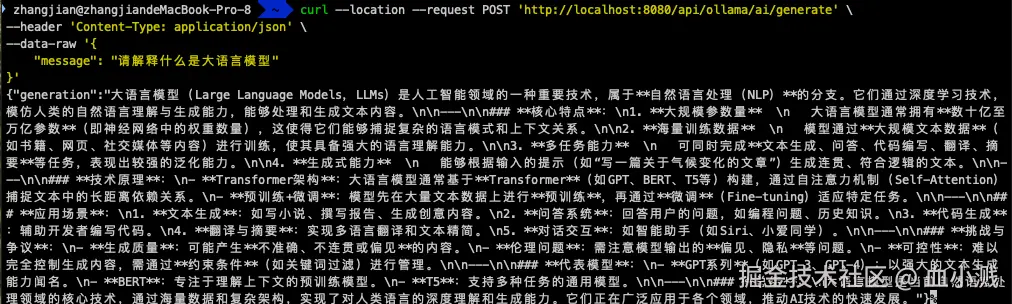
测试 Ollama 接口
bash
curl --location --request POST 'http://localhost:8080/api/ollama/ai/generate' \
--header 'Content-Type: application/json' \
--data-raw '{
    "message": "请解释什么是大语言模型"
}'
7. 扩展与优化
- 流式响应 :Spring AI 支持流式响应,可通过
chatModel.stream()方法实现 - 模型参数配置:可配置温度(temperature)、最大 tokens 等参数
- 异常处理:添加全局异常处理,处理 API 调用失败等情况
- 缓存机制:对重复请求添加缓存,提高响应速度并减少 API 调用次数
8. 总结
本文介绍了如何使用 Spring Boot 整合 Spring AI 框架,实现对 DeepSeek 在线模型和 Ollama 本地模型的调用。通过 Spring AI 提供的统一接口,我们可以轻松切换不同的大模型服务,而无需修改核心业务逻辑。这种方式极大地提高了代码的可扩展性和可维护性,适合在实际项目中应用。
如需进一步学习,可参考: