Step7 组态 PC Station 与 CM1243-5 基于 Profibus 的 S7 通信

Step7 组态PC Station 与 S7-1200 CM1243-5 基于Profibus 的S7 通信

硬件:

CPU1214C DC/DC/DC,V2.2

CM1243-5

CP5611 A2

软件:

STEP 7 V5.5

SIMATIC NET V8.2

STEP7 V11 SP2 Update5

由于CM1243-5 支持S7通信,因此,可以使用SIMATIC NET 组态的OPC 服务器与其建立S7通信连接。

操作步骤

1、使用 STEP7 V11 生成 S7-1200 项目文件

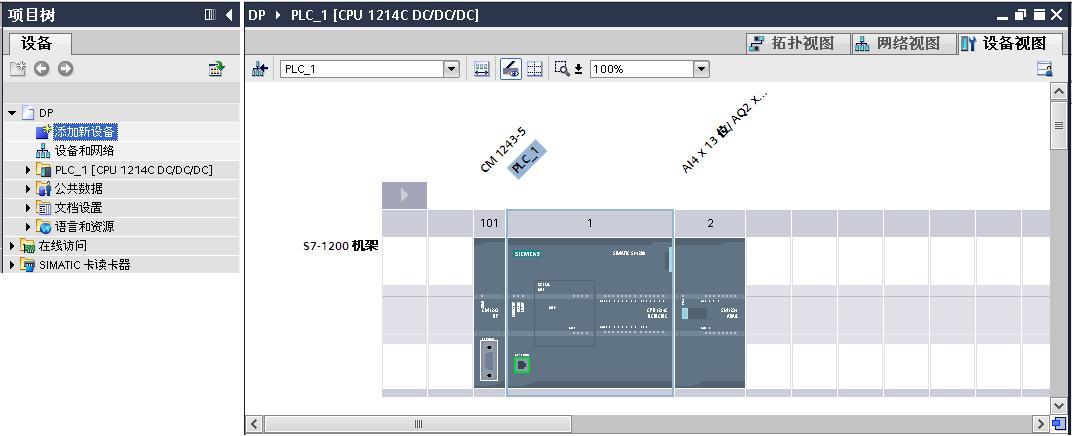
通过"添加新设备"组态 S7-1200 站PLC_1,选择 CPU1214C DC/DC/DC V2.2 创建项目。 如图1所示。
![A screenshot of a computer

Description automatically generated](https://i-blog.csdnimg.cn/img_convert/6bf7dcb55360db3ff9ff70bece44684b.png)

图1 创建 S7-1200 项目文件

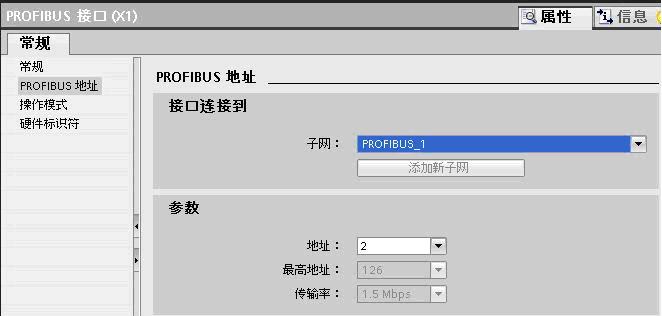
组态 CM1243-5 ,为 CM1243-5 添加子网PROFIBUS _1,分配站地址为2 。 如图2 所示。
![A screenshot of a computer

Description automatically generated](https://i-blog.csdnimg.cn/img_convert/2ad1d85996f4cd6b211628de34881fcf.png)

图2 组态 CM1243-5

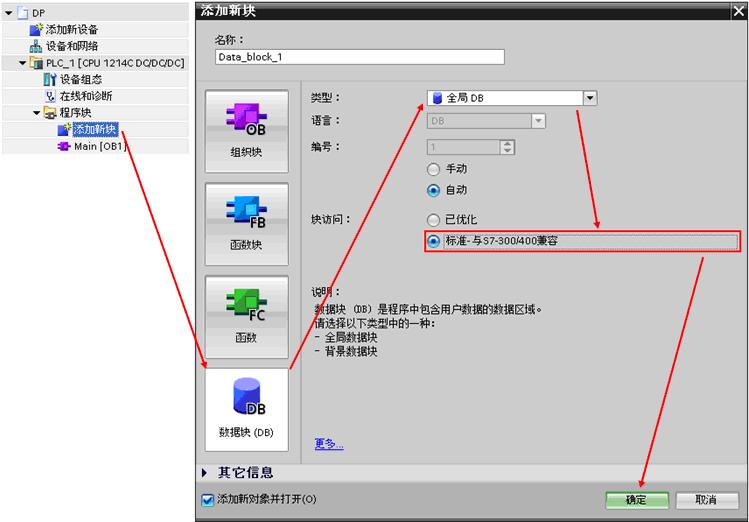
点击添加新块,生成块访问方式为"标准-与S7-300/400兼容"模式全局块数据块 DB1。如图3 所示。
![A screenshot of a computer

Description automatically generated](https://i-blog.csdnimg.cn/img_convert/552828fdb7e6069f4e750bbd4c3612eb.png)

图3 创建DB块

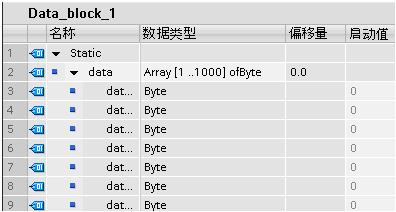
双击 DB 1,添加数据元素 data,数组数据类型, 1000个字节,编译 DB 1。如图4所示。
![A screenshot of a computer

Description automatically generated](https://i-blog.csdnimg.cn/img_convert/5271e2be4da899a202cfe25ddbe7419e.png)

图4 创建DB块元素

编译PLC_1站,下载到 CPU。

2、用STEP 7 组态SIMATIC PC Station

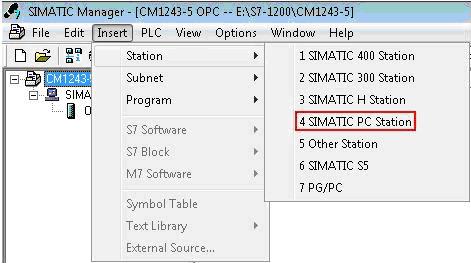
(1)打开STEP7 V5.5 生成新项目CM1243-5,在项目中添加SIMATIC PC Station。
![A screenshot of a computer program

Description automatically generated](https://i-blog.csdnimg.cn/img_convert/1fe17a3a7041091a8ea545e1c557ddec.png)

图5 建立PC站

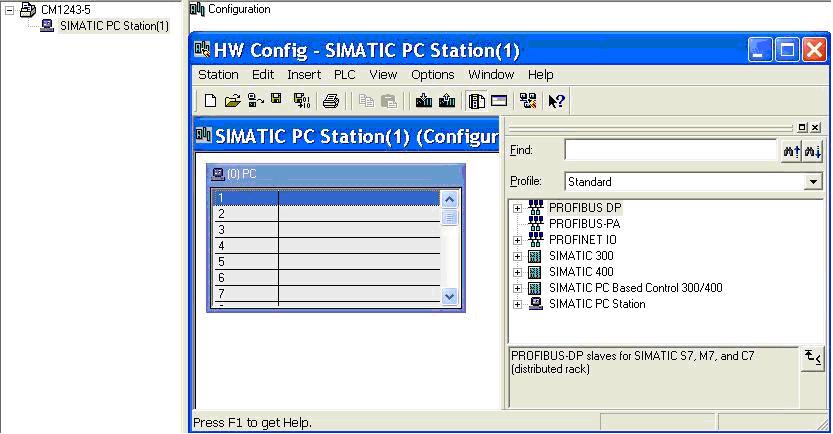
双击Configuration进入PC站的硬件组态。

![A computer screen shot of a computer

Description automatically generated](https://i-blog.csdnimg.cn/img_convert/ca88ad4af4cc765c6259c009d8a16792.png)

图6 进入硬件组态

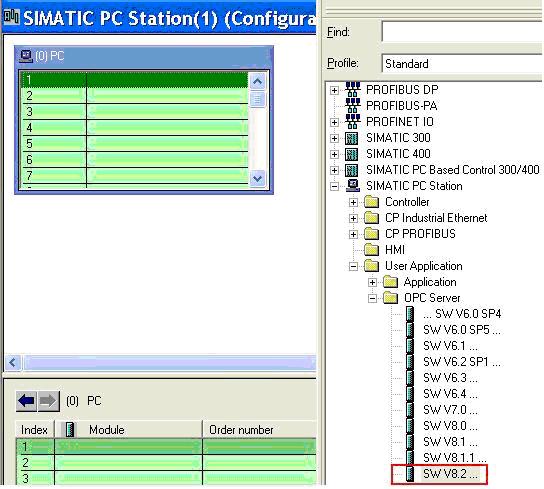
添加OPC Server。

![A screenshot of a computer program

Description automatically generated](https://i-blog.csdnimg.cn/img_convert/d40db02f1ea0608391d826bc2a250fa0.png)

图7 添加OPC Server

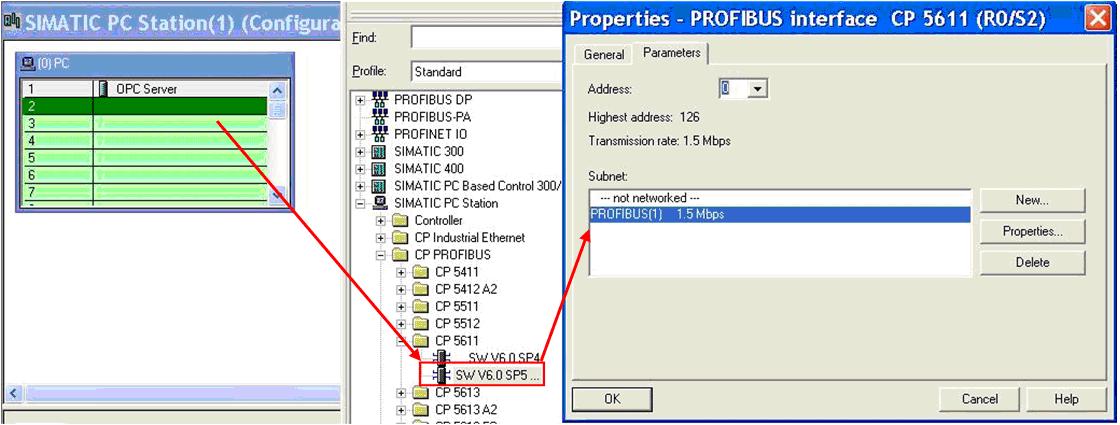
添加CP5611 ,为CP5611添加新网PROFIBUS(1),并选择地址为0,编译存盘。
![A screenshot of a computer

Description automatically generated](https://i-blog.csdnimg.cn/img_convert/c9bf75dc206bbca80e238bc3dd475c8b.png)

图8 添加CP卡

(2)组态网络连接

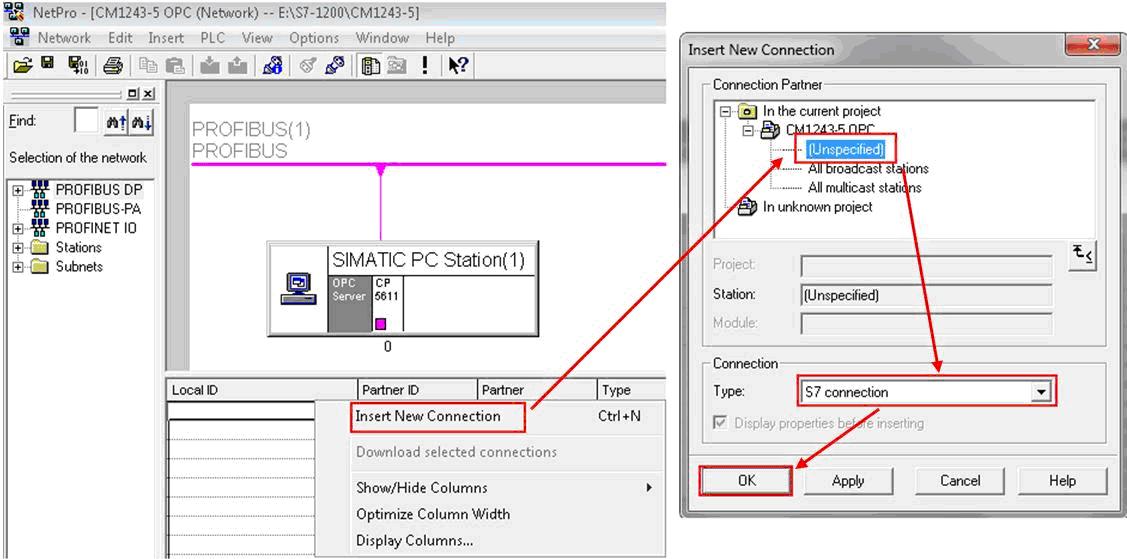
双击

进入网络组态,点亮OPC Server,在连接编辑栏右键插入新的连接,建立一个连接对象为 Unspecified 的 S7 Connection,点击 OK 确认连接。
![A screenshot of a computer

Description automatically generated](https://i-blog.csdnimg.cn/img_convert/f37a18267d7efd5c0b30157b310b68e7.png)

图9 建立S7连接

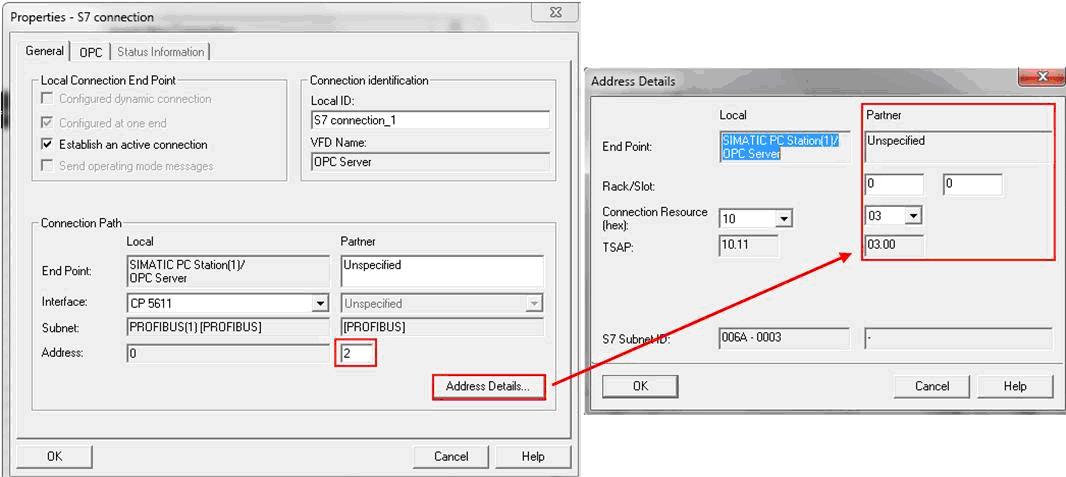
双击连接组态连接参数。在General中选择连接伙伴的PROFIBUS 地址为2,点击Address Details 定义连接伙伴 S7-1200 CPU 的 TSAP(03 00和03 01都可以)。
![A screenshot of a computer

Description automatically generated](https://i-blog.csdnimg.cn/img_convert/a8f64c5b671326eeae11dac44ec75f5b.png)

图10 修改参数

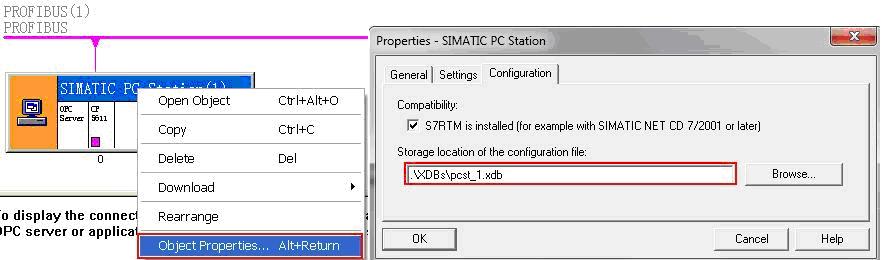
点击 OPC Server 站右键选择 Object Properties,在接下来的对话框中的 Configuration 选择生产.xdb 文件的路径,默认路径为项目文件的目录XDBs。
![A screenshot of a computer

Description automatically generated](https://i-blog.csdnimg.cn/img_convert/12d039f6aaa9bc86da47b02b1084df28.png)

图11 设置XDB路径

(3)导入组态到 OPC Server

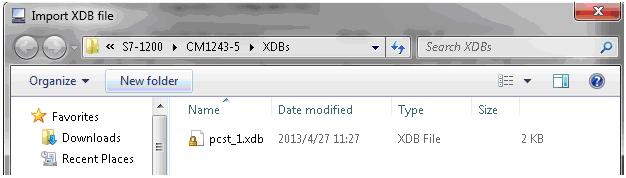
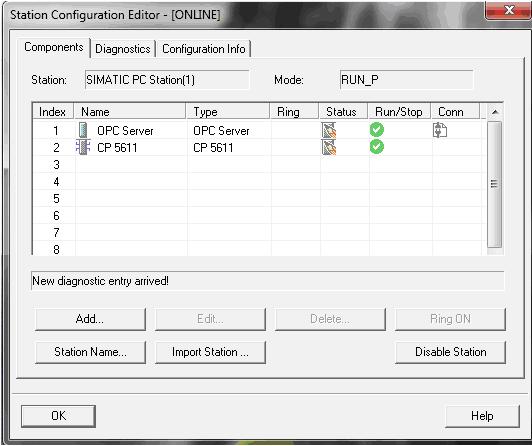
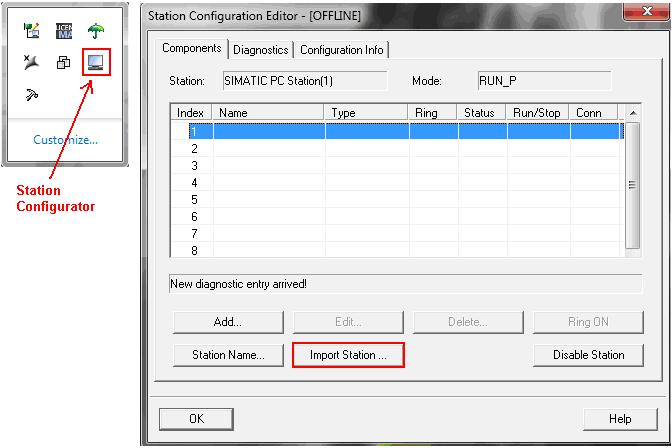
双击"Station Configurator"进入"Station Configuration Editor",点击"Import Station" 导入(2)中生成的文件"pcst_1.xdb"。
![A screenshot of a computer

Description automatically generated](https://i-blog.csdnimg.cn/img_convert/bdd78c0590c1e606db3468132d76d439.png)

图12 导入XDB文件

![A screenshot of a computer

Description automatically generated](https://i-blog.csdnimg.cn/img_convert/5ee6fe9bc30c9206f45c8acea1b6d366.png)

图13 浏览到XDB文件

组态正确导入后,连接建立。

![A screenshot of a computer

Description automatically generated](https://i-blog.csdnimg.cn/img_convert/0c2d24714a9ff0d0f0865ae8921677f7.png)

图14 导入完成

3、检查通信连接

计算机开始菜单,执 行SIMATIC NET的 OPC Scout V10 打开"Server Explorer"。
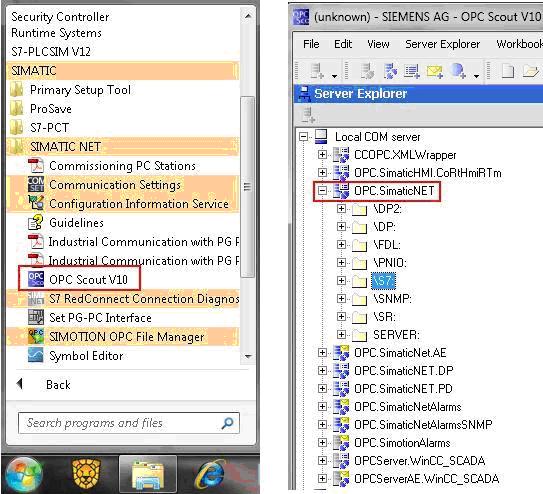
图15 打开OPC Scout

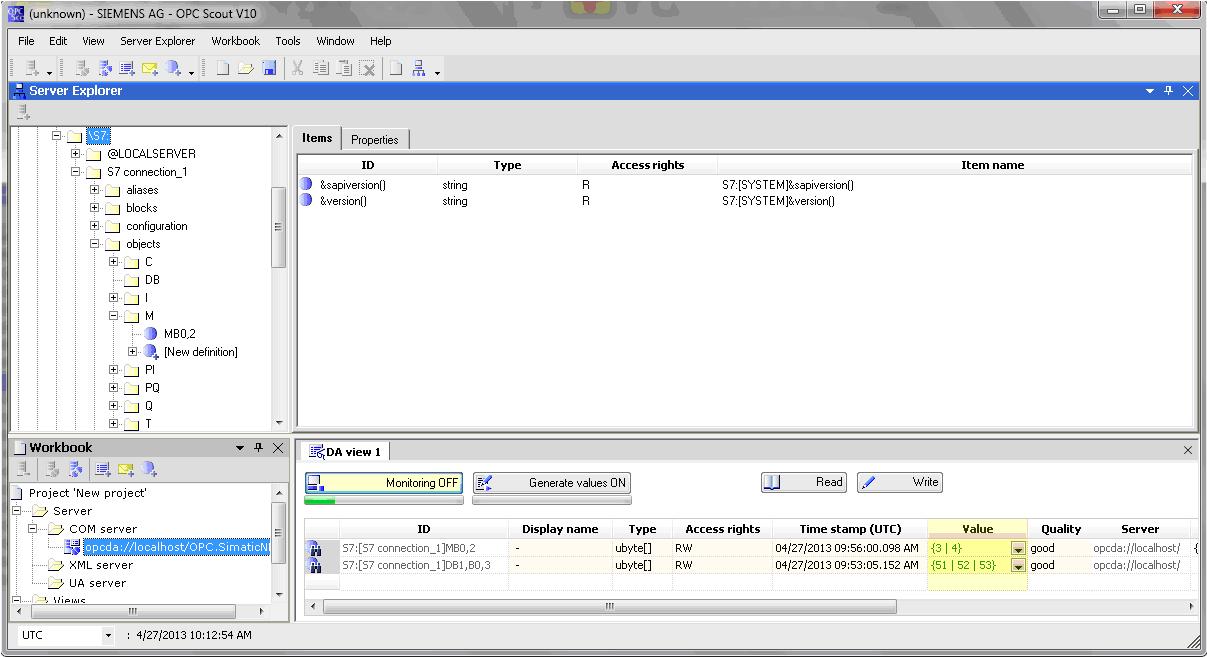
打开"S7"中"S7 connection_1"的"objects",添加变量,将添加的变量拖入到 "DA view",点击"Monitoring ON "查看变量状态。
![A computer screen shot of a computer

Description automatically generated](https://i-blog.csdnimg.cn/img_convert/6e01672be9e8bedbf2f38475722cb9c3.png)

图16 监视变量

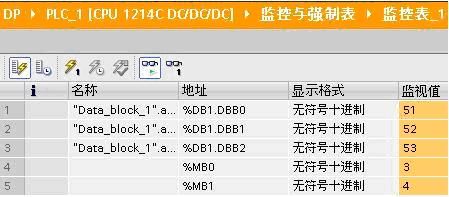
打开 PLC 变量表比较变量的值。

![A screenshot of a computer

Description automatically generated](https://i-blog.csdnimg.cn/img_convert/27b8726e17171f828259b26b84018f4a.png)

图17 监视DB

相关推荐
橘子洲头19 小时前
果汁 pH 检测用测试条采购选型,有哪些靠谱的实验室级品牌可选?
其他
we1less1 天前
Android-HAL (一) hw_module_t 的类型实现
其他
zuqiu_1231 天前
中超冬窗:申花引金靴 多队人员大变动
其他
老陈头聊SEO3 天前
生成引擎优化(GEO)如何提升内容创作效率与增强用户体验
其他·搜索引擎·seo优化
视频技术分享3 天前
云屋音视频 SDK 国产化适配:兼容自主系统、芯片,符合信创标准
其他
qq26215424093 天前
《高考》CN期刊简介
其他·期刊·教育·高考
WiKiLeaks_successor3 天前
精神空虚、自卑、自恋、自信
其他
DELOK ULTRASONIC4 天前
德诺超声波(DELOK)在医疗产品焊接中的高效应用案例分析
其他
老陈头聊SEO4 天前
长尾关键词对SEO的重要性及其优化策略总结
其他·搜索引擎·seo优化
t057775 天前
40年匠心传承!维乐ANGEL GLIDE坐垫重塑骑行美学
其他