WebSocket调试工具,用于调试WebSocket链接是否畅通
纯html+js编写
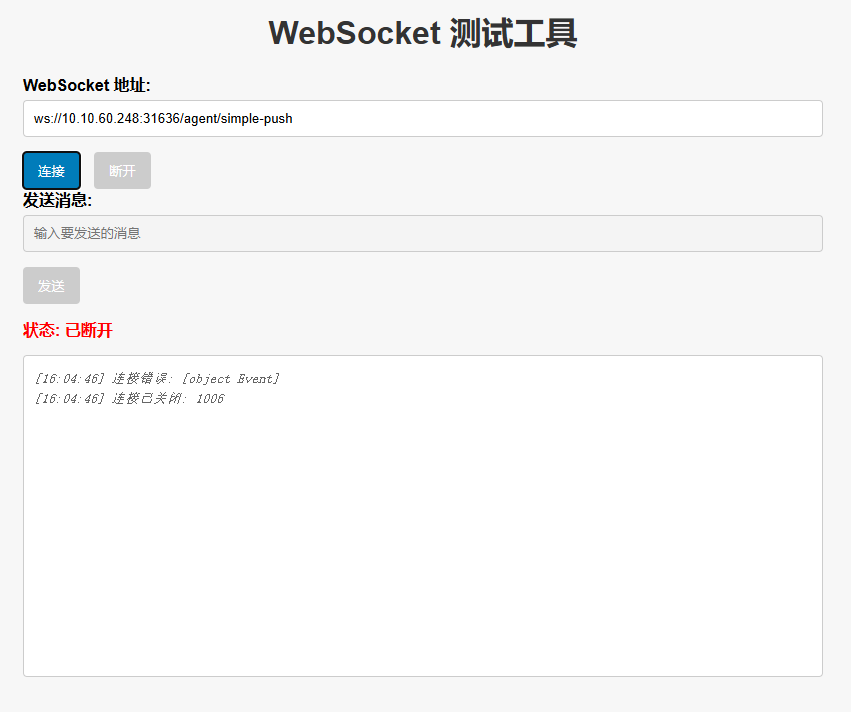
直接粘贴使用
html
<!DOCTYPE html>
<html lang="zh">
  <head>
    <meta charset="UTF-8" />
    <meta name="viewport" content="width=device-width, initial-scale=1.0" />
    <title>WebSocket 测试工具</title>
    <style>
      body {
        font-family: Arial, sans-serif;
        max-width: 800px;
        margin: 20px auto;
        padding: 20px;
        background-color: #f7f7f7;
      }
      h1 {
        text-align: center;
        color: #333;
      }
      .form-group {
        margin-bottom: 15px;
      }
      label {
        display: block;
        margin-bottom: 5px;
        font-weight: bold;
      }
      input[type="text"] {
        width: 100%;
        padding: 10px;
        border: 1px solid #ccc;
        border-radius: 4px;
        box-sizing: border-box;
      }
      button {
        background-color: #007cba;
        color: white;
        padding: 10px 15px;
        border: none;
        border-radius: 4px;
        cursor: pointer;
        margin-right: 10px;
      }
      button:hover {
        background-color: #005a87;
      }
      button:disabled {
        background-color: #ccc;
        cursor: not-allowed;
      }
      #status {
        margin: 15px 0;
        font-weight: bold;
      }
      #messages {
        height: 300px;
        overflow-y: auto;
        border: 1px solid #ccc;
        padding: 10px;
        background-color: #fff;
        border-radius: 4px;
        font-family: monospace;
      }
      .log {
        margin: 5px 0;
        color: #333;
      }
      .received {
        color: #007cba;
      }
      .sent {
        color: #28a745;
      }
      .system {
        color: #666;
        font-style: italic;
      }
    </style>
  </head>
  <body>
    <h1>WebSocket 测试工具</h1>

    <div class="form-group">
      <label for="wsUrl">WebSocket 地址:</label>
      <input
        type="text"
        id="wsUrl"
        placeholder="例如: ws://10.10.2.10:85214 或 wss://yourdomain.com/ws"
        value="ws://10.10.60.248:31636/agent/simple-push"
      />
    </div>

    <button id="connectBtn">连接</button>
    <button id="disconnectBtn" disabled>断开</button>

    <div class="form-group">
      <label for="messageInput">发送消息:</label>
      <input
        type="text"
        id="messageInput"
        placeholder="输入要发送的消息"
        disabled
      />
    </div>

    <button id="sendBtn" disabled>发送</button>

    <div id="status">状态: 未连接</div>

    <div id="messages"></div>

    <script>
      let ws = null;
      const wsUrlInput = document.getElementById("wsUrl");
      const messageInput = document.getElementById("messageInput");
      const connectBtn = document.getElementById("connectBtn");
      const disconnectBtn = document.getElementById("disconnectBtn");
      const sendBtn = document.getElementById("sendBtn");
      const statusDiv = document.getElementById("status");
      const messagesDiv = document.getElementById("messages");

      function log(message, type = "system") {
        const el = document.createElement("div");
        el.className = `log ${type}`;
        el.textContent = `[${new Date().toLocaleTimeString()}] ${message}`;
        messagesDiv.appendChild(el);
        messagesDiv.scrollTop = messagesDiv.scrollHeight;
      }

      connectBtn.addEventListener("click", () => {
        const url = wsUrlInput.value.trim();
        if (!url) {
          alert("请输入 WebSocket 地址");
          return;
        }

        try {
          ws = new WebSocket(url);

          ws.onopen = () => {
            log("WebSocket 连接已建立", "system");
            statusDiv.textContent = "状态: 已连接";
            statusDiv.style.color = "green";
            messageInput.disabled = false;
            sendBtn.disabled = false;
            connectBtn.disabled = true;
            disconnectBtn.disabled = false;
          };

          ws.onmessage = (event) => {
            log(`收到: ${event.data}`, "received");
          };

          ws.onclose = (event) => {
            log(`连接已关闭: ${event.code} ${event.reason}`, "system");
            statusDiv.textContent = "状态: 已断开";
            statusDiv.style.color = "red";
            messageInput.disabled = true;
            sendBtn.disabled = true;
            connectBtn.disabled = false;
            disconnectBtn.disabled = true;
            ws = null;
          };

          ws.onerror = (error) => {
            log(`连接错误: ${error}`, "system");
            statusDiv.textContent = "状态: 连接失败";
            statusDiv.style.color = "red";
          };
        } catch (err) {
          log(`连接异常: ${err.message}`, "system");
        }
      });

      disconnectBtn.addEventListener("click", () => {
        if (ws) {
          ws.close();
        }
      });

      sendBtn.addEventListener("click", () => {
        const msg = messageInput.value.trim();
        if (!msg || !ws) return;

        try {
          ws.send(msg);
          log(`发送: ${msg}`, "sent");
          messageInput.value = "";
        } catch (err) {
          log(`发送失败: ${err.message}`, "system");
        }
      });

      // 回车发送
      messageInput.addEventListener("keypress", (e) => {
        if (e.key === "Enter") {
          sendBtn.click();
        }
      });
    </script>
  </body>
</html>