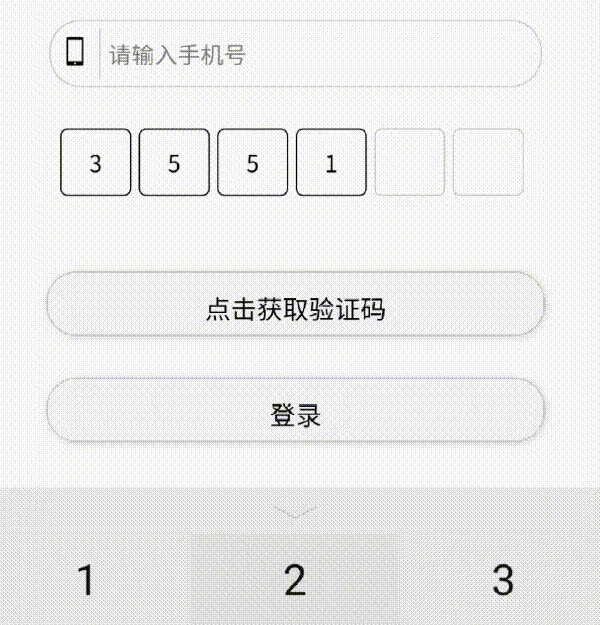
实现思路
该效果的主要实现思路是利用v-for循环生成6个用于展示的输入框,再通过一个隐藏的输入框作为真正的输入源获取用户输入的验证码vcode。在隐藏的输入框进行输入时,当vcode长度为6时控制输入框失焦,而用于展示的6个小输入框通过vcode的 length和index控制高亮效果和输入内容
关键实现
多格子验证码的实现和隐藏输入框的部分
-
数据部分
data: {
vcode: '',//验证码内容
isFoucs: false//是否获取隐藏输入框的焦点
}, -
结构部分
-
展示输入框
- 当
vode的长度大于遍历时的index值时,显示高亮类 - 使用
disabled禁止展示输入框的输入 - 展示输入框的值为
vcode[index]的值 - 当点击触发
handleFoucs事件
- 当
-
隐藏输入框
-
由
isFoucs控制焦点 -
当输入时触发
handleInput事件
-
-
样式部分
//公共的css定义
input,
.vcode-btn,
.vcode{
width: 520rpx;
height: 80rpx;
border: 1rpx solid #ccc;
margin-top: 50rpx;
border-radius: 40rpx;
}
// 展示输入框
.show-vscode{
display: flex;
justify-content: center;
width: 100%;
.show-code {
padding: 0 10rpx;
margin-right: 10rpx;
width: 65rpx;
height: 80rpx;
border-radius: 10rpx;
text-align: center;
}
}
// 隐藏输入框
.vcode-input{
margin-top: 0;
width: 0;
height: 0;
border: none;
} -
逻辑部分
//获取隐藏输入框的焦点
handleFoucs() {
this.setData({
isFoucs: true
})
},//处理输入事件(该方法与获取手机号通用)
handleInput(e: any) {
//当触发输入事件的对象为隐藏输入框时,值大于6就使隐藏输入框失焦
if (e.currentTarget.dataset.name == 'vcode') {
if (e.detail.value.length == 6) {
this.setData({
isFoucs: false
})
}
}
//存储对应输入事件对象的值
this.setData({
[e.currentTarget.dataset.name]: e.detail.value
})
},
完整代码
-
json 配置文件
{
"usingComponents": {},
"navigationStyle": "custom"
} -
wxml 的内容:
<div class="vcode-box"> <text class="title">{{title}}</text> <view class="input-form"> <input id="phone" data-name="phoneNumber" type="text" placeholder="请输入手机号" bindinput="handleInput" /> <div class="show-vscode"> <input type="number" class="show-code {{vcode.length>index?'input-vcode-active':''}}" wx:for="{{6}}" disabled wx:key="index" value="{{vcode[index]}}" catch:tap="handleFoucs" /> </div> <input type="number" data-name="vcode" focus="{{isFoucs}}" class="vcode-input" maxlength="6" bindinput="handleInput" /> <button class="vcode" bind:tap="handleGetVcode"> {{isCooling?countdown:'点击获取验证码'}} </button> <button class="vcode-btn" bind:tap="goLogin">登录</button> </view> </div> <div class="other-login"> <text>------------ 其他登录方式 ------------</text> <div class="other-logo"> <view class="iconfont icon-qq" style="color: #00A1E9"></view> <view class="icon-weixin" style="color:#03a41b"></view> </div> </div> -
scss内容:
/* pages/login-vcode/login-vcode.wxss /
@font-face {
font-family: "iconfont";
/ Project id 4725862 */
src: url('//at.alicdn.com/t/c/font_4725862_bmjjumps89t.woff2?t=1730099243631') format('woff2'),
url('//at.alicdn.com/t/c/font_4725862_bmjjumps89t.woff?t=1730099243631') format('woff'),
url('//at.alicdn.com/t/c/font_4725862_bmjjumps89t.ttf?t=1730099243631') format('truetype');
}
.iconfont {
font-family: "iconfont" !important;
font-size: 16px;
font-style: normal;
-webkit-font-smoothing: antialiased;
-moz-osx-font-smoothing: grayscale;
}
.icon-weixin:before {
content: "\e600";
}
.icon-qq:before {
content: "\e6ca";
}
.icon-yanzhengma:before {
content: "\e614";
}
.icon-shouji:before {
content: "\e60e";
}
.login-vcode-contain{
display: flex;
flex-wrap: wrap;
width: 100vw;
height: 100vh;
.vcode-box{
padding: 0 50rpx;
width: 100%;
height: 50vh;
transform: translateY(30%);
.title{
font-size: 45rpx;
font-weight: 700;
}
.input-form{
margin-top: 70rpx;
position: relative;
display: flex;
flex-wrap: wrap;
justify-content: center;
#phone::before{
content: '\e60e';
position: absolute;
left: 0;
top: 10%;
width: 60rpx;
height: 80%;
border-right: 1px solid #ccc;
font-family: 'iconfont';
font-size: 35rpx;
text-align: center;
line-height: 60rpx;}
input{
position: relative;
padding-left: 70rpx;
font-size: 30rpx;
}
.show-vscode{
display: flex;
justify-content: center;
width: 100%;
.show-code {
padding: 0 10rpx;
margin-right: 10rpx;
width: 65rpx;
height: 80rpx;
border-radius: 10rpx;
text-align: center;
}
}
.vcode-input{
margin-top: 0;
width: 0;
height: 0;
border: none;
}
input,
.vcode-btn,
.vcode{
width: 520rpx;
height: 80rpx;
border: 1rpx solid #ccc;
margin-top: 50rpx;
border-radius: 40rpx;
}
.vcode-btn,
.vcode{
width: 600rpx;
box-shadow: 2rpx 2rpx 10rpx #dfdfdf;
text-align: center;
}
.input-vcode-active{
border: 1px solid #000;
}
}
}
.other-login{
display: flex;
justify-content: center;
align-items: start;
flex-wrap: wrap;
width: 100%;
height: 15vh;
text{
font-size: 30rpx;
color: #ccc;
}
.other-logo{
display: flex;
justify-content: center;
align-items: center;
width: 100%;
font-size: 50rpx;
view{
margin-right: 40rpx;
font-family: 'iconfont';
}
}
}
} -
ts内容
// pages/login-vcode/login-vcode.js
Page({
// 页面的初始数据
data: {
title: '手机验证码登录',
phoneNumber: '',
vcode: '',
countdown: 5,
isCooling: false,
timer: -1 as number | NodeJS.Timeout,
isFoucs: false
},
handleGetVcode() {
console.log(this.data.isCooling);
if (!this.data.isCooling) {
this.setData({
isCooling: true
})
this.data.timer = setInterval(() => {
this.setData({
countdown: this.data.countdown - 1
})
if (this.data.countdown <= 0) {
clearInterval(this.data.timer)
this.setData({
isCooling: false,
countdown: 5
})
}
}, 1000)
}
},
handleFoucs() {this.setData({ isFoucs: true }) },
handleInput(e: any) {
if (e.currentTarget.dataset.name == 'vcode') {
if (e.detail.value.length == 6) {
this.setData({
isFoucs: false
})
}
}
this.setData({
[e.currentTarget.dataset.name]: e.detail.value
})
},
checkNull() {
const regex = /^1[3-9]\d{9}$/
if (!regex.test(this.data.phoneNumber)) {
wx.showToast({
title: '请输入正确的手机号',
icon: 'none'
})
return false
}
if (this.data.phoneNumber && this.data.vcode) {
return true
} else {
wx.showToast({
title: '请输入完整信息',
icon: 'none'
})
return false
}
},
goLogin() {
if (this.checkNull()) {
wx.showToast({
title: '登录成功',
icon: 'success'
})
}
}
})
来源:稀土掘金 果九
因为需求要求中间穿插四位*号,且不做输入。
html部分修改为:
<block wx:for="{{8}}" wx:key="index">
  <!-- 第 3 位之后插入 4 个 * 号 -->
  <text wx:if="{{index===3}}">****</text>

  <!-- 真正的输入框,跳过插入位 -->
  <input
    wx:else
    class="show-code {{vcode.length > (index<3?index:index-1) ? 'input-vcode-active':''}}"
    disabled
    value="{{vcode[index<3?index:index-1]}}"
    catch:tap="handleFoucs"
  />
</block>