文章目录
在winform项目开发时,会遇到这样一个场景,需要鼠标穿透操作,此功能主要用到windows系统的API函数。
知识点
SetWindowLong
更改指定窗口的属性
注意 :
此函数已被 setWindowLongPtr 函数 取代。 若要编写与 32 位和 64 位版本的 Windows 兼容的代码,请使用 SetWindowLongPtr 函数。 2025-11-18
语法:
csharp
LONG SetWindowLong(
  HWND hWnd,
  LONG nIndex,
  LONG dwNewLong
);
参数
- HWND hWnd:要修改的窗口句柄。
- LONG nIndex:指定要设置的窗口属性的索引。
- LONG dwNewLong:新设置的值。
返回:该函数返回修改前的值。
nIndex :
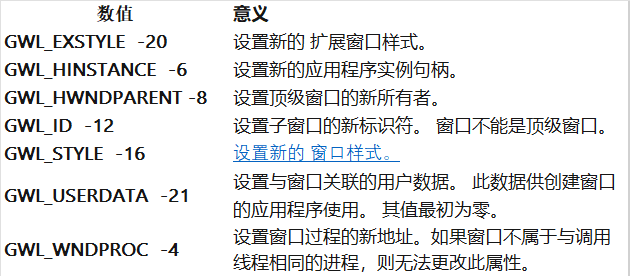
函数调用
csharp
       #region 在窗口结构中为指定的窗口设置信息
/// <summary>
/// 在窗口结构中为指定的窗口设置信息
/// </summary>
/// <param name="hwnd">欲为其取得信息的窗口的句柄</param>
/// <param name="nIndex">欲取回的信息</param>
/// <param name="dwNewLong">由nIndex指定的窗口信息的新值</param>
/// <returns></returns>
[DllImport("user32", EntryPoint = "SetWindowLong")]
private static extern uint SetWindowLong(IntPtr hwnd, int nIndex, uint dwNewLong);
#endregion
GetWindowLong
检索有关指定窗口的信息。 该函数还将检索 32 位(DWORD) 值,该值在指定的偏移量处进入额外的窗口内存。
注意 :此函数已被 GetWindowLongPtr 函数 取代。 若要编写与 32 位和 64 位版本的 Windows 兼容的代码,请使用 GetWindowLongPtr 函数。 2025-11-18
语法结构
csharp
LONG GetWindowLongA(
  [in] HWND hWnd,
  [in] int  nIndex
);
参数
-
HWND 窗口的句柄,间接地是窗口所属的类。
-
nIndex 类型:int
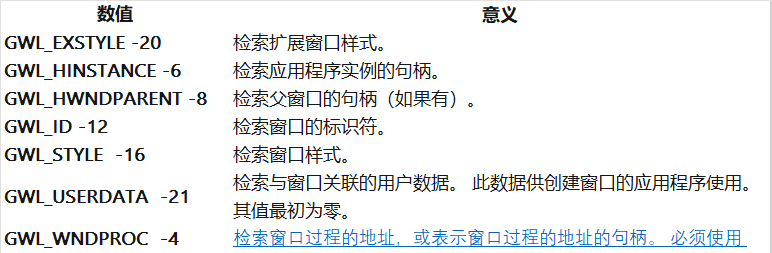
函数调用
csharp
        #region 从指定窗口的结构中取得信息
        /// <summary>
        /// 从指定窗口的结构中取得信息
        /// </summary>
        /// <param name="hwnd">欲为其获取信息的窗口的句柄</param>
        /// <param name="nIndex">欲取回的信息</param>
        /// <returns></returns>
        [DllImport("user32", EntryPoint = "GetWindowLong")]
        private static extern uint GetWindowLong(IntPtr hwnd, int nIndex);
sender
作为事件对象,用于管理多个控件。
应用场景1:在多个控件共享同一个事件处理方法时,区分出是哪个控件触发了事件
csharp
private void btnObj1_Click(object sender, RoutedEventArgs e)
{
   Button btn = (Button)sender;
   if (btn == btnObj1)
   {
       MessageBox.Show("Btn1 被点击了");
   }
   else
   {
       MessageBox.Show("Btn2 被点击了");
   }
}
本项目使用场景为获取所选菜单名,执行不同的操作
##字符串操作
IndexOf
字符串中查找指定字符或字符串的第一个匹配项的索引。如果未找到字符或字符串,则返回-1
csharp
string value = "fox";
string sample = "The quick brown fox jumps over the lazy dog.";
int index = sample.IndexOf(value, StringComparison.CurrentCultureIgnoreCase);
Console.WriteLine(index); // 输出:16
Substring
从字符串中检索子字符串,包含两种重载方法
1、从指定位置开始截取到字符串末尾
csharp
string example = "Hello, world!";
string sub = example.Substring(7); // 结果: "world!"
2、从指定位置开始截取特定长度的字符串
csharp
string example = "Hello, world!";
string sub = example.Substring(0, 5); // 结果: "Hello"
代码展示
csharp
using System;
using System.Collections.Generic;
using System.ComponentModel;
using System.Data;
using System.Drawing;
using System.Linq;
using System.Text;
using System.Windows.Forms;
using System.Runtime.InteropServices;

namespace MouseThroughForm
{
    public partial class Frm_Main : Form
    {
        public Frm_Main()
        {
            InitializeComponent();
        }

        private const uint WS_EX_LAYERED = 0x80000;
        private const int WS_EX_TRANSPARENT = 0x20;
        private const int GWL_EXSTYLE = (-20);
        private string Var_genre = "";//记录当前操作的类型

        #region 在窗口结构中为指定的窗口设置信息
        /// <summary>
        /// 在窗口结构中为指定的窗口设置信息
        /// </summary>
        /// <param name="hwnd">欲为其取得信息的窗口的句柄</param>
        /// <param name="nIndex">欲取回的信息</param>
        /// <param name="dwNewLong">由nIndex指定的窗口信息的新值</param>
        /// <returns></returns>
        [DllImport("user32", EntryPoint = "SetWindowLong")]
        private static extern uint SetWindowLong(IntPtr hwnd, int nIndex, uint dwNewLong);
        #endregion

        #region 从指定窗口的结构中取得信息
        /// <summary>
        /// 从指定窗口的结构中取得信息
        /// </summary>
        /// <param name="hwnd">欲为其获取信息的窗口的句柄</param>
        /// <param name="nIndex">欲取回的信息</param>
        /// <returns></returns>
        [DllImport("user32", EntryPoint = "GetWindowLong")]
        private static extern uint GetWindowLong(IntPtr hwnd, int nIndex);
        #endregion

        #region 使窗口有鼠标穿透功能
        /// <summary>
        /// 使窗口有鼠标穿透功能
        /// </summary>
        private void CanPenetrate()
        {
            uint intExTemp = GetWindowLong(this.Handle, GWL_EXSTYLE);
            uint oldGWLEx = SetWindowLong(this.Handle, GWL_EXSTYLE, WS_EX_TRANSPARENT | WS_EX_LAYERED);
        }
        #endregion

        private void Frm_Main_Load(object sender, EventArgs e)
        {
            this.ShowInTaskbar = false;//窗体不出现在Windows任务栏中
            CanPenetrate();
            this.TopMost = true;//使窗体始终在其它窗体之上
        }

        #region 设置颜色和透明度的状态
        /// <summary>
        /// 设置颜色和透明度的状态
        /// </summary>
        private void SetEstate(Form Frm, object sender)
        {
            Var_genre = ((ToolStripMenuItem)sender).Name;
            string Tem_Str = Var_genre;
            if (Var_genre.IndexOf('_') >= 0)
            {
                Var_genre = Tem_Str.Substring(0, Tem_Str.IndexOf('_'));
            }

            switch (Var_genre)
            {
                case "ToolColor":
                    {
                        Color Tem_Color=Color.Gainsboro;
                        switch (Convert.ToInt32(((ToolStripMenuItem)sender).Tag.ToString()))
                        {
                            case 1: Tem_Color = Color.Gainsboro; break;
                            case 2: Tem_Color = Color.DarkOrchid; break;
                            case 3: Tem_Color = Color.RoyalBlue; break;
                            case 4: Tem_Color = Color.Gold; break;
                            case 5: Tem_Color = Color.LightGreen; break;
                        }
                        Frm.BackColor = Tem_Color;
                        break;
                    }
                case "ToolClarity":
                    {
                        double Tem_Double = 0.0;
                        switch (Convert.ToInt32(((ToolStripMenuItem)sender).Tag.ToString()))
                        {
                            case 1: Tem_Double = 0.1; break;
                            case 2: Tem_Double = 0.2; break;
                            case 3: Tem_Double = 0.3; break;
                            case 4: Tem_Double = 0.4; break;
                            case 5: Tem_Double = 0.5; break;
                            case 6: Tem_Double = 0.6; break;
                            case 7: Tem_Double = 0.7; break;
                            case 8: Tem_Double = 0.8; break;
                            case 9: Tem_Double = 0.9; break;

                        }
                        Frm.Opacity = Tem_Double;
                        break;
                    }
                case "ToolAcquiescence":
                    {
                        Frm.BackColor = Color.Gainsboro;
                        Frm.Opacity = 0.6;
                        break;
                    }
                case "ToolClose":
                    {
                        Close();
                        break;
                    }

            }
        }
        #endregion

        private void ToolColor_Glass_Click(object sender, EventArgs e)
        {
            SetEstate(this, sender);
        }
    }
}
注意事项
1、注意控件名称。ToolColor_Gainsboro