创建 item 实体
Entity 类定义了一个表,该类的每个实例都表示数据库表中的一行。Entity 类以映射告知 Room 它打算如何呈现数据库中的信息并与之交互。在此应用中,实体将保存有关商品目录商品的信息,例如商品名称、商品价格和商品数量。
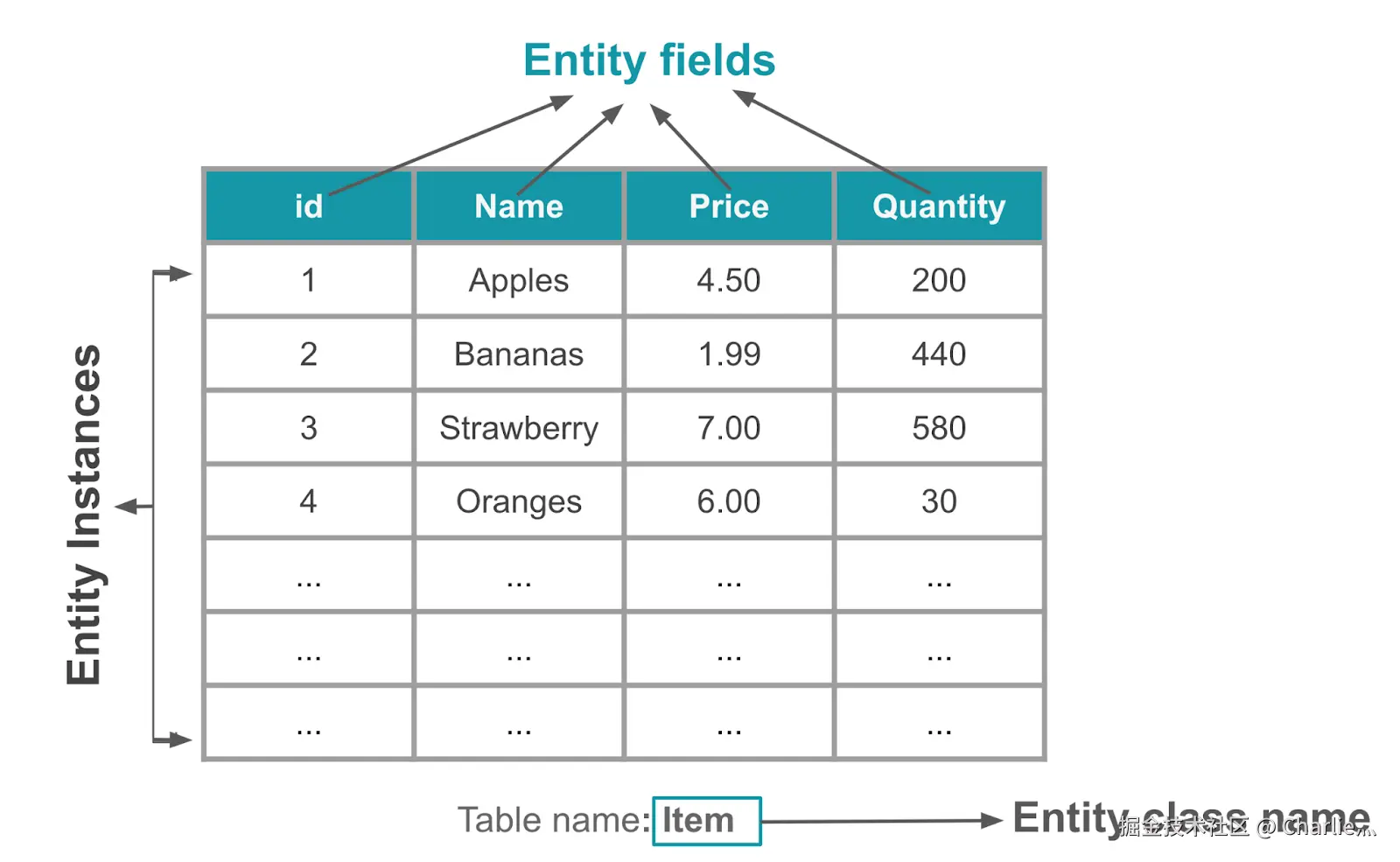
@Entity 注解用于将某个类标记为数据库 Entity 类。对于每个 Entity 类,该应用都会创建一个数据库表来保存这些项。除非另行说明,否则 Entity 的每个字段在数据库中都表示为一列。存储在数据库中的每个实体实例都必须有一个主键。主键用于唯一标识数据库表中的每个记录/条目。应用分配主键后,便无法再修改主键;只要主键存在于数据库中,它就会表示实体对象。
在此任务中,将创建一个 Entity 类,并定义字段来存储每个商品的以下商品目录信息:Int 用于存储主键,String 用于存储商品名称,double 用于存储商品价格,Int 用于存储库存数量。
kotlin
@Entity(tableName = "items")
data class Item(
    @PrimaryKey(autoGenerate = true)
    val id: Int = 0,
    val name: String,
    val price: Double,
    val quantity: Int
)
创建 item DAO
数据访问对象 (DAO) 是一种模式(单一责任原则),其作用是通过提供抽象接口将持久性层与应用的其余部分分离,负责定义用于访问数据库的接口。
DAO 的功能在于,让在底层持久性层执行数据库操作所涉及的所有复杂性与应用的其余部分分离。这样,就可以独立于使用数据的代码更改数据层。
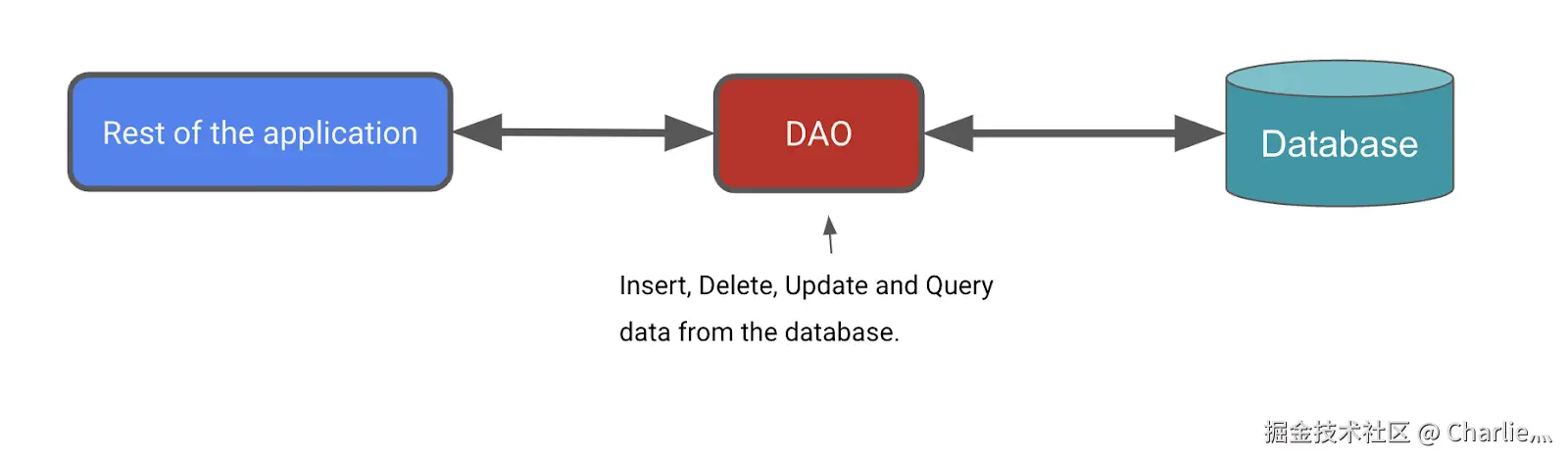
Room 库提供了便捷注解(例如 @Insert、@Delete 和 @Update),用于定义执行简单插入、删除和更新的方法,而无需编写 SQL 语句。如果需要定义更复杂的插入、删除或更新操作,或者需要查询数据库中的数据,请改用 @Query 注解。
数据库操作的执行可能用时较长,因此需要在单独的线程上运行。Room 不允许在主线程上访问数据库。
kotlin
import androidx.room.Dao

@Dao
interface ItemDao {

    @Insert(onConflict = OnConflictStrategy.IGNORE)
    suspend fun insert(item: Item)

    @Update
    suspend fun update(item: Item)

    @Delete
    suspend fun delete(item: Item)

    @Query("SELECT * from items WHERE id = :id")
    fun getItem(id: Int): Flow<Item>

    @Query("SELECT * from items ORDER BY name ASC")
    fun getAllItems(): Flow<List<Item>>
}
添加参数
onConflict并为其赋值OnConflictStrategy.``IGNORE。参数onConflict用于告知 Room 在发生冲突时应该执行的操作。OnConflictStrategy.``IGNORE策略会忽略新商品。由于返回值类型为
Flow,Room 还会在后台线程上运行该查询。无需将其明确设为suspend函数并在协程作用域内调用它。
创建 Database 实例
Database 类可为应用提供定义的 DAO 实例。反过来,应用可以使用 DAO 从数据库中检索数据,作为关联的数据实体对象的实例。此外,应用还可以使用定义的数据实体更新相应表中的行,或者创建新行供插入。
需要创建一个抽象 RoomDatabase 类,并为其添加 @Database 注解。此类有一个方法,如果数据库不存在,该方法会返回 RoomDatabase 的现有实例。
获取 **RoomDatabase** 实例的一般过程:
- 创建一个扩展
RoomDatabase的public abstract类。您定义的新抽象类将用作数据库持有者。您定义的类是抽象类,因为Room会为您创建实现。 - 为该类添加
@Database注解。在参数中,为数据库列出实体并设置版本号。 - 定义一个返回
ItemDao实例的抽象方法或属性,Room会为您生成实现。 - 整个应用只需要一个
RoomDatabase实例,因此请将RoomDatabase设为单例。 - 使用
Room的 Room.databaseBuilder 创建 (item_database) 数据库。不过,仅当该数据库不存在时才应创建。否则,请返回现有数据库。
kotlin
import android.content.Context
import androidx.room.Database
import androidx.room.Room
import androidx.room.RoomDatabase

/**
* Database class with a singleton Instance object.
*/
@Database(entities = [Item::class], version = 1, exportSchema = false)
abstract class InventoryDatabase : RoomDatabase() {

    abstract fun itemDao(): ItemDao

    companion object {
        @Volatile
        private var Instance: InventoryDatabase? = null

        fun getDatabase(context: Context): InventoryDatabase {
            // if the Instance is not null, return it, otherwise create a new database instance.
            return Instance ?: synchronized(this) {
                Room.databaseBuilder(context, InventoryDatabase::class.java, "item_database")
                    .build()
                    .also { Instance = it }
            }
        }
    }
}
将
exportSchema设为false,这样就不会保留架构版本记录的备份。volatile 变量的值绝不会缓存,所有读写操作都将在主内存中完成。这些功能有助于确保
Instance的值始终是最新的,并且对所有执行线程都相同。也就是说,一个线程对Instance所做的更改会立即对所有其他线程可见。
实现存储库
将实现 ItemsRepository 接口和 OfflineItemsRepository 类,以从数据库提供 get、insert、delete 和 update 实体。
kotlin
import kotlinx.coroutines.flow.Flow

/**
* Repository that provides insert, update, delete, and retrieve of [Item] from a given data source.
*/
interface ItemsRepository {
    /**
     * Retrieve all the items from the the given data source.
     */
    fun getAllItemsStream(): Flow<List<Item>>

    /**
     * Retrieve an item from the given data source that matches with the [id].
     */
    fun getItemStream(id: Int): Flow<Item?>

    /**
     * Insert item in the data source
     */
    suspend fun insertItem(item: Item)

    /**
     * Delete item from the data source
     */
    suspend fun deleteItem(item: Item)

    /**
     * Update item in the data source
     */
    suspend fun updateItem(item: Item)
}
kotlin
import kotlinx.coroutines.flow.Flow

class OfflineItemsRepository(private val itemDao: ItemDao) : ItemsRepository {
    override fun getAllItemsStream(): Flow<List<Item>> = itemDao.getAllItems()

    override fun getItemStream(id: Int): Flow<Item?> = itemDao.getItem(id)

    override suspend fun insertItem(item: Item) = itemDao.insert(item)

    override suspend fun deleteItem(item: Item) = itemDao.delete(item)

    override suspend fun updateItem(item: Item) = itemDao.update(item)
}
实现 AppContainer 类
kotlin
override val itemsRepository: ItemsRepository by lazy {
    OfflineItemsRepository(InventoryDatabase.getDatabase(context).itemDao())
}