一、测试环境
- windows11
cursor 2.1.20版本连接 wsl2 Ubuntu22.04,gvm安装在linux子系统 - 同样的环境
vscode 正常使用gvm的go环境路径,而cursor报下面的错误
错误如下
bash
Failed to find the "go" binary in either GOROOT() or PATH(/home/shayuer/.cursor-server/bin/a8d8905b06c8da1739af6f789efd59c28ac2a680/bin/remote-cli:/home/shayuer/.local/bin:/usr/local/cuda-12.9/bin:/run/user/1000/fnm_multishells/2918_1763875263165/bin:/home/shayuer/.local/share/fnm:/home/shayuer/miniconda3/bin:/home/shayuer/miniconda3/condabin:/home/shayuer/.cursor-server/bin/a8d8905b06c8da1739af6f789efd59c28ac2a680/bin/remote-cli:/usr/local/sbin:/usr/local/bin:/usr/sbin:/usr/bin:/sbin:/bin:/usr/games:/usr/local/games:/usr/lib/wsl/lib:/mnt/c/Program Files/Volta:/mnt/c/WINDOWS/system32:/mnt/c/WINDOWS:/mnt/c/WINDOWS/System32/Wbem:/mnt/c/WINDOWS/System32/WindowsPowerShell/v1.0:/mnt/c/WINDOWS/System32/OpenSSH:/mnt/c/Program Files/NVIDIA Corporation/NVIDIA App/NvDLISR:/mnt/c/Program Files (x86)/NVIDIA Corporation/PhysX/Common:/mnt/c/Program Files/Docker/Docker/resources/bin:/mnt/c/Program Files/dotnet:/mnt/d/Programs/Git/cmd:/mnt/c/Users/amliu/AppData/Local/Volta/bin:/mnt/c/Users/amliu/.loca...查询相关资料有说是 cursor 连接wsl2环境在开启时不会像vscode一样加载登录 .bashrc,gvm 没有更改GOPATH,而全局变量中没有安装go,于是报错了
二、cursor 在 settings.json 配置 GO环境变量(更换新的go版本需要重新指定)
秉着继续使用gvm管理多个go版本,在使用cursor开发go程序时,可以使用手动在settings.json 文件中加入go的路径,后续如果使用其他go版本,在gvm install 需要的go版本后再次将cursor的settings.json文件 go路径重新指定新的即可,步骤如下:
- cursor 主页面下使用快捷键:
ctrl + shift + p,输入Preferences: Open User Settings (JSON)打开settings.json配置文件 - 写入以下go配置(去掉注释,替换成自己的实际路径):
bash
	"go.alternateTools": {
        "go": "/home/shayuer/.gvm/gos/go1.22.12/bin/go"  // 指定 go 可执行文件,使用gvm管理的路径
    },
    "go.goroot": "/home/shayuer/.gvm/gos/go1.22.12",      // 使用gvm管理的路径
    "go.gopath": "/home/shayuer/.gvm/pkgsets/go1.22.12/global"   //设置项目的 GOPATH,使用gvm管理的路径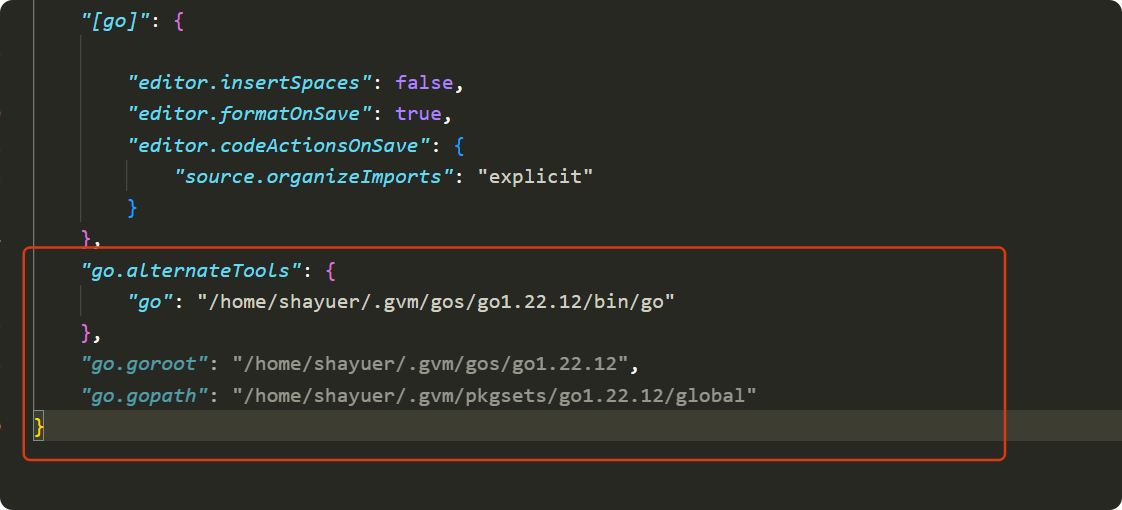
- 重启 cursor,新安装的go环境IDE还会安装 gopls,需要等待一段时间,终端中会打印出gopls安装的路径,观察是否与设置的路径相同
相关路径为:
bash
toolsGopath:
gopath: /home/shayuer/.gvm/pkgsets/go1.22.12/global
GOROOT: /home/shayuer/.gvm/gos/go1.22.12
PATH: /home/shayuer/.gvm/gos/go1.22.12/bin:/home/shayuer/.cursor-server/bin/a8d8905b06c8da1739af6f789efd59c28ac2a680/bin/remote-cli:/home/shayuer/.local/bin:/usr/local/cuda-12.9/bin .....