说在前面
封装的easyexcel,基于注解实现excel的导入导出,以场景来说,就是你有一个现成的分页接口或者一个list接口,只需要添加几个简单的注解,就可以实现excel的导出,也是为了方便有模板生成代码的情况下直接生成导出功能。
这是封装的依赖库源码:github.com/chenqi92/al...
这是这个依赖库的使用示例:github.com/chenqi92/al...
依赖库运行后在浏览器中打开:http://localhost:8080/ 即可测试各种示例,参照示例进行使用可以不用看后续的使用说明。
使用说明
添加maven依赖
xml
<dependency>
    <groupId>cn.allbs</groupId>
    <artifactId>allbs-excel</artifactId>
    <version>3.0.1</version>
</dependency>
普通导入
导入首先是需要提供用户一份模板的,用于让用户知道那一列填什么。如下有这么一个模板:
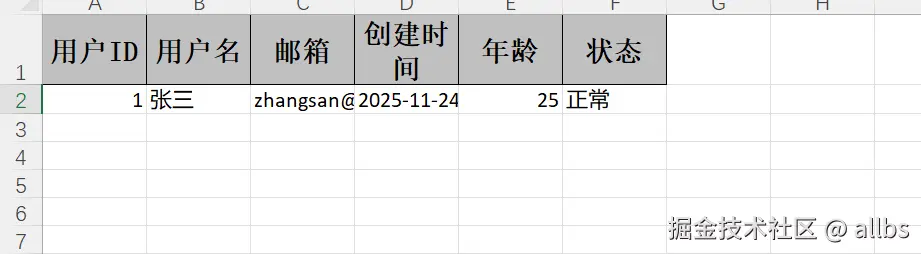
那么导入代码(直接返回展示,实际业务可以进行数据库储存)就是:
java
@PostMapping("/simple")
public ResponseEntity<?> simpleImport(@ImportExcel List<UserDTO> users) {
    Map<String, Object> result = new HashMap<>();
    result.put("success", true);
    result.put("message", "导入成功");
    result.put("count", users.size());
    result.put("data", users);
    return ResponseEntity.ok(result);
}
java
@Data
public class UserDTO {

    @ExcelProperty(value = "用户ID", index = 0)
    @NotNull(message = "用户ID不能为空")
    private Long id;

    @ExcelProperty(value = "用户名", index = 1)
    @NotBlank(message = "用户名不能为空")
    @Size(min = 2, max = 20, message = "用户名长度必须在2-20之间")
    private String username;

    @ExcelProperty(value = "邮箱", index = 2)
    @Email(message = "邮箱格式不正确")
    private String email;

    @ExcelProperty(value = "创建时间", index = 3)
    @DateTimeFormat("yyyy-MM-dd HH:mm:ss")
    private LocalDateTime createTime;

    @ExcelProperty(value = "年龄", index = 4)
    private Integer age;

    @ExcelProperty(value = "状态", index = 5)
    private String status;
}
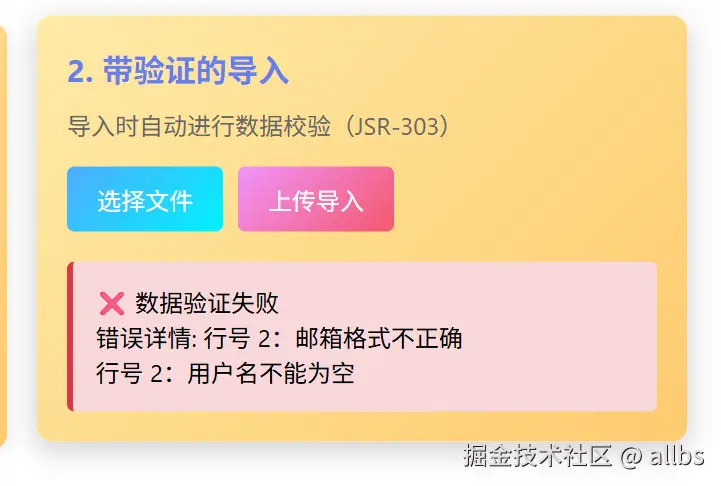
带验证的导入,让用户和开发知道导入数据的哪一行存在问题
上述代码已经完成了一个导入功能,实际导入过程中难免遇到用户瞎填的情况,那么上面的UserDTO中字段上的校验就可以生效了。比如我不填用户名或者瞎填邮箱。
示例代码:
java
@PostMapping("/validate")
public ResponseEntity<?> importWithValidation(
        @ImportExcel List<UserDTO> users,
        @RequestAttribute(name = "excelErrors", required = false) List<ErrorMessage> excelErrors
) {
    Map<String, Object> result = new HashMap<>();

    if (!CollectionUtils.isEmpty(excelErrors)) {
        // 使用默认格式化的错误消息
        List<String> errors = excelErrors.stream()
                .flatMap(em -> em.getErrorMessages().stream()
                        .map(msg -> "行号 " + em.getLineNum() + ":" + msg))
                .collect(Collectors.toList());

        result.put("success", false);
        result.put("message", "数据验证失败");
        result.put("errors", errors);
        result.put("validCount", users.size());
        result.put("errorCount", excelErrors.size());
        return ResponseEntity.badRequest().body(result);
    }

    result.put("success", true);
    result.put("message", "导入成功");
    result.put("count", users.size());
    result.put("data", users);
    return ResponseEntity.ok(result);
}
实际效果为:
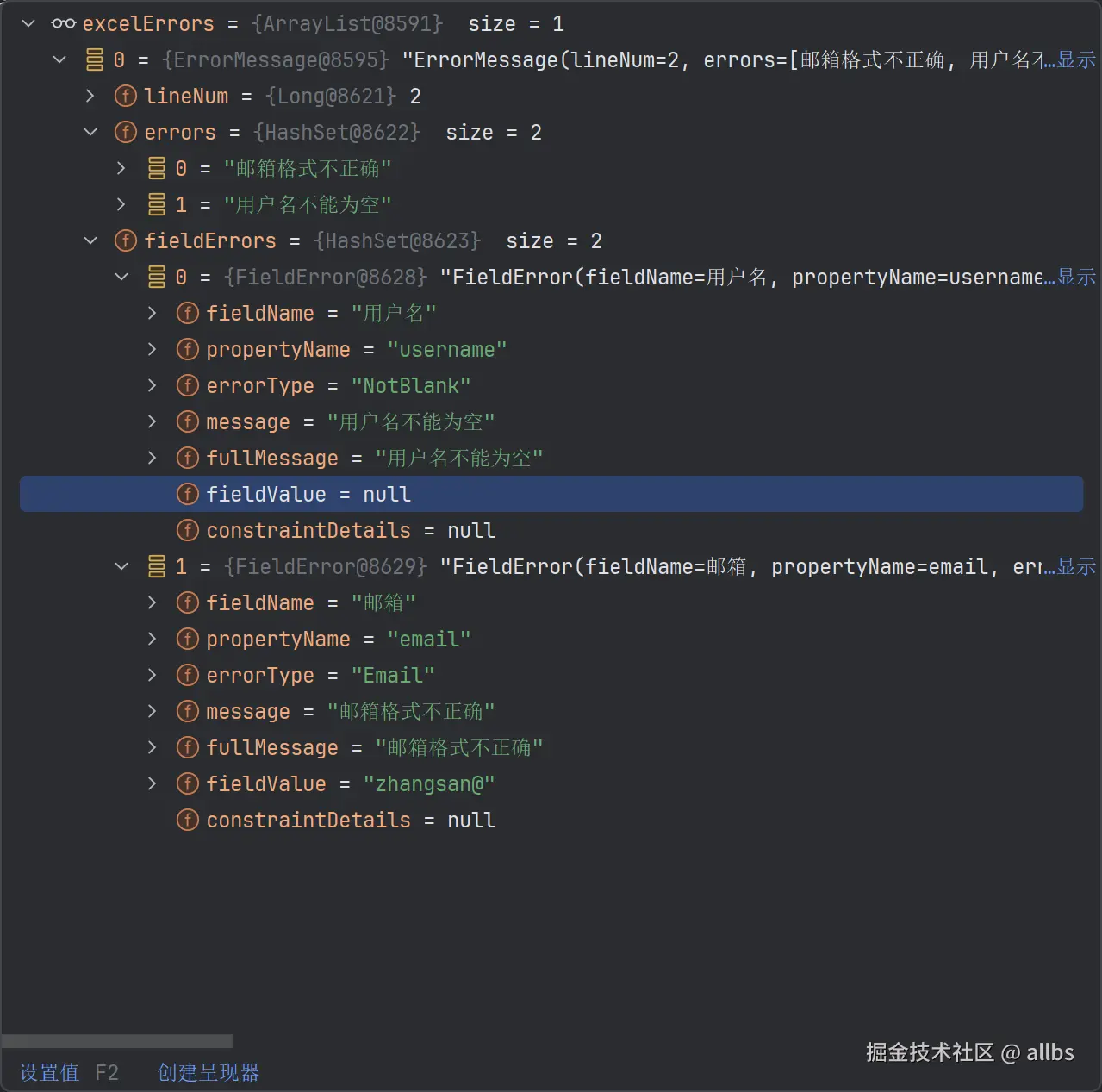
这是额外可以获取到的内容(errors中为简单的提示,fieldErrors内容较全,用于更多不同的业务场景使用):
图片导入
首先是模板:
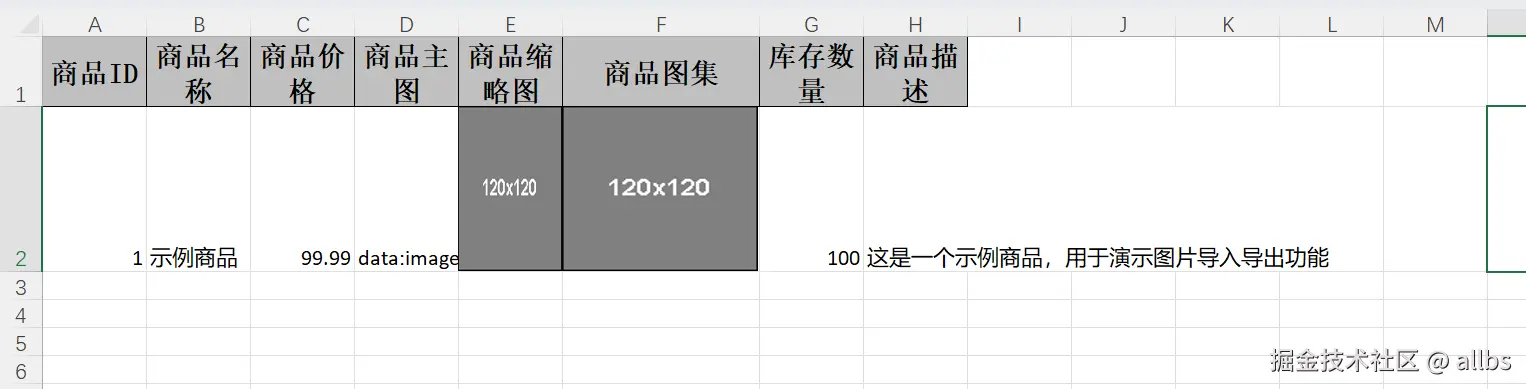
图片导入的示例代码(注意ProductImageDTO这个类中的关于图片字段的定义方式):
java
@PostMapping("/import")
public ResponseEntity<?> importWithImages(@ImportExcel List<ProductImageDTO> products) {

    Map<String, Object> result = new HashMap<>();
    result.put("success", true);
    result.put("message", "导入成功");
    result.put("count", products.size());

    // 处理导入的数据
    List<Map<String, Object>> productInfos = new ArrayList<>();
    for (ProductImageDTO product : products) {
       Map<String, Object> info = new HashMap<>();
       info.put("id", product.getId());
       info.put("name", product.getName());
       info.put("price", product.getPrice());
       info.put("stock", product.getStock());
       info.put("description", product.getDescription());

       // 图片信息
       info.put("hasMainImage", product.getMainImage() != null && !product.getMainImage().isEmpty());
       info.put("hasThumbnail", product.getThumbnail() != null && product.getThumbnail().length > 0);
       info.put("imageListCount",
             product.getImageList() != null ? product.getImageList().size() : 0);

       // 如果需要,可以在这里保存图片到服务器
       // saveImage(product.getMainImage(), "main_" + product.getId());
       // saveImage(product.getThumbnail(), "thumbnail_" + product.getId());

       productInfos.add(info);
    }

    result.put("products", productInfos);

    log.info("Imported {} products with images", products.size());
    return ResponseEntity.ok(result);
}
java
@Data
@NoArgsConstructor
@AllArgsConstructor
public class ProductImageDTO {

    @ExcelProperty("商品ID")
    private Long id;

    @ExcelProperty("商品名称")
    private String name;

    @ExcelProperty("商品价格")
    private BigDecimal price;

    /**
     * 商品主图(单张图片)
     * <p>
     * 导出时:支持 URL、本地路径、Base64
     * 导入时:读取为 Base64 字符串
     * </p>
     */
    @ExcelProperty("商品主图")
    @ExcelImage(width = 120, height = 120)
    private String mainImage;

    /**
     * 商品缩略图(字节数组)
     * <p>
     * 导出时:直接使用字节数组
     * 导入时:读取为字节数组
     * </p>
     */
    @ExcelProperty("商品缩略图")
    @ExcelImage(width = 80, height = 80, type = ExcelImage.ImageType.BYTES)
    private byte[] thumbnail;

    /**
     * 商品图集(多张图片)
     * <p>
     * 导出时:支持多张图片水平排列
     * 导入时:读取为 Base64 字符串列表
     * </p>
     */
    @ExcelProperty(value = "商品图集", converter = ImageListConverter.class)
    @ExcelImage(width = 100, height = 100)
    private List<String> imageList;

    @ExcelProperty("库存数量")
    private Integer stock;

    @ExcelProperty("商品描述")
    private String description;

}
实际导入后,debug可以获取到的内容为:
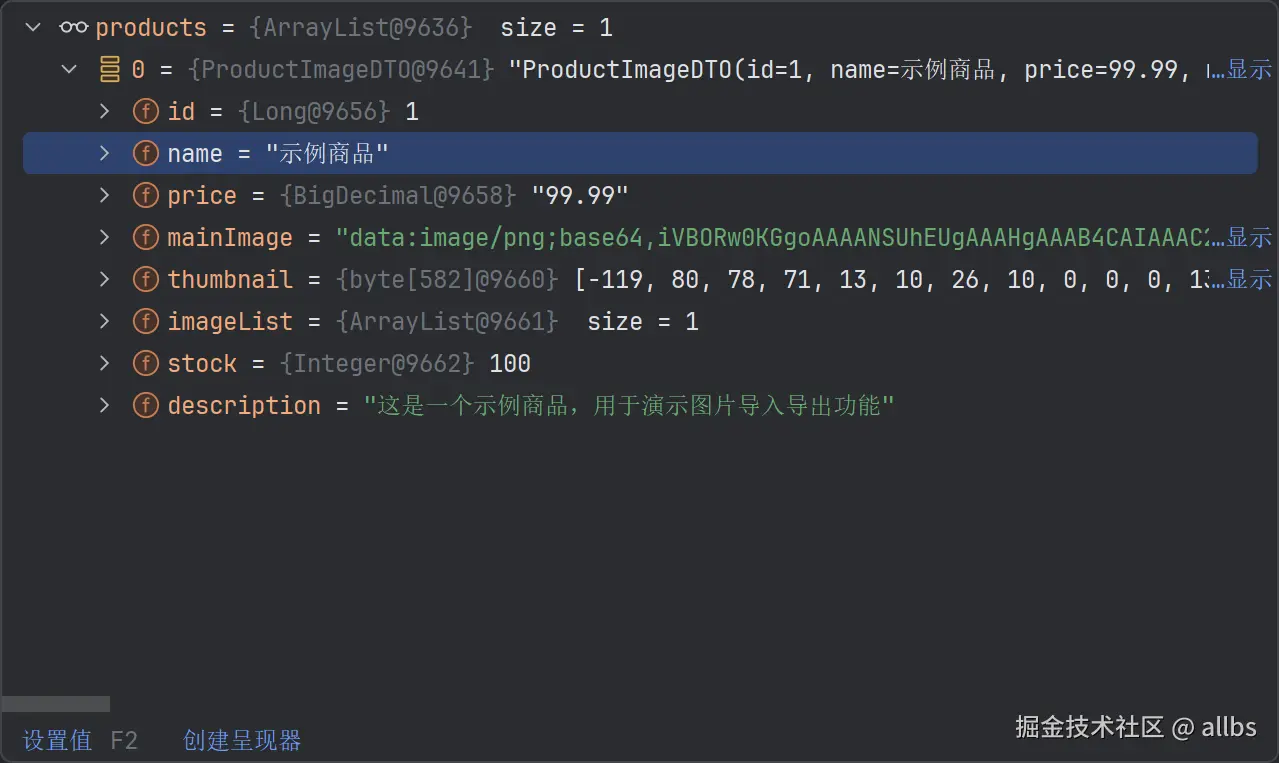
导出时这三列分别为base64的字符串、图片、图片。导入后获取到的内容为base64的字符串、转为二进制的数据、转为base64的图片。后续可以上传至minio等进行处理。
嵌套对象导入
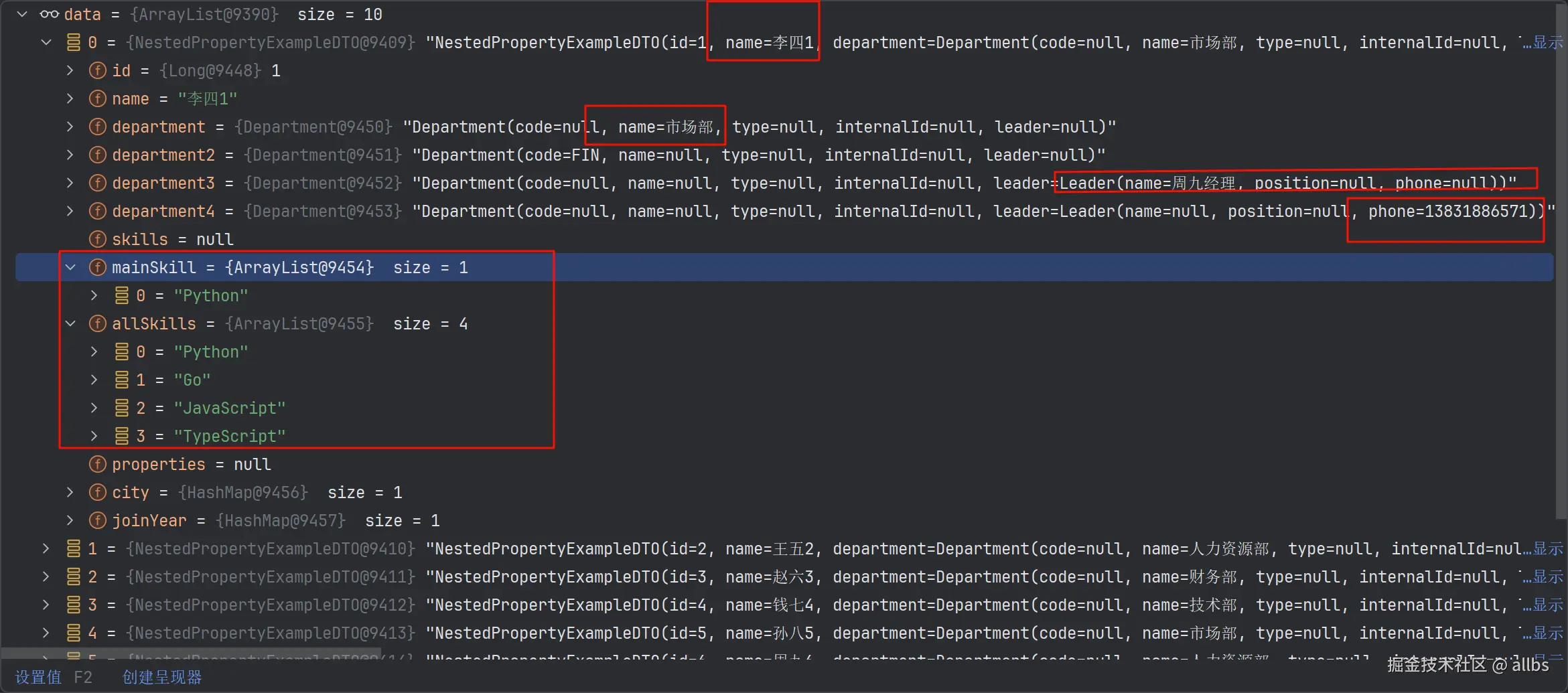
这个是第二篇嵌套对象字段提取部分的数据导入。 对应的视图对象长这样,注意其中的@NestedProperty注解,其中department、department2、department3和department4实际上都只导出了一个字段:
java
@Data
@NoArgsConstructor
@AllArgsConstructor
public class NestedPropertyExampleDTO {

    @ExcelProperty("员工ID")
    private Long id;

    @ExcelProperty("员工姓名")
    private String name;

    // ==================== 单层嵌套对象 ====================
    @ExcelProperty(value = "部门名称", converter = NestedObjectConverter.class)
    @NestedProperty("name")
    private Department department;

    @ExcelProperty(value = "部门编码", converter = NestedObjectConverter.class)
    @NestedProperty(value = "code", nullValue = "未分配")
    private Department department2;

    // ==================== 多层嵌套对象 ====================
    @ExcelProperty(value = "直属领导", converter = NestedObjectConverter.class)
    @NestedProperty(value = "leader.name", nullValue = "暂无")
    private Department department3;

    @ExcelProperty(value = "领导电话", converter = NestedObjectConverter.class)
    @NestedProperty(value = "leader.phone", nullValue = "-")
    private Department department4;

    // ==================== 集合类型 ====================
    // 技能列表(内部字段,不导出)
    @ExcelIgnore
    private List<String> skills;

    @ExcelProperty(value = "主要技能", converter = NestedObjectConverter.class)
    @NestedProperty(value = "[0]", nullValue = "无")
    private List<String> mainSkill;

    @ExcelProperty(value = "所有技能", converter = NestedObjectConverter.class)
    @NestedProperty(value = "[*]", separator = ",", maxJoinSize = 5)
    private List<String> allSkills;

    // ==================== Map 类型 ====================
    // 扩展属性(内部字段,不导出)
    @ExcelIgnore
    private Map<String, Object> properties;

    @ExcelProperty(value = "工作城市", converter = NestedObjectConverter.class)
    @NestedProperty(value = "[city]", nullValue = "-")
    private Map<String, Object> city;

    @ExcelProperty(value = "入职年份", converter = NestedObjectConverter.class)
    @NestedProperty(value = "[joinYear]", nullValue = "-")
    private Map<String, Object> joinYear;
}所以使用该视图对象进行导入时,数据也会对应的缺少,如果想完整导入,看后面的示例。 这是导入使用的方法,和前面的实际上一样:
java
@PostMapping("/nested-property")
public Map<String, Object> nestedPropertyImport(@ImportExcel List<NestedPropertyExampleDTO> data) {
    Map<String, Object> result = new HashMap<>();
    result.put("success", true);
    result.put("count", data.size());
    result.put("data", data);
    result.put("message", "成功导入 " + data.size() + " 条数据");

    log.info("Imported {} records", data.size());
    return result;
}
嵌套对象多行聚合导入
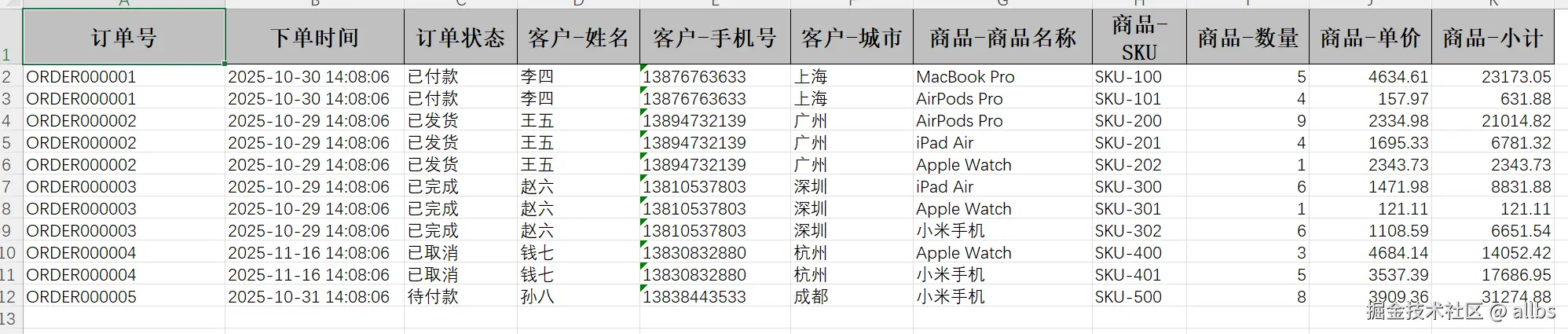
使用的是之前明细展开导出功能,大概可以理解为返回的对象list有5条数据,但是每条数据有子对象list,每个里面2条数据,实际上导出就是10条数据。
导出的内容示例为(实际接口返回list有5条数据,但是因为部分数据有子数据会自动撑开):
那么将这个多行聚合数据导入使用的代码示例为:
java
@PostMapping("/flatten-list-order")
public Map<String, Object> flattenListOrderImport(@ImportExcel List<FlattenListOrderDTO> data) {
    Map<String, Object> response = new HashMap<>();
    response.put("success", true);
    response.put("count", data.size());
    response.put("data", data);
    response.put("message", "成功导入 " + data.size() + " 个订单");

    log.info("Imported {} orders", data.size());
    return response;
}
接收到的数据为:
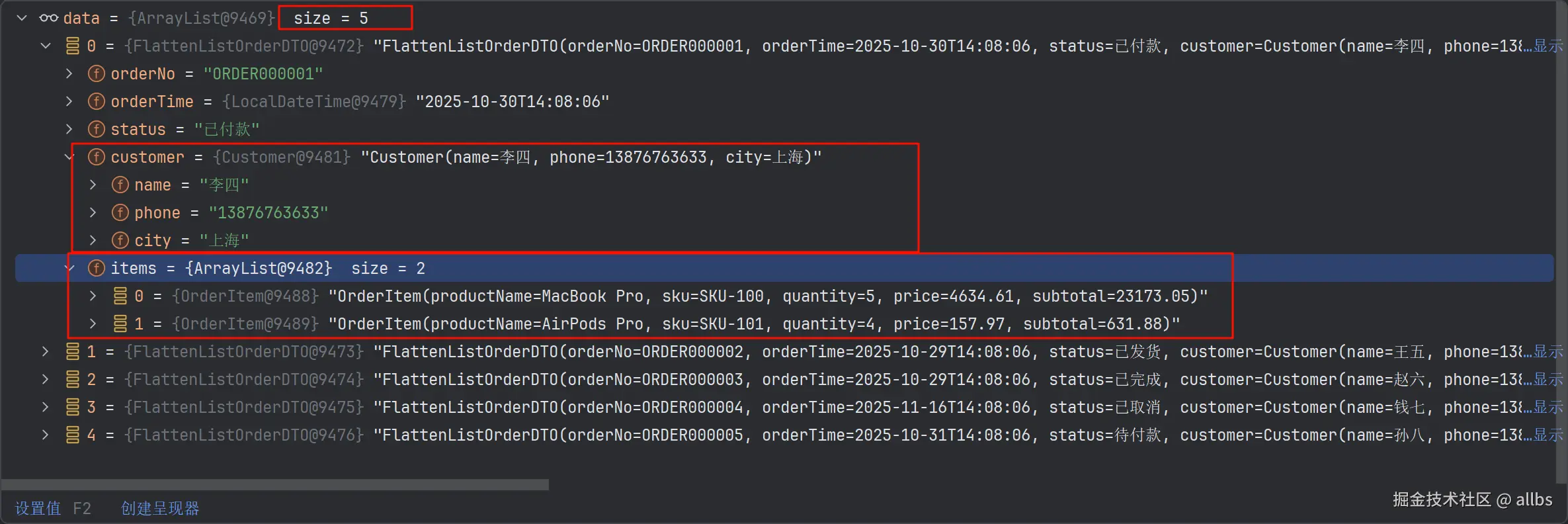
可以看到实际上也是五条数据,并且嵌套的对象list或者对象也正常将数据加载进去了。