Google play 最新上线要求 必须适配 targetSdk 35 七八年的老项目噩梦开始了
老项目升级开始
....
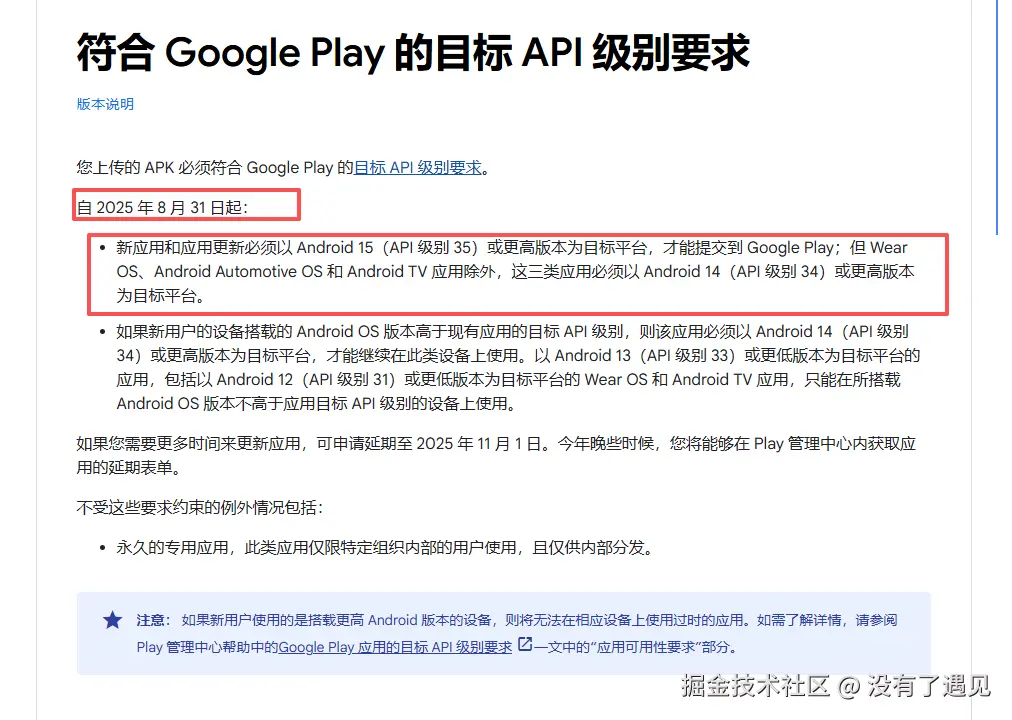
Google 的要求实际上是"连环硬性升级":
markdown
targetSdk 35
    ↓
AGP 8.0+
    ↓
Gradle 8.0+
    ↓
JDK 17+
意味着你无法再用 JDK8,也无法继续沿用旧的 Annotation Processor 黑魔法,包括 ButterKnife。
2️⃣ 原项目与升级目标
当前老项目环境
- targetSdk:33
- Gradle:7.3.1
- Kotlin:1.9.20
- JDK:8
Google Play 适配目标
- targetSdk:35
- Gradle:8.2.0
- Kotlin:1.9.20
- JDK:17
升级带来的所有问题都来自下面两个:
❌ JDK 从 8 → 17
❌ Gradle 7 → 8(DSL 改动很大)
3️⃣ 升级后必做的配置调整
下面是升级 target35 + Gradle8 后所有必须改的点。
🔵 1. 必须声明 namespace(否则直接 build error)
Gradle 8 强制要求 module 中显式设置 namespace:
arduino
android {
    namespace 'com.xxx.yyy'
}
如果不写,直接报错:
vbnet
The namespace not specified. Please specify a namespace in the module's build.gradle file.🔵 2. 必须显式开启 BuildConfig(否则找不到 BuildConfig)
Gradle 8 默认关闭 BuildConfig 生成。
arduino
buildFeatures {
    viewBinding true
    buildConfig true
}
否则会出现经典报错:
arduino
error: cannot find symbol class BuildConfig🔵 3. 必须使用 JDK17(且全局一致)
你可能遇到这样一种"精神分裂"错误:
kotlin
Unsupported class file major version 61或:
makefile
java.lang.NoSuchFieldException: classFile原因是:
IDE 设置 JDK17,但系统 PATH 是 JDK8 → Gradle 还是调用 JDK8 → 直接炸。
必须保证:
- Android Studio Gradle JDK = 17
- 系统环境 JAVA_HOME = 17
- 命令行 java -version = 17
不然各种奇怪报错乱飞。
4️⃣ 最致命部分:ButterKnife 在 JDK17 下完全炸裂
ButterKnife 是基于 Javac 内部 API 的 annotationProcessor,
而 JDK9+ 开始把这些内部 API 封死,JDK17 更是完全锁死。
于是你会看到这个大杀器报错:
ini
Invalid argument: --add-opens=jdk.compiler/com.sun.tools.javac.tree=ALL-UNNAMED或者:
makefile
java.lang.ClassNotFoundException: com.sun.tools.javac.tree.JCTree或更常见的:
vbnet
warning: unknown enum constant ElementType.MODULE
error: cannot access com.sun.tools.javac.tree.JCTree
这些都是 JDK17 和 ButterKnife 的天然冲突。
5️⃣ ButterKnife 在 Gradle 8 + JDK17 的最终可用修复方案
官方已经不维护,但还能"强行续命"。
你需要加:
🔸 1. 老版本(最后一个)ButterKnife
去掉 项目目录中 build.gradle中的
classpath 'com.jakewharton:butterknife-gradle-plugin:10.2.3'
perl
buildscript {
    dependencies {
        // classpath 'com.jakewharton:butterknife-gradle-plugin:10.2.3'
                }
        }
module 目录下保留
arduino
implementation 'com.jakewharton:butterknife:10.2.3'
annotationProcessor 'com.jakewharton:butterknife-compiler:10.2.3'
🔸 2. 必须关闭 nonFinalResIds
ButterKnife 编译依赖 final R.id.xxx
而 Gradle 8 默认是 non-final。
强制设置: 在 gradle.properties 文件中添加
ini
nonFinalResIds = false不然出现:
python
error: id cannot be resolved or is not a field🔸 3. 添加 Javac 打开模块的参数(核心 patch)
在模块 build.gradle 顶部/或尾部加入:
scss
tasks.withType(JavaCompile).configureEach {
    options.fork = true
    options.forkOptions.jvmArgs += [            '--add-opens=jdk.compiler/com.sun.tools.javac.tree=ALL-UNNAMED',            '--add-opens=jdk.compiler/com.sun.tools.javac.code=ALL-UNNAMED',            '--add-opens=jdk.compiler/com.sun.tools.javac.comp=ALL-UNNAMED',            '--add-opens=jdk.compiler/com.sun.tools.javac.file=ALL-UNNAMED',            '--add-opens=jdk.compiler/com.sun.tools.javac.main=ALL-UNNAMED',            '--add-opens=jdk.compiler/com.sun.tools.javac.model=ALL-UNNAMED',            '--add-opens=jdk.compiler/com.sun.tools.javac.parser=ALL-UNNAMED',            '--add-opens=jdk.compiler/com.sun.tools.javac.processing=ALL-UNNAMED',            '--add-opens=jdk.compiler/com.sun.tools.javac.util=ALL-UNNAMED',            '--add-opens=jdk.compiler/com.sun.tools.javac.jvm=ALL-UNNAMED'    ]
}
这一段的意思就是:
强行撬开 JDK17 的封印,让 ButterKnife 能继续访问内部 API。
6️⃣ 实际出现的报错总结(可加到博客)
升级过程中出现这些错误很正常:
① JDK8/17 混用导致
kotlin
Unsupported class file major version 61② namespace 未声明
arduino
The namespace not specified. Please specify a namespace...③ BuildConfig 未生成
arduino
cannot find symbol class BuildConfig④ ButterKnife 访问 Javac 内部 API 失败
ini
Invalid argument: --add-opens=jdk.compiler/...
go
error: cannot access com.sun.tools.javac.tree.JCTree⑤ R.id 变 non-final 导致 ButterKnife 编译失败
python
id cannot be resolved or is not a field7️⃣ 最终总结:老项目升级 target 35 的通关地图
要想在不迁移到 ViewBinding 的情况下继续保留 ButterKnife,一个可行方案是:
- AGP 8 + JDK17 是强制升级
- ButterKnife 虽然官方不维护,但仍可通过 add-opens 暴力续命
- Gradle 配置必须补齐 namespace、BuildConfig、nonFinalResIds
- 全局 JDK17 一致性非常关键
- kotlin 版本 1.7.20