目录
- 一、核心思路(高层)
- 二、推荐架构(简单图)
- [三、关键 API 流程(说明 + 代码示例)](#三、关键 API 流程(说明 + 代码示例))
-
- [1、对话 API(LLM)](#1、对话 API(LLM))
- [2、Vision API(图像问答)](#2、Vision API(图像问答))
- [3、Embedding API](#3、Embedding API)
- 四、后端实现(Fastify)
-
- 1、安装项目依赖
- [2、env 配置](#2、env 配置)
- [3、index.js(Fastify 主服务)](#3、index.js(Fastify 主服务))
- [五、前端:React 客户端(简易聊天 UI)](#五、前端:React 客户端(简易聊天 UI))
-
- [1、API 封装 api.js(封装前端 API)](#1、API 封装 api.js(封装前端 API))
- [2、app.jsx(简单对话 UI)](#2、app.jsx(简单对话 UI))
- [六、加上 Vision 上传按钮(选做)](#六、加上 Vision 上传按钮(选做))
- [七、加上 Embedding 演示(选做)](#七、加上 Embedding 演示(选做))
- 八、项目结构图
- [九、DeepSeek + React + Fastify 常见坑](#九、DeepSeek + React + Fastify 常见坑)
一、核心思路(高层)
前端(React):负责用户交互,包括聊天输入、消息展示、图片上传、触发 Embedding 计算等。
后端(Fastify):代理 DeepSeek API 请求,隐藏 API Key,处理逻辑(LLM / Vision / Embedding)。
DeepSeek API:提供三类能力:
- LLM:自然语言对话
- Vision:图像理解和问答
- Embedding:文本向量生成,用于检索或语义搜索
核心原则:
- API Key 永不暴露在前端
- 消息与图像统一通过后端转发
- Embedding / 文档检索可用于 RAG(可选拓展)
二、推荐架构(简单图)
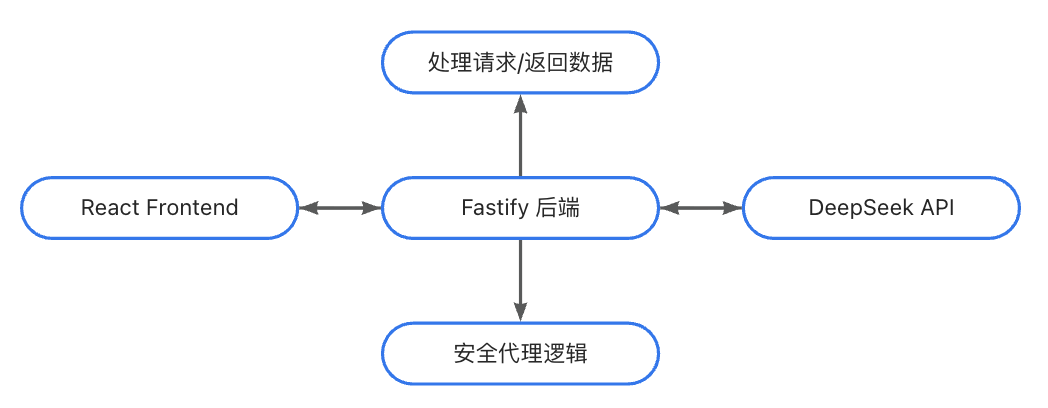
说明:
- 前端仅和 Fastify 后端 通信
- 后端根据请求类型调用 DeepSeek 的不同接口
- 前端可以显示消息、图片解析结果、embedding 长度等(可选)
三、关键 API 流程(说明 + 代码示例)
1、对话 API(LLM)
流程说明:
- 前端发送 messages 数组到 /api/chat
- Fastify 读取 env 中的 API Key,调用 DeepSeek Chat API
- 返回 LLM 回复内容给前端
示例代码:
typescript
// Fastify 后端
app.post("/api/chat", async (req, reply) => {
  const { messages } = req.body;

  const completion = await deepseek.chat.completions.create({
    model: "deepseek-chat",
    messages,
  });

  reply.send({ reply: completion.choices[0].message.content });
});
2、Vision API(图像问答)
流程说明:
- 前端上传图片(Base64 编码) + 问题
- 后端调用 DeepSeek Vision 模型
- 返回模型对图片的理解
示例代码:
typescript
app.post("/api/vision", async (req, reply) => {
  const { imageBase64, question } = req.body;

  const completion = await deepseek.chat.completions.create({
    model: "deepseek-vision",
    messages: [
      { role: "user", content: [
        { type: "input_text", text: question },
        { type: "input_image", image_url: `data:image/jpeg;base64,${imageBase64}` }
      ]}
    ]
  });

  reply.send({ reply: completion.choices[0].message.content });
});
3、Embedding API
流程说明:
- 前端发送文本
- 后端生成向量 embedding
- 可用于向量数据库存储或语义搜索
示例代码:
typescript
app.post("/api/embed", async (req, reply) => {
  const { text } = req.body;

  const emb = await deepseek.embeddings.create({
    model: "deepseek-embedding",
    input: text,
  });

  reply.send({ embedding: emb.data[0].embedding });
});
四、后端实现(Fastify)
1、安装项目依赖
bash
npm install fastify fastify-cors dotenv openai2、env 配置
bash
DEEPSEEK_API_KEY=你的key
DEEPSEEK_BASE_URL=https://api.deepseek.com
3、index.js(Fastify 主服务)
typescript
import Fastify from "fastify";
import cors from "fastify-cors";
import { deepseek } from "./deepseek.js";

const app = Fastify();
app.register(cors, { origin: "*" });

/** ================================
 *  LLM 对话接口
 *  ================================
 */
app.post("/api/chat", async (req, reply) => {
  const { messages } = req.body;

  const completion = await deepseek.chat.completions.create({
    model: "deepseek-chat",
    messages,
  });

  reply.send({ reply: completion.choices[0].message.content });
});

/** ================================
 *  Vision 图像识别 + 对话
 *  ================================
 */
app.post("/api/vision", async (req, reply) => {
  const { imageBase64, question } = req.body;

  const completion = await deepseek.chat.completions.create({
    model: "deepseek-vision",
    messages: [
      { role: "user", content: [
        { type: "input_text", text: question },
        {
          type: "input_image",
          image_url: `data:image/jpeg;base64,${imageBase64}`
        }
      ]}
    ]
  });

  reply.send({ reply: completion.choices[0].message.content });
});

/** ================================
 *  Embedding
 *  ================================
 */
app.post("/api/embed", async (req, reply) => {
  const { text } = req.body;

  const emb = await deepseek.embeddings.create({
    model: "deepseek-embedding",
    input: text,
  });

  reply.send({ embedding: emb.data[0].embedding });
});

app.listen(3001, () => {
  console.log("Fastify server running at http://localhost:3001");
});
五、前端:React 客户端(简易聊天 UI)
1、API 封装 api.js(封装前端 API)
typescript
import axios from "axios";

const API = "http://localhost:3001/api";

/** LLM 对话 */
export const chat = (messages) =>
  axios.post(`${API}/chat`, { messages });

/** Vision */
export const visionAsk = (imageBase64, question) =>
  axios.post(`${API}/vision`, { imageBase64, question });

/** Embeddings */
export const embed = (text) =>
  axios.post(`${API}/embed`, { text });
2、app.jsx(简单对话 UI)
typescript
import { useState } from "react";
import { chat, embed, visionAsk } from "./api";

export default function App() {
  const [messages, setMessages] = useState([]);
  const [input, setInput] = useState("");

  async function send() {
    const newMessages = [...messages, { role: "user", content: input }];
    setMessages(newMessages);

    const res = await chat(newMessages);
    setMessages([
      ...newMessages,
      { role: "assistant", content: res.data.reply }
    ]);

    setInput("");
  }

  return (
    <div style={{ padding: 30, maxWidth: 600, margin: "0 auto" }}>
      <h1>DeepSeek Chat (React + Fastify)</h1>

      {/* message list */}
      <div style={{ height: 400, overflowY: "auto", border: "1px solid #ddd", padding: 16 }}>
        {messages.map((m, i) => (
          <div key={i} style={{ marginBottom: 16 }}>
            <b>{m.role}:</b> {m.content}
          </div>
        ))}
      </div>

      {/* input */}
      <div style={{ marginTop: 20 }}>
        <input
          value={input}
          onChange={e => setInput(e.target.value)}
          style={{ width: "80%", padding: 8 }}
        />
        <button onClick={send} style={{ padding: "8px 16px" }}>Send</button>
      </div>
    </div>
  );
}
六、加上 Vision 上传按钮(选做)
typescript
<input
  type="file"
  accept="image/*"
  onChange={async e => {
    const file = e.target.files[0];
    const base64 = await fileToBase64(file);
    const res = await visionAsk(base64, "图里有什么?");

    setMessages(m => [
      ...m,
      { role: "user", content: "[图片上传]" },
      { role: "assistant", content: res.data.reply }
    ]);
  }}
/>
typescript
function fileToBase64(file) {
  return new Promise(r => {
    const reader = new FileReader();
    reader.onload = () => r(reader.result.split(",")[1]);
    reader.readAsDataURL(file);
  });
}
七、加上 Embedding 演示(选做)
在 React 中加入一个按钮:
typescript
<button
  onClick={async () => {
    const res = await embed("Hello DeepSeek!");
    alert("Embedding length: " + res.data.embedding.length);
  }}
>
  Generate Embedding
</button>
八、项目结构图
bash
frontend/ (React)
  ├─ src/
  │   ├─ api.js
  │   └─ App.jsx

backend/ (Fastify)
  ├─ index.js
  └─ .env
九、DeepSeek + React + Fastify 常见坑
| 问题 | 原因 | 解决方案 |
|---|---|---|
| CORS 报错 | Fastify 默认不开 CORS | fastify-cors |
| 前端暴露 API Key | 不安全 | 只能放到 Fastify 后端 |
| Vision Base64 太大导致请求失败 | 默认 JSON 限制较小 | app.addContentTypeParser 开大限制 或 nginx 上传限制 |
| Chat 需要 message 数组 | OpenAI 格式固定 | 用 [{ role, content }] |
| Fastify body 不解析 | 需要 app.register(require("@fastify/formbody"))(如使用 form) |
使用 JSON body 无需 |
| Embedding 返回维度太大(1024/2048) | 正常 | 用向量数据库存储 |
| 前端直接调用 DeepSeek 接口跨域失败 | DeepSeek 不支持前端 CORS 调用 | 必须走 Fastify 后端 |