一、cpp-httplib库
1.功能
cpp-httplib是一个用C++11编写的HTTP/HTTPS客户端和服务器库,该库设计简洁、易于集成,用于快速开发轻量级的HTTP服务或客户端应用
2.引入cpp-httplib库
将下边这段链接复制到服务器进行克隆
克隆后会在当前目录下行成一个cpp-httplib目录

我们需要的只有benchmark中的cpp-httplib-base/httplib.h

对其进行软连接就能直接使用了

3.预备使用
①头文件
cpp
#include"cpphttplib/httplib.h"②编译
bash
httpserver:http_server.cpp
	g++ -o  $@ $^ -ljsoncpp -lpthread -lssl -lcrypto -std=c++11
二、cpp-httplib的使用
bash
int main()
{
    httplib::Server svr;
    svr.Get("/hi", [](const httplib::Request &req, httplib::Response &rsp){
        rsp.set_content("hello world!", "text/plain: charset=utf-8");
    });
    svr.listen("0.0.0.0", 8081);
    return 0;
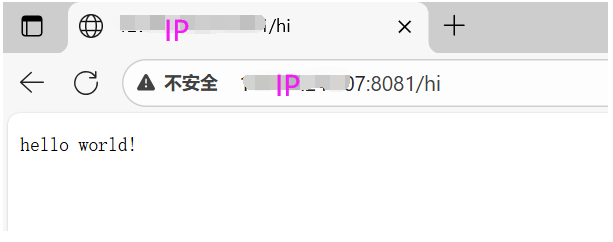
}这段代码启动了一个HTTP服务器,监听"http://IP:8081/hi",当有GET请求访问该路径时,返回文本"hello world!"
三、服务端
1.目的
①初始化搜索引擎:程序启动时,加载位于data/raw_html/raw.txt的原始网页数据,并构建内部索引(由Searcher类完成),为后续的关键词检索做准备
②静态资源托管:服务器自动将./wwwroot目录作为Web根目录,用于托管钱罐Html、Css、Js等静态文件
③支持跨设备访问
服务器监听0.0.0.0:8081,允许局域网内任意设备通过浏览器访问搜索服务
2.代码
cpp
#include "Search.hpp"
#include "cpphttplib/httplib.h"

const std::string root_path = "./wwwroot";
const std::string input = "data/raw_html/raw.txt";

int main()
{
    ns_searcher::Searcher search;
    search.InitSearcher(input);

    httplib::Server svr;
    svr.set_base_dir(root_path.c_str());//将root_path目录设为服务器的静态文件根目录
    svr.Get("/s", [&search](const httplib::Request &req, httplib::Response &rep){
        if(!req.has_param("word")){
            rep.set_content("必须要有搜索关键字!", "text/plain; charset=utf-8");
            return;
        }
        std::string word = req.get_param_value("word");
        std::cout << "用户正在搜索: " << word << std::endl;
        std::string json_string;
        search.Search(word, &json_string);
        rep.set_content(json_string, "application/json");
    });
    svr.listen("0.0.0.0", 8081);
    return 0;
}
四、前端
1.功能
实现一个简洁的搜索页面界面,与后端搜索服务配合使用,为用户提供关键词搜索功能
2.页面结构
html
<div class="container">
    <div class="search">
        <input type="text" value="请输入搜索关键字">
        <button onclick="Search()">搜索一下</button>
    </div>
    <div class="result"></div>
</div>
搜索框:包含一个输入框和一个按钮
结果区域:初始为空,用于动态展示搜索结果
3.样式设计(CSS)
-
全局样式重置:清空所有元素的默认内外边距,避免浏览器差异。
-
容器布局 :
.container固定宽度 800px,居中对齐,顶部留白 15px。 -
搜索框样式 :
.search input:宽度 600px,高度 50px,左侧边框,灰色提示文字。.search button:宽度 150px,高度 52px,蓝色背景,白色字体。
-
搜索结果样式:
- 每个
.item包含标题(<a>)、描述(<p>)和链接(<i>)。 - 标题为蓝色链接,悬停时显示下划线;描述为灰色文字;链接为绿色
- 每个
4.构建结果页面
javascript
function BuildHtml(data) {
    let result_label = $(".container .result");
    result_label.empty(); // 清空历史结果
    for (let elem of data) {
        let a_label = $("<a>", {
            text: elem.title,
            href: elem.url,
            target: "_blank"
        });
        let p_label = $("<p>", { text: elem.desc });
        let i_label = $("<i>", { text: elem.url });
        let div_label = $("<div>", { class: "item" });
        a_label.appendTo(div_label);
        p_label.appendTo(div_label);
        i_label.appendTo(div_label);
        div_label.appendTo(result_label);
    }
}- 清空
.result区域的历史内容。 - 遍历后端返回的 JSON 数据(
data),每个元素包含title、url、desc。 - 动态创建 HTML 元素:
<a>:标题,点击后在新标签页打开链接。<p>:摘要描述。<i>:原始 URL(绿色显示)。
- 将每个结果项追加到
.result容器中。
5.完整代码
html
<!DOCTYPE html>
<html lang="en">
<head>
    <meta charset="UTF-8">
    <meta http-equiv="X-UA-Compatible" content="IE=edge">
    <meta name="viewport" content="width=device-width, initial-scale=1.0">
    <script src="http://code.jquery.com/jquery-2.1.1.min.js"></script>

    <title>boost 搜索引擎</title>
    <style>
        /* 去掉网页中的所有的默认内外边距,html的盒子模型 */
        * {
            /* 设置外边距 */
            margin: 0;
            /* 设置内边距 */
            padding: 0;
        }
        /* 将我们的body内的内容100%和html的呈现吻合 */
        html,
        body {
            height: 100%;
        }
        /* 类选择器.container */
        .container {
            /* 设置div的宽度 */
            width: 800px;
            /* 通过设置外边距达到居中对齐的目的 */
            margin: 0px auto;
            /* 设置外边距的上边距,保持元素和网页的上部距离 */
            margin-top: 15px;
        }
        /* 复合选择器,选中container 下的 search */
        .container .search {
            /* 宽度与父标签保持一致 */
            width: 100%;
            /* 高度设置为52px */
            height: 52px;
        }
        /* 先选中input标签, 直接设置标签的属性,先要选中, input:标签选择器*/
        /* input在进行高度设置的时候,没有考虑边框的问题 */
        .container .search input {
            /* 设置left浮动 */
            float: left;
            width: 600px;
            height: 50px;
            /* 设置边框属性:边框的宽度,样式,颜色 */
            border: 1px solid black;
            /* 去掉input输入框的有边框 */
            border-right: none;
            /* 设置内边距,默认文字不要和左侧边框紧挨着 */
            padding-left: 10px;
            /* 设置input内部的字体的颜色和样式 */
            color: #CCC;
            font-size: 14px;
        }
        /* 先选中button标签, 直接设置标签的属性,先要选中, button:标签选择器*/
        .container .search button {
            /* 设置left浮动 */
            float: left;
            width: 150px;
            height: 52px;
            /* 设置button的背景颜色,#4e6ef2 */
            background-color: #4e6ef2;
            /* 设置button中的字体颜色 */
            color: #FFF;
            /* 设置字体的大小 */
            font-size: 19px;
            font-family:Georgia, 'Times New Roman', Times, serif;
        }
        .container .result {
            width: 100%;
        }
        .container .result .item {
            margin-top: 15px;
        }

        .container .result .item a {
            /* 设置为块级元素,单独站一行 */
            display: block;
            /* a标签的下划线去掉 */
            text-decoration: none;
            /* 设置a标签中的文字的字体大小 */
            font-size: 20px;
            /* 设置字体的颜色 */
            color: #4e6ef2;
        }
        .container .result .item a:hover {
            text-decoration: underline;
        }
        .container .result .item p {
            margin-top: 5px;
            font-size: 16px;
            font-family:'Lucida Sans', 'Lucida Sans Regular', 'Lucida Grande', 'Lucida Sans Unicode', Geneva, Verdana, sans-serif;
        }

        .container .result .item i{
            /* 设置为块级元素,单独站一行 */
            display: block;
            /* 取消斜体风格 */
            font-style: normal;
            color: green;
        }
    </style>
</head>
<body>
    <div class="container">
        <div class="search">
            <input type="text" value="请输入搜索关键字">
            <button onclick="Search()">搜索一下</button>
        </div>
        <div class="result">
        </div>
    </div>
    <script>
        function Search(){
            // 是浏览器的一个弹出框
            // alert("hello js!");
            // 1. 提取数据, $可以理解成就是JQuery的别称
            let query = $(".container .search input").val();
            console.log("query = " + query); //console是浏览器的对话框,可以用来进行查看js数据

            //2. 发起http请求,ajax: 属于一个和后端进行数据交互的函数,JQuery中的
            $.ajax({
                type: "GET",
                url: "/s?word=" + query,
                success: function(data){
                    console.log(data);
                    BuildHtml(data);
                }
            });
        }

        function BuildHtml(data){
            // 获取html中的result标签
            let result_lable = $(".container .result");
            // 清空历史搜索结果
            result_lable.empty();

            for( let elem of data){
                // console.log(elem.title);
                // console.log(elem.url);
                let a_lable = $("<a>", {
                    text: elem.title,
                    href: elem.url,
                    // 跳转到新的页面
                    target: "_blank"
                });
                let p_lable = $("<p>", {
                    text: elem.desc
                });
                let i_lable = $("<i>", {
                    text: elem.url
                });
                let div_lable = $("<div>", {
                    class: "item"
                });
                a_lable.appendTo(div_lable);
                p_lable.appendTo(div_lable);
                i_lable.appendTo(div_lable);
                div_lable.appendTo(result_lable);
            }
        }
    </script>
</body>
</html>
五、结果

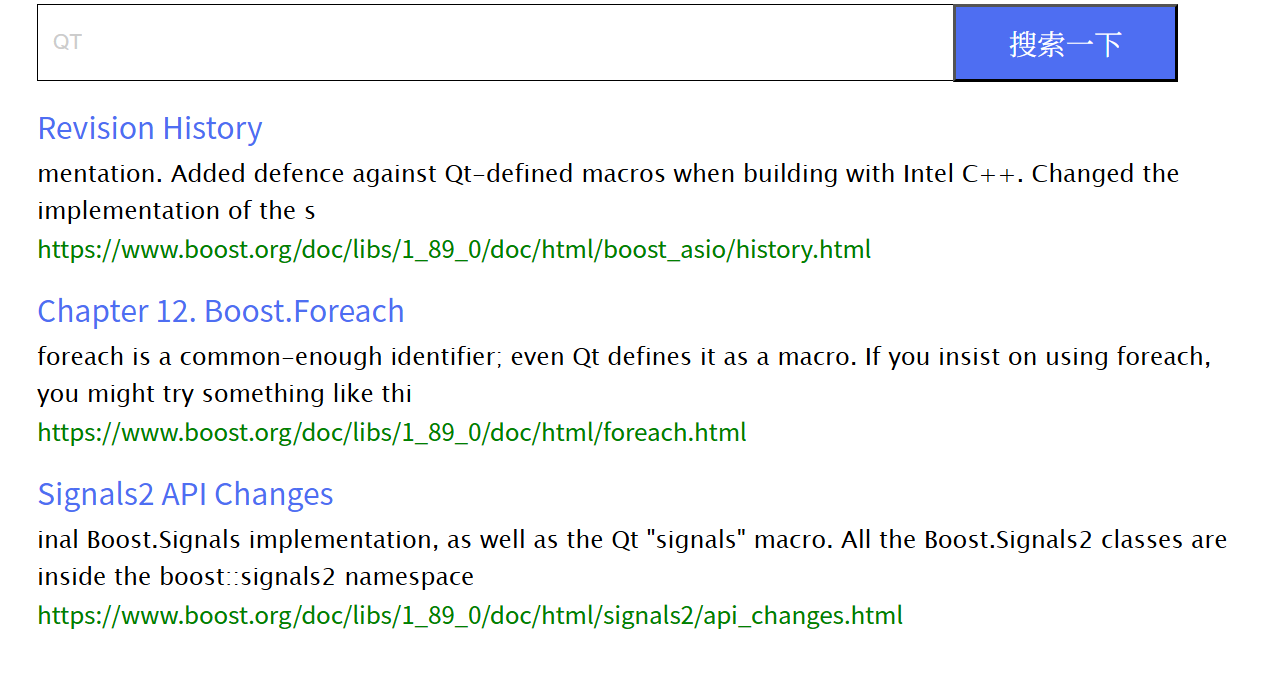
点击自动跳转