问:HTTP和HTTPS的区别及安全性 🔐
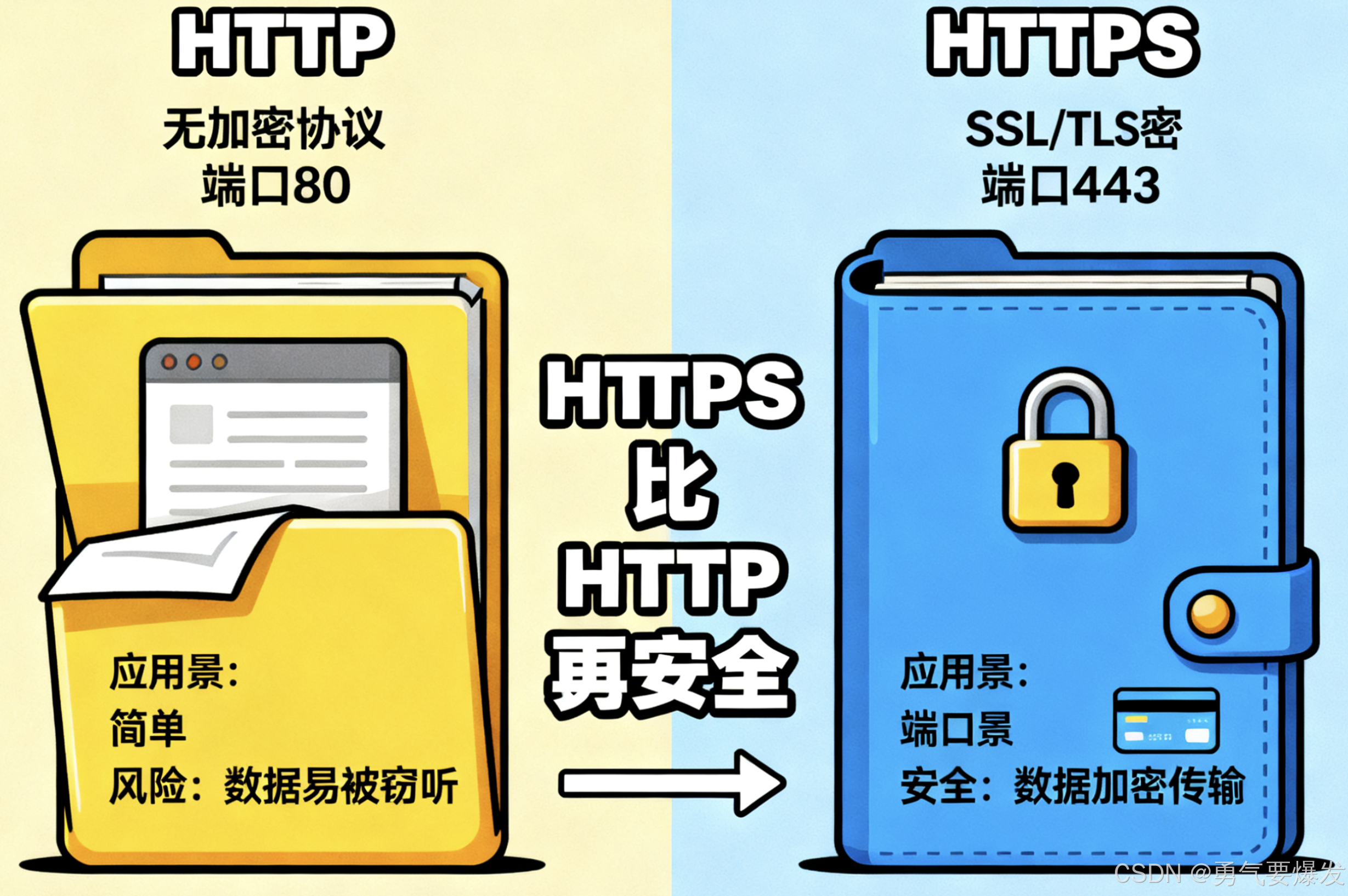
📊 对比表格
| 特性 |
HTTP |
HTTPS |
| 安全性 |
不安全 |
安全 |
| 端口 |
80 |
443 |
| 协议 |
HTTP |
HTTP + SSL/TLS |
| 数据加密 |
明文传输 |
加密传输 |
| 证书 |
不需要 |
需要SSL证书 |
| 性能 |
较快 |
较慢(加密开销) |
| SEO |
普通 |
搜索引擎优先 |
| 浏览器标识 |
无特殊标识 |
🔒 锁图标 |
🔍 详细分析
HTTP (HyperText Transfer Protocol)
/**
 * HTTP - 超文本传输协议
 * 本质:应用层协议,明文传输
 */

// HTTP请求示例
const http = require('http');

// 创建HTTP服务器
const server = http.createServer((req, res) => {
  // 设置响应头
  res.writeHead(200, {
    'Content-Type': 'application/json',
    'Access-Control-Allow-Origin': '*'
  });

  // 发送响应数据(明文)
  res.end(JSON.stringify({
    message: '这是明文传输的数据',
    timestamp: Date.now()
  }));
});

server.listen(80, () => {
  console.log('HTTP服务器运行在端口80');
});

// 客户端请求
fetch('http://example.com/api/data')
  .then(response => response.json())
  .then(data => console.log(data));
HTTP特点:
- 📝 明文传输 - 数据以明文形式传输,容易被窃听
- ⚡ 速度快 - 无加密解密过程,传输效率高
- 🔓 无身份验证 - 无法验证服务器身份
- 🚫 数据易篡改 - 传输过程中数据可能被修改
HTTPS (HTTP Secure)
/**
 * HTTPS - 安全的HTTP协议
 * 本质:HTTP + SSL/TLS加密层
 */

const https = require('https');
const fs = require('fs');

// SSL证书配置
const options = {
  key: fs.readFileSync('private-key.pem'),
  cert: fs.readFileSync('certificate.pem')
};

// 创建HTTPS服务器
const server = https.createServer(options, (req, res) => {
  res.writeHead(200, {
    'Content-Type': 'application/json',
    'Strict-Transport-Security': 'max-age=31536000'
  });

  // 发送加密响应数据
  res.end(JSON.stringify({
    message: '这是加密传输的数据',
    secure: true,
    timestamp: Date.now()
  }));
});

server.listen(443, () => {
  console.log('HTTPS服务器运行在端口443');
});

// 客户端请求(自动加密)
fetch('https://example.com/api/data')
  .then(response => response.json())
  .then(data => console.log(data));
HTTPS特点:
- 🔐 加密传输 - 使用SSL/TLS协议加密数据
- 🛡️ 身份验证 - 通过数字证书验证服务器身份
- ✅ 数据完整性 - 防止数据在传输过程中被篡改
- 🔒 防窃听 - 即使被截获也无法解读
🔐 HTTPS安全机制详解
1. 加密算法
/**
 * HTTPS使用的加密技术
 */

// 对称加密 - 数据传输阶段
const crypto = require('crypto');

function symmetricEncrypt(data, key) {
  const cipher = crypto.createCipher('aes-256-cbc', key);
  let encrypted = cipher.update(data, 'utf8', 'hex');
  encrypted += cipher.final('hex');
  return encrypted;
}

// 非对称加密 - 密钥交换阶段
function generateKeyPair() {
  return crypto.generateKeyPairSync('rsa', {
    modulusLength: 2048,
    publicKeyEncoding: {
      type: 'spki',
      format: 'pem'
    },
    privateKeyEncoding: {
      type: 'pkcs8',
      format: 'pem'
    }
  });
}
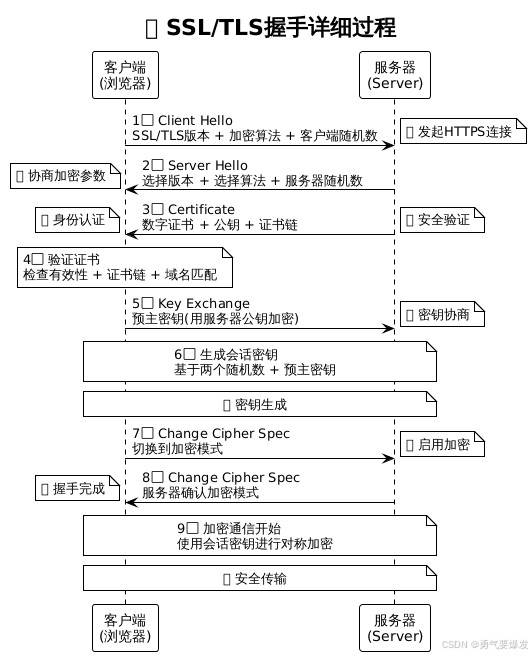
2. SSL/TLS握手过程
🔐 SSL/TLS握手流程图
| 步骤 |
客户端 (浏览器) |
方向 |
服务器 |
传输内容 |
说明 |
| 1 |
Client Hello |
➡️ |
接收请求 |
• SSL/TLS版本 • 支持的加密算法 • 客户端随机数 |
🚀 发起HTTPS连接 |
| 2 |
接收响应 |
⬅️ |
Server Hello |
• 选择的SSL/TLS版本 • 选择的加密算法 • 服务器随机数 |
📋 协商加密参数 |
| 3 |
接收证书 |
⬅️ |
Certificate |
• 服务器数字证书 • 公钥信息 • 证书链 |
📜 身份认证 |
| 4 |
验证证书 |
🔍 |
等待验证 |
• 检查证书有效性 • 验证证书链 • 确认域名匹配 |
✅ 安全验证 |
| 5 |
Key Exchange |
➡️ |
接收密钥 |
• 预主密钥(用服务器公钥加密) • 客户端密钥交换完成 |
🔑 密钥协商 |
| 6 |
生成会话密钥 |
🔄 |
生成会话密钥 |
• 基于两个随机数 • 基于预主密钥 • 生成对称密钥 |
🛡️ 密钥生成 |
| 7 |
Change Cipher |
➡️ |
接收通知 |
• 切换到加密模式 • 客户端握手完成 |
🔒 启用加密 |
| 8 |
接收确认 |
⬅️ |
Change Cipher |
• 服务器切换加密 • 服务器握手完成 |
✅ 握手完成 |
| 9 |
加密通信开始 |
🔄 |
加密通信开始 |
• 使用会话密钥 • 对称加密传输 • 数据完整性保护 |
🚀 安全传输 |
SSL/TLS握手时序图
3. 数字证书验证
/**
 * 数字证书包含的信息
 */

const certificateInfo = {
  // 证书基本信息
  subject: {
    commonName: 'example.com',
    organization: 'Example Corp',
    country: 'CN'
  },

  // 证书颁发机构
  issuer: {
    commonName: 'DigiCert SHA2 Secure Server CA',
    organization: 'DigiCert Inc',
    country: 'US'
  },

  // 有效期
  validity: {
    notBefore: '2023-01-01T00:00:00Z',
    notAfter: '2024-01-01T00:00:00Z'
  },

  // 公钥信息
  publicKey: {
    algorithm: 'RSA',
    keySize: 2048
  },

  // 数字签名
  signature: {
    algorithm: 'SHA256withRSA',
    value: '...'
  }
};
🛡️ 为什么HTTPS更安全?
1. 数据加密保护
// HTTP - 明文传输(不安全)
const httpData = {
  username: 'admin',
  password: '123456',
  creditCard: '1234-5678-9012-3456'
};
// 网络中传输:{"username":"admin","password":"123456",...}
// 任何人都能看到敏感信息!

// HTTPS - 加密传输(安全)
const httpsData = {
  username: 'admin',
  password: '123456',
  creditCard: '1234-5678-9012-3456'
};
// 网络中传输:加密后的乱码
// 只有服务器能解密!
2. 身份验证
/**
 * HTTPS通过数字证书验证服务器身份
 */

// 防止中间人攻击
function validateCertificate(cert) {
  // 1. 验证证书是否由可信CA签发
  if (!isTrustedCA(cert.issuer)) {
    throw new Error('不可信的证书颁发机构');
  }

  // 2. 验证证书是否在有效期内
  if (cert.notAfter < Date.now()) {
    throw new Error('证书已过期');
  }

  // 3. 验证域名是否匹配
  if (cert.subject.commonName !== window.location.hostname) {
    throw new Error('域名不匹配');
  }

  return true;
}
3. 数据完整性
/**
 * HTTPS使用消息认证码(MAC)保证数据完整性
 */

function calculateMAC(data, key) {
  const hmac = crypto.createHmac('sha256', key);
  hmac.update(data);
  return hmac.digest('hex');
}

// 发送数据时附加MAC
const message = 'Hello World';
const mac = calculateMAC(message, sessionKey);
const packet = { data: message, mac: mac };

// 接收时验证MAC
function verifyIntegrity(packet, key) {
  const expectedMAC = calculateMAC(packet.data, key);
  return packet.mac === expectedMAC;
}
🎯 实际应用建议
何时使用HTTPS?
📊 HTTPS使用场景对比表
| 优先级 |
应用场景 |
必要性 |
原因 |
风险等级 |
示例 |
| 🔴 必须 |
用户登录页面 |
✅ 强制 |
保护用户凭据 |
极高 |
用户名、密码传输 |
| 🔴 必须 |
支付页面 |
✅ 强制 |
保护财务信息 |
极高 |
信用卡、支付宝支付 |
| 🔴 必须 |
个人信息页面 |
✅ 强制 |
保护隐私数据 |
极高 |
身份证、手机号等 |
| 🔴 必须 |
API接口 |
✅ 强制 |
保护数据传输 |
极高 |
用户数据、业务数据 |
| 🔴 必须 |
管理后台 |
✅ 强制 |
保护系统安全 |
极高 |
后台管理、配置页面 |
| 🔴 必须 |
敏感数据页面 |
✅ 强制 |
法律法规要求 |
极高 |
医疗、金融、教育数据 |
| 🟡 强烈建议 |
所有网站页面 |
⭐ 推荐 |
SEO优势、用户信任 |
中等 |
企业官网、博客 |
| 🟡 强烈建议 |
移动应用API |
⭐ 推荐 |
移动网络安全 |
中等 |
App接口、小程序 |
| 🟡 强烈建议 |
第三方集成 |
⭐ 推荐 |
接口安全要求 |
中等 |
OAuth、支付接口 |
| 🟡 强烈建议 |
现代Web应用 |
⭐ 推荐 |
现代浏览器要求 |
中等 |
PWA、SPA应用 |
| 🟢 可选 |
静态资源 |
💡 考虑 |
CDN性能优化 |
低 |
图片、CSS、JS文件 |
| 🟢 可选 |
内部测试环境 |
💡 考虑 |
开发调试便利 |
低 |
开发、测试服务器 |
🎯 使用决策流程图
| 问题 |
是 |
否 |
建议 |
| 是否涉及用户敏感信息? |
🔴 必须使用HTTPS |
继续下一步 |
登录、支付、个人信息 |
| 是否为生产环境? |
🟡 强烈建议HTTPS |
继续下一步 |
SEO、用户信任、安全 |
| 是否为现代Web应用? |
🟡 建议使用HTTPS |
继续下一步 |
PWA、Service Worker |
| 是否需要现代浏览器功能? |
🟡 建议使用HTTPS |
🟢 可选HTTPS |
地理位置、摄像头等API |