1.概述
在15.0的系统rom定制化开发中,在系统进入recovery模式后,界面会g_menu_actions 菜单选项和 提示文字,而这些文字的大小不像上层一样是通过设置属性来表示大小的 而它确是通过字体png图片的大小来计算文字的宽和高的,然后可以修改字体大小,接下来就实现菜单项字体大小修改功能
2. 修改recovery 菜单项字体大小的核心类
    build/make/core/Makefile
        bootable\recovery\minui\graphics.c
3.修改recovery 菜单项字体大小的核心功能分析和实现
首选来看build/make/core/Makefile 文件
   $(INSTALLED_FILES_FILE_RECOVERY): $(INTERNAL_RECOVERY_RAMDISK_FILES_TIMESTAMP)

     $(INSTALLED_FILES_FILE_RECOVERY): .KATI_IMPLICIT_OUTPUTS := $(INSTALLED_FILES_JSON_RECOVERY)
     $(INSTALLED_FILES_FILE_RECOVERY): $(INTERNAL_RECOVERYIMAGE_FILES) $(FILESLIST) $(FILESLIST_UTIL)
     	@echo Installed file list: $@
     	mkdir -p $(dir $@)
     	rm -f $@
     	$(FILESLIST) $(TARGET_RECOVERY_ROOT_OUT) > $(@:.txt=.json)
     	$(FILESLIST_UTIL) -c $(@:.txt=.json) > $@

     recovery_sepolicy := \
         $(TARGET_RECOVERY_ROOT_OUT)/sepolicy \
         $(TARGET_RECOVERY_ROOT_OUT)/plat_file_contexts \
         $(TARGET_RECOVERY_ROOT_OUT)/plat_property_contexts \
         $(TARGET_RECOVERY_ROOT_OUT)/system_ext_file_contexts \
         $(TARGET_RECOVERY_ROOT_OUT)/system_ext_property_contexts \
         $(TARGET_RECOVERY_ROOT_OUT)/vendor_file_contexts \
         $(TARGET_RECOVERY_ROOT_OUT)/vendor_property_contexts \
         $(TARGET_RECOVERY_ROOT_OUT)/odm_file_contexts \
         $(TARGET_RECOVERY_ROOT_OUT)/odm_property_contexts \
         $(TARGET_RECOVERY_ROOT_OUT)/product_file_contexts \
         $(TARGET_RECOVERY_ROOT_OUT)/product_property_contexts

     # Passed into rsync from non-recovery root to recovery root, to avoid overwriting recovery-specific
     # SELinux files
     IGNORE_RECOVERY_SEPOLICY := $(patsubst $(TARGET_RECOVERY_OUT)/%,--exclude=/%,$(recovery_sepolicy))

     # if building multiple boot images from multiple kernels, use the first kernel listed
     # for the recovery image
     recovery_kernel := $(firstword $(INSTALLED_KERNEL_TARGET))
     recovery_ramdisk := $(PRODUCT_OUT)/ramdisk-recovery.img
     recovery_resources_common := bootable/recovery/res

     # Set recovery_density to a density bucket based on TARGET_SCREEN_DENSITY, PRODUCT_AAPT_PREF_CONFIG,
     # or mdpi, in order of preference. We support both specific buckets (e.g. xdpi) and numbers,
     # which get remapped to a bucket.
     recovery_density := $(or $(TARGET_SCREEN_DENSITY),$(PRODUCT_AAPT_PREF_CONFIG),mdpi)
     ifeq (,$(filter xxxhdpi xxhdpi xhdpi hdpi mdpi,$(recovery_density)))
     recovery_density_value := $(patsubst %dpi,%,$(recovery_density))
     # We roughly use the medium point between the primary densities to split buckets.
     # ------160------240------320----------480------------640------
     #       mdpi     hdpi    xhdpi        xxhdpi        xxxhdpi
     recovery_density := $(strip \
       $(or $(if $(filter $(shell echo $$(($(recovery_density_value) >= 560))),1),xxxhdpi),\
            $(if $(filter $(shell echo $$(($(recovery_density_value) >= 400))),1),xxhdpi),\
            $(if $(filter $(shell echo $$(($(recovery_density_value) >= 280))),1),xhdpi),\
            $(if $(filter $(shell echo $$(($(recovery_density_value) >= 200))),1),hdpi,mdpi)))
     endif

     ifneq (,$(wildcard $(recovery_resources_common)-$(recovery_density)))
     recovery_resources_common := $(recovery_resources_common)-$(recovery_density)
     else
     recovery_resources_common := $(recovery_resources_common)-xhdpi
     endif

     ifneq (,$(filter xxxhdpi xxhdpi xhdpi,$(recovery_density)))
     recovery_font := bootable/recovery/fonts/18x32.png
     else
     recovery_font := bootable/recovery/fonts/12x22.png
     endif
在实现修改recovery 菜单项字体大小的核心功能中,通过上述的分析得知,
在上述的Makefile的相关源码中,在
Makefile中关于recovery的菜单字体的核心代码为:
    recovery_density := $(strip \
      $(or $(if $(filter $(shell echo $$(($(recovery_density_value) >= 560))),1),xxxhdpi),\
           $(if $(filter $(shell echo $$(($(recovery_density_value) >= 400))),1),xxhdpi),\
           $(if $(filter $(shell echo $$(($(recovery_density_value) >= 280))),1),xhdpi),\
           $(if $(filter $(shell echo $$(($(recovery_density_value) >= 200))),1),hdpi,mdpi)))
    endif

    ifneq (,$(wildcard $(recovery_resources_common)-$(recovery_density)))
    recovery_resources_common := $(recovery_resources_common)-$(recovery_density)
    else
    recovery_resources_common := $(recovery_resources_common)-xhdpi
    endif

    # Select the 18x32 font on high-density devices (xhdpi and up); and the 12x22 font on other devices.
    # Note that the font selected here can be overridden for a particular device by putting a font.png
    # in its private recovery resources.
    ifneq (,$(filter xxxhdpi xxhdpi xhdpi,$(recovery_density)))
    recovery_font := $(call include-path-for, recovery)/fonts/18x32.png
    else
    recovery_font := $(call include-path-for, recovery)/fonts/12x22.png
    endif
在实现修改recovery 菜单项字体大小的核心功能中,通过上述的分析得知,
通过Makefile 我们可以看到 是通过设备的密度来选择字体的大小的
当密度大于280时 就是用的recovery_font := $(call include-path-for, recovery)/fonts/18x32.png 来设置字体的,而路径就在:bootable\recovery\fonts\18x32.png
而具体计算字体的宽高是通过
bootable\recovery\minui\graphics.c 来处理这些图片
中的
   int gr_init_font(const char* name, GRFont** dest) {
      GRFont* font = static_cast<GRFont*>(calloc(1, sizeof(*gr_font)));
      if (font == nullptr) {
        return -1;
      }

      int res = res_create_alpha_surface(name, &(font->texture));
      if (res < 0) {
        free(font);
        return res;
      }

      font->char_width = font->texture->width / 96;
      font->char_height = font->texture->height / 2;

      *dest = font;
      return 0;
    }
在实现修改recovery 菜单项字体大小的核心功能中,通过上述的分析得知,
通过获取图片的宽来除以96 为字体的宽 图片的高/2为字体的高
所以要修改字体只需要把 18X32.png的图片 通过photoshop工具 重新做张图片 修改长和宽
例如:修改成36x64.png 宽设置成36x96 高设置成64x2 即为3456x128的图片
然后放在bootable\recovery\fonts\ 下
如图:
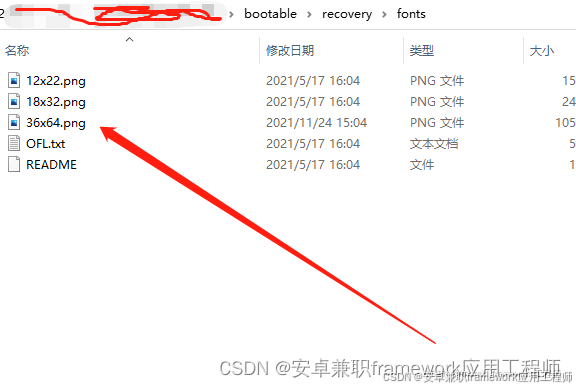
然后Makefile中修改使用这个font图片
修改如下:
   ifneq (,$(filter xxxhdpi xxhdpi xhdpi,$(recovery_density)))
    - recovery_font := $(call include-path-for, recovery)/fonts/18x32.png
    +recovery_font := $(call include-path-for, recovery)/fonts/36x64.png
    else
    recovery_font := $(call include-path-for, recovery)/fonts/12x22.png
    endif
在实现修改recovery 菜单项字体大小的核心功能中,通过上述的分析得知,
通过上述的修改,然后编译即可 发现 recovery 界面字体已经变大,通过上述的修改就实现了
在修改菜单项字体大小的功能。