Word对比
本文,我们将实现一个Word对比工具

🌰demo
思路
Word文档解析
Word的本质是XML压缩包,在我们的diff过程中,我们只关心纯文本的变化,因此我们需要先将word进行解析转化。
本文借助mammoth.js完成
文本token化
根据不同的粒度做分词
Diff算法核心
双栏对比
本文使用antd组件库
实现
文档解析
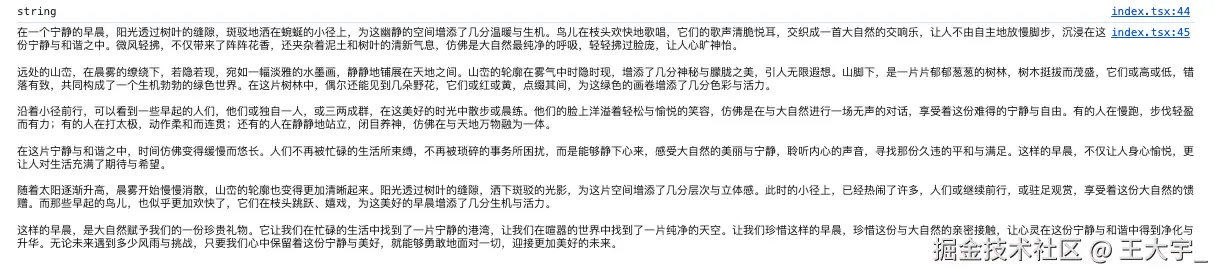
首先,我们通过mammoth将word转化为string
jsx
  // 上传word 并提取文本
  async function handleUpload(file: File, type: 'old' | 'new') {
    const arrayBuffer = await file.arrayBuffer();
    // mammith.extractRawText从docx中提取纯文本
    const { value } = await mammoth.extractRawText({ arrayBuffer });
    if (type === 'old') {
      setOldText(value);
    } else {
      setNewText(value);
    }
  }
分词
按照不同的粒度,将string划分
jsx
  // 分词
  function tokenize(text: string, mode: string): string[] {
    // 按行分,按换行符拆分为数组
    if (mode === 'line') return text.split(/\r?\n/);
    // 按字符分,把字符串拆分成单个字符数组
    if (mode === 'char') return text.split('');
    //用正则将文本切成中文单字、英文单词、其他单个符号
    return text.match(/[\u4e00-\u9fa5]|\w+|[^\w\u4e00-\u9fa5]/g) || [];
  }
Diff
最长公共子序列
jsx
  // LCS构建DP
  function buildLCS(a: string[], b: string[]) {
    // 构建二维数组,并将其初始化为0
    // dp[i][j]表示从a[i:]与b[j:]的最长公共子序列长度
    const dp = Array.from({ length: a.length + 1 }, () =>
      Array(b.length + 1).fill(0)
    );

    // 倒序填充dp
    for (let i = a.length - 1; i >= 0; i--) {
      for (let j = b.length - 1; j >= 0; j--) {
        if (a[i] === b[j]) {
          dp[i][j] = dp[i + 1][j + 1] + 1;
        } else {
          dp[i][j] = Math.max(dp[i + 1][j], dp[i][j + 1]);
        }
      }
    }

    return dp;
  }
差异计算
基于二维数组计算文本的差异,标记新增、删除、相同的部分
- 设置两个指针分别指向新旧文本
- 当元素相同,标记为equal,两个指针同时向前
- 当新文本还有剩余,旧文本已经遍历完,插入新元素
- 当不满足插入条件,为删除旧元素
jsx
  // 得到diff结构
  function diffTokens(a: string[], b: string[]): DiffPart[] {
    //构建新旧内容dp数组
    const dp = buildLCS(a, b);
    let i = 0,
      j = 0;
    const result: DiffPart[] = [];

    // 便利新旧内容
    while (i < a.length && j < b.length) {
      //若当前token相等,则记录下来并移动i j
      if (i < a.length && j < b.length && a[i] === b[j]) {
        result.push({ type: 'equal', text: a[i] });
        i++;
        j++;
      } else if (
        j < b.length &&
        (i === a.length || dp[i][j + 1] >= dp[i + 1][j])
      ) {
        result.push({ type: 'insert', text: b[j] });
        j++;
      } else if (i < a.length) {
        result.push({ type: 'delete', text: a[i] });
        i++;
      }
    }
    return result;
  }
数据流动🌰
jsx
// 旧文本
const oldText = "今天天气很好,我们去公园散步吧。";
// 新文本
const newText = "今天天气不错,我们去山上徒步吧,顺便看看风景。";
// 对比粒度
const granularity = "word";
分词
jsx
// 旧文本分词结果
const oldTokens = tokenize("今天天气很好,我们去公园散步吧。", "word");
// 结果: ["今天", "天气", "很", "好", ",", "我们", "去", "公园", "散步", "吧", "。"]

// 新文本分词结果
const newTokens = tokenize("今天天气不错,我们去山上徒步吧,顺便看看风景。", "word");
// 结果: ["今天", "天气", "不", "错", ",", "我们", "去", "山上", "徒步", "吧", ",", "顺便", "看看", "风景", "。"]
构建LCS
jsx
oldTokens = ["今天", "天气", "很", "好", ",", "我们", "去", "公园", "散步", "吧", "。"]
newTokens = ["今天", "天气", "不", "错", ",", "我们", "去", "山上", "徒步", "吧", ",", "顺便", "看看", "风景", "。"]
Diff
jsx
[
  { type: 'equal',  text: '今天' },
  { type: 'equal',  text: '天气' },
  { type: 'delete', text: '很' },
  { type: 'delete', text: '好' },
  { type: 'equal',  text: ',' },
  { type: 'equal',  text: '我们' },
  { type: 'equal',  text: '去' },
  { type: 'insert', text: '山上' },
  { type: 'delete', text: '公园' },
  { type: 'insert', text: '徒步' },
  { type: 'equal',  text: '吧' },
  { type: 'insert', text: ',' },
  { type: 'insert', text: '顺便' },
  { type: 'insert', text: '看看' },
  { type: 'insert', text: '风景' },
  { type: 'equal',  text: '。' }
]
完整代码
jsx
import {
  Upload,
  Button,
  Row,
  Col,
  Select,
  Input,
  Typography,
  Space,
} from 'antd';
import { UploadOutlined } from '@ant-design/icons';
import mammoth from 'mammoth';
const { TextArea } = Input;
const { Title } = Typography;

import './index.less';
import { useState } from 'react';

// diff
// insert 添加  delete 删除  equal 相等
type DiffPart = {
  type: 'insert' | 'delete' | 'equal';
  text: string;
};
const WordDiffTool = () => {
  // 旧文本内容
  const [oldText, setOldText] =
    useState<string>('这是一个示例文本,用于测试对比功能。');

  // 新文本内容
  const [newText, setNewText] = useState<string>(
    '这是用于测试的示例文本,用于对比功能。添加了一些内容。'
  );

  // 对比粒度
  const [granularity, setGranularity] = useState<'word' | 'char' | 'line'>(
    'word'
  );

  // 上传word 并提取文本
  async function handleUpload(file: File, type: 'old' | 'new') {
    const arrayBuffer = await file.arrayBuffer();
    // mammith.extractRawText从docx中提取纯文本
    const { value } = await mammoth.extractRawText({ arrayBuffer });
    if (type === 'old') {
      setOldText(value);
    } else {
      setNewText(value);
    }
  }

  // 分词
  function tokenize(text: string, mode: string): string[] {
    // 按行分,按换行符拆分为数组
    if (mode === 'line') return text.split(/\r?\n/);
    // 按字符分,把字符串拆分成单个字符数组
    if (mode === 'char') return text.split('');
    //用正则将文本切成中文单字、英文单词、其他单个符号
    return text.match(/[\u4e00-\u9fa5]|\w+|[^\w\u4e00-\u9fa5]/g) || [];
  }

  // LCS构建DP
  function buildLCS(a: string[], b: string[]) {
    // 构建二维数组,并将其初始化为0
    // dp[i][j]表示从a[i:]与b[j:]的最长公共子序列长度
    const dp = Array.from({ length: a.length + 1 }, () =>
      Array(b.length + 1).fill(0)
    );

    // 倒序填充dp
    for (let i = a.length - 1; i >= 0; i--) {
      for (let j = b.length - 1; j >= 0; j--) {
        if (a[i] === b[j]) {
          dp[i][j] = dp[i + 1][j + 1] + 1;
        } else {
          dp[i][j] = Math.max(dp[i + 1][j], dp[i][j + 1]);
        }
      }
    }

    return dp;
  }

  // 得到diff结构
  function diffTokens(a: string[], b: string[]): DiffPart[] {
    //构建新旧内容dp数组
    const dp = buildLCS(a, b);
    let i = 0,
      j = 0;
    const result: DiffPart[] = [];

    // 便利新旧内容
    while (i < a.length || j < b.length) {
      //若当前token相等,则记录下来并移动i j
      if (i < a.length && j < b.length && a[i] === b[j]) {
        result.push({ type: 'equal', text: a[i] });
        i++;
        j++;
      } else if (
        j < b.length &&
        (i === a.length || dp[i][j + 1] >= dp[i + 1][j])
      ) {
        result.push({ type: 'insert', text: b[j] });
        j++;
      } else if (i < a.length) {
        result.push({ type: 'delete', text: a[i] });
        i++;
      }
    }
    return result;
  }

  // 将diff 转化成左右两侧展示
  function buildSideBySide(parts: DiffPart[]) {
    const oldView: DiffPart[] = [];
    const newView: DiffPart[] = [];

    parts.forEach(p => {
      if (p.type === 'equal') {
        oldView.push({ type: 'equal', text: p.text });
        newView.push({ type: 'equal', text: p.text });
      } else if (p.type === 'delete') {
        oldView.push({ type: 'delete', text: p.text });
        newView.push({ type: 'equal', text: p.text });
      } else if (p.type === 'insert') {
        oldView.push({ type: 'equal', text: p.text });
        newView.push({ type: 'insert', text: p.text });
      }
    });

    return { oldView, newView };
  }

  const oldTokens = tokenize(oldText, granularity);
  const newTokens = tokenize(newText, granularity);

  const diffParts = diffTokens(oldTokens, newTokens);
  const { oldView, newView } = buildSideBySide(diffParts);

  function renderDiff(parts: DiffPart[]) {
    return parts.map((p, i) => {
      if (p.type === 'equal') return <span key={i}>{p.text}</span>;
      if (p.type === 'delete')
        return (
          <span key={i} className="deleted">
            {p.text}
          </span>
        );
      if (p.type === 'insert') {
        return (
          <span key={i} className="inserted">
            {p.text}
          </span>
        );
      }
      return null;
    });
  }

  return (
    <div className="word-diff-tool">
      <Title level={3}>Word 文本对比工具</Title>

      <Space style={{ marginBottom: 16 }}>
        <Upload
          beforeUpload={file => {
            handleUpload(file, 'old').catch(err => {
              console.log('文件处理失败', err);
            });
            return false;
          }}
          showUploadList={false}
        >
          <Button icon={<UploadOutlined />}>上传旧文本</Button>
        </Upload>

        <Upload
          beforeUpload={file => {
            handleUpload(file, 'new').catch(err => {
              console.log('文件处理失败', err);
            });
            return false;
          }}
          showUploadList={false}
        >
          <Button icon={<UploadOutlined />}>上传新文本</Button>
        </Upload>

        <Select
          value={granularity}
          onChange={v => setGranularity(v)}
          className="granularity-select"
        >
          <Select.Option value="word">按词 diff</Select.Option>
          <Select.Option value="char">按字符 diff</Select.Option>
          <Select.Option value="line">按行 diff</Select.Option>
        </Select>
      </Space>

      <Row gutter={24}>
        <Col span={12}>
          <div className="diff-col">
            <div className="col-title old">旧版本内容</div>
            <TextArea
              rows={10}
              value={oldText}
              onChange={e => setOldText(e.target.value)}
            />
            <div className="diff-result">{renderDiff(oldView)}</div>
          </div>
        </Col>

        <Col span={12}>
          <div className="diff-col">
            <div className="col-title new">新版本内容</div>
            <TextArea
              rows={10}
              value={newText}
              onChange={e => setNewText(e.target.value)}
            />
            <div className="diff-result">{renderDiff(newView)}</div>
          </div>
        </Col>
      </Row>
    </div>
  );
};

export default WordDiffTool;
less
.word-diff-tool {
  padding: 24px;

  .diff-col {
    background: #fff;
    padding: 16px;
    border-radius: 8px;
    box-shadow: 0 2px 10px rgba(0, 0, 0, 0.05);

    .col-title {
      font-size: 15px;
      margin-bottom: 8px;
      font-weight: 600;

      &.old {
        color: #c0392b;
      }
      &.new {
        color: #27ae60;
      }
    }

    .diff-result {
      margin-top: 12px;
      padding: 12px;
      min-height: 200px;
      border: 1px solid #f0f0f0;
      border-radius: 6px;
      line-height: 1.8;
      white-space: pre-wrap;
      overflow: auto;
      background: #fafafa;
      color: #bbb;
    }
  }

  .deleted {
    background: #ffe5e5;
    color: #e11;
    padding: 1px 3px;
    border-radius: 3px;
  }

  .inserted {
    background: #e6ffed;
    color: #0a0;
    padding: 1px 3px;
    border-radius: 3px;
  }
}