在爬虫中,协程一般在请求并发上用的较多,用于解决请求阻塞问题,本文就来带大家学一学协程
协程写法
先看一下普通的函数:

先要将普通函数变为协程函数,就要在def前面加上async关键字,加上之后,无法直接调用:
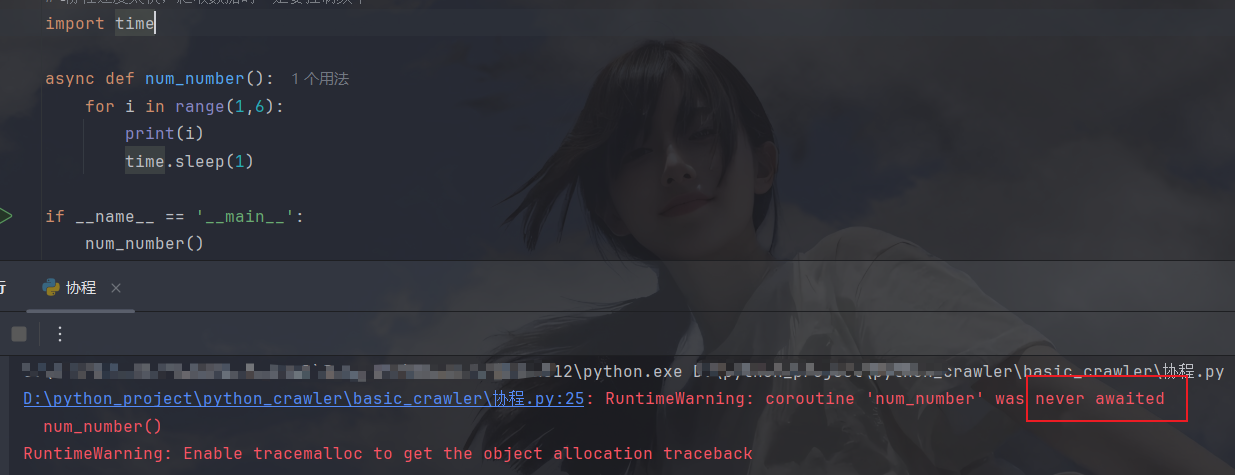
需要先导入一个协程库(asyncio),然后创建协程对象,再运行携程:
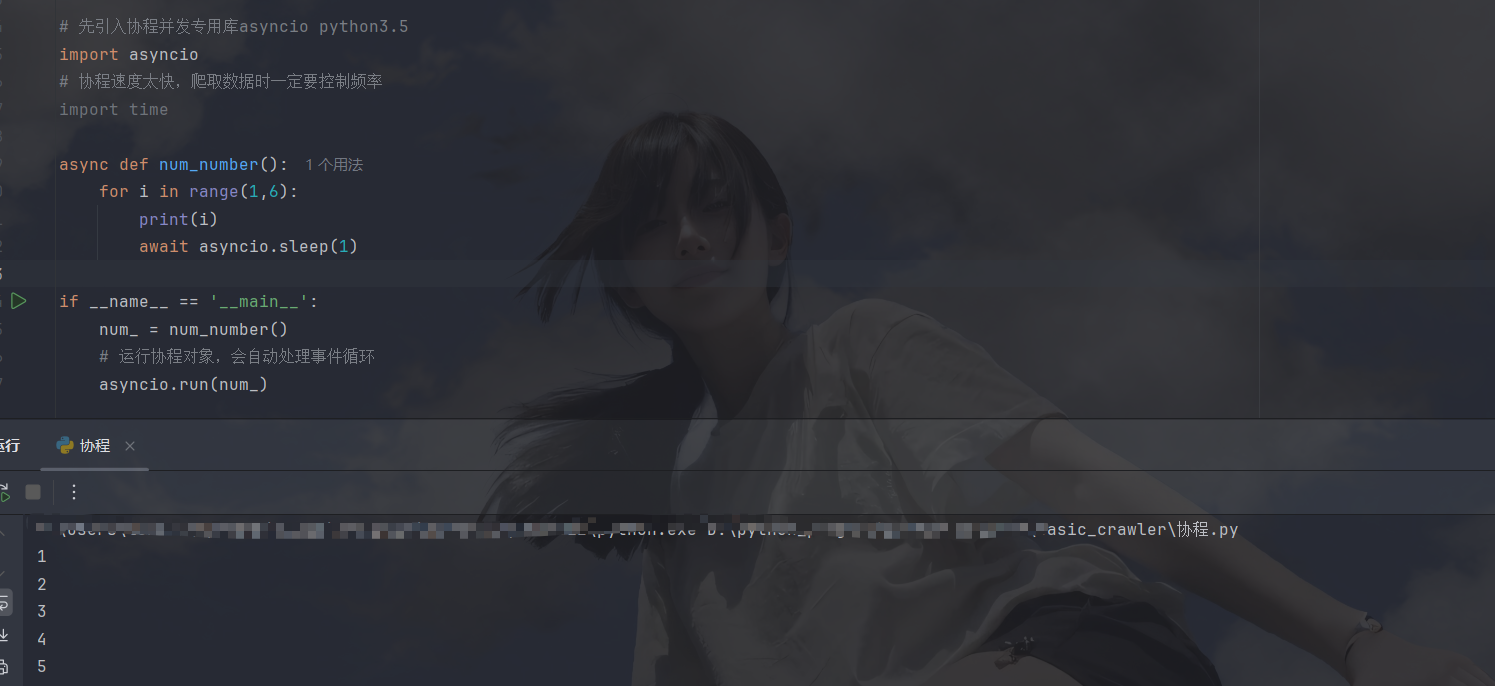
值得注意一下的是,time.sleep是阻塞式睡眠(会导致协程无法并发),协程应该用await asyncio.sleep来等待,下面来执行一下多个协程对象:
javascript
# 执行多个协程
async def work_1():
    for i in range(1,6):
        print('work_1' , i)
        await asyncio.sleep(1)

async def work_2():
    for i in range(1,6):
        print('work_1' , i)
        await asyncio.sleep(1)

async def main():
    task_list = [
        # 需要将协程对象转化为task才能多任务执行
        asyncio.create_task(work_1()),
        asyncio.create_task(work_2())
    ]

    # 等待所有Task完成(并发执行)
    await asyncio.wait(task_list)

if __name__ == '__main__':
    asyncio.run(main())
result:

在协程环境下运行爬虫文件
第一种:requests同步库
requests是同步库,需要借助线程池,线程池在这里的作用就是处理IO,将IO拿走在多线程的环境下运行,然后协程就专心做其他事,不必等待IO,下面是演示代码:
javascript
# 在协程环境下执行爬虫程序(requests库,线程池结局同步问题)
# 先引入协程并发专用库asyncio python3.5
import asyncio

import requests
from bs4 import BeautifulSoup
# 线程池库
from concurrent.futures import ThreadPoolExecutor

def get_data(headers, page):
    url = 'https://movie.douban.com/top250?start={}&filter='
    response = requests.get(url.format(page * 25), headers=headers)
    # print(len(response.text))
    return response.text


async def io_async():
    headers = {
        'user-agent': 'Mozilla/5.0 (Windows NT 10.0; Win64; x64) AppleWebKit/537.36 (KHTML, like Gecko) Chrome/142.0.0.0 Safari/537.36 Edg/142.0.0.0'
    }

    # 创建线程池
    executor = ThreadPoolExecutor(max_workers=10)
    # 创建事件循环
    loop = asyncio.get_event_loop()
    tasks = [loop.run_in_executor(executor, get_data, headers, page) for page in range(10)]  # 第二个参数需要是一个函数

    # 等待任务完成后,提取结果(关键修改)
    done, pending = await asyncio.wait(tasks)
    # 从done集合中取第一个任务的结果(因为只有1个任务)
    result = [task.result() for task in done]
    return result  # 返回实际的response.text

if __name__ == '__main__':
    data = asyncio.run(io_async())
    # print(data)
    lst = []
    for every_page_data in data:
        soup = BeautifulSoup(every_page_data, 'lxml')
        titles = soup.find_all('div', class_='hd')

        for title in titles:
            print(title.get_text())
            lst.append(title.get_text())
    print(len(lst))
这里有一点,当我们不需要将数据拿到函数外部时,不需要按我这样写,直接在get_data函数中处理即可,不然还要从await asyncio.wait(tasks)中取到done(已完成的内容,是个无序集合),再循环取出Task对象,然后用.result()方法取出执行结果
第二种:aoihttp异步库
先来了解一下这个异步库,此库是第三方库,安装命令就是 pip install aoihttp 使用时需要先创建session对象,然后session就可以当作的异步requests,我们先拿一下百度首页html,下面是代码(未用异步上下文管理器):
javascript
# 异步库:aiohttp学习
import aiohttp
"""
非上下文模式,手动关闭
"""
url = 'https://www.baidu.com'
headers = {
    'user-agent': 'Mozilla/5.0 (Windows NT 10.0; Win64; x64) AppleWebKit/537.36 (KHTML, like Gecko) Chrome/142.0.0.0 Safari/537.36 Edg/142.0.0.0'
}

async def get_html():
    # 先创建session类对象
    session = aiohttp.ClientSession()
    # 通过session对象调用方法(这里是个异步方法,需要await执行)
    response = await session.get(url, headers=headers)
    # 拿到html文本,这里也需要await,因为text()方法也是耗时操作,底层也是异步方法,需要用await(这里的await和括号都不能忘记)
    content = await response.text()
    print(content)

    # 手动关闭session
    await session.close()

if __name__ == '__main__':
    asyncio.run(get_html())
还有一种写法(异步上下文管理器):
javascript
"""
上下文管理器
"""
url = 'https://www.baidu.com'
headers = {
    'user-agent': 'Mozilla/5.0 (Windows NT 10.0; Win64; x64) AppleWebKit/537.36 (KHTML, like Gecko) Chrome/142.0.0.0 Safari/537.36 Edg/142.0.0.0'
}
async def get_html():
    async with aiohttp.ClientSession(headers=headers) as session:
        async with session.get(url, headers=headers) as response:
            result = await response.text()
            return result

if __name__ == '__main__':
    print(asyncio.run(get_html()))
下面来试一下多并发:
javascript
url = 'https://www.baidu.com'
headers = {
    'user-agent': 'Mozilla/5.0 (Windows NT 10.0; Win64; x64) AppleWebKit/537.36 (KHTML, like Gecko) Chrome/142.0.0.0 Safari/537.36 Edg/142.0.0.0'
}
async def get_html():
    async with aiohttp.ClientSession(headers=headers) as session:
        async with session.get(url, headers=headers) as response:
            result = await response.text()
            print(result)


 # 并发
async def main():
    loop = asyncio.get_event_loop()  # 创建事件循环
    tasks = [
        loop.create_task(get_html()) for _ in range(10)  # 创建十个并发量
    ]
    # 等待所有任务完成
    await asyncio.wait(tasks)
if __name__ == '__main__':
    asyncio.run(main())
下面来做一个小demo(豆瓣协程爬取):
javascript
# aiohttp获取豆瓣电影信息
url = 'https://movie.douban.com/top250?start={}&filter='
headers = {
    'user-agent': 'Mozilla/5.0 (Windows NT 10.0; Win64; x64) AppleWebKit/537.36 (KHTML, like Gecko) Chrome/142.0.0.0 Safari/537.36 Edg/142.0.0.0'
}
lst = []
async def get_data(page):
    async with aiohttp.ClientSession() as session:
        async with session.get(url.format(page * 25), headers=headers) as response:
            res = await response.text()
            soup = BeautifulSoup(res, 'lxml')
            # print(res)

            titles = soup.find_all('div', class_='hd')
            for title in titles:
                print(title.get_text())
                lst.append(title.get_text())


async def main():
    loop = asyncio.get_event_loop()
    tasks = [loop.create_task(get_data(page)) for page in range(10)]
    await asyncio.wait(tasks)


if __name__ == '__main__':
    asyncio.run(main())
    print(len(lst))
还有一种写法是基于回调函数的:
javascript
# 使用回调函数
import asyncio
import aiohttp
from bs4 import BeautifulSoup

url = 'https://movie.douban.com/top250?start={}&filter='
headers = {'user-agent': 'Mozilla/5.0 (Windows NT 10.0; Win64; x64) Chrome/142.0.0.0'}
movie_list = []

# 回调函数
def callback(task):
    result = task.result()
    movie_list.extend(result)

async def get_data(page):
    async with aiohttp.ClientSession() as session:
        async with session.get(url.format(page*25), headers=headers) as resp:
            soup = BeautifulSoup(await resp.text(), 'lxml')
            titles = [t.get_text(strip=True) for t in soup.find_all('div', class_='hd')]
            return titles  # 返回当前页数据给回调函数

async def main():
    tasks = []
    for page in range(10):
        task = asyncio.create_task(get_data(page))
        task.add_done_callback(callback)  # 绑定回调
        tasks.append(task)
    await asyncio.wait(tasks)

if __name__ == '__main__':
    asyncio.run(main())
    print(f'共爬取{len(movie_list)}条数据')
异步存储
非协程存储:
使用aiomysql来执行 sql语句:
javascript
# aiomysql存储数据
async def read_data():
    async with await aiomysql.connect(host='localhost', port=3306, user='root', password='xxx', db='sql_name')as db:  # 这里创建连接需要用await
        async with db.cursor() as cursor:
            sql_code = 'select * from xxx;'
            await cursor.execute(sql_code)
            result = await cursor.fetchall()
            print(result)

async def main():
    task = asyncio.create_task(read_data())
    await task

if __name__ == '__main__':
    asyncio.run(main())
这里和pymysql用法差不多,这里就不解释了,只要能够记住读写都是IO操作,需要写await
协程存储:
要用协程存储,需要用到连接池:
javascript
import asyncio
import aiomysql

# 建议用连接池管理连接(更高效)
async def read_data(pool):
    async with pool.acquire() as conn:  # 从连接池获取连接
        async with conn.cursor() as cursor:
            sql_code = 'select * from your_table;'  # 替换实际表名
            await cursor.execute(sql_code)
            result = await cursor.fetchall()
            print(result)

async def main():
    # 创建连接池(替代单次连接)
    pool = await aiomysql.create_pool(
        host='localhost',
        port=3306,
        user='root',
        password='your_password',  # 替换实际密码
        db='your_db_name',         # 替换实际数据库名
        minsize=1,  # 最小连接数
        maxsize=10  # 最大连接数(匹配任务数)
    )

    # 创建任务(复用连接池)
    tasks = [asyncio.create_task(read_data(pool)) for _ in range(10)]
    await asyncio.wait(tasks)

    # 关闭连接池
    pool.close()
    await pool.wait_closed()

if __name__ == '__main__':
    asyncio.run(main())
小结
本文到此就结束了,协程不用太过重视,因为用的其实并不是很多,最重要的是下一文的多线程,如果本文有什么问题欢迎评论区讨论,加油加油