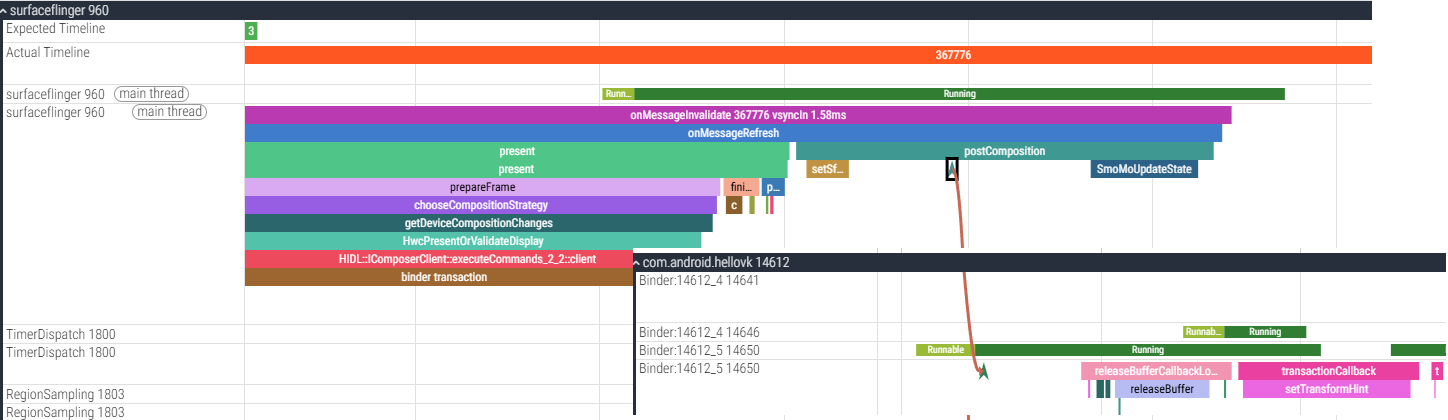
android vulkan 程序,当开启VK_GOOGLE_DISPLAY_TIMING_EXTENSION_NAME 功能, 跑在android12 上, swapchain 用的是三缓冲,所有当sufaceflinger 一个vsync 来的时候, 图像缓冲中有app已经渲染好的两个的的图像, 同一个vsync 中会释放两个buffer(如上图), 一个是两图像中的前一个, 一个是上一帧显示完成的。
frameIndex ++;
//设置id,和desiredPresentTime
VkPresentTimeGOOGLE times = {
.presentID = frameIndex,
.desiredPresentTime = os_realtime_get_ns()+10000000,
};
VkPresentTimesInfoGOOGLE timings = {
.sType = VK_STRUCTURE_TYPE_PRESENT_TIMES_INFO_GOOGLE,
.swapchainCount = 1,
.pTimes = ×,
};
VkPresentInfoKHR presentInfo{};
presentInfo.sType = VK_STRUCTURE_TYPE_PRESENT_INFO_KHR;
presentInfo.waitSemaphoreCount = 1;
presentInfo.pWaitSemaphores = signalSemaphores;
VkSwapchainKHR swapChains[] = {swapChain};
presentInfo.swapchainCount = 1;
presentInfo.pSwapchains = swapChains;
presentInfo.pImageIndices = &imageIndex;
presentInfo.pResults = nullptr;
presentInfo.pNext = &timings;
result = vkQueuePresentKHR(presentQueue, &presentInfo);
if (result == VK_SUBOPTIMAL_KHR) {
orientationChanged = true;
} else if (result == VK_ERROR_OUT_OF_DATE_KHR) {
recreateSwapChain();
} else {
assert(result == VK_SUCCESS); // failed to present swap chain image!
}
currentFrame = (currentFrame + 1) % MAX_FRAMES_IN_FLIGHT;
//获取vkGetPastPresentationTimingGOOGLE
VkPastPresentationTimingGOOGLE tims[3];
uint32_t count = 0;
vkGetPastPresentationTimingGOOGLE( //
device, //
swapChain, //
&count, //
nullptr); //
LOGI("bacal_log vkGetPastPresentationTimingGOOGLE count=%d",count);
if(count > 0) {
VkPastPresentationTimingGOOGLE tims[3];
vkGetPastPresentationTimingGOOGLE( //
device, //
swapChain, //
&count, //
tims); //
for (int i = 0; i < count; i++) {
LOGI("image presentID=%d, desiredPresentTime=%lld, actualPresentTime=%lld, diffPresentTime=%lld", tims[i].presentID, tims[i].desiredPresentTime, tims[i].actualPresentTime, ((tims[i].earliestPresentTime-tims[i].desiredPresentTime)/1000000));
}
}Vsync 来的时候, SF 遍历可以用来合成显示的buffer, 两个buffer都满足(transactionIsReadyToBeApplied),
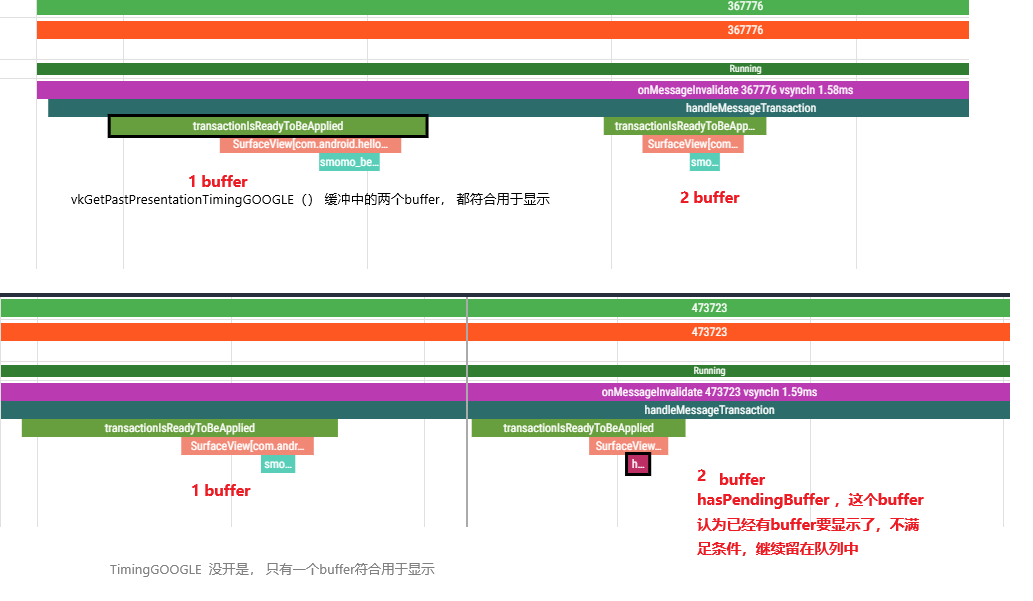
有没有开TimingGOOGLE,影响到surfaceFlinger 显示buffer的策略(isAutoTimestamp 值不一样):
cpp
bool SurfaceFlinger::transactionIsReadyToBeApplied(
        const FrameTimelineInfo& info, bool isAutoTimestamp, int64_t desiredPresentTime,
        uid_t originUid, const Vector<ComposerState>& states,
        const std::unordered_set<sp<IBinder>, ISurfaceComposer::SpHash<IBinder>>&
                bufferLayersReadyToPresent) const {
    ATRACE_CALL();
    const nsecs_t expectedPresentTime = mExpectedPresentTime.load();

    ......
    for (const ComposerState& state : states) {
        const layer_state_t& s = state.state;
        const bool acquireFenceChanged = (s.what & layer_state_t::eAcquireFenceChanged);
        if (acquireFenceChanged && s.acquireFence && !enableLatchUnsignaled &&
            s.acquireFence->getStatus() == Fence::Status::Unsignaled) {
            ATRACE_NAME("fence unsignaled");
            return false;
        }

        sp<Layer> layer = nullptr;
        if (s.surface) {
            layer = fromHandle(s.surface).promote();
        } else if (s.hasBufferChanges()) {
            ALOGW("Transaction with buffer, but no Layer?");
            continue;
        }
        if (!layer) {
            continue;
        }

        ATRACE_NAME(layer->getName().c_str());

        if (s.hasBufferChanges()) {
            //layer 中已经有buffer等待用于合成显示了
            //isAutoTimestamp = true, TimingGOOGLE 没有开,
            //isAutoTimestamp = false, TimingGOOGLE 打开了
            //TimingGOOGLE开了后,第二哥buffer和会认为符合用于显示
            const bool hasPendingBuffer =
                    bufferLayersReadyToPresent.find(s.surface) != bufferLayersReadyToPresent.end();
            if (layer->backpressureEnabled() && hasPendingBuffer && isAutoTimestamp) {
                ATRACE_NAME("hasPendingBuffer");
                return false;
            }
        }
    }
    return true;
TimingGOOGLE 功能是如何改变isAutoTimestamp 的值的?
cpp
//swapchain.cpp  (vulkan framework)
VkResult QueuePresentKHR(VkQueue queue, const VkPresentInfoKHR* present_info){

    //present_info 中带有VkPresentTimesInfoGOOGLE 信息

    const VkPresentTimesInfoGOOGLE* present_times = nullptr;

     present_times =
                    reinterpret_cast<const VkPresentTimesInfoGOOGLE*>(next);

     const VkPresentTimeGOOGLE* times =
        (present_times) ? present_times->pTimes : nullptr;

     if (time) {

                        native_window_set_buffers_timestamp(
                            window,
                            static_cast<int64_t>(time->desiredPresentTime));

     }

}


static inline int native_window_set_buffers_timestamp(
        struct ANativeWindow* window,
        int64_t timestamp)
{
    return window->perform(window, NATIVE_WINDOW_SET_BUFFERS_TIMESTAMP,
            timestamp);
}

//Surface.cpp
//最终这个时间设置到了Surface中
int Surface::setBuffersTimestamp(int64_t timestamp)
{
    ALOGV("Surface::setBuffersTimestamp");
    Mutex::Autolock lock(mMutex);
    mTimestamp = timestamp;
    return NO_ERROR;
}

//buffer 加到缓冲区的时候, 会用到这个时间去改变isAutoTimestamp 的值
int Surface::queueBuffer(android_native_buffer_t* buffer, int fenceFd) {

    getQueueBufferInputLocked(buffer, fenceFd, mTimestamp, &input);
}


void Surface::getQueueBufferInputLocked(android_native_buffer_t* buffer, int fenceFd,
        nsecs_t timestamp, IGraphicBufferProducer::QueueBufferInput* out) {
    bool isAutoTimestamp = false;  //默认是false

    //如果app有设置时间,就是vulkan中设置的desiredPresentTime
    if (timestamp == NATIVE_WINDOW_TIMESTAMP_AUTO) {
        timestamp = systemTime(SYSTEM_TIME_MONOTONIC);
        isAutoTimestamp = true;  //被修改为true了
        ALOGV("Surface::queueBuffer making up timestamp: %.2f ms",
            timestamp / 1000000.0);
    }

    // Make sure the crop rectangle is entirely inside the buffer.
    Rect crop(Rect::EMPTY_RECT);
    mCrop.intersect(Rect(buffer->width, buffer->height), &crop);

    sp<Fence> fence(fenceFd >= 0 ? new Fence(fenceFd) : Fence::NO_FENCE);
    //isAutoTimestamp  值被传到了GraphicBuffer中, 后续的SF就会用到这个值

    IGraphicBufferProducer::QueueBufferInput input(timestamp, isAutoTimestamp,
            static_cast<android_dataspace>(mDataSpace), crop, mScalingMode,
            mTransform ^ mStickyTransform, fence, mStickyTransform,
            mEnableFrameTimestamps);
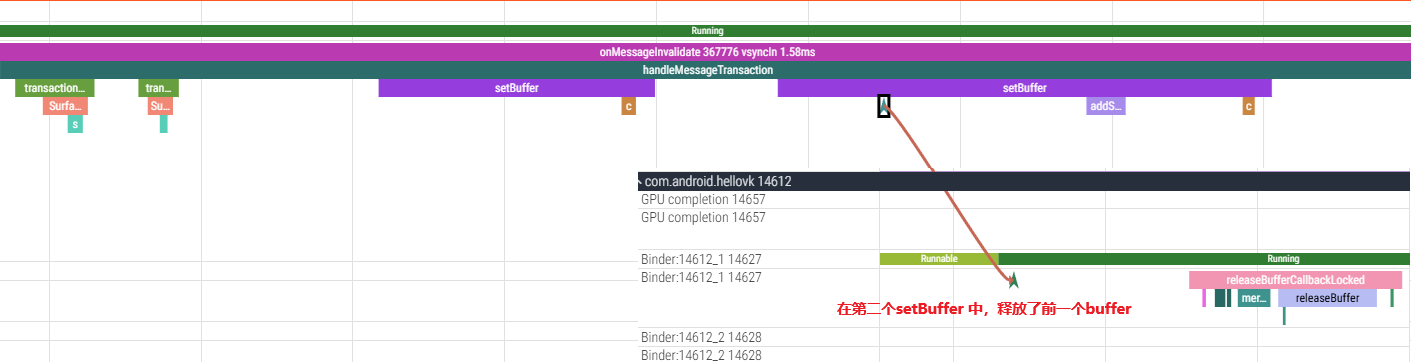
这里是SF 判断了两个buffer 都符合条件可以用于合成,(但是显然,同一帧没有必要合成同一个窗口的两个buffer, 肯定需要丢掉一个)
所有在后面提交buffer的时候,释放了第一个buffer(在第二个setBuffer 中,释放了前一个buffer)
cpp
//SurfaceFlinger.cpp

void SurfaceFlinger::flushTransactionQueues() {

     // Now apply all transactions.
        for (const auto& transaction : transactions) {
            applyTransactionState(transaction.frameTimelineInfo, transaction.states,
                                  transaction.displays, transaction.flags,
                                  transaction.inputWindowCommands, transaction.desiredPresentTime,
                                  transaction.isAutoTimestamp, transaction.buffer,
                                  transaction.postTime, transaction.permissions,
                                  transaction.hasListenerCallbacks, transaction.listenerCallbacks,
                                  transaction.originPid, transaction.originUid, transaction.id);
            if (transaction.transactionCommittedSignal) {
                mTransactionCommittedSignals.emplace_back(
                        std::move(transaction.transactionCommittedSignal));
            }
        }
    }
}

applyTransactionState();
setClientStateLocked();

bool BufferStateLayer::setBuffer


    if (mDrawingState.buffer) {
        mReleasePreviousBuffer = true;
        if (mDrawingState.buffer != mBufferInfo.mBuffer ||
            mDrawingState.frameNumber != mBufferInfo.mFrameNumber) {
            // If mDrawingState has a buffer, and we are about to update again
            // before swapping to drawing state, then the first buffer will be
            // dropped and we should decrement the pending buffer count and
            // call any release buffer callbacks if set.
            callReleaseBufferCallback(mDrawingState.releaseBufferListener,
                                      mDrawingState.buffer->getBuffer(), mDrawingState.frameNumber,
                                      mDrawingState.acquireFence, mTransformHint,
                                      mFlinger->getMaxAcquiredBufferCountForCurrentRefreshRate(
                                              mOwnerUid));
            decrementPendingBufferCount();
            if (mDrawingState.bufferSurfaceFrameTX != nullptr &&
                mDrawingState.bufferSurfaceFrameTX->getPresentState() != PresentState::Presented) {
              addSurfaceFrameDroppedForBuffer(mDrawingState.bufferSurfaceFrameTX);
              mDrawingState.bufferSurfaceFrameTX.reset();
            }
        }
    }
第二个buffer的释放是在SF合成结束的时候(postComposition)
releasePendingBuffer 释放的不是 "当前帧(本次合成的帧)的 Buffer" ,而是该图层中 "已完成合成 / 呈现流程、不再被使用的旧 Buffer(通常是上一帧 / 更早的 Buffer)";