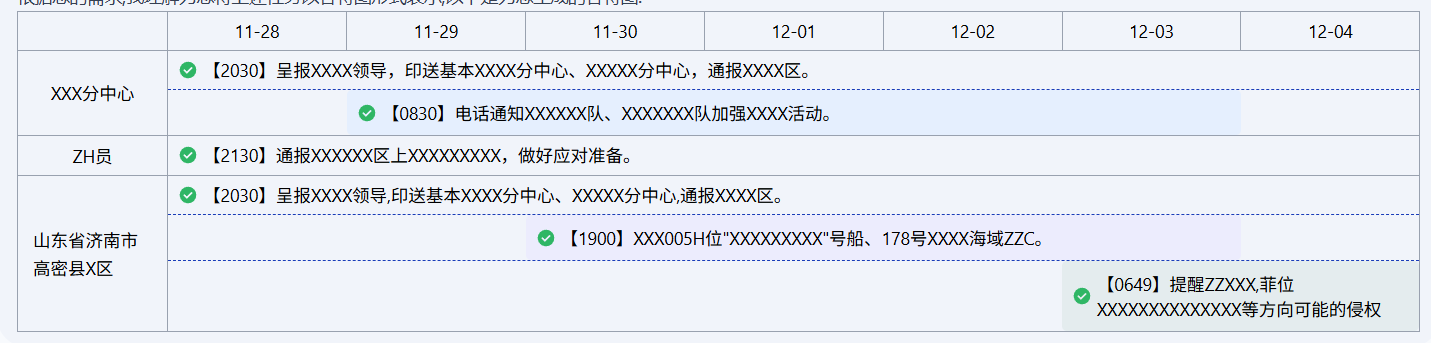
<script setup lang="ts">
defineOptions({
  name: 'GanttTable'
})

interface TaskGroup {
  id: string
  text: string
  description?: string
  task: Task[]
}

interface Task {
  id: string
  text: string
  start: string
  end: string
}

// 颜色列表
const colors = ['#e5effe', '#ececfd', '#e4ecee', '#fce7f3', '#f3e8ff', '#ecfccb', '#ffedd5', '#e0f2fe']
// 日期范围
const dateRange = ref(['11-28', '11-29', '11-30', '12-01', '12-02', '12-03', '12-04'])

/**
 * 任务列表
 */
const data = ref<TaskGroup[]>([
  {
    id: '001',
    text: 'XXX分中心',
    description: '【2030】呈报XXXX领导,印送基本XXXX分中心、XXXXX分中心,通报XXXX区。',
    task: [
      {
        id: '001-001',
        text: '【0830】电话通知XXXXXX队、XXXXXXX队加强XXXX活动。',
        start: '11-29',
        end: '12-03'
      }
    ]
  },
  {
    id: '002',
    text: 'ZH员',
    description: '【2130】通报XXXXXX区上XXXXXXXXX,做好应对准备。',
    task: []
  },
  {
    id: '003',
    text: '山东省济南市高密县X区',
    description: '【2030】呈报XXXX领导,印送基本XXXX分中心、XXXXX分中心,通报XXXX区。',
    task: [
      {
        id: '003-001',
        text: '【1900】XXX005H位"XXXXXXXXX"号船、178号XXXX海域ZZC。',
        start: '11-30',
        end: '12-03'
      },
      {
        id: '003-002',
        text: '【0649】提醒ZZXXX,菲位XXXXXXXXXXXXXX等方向可能的侵权',
        start: '12-03',
        end: '12-04'
      }
    ]
  }
])

/**
 * 计算 task 的样式(宽度和左边距)
 * @param start 开始日期,如 '11-28'
 * @param end 结束日期,如 '12-04'
 * @returns { marginLeft: string, width: string }
 */
const getTaskStyle = (start: string, end: string) => {
  const totalCols = dateRange.value.length
  const startIndex = dateRange.value.indexOf(start)
  const endIndex = dateRange.value.indexOf(end)

  // 如果找不到日期,返回默认样式
  if (startIndex === -1 || endIndex === -1) {
    return {
      marginLeft: '0%',
      width: '100%'
    }
  }

  // 计算跨越的列数(包含起始和结束日期)
  const spanCols = endIndex - startIndex + 1

  // 计算百分比
  const marginLeftPercent = (startIndex / totalCols) * 100
  const widthPercent = (spanCols / totalCols) * 100

  return {
    marginLeft: `${marginLeftPercent}%`,
    width: `${widthPercent}%`
  }
}

// 全局计数器
let taskColorIndex = 0

// 缓存 task id 和颜色的映射
const taskColorMap = new Map<string, number>()

const getTaskColor = (taskId: string): string => {
  if (!taskColorMap.has(taskId)) {
    taskColorMap.set(taskId, taskColorIndex)
    taskColorIndex++
  }
  const index = taskColorMap.get(taskId)!
  return colors[index % colors.length] // 循环使用颜色
}
</script>

<template>
  <div class="box-border w-full">
    <div>
      <!-- 表头 -->
      <div class="flex h-8 divide-x divide-gray-400 border border-gray-400">
        <div class="w-30 shrink-0"></div>
        <div v-for="d1 in dateRange" :key="d1" class="flex flex-1 items-center justify-center">{{ d1 }}</div>
      </div>

      <!-- 数据行 -->
      <div v-for="d2 in data" :key="d2.id" class="flex min-h-8 divide-x divide-gray-400 border border-t-0 border-gray-400">
        <!-- 左侧标题列 -->
        <div class="flex w-30 shrink-0 items-center justify-center px-3">{{ d2.text }}</div>

        <!-- 右侧内容区域 -->
        <div class="flex-1 divide-y divide-dashed divide-blue-800">
          <!-- 描述行 -->
          <div class="flex w-full items-center px-2 py-1">
            <Icon icon="material-symbols:check-circle" width="16" height="16" color="#2FB665" class="shrink-0" />
            <span class="ml-1">{{ d2.description }}</span>
          </div>

          <!-- Task 行 -->
          <div v-for="d3 in d2.task" :key="d3.id" class="relative w-full">
            <div
              class="rounded bg-[#E5EFFE] p-2"
              :style="{
                marginLeft: getTaskStyle(d3.start, d3.end).marginLeft,
                width: getTaskStyle(d3.start, d3.end).width,
                backgroundColor: getTaskColor(d3.id)
              }"
            >
              <div class="flex items-center">
                <Icon icon="material-symbols:check-circle" width="16" height="16" color="#2FB665" class="shrink-0" />
                <span class="ml-1 text-sm">{{ d3.text }}</span>
              </div>
            </div>
          </div>
        </div>
      </div>
    </div>
  </div>
</template>