目录
[2.1 list的初始化与销毁](#2.1 list的初始化与销毁)
[2.2 list的迭代器](#2.2 list的迭代器)
[2.3 list的容量操作](#2.3 list的容量操作)
[2.4 list的访问操作](#2.4 list的访问操作)
[2.5 list的修改操作](#2.5 list的修改操作)
[2.6 list的其他操作](#2.6 list的其他操作)
1、forward_list与list
forward_list 是 C++11 引入的一种容器,它是一种带有头节点的单向链表。使用时需要包含头文件 #include<forward_list>,其特点为:
- 内存使用高效,因为只维护单向的链接。
- 擅长在头部进行插入和删除操作,时间复杂度为 O(1)。

#下面是 forward_list 用法的简单示例:
cpp
#include <iostream>
using namespace std;
#include <forward_list>
int main()
{
    forward_list<int> fl = {1, 2, 3};
    // 在头部插入元素
    fl.push_front(0);

    // 遍历并输出
    for (int num : fl)
    {
        cout << num << " ";
    }
    cout << endl;

    return 0;
}
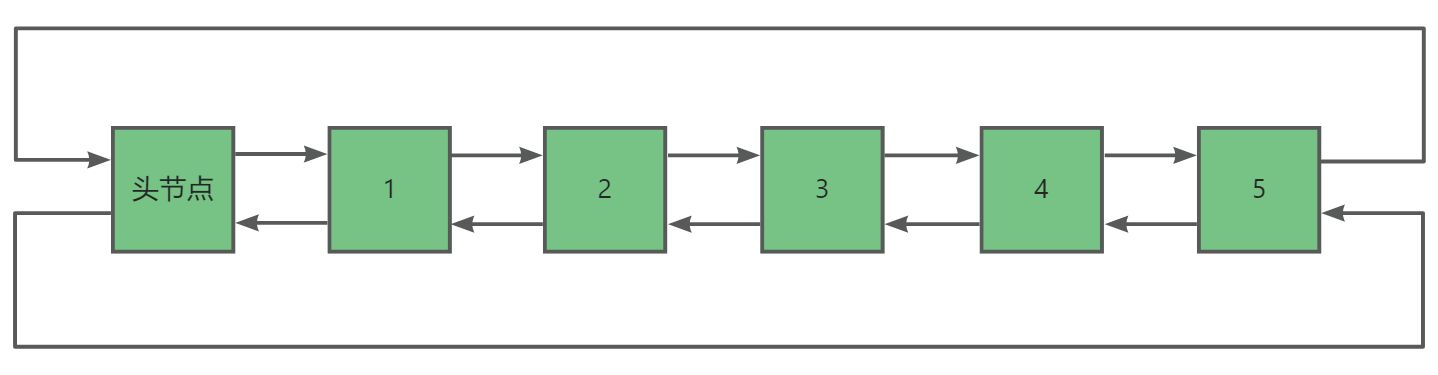
list 是 C++ 标准库中基于带头双向循环链表实现的容器。使用时需要包含头文件 #include<list>,其特点为:
- 动态大小:可以根据需要自动增长或收缩。
- 高效的插入和删除操作:在任何位置进行插入和删除操作的时间复杂度都是近似 O(1)。
- 双向遍历:支持双向迭代器,可以从前往后和从后往前遍历。
下面是 list 用法的简单示例:
cpp
#include <iostream>
#include <list>
using namespace std;
int main()
{
    list<int> myList = {10, 20, 30, 40, 50};
    // 在头部插入元素
    myList.push_front(5);
    // 在尾部插入元素
    myList.push_back(60);
    // 遍历并输出
    for (int num : myList) {
        cout << num << " ";
    }
    cout << endl;

    // 删除指定元素
    myList.remove(30);

    // 再次遍历输出
    for (int num : myList) {
        cout << num << " ";
    }
    cout << endl;
    return 0;
}
forward_list 和 list 都是用于存储序列的数据结构,但有一些明显的区别。
- 结构:forward_list 是单向链表,list 是双向链表。
- 迭代器:forward_list 只提供前向迭代器,而 list 提供双向迭代器,使用更灵活。
- 内存占用:一般情况下,forward_list 比 list 内存占用更少。
在实际应用中,如果只需要前向遍历且对内存使用要求较高,优先选择 forward_list ;如果需要双向遍历和更灵活的操作,list 则更合适。
因为forward_list 日常中并不常用,所以这里就不在详细介绍,如果有需求可以直接去查官方文档即可。下面就让我们来介绍一下 list 的一些基本用法。
2、list的接口
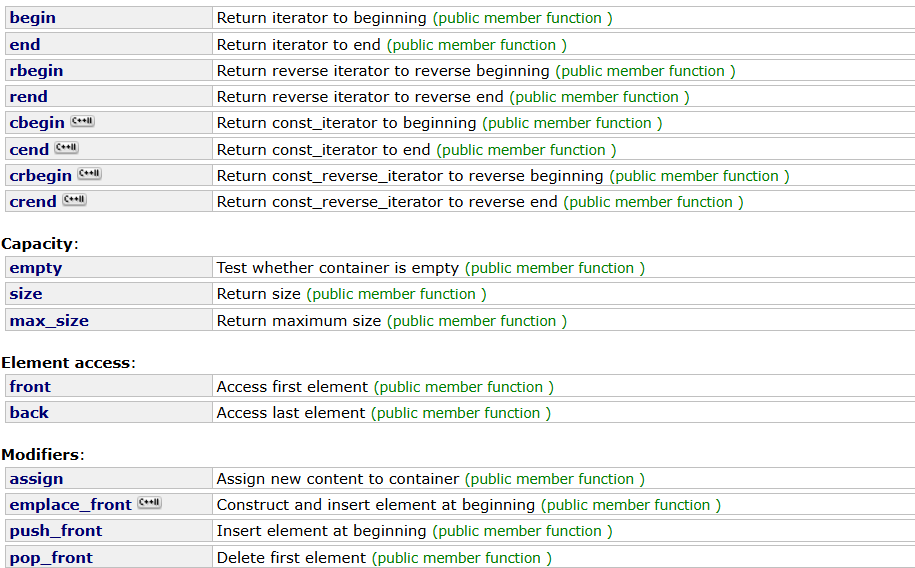
# list 的接口也有很多,我们学习时也需要借助相关的文档 ------ list的用法。
2.1 list的初始化与销毁
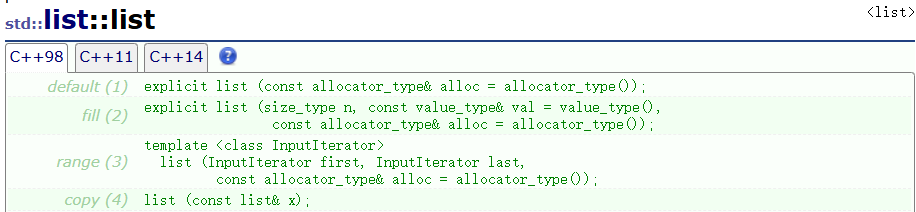
因为 list 是一个类,所以我们在初始化时肯定调用其构造函数初始化。以下就是我们常见初始化的接口:

下面是具体的代码示例:
cpp
void Test3()
{
    // 默认构造函数
    list<int> numbers1;
    cout << "默认构造: ";
    for (const auto& num : numbers1) {
        cout << num << " ";
    }
    cout << endl;
    // n个val构造
    list<int> numbers2(5, 10);
    cout << "n个val构造: ";
    for (const auto& num : numbers2) {
        cout << num << " ";
    }
    cout << endl;

    int arr[] = {1, 2, 3};
    // 通过vector的迭代器初始化
    list<int> numbers3(arr, arr + sizeof(arr) / sizeof(arr[0]));
    cout << "迭代器区间构造: ";
    for (const auto& num : numbers3) {
        cout << num << " ";
    }
    cout << endl;

    list<int> numbers4 = {4, 5, 6};
    // 拷贝构造
    list<int> numbers5(numbers4);
    cout << "拷贝构造: ";
    for (const auto& num : numbers5) {
        cout << num << " ";
    }
    cout << endl;

    numbers1 = numbers2;
    // 赋值重载
    cout << "赋值重载: ";
    for (const auto& num : numbers1) {
        cout << num << " ";
    }
    cout << endl;
}
而由于 list 是一个类,出了作用域会自动调用它的析构函数,所以不用显示调用。
2.2 list的迭代器
list 迭代器的 begin() 和 end() 的使用方法具体如下:
- 函数声明
iterator begin();const_iterator begin() const;
- 作用:返回指向列表第一个元素的迭代器。
- 返回值:普通对象返回 iterator 迭代器,const 对象返回 const_iterator 迭代器。
- 函数声明:
iterator end();const_iterator end() const;
- 作用:返回指向列表最后一个元素下一个位置(头节点)的迭代器。
- 返回值:普通对象返回 iterator 迭代器,const 对象返回 const_iterator 迭代器。
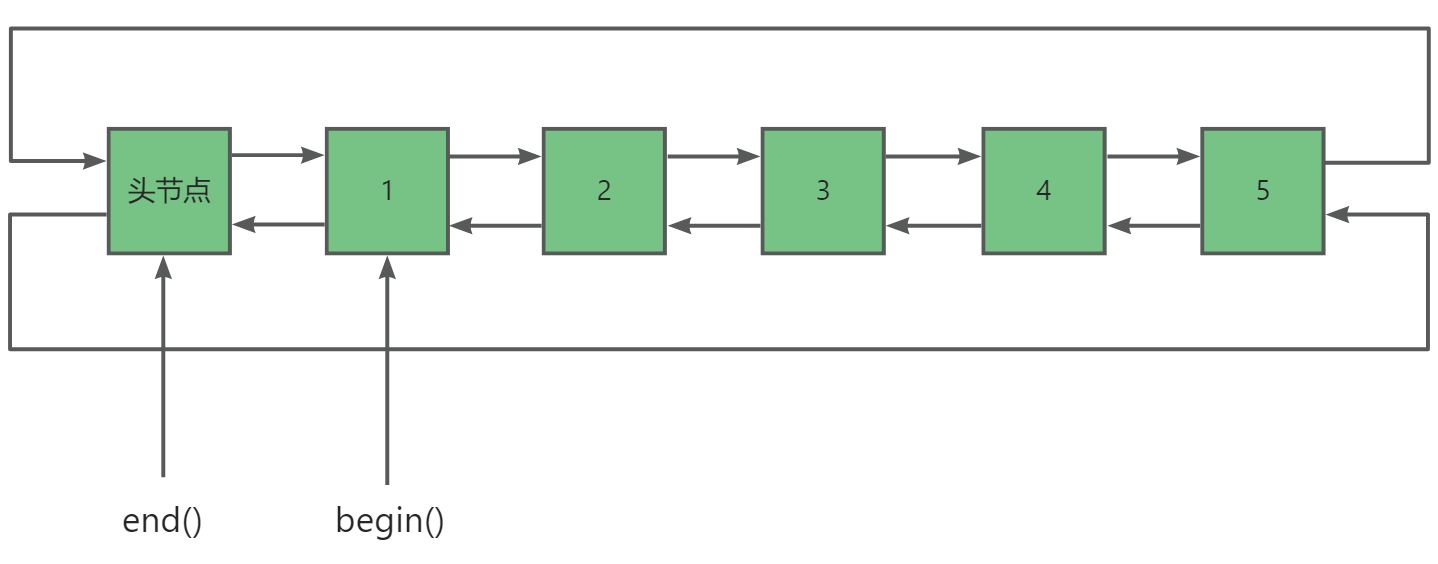
示例:
cpp
void Test1()
{
	list<int> numbers = { 1, 2, 3, 4, 5 };
	list<int>::iterator it = numbers.begin();
	cout << "First element: " << *it << endl;
	while (it != numbers.end())
	{
		cout << *it <<" ";
		++it;
	}
	// 注意:这里不能直接解引用it,因为此时它指向的是头节点
	cout << endl;
}
list 迭代器的 rbegin() 和 rend() 的使用方法具体如下:
- 函数声明:
- reverse_iterator rbegin();
- const_reverse_iterator rbegin() const;
- 作用:返回指向列表最后一个元素的反向迭代器。
- 返回值:普通对象返回 reverse_iterator 迭代器,const 对象返回 const_reverse_iterator 迭代器。
- 函数声明:
- reverse_iterator rend();
- const_reverse_iterator rend() const;
- 作用:返回指向列表第一个元素前一个位置(头节点)的反向迭代器。
- 返回值:普通对象返回 reverse_iterator 迭代器,const 对象返回 const_reverse_iterator 迭代器。
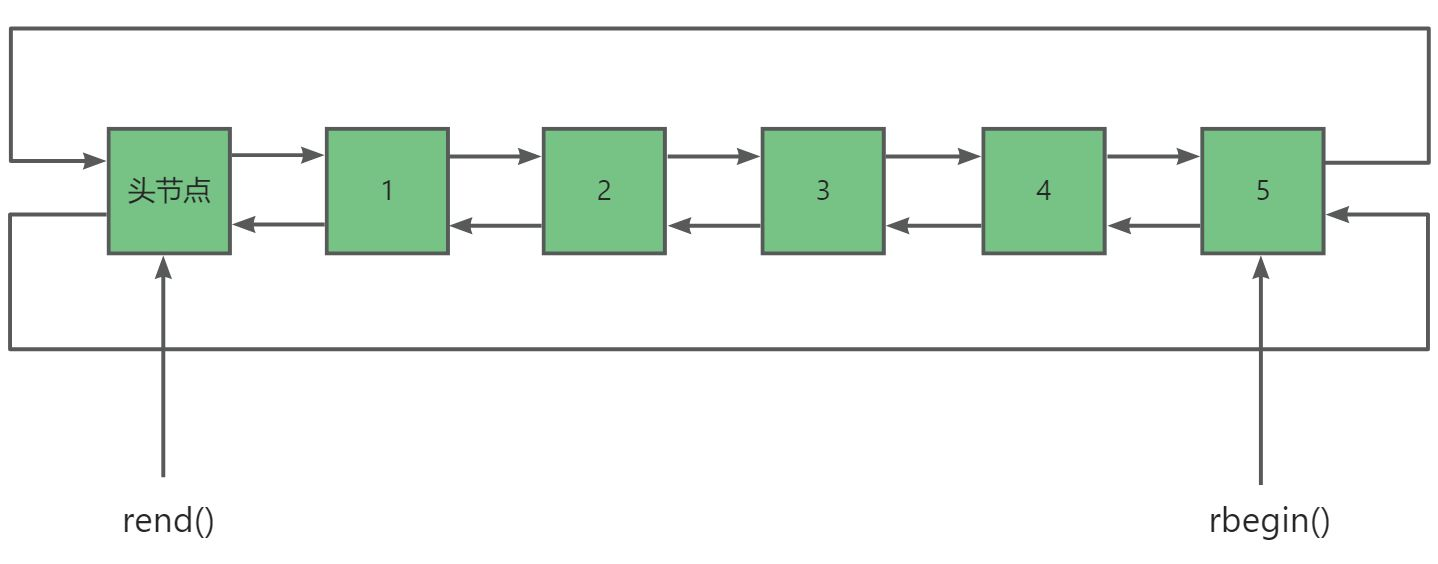
示例:
cpp
void Test2()
{
    list<int> numbers = {1, 2, 3, 4, 5};
    list<int>::reverse_iterator rit = numbers.rbegin();
    cout << "Last element: " << *rit << endl;
    while (rit!= numbers.rend())
    {
        cout << *rit << " ";
        ++rit;
    }
    cout << endl;
}
2.3 list的容量操作
接下来我们将学习关于 list 类常见的容量操作:
| 函数名称 | 功能 |
|---|---|
| size | 返回列表中元素的数量 |
| max_size | 返回列表可容纳的最大元素数量 |
| empty | 检查列表是否为空,是则返回 true,否则返回 false |
| resize | 重新设置列表中元素的数量,超过原来数量则用默认值填充 |
| clear | 清空列表中的所有元素 |
size 用于获取列表中当前元素的数量。max_size 返回列表能够容纳的最大元素数量。
cpp
void Test4()
{
    list<int> numbers = {1, 2, 3, 4, 5};
    cout << "Size of list: " << numbers.size() << endl;
    cout << "Max size of list: " << numbers.max_size() << endl;
}
empty 用于检查列表是否为空。clear 用于清空列表中的所有元素。
cpp
void Test5()
{
    list<int> numbers;
    if (numbers.empty())
    {
       cout << "List is empty" << endl;
    }
    numbers = {1, 2, 3};
    numbers.clear();
    if (numbers.empty())
    {
        cout << "List is cleared and now empty" << endl;
    }
}
resize 用于重新设置列表中元素的数量。
当使用 resize(n) 时,如果 n 大于当前列表的大小,那么会在列表末尾添加足够数量的默认值元素,使列表大小达到 n 。如果 n 小于当前列表的大小,那么会从列表末尾删除一些元素,使列表大小变为 n 。
cpp
void Test6()
{
    list<int> numbers = {1, 2, 3};
    numbers.resize(5);
    cout << "After resizing to 5: ";
    for (auto& num : numbers)
    {
        cout << num << " ";
    }
    cout << endl;

    numbers.resize(2);
    cout << "After resizing to 2: ";
    for (auto& num : numbers)
    {
        cout << num << " ";
    }
    cout << endl;
}
2.4 list的访问操作
接下来我们就来介绍 list 常见的访问函数:
| 函数名称 | 功能 |
|---|---|
| back | 返回列表最后一个元素 |
| front | 返回列表第一个元素 |
需要注意的是list 不支持 下标 + ,因为之前像 vector 这样底层连续的空间,直接用+指针下标即可索引到目标值,但是 list 空间不连续。所以需要遍历 n 次,依次移动才可以,所以时间复杂度是 O(n),虽然语法上可以实现,但是可行性上成本很高,所以 list 没有实现 operator 。
cpp
void Test7()
{
    list<int> myList = {10, 20, 30};  // 创建一个包含元素的列表

    // 输出列表的第一个元素
    cout << "The front element is: " << myList.front() << endl;

    // 输出列表的最后一个元素
    cout << "The back element is: " << myList.back() << endl;
}
2.5 list的修改操作
list 关于修改的函数的接口都比较多,一一列举比较麻烦,这里我们只重点介绍常用的接口,剩下的大家具体使用时查官方文档即可。下面是常见的关于 list 修改的函数接口:
| 函数名称 | 功能 |
|---|---|
| push_back | 在列表尾部添加元素 |
| emplace_back | 在列表尾部添加元素 |
| push_front | 在列表头部添加元素 |
| emplace_front | 在列表头部添加元素 |
| pop_back | 删除列表最后一个元素 |
| pop_front | 删除列表第一个元素 |
| insert | 在指定位置插入元素 |
| erase | 删除指定位置或区间的元素 |
| swap | 交换两个列表 |
push_back() 与 pop_back() 这两个函数就是简单的尾插与尾删。
cpp
void Test8()
{
    list<int> myList;  // 创建一个空列表

    myList.push_back(10);  // 在列表尾部添加元素 10
    myList.push_back(20);  // 在列表尾部添加元素 20

    cout << "列表元素: ";
    for (auto& num : myList) {
        cout << num << " ";
    }
    cout << endl;

    myList.pop_back();  // 删除列表尾部的元素

    cout << "删除尾部元素后列表元素: ";
    for (auto& num : myList) {
        cout << num << " ";
    }
    cout << endl;
}
push_front() 与 pop_front() 这两个函数就是简单的头插与头删。
cpp
void Test9()
{
    list<int> myList;  // 创建一个空列表
    myList.push_front(5);  // 在列表头部添加元素 5
    myList.push_front(3);  // 在列表头部添加元素 3
    cout << "列表元素: ";
    for (auto& num : myList) {
        cout << num << " ";
    }
    cout << endl;
    myList.pop_front();  // 删除列表头部的元素
    cout << "删除头部元素后列表元素: ";
    for (auto& num : myList)
    {
        cout << num << " ";
    }
    cout << endl;
}
C++11 引入的 emplace 系列函数,核心特性是就地构造元素,避免临时对象的创建和拷贝 / 移动开销,大幅提升性能。
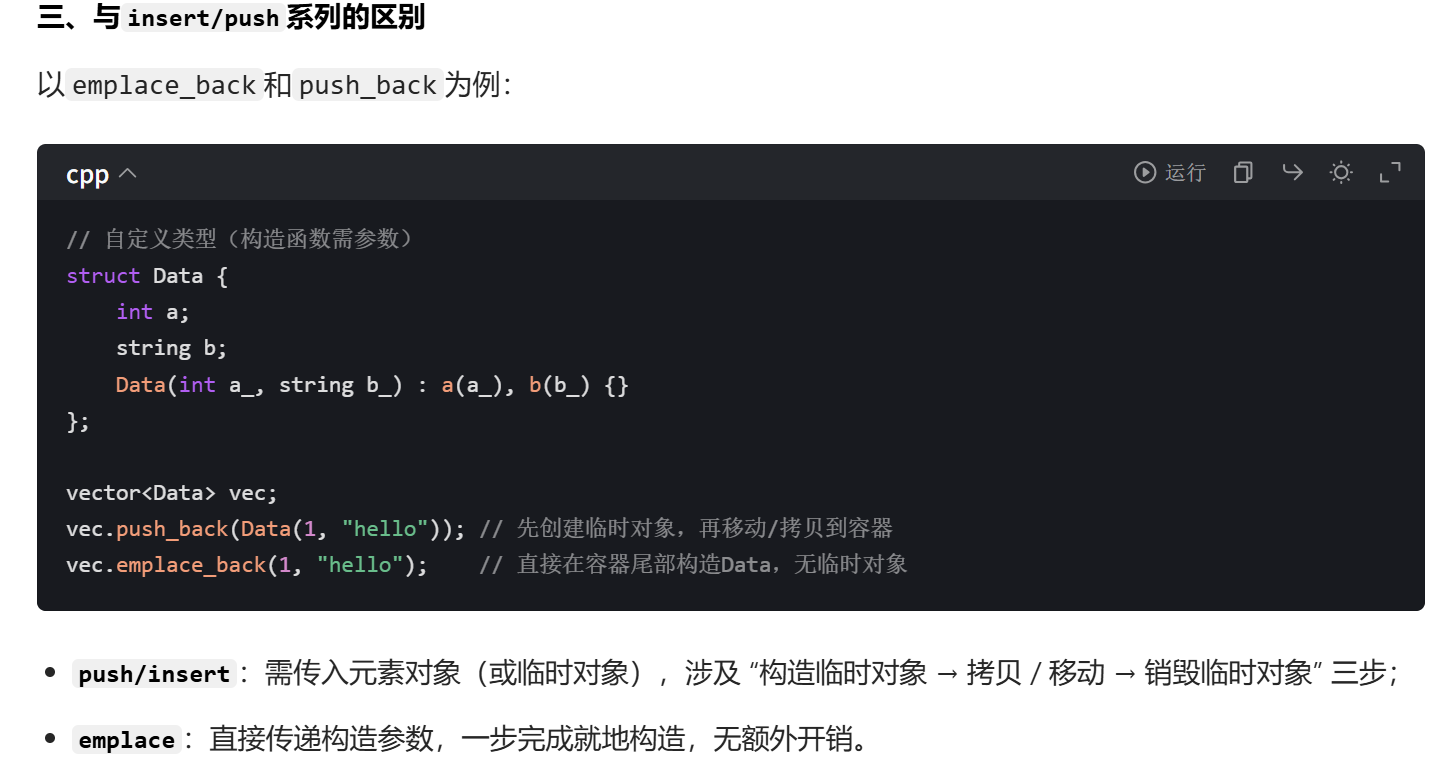
emplace 系列支持传构造自定义对象的参数。
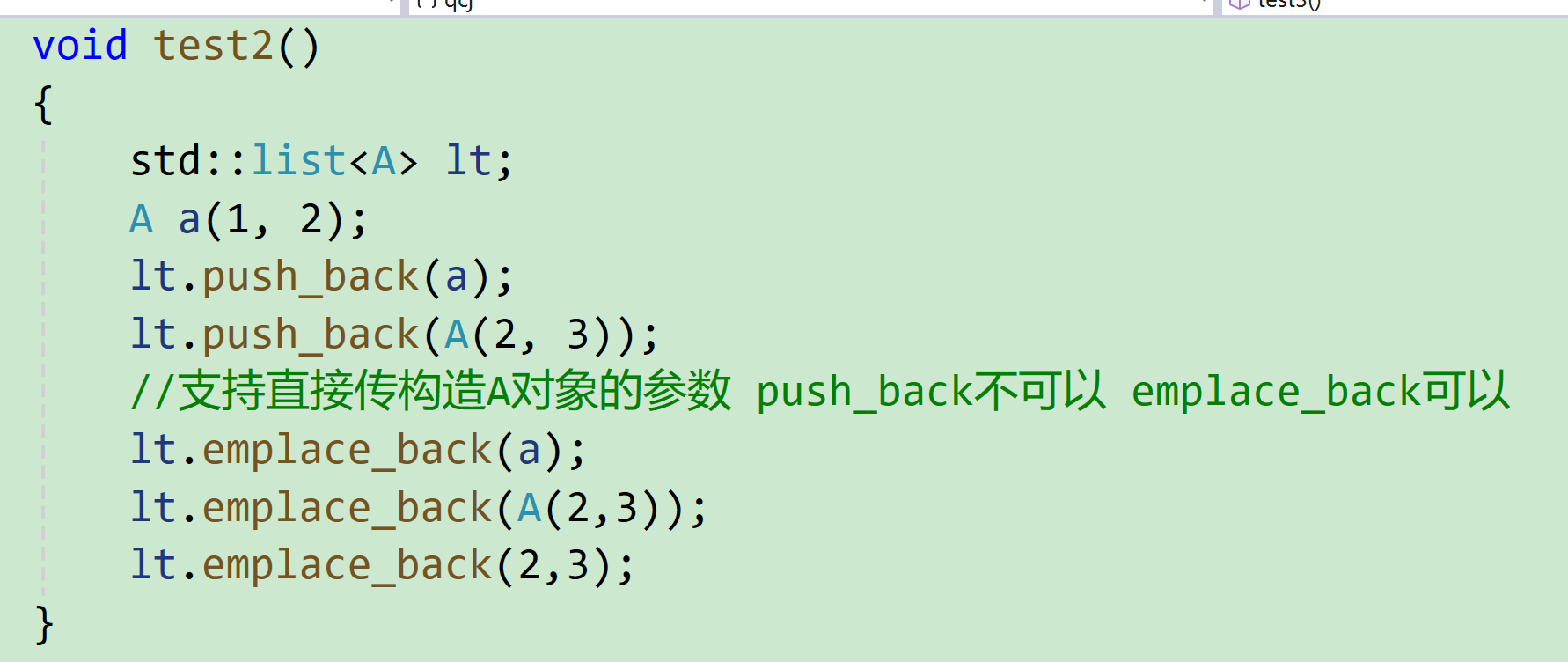
insert() 与 erase():
当在列表中进行插入操作时,如果在一个迭代器指向的位置之前或之后插入元素,那么这个迭代器就会失效。所以我们需要接受 insert 的返回值,该返回值是一个指向新插入元素的迭代器。
cpp
void Test10()
{
	list<int> myList = { 1, 2, 3 };
	list<int>::iterator it = myList.begin();
	it = myList.insert(it, 4);  // 这里迭代器 it 失效
	it = myList.insert(it, 5);  // 这里迭代器 it 失效
	for (auto& num : myList)
	{
		cout << num << " ";
	}
	cout << endl;
}
使用 erase 函数删除元素后,指向被删除元素的迭代器也会失效,同样需要接受返回值,该返回值是一个指向删除元素后一个元素的迭代器。
cpp
void Test11()
{
	list<int> myList = { 1, 2, 3, 4, 5 };
	list<int>::iterator it = myList.begin();
	it = myList.erase(it);  // 迭代器 it 失效
	it = myList.erase(it);  // 迭代器 it 失效
	for (auto& num : myList)
	{
		cout << num << " ";
	}
	cout << endl;
}
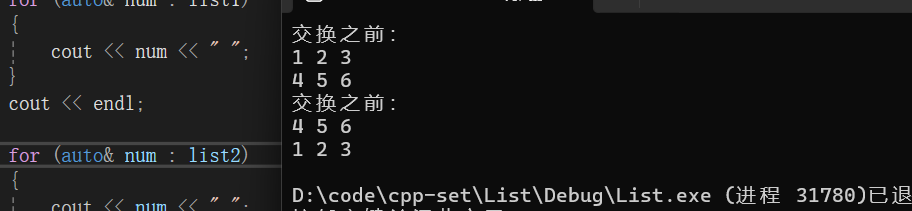
list 中 swap 交换也与之前 vector、string 中的 swap 一样只是指针交换,效率很高。
cpp
void Test12()
{
	list<int> list1 = { 1, 2, 3 };
	list<int> list2 = { 4, 5, 6 };
	cout << "交换之前:" << endl;
	for (auto& num : list1)
	{
		cout << num << " ";
	}
	cout << endl;

	for (auto& num : list2)
	{
		cout << num << " ";
	}
	cout << endl;
	list1.swap(list2);
	cout << "交换之前:" << endl;
	for (auto& num : list1)
	{
		cout << num << " ";
	}
	cout << endl;

	for (auto& num : list2)
	{
		cout << num << " ";
	}
	cout << endl;

}
2.6 list的其他操作
下面我们接受一些关于 list 常见的其他操作。
| 函数名称 | 功能描述 |
|---|---|
| splice | 将元素从一个列表转移到另一个列表 |
| remove | 移除具有特定值的元素 |
| remove_if | 移除满足条件的元素 |
| unique | 移除重复的值 |
| merge | 合并已排序的列表 |
| sort | 对容器中的元素进行排序 |
| reverse | 反转元素的顺序 |
splice() 函数主要用于在列表中进行元素的转移操作。 它可以将一个列表中的部分或全部元素转移到另一个列表中。可以指定要转移的元素范围以及目标插入位置等,实现了高效灵活的元素移动和重组。
cpp
void Test13()
{
    list<int> list1 = {1, 2, 3};
    list<int> list2 = {4, 5};

    // 将 list2 的元素转移到 list1 中
    list1.splice(list1.end(), list2);

    for (auto num : list1) {
        cout << num << " ";
    }
    cout << endl;
}
remove 函数相当于一直遍历列表,然后 erase 删除指定元素。
cpp
void Test14()
{
    list<int> myList = {1, 2, 2, 3, 2};

    // 移除值为 2 的元素
    myList.remove(2);

    for (auto num : myList) {
        cout << num << " ";
    }
    cout << endl;
}
remove_if 函数相当于 remove 的补充,它支持传参函数或者仿函数。
cpp
bool isEven(int num) {
    return num % 2 == 0;
}

void Test15() {
    list<int> myList = {1, 2, 3, 4, 5, 6};

    // 移除满足偶数条件的元素
    myList.remove_if(isEven);

    for (auto num : myList) {
        cout << num << " ";
    }
    cout << endl;
}
unique 函数主要用于移除列表中相邻的重复元素。它使得容器中只保留不重复的元素序列,但需要注意的是,它并不保证完全去除所有重复元素,只是处理相邻的重复项,通常也需要结合其他操作来实现完全去重。
cpp
void Test16()
{
    list<int> myList = {1, 2, 2, 3, 3, 3};

    // 移除相邻的重复元素
    myList.unique();
    for (auto num : myList) {
        cout << num << " ";
    }
    cout << endl;
}
merge() 函数主要用于将两个已排序的序列合并成一个新的已排序序列。 它会按照排序顺序将一个序列中的元素与另一个序列中的元素合理地组合在一起,形成一个合并后的有序序列。需要注意的是,在合并之前,两个原序列本身需要是已经排序好的。
cpp
void Test17()
{
    list<int> list1 = {1, 3, 5};
    list<int> list2 = {2, 4, 6};

    list1.sort();
    list2.sort();

    // 合并两个已排序的列表
    list1.merge(list2);

    for (auto num : list1) {
        cout << num << " ";
    }
    cout << endl;
}
list 中的 sort() 函数用于对列表进行排序。它会按照指定的排序规则(默认为升序)对列表中的元素进行重新排列,使得元素按有序的方式呈现。
需要注意的是算法库 中也有一个 sort() 函数,但是其支持的是随机迭代器 ,而 list 是一种双向迭代器 ,所以 list 无法调用算法库 中的 sort()。
cpp
void Test18() {
    list<int> myList = {3, 1, 4, 1, 5, 9, 2, 6, 5};

    // 对列表进行排序
    myList.sort();

    for (auto num : myList) {
        cout << num << " ";
    }
    cout << endl;
}
最后还有一个 reverse() 函数,这个函数在算法库中也有,也可以用于实现 list 的逆置。
cpp
void Test19()
{
	list<int> l2 = { 1,2,4,5 };
	l2.reverse();//list中的reverse
	reverse(l2.begin(), l2.end());//算法库中的reverse
	for (auto& num : l2)
	{
		cout << num << " ";
	}
}
3、迭代器分类
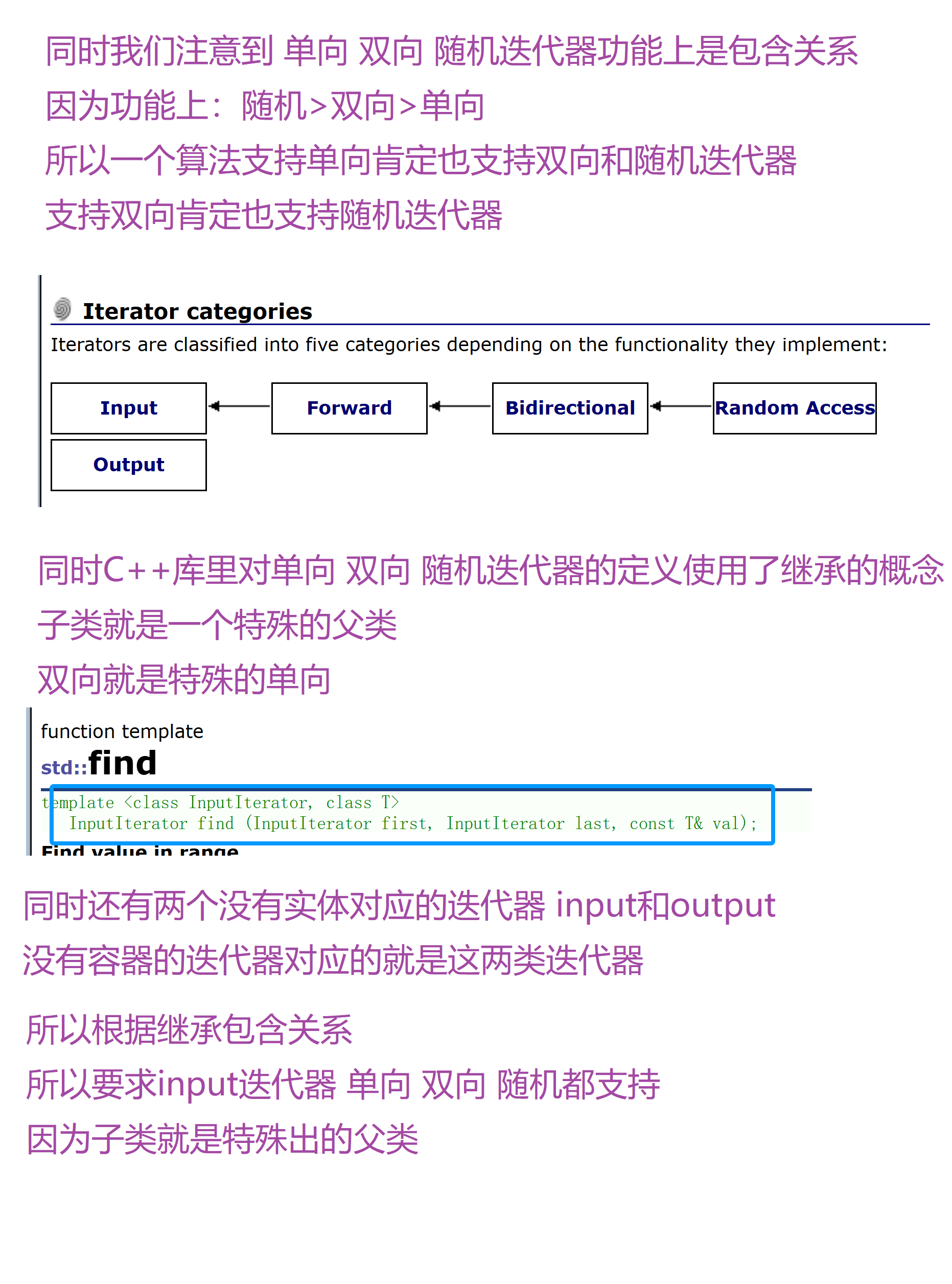
根据功能和性质可以将迭代器这样划分:
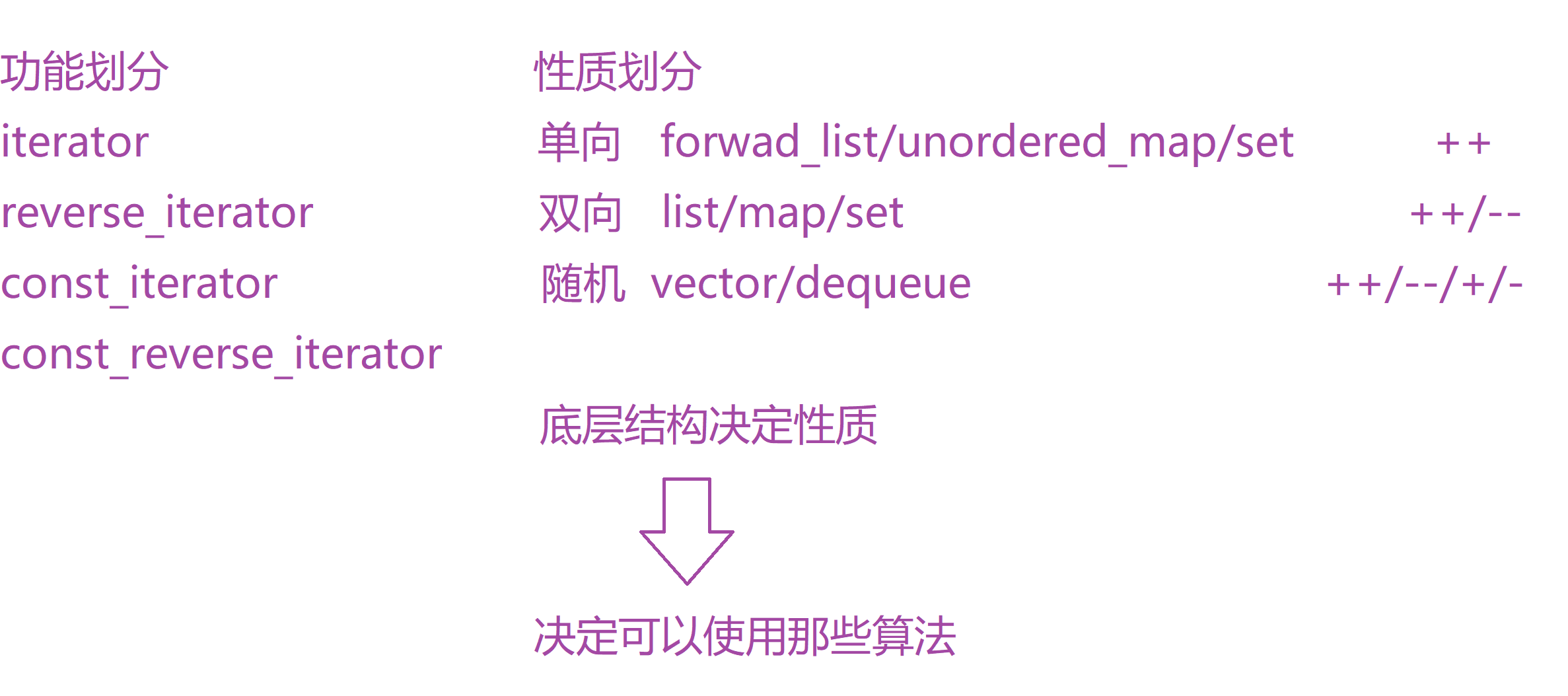
迭代器的性质决定了可以使用那些算法,例如算法库的 sort 算法就要求是随机迭代器。
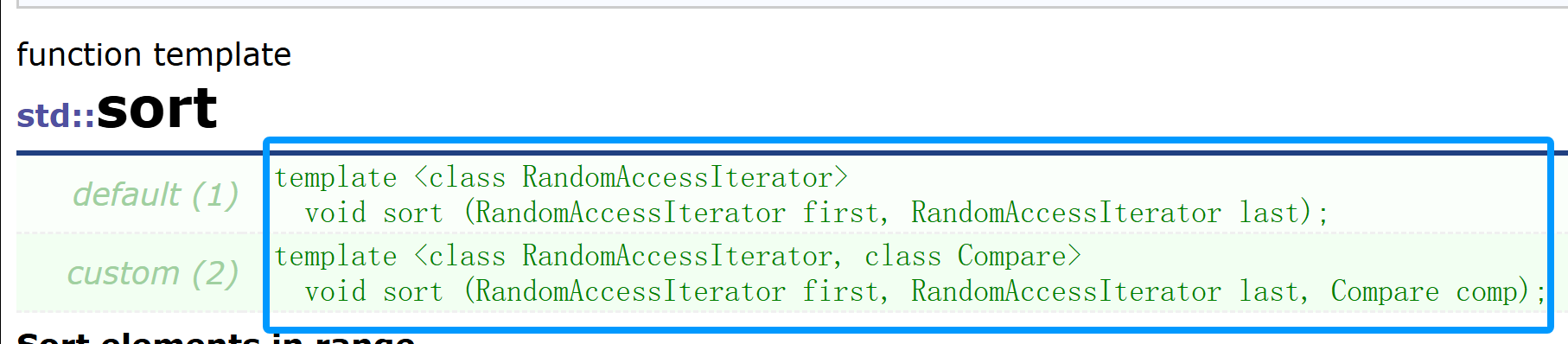
因为 sort 的底层是快排,需要支持 随机访问 和 下标 ± ,所以 list 不可以使用库的 sort,因为他不支持随机迭代器,所以 list 自己支持了一个 sort。
同时 C++ 库里对迭代器的定义使用了继承的概念,子类就是特殊的父类。