鸿蒙NEXT蓝牙连接及数据写入
uni-app x 从4.61+起支持纯血鸿蒙,即Harmony next。
将uni-app x代码编译为运行在ArkTS引擎上代码,生成鸿蒙原生应用。
开发环境要求
HBuilderX 4.61+
鸿蒙电脑端开发工具DevEco Studio BuildVersion 5.0.7.210+
鸿蒙手机系统 API版本 14+
鸿蒙的API版本类似于Android的API Level。鸿蒙的API版本在手机设置 - 关于本机 中,可找到API版本,比如5.0.2(14),这个14即是API版本。
在uni.getDeviceInfo中也可以通过属性osHarmonySDKAPIVersion获取API版本。
运行和发行注意
uni-app x编译到鸿蒙运行在ArkTS引擎上,ArkTS在鸿蒙的ide deveco中没有热刷新。每次改动代码,需要重新build包、签名、安装新包到手机。
这与uni-app不同,uni-app基于js,可以热刷新。
所以uts的运行,需要在本地安装鸿蒙deveco,本地直接编译出包。既然本地可以出包,那么鸿蒙就没有做云打包。这也是和Android和iOS的云打包的区别。
uni-app 因使用jsvm,而鸿蒙模拟器自身在某些CPU上还未适配好jsvm,导致开发者使用模拟器受限。但uni-app x在鸿蒙模拟器运行不受限制。
HBuilderX自身提供了运行、日志、debug、发行、调试证书申请等全套功能,开发者安装deveco后,可以做到不启动deveco,在HBuilderX中完成所有开发。
鸿蒙权限配置 harmony-permissions
介绍
类库实现参考 https://ext.dcloud.net.cn/plugin?id=24908
在 uniapp 的开发中,鸿蒙平台,申请权限的方式,可以在 harmony-configs 下对应位置创建 /entry/src/main/module.json5 ,通过覆盖对应文件的方式来创建。但是开发者在配置中存在各种问题,此插件为初学者提供了一个更为简单的权限配置方式
在 鸿蒙requestPermissions文档 中提到,已在子模块中申请的权限无需在主项目中重复添加,权限将在整个应用中生效。 ,而 UTS 插件在打包进入鸿蒙工程后,就是作为了一个子模块存在,因此在 UTS 插件中即可实现应用的权限配置
如何使用
由于 uts 插件摇树机制,需要在页面中引入此插件,不然会被摇掉,需要在任意页面上
// #ifdef APP-HARMONY
import "@/uni_modules/harmony-permissions"
// #endif
在鸿蒙中,权限的配置需要配置在 module.json5 中的requestPermissions 字段中
{
  "module": {
    "name": "uni_modules__harmony_permissions",
    "type": "har",
    "deviceTypes": [
      "default",
      "tablet",
      "2in1"
    ],
    "requestPermissions": [
      {
        "name": "ohos.permission.INTERNET"
      },{
        "name": "ohos.permission.APPROXIMATELY_LOCATION",
        "reason": "$string:location_desc",
        "usedScene": {"when": "inuse"}
      },{
        "name": "ohos.permission.LOCATION",
        "reason": "$string:location_desc",
        "usedScene": {"when": "inuse"}
      }
    ]
  }
}
其中:
- name 是需要使用的权限名称。
- reason是申请权限的原因。注意:不能直接使用文本,需要使用 $string:... , 此属性为定义于 string.json 中的变量
- usedScene 是权限使用的场景
其它详细内容见:鸿蒙requestPermissions文档
在本插件中,$string定义于:/harmony-permissions/utssdk/app-harmony/resources/base/element/string.json
{
    "string": [{
        "name": "permission_module",
        "value": "permission_module"
    }, {
        "name": "location_desc",
        "value": "正在申请获取您的位置信息,以便为您提供相应的服务"
    }, {
        "name": "get_networkinfo_tips",
        "value": "正在申请获取网络信息权限,以便为您提供相应的服务"
    }, {
        "name": "write_contacts",
        "value": "正在申请写入联系人权限,以便为您提供相应的服务"
    }, {
        "name": "microphone",
        "value": "正在申请使用麦克风权限,以便为您提供相应的服务"
    }, {
        "name": "access_biometric",
        "value": "正在申请访问用户认证权限,以便为您提供相应的服务"
    }, {
        "name": "read_pasteboard",
        "value": "正在申请获取剪切版权限,以便为您提供相应的服务"
    }]
}
基于上面的配置我们进行了一个修 增加蓝牙权限配置
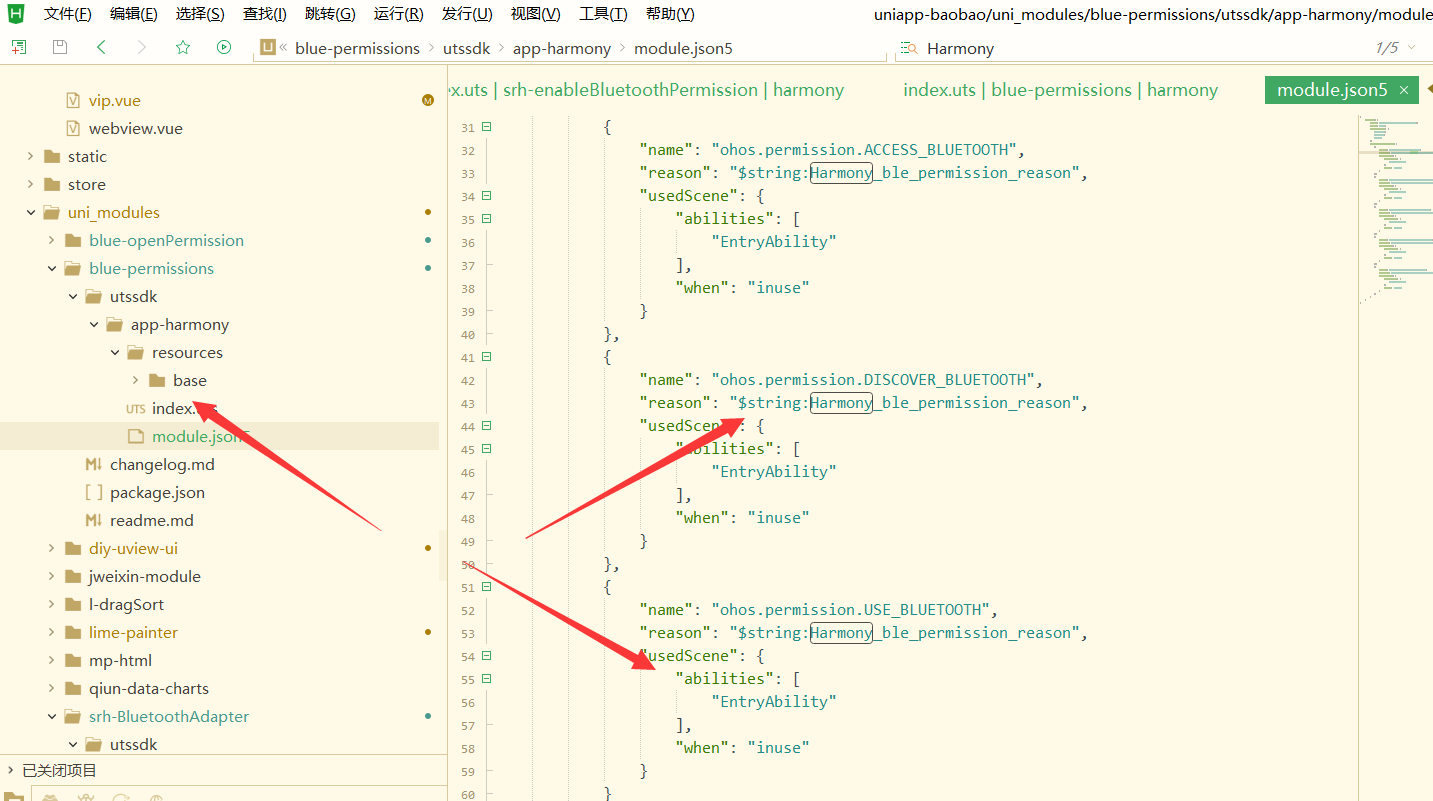
开启用户级蓝牙权限
开启蓝牙权限,鸿蒙NEXT开启蓝牙权限,鸿蒙NEXT开启照相机权限
插件库来源
https://ext.dcloud.net.cn/plugin?id=22261
import { openPermission } from '@/uni_modules/srh-openPermission';
openPermission(permissionName);

需要返回结果,请使用async await
let status = await openPermission(permissionName);
permissionName: 'ohos.permission.ACCESS_BLUETOOTH' //权限名称,不填默认为蓝牙权限
status //权限状态, -1:未授权。①dialogShownResults返回为true,表示用户首次申请;②dialogShownResults返回为false,表示权限已设置,无需弹窗,需要用户在"设置"中修改。 0:已授权。 2:未授权,表示请求无效。可能原因有:①未在设置文件中声明目标权限;②权限名非法;③部分权限存在特殊申请条件,在申请对应权限时未满足其指定的条件
import { abilityAccessCtrl,bundleManager, Context, Permissions, common,PermissionRequestResult } from '@kit.AbilityKit';
import { ble } from '@kit.ConnectivityKit';
import { AsyncCallback, BusinessError } from '@kit.BasicServicesKit';

export async function openPermission(permission:Permissions): Promise<PermissionRequestResult>  {
	const permissionName: Permissions = permission || ('ohos.permission.ACCESS_BLUETOOTH' as Permissions);
	let atManager : abilityAccessCtrl.AtManager = abilityAccessCtrl.createAtManager();
	// let context : Context = getContext() as common.UIAbilityContext;
	let context:Context = UTSHarmony.getUIAbilityContext() as common.UIAbilityContext;
	let data:PermissionRequestResult = await atManager.requestPermissionsFromUser(context, [permissionName])//ohos.permission.ACCESS_BLUETOOTH
	return data;
}


export async function checkAccessBluetooth(): Promise<abilityAccessCtrl.GrantStatus | undefined> {

	let bundleFlags = bundleManager.BundleFlag.GET_BUNDLE_INFO_WITH_METADATA |
	bundleManager.BundleFlag.GET_BUNDLE_INFO_WITH_APPLICATION |
	bundleManager.BundleFlag.GET_BUNDLE_INFO_WITH_HAP_MODULE |
	bundleManager.BundleFlag.GET_BUNDLE_INFO_WITH_ABILITY |
	bundleManager.BundleFlag.GET_BUNDLE_INFO_WITH_EXTENSION_ABILITY;

	try {

		let atManager: abilityAccessCtrl.AtManager = abilityAccessCtrl.createAtManager();

		let data = await bundleManager.getBundleInfoForSelf(bundleFlags)
		let tokenID: number = data.appInfo.accessTokenId; // 系统应用可以通过bundleManager.getApplicationInfo获取,三方应用可以通过bundleManager.getBundleInfoForSelf获取
		// let permissionName: Permissions = 'ohos.permission.ACCESS_BLUETOOTH';
		let result: abilityAccessCtrl.GrantStatus = atManager.checkAccessTokenSync(tokenID, 'ohos.permission.ACCESS_BLUETOOTH');

		return result;


	} catch (err) {

		console.error('errCode: ' + (err as BusinessError).code + ', errMessage: ' + (err as BusinessError).message);
		return -1;
	}

}
鸿蒙NEXT蓝牙连接及数据写入
插件库地址:
https://ext.dcloud.net.cn/plugin?id=21865
类似Uniapp官方API类库实现
鸿蒙中单独调用
import { createBLEConnection } from '@/uni_modules/srh-BluetoothAdapter';
createBLEConnection({
    deviceId: 'xxx',
    success: (res) => {

    },
    fail:(e) => {

    }
})
兼容uniapp写法, 新建文件index.ts
import { createBLEConnection } from '@/uni_modules/srh-BluetoothAdapter';

interface UniExtensions {
    createBLEConnection : typeof createBLEConnection;
}

const $uni : UniExtensions = {
    createBLEConnection
};
export default $uni;
另建一个main.ts文件
// #ifdef APP-HARMONY
    import $uni from './index.ts';
// #endif
// #ifdef APP-PLUS
    const $uni = uni;
// #endif
export { $uni }
页面中导入main.ts
import {$uni} from '@/main.ts';
$uni.createBLEConnection({
    deviceId: 'xxx',
    success: (res) => {

    },
    fail:(e) => {

    }
})
支持的API
openBluetoothAdapter,
closeBLEConnection,
closeBluetoothAdapter,
onBluetoothDeviceFound,
createBLEConnection,
getBLEDeviceCharacteristics,
getBLEDeviceServices,
getBluetoothDevices,
notifyBLECharacteristicValueChange,
onBLECharacteristicValueChange,
onBLEConnectionStateChange,
setBLEMTU,
startBluetoothDevicesDiscovery,
stopBluetoothDevicesDiscovery,
writeBLECharacteristicValue,
getBLEDeviceRSSI
注意: 1、插件过滤了uuid,如果需要请在config.uts自行添加 2、插件需要定位权限,请自行配置并获取授权 3、插件需要蓝牙权限,请自行配置并获取授权,获取蓝牙授权可使用srh-openPermission插件 4、权限需要在使用插件前先行获取授权
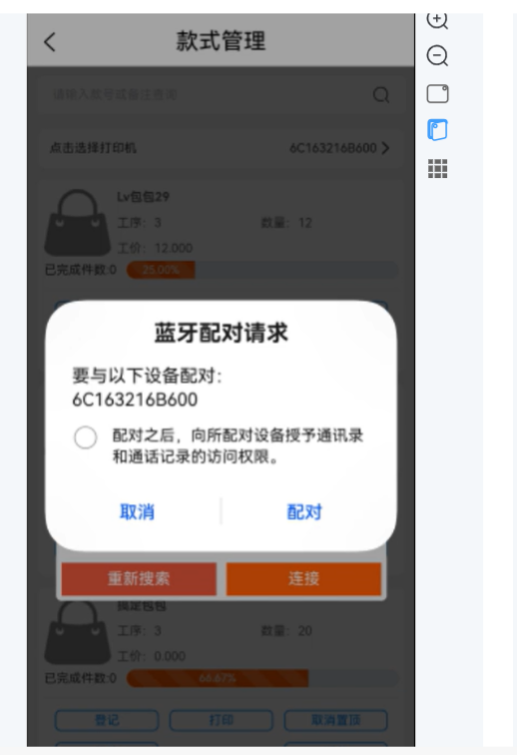
最主要感觉开源类库srh-BluetoothAdapter 作者
贴出一些调用代码供大家学习参考
import {
	BleReturnCode,
	BleReturnMessage,
	BluetoothCallbackEventOptions,
	BluetoothReturnOptions,
	BluetoothReturnCallback
} from '../../interface.uts'

import { createHSGatt } from '../global.uts'

import { ble } from '@kit.ConnectivityKit';
import { AsyncCallback, BusinessError } from '@kit.BasicServicesKit';

export function writeBLECharacteristicValue(
	options : BluetoothCallbackEventOptions<
		BluetoothReturnCallback,
		BluetoothReturnCallback,
		BluetoothReturnCallback
	>) {
	let descriptors : Array<ble.BLEDescriptor> = [];
	let bufferDesc = new ArrayBuffer(8);
	let descV = new Uint8Array(bufferDesc);
	descV[0] = 11;

	let descriptor : ble.BLEDescriptor = {
		serviceUuid: options.serviceId,
		characteristicUuid: options.characteristicId,
		descriptorUuid: '00002902-0000-1000-8000-00805F9B34FB',
		descriptorValue: bufferDesc
	};
	descriptors[0] = descriptor;

	let characteristic : ble.BLECharacteristic = {
		serviceUuid: options.serviceId,
		characteristicUuid: options.characteristicId,
		characteristicValue: options.value,
		descriptors: descriptors
	};
	let isSuccess = true;
	// console.log(JSON.stringify(options), options.value, options.value.byteLength)
	try {
		// console.log(JSON.stringify(options), options.value, options.value.byteLength)
		createHSGatt.gattClientDevice(options?.deviceId).writeCharacteristicValue(characteristic, ble.GattWriteType.WRITE_NO_RESPONSE, (code : BusinessError)=>{
			if (code != null) {
				return;
			}
			// console.info('bluetooth writeCharacteristicValue success');
			let result : BluetoothReturnOptions = {
				code: BleReturnCode.OK,
				errMsg: BleReturnMessage.OK
			};
			const completeResult : BluetoothReturnOptions = {
				code: BleReturnCode.OK,
				errMsg: BleReturnMessage.OK
			}
			options?.success?.(result);
			options?.complete?.(completeResult);
		});
	} catch (err) {
		console.error('errCode: ' + (err as BusinessError).code + ', errMessage: ' + (err as BusinessError).message);
		isSuccess = false;

		let result : BluetoothReturnOptions = {
			code: err.code,
			errMsg: err.message
		};
		const completeResult : BluetoothReturnOptions = {
			code: err.code,
			errMsg: err.message
		}
		options?.fail?.(result);
		options?.complete?.(completeResult);
	}
}