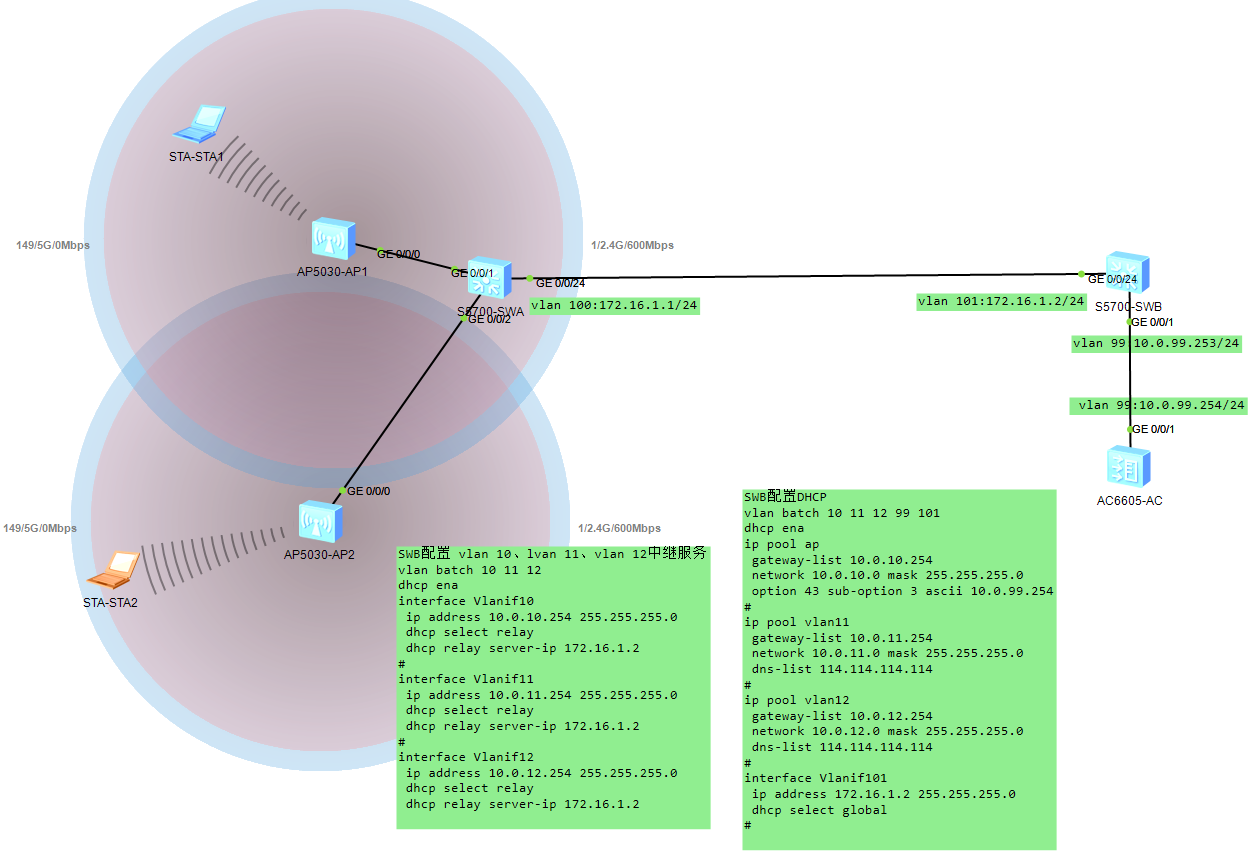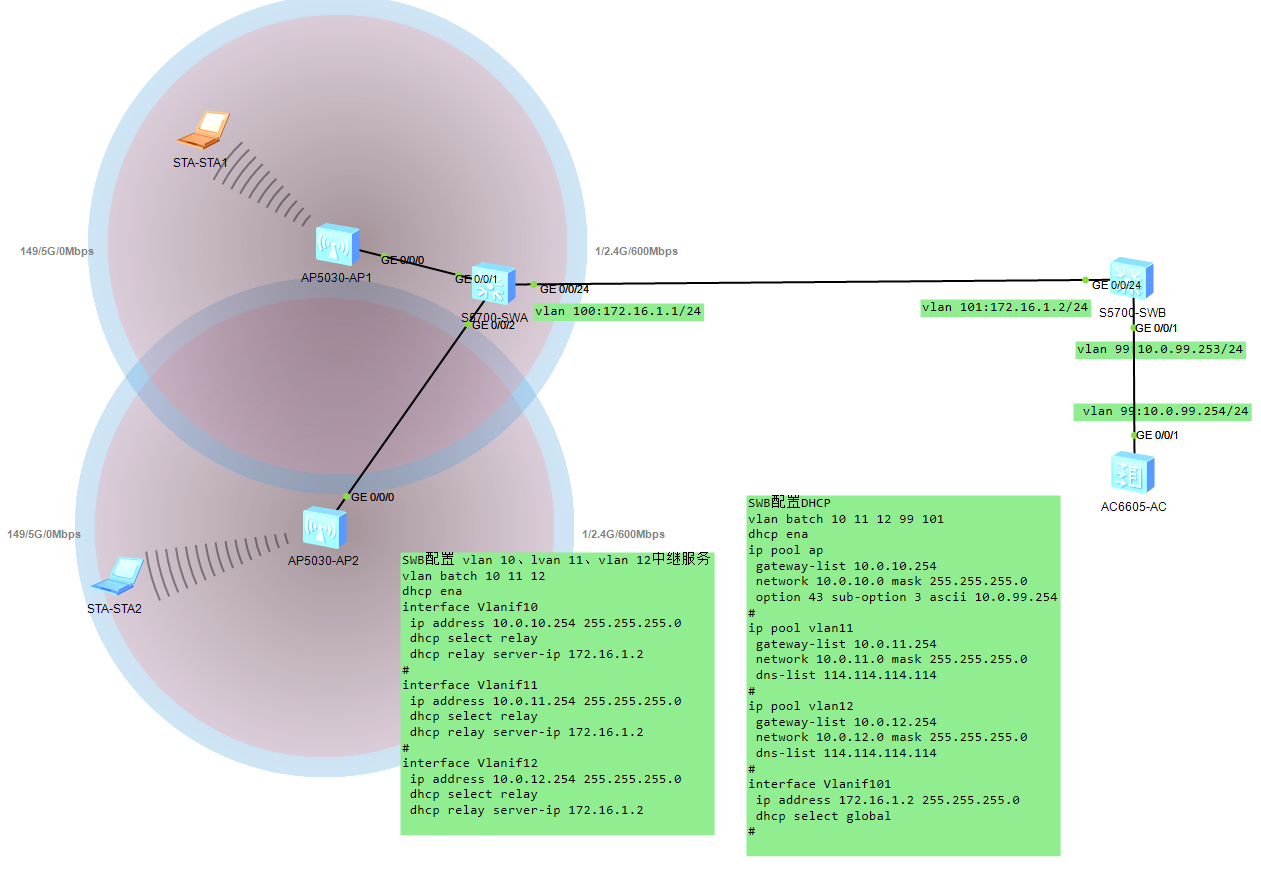
一、基础配置
SWA:
<Huawei>sys
Enter system view, return user view with Ctrl+Z.
Huaweiundo in
Huaweiundo info-center ena
Info: Information center is disabled.
Huaweisysn SWA
SWAvlan batch 10 11 12 99
Info: This operation may take a few seconds. Please wait for a moment...done.
SWAint g0/0/1
SWA-GigabitEthernet0/0/1p l t
SWA-GigabitEthernet0/0/1p t p v 10
SWA-GigabitEthernet0/0/1p t a v 10 11
SWA-GigabitEthernet0/0/1int g0/0/2
SWA-GigabitEthernet0/0/2p l t
SWA-GigabitEthernet0/0/2p t p v 10
SWA-GigabitEthernet0/0/2p t a v 10 12
SWA-GigabitEthernet0/0/2int g0/0/24
SWA-GigabitEthernet0/0/24qu
SWAvlan 100
SWA-vlan100int g0/0/24
SWA-GigabitEthernet0/0/24p l a
SWA-GigabitEthernet0/0/24p d v 100
SWA-GigabitEthernet0/0/24int vlan 100
SWA-Vlanif100ip add 172.16.1.1 24
SWA-Vlanif100qu
SWAqu
<SWA>save
SWB:
<Huawei>sys
Enter system view, return user view with Ctrl+Z.
Huaweiundo in
Huaweiundo info-center ena
Info: Information center is disabled.
Huaweisysn SWB
SWBvlan batch 10 11 12 99 101
Info: This operation may take a few seconds. Please wait for a moment...done.
SWBint vlan 99
SWB-Vlanif99ip add 10.0.99.253 24
SWB-Vlanif99int vlan 101
SWB-Vlanif101ip add 172.16.1.2 24
SWB-Vlanif101int g0/0/24
SWB-GigabitEthernet0/0/24p l a
SWB-GigabitEthernet0/0/24p d v 101
SWB-GigabitEthernet0/0/24int g0/0/1
SWB-GigabitEthernet0/0/1p l a
SWB-GigabitEthernet0/0/1p d v 99
SWB-GigabitEthernet0/0/1qu
SWBqu
<SWB>save
AC:
<AC6605>sys
Enter system view, return user view with Ctrl+Z.
AC6605undo in
AC6605undo info-center ena
Info: Information center is disabled.
AC6605sysn AC
ACvlan 99
Info: This operation may take a few seconds. Please wait for a moment...done.
AC-vlan99int vlan 99
AC-Vlanif99ip add 10.0.99.254 24
AC-Vlanif99int g0/0/1
AC-GigabitEthernet0/0/1p l a
AC-GigabitEthernet0/0/1p d v 99
AC-GigabitEthernet0/0/1qu
ACqu
<AC>save
二、SWB配置DHCP服务
SWB:
SWBip pool ap
Info:It's successful to create an IP address pool.
SWB-ip-pool-apnetwork 10.0.10.0 mask 24
SWB-ip-pool-apgateway-list 10.0.10.254
SWB-ip-pool-apoption 43 sub-option 3 ascii 10.0.99.254
SWB-ip-pool-apip pool vlan11
Info:It's successful to create an IP address pool.
SWB-ip-pool-vlan10network 10.0.11.0 mask 24
SWB-ip-pool-vlan10gateway-list 10.0.11.254
SWB-ip-pool-vlan10dns-list 114.114.114.114
SWB-ip-pool-vlan10ip pool vlan12
Info:It's successful to create an IP address pool.
SWB-ip-pool-vlan20network 10.0.12.0 mask 24
SWB-ip-pool-vlan20gateway-list 10.0.12.254
SWB-ip-pool-vlan20dns-list 114.114.114.114
SWB-ip-pool-vlan20qu
三、SWA配置vlan 10 vlan 11 vlan12 中继服务
SWA:
SWAdhcp ena
Info: The operation may take a few seconds. Please wait for a moment.done.
SWA
SWAint vlan 10
SWA-Vlanif10ip add 10.0.10.254 24
SWA-Vlanif10dhcp select relay
SWA-Vlanif10dhcp relay server-ip 172.16.1.2
SWA-Vlanif10int vlan 11
SWA-Vlanif11ip add 10.0.11.254 24
SWA-Vlanif11dhcp select relay
SWA-Vlanif11dhcp relay server-ip 172.16.1.2
SWA-Vlanif11int vlan 12
SWA-Vlanif12ip add 10.0.12.254 24
SWA-Vlanif12dhcp select relay
SWA-Vlanif12dhcp relay server-ip 172.16.1.2
SWA-Vlanif12qu
SWB:
SWBint vlan 101
SWB-Vlanif101dhcp select global
四、SWA、SWB、AC配置OSPF路由
SWA:
SWAospf 1
SWA-ospf-1ar 0
SWA-ospf-1-area-0.0.0.0netw
SWA-ospf-1-area-0.0.0.0network 10.0.10.0 0.0.0.255
SWA-ospf-1-area-0.0.0.0network 10.0.11.0 0.0.0.255
SWA-ospf-1-area-0.0.0.0network 10.0.12.0 0.0.0.255
SWA-ospf-1-area-0.0.0.0network 172.16.1.0 0.0.0.255
SWA-ospf-1-area-0.0.0.0qu
SWB:
SWBospf 1
SWB-ospf-1ar 0
SWB-ospf-1-area-0.0.0.0network 172.16.1.0 0.0.0.255
SWB-ospf-1-area-0.0.0.0network 10.0.99.0 0.0.0.255
SWB-ospf-1-area-0.0.0.0qu
SWB-ospf-1
AC:
ACospf 1
AC-ospf-1ar 0
AC-ospf-1-area-0.0.0.0network 10.0.99.0 0.0.0.255
AC-ospf-1-area-0.0.0.0qu
五、无线AC配置
<AC>sys
Enter system view, return user view with Ctrl+Z.
ACcapwap source int vlan 99
ACwlan
AC-wlan-viewap-group name ap-group1
Info: This operation may take a few seconds. Please wait for a moment.done.
AC-wlan-ap-group-ap-group1regulatory-domain-profile default
Warning: Modifying the country code will clear channel, power and antenna gain c
onfigurations of the radio and reset the AP. Continue?Y/N:y
AC-wlan-ap-group-ap-group1qu
AC-wlan-viewap auth-mode mac-auth
AC-wlan-viewap-id 0 ap-mac 00e0-fcf7-0210
AC-wlan-ap-0ap-name area_1
AC-wlan-ap-0ap-group ap-group1
Warning: This operation may cause AP reset. If the country code changes, it will
clear channel, power and antenna gain configurations of the radio, Whether to c
ontinue? Y/N:y
Info: This operation may take a few seconds. Please wait for a moment.. done.
AC-wlan-ap-0qu
AC-wlan-viewap-id 1 ap-mac 00e0-fc5a-6ba0
AC-wlan-ap-1ap-name area_2
AC-wlan-ap-1ap-group ap-group1
Warning: This operation may cause AP reset. If the country code changes, it will
clear channel, power and antenna gain configurations of the radio, Whether to c
ontinue? Y/N:y
Info: This operation may take a few seconds. Please wait for a moment.. done.
AC-wlan-ap-1qu
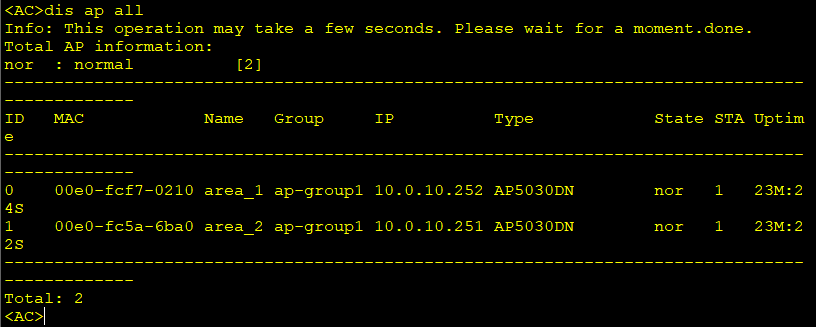
AC-wlan-viewdis ap all
AC-wlan-viewsecurity-profile name wlan-net1
AC-wlan-sec-prof-wlan-net1security wpa-wpa2 psk pass-phrase abc12345 aes
AC-wlan-sec-prof-wlan-net1qu
AC-wlan-viewssid-profile name wlan-net1
AC-wlan-ssid-prof-wlan-net1ssid Sales
Info: This operation may take a few seconds, please wait.done.
AC-wlan-ssid-prof-wlan-net1qu
AC-wlan-viewvap-profile name wlan-net1
AC-wlan-vap-prof-wlan-net1forward-mode direct-forward
AC-wlan-vap-prof-wlan-net1service-vlan vlan-id 11
AC-wlan-vap-prof-wlan-net1security-profile wlan-net1
Info: This operation may take a few seconds, please wait.done.
AC-wlan-vap-prof-wlan-net1ssid-profile wlan-net1
Info: This operation may take a few seconds, please wait.done.
AC-wlan-vap-prof-wlan-net1qu
AC-wlan-viewsecurity-profile name wlan-net2
AC-wlan-sec-prof-wlan-net2security wpa-wpa2 psk pass-phrase abc12345 aes
AC-wlan-sec-prof-wlan-net2qu
AC-wlan-viewssid-profile name wlan-net2
AC-wlan-ssid-prof-wlan-net2ssid Finances
Info: This operation may take a few seconds, please wait.done.
AC-wlan-ssid-prof-wlan-net2qu
AC-wlan-viewvap-profile name wlan-net2
AC-wlan-vap-prof-wlan-net2forward-mode direct-forward
AC-wlan-vap-prof-wlan-net2service-vlan vlan-id 12
Info: This operation may take a few seconds, please wait.done.
AC-wlan-vap-prof-wlan-net2security-profile wlan-net2
Info: This operation may take a few seconds, please wait.done.
AC-wlan-vap-prof-wlan-net2ssid-profile wlan-net2
Info: This operation may take a few seconds, please wait.done.
AC-wlan-vap-prof-wlan-net2qu
AC-wlan-viewap-group name ap-group1
AC-wlan-ap-group-ap-group1vap-profile wlan-net1 wlan 1 radio all
Info: This operation may take a few seconds, please wait...done.
AC-wlan-ap-group-ap-group1vap-profile wlan-net2 wlan 2 radio all
Info: This operation may take a few seconds, please wait...done.
AC-wlan-ap-group-ap-group1qu
AC-wlan-viewqu
ACqu
<AC>save
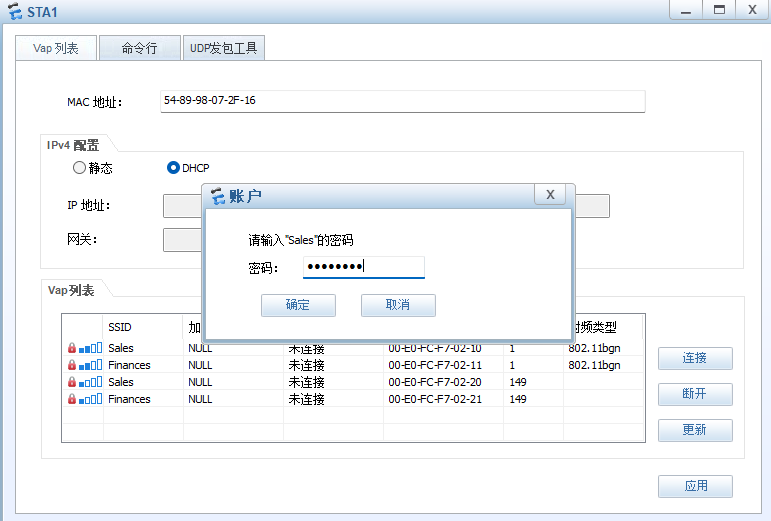
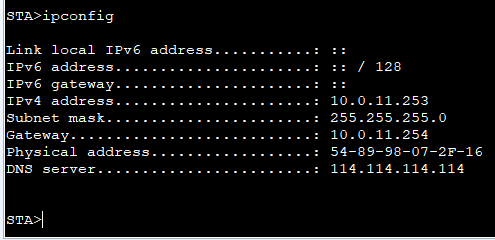
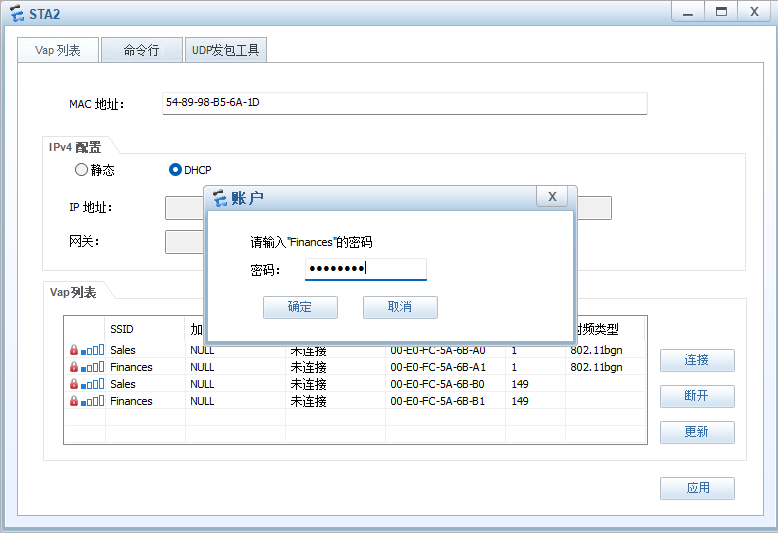
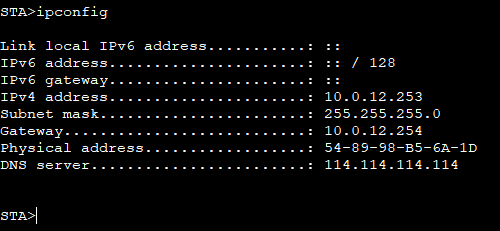
六、无线访问